
Backstage MCP server
Commit Nov 13, 2026Exposes the Backstage Software Catalog API as tools for LLMs to perform entity discovery, catalog operations, and validation.
Also known as Coderrob/backstage-mcp-server
- Stars
- 3
- Tools
- —
- Downloads, 30 days
- —
- Latest version
- —
- Last commit
- Nov 13, 2026
- License
- GPL-3.0
What is Backstage MCP?
Backstage exposes the Backstage Software Catalog API as tools for LLMs to perform entity discovery, catalog operations, and validation.
Summary generated from the project's README
About Backstage MCP server
Managing software catalogs through AI agents is made possible by this server, which connects LLMs to the Backstage Software Catalog API. It provides 32 specialized tools for discovering entities, managing locations, and validating descriptors via a stdio connection. Developers can use it to query entity ancestry, facets, and source locations, or perform mutations like adding locations and refreshing entities.
To set up the server, you need Node.js 24.15 or newer and a reachable Backstage backend. Authentication is handled through a bearer token provided via the BACKSTAGE_TOKEN environment variable or a BACKSTAGE_TOKEN_FILE for rotating credentials. The server uses the official Backstage CatalogClient to ensure production-grade integration. It includes built-in safety features such as per-principal rate limits, timeouts, and annotations that distinguish between read-only, mutating, and destructive tools like remove_entity_by_uid.
What you can do with it
- 1Discovering software componentsAsk the AI to find all components and APIs within a specific namespace.
Written from the project's README. Every use case is checked against a quote from it.
Configuration
BACKSTAGE_BASE_URLBACKSTAGE_TOKENBACKSTAGE_TOKEN_FILE
| Name | Description | |
|---|---|---|
| BACKSTAGE_BASE_URL | — | |
| BACKSTAGE_TOKEN | — | |
| BACKSTAGE_TOKEN_FILE | — |
Automated checks
Ran Nov 14, 2026Full report →Not verified yet. A server needs a score of 80, no serious finding, and enough data for us to check. How checks work · What to fix for more points

- Source repository linked and reachablecoderrob/backstage-mcp-server is public and reachablegithub.com/coderrob/backstage-mcp-server ↗Pass
- Package names this repository as its sourceNot checked
- Build provenance (Sigstore attestation)Not checked
- Open source license (OSI)GPL-3.0spdx.org/licenses/GPL-3.0.html ↗Pass
- Commit or release in the last yearLast commit or release 2026-11-12github.com/coderrob/backstage-mcp-server ↗Pass
- OpenSSF ScorecardNot checked
- Package name not close to a popular packageNot checked
- No critical advisory in the package or its dependenciesNot checked
- No hidden instructions to the model0 tool descriptions and the README read; no override phrases, credential paths or hidden charactersPass
- Destructive tools are labelledNot checked
- Remote endpoint answers the MCP handshakeNot checked
README
View on GitHubBackstage MCP Server
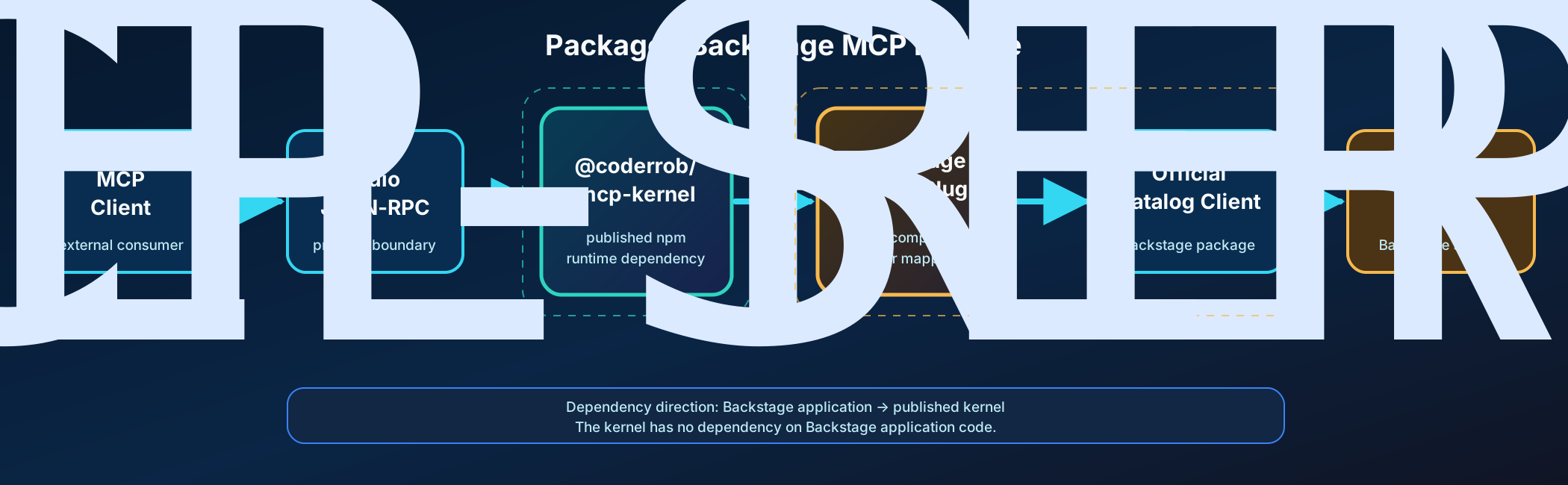
A type-safe Model Context Protocol server for the Backstage Software Catalog, built on the published @coderrob/mcp-kernel runtime.
It exposes 32 Catalog tools over stdio, uses Backstage's official Catalog client, supports rotating bearer credentials, and ships with black-box SDK and MCP Inspector verification.
What you get
| Capability | Implementation |
|---|---|
| Catalog discovery | Entity queries, references, ancestry, facets, and source locations |
| Catalog operations | Add locations, refresh entities, remove entities or locations, and validate descriptors |
| Type safety | Zod schemas infer handler inputs and emit MCP-compatible JSON Schemas |
| Runtime policies | Timeouts, caller scopes, per-principal rate limits, tagged caching, and invalidation |
| Safe operations | MCP annotations distinguish read-only, mutating, idempotent, and destructive tools |
| Production boundary | Official Backstage CatalogClient, authenticated fetch, redacted stderr logging |
| Verification | Per-file coverage, SDK stdio smoke tests, every-tool execution, and MCP Inspector |
Quick start
1. Install and build
Requirements:
- Node.js 24.15 or newer
- Corepack
- A reachable Backstage backend and an accepted external-access bearer token
corepack enable
corepack yarn install --immutable
corepack yarn build
The Yarn release comes from the packageManager field in package.json; use corepack yarn so local and CI behavior stay aligned.
2. Configure Backstage
Set the backend root or the complete Catalog plugin URL and choose one credential source:
export BACKSTAGE_BASE_URL=https://backstage.example.com
export BACKSTAGE_TOKEN=your-token
For externally rotated credentials, point to a token file instead:
export BACKSTAGE_BASE_URL=https://backstage.example.com
export BACKSTAGE_TOKEN_FILE=/run/secrets/backstage-token
BACKSTAGE_TOKEN_FILE takes precedence when both variables are present and is reread for every outgoing request. Optional LOG_LEVEL=debug enables diagnostic logging. Logs always go to stderr because stdout carries MCP protocol traffic.
3. Start the stdio server
corepack yarn start
The process waits for an MCP client on stdin/stdout. For a read-only check against a real deployment, use corepack yarn test:live; see live Backstage verification.
Connect an MCP client
After building, configure a stdio client with an absolute path:
{
  "mcpServers": {
    "backstage": {
      "command": "node",
      "args": ["/absolute/path/to/backstage-mcp-server/dist/cli.cjs"],
      "env": {
        "BACKSTAGE_BASE_URL": "https://backstage.example.com",
        "BACKSTAGE_TOKEN": "your-token"
      }
    }
  }
}
After global installation, use backstage-mcp-server as the command. Do not place credentials in committed client configuration; use the client's secret or environment mechanism where available.
Tool catalog
The checked-in tools-manifest.json is generated from the runtime definitions and is the machine-readable source of truth.
| Category | Tools |
|---|---|
| Entity discovery | get_entities, get_entities_by_query, get_entities_by_refs, get_entity_by_ref, get_entity_ancestors, get_entity_facets |
| Location discovery | get_location_by_entity, get_location_by_ref |
| Validation | validate_entity |
| Catalog mutation | add_location, refresh_entity |
| Destructive mutation | remove_entity_by_uid, remove_location_by_id |
get_entities.filter follows Backstage's key-value model: keys in one record are AND conditions, values for one key are OR conditions, and multiple records are OR groups.
{
  "filter": {
    "kind": ["Component", "API"],
    "metadata.namespace": "default"
  }
}
This selects Components or APIs in the default namespace. The Backstage integration guide documents every tool-to-client mapping, cursor behavior, authentication, permissions, and error conversion.
How it works
- An MCP client launches the packaged CLI and exchanges JSON-RPC over stdio.
- The published MCP Kernel validates and compiles immutable feature definitions.
- Zod validates input before middleware, authorization, caching, rate limiting, and timeout policies run.
- A Backstage tool calls the typed Catalog contract from its application context.
- The adapter delegates HTTP behavior to the official Backstage
CatalogClientand injects the bearer token at the fetch boundary. - Results return as MCP text plus structured content; expected failures use stable error codes and safe details.
The published @coderrob/mcp-kernel package owns protocol registration, lifecycle, policies, transports, testing support, and protocol-safe logging. This repository owns only the Backstage application and Catalog integration. See the current architecture overview for the dependency boundary.
MCP Kernel dependency
Generic server authoring, lifecycle, policies, transports, results, testing support, and logging are documented in the @coderrob/mcp-kernel repository. This package re-exports the kernel API for compatibility, but new generic consumers should install and import @coderrob/mcp-kernel directly.
To contribute a Catalog capability, follow Adding a Backstage MCP tool.
Verification
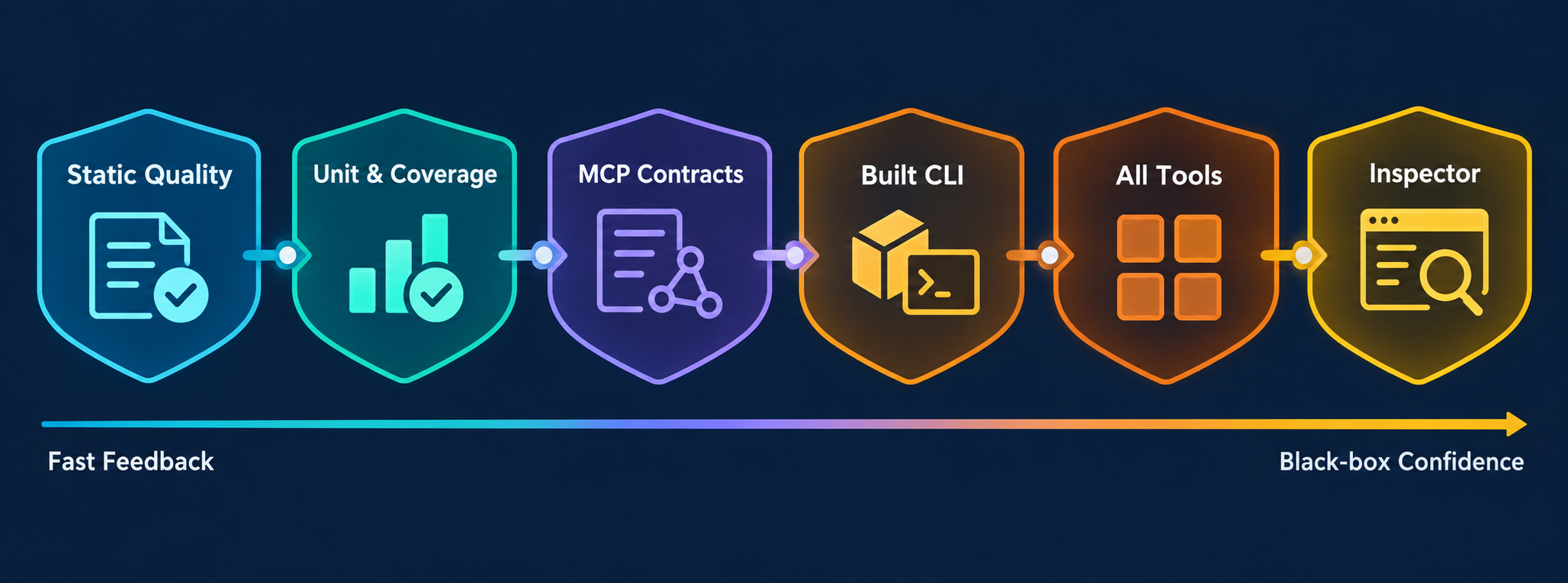
Run the normal contributor gate:
corepack yarn lint
corepack yarn typecheck
corepack yarn architecture:check
corepack yarn knip
corepack yarn test
corepack yarn test:shell
For MCP, tool, adapter, or packaging changes, also run:
corepack yarn test:mcp
corepack yarn manifest:check
test:mcp runs contract tests, builds the distribution, launches dist/cli.cjs over stdio with the official SDK client, invokes every registered tool against a deterministic authenticated Catalog stub, and performs an independent MCP Inspector check. It does not bypass the server with direct handler or HTTP calls.
See Repository tooling for the purpose and side effects of every command and MCP end-to-end testing for the exact black-box boundary.
Documentation
Choose a path from the documentation hub:
- Operate it: Backstage integration and end-to-end testing
- Develop it: Repository tooling, code quality, and adding tools
- Understand it: Architecture overview, ADRs, historical analysis, and implementation plan
- Maintain it: Dependency management
License
GPL-3.0. See LICENSE.
Curated knowledge and skills
The Backstage knowledge base maintains classified articles, named source citations and schema.org metadata. Repository skills in .agents/skills support catalog lookups, entity maintenance and MCP development.
The 19 contextual lookup tools cover names, System and Domain contents, Groups, ownership, dependencies, APIs, annotations and orphaned entities. See lookup contracts and examples, including pagination, ambiguity and work bounds.
Backstage MCP questions
How do I configure authentication for the Backstage server?
You can provide a bearer token via the BACKSTAGE_TOKEN environment variable or point to a token file using BACKSTAGE_TOKEN_FILE.
What kind of catalog operations can the AI perform?
The server provides tools for entity discovery, location discovery, entity validation, and catalog mutations such as adding, refreshing, or removing entities and locations.
Can I use this server with a real Backstage deployment?
Yes, you can perform a read-only check against a real deployment using the test:live command.
What are the system requirements for installation?
You need Node.js version 24.15 or newer and Corepack installed.