
Provides a local-first memory and continuity layer that allows different AI coding agents to share context and resume work from where another left off.
Also known as Coder8124/logos, @noeton/logos
- Stars
- 4
- Tools
- —
- Downloads, 30 days
- —
- Latest version
- —
- Last commit
- Nov 9, 2026
- License
- Apache-2.0
What is Logos MCP?
Logos provides a local-first memory and continuity layer that allows different AI coding agents to share context and resume work from where another left off.
Summary generated from the project's README
About Logos MCP server
Developers using multiple AI coding agents can use logos to maintain continuity across different sessions and tools. It acts as a local-first memory layer where agents like Claude Code, Cursor, and Codex share a single vault of markdown files. This setup allows one agent to checkpoint its progress so that a different model or tool can resume the work exactly where the previous one stopped.
The system operates entirely on your machine, ensuring data privacy by keeping the vault local. It uses a SQLite index for caching, which can be rebuilt using the logos index command without losing data. Users can install it via Homebrew on macOS and Linux or through npm on Windows. The server supports various hosts including Claude Desktop, Cline, Devin, and GitHub Copilot, providing a CLI for agents that only have shell access.
Beyond simple resumption, the server helps prevent agents from repeating failed approaches through the before_you_try tool. It also allows developers to query the reasoning behind specific code changes using the why command. You can import existing project history from sources like git history, Cursor rules, or CLAUDE.md to populate the memory vault.
What you can do with it
- 1Resume interrupted coding tasksHand off a project from one AI agent to another by retrieving the last known state and open tasks.
- 2Avoid repetitive coding errorsPrevent a new agent from attempting a solution that has already been proven unsuccessful.
- 3Understand historical code decisionsAsk the AI to explain the rationale behind a specific file's current implementation.
- 4Migrate existing agent memoriesMove your previous brain vault into the new logos system.
Written from the project's README. Every use case is checked against a quote from it.
How to install Logos MCP
Formats verified 10 Nov 2026Add to CursorAdd to GooseInstall Logos MCP in Claude Code
$ claude mcp add logos -- npx -y @noeton/logosInstall Logos MCP in Cursor
~/.cursor/mcp.json
{
  "mcpServers": {
    "logos": {
      "command": "npx",
      "args": [
        "-y",
        "@noeton/logos"
      ]
    }
  }
}Install Logos MCP in VS Code
.vscode/mcp.json
{
  "servers": {
    "logos": {
      "type": "stdio",
      "command": "npx",
      "args": [
        "-y",
        "@noeton/logos"
      ]
    }
  }
}Install Logos MCP in VS Code CLI
$ code --add-mcp '{"name":"logos","type":"stdio","command":"npx","args":["-y","@noeton/logos"]}'Install Logos MCP in Claude Desktop
claude_desktop_config.json
{
  "mcpServers": {
    "logos": {
      "command": "npx",
      "args": [
        "-y",
        "@noeton/logos"
      ]
    }
  }
}Install Logos MCP in Codex
$ codex mcp add logos -- npx -y @noeton/logosInstall Logos MCP in Codex config.toml
~/.codex/config.toml
[mcp_servers.logos]
command = "npx"
args = ["-y", "@noeton/logos"]
Install Logos MCP in Gemini CLI
$ gemini mcp add -s user logos npx -- -y @noeton/logosInstall Logos MCP in Gemini settings.json
~/.gemini/settings.json
{
  "mcpServers": {
    "logos": {
      "command": "npx",
      "args": [
        "-y",
        "@noeton/logos"
      ]
    }
  }
}Automated checks
Ran Nov 14, 2026Full report →Passed our automated checks. That is not a security audit: read the code and give the server the narrowest access it needs. How checks work

- Source repository linked and reachablecoder8124/logos is public and reachablegithub.com/coder8124/logos ↗Pass
- Package names this repository as its source@noeton/logos names coder8124/logos as sourcenpmjs.com/package/@noeton/logos ↗Pass
- Build provenance (Sigstore attestation)Sigstore attestation for @noeton/logosnpmjs.com/package/@noeton/logos/v/0.5.8#provenance ↗Pass
- Open source license (OSI)Apache-2.0spdx.org/licenses/Apache-2.0.html ↗Pass
- Commit or release in the last yearLast commit or release 2026-11-09github.com/coder8124/logos ↗Pass
- OpenSSF ScorecardNot checked
- Package name not close to a popular packageNo popular package one edit away from @noeton/logosPass
- No critical advisory in the package or its dependenciesNot checked
- No hidden instructions to the model0 tool descriptions and the README read; no override phrases, credential paths or hidden charactersPass
- Destructive tools are labelledNot checked
- Remote endpoint answers the MCP handshakeNot checked
README
View on GitHubLogos
When one coding agent stops, the next one continues the work.











Docs · Quick Start · Benchmark · Site · Issues
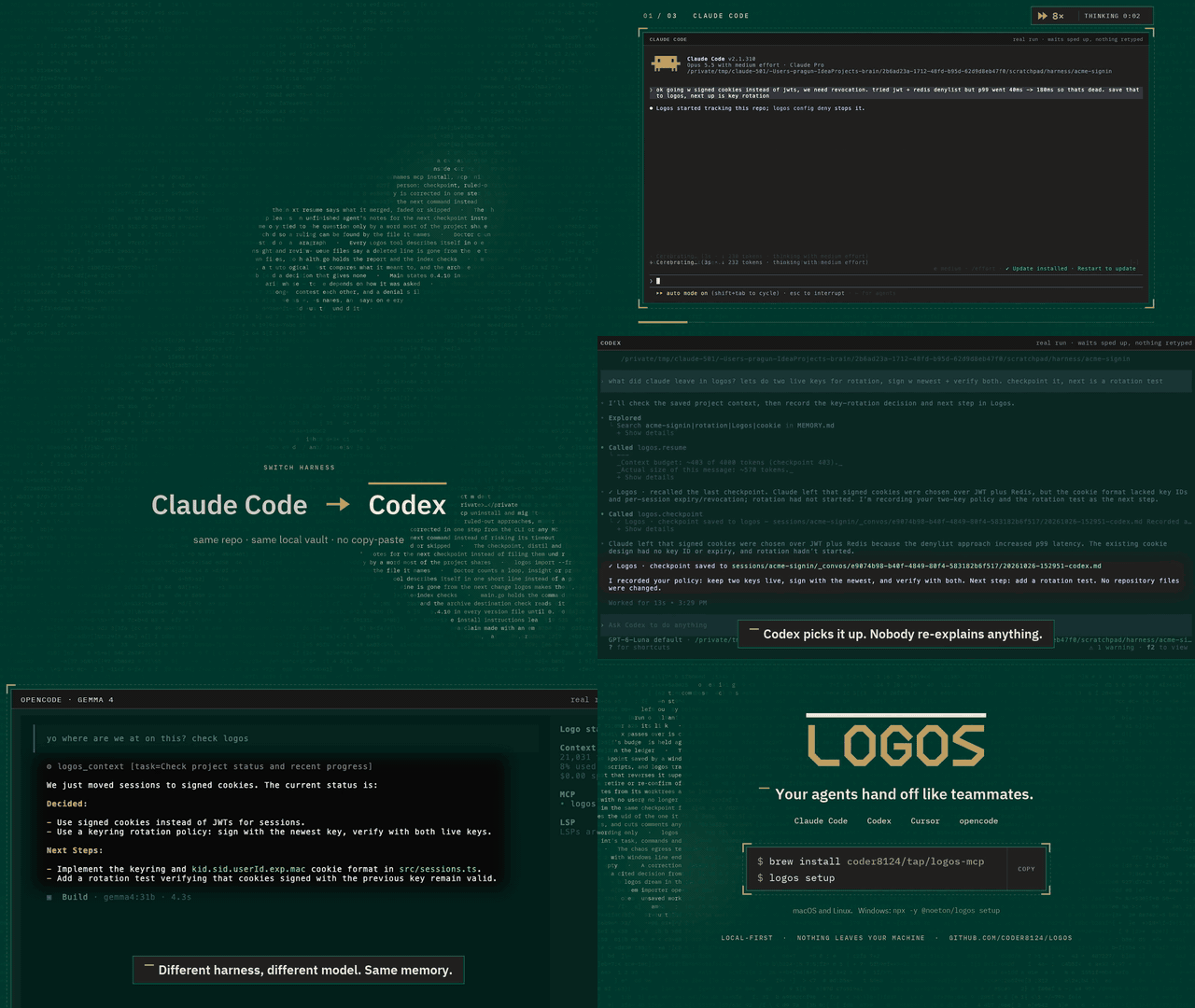
Logos is a local-first memory and continuity layer for coding agents. Claude Code, Codex, Cursor and your own agents share one vault over MCP. An agent checkpoints what it did, and the next one resumes where it stopped, even if it is a different model, in a different tool, on a different day.
Claude Code  ──▶  checkpoint  ──▶  Logos  ──▶  resume  ──▶  Cursor
                                (your vault)
The vault is a folder of markdown files on your machine. Nothing is uploaded,
and the SQLite index beside it is a cache: delete it, run logos index, and you
lose nothing.
Quick start
brew install coder8124/tap/logos-mcp && logos setup    # macOS and Linux
npm i -g @noeton/logos && logos setup                  # Windows
setup picks a vault, shows which agents it would wire, and asks before
touching any of them (--dry-run writes nothing). For Claude Code it also
installs the plugin, so the last handoff is in front of the model before it does
anything.
The formula is logos-mcp: a bare brew install logos installs Logos Bible
Software. Building from source, hand-wiring a host and the one-click buttons are
in Installation.
What it does
- Resume where the last agent stopped.
resumeshows what was done, what was verified and what is still open. - Stop the next agent repeating a dead end. Ruled-out approaches are their
own field, and
before_you_trychecks a plan against them. - Keep "verified" apart from "claimed". Resume marks another agent's verified items as its claim, and flags a command the activity log never saw.
- Answer "why is this code like this?"
why <path>shows what was being decided when a file was last worked on. - Remember what lasts. Decisions, constraints and procedures, reviewed before they become project memory.
- Bring your history. Import CLAUDE.md, AGENTS.md, Cursor rules, claude-mem, Claude Code's auto memory, transcripts or git history.
Every write returns a receipt, so you can see it working. The Handoff Loop shows how an agent uses it, step by step.
Works with
Claude Code, Codex, Cursor, Claude Desktop, Cline, Devin, GitHub Copilot, opencode, Amp, Grok Build, and anything else that speaks MCP. Agents with only a shell get a CLI command for every tool. See Agent Hosts.
Does it work?
On a handoff suite built for this (32 scenarios, nine memory systems, one machine), Logos passes 84.4%. The next best system passes 46.9%.
Every real system retrieves about equally well. What separates them is whether the agent that resumes gets the current answer, or gets it next to the stale one it replaced. Method, per-scenario scores and the cases Logos loses are in the benchmark.
Local, private and durable
- No model required. Search falls back from local embeddings (Ollama) to full-text search, and nothing breaks.
- Nothing is observed. Logos does not watch your screen, browser or files. The vault holds what agents wrote there, plus the Claude Code plugin's activity log, which you can turn off.
- Nothing leaves.
logos doctor --egresslists every address Logos can contact, and when. - Hard to break. It survives SIGKILL mid-write, a full disk, sync-client
conflict copies and two worktrees racing on one vault (
chaos/).
Exactly what is recorded, and every switch for it, is in Settings and Privacy.
Documentation
Everything lives in the wiki.
| Start | Use | Look up |
|---|---|---|
| Installation | The Handoff Loop | CLI Reference |
| Quick Start | Memory | MCP Tools Reference |
| Core Concepts | Importing History | Agent Hosts |
| Troubleshooting | The Vault | Embedding in Go |
Contributing
Contributions are welcome. CONTRIBUTING.md covers the build,
the test tiers and the two load-bearing conventions: the vault is the truth, and
every feature announces itself. Agents working here get the context-connect
and continuity skills from the plugin (plugin/skills/); this repository
dogfoods its own plugin.
Coming from brain? Since 0.5.0 the old names are not read. logos migrate
moves a ~/brain vault; see
Moving a 0.4 vault.
License
Apache 2.0. See LICENSE. Git history satisfies §4(b), so there are no change notices to add and no CLA (details). Prior work that shaped the ideas is in systemmd/CREDITS.md.
Logos MCP questions
How do I add Logos MCP to Claude Code?
Run claude mcp add logos -- npx -y @noeton/logos in your terminal. Add --scope user to make it available in every project.
How do I add Logos MCP to Cursor?
Open ~/.cursor/mcp.json and add the server under mcpServers, using the Cursor config shown in the install section above.
How does Logos handle data privacy?
Logos is local-first; the vault is a folder of markdown files on your machine and nothing is uploaded.
Can I use Logos with different AI agents?
Yes, it works with Claude Code, Codex, Cursor, Claude Desktop, Cline, Devin, GitHub Copilot, and any other tool that supports MCP.
What happens if I delete the index file?
You will lose nothing; you can simply run the index command to rebuild it.
Does it require an LLM to function?
No model is required for basic functionality; search falls back to full-text search if local embeddings are unavailable.