
scenario-browser MCP server
Commit Nov 14, 2026Automates browser testing and workflows using JSON or Markdown scenarios with optional AI-driven selector healing and JavaScript execution.
Also known as chiempt/scenario-browser
- Stars
- 1
- Tools
- —
- Downloads, 30 days
- —
- Latest version
- —
- Last commit
- Nov 14, 2026
- License
- MIT
What is scenario-browser MCP?
scenario-browser automates browser testing and workflows using JSON or Markdown scenarios with optional AI-driven selector healing and JavaScript execution.
Summary generated from the project's README
About scenario-browser MCP server
Automating browser tests and workflows through readable JSON or Markdown files is what scenario-browser enables for developers and non-programmers alike. By using plain Playwright and Chromium, it allows users to define sequences of actions like clicking, filling forms, or extracting data without complex test framework setups. The system organizes these actions into projects that support shared variables, environment files, and setup or teardown procedures.
Users can run these scenarios locally via a CLI or through an MCP server using stdio. While most steps remain declarative, the tool supports JavaScript execution through evaluate and script commands for custom logic. It also features experimental AI capabilities that can draft new scenarios or repair broken selectors using an Anthropic API key. This makes it possible to maintain tests even when website structures change, provided the user manages the security of the execution environment.
What you can do with it
- 1Create readable smoke testsA developer can write a five-line Markdown file to perform a basic website check.
- 2Repair broken automation selectorsYou can use experimental AI to automatically suggest new selectors when a step fails due to a UI change.
- 3Execute complex custom logicDevelopers can drop into JavaScript to run code inside the page or within the Node environment.
Written from the project's README. Every use case is checked against a quote from it.
Configuration
ANTHROPIC_API_KEY
Automated checks
Ran Nov 15, 2026Full report →Not verified yet. A server needs a score of 80, no serious finding, and enough data for us to check. How checks work · What to fix for more points

- Source repository linked and reachablechiempt/scenario-browser is public and reachablegithub.com/chiempt/scenario-browser ↗Pass
- Package names this repository as its sourceNot checked
- Build provenance (Sigstore attestation)Not checked
- Open source license (OSI)MITspdx.org/licenses/MIT.html ↗Pass
- Commit or release in the last yearLast commit or release 2026-11-14github.com/chiempt/scenario-browser ↗Pass
- OpenSSF ScorecardNot checked
- Package name not close to a popular packageNot checked
- No critical advisory in the package or its dependenciesNot checked
- No hidden instructions to the model0 tool descriptions and the README read; no override phrases, credential paths or hidden charactersPass
- Destructive tools are labelledNot checked
- Remote endpoint answers the MCP handshakeNot checked
README
View on GitHubscenario-browser


Browser tests and automations as small scenario files (JSON or Markdown), organised in projects, with optional JavaScript where you need it. Plain Playwright + Chromium underneath. Experimental AI can draft scenarios and repair broken selectors.
Use it only on sites you own or are explicitly allowed to automate. It does not solve captchas, evade bot detection, or spoof fingerprints, and will not accept contributions that do.
Why
- Readable by non-programmers. A smoke test is five lines of Markdown, not a test framework setup.
- Strict and honest. Unknown keys are errors, failures name the step, and every failed step gets a screenshot and an HTML report.
- Project-shaped. Tags, shared variables,
.env, setup/teardown and CI exit codes, so scenarios grow into a real suite. - Code when you need it.
evaluateandscriptsteps drop into JavaScript; the rest stays declarative. - Small. Two runtime dependencies (
playwright,zod). No server, no account.
Quickstart
npm install scenario-browser && npx cloakbrowser install   # or clone this repo: npm install && npm run browser:install
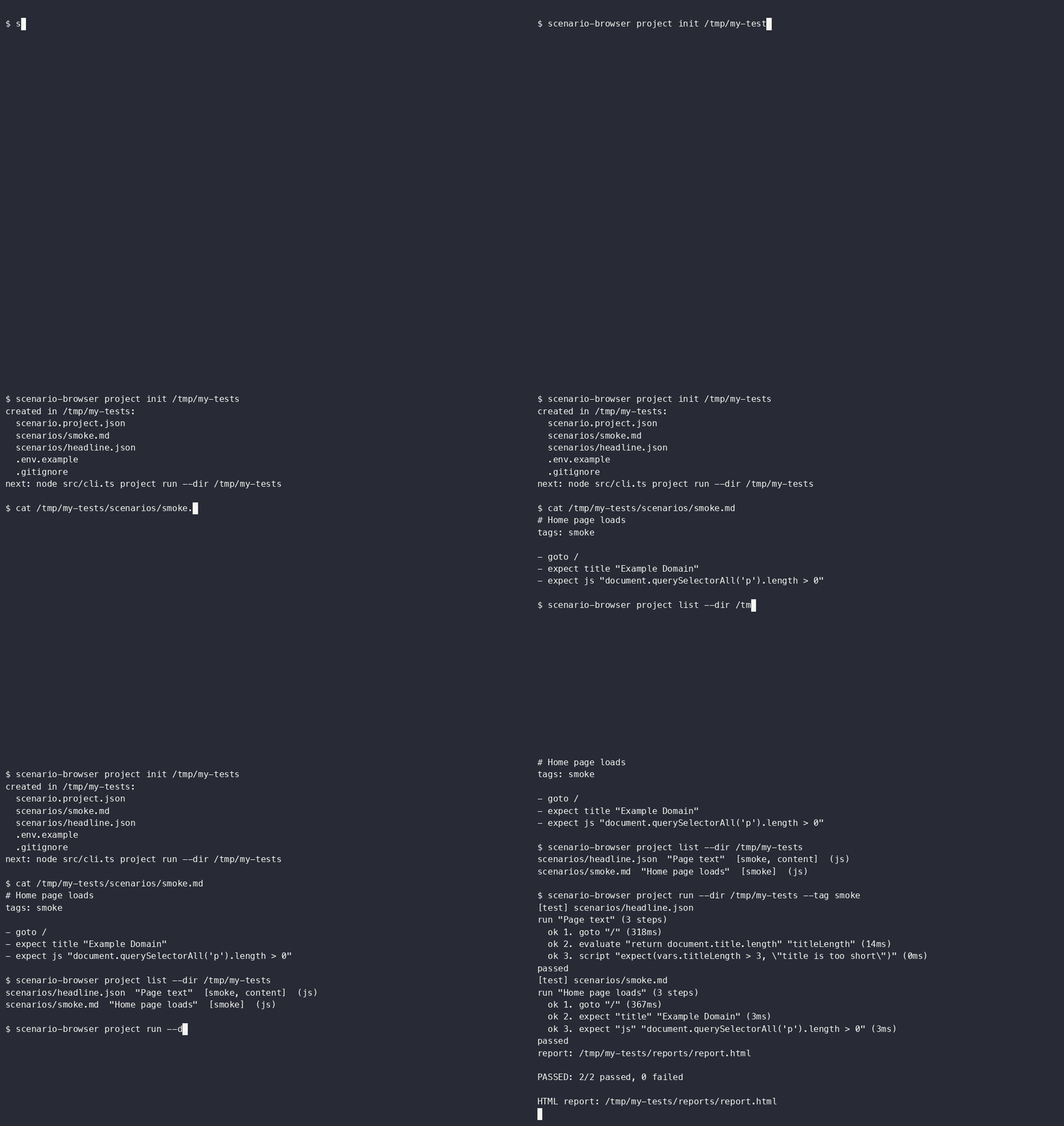
npx scenario-browser project init my-tests
npx scenario-browser project run --dir my-tests --tag smoke       # opens my-tests/reports/report.html afterwards
In a clone, replace npx scenario-browser with node src/cli.ts (Node 23.6+ runs the TypeScript directly). A terminal demo script is in scripts/demo.sh; the heal benchmark is in docs/HEAL-BENCH.md (npm run bench:heal).
Scenarios
JSON (scenario.schema.json is included for editor autocomplete):
{
  "name": "example.com page check",
  "tags": ["smoke"],
  "steps": [
    { "action": "goto", "url": "https://example.com" },
    { "action": "expect", "kind": "title", "value": "Example Domain" },
    { "action": "extract", "selector": "p", "as": "intro" }
  ]
}
Markdown, one step per line:
# httpbin HTML page
tags: smoke

- goto https://httpbin.org/html
- waitFor h1
- expect text "Herman Melville"
- fill #q "text"            # unquoted = CSS/XPath/Playwright selector
- click "Login"             # quoted = visible text (text=Login)
- extract h1 as title       # later usable as {{title}}
- include ./login.md
- expect js "document.title.length > 0"

```js evaluate as headings
return document.querySelectorAll('h1').length;
```

```js
expect(vars.headings === 1, 'expected one h1');
```
Steps: goto, click, fill, press, select, check, wait, waitFor, expect (text, visible, url, title, js), extract, screenshot, evaluate, script, include, if, repeat, forEach. Every step accepts note, continueOnError (record as ignored, carry on) and retry (extra attempts, leaf steps). if/repeat/forEach/retry/continueOnError are JSON-only; Markdown covers the linear steps, include, and js blocks.
Selectors (details and the AI form in docs/ai-context.md):
| Form | Example |
|---|---|
| CSS (default) | #go, css=.card > a |
| XPath | //button[@id="go"], xpath=//a[1] |
| Visible text | text=Login (Markdown: click "Login") |
| Role + name | role=button[name="Sign in"] |
| Test id | testid=login-btn |
| Label / placeholder | label=Email, placeholder=Search |
| AI target | ai=the Sign in button in the top right |
In Markdown, quote a selector that has spaces: click "role=button[name=\"Sign in\"]". URLs: absolute http(s), or /path joined to baseUrl (scenario or project). Unknown keys are errors.
Variables
{{name}} placeholders (dotted paths work: {{user.id}}). Precedence, low to high: project vars < setup output < scenario vars < --var k=v. {{env.NAME}} reads environment variables, with the project's .env file underneath (real environment wins, so CI secrets override local files). Unknown names are errors. Run reports list only variables a run created or changed, never the initial values or env.
JavaScript steps
| Step | Runs | In scope |
|---|---|---|
evaluate {code, as} |
inside the page (page.evaluate) |
vars; return a value, stored in as |
expect {kind:"js", value} |
inside the page, polled until truthy | vars |
script {code} or {file} |
in Node, async | page, vars, env, expect, context |
expect(cond, msg), expect.equal(a, b), expect.contains(text, needle) throw on failure. script can set vars.x = ... for later steps. script file and include paths resolve from the scenario file and may not leave the project directory.
A scenario is code.
scriptruns in Node with your user's rights, with no sandbox. Do not run scenarios or projects you did not write or review. See SECURITY.md.
Control flow
{ "action": "forEach", "items": "names", "as": "name", "steps": [
    { "action": "fill", "selector": "#q", "value": "{{name}}" },
    { "action": "click", "selector": "text=Search", "retry": 2 },
    { "action": "if", "when": { "visible": ".empty" }, "then": [ { "action": "screenshot", "path": "empty-{{name}}.png" } ] }
] }
forEach takes an array or the name of an array variable (<as>_index holds the position). repeat takes times and an optional as counter. if takes {"js": "..."} or {"visible": "..."} with then and optional else. include runs another scenario in the same page, optionally with vars.
Projects
A project is a directory with scenario.project.json:
{
  "name": "my app",
  "baseUrl": "https://staging.example.com",
  "vars": { "user": "demo" },
  "envFile": ".env",
  "defaults": { "timeout": 10000, "headless": true, "launcher": "./launcher.mjs" },
  "scenarios": ["scenarios/**/*.{json,md}"],
  "setup": ["setup/login-check.json"],
  "teardown": [],
  "reportDir": "reports"
}
scenario-browser project init [dir]
scenario-browser project list --dir my-tests
scenario-browser project run --dir my-tests --tag smoke --grep login --var user=ann
--tag may repeat (any match). setup scenarios run first; a failure skips the tests, and values they extract flow into later scenarios as variables. teardown always runs. Each scenario gets a fresh browser context; share steps with include, not with browser state.
Exit codes: 0 all passed, 1 any scenario failed, 2 project/config error or nothing matched. The report (reports/report.json, reports/report.html, failure screenshots in reports/shots/) is overwritten each run. Two example projects are in examples/projects/.
GitHub Actions
name: browser-tests
on: [push, pull_request]
jobs:
  e2e:
    runs-on: ubuntu-latest
    steps:
      - uses: actions/checkout@v4
      - uses: actions/setup-node@v4
        with: { node-version: 24 }
      - run: npm ci
      - run: npx cloakbrowser install
      - run: npx scenario-browser project run --dir tests --tag smoke
        env:
          APP_PASSWORD: ${{ secrets.APP_PASSWORD }}   # read in scenarios as {{env.APP_PASSWORD}}
      - uses: actions/upload-artifact@v4
        if: always()
        with: { name: browser-report, path: tests/reports }
CLI
| Command | What it does |
|---|---|
run <file> [--headed] [--var k=v] [--launcher mod] [--heal [--save-healed]] [--lock] [--no-ai] |
Run one scenario. Exit 0 pass, 1 fail. --lock saves selectors the AI found; --no-ai forbids AI calls. |
explain <file> |
Print a scenario as plain sentences. |
pick <url> |
Open the page, click an element, print XPath / CSS / text / role suggestions. |
validate <file|dir>... |
Check scenarios and projects, including that include/script file targets exist. No browser. |
project init|list|run |
See Projects. |
portal [--port 7070] [--project dir] |
Local web UI. |
generate "description" [-o file.json] |
Experimental. AI drafts a scenario. |
schema [scenario|project] |
Print a JSON Schema. |
AI context (v0.2)
Give the AI your project's context and let it find selectors, or pick them yourself. Full guide with a context.md example: docs/ai-context.md.
echo '"Giỏ hàng" is the cart icon in the header.' > context.md # next to scenario.project.json
- click ai="the cart icon"
export ANTHROPIC_API_KEY=...
scenario-browser run cart.md --lock       # AI finds it once, the selector is written into cart.md
scenario-browser run cart.md --no-ai      # from now on: locked selectors only, no AI, no key
scenario-browser explain cart.md          # read it back in plain sentences
scenario-browser pick https://your-site.example   # or click-to-copy locators yourself (also in the portal)
The model gets your context, the URL (no query), the title, your description and a reduced element list. Never input values, hidden inputs, cookies or screenshots. Without a key an ai= step stops the run with a clear error before the browser opens.
Status: the AI path is tested against a mocked API and real Chromium, not yet against the live Anthropic API; treat found selectors as drafts and review them (that is what --lock leaves in the file).
AI steps (experimental)
generate and --heal are early and can be wrong. Treat their output as a draft you review. Set ANTHROPIC_API_KEY in your shell (read from the environment only, never stored or logged). Optional SCENARIO_MODEL overrides the model.
export ANTHROPIC_API_KEY=...
scenario-browser generate "open example.com and check the page title" -o my.json
scenario-browser run my.json --heal --save-healed
generateasks the model for JSON, validates it against the schema, and retries once with the validation errors. Generated scenarios can contain JavaScript: read them before running.--heal: when a leaf step fails on a selector, a compact list of interactive elements from the current page (tags, ids, labels, trimmed text; never field values) is sent to the model, which proposes a replacement. The step is retried once and markedhealedin the report.--save-healedwrites repaired selectors back to a.jsonscenario.
Both send data to the Anthropic API (your description, or page structure). Do not use them on pages with data you may not share.
Custom launcher
By default run starts plain Playwright Chromium. --launcher <module> (or defaults.launcher in a project) swaps that out: the module (path or package name) is imported dynamically and its default export (or named launch) is called with { headless }. It must return a Playwright BrowserContext or Page; the runner closes it and its browser at the end. Works with --heal.
Plain Playwright with your own options (my-launcher.mjs):
import { chromium } from 'playwright';

export default async ({ headless }) => {
  const browser = await chromium.launch({ headless });
  return browser.newContext({ viewport: { width: 1280, height: 800 }, locale: 'en-US' });
};
An already-installed Chrome via channel (no Chromium download needed):
import { chromium } from 'playwright';

export default async ({ headless }) => {
  const browser = await chromium.launch({ channel: 'chrome', headless });
  return browser.newContext();
};
scenario-browser run examples/httpbin-html.md --launcher ./my-launcher.mjs --heal
The same acceptable-use rule applies to any launcher.
Use as an MCP server
scenario-browser-mcp is a small stdio MCP server. It has three tools:
| Tool | What it does |
|---|---|
validate |
Check scenario text (JSON or Markdown). No browser. Returns ok or the errors. |
run |
Run a scenario (text, or a file path) headless and return the per-step report. Takes vars, timeoutMs (default 120000, max 600000) and allowScript. |
get_schema |
Return the scenario JSON Schema. |
Paths given to run must stay inside the server's working directory. JavaScript steps (evaluate, script, expect with js, if with js, including ones reached through include) are refused unless allowScript is true; it is off by default.
Claude Desktop (claude_desktop_config.json):
{
  "mcpServers": {
    "scenario-browser": {
      "command": "npx",
      "args": ["-y", "-p", "scenario-browser", "scenario-browser-mcp"],
      "cwd": "/path/to/your/scenarios"
    }
  }
}
Claude Code:
claude mcp add scenario-browser -- npx -y -p scenario-browser scenario-browser-mcp
The browser is CloakBrowser (stealth Chromium, Playwright API): run npx cloakbrowser install once.
Safety. A scenario is code. With
allowScripton, it runs in Node with your user's rights and no sandbox, and even without it a scenario can open any URL your machine can reach. Only run scenarios you wrote or reviewed, and keep the server's working directory limited to the scenarios you mean to expose.
Portal
scenario-browser portal --project my-tests # http://127.0.0.1:7070
One page: paste or edit a scenario (JSON or Markdown), Validate, Run, read the log, Generate with AI (experimental). Pick element opens a page in a normal browser window; click an element to get XPath, CSS, text and role locators to copy or insert as a step. With a project it also lists scenarios and tags, runs by tag/grep, and shows the HTML report. It binds to 127.0.0.1, rejects non-local Host headers and cross-origin POSTs, and has no authentication: do not expose it to a network. A scenario containing JavaScript shows a warning and asks for confirmation before it runs.
Development
npm run check # typecheck + build + tests + validate examples
Tests run against local fixture pages (real Chromium) and a mocked Anthropic API; no network or key needed. The example scenarios hit public sites (example.com, httpbin.org), which can change. See CONTRIBUTING.md.
Not done yet
Iframes, multi-tab, file upload/download steps, if/loops in Markdown, parallel runs, scheduled runs, run history in the portal, streaming logs, JUnit XML report, --var for non-string values.
Maintained by PipeX
scenario-browser is maintained by PipeX, a small company making Odoo modules and mobile apps. Related open source from the same maintainer: MCP Lite, a free read-only MCP server module for Odoo (Claude, ChatGPT, Cursor).
License
MIT
scenario-browser MCP questions
What formats can I use for scenarios?
You can write scenarios using either JSON or Markdown files.
Can I use JavaScript in my scenarios?
Yes, you can use evaluate and script steps to drop into JavaScript for more complex logic.
Does this tool help with broken selectors?
Yes, it features an experimental AI capability that can repair broken selectors through a healing process.