
a2a-panel MCP server
Commit Nov 14, 2026Delegates coding tasks from Claude Code to a specialized team of Google Antigravity agents with a web panel and Telegram remote control.
Also known as CHANDARA-code/a2a-panel
- Stars
- 1
- Tools
- 4
- Downloads, 30 days
- —
- Latest version
- —
- Last commit
- Nov 14, 2026
- License
- MIT
What is a2a-panel MCP?
a2a-panel delegates coding tasks from Claude Code to a specialized team of Google Antigravity agents with a web panel and Telegram remote control. It exposes 4 tools, such as a2a_list_teams, a2a_run_team, a2a_get_team_run.
Summary generated from the project's README
About a2a-panel MCP server
Delegating complex coding tasks from Claude Code to a specialized team of Google Antigravity agents is what a2a-panel enables. It allows Claude Code to act as a team leader that plans and reviews work, while the heavy lifting of reading, editing, and running tests is handled by thirteen distinct specialist roles like web-engineer, api-engineer, and security-auditor. This setup uses your Antigravity quota instead of your Claude context to manage large-scale development tasks.
Users can monitor and control these agents through a web panel featuring live logs and task dispatching, or via Telegram remote control for mobile management. The system supports macOS and Linux environments and requires Node.js, the Antigravity CLI, and Claude Code. It provides safety through concurrency caps, memory limits, and timeout controls. Developers can also define presets for coding styles and technology choices to ensure consistency across the agent team.
What you can do with it
- 1Delegate multi-role development tasksAssign a database design task to one agent and then have specialized engineers handle the API and testing.
Written from the project's README. Every use case is checked against a quote from it.
a2a-panel MCP tools 4
Detected from the READMEa2a_list_teamsa2a_run_teama2a_get_team_runa2a_cancel_team_run
| a2a_list_teams | — | |
| a2a_run_team | — | |
| a2a_get_team_run | — | |
| a2a_cancel_team_run | — |
README
View on GitHuba2a-panel
Delegate coding work from Claude Code to a team of Google Antigravity (agy) specialists, or to teams that mix Antigravity, Claude Code and Codex accounts, and watch and control it from a web panel or from Telegram.
Claude Code stays the team leader: it plans, splits the work and reviews the result. The heavy reading, editing and test running happens in Antigravity, so it uses your Antigravity quota instead of your Claude context. Claude reads back a short result: status, token usage, a git change summary and the tail of the output.
- 13 specialist roles that follow the software lifecycle:
solution-architect(requirements and design),web-engineer,api-engineer,mobile-engineer,desktop-engineer,lead-software-engineer,test-engineer,bug-triager,code-reviewer,security-auditor,web-performance-auditor,devops-engineer,release-manager. - Web panel: live logs, dispatch, cancel and re-run from the browser, with light and dark themes.
- Token usage: real token counts from
agy, per task and per role (a2a-panel usage). - Safe process control: cancel stops the whole process group; wall-clock and silence timeouts, a concurrency cap and bounded memory protect your machine.
- Sessions: continue an Antigravity conversation by id instead of resending context.
- Presets: your coding style, frontend and API libraries and default technology choices, kept as markdown files and sent to the specialists they apply to.
- Standard interfaces: an MCP server for Claude Code, and an A2A-style HTTP / JSON-RPC server for other clients.
- Settings page: time limits, how many agents run at once, log retention and update checks, changed from the panel without a restart.
- Telegram remote control: check on your agents, start work, approve team plans and answer your team leader from your phone.
Requirements
- Node.js 18 or newer
- The Antigravity CLI (
agy), installed and signed in - Claude Code (for the MCP integration)
- macOS or Linux. Windows is not tested.
Install
git clone https://github.com/CHANDARA-code/a2a-panel.git a2a-panel
cd a2a-panel
npm run build:panel     # builds the web panel (optional, needed for the dashboard)
node cli.js doctor      # checks Node, agy, sign-in, git and Claude Code
node cli.js init        # registers the MCP server with Claude Code
node cli.js autostart enable   # optional: start the server and dashboard at login (see below)
With npm: npm install -g a2a-panel, then a2a-panel doctor and a2a-panel init. Restart Claude Code (or run /mcp) afterwards. In the examples below a2a-panel stands for node cli.js if you installed from a clone. To remove it again, see 14. Uninstall.
Coming from agy-bridge? This project used to be called agy-bridge. Run a2a-panel init (or node cli.js init) once: it removes the old agy-bridge MCP registration from Claude Code and registers a2a-panel. An npm install keeps using an existing ~/.agy-bridge data folder, so your task history and presets stay. The short a2a command still works.
Safety
Tasks run agy with --dangerously-skip-permissions, because headless agy cannot ask for approval. A task can edit files and run commands in its workspace without a prompt. Read SECURITY.md before you point it at a workspace you care about, and use plan mode when nothing should change.
Architecture Overview
                      +---------------------------------------+
                      |         USER REQUEST / GOAL           |
                      +---------------------------------------+
                                          |
                                          v
                      +---------------------------------------+
                      |       Claude Code (Team Leader)       |
                      |   • High-Level Architecture           |
                      |   • Requirements Decomposition        |
                      |   • Code Review & Integration         |
                      +---------------------------------------+
                                          |
                 +------------------------+------------------------+
                 | A2A Protocol Bridge                             |
                 | (Native MCP Stdio / HTTP / JSON-RPC 2.0)        |
                 v                                                 v
   +---------------------------+                     +---------------------------+
   |   A2A MCP Stdio Server    |                     |  A2A HTTP/JSON-RPC Server |
   |  (Direct inside Claude)   |                     |   (http://127.0.0.1:5188) |
   +---------------------------+                     +---------------------------+
                 \                                                 /
                  \                                               /
                   v                                             v
        +---------------------------------------------------------------+
        |           ANTIGRAVITY SENIOR DEVELOPER TEAM (agy)             |
        |                                                               |
        |  [web-engineer]           Frontend UI, SSR/SSG, React/Next    |
        |  [api-engineer]           REST/GraphQL APIs, DB schemas, ORM  |
        |  [mobile-engineer]        Flutter, Dart, iOS, Android         |
        |  [desktop-engineer]       Electron, Tauri, native macOS       |
        |  [test-engineer]          QA test suites, unit & integration  |
        |  [bug-triager]            Root cause analysis & reproduction  |
        |  [security-auditor]       OWASP audits, auth flow hardening   |
        |  [code-reviewer]          Multi-axis code review & logic      |
        |  [web-performance-auditor]Core Web Vitals & bundle profiling  |
        |  [solution-architect]     Requirements, SRS, HLD/LLD, task plan|
        |  [devops-engineer]        CI/CD, deploy, rollout, monitoring  |
        |  [release-manager]        Versions, changelogs, publishing    |
        |  [lead-software-engineer] Complex multi-file implementations  |
        +---------------------------------------------------------------+
1. Native Claude Code Integration
Claude Code automatically connects to the a2a-panel MCP server on startup once you have run a2a-panel init.
It provides Claude Code with the following tools:
a2a_dispatch_to_antigravity(role, task_description, workspace_path, mode, effort, model, conversation_id, acceptance_criteria, verification_command, preset, is_async, account)a2a_list_expert_agents()a2a_list_accounts()a2a_list_presets()a2a_get_task_status(task_id)a2a_cancel_task(task_id)a2a_validate_delivery(task_summary, acceptance_criteria, verification_command, workspace_path, account)a2a_notify_user(text, choices)anda2a_wait_for_user(timeout_seconds): talk to you on Telegram (see 8. Telegram remote control)
In Claude Code, you can:
"Design the database schema, then delegate the API endpoints to the Antigravity api-engineer and have the test-engineer cover them."
2. Command line
The package installs the a2a-panel command (also available as a2a):
# List available Antigravity developer roles & specialties
a2a-panel list

# Check A2A server status & agent readiness
a2a-panel status

# Open the web task panel (monitor, dispatch, cancel)
a2a-panel dashboard

# Start / Stop the HTTP & JSON-RPC daemon (listening on port 5188)
a2a-panel server start
a2a-panel server stop

# Start the daemon and dashboard automatically at login (macOS and Linux)
a2a-panel autostart enable
a2a-panel autostart            # status
a2a-panel autostart disable

# Manage signed-in accounts (see "6. Accounts")
a2a-panel accounts                     # list
a2a-panel accounts add work-claude --provider claude --label "Work Claude"
a2a-panel accounts login work-claude
a2a-panel accounts check work-claude
a2a-panel accounts logout work-claude
a2a-panel accounts delete work-claude

# Dispatch a task directly from terminal
a2a-panel run web-engineer "Create a user avatar component"
a2a-panel run test-engineer "Write unit tests for the auth service"
a2a-panel run code-reviewer "Review the latest changes in git"
a2a-panel run web-engineer "Add a settings page" --preset my-team
a2a-panel run web-engineer "Create avatar" --account work-claude

# Manage preference presets (see "5. Presets")
a2a-panel presets                      # list
a2a-panel presets templates
a2a-panel presets new my-team --template nestjs-react
a2a-panel presets default my-team      # or: a2a-panel presets default none
a2a-panel presets show my-team
3. A2A HTTP & JSON-RPC Endpoints
When running a2a-panel server start:
- Agent Card:
GET http://127.0.0.1:5188/.well-known/agent.json - Health Check:
GET http://127.0.0.1:5188/health - List Roles:
GET http://127.0.0.1:5188/roles - Dispatch Task:
POST http://127.0.0.1:5188/tasks/send. Optionalpreset(a preset id, ornull/"none"for none; omitted means the default preset) and optionalaccount(account id). JSON-RPCmessage/sendtakes the same fields. - Version and update (panel API):
GET /api/version(?refresh=1asks npm again, at most once a minute) returns the running and newest versions and how this copy was installed;POST /api/update(token required) installs the newest version withnpm install -gand restarts the server. - Accounts (panel API, token required for changes):
GET /api/accounts,POST /api/accounts({id, provider, label?, model?}),PUT /api/accounts/:id,DELETE /api/accounts/:id,POST /api/accounts/:id/check,GET /api/accounts/:id/models(?refresh=1lists them again),POST /api/accounts/:id/login,POST /api/accounts/:id/logout,GET /api/accounts/logins/:loginId,POST /api/accounts/logins/:loginId/code,POST /api/accounts/logins/:loginId/cancel. - Presets (panel API, token required for changes):
GET /api/presets,POST /api/presets({id, template?, from?, title?}),GET|PUT|DELETE /api/presets/:id,POST|DELETE /api/presets/:id/default, andPOST /api/prompt-preview({role, workspace, prompt, preset}) to see the exact prompt. - Task Status:
GET http://127.0.0.1:5188/tasks/:id. Returns status, output,usage,verification,conversationId,changes,workspace,accountandprovider. JSON-RPCtasks/getreturns the same fields. - Server-Sent Events Stream:
GET http://127.0.0.1:5188/api/events(text/event-stream). Streams real-time updates to the web panel so idle clients make no repeating polling requests. Emits initial burst on connect, then pushes updates only when data changes:hello:{"uptimeSeconds": <number>, "pid": <number>}on client connect.tasks:{"tasks": [...], "removed": [], "full": true}with the whole list on connect, then{"tasks": [<changed tasks>], "removed": [<task ids>], "full": false}with only the tasks that changed. A running task whose only change is more output is sent at most every 5 seconds.settings:{}when settings are saved;telegram: the Telegram connection status whenever it changes.teams:{}on connect and whenever team definitions or team run records change.usage:{}on connect and wheneverusage.jsonlchanges.login:{"id": <loginId>, "state": <state>}whenever an account login session updates (session details are fetched separately viaGET /api/accounts/logins/:id).: ping: periodic comment sent every 25 seconds while idle to keep the connection alive.- The panel opens one stream per visible tab, closes it while the tab is hidden, and reconnects on its own; at most 32 streams are served at once (
A2A_MAX_EVENT_CLIENTS).
- Live task log:
GET /api/tasks/:id/log?from=<byte offset>returns{"text", "next", "reset"}with the output after that offset (reset: truemeans the text replaces what you have, starting with the newest 30 KB).GET /api/tasks/:id/log/stream?from=<offset>pushes the same chunks aslogevents while the task writes; each event'sidis the next offset, so a reconnectingEventSourcecontinues where it stopped. - JSON-RPC 2.0:
POST http://127.0.0.1:5188/rpcwithmessage/send,tasks/get,tasks/listandtasks/cancel. Streaming and push notifications are not implemented; the agent card says so.
4. Web Task Panel
Open http://127.0.0.1:5188/dashboard (or run a2a-panel dashboard).
- Pages: Tasks, Teams, Accounts, Usage, Presets and Settings (the gear button). Updates are pushed to the page over one event stream, so an idle panel sends no repeating requests. After the first full list, the stream sends only the tasks that changed, and an open task's log loads only the new output.
- Update button: when npm has a newer version, the header shows "Update to x.y.z". For a global npm install, Update now installs it and restarts the server (refused while tasks or team runs are running), and the page reloads on the new version; for a git clone it shows the commands to run. The check asks the npm registry at most every 6 hours;
A2A_UPDATE_CHECK=0turns it off. - Monitor: stat cards, status filter, search, per-task detail with live log. Works on mobile.
- Control: dispatch a task (specialist, workspace, prompt, preset, plan/edit mode, effort), preview the exact prompt, cancel a running task, run a task again.
- Presets: create, edit and preview your preference files (see "5. Presets").
- Built with React, Vite and Ant Design in
panel/. Light and dark themes. - Tasks started from Claude Code (MCP) or the CLI show up too, because the panel reads the task logs and PID files in
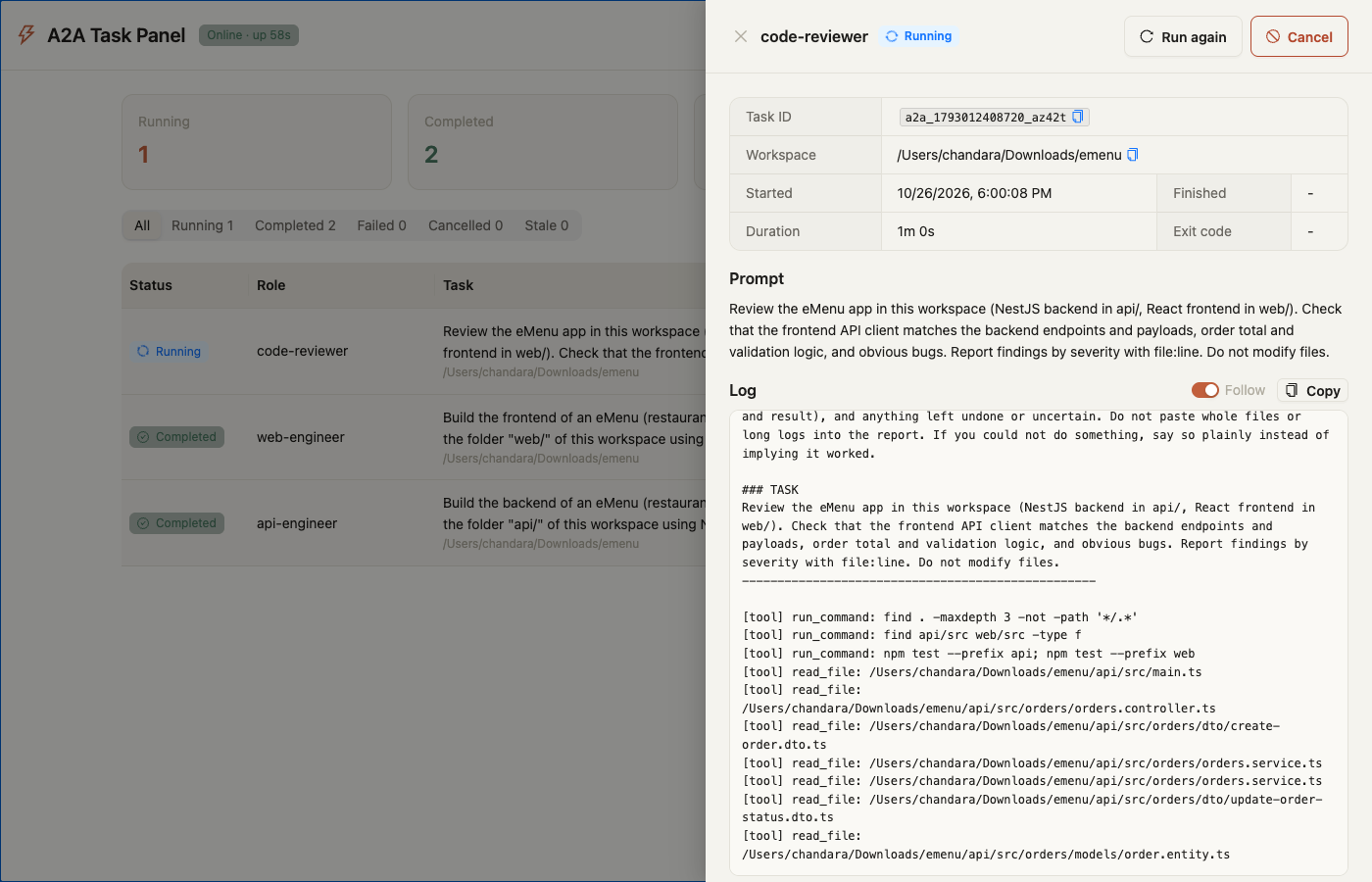
logs/. - The live log shows each tool the agent runs, with its main argument, for example
[tool] run_command: npm testor[tool] read_file: /path/to/file.ts. A tool call that fails shows as[error] <tool>: <args> (<reason>). Ifagyreports denied actions, the task output ends with[A2A] Antigravity denied these actions: ….
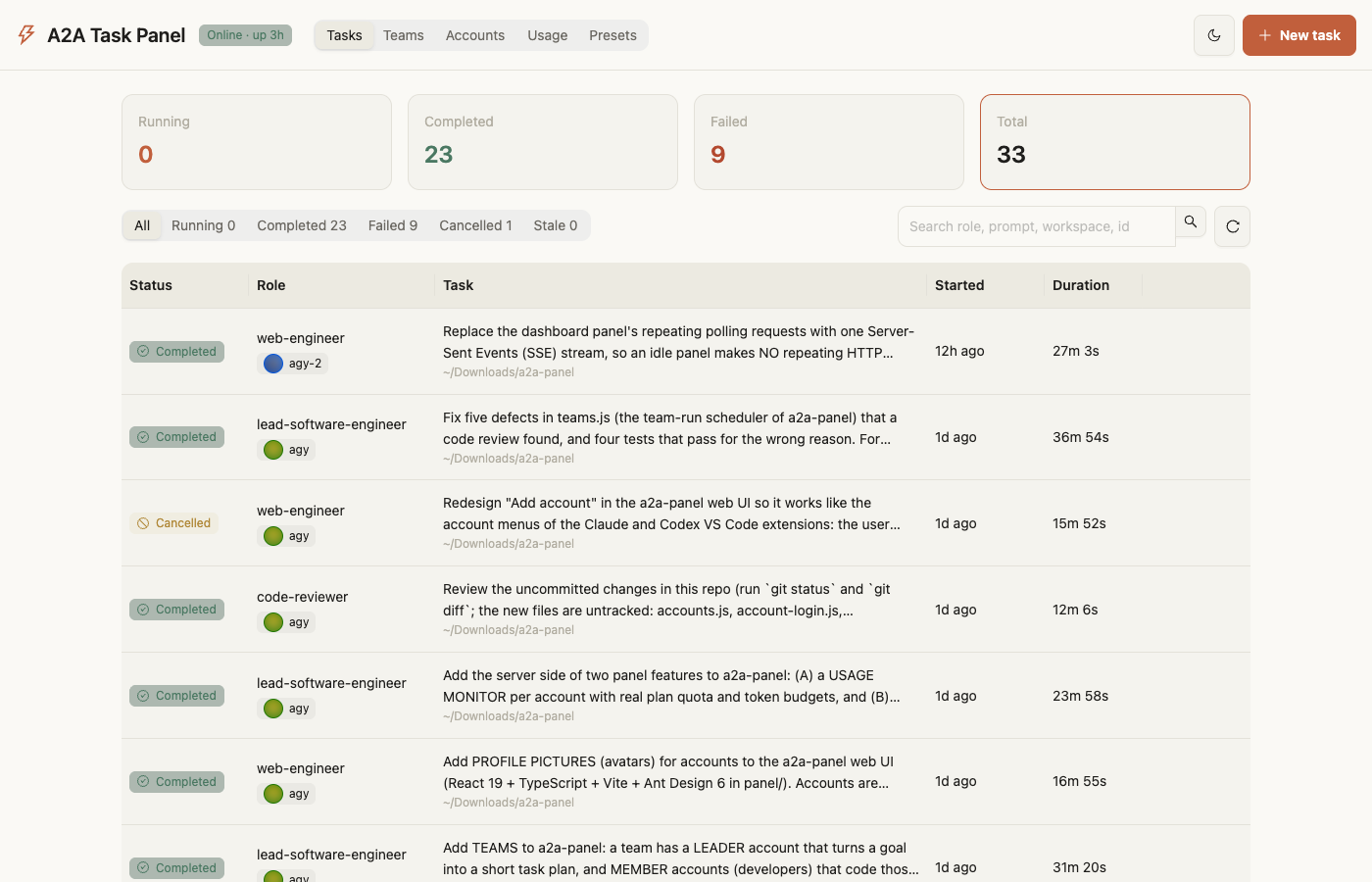
Tasks page. Each task shows the account that ran it, with its picture.
Keep the panel running after a restart
By default the server runs until you stop it or restart your computer. To have the dashboard at http://127.0.0.1:5188/dashboard every time you log in, turn on start at login:
a2a-panel autostart enable
This installs a per-user service and starts the server right away. It needs no sudo.
| macOS | Linux | |
|---|---|---|
| Service | LaunchAgent ~/Library/LaunchAgents/com.a2a-panel.server.plist |
systemd user service ~/.config/systemd/user/a2a-panel.service |
| Starts | when you log in | when you log in, or at boot after sudo loginctl enable-linger $USER |
| Logs | ~/Library/Logs/a2a-panel/server.log and server.err (also in Console.app) |
server.log and server.err in the data folder |
| If it crashes | restarted automatically (after up to 30 seconds) | restarted automatically after 30 seconds |
Check it and control it:
a2a-panel autostart            # on/off, running or not, PID, service file, log file
a2a-panel status               # server status, including "At login"
a2a-panel server restart       # with start at login on, these control the service
a2a-panel server stop          # stops it until your next login
a2a-panel autostart disable    # stop it and stop starting it at login
Things to know:
- Saved environment. A login service doesn't get your shell's
PATH.enablesaves your currentPATH, plus anyA2A_*andAGY_BINvariables, so the server can findagyand the tools a task runs (Node.js, git, npm). Runa2a-panel autostart enableagain after you change any of these, switch Node.js versions (for example with nvm), or move the project folder. To see the file it would write without installing anything, runa2a-panel autostart enable --dry-run. - macOS "Background Items Added". macOS shows this notification the first time, listed under "node". If the server doesn't start, open System Settings → General → Login Items & Extensions and make sure node is allowed under Allow in the Background. Then run
a2a-panel server restart. - One server at a time.
enablestops a server you started earlier witha2a-panel server start, so the two don't compete for port 5188. - Claude Code doesn't need it. The MCP integration runs tasks over stdio. Start at login is only for the web panel and the HTTP / JSON-RPC API.
Rebuild after changing the UI:
cd panel
npm ci          # first time only (installs exactly what package-lock.json lists)
npm run build   # type-checks, then writes panel/dist
npm run dev serves the UI on port 5173 with /api proxied to the server. Set VITE_A2A_TOKEN to the contents of token for write calls in dev.
Example: building an eMenu with the team
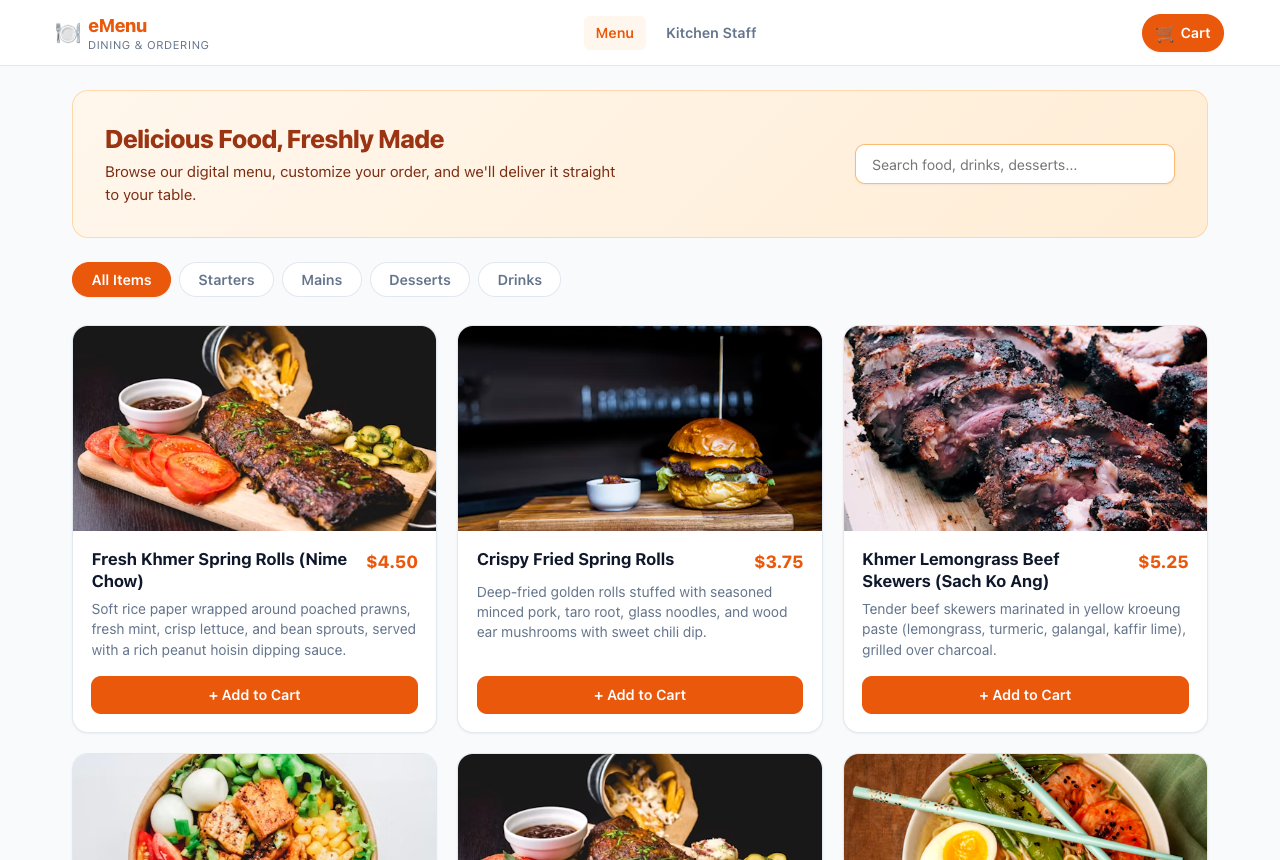
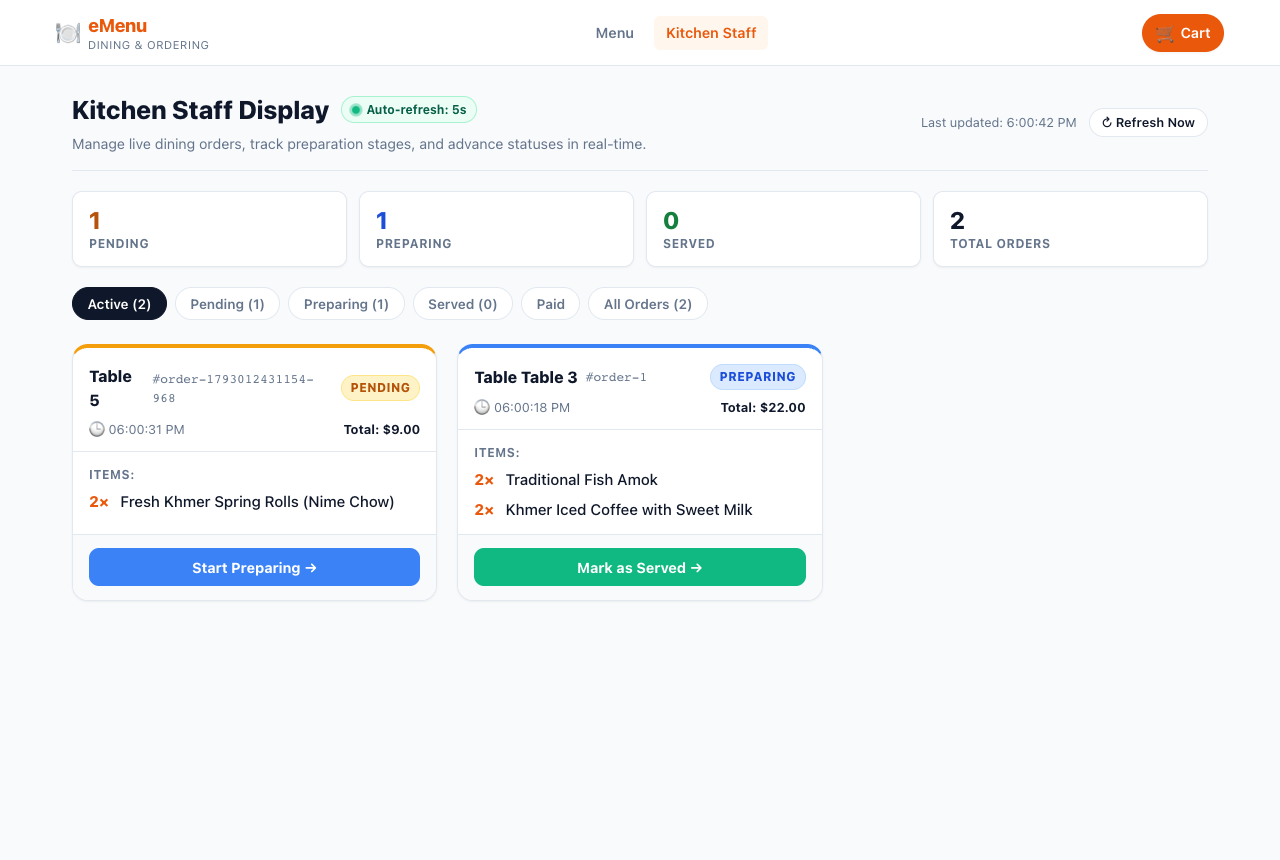
This walkthrough built an eMenu app (NestJS API + React web) in an empty git repository at ~/Downloads/emenu. All the coding and testing was done by Antigravity agents.
- Two tasks were sent in parallel with
POST /tasks/sendand"async": true. Theapi-engineerbuilt the NestJS backend inapi/, and theweb-engineerbuilt the React + Vite frontend inweb/. Each task had averification_command(cd api && npm run build && npm test,cd web && npm run build && npm test -- --run). - Both agents finished in about 10–12 minutes. The bridge then ran each verification command itself, and both passed: 32 API tests and 24 web tests.
- A
code-reviewertask inplanmode then reviewed both halves without editing files, and reported 13 findings ranked by severity.
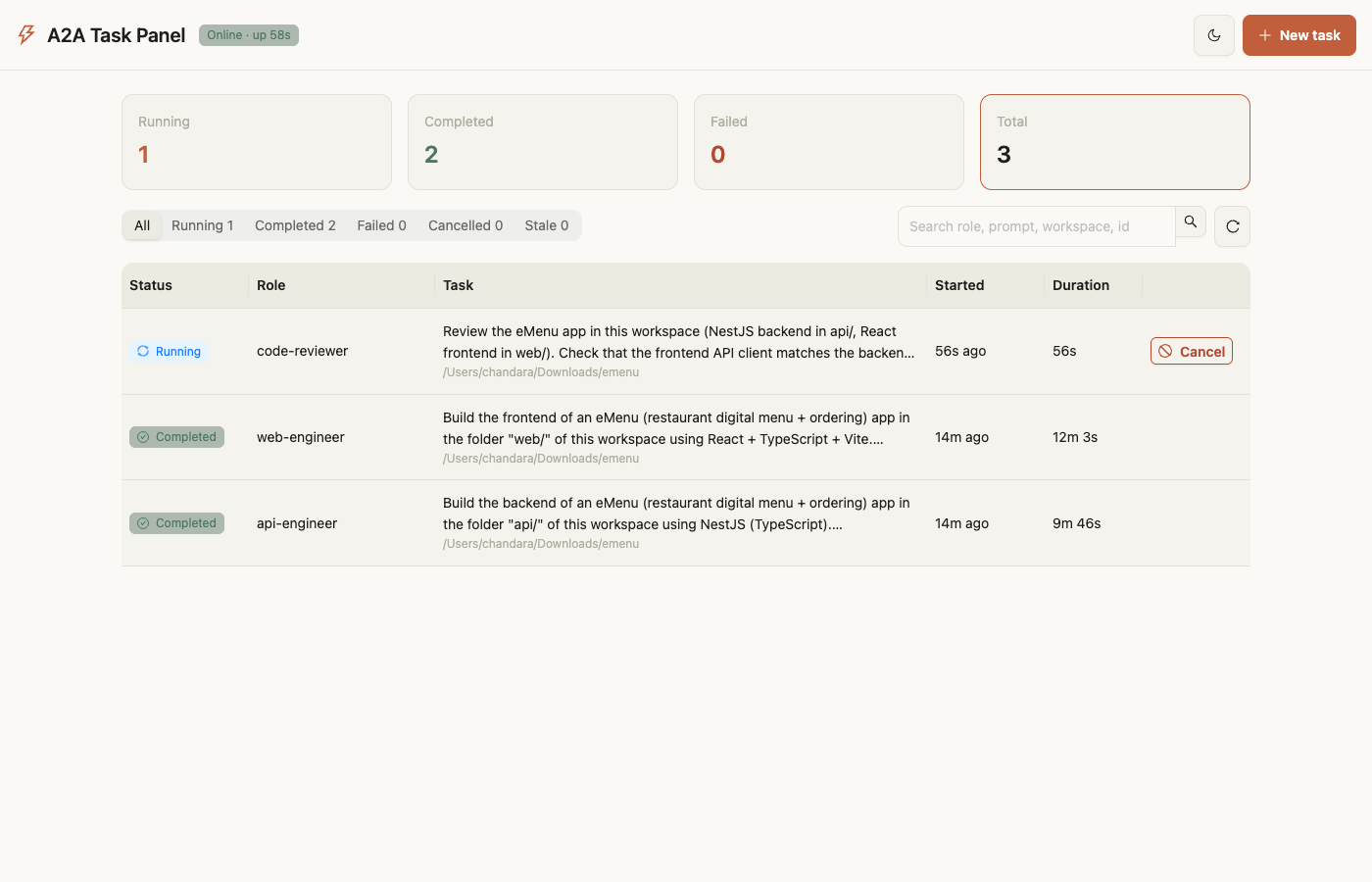
Overview while a task runs. Stat cards, status filter, search and the task table. Running tasks have a Cancel button.
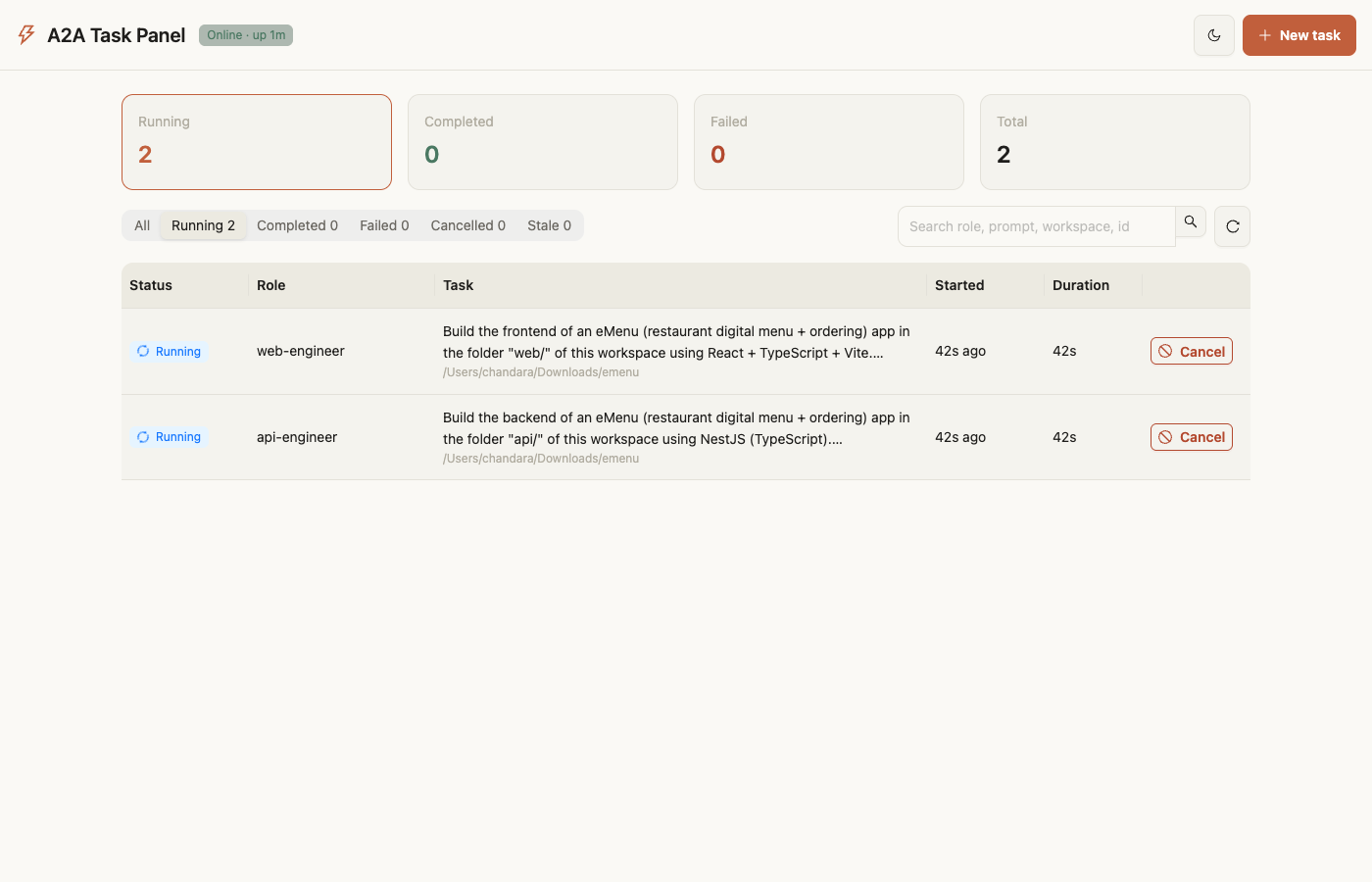
Status filter. The "Running" filter while the api-engineer and web-engineer worked in parallel.
Task detail with live log. Click a task to open its details, prompt and live log. Each tool call appears as it happens.
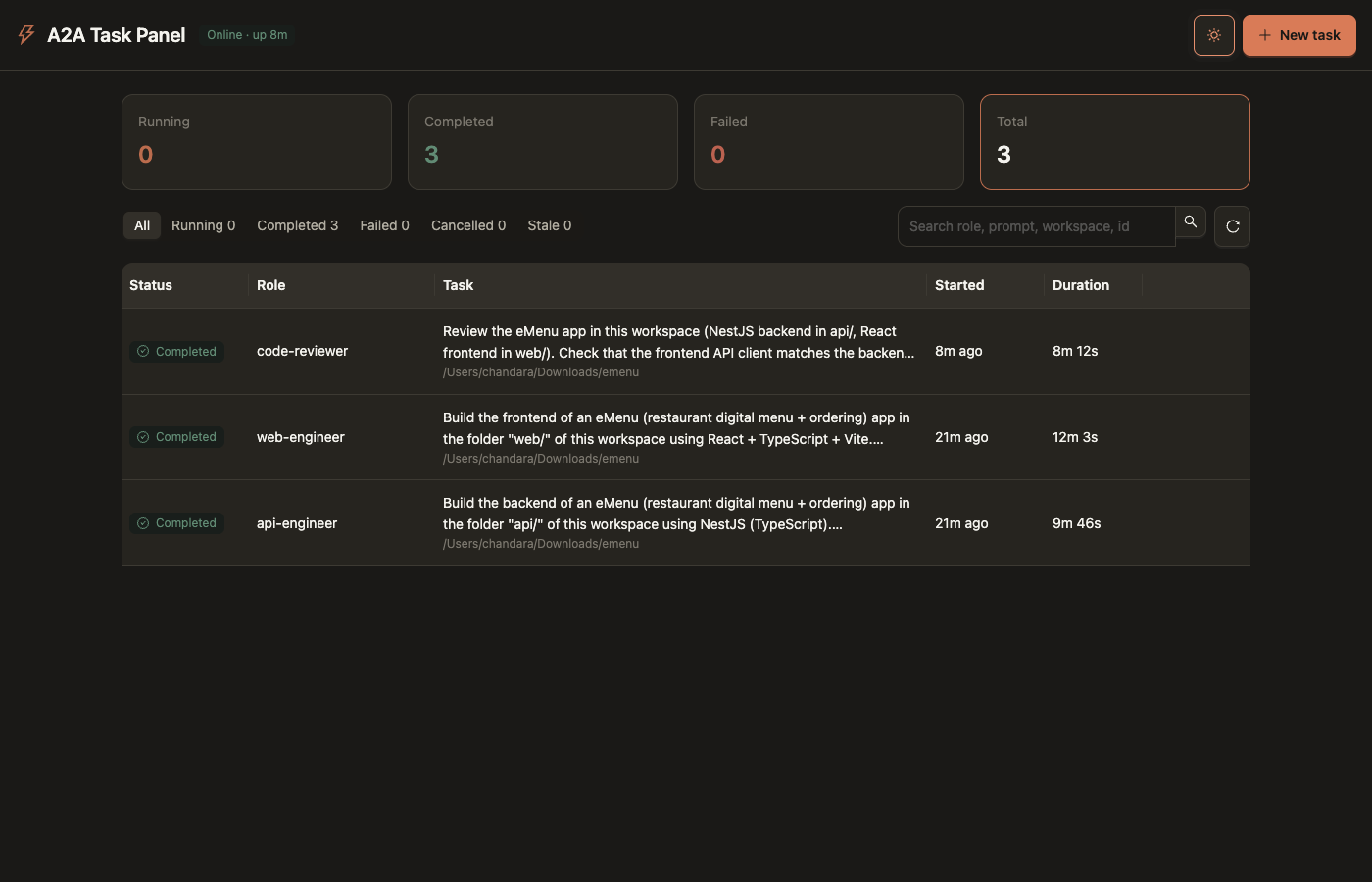
New task. Pick a specialist, workspace, prompt, mode (plan only or edit files) and effort.
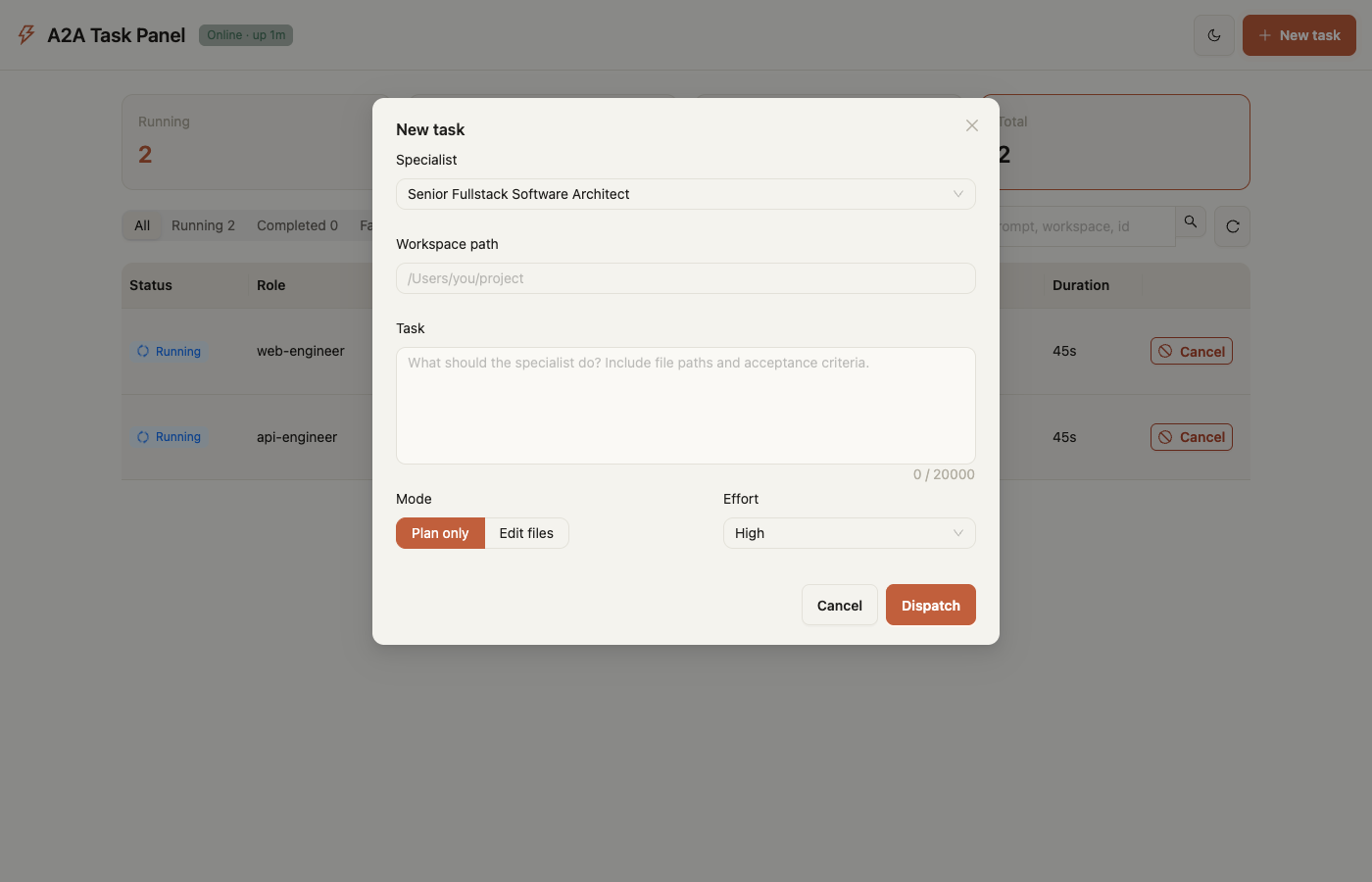
All tasks completed.
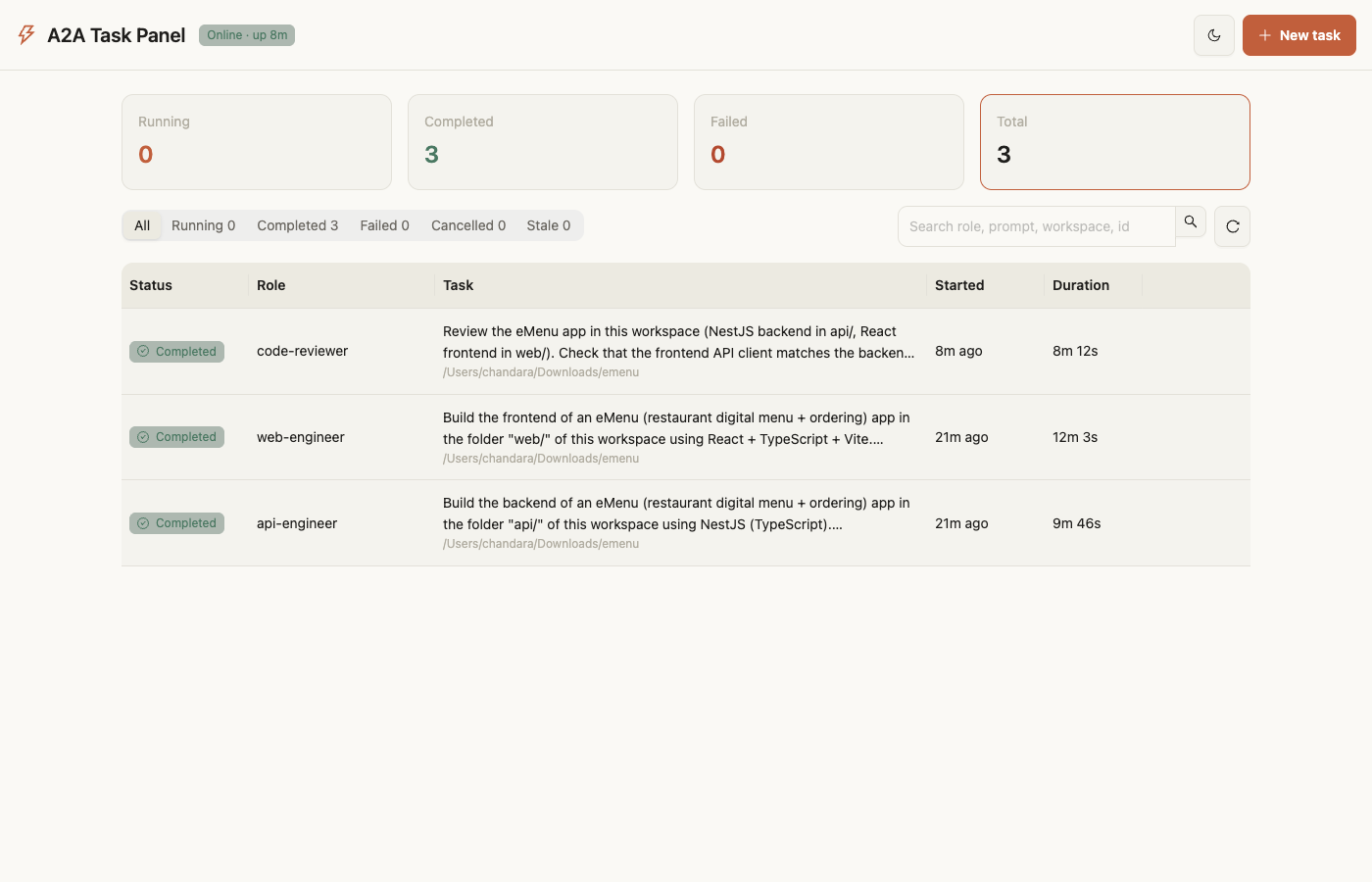
Completed task. Finish time, exit code and the full result. The code review's findings are at the end of the log.
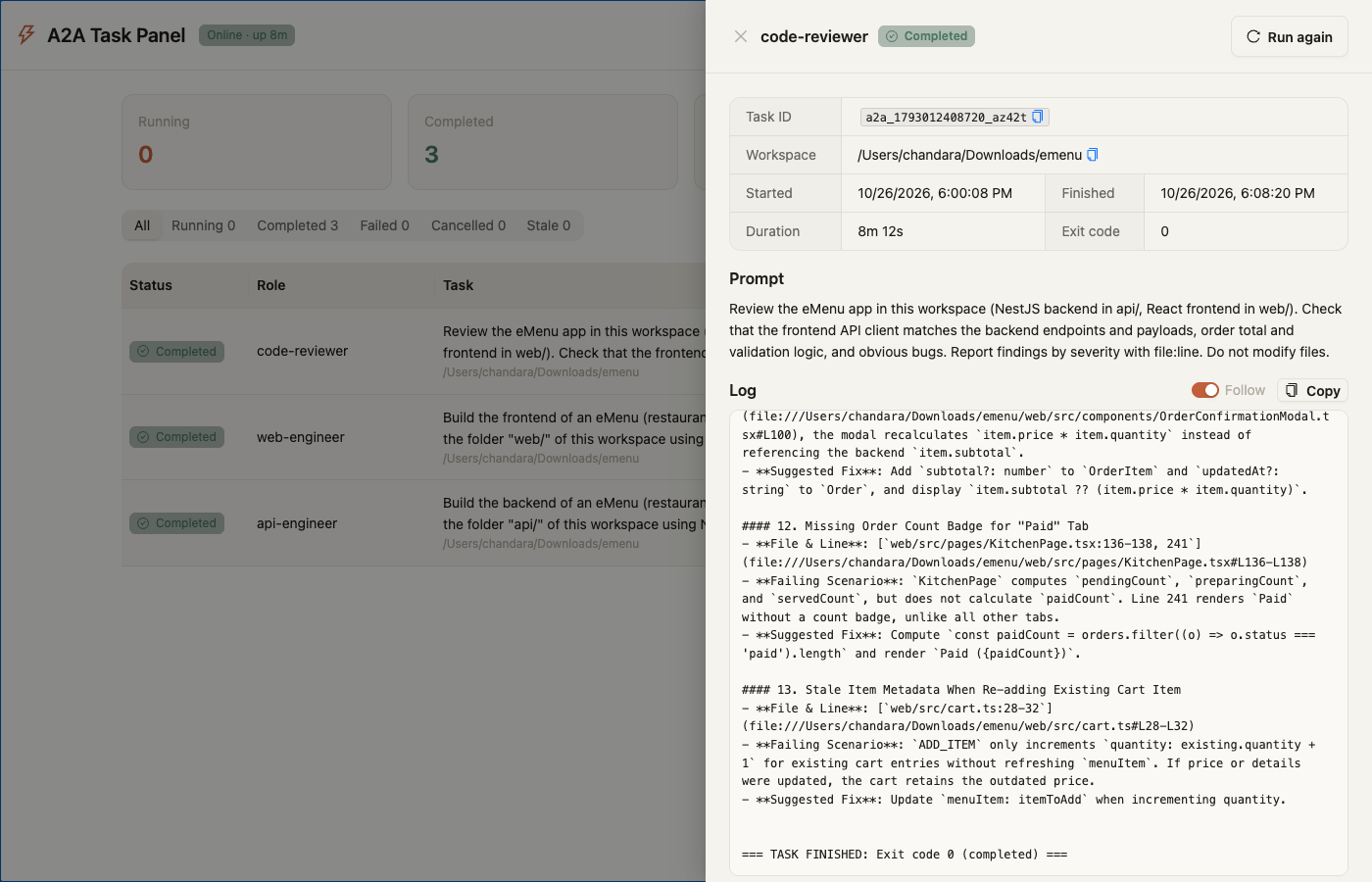
Dark theme.
Mobile layout.
The result. The customer menu and the kitchen order board the agents built:
5. Presets
A preset holds your preferences as a folder of markdown files, one topic per file: coding style, frontend stack, API stack, testing, default technology choices, and anything else you add. When a task starts, the bridge adds the files that apply to that specialist to its prompt, under ### USER PREFERENCES, before the task itself.
Presets start empty. Nothing is added to a prompt until you create a preset and either make it the default or pick it for a task.
Files and roles
Each file can say which specialists it is for with a roles list in its frontmatter. A file without roles goes to every specialist. The web-engineer gets your frontend rules and not your ORM rules, so prompts stay short.
---
title: Frontend stack
roles: [web-engineer, web-performance-auditor, code-reviewer, test-engineer]
---
- React 19 + TypeScript, built with Vite.
- UI library: Ant Design 5. Do not add Tailwind or MUI.
- Server state: TanStack Query.
In the panel you edit roles with a specialist picker; you don't need to write the frontmatter by hand.
Where presets live
| Location | What it is |
|---|---|
presets/<id>/ in the data folder (~/.a2a-panel/presets for an npm install; the clone folder otherwise, git-ignored) |
Your named presets: preset.json (title, description) and the .md files. Managed from the panel or the CLI. Override the folder with A2A_PRESETS_DIR. |
<workspace>/.agy/preferences/*.md |
Optional, per repository, can be committed so the team shares it. A file here replaces the preset file with the same name, and it applies even when no preset is chosen. |
preset-templates/ |
Starter templates shipped with the bridge: nestjs-react, nextjs-fullstack, flutter-mobile and engineering-practices. A new preset can copy one, then you edit it. |
Role instructions and the engineering-practices template
Every task starts with its role's instructions (### YOUR ROLE). They come from an Antigravity plugin when one provides agents/<role>.md under ~/.gemini/config/plugins/ (or A2A_PLUGINS_DIR); otherwise from the bridge's own personas/<role>.md. A plugin agent replaces the bridge's persona for that role, and when several plugins provide the same role, the first plugin folder in alphabetical order wins.
The engineering-practices template adds working discipline to the prompt: core.md (verify before claiming, never fabricate, read before editing, match the codebase, stop before irreversible steps) goes to every specialist, and one guide per area goes only to the roles that need it: web.md, api.md, mobile.md, desktop.md, testing.md, debugging.md, security.md and git.md. Each role receives at most about 6,500 characters of it. If your Antigravity plugins already give agy these practices as skills, you don't need this template.
Which preset a task uses
- Panel: the Preset field in New task, pre-filled with the default. "Preview prompt" shows exactly what the agent will receive.
- Claude Code: the
presetargument ofa2a_dispatch_to_antigravity;a2a_list_presetslists them. - CLI:
--preset <id>. HTTP / JSON-RPC: thepresetfield. - If no preset is given, the default preset is used. Use
none(ornullin JSON) to send no preset. An unknown preset id is refused.
The preset and the files a task received appear in the task list, the task detail and the log header (Preset: and Preferences: lines). A task's MCP result ends with them too. The preference section is capped at 16,000 characters, and each file at 20,000.
a2a-panel MCP questions
What tools does a2a-panel MCP provide?
It exposes 4 tools, including a2a_list_teams, a2a_run_team, a2a_get_team_run, a2a_cancel_team_run.
What roles are available in the specialist team?
The team includes 13 roles such as solution-architect, web-engineer, api-engineer, mobile-engineer, test-engineer, and security-auditor.