
mcpyard MCP server
Commit Oct 26, 2026Provides a single merged endpoint to manage, secure, and update multiple MCP servers with scoped API keys.
Also known as cedhuf/mcpyard
- Stars
- 1
- Tools
- —
- Downloads, 30 days
- —
- Latest version
- —
- Last commit
- Oct 26, 2026
- License
- MIT
What is mcpyard MCP?
mcpyard provides a single merged endpoint to manage, secure, and update multiple MCP servers with scoped API keys.
Summary generated from the project's README
About mcpyard MCP server
Managing multiple MCP servers through a single connection point is what mcpyard enables for developers using agents like Claude Code or llooma. This self-hosted hub acts as a central switchyard, merging tools from various upstream servers into one unified /mcp endpoint. Instead of configuring every individual server in your client, you connect to this single route using a bearer key that defines exactly which tools and servers that specific client can access.
Users deploy the system via a Docker image and manage configurations through a YAML file or a web dashboard. The dashboard provides visibility into server health via MCP pings, tracks recent activity, and manages updates. Unlike standard proxies, it allows you to pin specific package versions and perform one-click updates or rollbacks. Security is handled through OIDC integration with providers like Keycloak or Authelia, ensuring that access to the management interface is tied to your existing identity provider rather than local passwords.
What you can do with it
- 1Consolidate multiple server connectionsConnect an AI agent to a single endpoint that provides access to all your configured MCP tools at once.
- 2Restrict tool access by clientCreate unique API keys that limit specific agents to only the servers and tools they are authorized to use.
- 3Automate and manage server updatesKeep your MCP server packages up to date with one-click updates or scheduled nightly tasks.
Written from the project's README. Every use case is checked against a quote from it.
Configuration
MCPYARD_PUBLIC_URLOIDC_CLIENT_IDOIDC_CLIENT_SECRETOIDC_ISSUER
Automated checks
Ran Nov 15, 2026Full report →Not verified yet. A server needs a score of 80, no serious finding, and enough data for us to check. How checks work · What to fix for more points

- Source repository linked and reachablecedhuf/mcpyard is public and reachablegithub.com/cedhuf/mcpyard ↗Pass
- Package names this repository as its sourceNot checked
- Build provenance (Sigstore attestation)Not checked
- Open source license (OSI)MITspdx.org/licenses/MIT.html ↗Pass
- Commit or release in the last yearLast commit or release 2026-10-26github.com/cedhuf/mcpyard ↗Pass
- OpenSSF ScorecardNot checked
- Package name not close to a popular packageNot checked
- No critical advisory in the package or its dependenciesNot checked
- No hidden instructions to the model0 tool descriptions and the README read; no override phrases, credential paths or hidden charactersPass
- Destructive tools are labelledNot checked
- Remote endpoint answers the MCP handshakeNot checked
README
View on GitHubMCP Yard
A small, self-hosted MCP hub. One endpoint, every MCP server behind it, one key per client.
The name comes from a switchyard, where trains are sorted onto the right track and only cleared
ones get through. That is the whole job here. Clients (Claude Code, llooma, any MCP-capable agent)
connect to a single /mcp endpoint; MCP Yard starts and keeps the upstream MCP servers running,
merges their tools, and only lets each client reach what its key allows.
Status: early, everything below works; expect rough edges before 1.0. Documentation: cedhuf.github.io/mcpyard
Why
MCPHub does the job but carries a lot: marketplace, smart routing, a database for OIDC, a large UI. Lighter proxies (TBXark/mcp-proxy, sparfenyuk/mcp-proxy) expose one route per server instead of one merged endpoint, so every client has to declare every server. 1MCP merges and can be driven over MCP, but has no OIDC web UI and is still 0.x.
MCP Yard aims at the small intersection none of them covers:
- One merged endpoint.
/mcpserves the tools of every server the key may see. - Known versions, one-click updates. Each server runs a package version installed by the hub,
not whatever
npx -yhas cached. The UI shows when a newer one exists and updates it in one click, with rollback if it fails to start, or every night at an hour you pick. Pin a version in the file to freeze it. - Keys with scopes from day one. One bearer key per client, each limited to a set of servers and tools.
- OIDC first. The web UI sits behind your identity provider (PocketID, Authelia, Keycloak...). No local password.
- Configured by environment and one file. Runtime settings in env vars, servers in a single YAML file you can version.
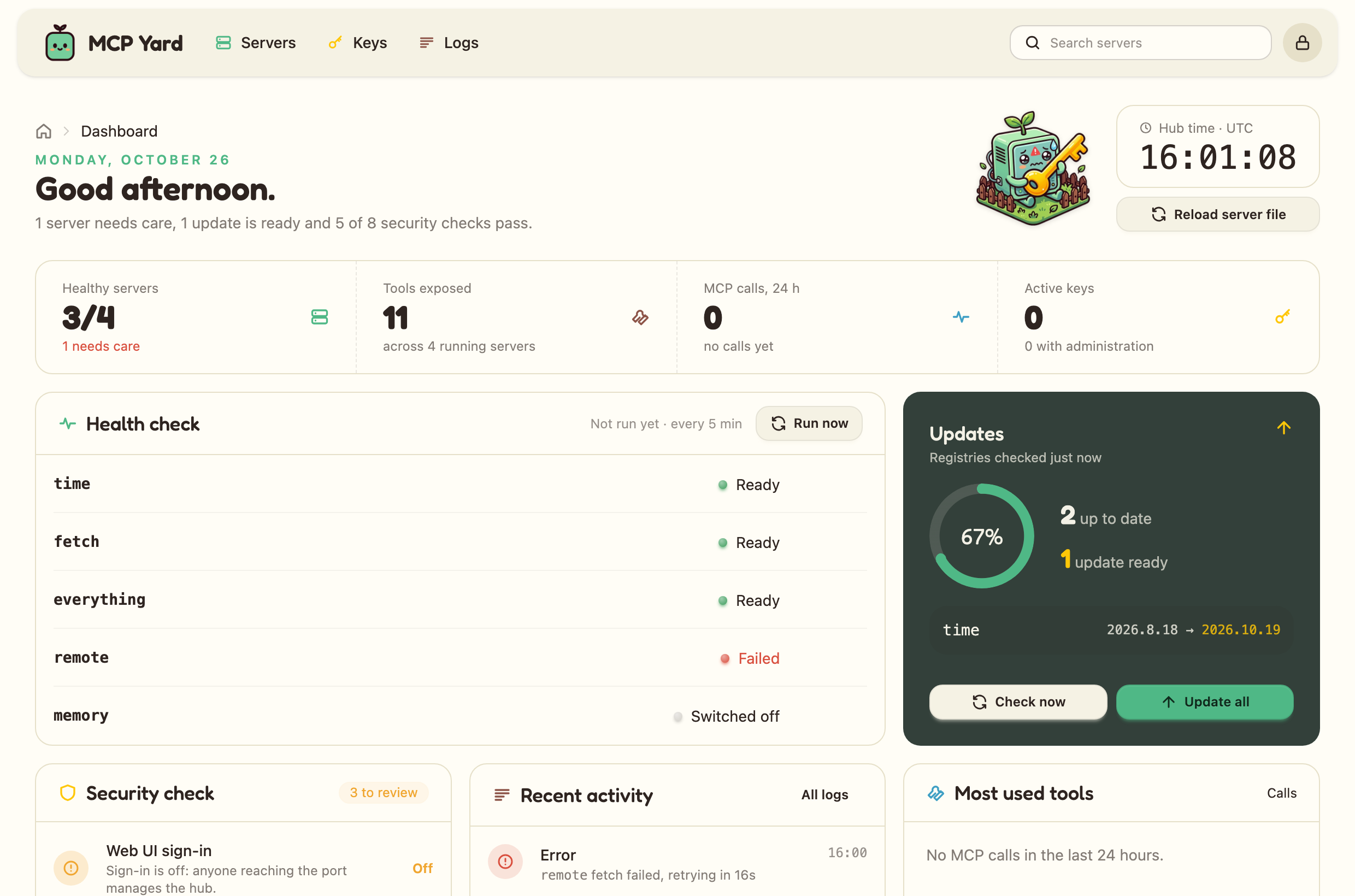
- A dashboard, not just a list. Server health with a one-click MCP ping, updates waiting and Update all, a security check of keys and settings, recent activity and the most used tools.
- Manageable over MCP. Keys you allow get the hub's own
yard-*tools: read status and versions, restart, switch or update a server, reload the configuration. - One small Docker image, built and published by GitHub Actions.
Non-goals
No marketplace, no smart routing or semantic tool search, no multi-tenant user management, no database server. If a feature needs one of those, it belongs in MCPHub, not here.
Quick start
A local trial, without sign-in and reachable only from your machine:
# mcpyard.yaml
servers:
  time:
    package: { pypi: mcp-server-time }
  memory:
    package: { npm: "@modelcontextprotocol/server-memory", version: "2026.8.31" }   # pinned
docker run -d --name mcpyard -p 127.0.0.1:3000:3000 -e MCPYARD_UI_AUTH=none \
  -v ./mcpyard.yaml:/config/mcpyard.yaml -v mcpyard-data:/data \
  ghcr.io/cedhuf/mcpyard:latest
Open http://localhost:3000, create a key, then point your client at /mcp:
claude mcp add --transport http mcpyard http://localhost:3000/mcp --header "Authorization: Bearer yard_..."
Docker Compose or Podman
For a real deployment, with the web UI behind your identity provider:
# compose.yaml
services:
  mcpyard:
    image: ghcr.io/cedhuf/mcpyard:latest
    restart: unless-stopped
    ports: ["127.0.0.1:3000:3000"]   # put a TLS reverse proxy in front
    env_file: .env
    volumes:
      - ./mcpyard.yaml:/config/mcpyard.yaml   # add :ro to forbid editing servers from the UI
      - mcpyard-data:/data

volumes:
  mcpyard-data:
# .env
# What browsers type; the OIDC redirect URI is <this>/auth/callback
MCPYARD_PUBLIC_URL=https://mcpyard.example.lan
OIDC_ISSUER=https://id.example.lan
OIDC_CLIENT_ID=mcpyard
OIDC_CLIENT_SECRET=change-me
# Optional: only these groups (from the groups claim) may sign in
# OIDC_ALLOWED_GROUPS=mcpyard-admins

# Every ${VAR} used in mcpyard.yaml must be defined here, or the hub refuses to start:
# SEARCH_TOKEN=...
Start it with docker compose up -d, or podman compose up -d (podman-compose works too). On
SELinux hosts such as Fedora or RHEL, label the bind mount: ./mcpyard.yaml:/config/mcpyard.yaml:Z.
The container runs as uid 1000: for the web UI to add and edit servers, the file must be writable by
it (chown 1000 mcpyard.yaml). Settings that are not in the environment, such as turning the admin
endpoint off, live on the UI's Settings page.
After editing mcpyard.yaml by hand, apply it without a restart from the web UI, or with
docker kill -s HUP mcpyard (podman kill -s HUP ...): only the servers you changed restart.
Where to go next:
| To... | Read |
|---|---|
| register mcpyard with PocketID, Authelia or Keycloak | Web UI and sign-in |
set up Caddy or nginx in front, and know what /data holds |
Deployment |
| declare packages, commands and remote servers | Server file |
| pin versions, update and roll back | Packages and updates |
| give each client only the servers and tools it needs | Keys and scopes |
| let an agent watch, restart and update servers | Admin endpoint |
| see every environment variable | Environment variables |
Contributing
The architecture pages explain how the hub is built and why.
License
If MCP Yard saves you some time, you can buy me a coffee on Ko-fi.
mcpyard MCP questions
How does MCP Yard handle multiple MCP servers?
It merges all upstream MCP servers into a single /mcp endpoint, allowing clients to access all tools through one connection.
Can I restrict what a specific client can access?
Yes, you can issue one bearer key per client that is limited to a specific set of servers and tools.
How are server updates managed?
The hub runs specific package versions and provides a UI to perform one-click updates or scheduled nightly updates with rollback support.
Does it support external identity providers?
Yes, the web UI is designed to sit behind OIDC providers like PocketID, Authelia, or Keycloak.