
Lets AI assistants inspect a PostgreSQL database read-only for slow queries, locks, bloat, VACUUM, indexes, replication, and WAL.
Also known as call518/MCP-PostgreSQL-Ops
- Stars
- 164
- Tools
- 37
- Downloads, 30 days
- —
- Latest version
- —
- Last commit
- Nov 14, 2026
- License
- MIT
What is PostgreSQL Ops MCP?
PostgreSQL Ops lets AI assistants inspect a PostgreSQL database read-only for slow queries, locks, bloat, VACUUM, indexes, replication, and WAL. It exposes 37 tools, such as get_server_info, get_active_connections, get_postgresql_config.
Summary generated from the project's README
About PostgreSQL Ops MCP server
Database administrators and developers can monitor PostgreSQL health through natural language by connecting AI assistants to their database. This server provides read-only observability, allowing tools like Claude Desktop or OpenWebUI to inspect performance metrics without the risk of executing arbitrary or destructive SQL commands. It works by translating user questions into predefined monitoring queries that return specific statistics.
Users can deploy the server as a Claude Desktop extension using an mcpb file, run it via uvx, or use Docker Compose to connect it to OpenWebUI through an HTTP connection. It automatically adapts to PostgreSQL versions 12 through 18, utilizing version-specific views for features like WAL, replication, and I/O activity. While core monitoring works with standard catalog access, adding extensions like pg_stat_statements enables deeper query analytics.
This tool focuses on maintenance intelligence, covering critical areas such as table bloat, index efficiency, and vacuum requirements. It is designed to be compatible with managed services like RDS or Aurora by using standard monitoring roles.
What you can do with it
- 1Identify slow queriesAsk the AI to find which specific queries are consuming the most execution time in your database.
- 2Diagnose table bloatRequest a list of bloated tables to determine which ones require immediate maintenance attention.
- 3Check vacuum requirementsDetermine which tables are in need of a VACUUM or require autovacuum tuning adjustments.
- 4Monitor active connectionsGet a summary of current active connections and identify any sessions that are currently blocked.
Written from the project's README. Every use case is checked against a quote from it.
PostgreSQL Ops MCP tools 37
Detected from the READMEget_server_infoget_active_connectionsget_postgresql_configget_database_listget_table_listget_table_schema_infoget_database_schema_infoget_table_relationshipsget_user_listget_index_usage_statsget_database_size_infoget_table_size_info
| get_server_info | — | |
| get_active_connections | — | |
| get_postgresql_config | — | |
| get_database_list | — | |
| get_table_list | — | |
| get_table_schema_info | — | |
| get_database_schema_info | — | |
| get_table_relationships | — | |
| get_user_list | — | |
| get_index_usage_stats | — | |
| get_database_size_info | — | |
| get_table_size_info | — |
Show all 37 toolsShow fewer tools
get_vacuum_analyze_statsget_current_database_infoget_table_bloat_analysisget_database_bloat_overviewget_autovacuum_statusget_autovacuum_activityget_running_vacuum_operationsget_vacuum_effectiveness_analysisget_lock_monitoringget_wal_statusget_database_statsget_table_io_statsget_index_io_statsget_database_conflicts_statsget_io_statsget_bgwriter_statsget_replication_statusget_all_tables_statsget_user_functions_statsget_wait_eventsget_wal_summarizer_statusget_async_io_statusget_per_backend_io_statsget_pg_stat_statements_top_queriesget_pg_stat_monitor_recent_queries
| get_vacuum_analyze_stats | — | |
| get_current_database_info | — | |
| get_table_bloat_analysis | — | |
| get_database_bloat_overview | — | |
| get_autovacuum_status | — | |
| get_autovacuum_activity | — | |
| get_running_vacuum_operations | — | |
| get_vacuum_effectiveness_analysis | — | |
| get_lock_monitoring | — | |
| get_wal_status | — | |
| get_database_stats | — | |
| get_table_io_stats | — | |
| get_index_io_stats | — | |
| get_database_conflicts_stats | — | |
| get_io_stats | — | |
| get_bgwriter_stats | — | |
| get_replication_status | — | |
| get_all_tables_stats | — | |
| get_user_functions_stats | — | |
| get_wait_events | — | |
| get_wal_summarizer_status | — | |
| get_async_io_status | — | |
| get_per_backend_io_stats | — | |
| get_pg_stat_statements_top_queries | — | |
| get_pg_stat_monitor_recent_queries | — |
Configuration
DEFAULT_MODEL_PARAMSPOSTGRES_DBPOSTGRES_HOSTPOSTGRES_PASSWORDPOSTGRES_PORTPOSTGRES_USERREMOTE_AUTH_ENABLEREMOTE_SECRET_KEY
| Name | Description | |
|---|---|---|
| DEFAULT_MODEL_PARAMS | — | |
| POSTGRES_DB | — | |
| POSTGRES_HOST | — | |
| POSTGRES_PASSWORD | — | |
| POSTGRES_PORT | — | |
| POSTGRES_USER | — | |
| REMOTE_AUTH_ENABLE | — | |
| REMOTE_SECRET_KEY | — |
Automated checks
Ran Nov 12, 2026Full report →Passed our automated checks. That is not a security audit: read the code and give the server the narrowest access it needs. How checks work

- Source repository linked and reachablePass
- Open source license (OSI)Pass
- Commit or release in the last yearPass
- Package name not close to a popular packageNot checked
- Remote endpoint uses HTTPSNot checked
- Destructive tools are labelledPass
- No hidden instructions to the modelPass
- No critical advisory in the package or its dependenciesNot checked
README
View on GitHubMCP-PostgreSQL-Ops
Give Claude and other AI assistants read-only PostgreSQL observability for slow queries, locks, bloat, VACUUM, indexes, replication, WAL, and capacity.








What is MCP-PostgreSQL-Ops?
MCP-PostgreSQL-Ops lets Claude, OpenWebUI, and other MCP clients inspect a PostgreSQL server through natural-language questions. It turns requests such as “Which tables need VACUUM now?” into predefined, read-only SQL queries and returns the evidence needed to diagnose the database.
- Read-only tools: no arbitrary SQL execution or data-changing operations.
- PostgreSQL 12–18: version-specific views and columns are detected automatically.
- Useful without extensions: core monitoring works immediately;
pg_stat_statementsandpg_stat_monitoradd query analytics. - Deployment choice: install a Claude Desktop extension, run with
uvx, or connect OpenWebUI directly to the HTTP MCP server.
For an AI-generated code walkthrough, use

What can you ask?
Show the current active connections and blocked sessions
Which queries consume the most execution time?
Find bloated tables and explain what needs attention first
Which tables need VACUUM or autovacuum tuning?
Show unused or inefficient indexes
Check replication, WAL, checkpoints, and background processes
Summarize database size, growth, and I/O activity
Draw the relationships for the ecommerce schema
Core tools work with normal catalog access. Broader cross-database visibility depends on the PostgreSQL role; use a least-privilege monitoring account in production.
Example: slow-query evidence and recommendations
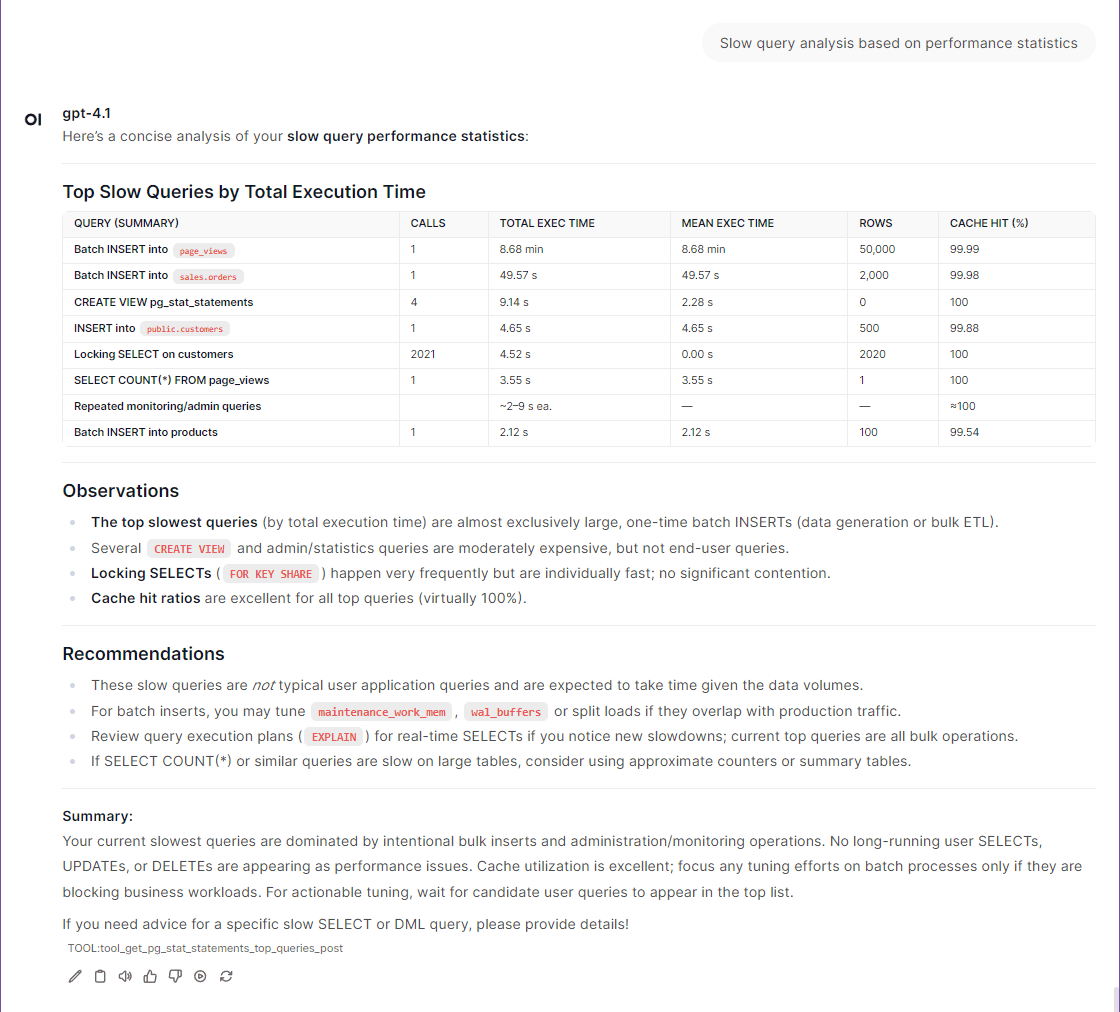
More examples are available in the screenshots and usage wiki.
Quick Start
Choose one path. If you already have PostgreSQL and Claude Desktop, Option A is the shortest. Option B provides a complete local demonstration with sample databases and OpenWebUI.
Option A: Claude Desktop extension (fastest)
Requirements: Claude Desktop with extension support and a PostgreSQL server reachable from the computer running Claude Desktop.
- Open the latest
GitHub Release
and download
mcp-postgresql-ops-<version>.mcpb. - In Claude Desktop, open Settings → Extensions → Advanced settings → Install Extension… and select the downloaded file.
- Enter the PostgreSQL host, port, user, password, and default database.
- Ask Claude:
Show the current active PostgreSQL connections.
The password field is marked sensitive and is stored by Claude Desktop. The
extension runs the server locally over stdio; it does not expose an HTTP
port.
Option B: OpenWebUI 0.13 with the included demo database
Requirements: Git, Docker with the Compose plugin, and an OpenWebUI model provider whose model supports tool calling.
1. Configure and start
git clone https://github.com/call518/MCP-PostgreSQL-Ops.git
cd MCP-PostgreSQL-Ops
cp .env.example .env
cp mcp-config.json.http mcp-config.json.http.local
chmod 600 mcp-config.json.http.local
openssl rand -hex 32  # set the output as WEBUI_SECRET_KEY in .env
docker compose up -d
docker compose ps     # wait for postgres-init-extensions to finish
mcp-config.json.http.local is ignored by Git and is mounted only into MCPO.
If REMOTE_AUTH_ENABLE=true, replace <REMOTE_SECRET_KEY> in that local file
with the same secret configured in .env. Leave the tracked
mcp-config.json.http file as a credential-free template.
This starts OpenWebUI at http://localhost:3003, the MCP server at
http://localhost:18003/mcp, optional MCPO/OpenAPI compatibility at
http://localhost:8003, and a disposable PostgreSQL demo environment. The
demo includes ecommerce, analytics, inventory, and HR data plus intentional
bloat and index patterns for realistic monitoring questions.
2. Connect OpenWebUI directly to MCP
- Open
http://localhost:3003, create the administrator account, and add a model provider under Settings → Admin → Connections. - Under Settings → Admin → Tools → Integrations → External Tool Servers,
add a connection of type MCP (Streamable HTTP) with URL
http://mcp-server:8000/mcpand authentication None. - Under Settings → Admin → System → Interface → Chat, enable Tool
Search and Defer Built-in Tools, then set Deferral Threshold to
0. - In a new chat, enable the connection under Integrations → Tools and ask:
Use mcp-postgresql-ops to show tables that need VACUUM.
.env.examplesetsDEFAULT_MODEL_PARAMS={"reasoning_effort":"none"}so OpenAI reasoning models can call MCP tools. If the chat still fails withFunction tools with reasoning_effort are not supported ..., see OpenWebUI Issues.
MCPO is optional. OpenWebUI 0.13 connects to the MCP server directly and does not require the MCPO proxy. To expose the tools as an OpenAPI/Swagger service for a legacy client, use MCPO at
http://localhost:8003. The Compose file starts it so every project keeps the same deployment layout. To run without it, usedocker compose up -d mcp-server open-webui.
To connect the Docker stack to an existing PostgreSQL server instead, update
the POSTGRES_* values in .env and run:
docker compose -f docker-compose.custom-db.yml up -d
Why this project?
- Operational evidence, not arbitrary SQL: every tool uses a predefined monitoring query and returns inspectable PostgreSQL statistics.
- Automatic version adaptation: one server supports PostgreSQL 12 through 18, including newer I/O, wait-event, checkpointer, and WAL views.
- Maintenance intelligence: bloat, VACUUM, autovacuum, indexes, locks, capacity, replication, and query performance are covered together.
- Managed-service friendly: core tools work on RDS/Aurora and with regular monitoring roles; advanced visibility still follows provider permissions.
- Multiple clients: Claude Desktop, OpenWebUI, any Streamable HTTP MCP client, and optional OpenAPI clients through MCPO.
How it works
Claude Desktop ── stdio ───────────────┐
                                       │
OpenWebUI 0.13 ─ Streamable HTTP ──────┼─> MCP-PostgreSQL-Ops
                                       │      │
OpenAPI client ─ optional MCPO proxy ──┘      └─> read-only SQL ─> PostgreSQL
The MCP server is the required component. OpenWebUI can call it directly; MCPO is only an optional protocol adapter. The DeepWiki architecture provides a code-level walkthrough.
Installation options
| Setup | Best for | Requirements |
|---|---|---|
| MCPB extension | Fastest Claude Desktop setup | Claude Desktop |
uvx --python 3.12 mcp-postgresql-ops |
Explicit local configuration | uv |
| Docker Compose | OpenWebUI and HTTP MCP clients | Docker Compose |
| Source checkout | Development and customization | Git, uv |
All methods run the same server. Choose one; they are not cumulative.
Features and compatibility
Tool Compatibility Matrix
Automatic Adaptation: All tools work transparently across supported versions - no configuration needed!
🟢 Extension-Independent Tools (No Extensions Required)
| Tool Name | Extensions Required | PG 12 | PG 13 | PG 14 | PG 15 | PG 16 | PG 17 | PG 18 | System Views/Tables Used |
|---|---|---|---|---|---|---|---|---|---|
get_server_info |
❌ None | ✅ | ✅ | ✅ | ✅ | ✅ | ✅ | ✅ | version(), pg_extension |
get_active_connections |
❌ None | ✅ | ✅ | ✅ | ✅ | ✅ | ✅ | ✅ | pg_stat_activity |
get_postgresql_config |
❌ None | ✅ | ✅ | ✅ | ✅ | ✅ | ✅ | ✅ | pg_settings |
get_database_list |
❌ None | ✅ | ✅ | ✅ | ✅ | ✅ | ✅ | ✅ | pg_database |
get_table_list |
❌ None | ✅ | ✅ | ✅ | ✅ | ✅ | ✅ | ✅ | information_schema.tables |
get_table_schema_info |
❌ None | ✅ | ✅ | ✅ | ✅ | ✅ | ✅ | ✅ | information_schema.*, pg_indexes |
get_database_schema_info |
❌ None | ✅ | ✅ | ✅ | ✅ | ✅ | ✅ | ✅ | pg_namespace, pg_class, pg_proc |
get_table_relationships |
❌ None | ✅ | ✅ | ✅ | ✅ | ✅ | ✅ | ✅ | information_schema.* (constraints) |
get_user_list |
❌ None | ✅ | ✅ | ✅ | ✅ | ✅ | ✅ | ✅ | pg_user, pg_roles |
get_index_usage_stats |
❌ None | ✅ | ✅ | ✅ | ✅ | ✅ | ✅ | ✅ | pg_stat_user_indexes |
get_database_size_info |
❌ None | ✅ | ✅ | ✅ | ✅ | ✅ | ✅ | ✅ | pg_database_size() |
get_table_size_info |
❌ None | ✅ | ✅ | ✅ | ✅ | ✅ | ✅ | ✅ | pg_total_relation_size() |
get_vacuum_analyze_stats |
❌ None | ✅ | ✅ | ✅ | ✅ | ✅ | ✅ | ✅ Enhanced | pg_stat_user_tables |
get_current_database_info |
❌ None | ✅ | ✅ | ✅ | ✅ | ✅ | ✅ | ✅ | pg_database, current_database() |
get_table_bloat_analysis |
❌ None | ✅ | ✅ | ✅ | ✅ | ✅ | ✅ | ✅ | pg_stat_user_tables |
get_database_bloat_overview |
❌ None | ✅ | ✅ | ✅ | ✅ | ✅ | ✅ | ✅ | pg_stat_user_tables |
get_autovacuum_status |
❌ None | ✅ | ✅ | ✅ | ✅ | ✅ | ✅ | ✅ | pg_stat_user_tables |
get_autovacuum_activity |
❌ None | ✅ | ✅ | ✅ | ✅ | ✅ | ✅ | ✅ | pg_stat_user_tables |
get_running_vacuum_operations |
❌ None | ✅ | ✅ | ✅ | ✅ | ✅ | ✅ | ✅ | pg_stat_activity |
get_vacuum_effectiveness_analysis |
❌ None | ✅ | ✅ | ✅ | ✅ | ✅ | ✅ | ✅ | pg_stat_user_tables |
get_lock_monitoring |
❌ None | ✅ | ✅ | ✅ | ✅ | ✅ | ✅ | ✅ | pg_locks, pg_stat_activity |
get_wal_status |
❌ None | ✅ | ✅ | ✅ | ✅ | ✅ | ✅ | ✅ | pg_current_wal_lsn() |
get_database_stats |
❌ None | ✅ | ✅ | ✅ | ✅ | ✅ | ✅ | ✅ Enhanced | pg_stat_database |
get_table_io_stats |
❌ None | ✅ | ✅ | ✅ | ✅ | ✅ | ✅ | ✅ | pg_statio_user_tables |
get_index_io_stats |
❌ None | ✅ | ✅ | ✅ | ✅ | ✅ | ✅ | ✅ | pg_statio_user_indexes |
get_database_conflicts_stats |
❌ None | ✅ | ✅ | ✅ | ✅ | ✅ | ✅ | ✅ | pg_stat_database_conflicts |
🚀 Version-Aware Tools (Auto-Adapting)
| Tool Name | Extensions Required | PG 12 | PG 13 | PG 14 | PG 15 | PG 16 | PG 17 | PG 18 | Special Features |
|---|---|---|---|---|---|---|---|---|---|
get_io_stats |
❌ None | ✅ Basic | ✅ Basic | ✅ Basic | ✅ Basic | ✅ Enhanced | ✅ Enhanced | ✅ Enhanced | PG16+: pg_stat_io support; PG18+: byte columns |
get_bgwriter_stats |
❌ None | ✅ | ✅ | ✅ | ✅ | ✅ | ✅ Special | ✅ Enhanced | PG17: Separate checkpointer stats; PG18+: num_done, slru_written |
get_replication_status |
❌ None | ✅ Compatible | ✅ Enhanced | ✅ Enhanced | ✅ Enhanced | ✅ Enhanced | ✅ Enhanced | ✅ Enhanced | PG13+: wal_status, safe_wal_size; PG16+: enhanced WAL receiver; PG17+: invalidation_reason, inactive_since |
get_all_tables_stats |
❌ None | ✅ Compatible | ✅ Enhanced | ✅ Enhanced | ✅ Enhanced | ✅ Enhanced | ✅ Enhanced | ✅ Enhanced | PG13+: n_ins_since_vacuum tracking for vacuum maintenance optimization |
get_user_functions_stats |
⚙️ Config Required | ✅ | ✅ | ✅ | ✅ | ✅ | ✅ | ✅ | Requires track_functions=pl |
get_wait_events |
❌ None | ✅ Fallback | ✅ Fallback | ✅ Fallback | ✅ Fallback | ✅ Fallback | ✅ Native | ✅ Native | PG17+: pg_wait_events catalog; PG12-16: fallback to pg_stat_activity current waits |
get_wal_summarizer_status |
❌ None | ❌ | ❌ | ❌ | ❌ | ❌ | ✅ | ✅ | PG17+: WAL summarizer monitoring for incremental backups |
get_async_io_status |
❌ None | ❌ | ❌ | ❌ | ❌ | ❌ | ❌ | ✅ | PG18+: pg_aios async I/O subsystem monitoring |
get_per_backend_io_stats |
❌ None | ❌ | ❌ | ❌ | ❌ | ❌ | ❌ | ✅ | PG18+: Per-backend I/O and WAL statistics |
🟡 Extension-Dependent Tools (Extensions Required)
| Tool Name | Required Extension | PG 12 | PG 13 | PG 14 | PG 15 | PG 16 | PG 17 | PG 18 | Notes |
|---|---|---|---|---|---|---|---|---|---|
get_pg_stat_statements_top_queries |
pg_stat_statements |
✅ Compatible | ✅ Enhanced | ✅ Enhanced | ✅ Enhanced | ✅ Enhanced | ✅ Enhanced | ✅ Enhanced | PG12: total_time → total_exec_time; PG13+: native total_exec_time; PG17+: stats_since |
get_pg_stat_monitor_recent_queries |
pg_stat_monitor |
✅ Compatible | ✅ Enhanced | ✅ Enhanced | ✅ Enhanced | ✅ Enhanced | ✅ Enhanced | ✅ Enhanced | PG12: total_time → total_exec_time; PG13+: native total_exec_time |
🆕 Version-Specific Features
PostgreSQL 17
pg_wait_eventsview: Native wait event catalog with descriptions (used byget_wait_events)- WAL summarizer: Monitoring for incremental backup support (used by
get_wal_summarizer_status) - Replication slot enhancements:
invalidation_reasonandinactive_sincecolumns (used byget_replication_status) pg_stat_statementsstats_since: Track when statistics were last reset (used byget_pg_stat_statements_top_queries)- VACUUM progress: Index vacuum tracking in progress views (future enhancement for
get_running_vacuum_operations)
PostgreSQL 18
pg_aiosview: Async I/O subsystem monitoring (used byget_async_io_status)- Per-backend I/O stats: Individual backend I/O and WAL statistics (used by
get_per_backend_io_stats) - VACUUM/ANALYZE time columns:
total_vacuum_time,total_autovacuum_time,total_analyze_time,total_autoanalyze_timecumulative timing (used byget_vacuum_analyze_stats) pg_stat_iobyte columns:read_bytes,write_bytes,extend_bytes(used byget_io_stats)- Parallel worker stats:
parallel_workers_launched,parallel_workers_to_launch(used byget_database_stats) - Checkpointer enhancements:
num_done,slru_writtencolumns (used byget_bgwriter_stats)
Other local setups
Run from PyPI with uvx
# Local stdio transport
uvx --python 3.12 mcp-postgresql-ops --type stdio

# Streamable HTTP transport
uvx --python 3.12 mcp-postgresql-ops \
  --type streamable-http \
  --host 127.0.0.1 \
  --port 8000
Run from source
git clone https://github.com/call518/MCP-PostgreSQL-Ops.git
cd MCP-PostgreSQL-Ops
uv sync
uv run mcp-postgresql-ops --help
The package is also available through pip install mcp-postgresql-ops.
Advanced configuration
Claude Desktop Configuration
(Optional) Run with Local Source:
{
  "mcpServers": {
    "mcp-postgresql-ops": {
      "command": "uv",
      "args": ["run", "python", "-m", "mcp_postgresql_ops"],
      "env": {
        "POSTGRES_HOST": "127.0.0.1",
        "POSTGRES_PORT": "15432",
        "POSTGRES_USER": "postgres",
        "POSTGRES_PASSWORD": "changeme!@34",
        "POSTGRES_DB": "ecommerce"
      }
    }
  }
}
Run the MCP server standalone
With PyPI and uvx
# Stdio mode
uvx --python 3.12 mcp-postgresql-ops \
  --type stdio

# HTTP mode
uvx --python 3.12 mcp-postgresql-ops \
  --type streamable-http \
  --host 127.0.0.1 \
  --port 8000 \
  --log-level DEBUG
(Option) Configure Multiple PostgreSQL Instances
{
  "mcpServers": {
    "Postgresql-A": {
      "command": "uvx",
      "args": ["--python", "3.12", "mcp-postgresql-ops"],
      "env": {
        "POSTGRES_HOST": "a.foo.com",
        "POSTGRES_PORT": "5432",
        "POSTGRES_USER": "postgres",
        "POSTGRES_PASSWORD": "postgres",
        "POSTGRES_DB": "postgres"
      }
    },
    "Postgresql-B": {
      "command": "uvx",
      "args": ["--python", "3.12", "mcp-postgresql-ops"],
      "env": {
        "POSTGRES_HOST": "b.bar.com",
        "POSTGRES_PORT": "5432",
        "POSTGRES_USER": "postgres",
        "POSTGRES_PASSWORD": "postgres",
        "POSTGRES_DB": "postgres"
      }
    }
  }
}
/w Local Source
# Method 1: Module execution (for development, requires PYTHONPATH)
PYTHONPATH=/path/to/MCP-PostgreSQL-Ops/src
python -m mcp_postgresql_ops \
  --type stdio

# Method 2: Direct script (after uv installation in project directory)
uv run mcp-postgresql-ops \
  --type stdio

# Method 3: Installed package script (after pip/uv install)
mcp-postgresql-ops \
  --type stdio

# HTTP mode examples:
# Development mode
PYTHONPATH=/path/to/MCP-PostgreSQL-Ops/src
python -m mcp_postgresql_ops \
  --type streamable-http \
  --host 127.0.0.1 \
  --port 8000 \
  --log-level DEBUG

# Production mode (after installation)
mcp-postgresql-ops \
  --type streamable-http \
  --host 127.0.0.1 \
  --port 8000 \
  --log-level DEBUG
CLI Arguments
--type: Transport type (stdioorstreamable-http) - Default:stdio--host: Host address for HTTP transport - Default:127.0.0.1--port: Port number for HTTP transport - Default:8000--auth-enable: Enable Bearer token authentication for streamable-http mode - Default:false--secret-key: Secret key for Bearer token authentication (required when auth enabled)--log-level: Logging level (DEBUG, INFO, WARNING, ERROR, CRITICAL) - Default:INFO
Environment Variables
| Variable | Description | Default | Project Default |
|---|---|---|---|
PYTHONPATH |
Python module search path (only needed for development mode) | - | /app/src |
MCPO_CONFIG_FILE |
Ignored local MCPO configuration mounted by Docker Compose | mcp-config.json.http.local |
mcp-config.json.http.local |
MCP_LOG_LEVEL |
Server logging verbosity (DEBUG, INFO, WARNING, ERROR) | INFO |
INFO |
FASTMCP_TYPE |
MCP transport protocol (stdio for CLI, streamable-http for web) | stdio |
streamable-http |
FASTMCP_HOST |
HTTP server bind address (0.0.0.0 for all interfaces) | 127.0.0.1 |
0.0.0.0 |
FASTMCP_PORT |
HTTP server port for MCP communication | 8000 |
8000 |
REMOTE_AUTH_ENABLE |
Enable Bearer token authentication for streamable-http mode (Default: false if undefined/null/empty) |
false |
false |
REMOTE_SECRET_KEY |
Secret key for Bearer token authentication (required when auth enabled) | - | empty |
PGSQL_VERSION |
PostgreSQL major version for Docker image selection | 16 |
16 |
PGDATA |
PostgreSQL data directory inside Docker container (Do not modify) | /var/lib/postgresql/data |
/data/db |
POSTGRES_HOST |
PostgreSQL server hostname or IP address | 127.0.0.1 |
host.docker.internal |
POSTGRES_PORT |
PostgreSQL server port number | 5432 |
15432 |
POSTGRES_USER |
PostgreSQL connection username (needs read permissions) | postgres |
postgres |
POSTGRES_PASSWORD |
PostgreSQL user password (supports special characters) | changeme!@34 |
changeme!@34 |
POSTGRES_DB |
Default database name for connections | testdb |
ecommerce |
POSTGRES_MAX_CONNECTIONS |
PostgreSQL max_connections configuration parameter | 200 |
200 |
DOCKER_BIND_ADDRESS |
Host address for published Docker ports | 127.0.0.1 |
127.0.0.1 |
DOCKER_EXTERNAL_PORT_OPENWEBUI |
Host port mapping for Open WebUI container | 8080 |
3003 |
DOCKER_EXTERNAL_PORT_MCP_SERVER |
Host port mapping for MCP server container | 8080 |
18003 |
DOCKER_EXTERNAL_PORT_MCPO_PROXY |
Host port mapping for MCPO proxy container | 8000 |
8003 |
DOCKER_INTERNAL_PORT_POSTGRESQL |
PostgreSQL container internal port | 5432 |
5432 |
Note: POSTGRES_DB serves as the default target database for operations when no specific database is specified. In Docker environments, if set to a non-default name, this database will be automatically created during initial PostgreSQL startup.
Port Configuration: The built-in PostgreSQL container uses port mapping 15432:5432 where:
POSTGRES_PORT=15432: External port for host access and MCP server connectionsDOCKER_INTERNAL_PORT_POSTGRESQL=5432: Internal container port (PostgreSQL default)- When using external PostgreSQL servers, set
POSTGRES_PORTto match your server's actual port
Prerequisites
Required PostgreSQL Extensions
For more details, see the ## Tool Compatibility Matrix
Note: Most MCP tools work without any PostgreSQL extensions. section below. Some advanced performance analysis tools require the following extensions:
-- Query performance statistics (required only for get_pg_stat_statements_top_queries)
CREATE EXTENSION IF NOT EXISTS pg_stat_statements;

-- Advanced monitoring (optional, used by get_pg_stat_monitor_recent_queries)
CREATE EXTENSION IF NOT EXISTS pg_stat_monitor;
Quick Setup: For new PostgreSQL installations, add to postgresql.conf:
shared_preload_libraries = 'pg_stat_statements'
Then restart PostgreSQL and run the CREATE EXTENSION commands above.
pg_stat_statementsis required only for slow query analysis tools.pg_stat_monitoris optional and used for real-time query monitoring.- All other tools work without these extensions.
Minimum Requirements
- PostgreSQL 12+ (tested with PostgreSQL 17 and 18)
- Python 3.12
- Network access to PostgreSQL server
- Read permissions on system catalogs
Required PostgreSQL Configuration
⚠️ Statistics Collection Settings: Some MCP tools require specific PostgreSQL configuration parameters to collect statistics. Choose one of the following configuration methods:
Tools affected by these settings:
- get_user_functions_stats: Requires
track_functions = plortrack_functions = all - get_table_io_stats & get_index_io_stats: More accurate timing with
track_io_timing = on - get_database_stats: Enhanced I/O timing with
track_io_timing = on
Verification: After applying any method, verify the settings:
SELECT name, setting, context FROM pg_settings WHERE name IN ('track_activities', 'track_counts', 'track_io_timing', 'track_functions') ORDER BY name;

       name       | setting |  context
------------------+---------+-----------
 track_activities | on      | superuser
 track_counts     | on      | superuser
 track_functions  | pl      | superuser
 track_io_timing  | on      | superuser
(4 rows)
Method 1: postgresql.conf (Recommended for Self-Managed PostgreSQL)
Add the following to your postgresql.conf:
# Basic statistics collection (usually enabled by default)
track_activities = on
track_counts = on

# Required for function statistics tools
track_functions = pl    # Enables PL/pgSQL function statistics collection
PostgreSQL Ops MCP questions
What tools does PostgreSQL Ops MCP provide?
It exposes 37 tools, including get_server_info, get_active_connections, get_postgresql_config, get_database_list, get_table_list.
What can I ask the PostgreSQL MCP server?
You can ask natural-language questions like which tables need VACUUM, which queries use the most time, or which sessions are blocked, and the server runs predefined read-only queries.
Can this MCP server modify my database?
No, all tools are read-only and it does not run arbitrary SQL or data-changing operations.
Does it require PostgreSQL extensions?
Core monitoring works without extensions, though pg_stat_statements and pg_stat_monitor add query analytics.
Which PostgreSQL versions are supported?
It supports PostgreSQL 12 through 18 and adapts to version-specific views automatically.
How do I connect it to Claude Desktop?
Download the .mcpb extension from GitHub Releases and install it via Settings → Extensions, then enter your PostgreSQL connection details.