
SkillSwitch MCP server
Commit Nov 8, 2026Manages skills, plugins, and MCP servers across multiple AI coding agents with automated backups and one-click rollback capabilities.
Also known as bromack241-ctrl/skillswitch
- Stars
- 1
- Tools
- —
- Downloads, 30 days
- —
- Latest version
- —
- Last commit
- Nov 8, 2026
- License
- Apache-2.0
What is SkillSwitch MCP?
SkillSwitch manages skills, plugins, and MCP servers across multiple AI coding agents with automated backups and one-click rollback capabilities.
Summary generated from the project's README
About SkillSwitch MCP server
Managing skills, plugins, and MCP servers across various AI coding agents like Claude Code, Codex, and DSH is what SkillSwitch enables for Windows users. This desktop tool provides a centralized interface to view, enable, or disable different capabilities without manually editing complex configuration files. It helps developers organize dozens of skills that might otherwise have confusing folder names and provides a safe way to manage MCP servers by reading and writing to files like config.toml.
Users can install new MCP servers by pasting a GitHub repository address, which the tool uses to identify startup commands such as npx, uvx, or docker. To prevent configuration errors from breaking your tools, the application automatically creates backups in the AppData folder before every change. It maintains the last 20 backups, allowing for one-click rollbacks if a new setting causes issues. This local tool requires no installation and uses a local HTTP interface protected by a token to ensure security.
What you can do with it
- 1Manage AI coding skillsEnable or disable specific skills across different agents like DSH or WorkBuddy by toggling their status in a single interface.
- 2Install MCP servers from GitHubAdd new MCP servers to Codex by providing a repository link and letting the tool extract the necessary startup commands.
Written from the project's README. Every use case is checked against a quote from it.
README
View on GitHubSkillSwitch
English | 中文
一个 Windows 桌面工具,用来管理多个 AI 编程工具里的 skill / 插件 / MCP / 子代理 / 斜杠命令: 在一个界面里看见它们、开关它们、从 GitHub 装新的、不要了就删掉——每一步都先备份,随时能回滚。
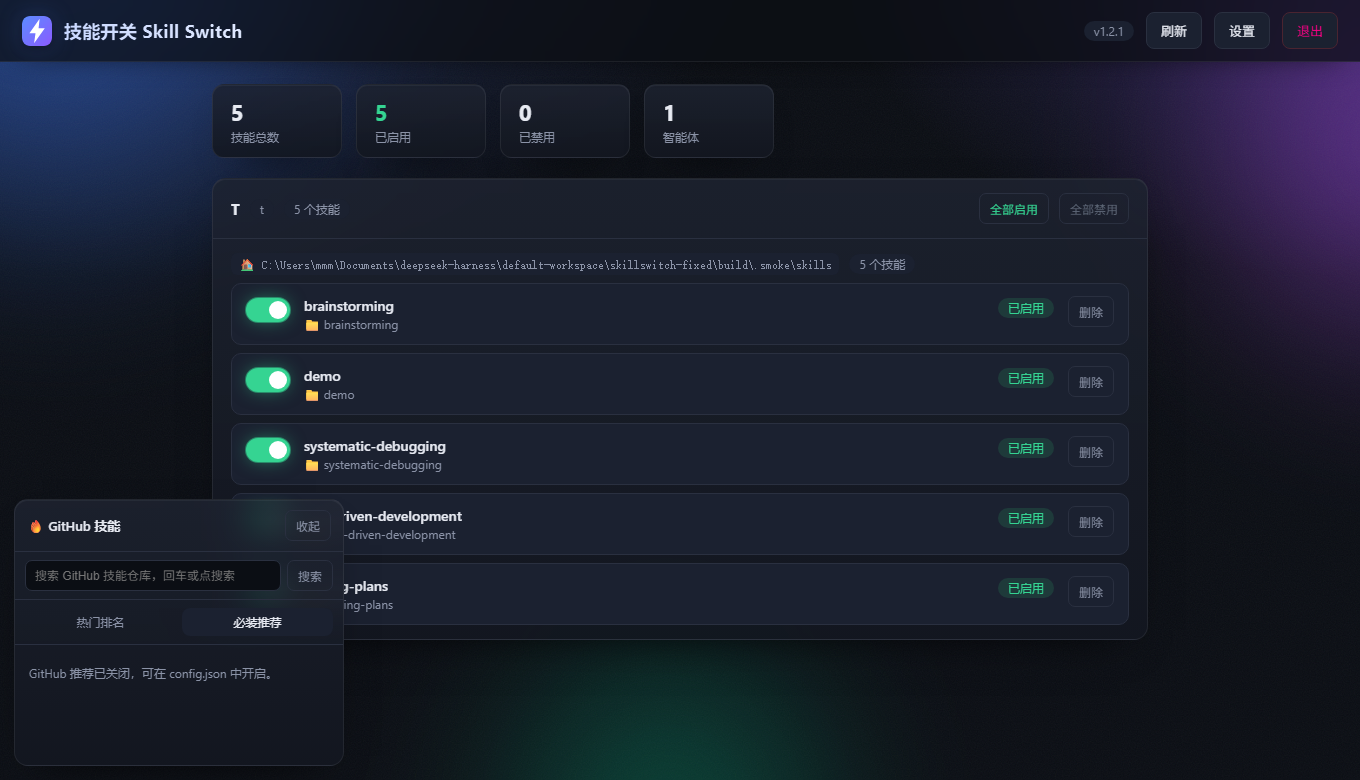
为什么做这个
同时用 DSH、Claude Code、Codex 这些工具的人,都会遇到同一类麻烦:
- 装了几十个 skill,全是英文文件夹名,不知道哪个是哪个
- 想删掉一个不用的,但怕删错——不知道还有没有别的东西在引用它
- MCP 和插件要改
config.toml/cordis.patch.yml,改坏一次整个工具就起不来 - 想装一个 GitHub 上的 MCP,得自己翻 README 找启动命令,再手写配置段
SkillSwitch 把这些收进一个界面,并且把「改配置」这件事做得可撤销。
现在能做什么
技能(skill)
- 扫描多个智能体 × 多个技能目录,列出全部技能
- 一键启用 / 禁用(改
SKILL.md的文件名,不删内容) - 删除进回收站,删错了能还原
- 支持
<名字>/SKILL.md和平铺的<名字>.md两种结构
MCP(目前支持 Codex)
- 看见:从
~/.codex/config.toml读出已装的 MCP,显示它是什么、启动命令、配置文件位置 - 安装:粘贴一个 GitHub 仓库地址 → 从 README 里识别
npx/uvx/docker启动命令 → 你核对后再写入 - 开关:改
enabled一行,不用删了重装 - 移除:精确删掉
[mcp_servers.名字]整段(含.env子段),其余内容一个字节不动
插件(目前支持 Codex)
- 看见已声明的插件和市场,带中文说明
- 开关 / 移除声明
- 声明新插件时,市场必须已存在,否则拒绝并列出可用市场
安全设计
| 机制 | 说明 |
|---|---|
| 改前必备份 | 每次写配置前存到 %APPDATA%\SkillSwitch\backups\,保留最近 20 份 |
| 一键回滚 | 用备份覆盖回去;回滚前还会再备一次,回滚本身也能反悔 |
| 只追加 / 只改目标段 | 不动你没碰过的内容,改完可逐字节比对 |
| 认不出就拒绝 | 插件市场不存在、名字非法、重名——一律拒绝,不猜着写 |
| 本地令牌 | 本地 HTTP 接口需要令牌(%APPDATA%\SkillSwitch\token.txt),并校验 Host 防 DNS rebinding |
安装
从 Releases 下载 SkillSwitch.exe 双击运行即可,无安装、无依赖。
目前没有代码签名,Windows 可能提示「未知发布者」。源码全部在这个仓库里,可以自行审计或构建。
从源码构建
需要 Node.js 22+:
pnpm install          # 或 npm install
node build/build.mjs  # 产物在 dist/SkillSwitch.exe
构建流程:把 src/server.js 与内嵌的界面打成 SEA blob → postject 注入到 node 可执行文件 → resedit 写入图标与版本资源 → 把 PE 子系统从 CUI 改成 GUI(双击不弹黑框)。
开发时直接跑:
node src/server.js
支持哪些工具
| 工具 | 技能 | MCP | 插件 |
|---|---|---|---|
| DSH | ✅ | 暂不支持 | 只读展示 |
| Claude Code | ✅ | 只读展示 | — |
| Codex | — | ✅ 增删改查 | ✅ 开关/移除/声明 |
| WorkBuddy | ✅ | — | — |
路线图
- DSH 的 MCP / 插件安装(要跑包管理器,只生成命令不代跑)
- 删除前的「影响面预览」:删这个技能会连累谁
- 安装前的高亮 diff
- 代码签名
许可证
版本历史见 docs/CHANGELOG.md。
SkillSwitch MCP questions
How does SkillSwitch ensure configuration safety?
It automatically creates a backup in the AppData folder before every write operation, keeping the 20 most recent versions for easy rollback.
Can I install MCP servers directly from GitHub?
Yes, you can paste a GitHub repository URL, and the tool will identify the startup command from the README for your verification before writing the configuration.
Does the application require a complex installation process?
No, you can simply download the executable from the releases page and run it without installation or dependencies.