
Connect AI assistants to multiple email accounts via IMAP and SMTP to search, read, draft, and schedule messages.
Also known as Bitfloo/mailoo, mailoo, @bitfloo/mailoo, mailoo-mcp
- Stars
- 0
- Tools
- 57
- Downloads, 30 days
- 2,347
- Latest version
- 0.3.5
- Last commit
- Nov 10, 2026
- License
- LGPL-3.0
What is Mailoo MCP?
Mailoo connects AI assistants to multiple email accounts via IMAP and SMTP to search, read, draft, and schedule messages. It exposes 57 tools, such as list_accounts, list_mailboxes, list_emails.
Summary generated from the project's README
About Mailoo MCP server
Mailoo is an open-source MCP server that connects AI assistants to multiple email accounts using IMAP and SMTP protocols. Designed for developers and agent builders, it allows users to search, read, draft, and schedule messages across various providers. The server can be run locally and integrated with clients like Claude Desktop or Cursor through a guided setup, or connected to custom agents via stdio.
Users can choose from three distinct toolset profiles—full, core, or minimal—to match their specific model capabilities and context window constraints. The full profile provides up to 57 tools, including advanced features like calendar integration, reminders, and ManageSieve filters. For security, the server supports a read-only mode that disables all write operations and includes a dryRun feature to preview high-risk actions like sending or deleting emails before they are executed.
What you can do with it
- 1Summarize unread messagesAsk your assistant to provide a summary of your latest unread emails including senders and subjects.
- 2Manage email draftsHave an AI agent prepare and manage email drafts for your review.
- 3Schedule future communicationsInstruct your AI client to send an email at a later time.
- 4Search through email historyUse the assistant to find specific information within your email threads and attachments.
Written from the project's README. Every use case is checked against a quote from it.
How to install Mailoo MCP
Formats verified 10 Nov 2026Install Mailoo MCP in Claude Code
$ claude mcp add --env MCP_EMAIL_ADDRESS=<MCP_EMAIL_ADDRESS> --env MCP_EMAIL_IMAP_HOST=<MCP_EMAIL_IMAP_HOST> --env MCP_EMAIL_SMTP_HOST=<MCP_EMAIL_SMTP_HOST> --env MCP_EMAIL_ALERT_WEBHOOK_URL=<YOUR_MCP_EMAIL_ALERT_WEBHOOK_URL> --env MCP_EMAIL_HTTP_TOKEN=<YOUR_MCP_EMAIL_HTTP_TOKEN> --env MCP_EMAIL_OAUTH2_CLIENT_SECRET=<YOUR_MCP_EMAIL_OAUTH2_CLIENT_SECRET> --env MCP_EMAIL_OAUTH2_REFRESH_TOKEN=<YOUR_MCP_EMAIL_OAUTH2_REFRESH_TOKEN> --env MCP_EMAIL_PASSWORD=<YOUR_MCP_EMAIL_PASSWORD> mailoo -- npx -y @bitfloo/mailooInstall Mailoo MCP in Cursor
~/.cursor/mcp.json
{
  "mcpServers": {
    "mailoo": {
      "command": "npx",
      "args": [
        "-y",
        "@bitfloo/mailoo"
      ],
      "env": {
        "MCP_EMAIL_ADDRESS": "<MCP_EMAIL_ADDRESS>",
        "MCP_EMAIL_IMAP_HOST": "<MCP_EMAIL_IMAP_HOST>",
        "MCP_EMAIL_SMTP_HOST": "<MCP_EMAIL_SMTP_HOST>",
        "MCP_EMAIL_ALERT_WEBHOOK_URL": "<YOUR_MCP_EMAIL_ALERT_WEBHOOK_URL>",
        "MCP_EMAIL_HTTP_TOKEN": "<YOUR_MCP_EMAIL_HTTP_TOKEN>",
        "MCP_EMAIL_OAUTH2_CLIENT_SECRET": "<YOUR_MCP_EMAIL_OAUTH2_CLIENT_SECRET>",
        "MCP_EMAIL_OAUTH2_REFRESH_TOKEN": "<YOUR_MCP_EMAIL_OAUTH2_REFRESH_TOKEN>",
        "MCP_EMAIL_PASSWORD": "<YOUR_MCP_EMAIL_PASSWORD>"
      }
    }
  }
}Install Mailoo MCP in VS Code
.vscode/mcp.json
{
  "servers": {
    "mailoo": {
      "type": "stdio",
      "command": "npx",
      "args": [
        "-y",
        "@bitfloo/mailoo"
      ],
      "env": {
        "MCP_EMAIL_ADDRESS": "<MCP_EMAIL_ADDRESS>",
        "MCP_EMAIL_IMAP_HOST": "<MCP_EMAIL_IMAP_HOST>",
        "MCP_EMAIL_SMTP_HOST": "<MCP_EMAIL_SMTP_HOST>",
        "MCP_EMAIL_ALERT_WEBHOOK_URL": "<YOUR_MCP_EMAIL_ALERT_WEBHOOK_URL>",
        "MCP_EMAIL_HTTP_TOKEN": "<YOUR_MCP_EMAIL_HTTP_TOKEN>",
        "MCP_EMAIL_OAUTH2_CLIENT_SECRET": "<YOUR_MCP_EMAIL_OAUTH2_CLIENT_SECRET>",
        "MCP_EMAIL_OAUTH2_REFRESH_TOKEN": "<YOUR_MCP_EMAIL_OAUTH2_REFRESH_TOKEN>",
        "MCP_EMAIL_PASSWORD": "<YOUR_MCP_EMAIL_PASSWORD>"
      }
    }
  }
}Install Mailoo MCP in Claude Desktop
claude_desktop_config.json
{
  "mcpServers": {
    "mailoo": {
      "command": "npx",
      "args": [
        "-y",
        "@bitfloo/mailoo"
      ],
      "env": {
        "MCP_EMAIL_ADDRESS": "<MCP_EMAIL_ADDRESS>",
        "MCP_EMAIL_IMAP_HOST": "<MCP_EMAIL_IMAP_HOST>",
        "MCP_EMAIL_SMTP_HOST": "<MCP_EMAIL_SMTP_HOST>",
        "MCP_EMAIL_ALERT_WEBHOOK_URL": "<YOUR_MCP_EMAIL_ALERT_WEBHOOK_URL>",
        "MCP_EMAIL_HTTP_TOKEN": "<YOUR_MCP_EMAIL_HTTP_TOKEN>",
        "MCP_EMAIL_OAUTH2_CLIENT_SECRET": "<YOUR_MCP_EMAIL_OAUTH2_CLIENT_SECRET>",
        "MCP_EMAIL_OAUTH2_REFRESH_TOKEN": "<YOUR_MCP_EMAIL_OAUTH2_REFRESH_TOKEN>",
        "MCP_EMAIL_PASSWORD": "<YOUR_MCP_EMAIL_PASSWORD>"
      }
    }
  }
}Install Mailoo MCP in Codex
~/.codex/config.toml
[mcp_servers.mailoo]
command = "npx"
args = ["-y", "@bitfloo/mailoo"]

[mcp_servers.mailoo.env]
MCP_EMAIL_ADDRESS = "<MCP_EMAIL_ADDRESS>"
MCP_EMAIL_IMAP_HOST = "<MCP_EMAIL_IMAP_HOST>"
MCP_EMAIL_SMTP_HOST = "<MCP_EMAIL_SMTP_HOST>"
MCP_EMAIL_ALERT_WEBHOOK_URL = "<YOUR_MCP_EMAIL_ALERT_WEBHOOK_URL>"
MCP_EMAIL_HTTP_TOKEN = "<YOUR_MCP_EMAIL_HTTP_TOKEN>"
MCP_EMAIL_OAUTH2_CLIENT_SECRET = "<YOUR_MCP_EMAIL_OAUTH2_CLIENT_SECRET>"
MCP_EMAIL_OAUTH2_REFRESH_TOKEN = "<YOUR_MCP_EMAIL_OAUTH2_REFRESH_TOKEN>"
MCP_EMAIL_PASSWORD = "<YOUR_MCP_EMAIL_PASSWORD>"
Install Mailoo MCP in Gemini CLI
~/.gemini/settings.json
{
  "mcpServers": {
    "mailoo": {
      "command": "npx",
      "args": [
        "-y",
        "@bitfloo/mailoo"
      ],
      "env": {
        "MCP_EMAIL_ADDRESS": "<MCP_EMAIL_ADDRESS>",
        "MCP_EMAIL_IMAP_HOST": "<MCP_EMAIL_IMAP_HOST>",
        "MCP_EMAIL_SMTP_HOST": "<MCP_EMAIL_SMTP_HOST>",
        "MCP_EMAIL_ALERT_WEBHOOK_URL": "<YOUR_MCP_EMAIL_ALERT_WEBHOOK_URL>",
        "MCP_EMAIL_HTTP_TOKEN": "<YOUR_MCP_EMAIL_HTTP_TOKEN>",
        "MCP_EMAIL_OAUTH2_CLIENT_SECRET": "<YOUR_MCP_EMAIL_OAUTH2_CLIENT_SECRET>",
        "MCP_EMAIL_OAUTH2_REFRESH_TOKEN": "<YOUR_MCP_EMAIL_OAUTH2_REFRESH_TOKEN>",
        "MCP_EMAIL_PASSWORD": "<YOUR_MCP_EMAIL_PASSWORD>"
      }
    }
  }
}Mailoo MCP tools 57
Detected from the READMElist_accountslist_mailboxeslist_emailsget_emailget_emailsget_email_statussearch_emailsdownload_attachmentexport_emailfind_email_folderextract_contactsget_thread
| list_accounts | — | |
| list_mailboxes | — | |
| list_emails | — | |
| get_email | — | |
| get_emails | — | |
| get_email_status | — | |
| search_emails | — | |
| download_attachment | — | |
| export_email | — | |
| find_email_folder | — | |
| extract_contacts | — | |
| get_thread | — |
Show all 57 toolsShow fewer tools
list_templatesget_email_statscheck_healthget_email_securitysieve_statussieve_list_scriptssieve_get_scriptsend_emailreply_emailforward_emailsave_draftsend_draftapply_templateschedule_emaillist_scheduledcancel_scheduledsieve_put_scriptsieve_delete_scriptsieve_activate_scriptmove_emaildelete_emailmark_emailbulk_actioncreate_mailboxrename_mailboxdelete_mailboxlist_labelsadd_labelremove_labelcreate_labeldelete_labelget_watcher_statuslist_presetsget_hooks_configconfigure_alertscheck_notification_setuptest_notificationextract_calendaranalyze_email_for_schedulingadd_to_calendarcreate_reminderlist_calendarslist_eventslist_reminderscheck_calendar_permissions
| list_templates | — | |
| get_email_stats | — | |
| check_health | — | |
| get_email_security | — | |
| sieve_status | — | |
| sieve_list_scripts | — | |
| sieve_get_script | — | |
| send_email | — | |
| reply_email | — | |
| forward_email | — | |
| save_draft | — | |
| send_draft | — | |
| apply_template | — | |
| schedule_email | — | |
| list_scheduled | — | |
| cancel_scheduled | — | |
| sieve_put_script | — | |
| sieve_delete_script | — | |
| sieve_activate_script | — | |
| move_email | — | |
| delete_email | — | |
| mark_email | — | |
| bulk_action | — | |
| create_mailbox | — | |
| rename_mailbox | — | |
| delete_mailbox | — | |
| list_labels | — | |
| add_label | — | |
| remove_label | — | |
| create_label | — | |
| delete_label | — | |
| get_watcher_status | — | |
| list_presets | — | |
| get_hooks_config | — | |
| configure_alerts | — | |
| check_notification_setup | — | |
| test_notification | — | |
| extract_calendar | — | |
| analyze_email_for_scheduling | — | |
| add_to_calendar | — | |
| create_reminder | — | |
| list_calendars | — | |
| list_events | — | |
| list_reminders | — | |
| check_calendar_permissions | — |
Configuration
MCP_EMAIL_ADDRESSRequiredEmail address. Required for the environment-variable account.
MCP_EMAIL_IMAP_HOSTRequiredIMAP server hostname.
MCP_EMAIL_SMTP_HOSTRequiredSMTP server hostname.
MCP_EMAIL_ALERT_WEBHOOK_URLSecretHTTP or HTTPS URL that receives alert POSTs.
MCP_EMAIL_HTTP_TOKENSecretBearer token. Required when the HTTP listen address is not loopback or MCP_EMAIL_HTTP_ALLOWED_HOSTS lists a non-loopback name.
MCP_EMAIL_OAUTH2_CLIENT_SECRETSecretOAuth2 client secret.
MCP_EMAIL_OAUTH2_REFRESH_TOKENSecretOAuth2 refresh token.
MCP_EMAIL_PASSWORDSecretPassword or app password. Required unless MCP_EMAIL_OAUTH2_PROVIDER is set.
MAILOO_INSTALL_COUNTERMCP_EMAIL_ACCOUNT_NAMEAccount name. Defaults to default.
MCP_EMAIL_ALERT_DESKTOPSet to true for desktop notifications.
MCP_EMAIL_ALERT_SOUNDSet to true to play a sound with desktop notifications.
MCP_EMAIL_ALERT_URGENCY_THRESHOLDMinimum urgency for an alert: urgent, high, normal, or low.
MCP_EMAIL_ALERT_WEBHOOK_ALLOW_PRIVATESet to true to allow webhook targets on a LAN, VPN, or tailnet.
MCP_EMAIL_DEFAULT_ACCOUNTDefault account name or email address when the account parameter is omitted.
MCP_EMAIL_FULL_NAMEDisplay name on sent mail.
MCP_EMAIL_HOOK_AUTO_CALENDARSet to true to create calendar events from hook triage.
MCP_EMAIL_HOOK_AUTO_FLAGSet to true to flag mail from hook triage.
MCP_EMAIL_HOOK_AUTO_LABELSet to true to apply labels from hook triage.
MCP_EMAIL_HOOK_BATCH_DELAYSeconds to batch arrivals before hooks run. Defaults to 5.
MCP_EMAIL_HOOK_CALENDAR_ALARM_MINUTESMinutes before an automatic event to alarm. Defaults to 15.
MCP_EMAIL_HOOK_CALENDAR_CONFIRMSet to false to skip confirming automatic calendar events. Defaults to true.
MCP_EMAIL_HOOK_CALENDAR_NAMECalendar name for automatic events.
MCP_EMAIL_HOOK_CUSTOM_INSTRUCTIONSExtra instructions appended to the hook preset.
MCP_EMAIL_HOOK_ON_NEW_EMAILWhat to do on arrival: triage, notify, or none.
MCP_EMAIL_HOOK_PRESETHook preset: inbox-zero, gtd, priority-focus, notification-only, or custom.
MCP_EMAIL_HTTP_ALLOWED_HOSTSComma-separated Host names. Required for 0.0.0.0 and ::.
MCP_EMAIL_HTTP_HOSTHTTP listen address. Defaults to loopback. The host argument wins.
MCP_EMAIL_IMAP_DISABLE_IMAP4REV2Set to true to force IMAP4rev1 SEARCH.
MCP_EMAIL_IMAP_PORTIMAP port. Defaults to 993.
MCP_EMAIL_IMAP_STARTTLSSet to true to upgrade IMAP with STARTTLS. Defaults to false.
MCP_EMAIL_IMAP_TLSSet to false to turn off implicit IMAP TLS. Defaults to true.
MCP_EMAIL_IMAP_VERIFY_SSLSet to false to skip IMAP certificate verification. Defaults to true.
MCP_EMAIL_OAUTH2_CLIENT_IDOAuth2 client id.
MCP_EMAIL_OAUTH2_PROVIDEROAuth2 provider: google, microsoft, or custom. Configure custom in the config file: an account in the environment replaces the config file, so custom set here has no token_url or auth_url.
MCP_EMAIL_RATE_LIMITMaximum sends per minute. Defaults to 10.
MCP_EMAIL_READ_ONLYSet to true to omit write tools and mailbox writers.
MCP_EMAIL_SAVE_TO_SENTSet to false to skip the IMAP Sent copy after SMTP. Defaults to true.
MCP_EMAIL_SIEVE_HOSTManageSieve hostname. Defaults to the IMAP host.
MCP_EMAIL_SIEVE_PORTManageSieve port. Defaults to 4190.
MCP_EMAIL_SMTP_POOL_ENABLEDSet to false to disable SMTP connection pooling. Defaults to true.
MCP_EMAIL_SMTP_POOL_MAX_CONNECTIONSMaximum pooled SMTP connections. Defaults to 1.
MCP_EMAIL_SMTP_POOL_MAX_MESSAGESMaximum messages per pooled SMTP connection. Defaults to 100.
MCP_EMAIL_SMTP_PORTSMTP port. Defaults to 465.
MCP_EMAIL_SMTP_STARTTLSSet to true to upgrade SMTP with STARTTLS. Defaults to false.
MCP_EMAIL_SMTP_TLSSet to false to turn off implicit SMTP TLS. Defaults to true.
MCP_EMAIL_SMTP_VERIFY_SSLSet to false to skip SMTP certificate verification. Defaults to true.
MCP_EMAIL_SYSTEM_ONE_ENABLEDSet to true to classify residue mail with System One. Off by default.
MCP_EMAIL_TOOLSETToolset profile to register: full, core, or minimal. Defaults to full.
MCP_EMAIL_USERNAMELogin username. Defaults to the email address.
MCP_EMAIL_WATCHER_ENABLEDSet to true to start the IMAP IDLE watcher.
MCP_EMAIL_WATCHER_FOLDERSComma-separated folders to watch. Defaults to INBOX.
MCP_EMAIL_WATCHER_IDLE_TIMEOUTIMAP IDLE timeout in seconds. Defaults to 1740.
| Name | Description | |
|---|---|---|
| MCP_EMAIL_ADDRESS | Email address. Required for the environment-variable account. | Required |
| MCP_EMAIL_IMAP_HOST | IMAP server hostname. | Required |
| MCP_EMAIL_SMTP_HOST | SMTP server hostname. | Required |
| MCP_EMAIL_ALERT_WEBHOOK_URL | HTTP or HTTPS URL that receives alert POSTs. | Secret |
| MCP_EMAIL_HTTP_TOKEN | Bearer token. Required when the HTTP listen address is not loopback or MCP_EMAIL_HTTP_ALLOWED_HOSTS lists a non-loopback name. | Secret |
| MCP_EMAIL_OAUTH2_CLIENT_SECRET | OAuth2 client secret. | Secret |
| MCP_EMAIL_OAUTH2_REFRESH_TOKEN | OAuth2 refresh token. | Secret |
| MCP_EMAIL_PASSWORD | Password or app password. Required unless MCP_EMAIL_OAUTH2_PROVIDER is set. | Secret |
| MAILOO_INSTALL_COUNTER | — | |
| MCP_EMAIL_ACCOUNT_NAME | Account name. Defaults to default. | |
| MCP_EMAIL_ALERT_DESKTOP | Set to true for desktop notifications. | |
| MCP_EMAIL_ALERT_SOUND | Set to true to play a sound with desktop notifications. | |
| MCP_EMAIL_ALERT_URGENCY_THRESHOLD | Minimum urgency for an alert: urgent, high, normal, or low. | |
| MCP_EMAIL_ALERT_WEBHOOK_ALLOW_PRIVATE | Set to true to allow webhook targets on a LAN, VPN, or tailnet. | |
| MCP_EMAIL_DEFAULT_ACCOUNT | Default account name or email address when the account parameter is omitted. | |
| MCP_EMAIL_FULL_NAME | Display name on sent mail. | |
| MCP_EMAIL_HOOK_AUTO_CALENDAR | Set to true to create calendar events from hook triage. | |
| MCP_EMAIL_HOOK_AUTO_FLAG | Set to true to flag mail from hook triage. | |
| MCP_EMAIL_HOOK_AUTO_LABEL | Set to true to apply labels from hook triage. | |
| MCP_EMAIL_HOOK_BATCH_DELAY | Seconds to batch arrivals before hooks run. Defaults to 5. | |
| MCP_EMAIL_HOOK_CALENDAR_ALARM_MINUTES | Minutes before an automatic event to alarm. Defaults to 15. | |
| MCP_EMAIL_HOOK_CALENDAR_CONFIRM | Set to false to skip confirming automatic calendar events. Defaults to true. | |
| MCP_EMAIL_HOOK_CALENDAR_NAME | Calendar name for automatic events. | |
| MCP_EMAIL_HOOK_CUSTOM_INSTRUCTIONS | Extra instructions appended to the hook preset. | |
| MCP_EMAIL_HOOK_ON_NEW_EMAIL | What to do on arrival: triage, notify, or none. | |
| MCP_EMAIL_HOOK_PRESET | Hook preset: inbox-zero, gtd, priority-focus, notification-only, or custom. | |
| MCP_EMAIL_HTTP_ALLOWED_HOSTS | Comma-separated Host names. Required for 0.0.0.0 and ::. | |
| MCP_EMAIL_HTTP_HOST | HTTP listen address. Defaults to loopback. The host argument wins. | |
| MCP_EMAIL_IMAP_DISABLE_IMAP4REV2 | Set to true to force IMAP4rev1 SEARCH. | |
| MCP_EMAIL_IMAP_PORT | IMAP port. Defaults to 993. | |
| MCP_EMAIL_IMAP_STARTTLS | Set to true to upgrade IMAP with STARTTLS. Defaults to false. | |
| MCP_EMAIL_IMAP_TLS | Set to false to turn off implicit IMAP TLS. Defaults to true. | |
| MCP_EMAIL_IMAP_VERIFY_SSL | Set to false to skip IMAP certificate verification. Defaults to true. | |
| MCP_EMAIL_OAUTH2_CLIENT_ID | OAuth2 client id. | |
| MCP_EMAIL_OAUTH2_PROVIDER | OAuth2 provider: google, microsoft, or custom. Configure custom in the config file: an account in the environment replaces the config file, so custom set here has no token_url or auth_url. | |
| MCP_EMAIL_RATE_LIMIT | Maximum sends per minute. Defaults to 10. | |
| MCP_EMAIL_READ_ONLY | Set to true to omit write tools and mailbox writers. | |
| MCP_EMAIL_SAVE_TO_SENT | Set to false to skip the IMAP Sent copy after SMTP. Defaults to true. | |
| MCP_EMAIL_SIEVE_HOST | ManageSieve hostname. Defaults to the IMAP host. | |
| MCP_EMAIL_SIEVE_PORT | ManageSieve port. Defaults to 4190. | |
| MCP_EMAIL_SMTP_POOL_ENABLED | Set to false to disable SMTP connection pooling. Defaults to true. | |
| MCP_EMAIL_SMTP_POOL_MAX_CONNECTIONS | Maximum pooled SMTP connections. Defaults to 1. | |
| MCP_EMAIL_SMTP_POOL_MAX_MESSAGES | Maximum messages per pooled SMTP connection. Defaults to 100. | |
| MCP_EMAIL_SMTP_PORT | SMTP port. Defaults to 465. | |
| MCP_EMAIL_SMTP_STARTTLS | Set to true to upgrade SMTP with STARTTLS. Defaults to false. | |
| MCP_EMAIL_SMTP_TLS | Set to false to turn off implicit SMTP TLS. Defaults to true. | |
| MCP_EMAIL_SMTP_VERIFY_SSL | Set to false to skip SMTP certificate verification. Defaults to true. | |
| MCP_EMAIL_SYSTEM_ONE_ENABLED | Set to true to classify residue mail with System One. Off by default. | |
| MCP_EMAIL_TOOLSET | Toolset profile to register: full, core, or minimal. Defaults to full. | |
| MCP_EMAIL_USERNAME | Login username. Defaults to the email address. | |
| MCP_EMAIL_WATCHER_ENABLED | Set to true to start the IMAP IDLE watcher. | |
| MCP_EMAIL_WATCHER_FOLDERS | Comma-separated folders to watch. Defaults to INBOX. | |
| MCP_EMAIL_WATCHER_IDLE_TIMEOUT | IMAP IDLE timeout in seconds. Defaults to 1740. |
Automated checks
Ran Nov 12, 2026Full report →Passed our automated checks. That is not a security audit: read the code and give the server the narrowest access it needs. How checks work

- Source repository linked and reachablePass
- Open source license (OSI)Pass
- Commit or release in the last yearPass
- Package name not close to a popular packagePass
- Remote endpoint uses HTTPSNot checked
- Destructive tools are labelledNot checked
- No hidden instructions to the modelPass
- No critical advisory in the package or its dependenciesPass
README
View on GitHubMailoo



Mailoo is an open-source MCP server you run yourself to connect AI assistants and agents to multiple email accounts over IMAP and SMTP.
- Find what you need — search and read email, threads, and attachments across accounts.
- Act on email — prepare drafts, reply, and schedule messages through your assistant or agent.
- Choose your setup — guided setup for Claude Desktop or Cursor, or a standard MCP connection for your own agent.
Maintained by Bitfloo, forked from email-mcp. Licensed under LGPL-3.0-or-later; see NOTICE for attribution.
Quickstart for Claude Desktop or Cursor
Install Node.js 24 or newer and prepare your email account first, including an app password if your provider requires one. Then run these commands in a terminal:
npx -y @bitfloo/mailoo@latest account add
npx -y @bitfloo/mailoo@latest config edit
npx -y @bitfloo/mailoo@latest install
In config edit, press Enter to keep the rate limit (10 for a new config), then choose Yes for Read-only mode? (disables all write operations). This saves read-only mode in TOML. Choose your client in the installer, restart it, and ask: “Summarize up to five unread emails. Include each sender, subject and any requested next step. Ask which account to use if needed.”
The wizard prints a read-only/core manual client entry; the installer does not apply those environment overrides. This guided path uses the read-only setting you saved in TOML. With untouched default settings, the installer's entry runs writable/full.
Follow the guided setup and check your first result →
Quickstart for agent builders
With Node.js 24 or newer and account credentials ready, create a local account using npx -y @bitfloo/mailoo@latest account add. Connect your MCP client over stdio:
{
  "mcpServers": {
    "mailoo": {
      "command": "npx",
      "args": ["-y", "@bitfloo/mailoo@latest", "stdio"],
      "env": { "MCP_EMAIL_READ_ONLY": "true", "MCP_EMAIL_TOOLSET": "core" }
    }
  }
}
Initialize the connection, list tools, then call list_accounts, list_emails, and get_email with the returned account name and message ID.
Follow the MCP request sequence and inspect its results →
Both quickstarts configure read-only access for the first read. The walkthrough also covers feature requirements and fallbacks, including AI triage, local calendars, ManageSieve, and experimental OAuth.
To enable writes later, run config edit, keep the rate limit, and choose No for read-only mode; for the builder entry, set MCP_EMAIL_READ_ONLY to "false". Restart the server after either change. Request sending or changes explicitly when you intend them. You can request a dryRun: true preview separately; Mailoo does not require a preview before sending.
Mailoo connects to the mail servers you configure. Your MCP client and its model provider receive the mail content you request. Optional TypeSafe classification and webhooks send data to their configured services when enabled. Usage reporting is off by default. See Capabilities & data flows for destinations and fields.
Highlights
Up to 57 tools across full, core, and minimal profiles, up to 7 prompts, and 6 resources. Includes calendar and reminders, scheduling, ManageSieve filters, and optional AI triage. See API for tools and docs/tools.md for behaviour and limits.
| Feature | In this tree |
|---|---|
| Multi-account IMAP/SMTP | ✅ |
Send / reply / forward (with dryRun preview) |
✅ |
| Drafts & templates | ✅ |
| Provider-aware labels & bulk ops | ✅ |
| Schedule future emails | ✅ |
| Real-time IMAP IDLE watcher | ✅ |
| AI triage with presets | ✅ |
| Desktop & webhook alerts | ✅ |
| Calendar (ICS, Apple Calendar/Reminders) | ✅ |
| Email analytics | ✅ |
| OAuth2 (Gmail / M365) | ✅ experimental |
| Guided setup wizard | ✅ |
| ManageSieve (server-side filters) | ✅ |
| Sender auth headers (SPF/DKIM/DMARC) | ✅ |
Toolset profiles (full / core / minimal) & GBNF small-LLM ergonomics |
✅ |
MCP outputSchema & structuredContent |
✅ |
Table of Contents
- Highlights
- Quickstart for Claude Desktop or Cursor
- Quickstart for agent builders
- Security & Sandboxing Architecture
- LLM Ergonomics & Toolset Profiles
- Docs
- Background
- Install
- Usage
- Capabilities & data flows
- API
- Maintainers
- Contributing
- Attribution & License
Security & Sandboxing Architecture
Policy and how to report a vulnerability: SECURITY.md.
Mailoo applies controls to specific network, filesystem, and tool operations. It also labels untrusted mail for the model. Those labels do not guarantee how an LLM will respond to instructions inside an email.
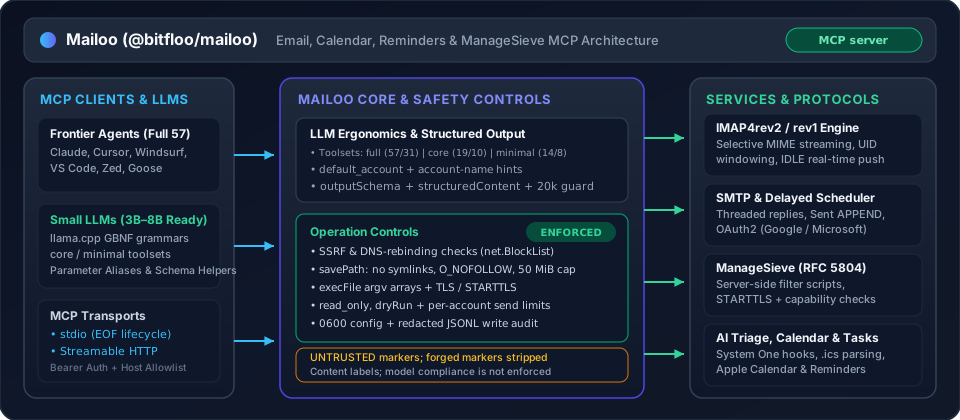
Enforced operation controls:
- Zero Shell Execution (
execFileonly) — Native OS integrations (macOSosascriptfor Calendar/Reminders/notifications, Linuxnotify-send, Windowspowershell, and crontab installation) invokechild_process.execFilewith argument arrays (shell: false), avoiding shell parsing of arguments. - SSRF & DNS-Rebinding Protection (
net.BlockList) — Outbound alert webhooks validate URLs against an IPv4/IPv6net.BlockListcovering loopback, RFC 1918 private ranges, link-local/cloud metadata (169.254.169.254,100.100.100.200), CGNAT, NAT64, 6to4, and reserved prefixes both at configuration time and at socket connection time (createWebhookConnectLookup), preventing DNS-rebinding attacks (src/safety/validation.ts). - Symlink-Free Write Containment (
savePath) — Attachment and.emlexports viasavePathare strictly confined to the working directory, walk every path segment withlstat, refuse hidden dotfiles and OS persistence directories (Library/LaunchAgents,.ssh,.gnupg), and open targets withO_CREAT | O_EXCL | O_NOFOLLOWunder a 50 MiB cap (5 MiB inline base64 cap). An.emlexport is capped by its own size; an attachment by its encoded size in the message, which for base64 runs above the file size (details). - Strict Credential File Permissions (
0600) —config.tomlis written and verified with mode0600inside a0700config directory ($XDG_CONFIG_HOME/mailoo/config.toml). Passwords and message bodies are redacted from the JSONL write audit log (src/safety/audit.ts). - TLS & STARTTLS Verification —
tlsenforces implicit TLS with certificate verification (verify_ssl = trueby default);starttlsfails closed if the server does not advertiseSTARTTLS. Turning both off is accepted only for a loopback host. ManageSieve refusesAUTHENTICATE PLAINover unencrypted sockets withoutSTARTTLS. - Operational Guardrails (
MCP_EMAIL_READ_ONLY,MCP_EMAIL_TOOLSET,dryRun) —MCP_EMAIL_READ_ONLY=truedisables all write tools, background watchers, hooks, and schedulers at startup, exposing only the 31 read-only tools.MCP_EMAIL_TOOLSET=full|core|minimalscopes the registered tool surface to match the agent's capability tier and context budget.dryRun: trueon high-risk tools (send_email,reply_email,forward_email,send_draft,delete_email,bulk_action,delete_mailbox,sieve_put_script,sieve_delete_script) validates all parameters and account resolution and returns a[DRY RUN]preview without modifying server state.
- Per-Account Rate Limiting —
rate_limit(default 10 sends/minute) enforces an independent token bucket per account (src/safety/rate-limiter.ts). Buckets live in memory, so each server process and eachmailoo scheduler checkrun counts on its own.
Untrusted-content labels: Email subjects, sender headers, bodies, previews, and authentication results are wrapped in <<<UNTRUSTED_EXTERNAL_CONTENT>>> … <<<END_UNTRUSTED_EXTERNAL_CONTENT>>> delimiters. Mailoo strips forged copies of these markers from the payload before wrapping it. This fencing identifies external content as data for the receiving model; it is not a sandbox for model behaviour or a guarantee against prompt injection.
LLM Ergonomics & Toolset Profiles
Mailoo is designed to work across both frontier models (Claude, GPT, Gemini) and local/small 3B–8B parameter models (llama.cpp GBNF grammars, Ollama, vLLM):
- Toolset Profiles (
MCP_EMAIL_TOOLSET/settings.toolset):full(default) — All 57 tools (31 inread_onlymode), including Calendar, Reminders, ManageSieve, Watcher, Scheduler, Templates, Contacts, and Analytics.core— 19 tools (10 inread_onlymode) covering core email workflows (accounts,mailboxes,emails,threads,send,drafts,manage,bulk,attachments,health).minimal— 14 tools (8 inread_onlymode) tailored for 3B–4B models with tight context budgets (accounts,mailboxes,emails,send,manage,health).
- Optional
account& Smart Account Resolution — When only a single account is configured ordefault_account(MCP_EMAIL_DEFAULT_ACCOUNT) is set, theaccountparameter is completely optional across tools. Account lookup also matches case-insensitively by profile name or email address (e.g., passing"you@example.com"resolves the matching account), and returns actionable error messages listing valid accounts (name (email)pairs) when ambiguous. - Lossless Parameter Normalization & GBNF Compatibility — Single-message tools accept
emailId,id, oremail_idas either string or integer (42or"42"). Batch tools (get_emails,bulk_action) accept string or numeric ID arrays (["42", "43"]or[42, 43]).list_emailsandsearch_emailsaccept bothhasAttachmentandhas_attachment. All Zod schemas avoid regex lookaheads sollama.cppGBNF grammar compilation succeeds without errors. - Context Window Protection —
get_emailandget_threaddefault toformat="text"and enforce a defaultmaxLengthof20000characters (appending a clear truncation notice when exceeded) so large HTML newsletters never overflow small context windows. - MCP
outputSchema&structuredContent— Tools declare structuredoutputSchemacontracts and return machine-readablestructuredContentalongside human-readable text blocks. - Outgoing attachment paths must be regular files under the working directory or home — Security considerations
Docs
| Topic | Where |
|---|---|
| First account, Claude Desktop / Cursor, and an agent's first MCP calls | docs/getting-started.md |
| IMAP credentials, Gmail / iCloud app passwords, and experimental Google / Microsoft OAuth | docs/authentication.md |
Sent APPEND, IMAP4rev2, Sieve, read_only, reconnect backoff, stdio EOF, shutdown, one mailbox writer per machine |
docs/configuration.md |
savePath, search dates, get_email_security, sieve tools, send/draft attachments, RFC 2047, protected folders, busy-mailbox timeout, bulk_action ids, calendar attachment saves |
docs/tools.md |
| Performance notes | docs/performance-roadmap.md |
Background
Most MCP email implementations provide only basic read/send. This server aims to be a full-featured email client for AI assistants, covering the entire lifecycle: reading, composing, managing, scheduling, and analyzing email — all from a single MCP server.
Key design decisions:
- XDG-compliant config — TOML at
~/.config/mailoo/config.toml - Multi-account — Operate across multiple IMAP/SMTP accounts simultaneously
- Layered services — Business logic is decoupled from MCP wiring for testability
- Provider auto-detection — Gmail, Outlook, Yahoo, iCloud, Fastmail, ProtonMail, Zoho, GMX
Install
Requires Node.js ≥ 24.
Before opening the wizard, prepare your provider credentials. For a complete first run, choose the Claude Desktop / Cursor or agent builder quickstart.
npx -y @bitfloo/mailoo@latest account add
That writes the local config and prints an MCP client snippet. The same package runs the server and the other commands:
npx -y @bitfloo/mailoo@latest
npx -y @bitfloo/mailoo@latest test
npx -y @bitfloo/mailoo@latest with no subcommand starts the MCP server over stdio. Keep the @latest tag: npx then checks the registry on every start, while a bare package name runs any copy installed globally or in the current project, however old. Or install the mailoo command:
npm install -g @bitfloo/mailoo
# or
pnpm add -g @bitfloo/mailoo
# or, without a global install:
pnpm dlx @bitfloo/mailoo account add
From a clone
Building this repository needs pnpm 12 (the packageManager version in package.json):
git clone https://github.com/Bitfloo/mailoo.git
cd mailoo
pnpm install && pnpm build
node dist/main.js account add
Docker
The running image needs Docker, not Node on the host. Create the config first with npx -y @bitfloo/mailoo@latest account add (or write the TOML by hand), then mount that directory into the container.
The image is ghcr.io/bitfloo/mailoo, built for linux/amd64 and linux/arm64. Version tags are bare semver (no v prefix); latest, alpine and the -bookworm / -alpine variants are published too. The 0.3 tag follows the newest 0.3.x release. Production setups should pin the full version from the release (it matches the npm version) or the image digest.
docker pull ghcr.io/bitfloo/mailoo:0.3
To build from a clone instead (docker-compose.yml uses build: .):
docker build -t ghcr.io/bitfloo/mailoo .
Note: The server uses stdio transport. Config is created on the host (
npx -y @bitfloo/mailoo@latest account add, or a hand-written TOML) and mounted into the container.
Installing or starting Mailoo does not send a usage report. An install count stays off until MAILOO_INSTALL_COUNTER is 1, true, on, or yes (any letter case, surrounding spaces ignored) and MAILOO_INSTALL_COUNTER_URL is set. The POST body is only product, version, event (install), and node_major. Unset, 0, false, no, or off keeps it off. Full rules: Install count.
Usage
Commands below use npx -y @bitfloo/mailoo@latest. A global install accepts the same subcommands as mailoo. From a clone, after pnpm build, those subcommands are node dist/main.js (see From a clone).
Setup
# Add an email account interactively (recommended)
npx -y @bitfloo/mailoo@latest account add

# Or use the deprecated alias (same wizard)
npx -y @bitfloo/mailoo@latest setup

# Or create a template config manually
npx -y @bitfloo/mailoo@latest config init
The setup wizard auto-detects server settings, tests connections, saves config, and outputs the MCP client config snippet.
Test Connections
npx -y @bitfloo/mailoo@latest test            # all accounts
npx -y @bitfloo/mailoo@latest test personal   # specific account
npx -y @bitfloo/mailoo@latest test / mailoo test is a live-account connection probe, not Vitest. Unit and integration tests are pnpm test / pnpm test:integration (see Contributing). OAuth2 accounts log in with an access token refreshed from the configured refresh token.
Configure Your MCP Client
Run the guided installer for Claude Desktop, Cursor or Windsurf, or paste a snippet below for any client. Mailoo is published to the official MCP Registry as io.github.Bitfloo/mailoo.
npx -y @bitfloo/mailoo@latest install
The installer can register an npx, pnpm dlx, or global mailoo launch. A mailoo binary already on PATH can use "command": "mailoo" with "args": ["stdio"].
Edit ~/Library/Application Support/Claude/claude_desktop_config.json (macOS) or %APPDATA%\Claude\claude_desktop_config.json (Windows):
{
  "mcpServers": {
    "mailoo": {
      "command": "npx",
      "args": ["-y", "@bitfloo/mailoo@latest", "stdio"]
    }
  }
}
Register the server with the claude CLI. The default scope is the current project only. Put --scope user before the server name to make it available in every project, or --scope project to write a shareable .mcp.json; anything after the -- is passed to the server, not to claude:
claude mcp add mailoo -- npx -y @bitfloo/mailoo@latest stdio
# or, available in every project:
claude mcp add --scope user mailoo -- npx -y @bitfloo/mailoo@latest stdio
Mailoo is not in the VS Code Extensions gallery. Point Copilot at the npx launch below.
Workspace (.vscode/mcp.json):
{
  "servers": {
    "mailoo": {
      "type": "stdio",
      "command": "npx",
      "args": ["-y", "@bitfloo/mailoo@latest", "stdio"]
    }
  }
}
User config (settings.json, all workspaces):
Open the Command Palette → Preferences: Open User Settings (JSON) and add:
{
  "mcp": {
    "servers": {
      "mailoo": {
        "type": "stdio",
        "command": "npx",
        "args": ["-y", "@bitfloo/mailoo@latest", "stdio"]
      }
    }
  }
}
Edit ~/.cursor/mcp.json:
{
  "mcpServers": {
    "mailoo": {
      "command": "npx",
      "args": ["-y", "@bitfloo/mailoo@latest", "stdio"]
    }
  }
}
Edit ~/.codeium/windsurf/mcp_config.json:
{
  "mcpServers": {
    "mailoo": {
      "command": "npx",
      "args": ["-y", "@bitfloo/mailoo@latest", "stdio"]
    }
  }
}
Edit ~/.config/zed/settings.json:
{
  "context_servers": {
    "mailoo": {
      "command": {
        "path": "npx",
        "args": ["-y", "@bitfloo/mailoo@latest", "stdio"]
      }
    }
  }
}
Add to ~/.vibe/config.toml:
[[mcp_servers]]
name = "mailoo"
transport = "stdio"
command = "npx"
args = ["-y", "@bitfloo/mailoo@latest", "stdio"]
To pass credentials directly instead of using a config file, use the env field:
[[mcp_servers]]
name = "mailoo"
transport = "stdio"
command = "npx"
args = ["-y", "@bitfloo/mailoo@latest", "stdio"]
env = { MCP_EMAIL_ADDRESS = "you@example.com", MCP_EMAIL_PASSWORD = "your-app-password", MCP_EMAIL_IMAP_HOST = "imap.example.com", MCP_EMAIL_SMTP_HOST = "smtp.example.com" }
MCP tools are exposed as mailoo_<tool_name> (e.g. mailoo_list_emails). Restart Vibe after editing the config.
Run the server in a container — mount your config directory read-only. The image is ghcr.io/bitfloo/mailoo:0.3 (or build it with docker build -t ghcr.io/bitfloo/mailoo .):
docker run --rm -i \
  -v ~/.config/mailoo:/home/node/.config/mailoo:ro \
  ghcr.io/bitfloo/mailoo:0.3
For MCP client configuration (e.g. Claude Desktop):
Replace /absolute/path/to/mailoo-config below with the full absolute path to the host directory containing config.toml. MCP clients spawn Docker directly: they do not expand ~ or shell variables in JSON arguments. The shell example above relies on shell expansion. On Windows with Docker Desktop, use a shared Windows host path such as C:/absolute/path/to/mailoo-config in this argument; do not copy the Unix path or shell line continuations.
{
  "mcpServers": {
    "mailoo": {
      "command": "docker",
      "args": [
        "run", "--rm", "-i",
        "-v", "/absolute/path/to/mailoo-config:/home/node/.config/mailoo:ro",
        "ghcr.io/bitfloo/mailoo:0.3"
      ]
    }
  }
}
{
  "mcpServers": {
    "mailoo": {
      "command": "npx",
      "args": ["-y", "@bitfloo/mailoo@latest", "stdio"],
      "env": {
        "MCP_EMAIL_ADDRESS": "you@example.com",
        "MCP_EMAIL_PASSWORD": "your-app-password",
        "MCP_EMAIL_IMAP_HOST": "imap.example.com",
        "MCP_EMAIL_SMTP_HOST": "smtp.example.com"
      }
    }
  }
}
CLI Commands
npx -y @bitfloo/mailoo@latest [command]

Commands:
  stdio                     Run as MCP server over stdio (default)
  http [port] [host]        Streamable HTTP (default: port 8080 on 127.0.0.1 and ::1)
  account list              List all configured accounts
  account add               Add a new email account interactively
  account edit [name]       Edit an existing account
  account delete [name]     Remove an account
  setup                     Deprecated alias for 'account add'
  test                      Test connections for all or a specific account
  install                   Register mailoo with MCP clients interactively
  install status            Show registration status for detected clients
  install remove            Unregister mailoo from MCP clients
  config show               Show config (passwords masked)
  config edit               Edit global settings (rate limit, read-only)
  config path               Print config file path
  config init               Create template config
  scheduler check           Process pending scheduled emails
  scheduler list            Show all scheduled emails
  scheduler install         Install OS-level scheduler (launchd/crontab)
  scheduler uninstall       Remove OS-level scheduler
  scheduler status          Show scheduler installation status
  notify test               Send a test desktop notification
  notify status             Check platform notification support
  --version, -v             Print the package version
  help                      Show help
Mailoo MCP questions
How do I add Mailoo MCP to Claude Code?
Run claude mcp add --env MCP_EMAIL_ADDRESS=<MCP_EMAIL_ADDRESS> --env MCP_EMAIL_IMAP_HOST=<MCP_EMAIL_IMAP_HOST> --env MCP_EMAIL_SMTP_HOST=<MCP_EMAIL_SMTP_HOST> --env MCP_EMAIL_ALERT_WEBHOOK_URL=<YOUR_MCP_EMAIL_ALERT_WEBHOOK_URL> --env MCP_EMAIL_HTTP_TOKEN=<YOUR_MCP_EMAIL_HTTP_TOKEN> --env MCP_EMAIL_OAUTH2_CLIENT_SECRET=<YOUR_MCP_EMAIL_OAUTH2_CLIENT_SECRET> --env MCP_EMAIL_OAUTH2_REFRESH_TOKEN=<YOUR_MCP_EMAIL_OAUTH2_REFRESH_TOKEN> --env MCP_EMAIL_PASSWORD=<YOUR_MCP_EMAIL_PASSWORD> mailoo -- npx -y @bitfloo/mailoo in your terminal. Add --scope user to make it available in every project.
How do I add Mailoo MCP to Cursor?
Open ~/.cursor/mcp.json and add the server under mcpServers, using the Cursor config shown in the install section above.
What tools does Mailoo MCP provide?
It exposes 57 tools, including list_accounts, list_mailboxes, list_emails, get_email, get_emails.
Can I restrict the AI to only read my emails without sending any?
Yes, you can enable a read-only mode that disables all write operations, background watchers, hooks, and schedulers.