
Provides Jetpack Compose UI feedback and source context handoff to AI coding agents via a local MCP server.
Also known as beyondwin/FixThis, @beyondwin/fixthis
- Stars
- 5
- Tools
- —
- Downloads, 30 days
- 357
- Latest version
- 1.5.0
- Last commit
- Oct 28, 2026
- License
- MIT
What is FixThis MCP?
FixThis provides Jetpack Compose UI feedback and source context handoff to AI coding agents via a local MCP server.
Summary generated from the project's README
About FixThis MCP server
Android developers working with Jetpack Compose can use FixThis to bridge the gap between visual UI bugs and source code context. By attaching a debug sidekick to a Compose application, the tool allows users to point at specific UI elements in a local browser console and annotate desired changes. This process generates a compact handoff containing screenshot bounds, semantics, and source candidates that can be sent directly to coding agents.
This local MCP server runs over ADB and localhost, ensuring that no data is sent to external APIs. It is designed for use with agents like Claude Code or Codex, which can automate the installation of the Gradle plugin and the MCP configuration. Users can choose to manually copy prompts for chat interfaces or use the Save to MCP feature to attach redacted Android diagnostics to their requests. The system provides specific technical details like line numbers and editSurface hints to help agents identify the correct composable components.
What you can do with it
- 1Automated agent installationAn AI agent can automatically configure a Jetpack Compose project by running the install-agent command and applying the necessary Gradle plugin.
- 2Visual UI debuggingDevelopers can select specific components or drag across areas in a browser-based console to describe layout or spacing changes.
- 3Contextual code handoffInstead of simple screenshots, the tool provides agents with top source candidates and line numbers for precise editing.
- 4Diagnostic data attachmentUsers can include bounded and redacted Android diagnostics when saving a session to an MCP client.
Written from the project's README. Every use case is checked against a quote from it.
How to install FixThis MCP
Formats verified 10 Nov 2026Add to CursorAdd to GooseInstall FixThis MCP in Claude Code
$ claude mcp add fixthis -- npx -y @beyondwin/fixthisInstall FixThis MCP in Cursor
~/.cursor/mcp.json
{
  "mcpServers": {
    "fixthis": {
      "command": "npx",
      "args": [
        "-y",
        "@beyondwin/fixthis"
      ]
    }
  }
}Install FixThis MCP in VS Code
.vscode/mcp.json
{
  "servers": {
    "fixthis": {
      "type": "stdio",
      "command": "npx",
      "args": [
        "-y",
        "@beyondwin/fixthis"
      ]
    }
  }
}Install FixThis MCP in VS Code CLI
$ code --add-mcp '{"name":"fixthis","type":"stdio","command":"npx","args":["-y","@beyondwin/fixthis"]}'Install FixThis MCP in Claude Desktop
claude_desktop_config.json
{
  "mcpServers": {
    "fixthis": {
      "command": "npx",
      "args": [
        "-y",
        "@beyondwin/fixthis"
      ]
    }
  }
}Install FixThis MCP in Codex
$ codex mcp add fixthis -- npx -y @beyondwin/fixthisInstall FixThis MCP in Codex config.toml
~/.codex/config.toml
[mcp_servers.fixthis]
command = "npx"
args = ["-y", "@beyondwin/fixthis"]
Install FixThis MCP in Gemini CLI
$ gemini mcp add -s user fixthis npx -- -y @beyondwin/fixthisInstall FixThis MCP in Gemini settings.json
~/.gemini/settings.json
{
  "mcpServers": {
    "fixthis": {
      "command": "npx",
      "args": [
        "-y",
        "@beyondwin/fixthis"
      ]
    }
  }
}Automated checks
Ran Nov 14, 2026Full report →Passed our automated checks. That is not a security audit: read the code and give the server the narrowest access it needs. How checks work

- Source repository linked and reachablebeyondwin/fixthis is public and reachablegithub.com/beyondwin/fixthis ↗Pass
- Package names this repository as its source@beyondwin/fixthis names beyondwin/fixthis as sourcenpmjs.com/package/@beyondwin/fixthis ↗Pass
- Build provenance (Sigstore attestation)Sigstore attestation for @beyondwin/fixthisnpmjs.com/package/@beyondwin/fixthis/v/1.5.0#provenance ↗Pass
- Open source license (OSI)MITspdx.org/licenses/MIT.html ↗Pass
- Commit or release in the last yearLast commit or release 2026-10-28github.com/beyondwin/fixthis ↗Pass
- OpenSSF ScorecardNot checked
- Package name not close to a popular packageNo popular package one edit away from @beyondwin/fixthisPass
- No critical advisory in the package or its dependencies1 resolved dependencies checked; no critical advisoryosv.dev ↗Pass
- No hidden instructions to the model0 tool descriptions and the README read; no override phrases, credential paths or hidden charactersPass
- Destructive tools are labelledNot checked
- Remote endpoint answers the MCP handshakeNot checked
README
View on GitHubFixThis for Android Compose


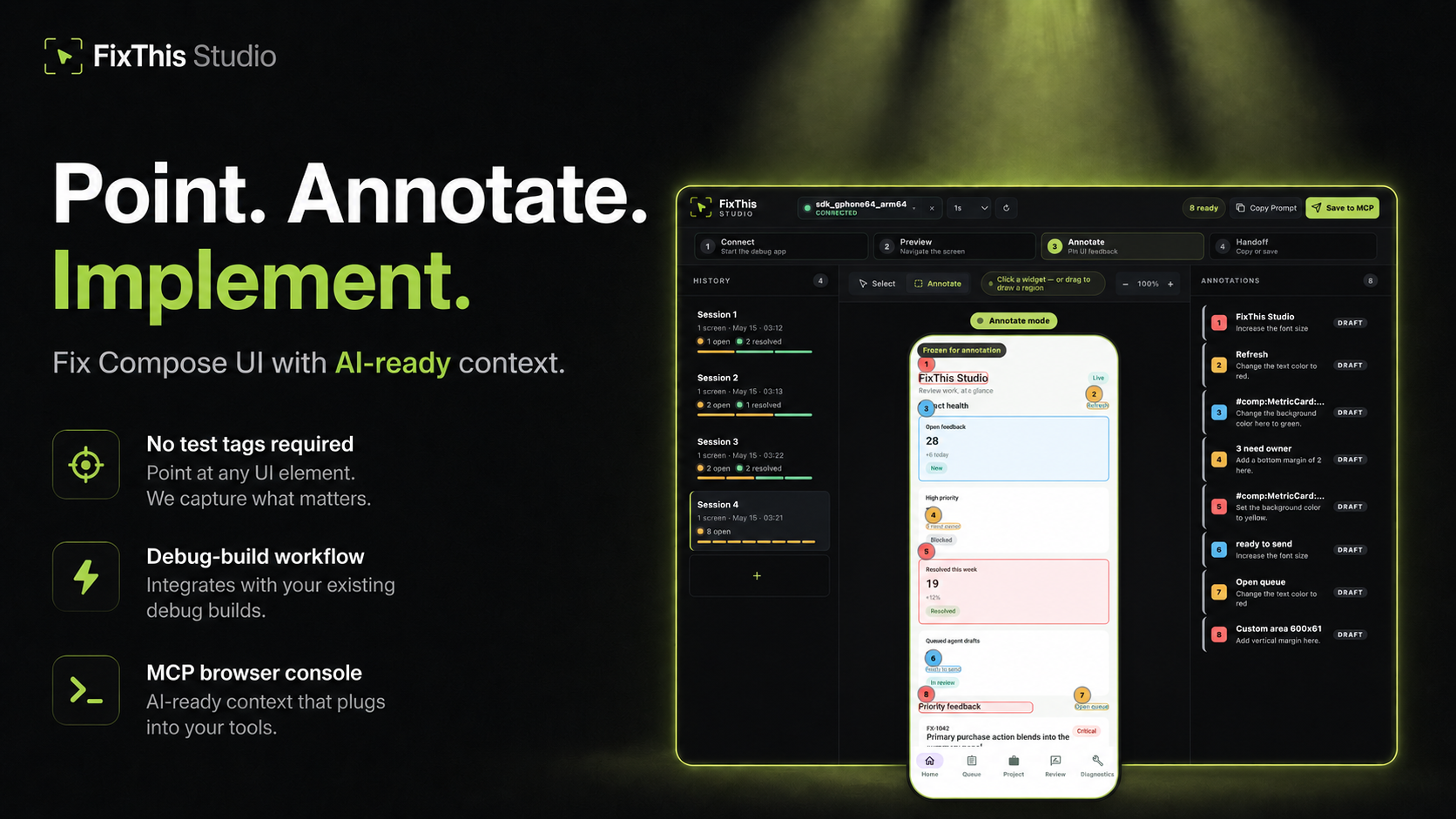
Point at a Jetpack Compose UI, write the change, and hand Claude, Codex, Cursor, or another coding agent the source context it needs.
FixThis is debug-only. It attaches a sidekick to a Compose debug app, mirrors the screen into a local browser console, and turns annotations into a compact handoff: screenshot bounds, semantics, source candidates, and confidence warnings.
Click a component to select it. Drag when the target is spacing, empty room, or something that is not a clean Compose node.
Works Today
- Try the sample app in about five minutes.
- Install the desktop CLI/MCP with Homebrew, npm, or GitHub Releases.
- Add it to an external app with the Gradle plugin
io.github.beyondwin.fixthis.compose. - Let Claude Code or Codex configure the sample with
./scripts/bootstrap-mcp.sh --sample. - Let an agent configure your app with
fixthis install-agent. - Use Copy Prompt with Cursor, ChatGPT, or any chat agent.
- Use Save to MCP with Claude Code or Codex.
- Save to MCP can attach a bounded, redacted Android diagnostics baseline. Switch the session to Manual or Off if you do not want that. Copy Prompt never starts collection.
- Runs locally over ADB and
127.0.0.1. No external API calls.
Quick Start: Agent Installs FixThis in Your App
Claude Code / Codex Bootstrap Prompt
Paste this into Claude Code or Codex from the root of a Jetpack Compose Android app:
Install FixThis in this project and configure it for this agent.

Use this order:
1. Run `fixthis install-agent --project-dir . --target all --verify --json`.
2. Use the JSON `readiness.state` and `actions[]` as the source of truth.
3. If `requiresUserAction` is true, tell me the exact blocking action.
4. Do not call `fixthis_open_feedback_console` until `readyForMcpTooling` is true, or until the report's `agent_after_restart` action is reached after restart.

Restart Claude Code or Codex if the report asks for it.
Do not configure release builds. Do not commit `.fixthis/`.
The agent should run:
# macOS
brew install beyondwin/tools/fixthis

# Node
npm install -g @beyondwin/fixthis

# macOS/Linux fallback
curl -fsSL https://raw.githubusercontent.com/beyondwin/FixThis/main/scripts/install-fixthis.sh \
  | bash -s -- --version v1.5.0

fixthis install-agent --project-dir . --target all --verify --json
If Homebrew already has it, run
brew update && brew upgrade beyondwin/tools/fixthis and check
fixthis --version.
fixthis install-agent applies the Gradle plugin, writes MCP config, and
writes .fixthis/project.json plus .fixthis/agent-setup.*. If doctor
reports NEEDS_INSTALL or metadata is missing, run ./gradlew fixthisSetup
and rerun fixthis install-agent --project-dir . --target all --verify --json.
Restart Claude Code or Codex when the report asks, then call
fixthis_open_feedback_console. For a manual check, use
fixthis doctor --project-dir . --json.
Published plugin:
plugins {
    id("io.github.beyondwin.fixthis.compose") version "1.5.0"
}
The plugin adds the debug-only sidekick and keeps release builds out.
Quick Start: Sample App to Agent Handoff
git clone <this-repo> && cd FixThis
./gradlew :fixthis-cli:installDist :fixthis-mcp:installDist
fixthis-cli/build/install/fixthis/bin/fixthis doctor --package io.github.beyondwin.fixthis.sample
fixthis-cli/build/install/fixthis/bin/fixthis run --package io.github.beyondwin.fixthis.sample
fixthis run installs the sample debug APK, launches it, and opens FixThis
Studio at http://127.0.0.1:<port>.
In the console:
- Click Annotate.
- Click a UI element, or drag an area.
- Type the change you want.
- Repeat for other spots on this screen.
- Copy Prompt for a chat agent, or Save to MCP for Claude Code / Codex.
You are done when a numbered annotation is visible and you have copied Markdown or saved a local MCP handoff.
Maintainers can prove that Copy Prompt path on a connected device:
npm run real-copy-prompt:smoke -- --strict
Pick Your Path
| Goal | Start here |
|---|---|
| Try it without touching your app | Sample quick start |
| Add it to your debug build | Add to your app |
| Connect an agent | Connect your agent |
| Bootstrap MCP from this repo | MCP.md |
| Use the console | Console tour |
| Understand the product | Product |
| Diagnose a failure | Troubleshooting |
| Inspect contracts | Docs index |
| Contribute | CONTRIBUTING.md |
| Reader | Start here |
|---|---|
| First-time user | Sample quick start |
| External app developer | Add to your app |
| Agent in this repo | AGENTS.md and project map |
| Maintainer | Docs index and project map |
| Contract or CLI change | Reference contracts |
Why not just a screenshot?
A screenshot is enough when the target is obvious. FixThis helps when the UI is dense, list-rendered, or named mostly by composable:
- Top-3 source candidates with line numbers and match reasons
editSurfacehints for call site vs component vs copy vs layout vs interop- Instance grouping so identical cards stay distinct
- Screen fingerprint so a rotated or changed screen cannot sneak into a save
- Honest confidence: visual-only, stale, or possible AndroidView/WebView
- Bounded runtime diagnostics on Save to MCP
- Retry-safe batches that do not duplicate work
Modules
| Module | Role |
|---|---|
:app (sample/) |
Validation sample |
:fixthis-compose-core |
Pure Kotlin domain |
:fixthis-compose-sidekick |
Debug Android runtime |
:fixthis-gradle-plugin |
Source index and debug wiring |
:fixthis-cli |
Desktop CLI |
:fixthis-mcp |
MCP server and local console |
More: Product, decisions, architecture.
Status
Public install paths:
- Gradle plugin
io.github.beyondwin.fixthis.compose - Maven
io.github.beyondwin:fixthis-compose-sidekickandfixthis-compose-core - Homebrew
brew install beyondwin/tools/fixthis - GitHub Release
fixthis-cli-mcp-vX.Y.Z.tar.gz - npm
@beyondwin/fixthis - MCP Registry
io.github.beyondwin/fixthis
Live dashboard: Release readiness.
main may be ahead of the latest tag. See CHANGELOG
and release notes.
Agents in this repo should read AGENTS.md.
Trust
FixThis stays on your machine. The sidekick talks over ADB, the console binds
to localhost, and Save to MCP writes under .fixthis/. Screenshots can
still contain sensitive pixels. Review them before sharing. Do not commit
.fixthis/.
Details: Privacy, Security, Threat model.
V1 stays narrow: Compose debug builds, local ADB, MCP-first handoff, best-effort source candidates, no cloud upload. See Roadmap.
License
FixThis MCP questions
How do I add FixThis MCP to Claude Code?
Run claude mcp add fixthis -- npx -y @beyondwin/fixthis in your terminal. Add --scope user to make it available in every project.
How do I add FixThis MCP to Cursor?
Open ~/.cursor/mcp.json and add the server under mcpServers, using the Cursor config shown in the install section above.
Does FixThis send data to the cloud?
No, it runs locally over ADB and localhost with no external API calls.
How can I use FixThis with Claude Code or Codex?
You can use the 'Save to MCP' feature or use the provided bootstrap prompt to configure the agent.