
basehim MCP server
Commit Nov 13, 2026An open-source PHP CMS that allows AI agents to manage content, themes, and site settings through a built-in MCP server and scoped OAuth 2.1 tokens.
Also known as basehim/basehim
- Stars
- 5
- Tools
- —
- Downloads, 30 days
- —
- Latest version
- —
- Last commit
- Nov 13, 2026
- License
- MIT
What is basehim MCP?
basehim is an open-source PHP CMS that allows AI agents to manage content, themes, and site settings through a built-in MCP server and scoped OAuth 2.1 tokens.
Summary generated from the project's README
About basehim MCP server
Managing website content and themes through AI assistants is what Basehim enables for developers and site owners. This open-source PHP CMS includes a built-in MCP server located at the /mcp endpoint, allowing clients like Claude to register themselves and interact with your site directly. It provides 32 core tools that cover posts, pages, media, comments, menus, and site settings.
Users deploy the system on web hosts or local machines using PHP 8.1+ and MySQL or MariaDB. Security is handled through OAuth 2.1 with scoped, revocable tokens, ensuring an agent with posts:read permissions cannot modify users. This architecture allows for dynamic client registration, meaning agents can connect without manual configuration of client IDs or secrets. The system is designed to be API-first, supporting REST API calls via bearer API keys, JWT, or OAuth 2.1 for different integration needs.
What you can do with it
- 1Automated theme and app developmentAn AI agent can build, modify, and fix your website's theme or write new applications.
- 2Granular content managementYou can grant an AI assistant specific permissions to only read or write certain types of content.
- 3Headless content orchestrationDevelopers can use the REST API to manage posts, media, and taxonomies through external scripts.
- 4Simplified AI agent onboardingAI assistants can connect to your CMS automatically without requiring manual setup of secrets.
Written from the project's README. Every use case is checked against a quote from it.
Automated checks
Ran Nov 15, 2026Full report →Not verified yet. A server needs a score of 80, no serious finding, and enough data for us to check. How checks work · What to fix for more points

- Source repository linked and reachablebasehim/basehim is public and reachablegithub.com/basehim/basehim ↗Pass
- Package names this repository as its sourceNot checked
- Build provenance (Sigstore attestation)Not checked
- Open source license (OSI)MITspdx.org/licenses/MIT.html ↗Pass
- Commit or release in the last yearLast commit or release 2026-11-13github.com/basehim/basehim ↗Pass
- OpenSSF ScorecardNot checked
- Package name not close to a popular packageNot checked
- No critical advisory in the package or its dependenciesNot checked
- No hidden instructions to the model0 tool descriptions and the README read; no override phrases, credential paths or hidden charactersPass
- Destructive tools are labelledNot checked
- Remote endpoint answers the MCP handshakeNot checked
README
View on GitHubBasehim
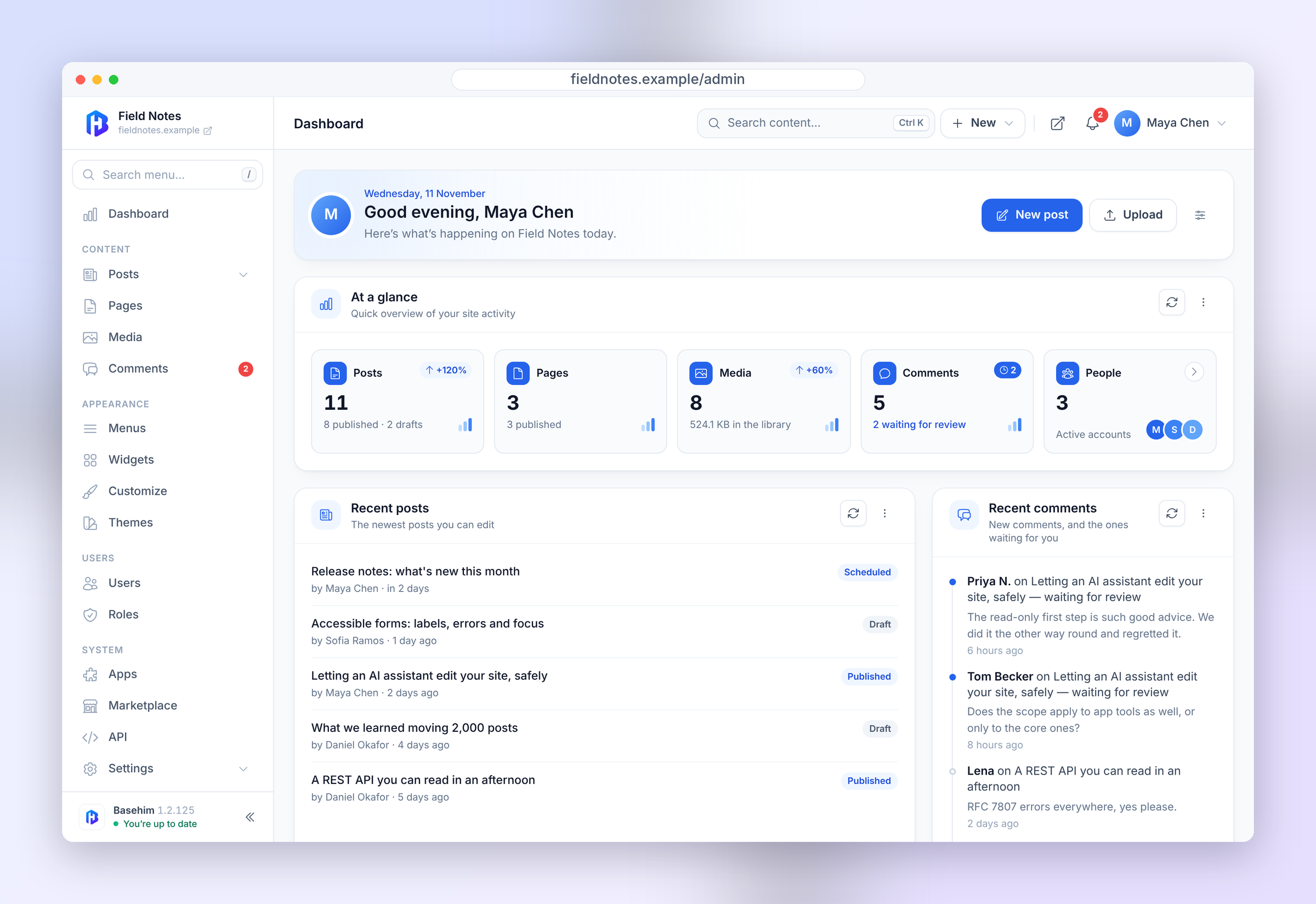
Open-source PHP CMS with a REST API and a built-in MCP server for AI agents. Manage content in the dashboard, through the REST API, or with AI assistants over MCP, each with only the permissions you grant.
Requires PHP 8.1 and MySQL or MariaDB. Deploy by uploading the release archive; the installer sets up the rest.


basehim.com · Docs · API reference · Getting started · Download
Quick start
On a web host — download basehim.zip,
upload the contents of its basehim/ folder to public_html/ (or any
subfolder), and open the site. The installer asks for your database details.
On your machine — PHP 8.1+ and a MySQL or MariaDB database:
curl -L -o basehim.zip https://github.com/basehim/basehim/releases/latest/download/basehim.zip
unzip basehim.zip && cd basehim
php -S localhost:8000 server.php     # then open http://localhost:8000
Or from source: git clone https://github.com/basehim/basehim.git && cd basehim
and the same php -S line.
No database handy? One container is enough:
docker run -d --name basehim-db -p 3306:3306 \
  -e MARIADB_ROOT_PASSWORD=secret -e MARIADB_DATABASE=basehim mariadb:11
# installer: host 127.0.0.1, database basehim, user root, password secret
server.php is for local development only. On a real host Apache uses the
bundled .htaccess, and server.php answers 404 to anything else.
The installer checks the server first, then asks for the database and your site's name; setup takes about a minute.
Why Basehim
Everything the dashboard does, the API can do: the dashboard is one client among several, alongside scripts, mobile apps and AI agents. Basehim runs on managed hosting with cPanel, Plesk or DirectAdmin as well as on a VPS or dedicated server, and shell access is not required.
- AI-ready by default — a built-in MCP server at
/mcp. Point Claude, or any MCP client, at your site and it registers itself. No client id, no secret. - Scoped, revocable access — agents get OAuth 2.1 tokens carrying explicit scopes. A token issued to read posts cannot touch users.
- API-first — a full REST API over posts, pages, media, taxonomies, menus, comments, users and settings.
- Simple deployment — upload the release archive and open the site; the installer checks the server and sets up the database. Updates install from the dashboard.
- Apps and themes — install from the built-in marketplace or upload a folder, then activate. Every download is checksum-verified.
- No third-party runtime dependencies — core is plain PHP with its own small framework, so there is nothing else to install or keep patched.
- A readable framework — autoloader, DI container with autowiring, router, view engine, hooks/events, JWT, CSRF, sessions, file cache.
AI and agents
This is the part worth reading first.
MCP server
Basehim exposes a Model Context Protocol endpoint at the root of your domain:
| Method | Path | Purpose |
|---|---|---|
GET |
/mcp |
Discovery — transport, auth methods, metadata URL |
POST |
/mcp |
JSON-RPC 2.0 endpoint |
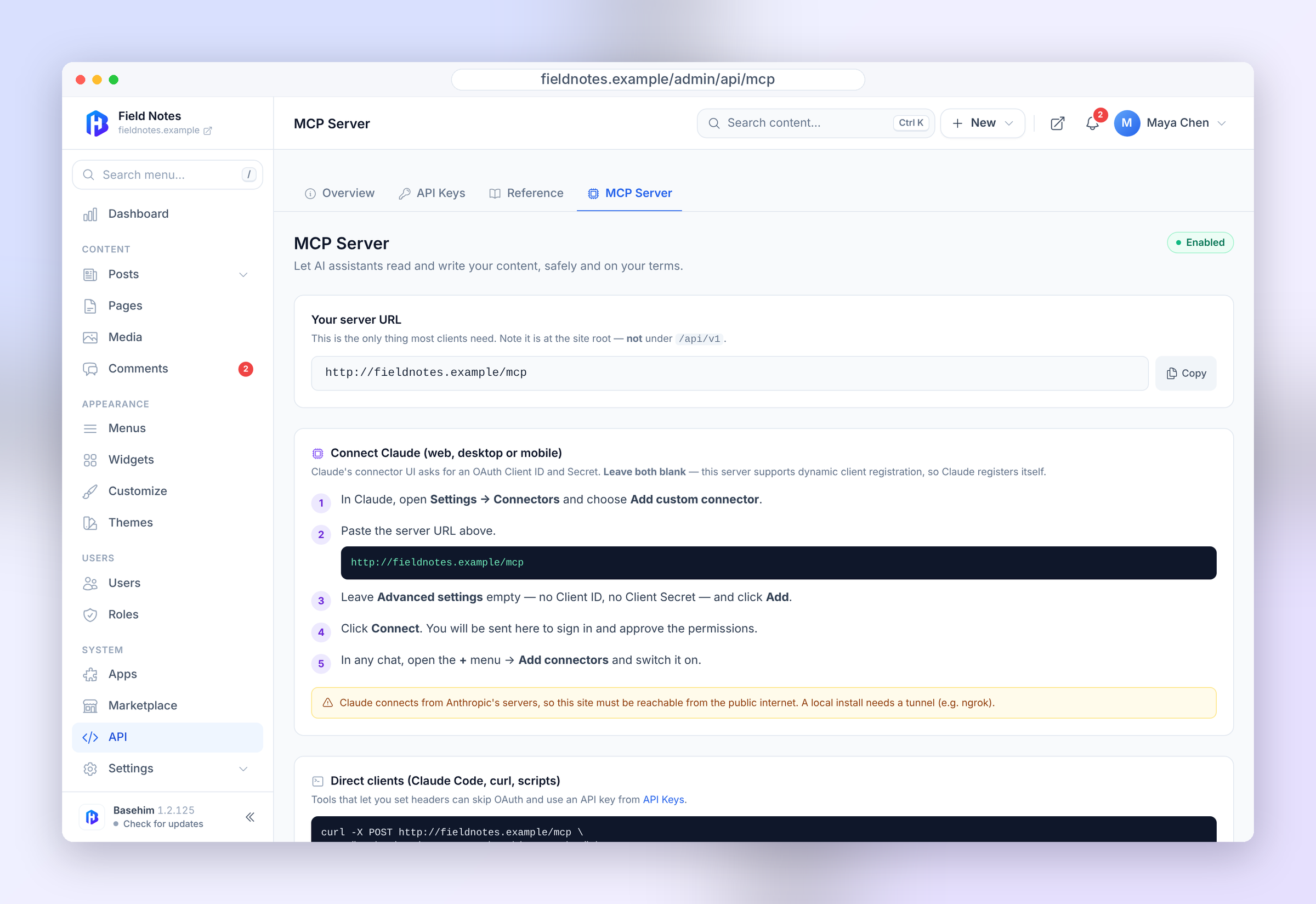
Add https://your-site.com/mcp as a custom connector in an AI assistant and it
handles registration itself. The endpoint accepts either an OAuth token or a
bearer API key.
Core's tools cover content (posts, pages, terms, media, comments), menus, themes and theme options, widget areas and site settings: 32 tools, each tied to a scope. Admin → API → MCP Server lists them, and apps can add their own. Settings that affect security, sign-in, email and permalinks are changed in the dashboard only.
Resources are addressed with a basehim:// URI scheme — basehim://site/info,
basehim://post/{id-or-slug} — and are enumerated through resources/list.
Build your site with an AI agent
Install the free Basehim Dev Tools app from the Marketplace in your dashboard, connect an agent such as Claude, and it can build and change your theme, write apps, read logs and fix problems on the site itself. You choose what it may do: nothing, read-only, or development. Every code change is checked before it is kept and can be rolled back. See basehim.com/docs/dev-tools.
OAuth 2.1 — built for agents, not humans clicking through consoles
Agent auth sits at the domain root, outside /api/v1:
| Method | Path | Purpose |
|---|---|---|
GET |
/.well-known/oauth-protected-resource |
Resource metadata (RFC 9728) |
GET |
/.well-known/oauth-protected-resource/mcp |
Path-suffixed variant |
GET |
/.well-known/oauth-authorization-server |
Server metadata (RFC 8414) |
GET |
/.well-known/openid-configuration |
Same metadata, OIDC path |
POST |
/oauth/register |
Dynamic client registration |
GET/POST |
/oauth/authorize |
Consent screen and approval |
POST |
/oauth/token |
Exchange a code, or refresh |
Grants: authorization_code and refresh_token, with PKCE (S256).
Dynamic client registration is the point — there is nothing to configure by hand before an agent can connect.
Scopes
Every token carries scopes, and a token issued for one thing cannot do another:
posts:read        posts:write
taxonomies:read   taxonomies:write
media:read
comments:read     comments:write
settings:read     settings:write
menus:read        menus:write
themes:read       themes:write
users:read
Installed apps can contribute their own scopes, so your site's list may be
longer. Whatever your site advertises is authoritative — fetch
/.well-known/oauth-authorization-server to see it.
A token also acts as the account behind it: scopes choose the tools, and the
account's role decides what those tools may do, exactly as on the REST API. An
author's posts:write token edits that author's posts and no one else's, a
contributor's goes in for review rather than live, and suspending an account
stops its tokens and keys at once. Scopes added by apps are granted only to
administrators unless the app maps them to a capability with the
mcp.scope_capabilities filter.
Token hygiene
A token is a password. Issue the narrowest scope that does the job, use a separate token per integration so one can be revoked without disturbing the others, and keep tokens out of client-side code and screenshots. Revoking in the admin takes effect immediately.
REST API
Base URL https://your-site.com/api/v1.
- Success responses are wrapped:
{"data": …} - Errors follow RFC 7807 problem details:
{"type", "title", "status", "detail"} - Single items are fetched by slug; updates and deletes address them by id.
GET /posts/hello-worldbutDELETE /posts/12. This catches people out. - List endpoints accept
page,per_page,status,qandauthor_id.
Reading published content needs no authentication. Anything that writes, or reads drafts, does.
# Public read — no auth
curl https://your-site.com/api/v1/posts

# API key
curl -H "Authorization: Bearer basehim_…" https://your-site.com/api/v1/me

# JWT
curl -X POST https://your-site.com/api/v1/auth/login \
  -H 'Content-Type: application/json' \
  -d '{"username":"admin","password":"…"}'

# Create a post
curl -X POST https://your-site.com/api/v1/posts \
  -H "Authorization: Bearer basehim_…" \
  -H 'Content-Type: application/json' \
  -d '{"title":"Hello","content":"<p>World</p>","status":"published"}'
Three ways in, for three different callers:
| Method | Header / flow | Best for |
|---|---|---|
| API key | Authorization: Bearer basehim_… |
Scripts, server-to-server |
| JWT | POST /auth/login, refresh at /auth/refresh |
Apps acting for a signed-in person |
| OAuth 2.1 | Dynamic client registration | AI agents over MCP |
The full endpoint list — content, media, taxonomies, comments, menus, users,
settings, apps, cache and scheduling — is at
basehim.com/docs/api-reference,
and mirrored in the admin at /admin/api/reference.
Requirements
- PHP 8.1+ (8.2 or 8.3 recommended) with
pdo_mysql,mbstring,opensslandfileinfo;gd,curlandziprecommended (image sizes, updates, and installing themes and apps from the dashboard) - MySQL 5.7+ or MariaDB 10.3+
- Apache or LiteSpeed with
mod_rewrite. nginx is supported with equivalent rules in the server configuration — see Security. - For local development, PHP's built-in server with
server.phpis enough - About 30 MB of disk space, plus uploaded media
The installer's server check and Admin → System → Health read the same list
(app/Core/Requirements.php). Shell access is not required.
Install
- Upload the contents of the
basehim/folder frombasehim.zip(or of this repository) to your document root, e.g.public_html/. - Create a MySQL database and grant a user full privileges.
- Visit your domain — you'll be redirected to
/install.php. - Work through the installer's four screens: a server check, the database connection, your site and account (name, tagline, address, timezone and optional starter content), and a confirmation with first steps.
- The installer locks itself when it finishes (
INSTALLED=truein.env); deletinginstall.phpafterwards is optional.
Log in at /admin/login.
rsync -avz basehim/ user@server:/path/to/webroot/

cp .env.example .env
# Edit DB_*, APP_URL, then generate the two secrets:
php -r "echo 'APP_KEY=' . bin2hex(random_bytes(16)) . PHP_EOL;"
php -r "echo 'JWT_SECRET=' . bin2hex(random_bytes(32)) . PHP_EOL;"

# Migrations apply in filename order
for f in database/migrations/*.sql; do mysql -u user -p mydb < "$f"; done

chmod -R 775 storage/ content/
Generate a password hash with:
php -r "echo password_hash('YourPassword', PASSWORD_BCRYPT, ['cost' => 12]) . PHP_EOL;"
Subdirectory installs work out of the box — Basehim detects its own base path.
Every install gets its own random table prefix (three characters and an
underscore, such as k7q_), chosen by the installer and written to .env as
DB_PREFIX. Several sites can share one database, which matters on shared
hosting where you get a fixed number, and table names can't be guessed. To use
a prefix of your own, put DB_PREFIX in .env before installing. Never
change it afterwards.
Directory map
basehim/
├── index.php              # Front controller (all requests funnel here)
├── install.php            # Web installer (locks itself when done)
├── server.php             # Router for `php -S` — local development only
├── bootstrap.php          # Autoloader, env, sessions, boots the app
├── .htaccess              # Apache rewrites + security headers
├── .env                   # Your environment — git-ignored, NEVER commit
├── .env.example           # Template to copy to .env
│
├── app/
│   ├── Core/              # Router, Container, View, Cache, JWT, App base class
│   ├── Http/
│   │   ├── Controllers/   # Admin/, Api/, Web/
│   │   └── Middleware/    # Authenticate, CheckCapability, Cors
│   ├── Repositories/      # DB access layer (PDO)
│   └── Services/          # Business logic (PostService, AppService, …)
│
├── admin/views/           # Admin UI templates (Tailwind)
├── api/v1/                # REST API entry
├── config/                # app, database, auth, capabilities, cms
├── content/
│   ├── apps/              # Drop-in apps (manifest in app.json)
│   ├── themes/            # Drop-in themes (manifest in theme.json)
│   └── uploads/           # Media library
├── database/migrations/   # SQL migrations, applied in filename order
├── docs/                  # App, permission, and agent API guides
├── routes/                # api.php, admin.php, web.php
└── storage/               # Runtime: cache/, logs/, sessions/ (must be writable)
Everything under storage/ and content/uploads/ is runtime state — the
directories are tracked, their contents are git-ignored.
Apps
An app is a folder in content/apps/ with an app.json manifest. Install by
uploading a zip from /admin/apps, from the built-in marketplace, or by
dropping the folder in — it is auto-detected.
content/apps/my-app/
├── app.json                 # Manifest (required)
├── src/
│   └── App.php              # Entry class extending App\Core\App
├── views/                   # (optional) app-owned templates
└── assets/                  # (optional) bundled css/js/images
app.json
{
    "name": "My App",
    "vendor": "myco",
    "slug": "my-app",
    "version": "1.0.0",
    "description": "What my app does.",
    "author": "Me",
    "namespace": "MyCo\\MyApp",
    "src": "src",
    "entry": "App"
}
Writing an app
Extend App\Core\App and implement boot(). Every helper below is provided by
the base class — no need to dig into the DI container.
<?php
namespace MyCo\MyApp;

class App extends \App\Core\App
{
    /* -- Lifecycle (all optional) -- */
    public function onInstall(): void   { /* first detection */ }
    public function onActivate(): void  { /* admin enabled it */ }
    public function onDeactivate(): void{ /* admin disabled it */ }
    public function onUninstall(): void { /* about to be removed */ }

    /* -- Main entry: runs on every request while active -- */
    public function boot(): void
    {
        // Hooks
        $this->addAction('post.created', [$this, 'onPostCreated']);
        $this->addFilter('post.content', fn($content) => $content . '<p>👋</p>');

        // Custom routes
        $this->get('/hello', fn() => 'Hello from an app!');
        $this->post('/admin/myapp', [$this, 'saveSettings']);

        // Dashboard widget (docs/DASHBOARD-WIDGETS.md)
        $this->registerWidget('stats', [
            'surfaces'    => ['dashboard'],
            'title'      => 'Site Stats',
            'capability' => 'edit_posts',
            'dashboard'  => [
                'view' => 'stat',
                'data' => fn($ctx) => ['items' => [['label' => 'Hello', 'value' => 42]]],
            ],
        ]);

        // Admin sidebar item
        $this->addAdminMenu([
            'url' => '/admin/myapp', 'label' => 'My App', 'icon' => 'fa-star',
        ]);
    }
}
Built-in helpers
| Helper | What it does |
|---|---|
addAction($tag, $cb, $priority?, $args?) |
Register an event listener |
addFilter($tag, $cb, $priority?, $args?) |
Register a value transformer |
doAction($tag, ...$args) |
Fire your own event |
applyFilters($tag, $value, ...) |
Run a value through your filter chain |
get($pattern, $handler) / post(...) / route([...], ...) |
Register HTTP routes |
routeGroup($attrs, $cb) |
Group routes with shared prefix/middleware |
addAdminMenu(['url'=>'…','label'=>'…','icon'=>'…']) |
Add a sidebar item |
registerWidget($key, $def) |
Contribute a widget (editor/frontend/dashboard); dashboard cards: docs/DASHBOARD-WIDGETS.md |
getSetting($key, $default = null) |
Read an app-scoped setting |
setSetting($key, $value) |
Write an app-scoped setting |
deleteSetting($key) / allSettings() / dropAllSettings() |
Manage settings |
table($name) |
Prefixed, app-namespaced table name (app_{slug}_{name}) |
db() |
The PDO-wrapped Database instance |
cache() |
File-based key/value cache |
log($msg, $context?, $level?) |
Log line tagged with your app slug |
view($template, $data = []) |
Render a PHP template from views/ |
asset($relativePath) |
URL to a bundled asset under assets/ |
schema($sql) |
Run a CREATE / ALTER (idempotent table setup) |
make($class) |
Resolve anything from the container |
config($key, $default = null) |
Read a config value |
request() / session() |
Current request / session |
slug() / path() / manifest() |
App metadata |
Settings written via setSetting() are stored in the settings table under
the group app:{slug}, so they can never collide with core or other apps. On
uninstall, all app-owned settings are removed for you automatically.
Bundled assets are served by Basehim itself at
/content/apps/{slug}/assets/{path}, with ETags and correct MIME types — no
route needed. Use $this->asset('css/style.css') to build the URL.
Permissions
Apps declare what they need in app.json, and the admin sees and approves that
list before activation. See
docs/APP-PERMISSIONS.md.
Each app with an admin area also gets an access_app:{slug} capability, so
access can be granted or denied per role and per user.
Installing an app
From the admin: /admin/apps → Upload app → pick a .zip. The
installer validates the archive is readable and under 16 MB, finds app.json
at the archive root or one level deep, rejects archives containing .. or
absolute paths (zip-slip protection), validates the manifest, refuses to
overwrite an existing app with the same slug, extracts to a temp directory,
then atomically renames into place.
The app appears as inactive. Click Activate to fire onActivate(),
where you'd typically create your tables.
From the marketplace: /admin/apps/marketplace — browse and install
directly, every download SHA-256 verified.
Lifecycle
- Deactivate — stops booting the app; data is preserved.
- Delete — fires
onUninstall(), removes app-scoped settings, drops the DB row, and removes files from disk.
Worked examples
docs/examples/system-monitor/— a small working app: an admin page behind the app's access capability, rendered in the admin layout, and a dashboard card with a data provider, a setting and an action.docs/examples/dashboard-widgets/— every kind of dashboard card: stat, table with settings, status with an action, a card fed by the app's own AJAX action, and an HTML widget.
Full guides live in docs/:
theme development,
app development,
the app API,
permissions.
Themes
A theme is a folder under content/themes/ with a theme.json manifest and a
templates/ directory. Templates are plain PHP and assets are served as they
are; to ship a theme, zip its folder.
content/themes/my-theme/
├── theme.json
├── templates/
│   ├── index.php           # Post feed
│   ├── single.php          # Single post
│   ├── page.php            # Static page
│   └── partials/
└── assets/
Themes declare where menus go with a menu_locations map and widget areas with
a widget_areas map in theme.json; Appearance → Menus and
/admin/widgets/areas offer exactly those.
Core ships one theme, default. More themes and apps install from the
marketplace in the dashboard (Admin → Marketplace).
Scheduling
Scheduled tasks are registered by apps and run through a cron entry point:
*/5 * * * * curl -s "https://your-site.com/api/v1/schedule/run?token=…"
/schedule/run sits outside the authenticated group deliberately — a crontab
sends no cookies and holds no token, so it is guarded by an unguessable token
instead. List tasks with GET /api/v1/schedule, or run one on demand with
POST /api/v1/schedule/{app}/{key}/run.
Security
-
All requests funnel through
index.php..htaccessblocks direct access toapp/,config/,storage/,database/,.envandbootstrap.php.content/.htaccesslets the web server send only static assets (styles, scripts, images, fonts, audio, video) fromcontent/; templates, app source, manifests and backups such assingle.php.bakare refused. If you run nginx you must replicate those denials yourself, for example:location ~ ^/content/ { location ~* \.(css|js|mjs|map|jpe?g|png|gif|webp|avif|svg|ico|woff2?|ttf|otf|eot|mp4|m4v|webm|mp3|m4a|wav|ogg)$ { try_files $uri /index.php?$query_string; } return 403; } -
Passwords hashed with bcrypt, cost 12.
-
CSRF tokens on every form (
_csrffield,X-CSRF-Tokenheader). -
JWTs (HS256) are short-lived; refresh tokens are stored as SHA-256 hashes and can be revoked.
-
API keys are stored as SHA-256 hashes — the plaintext key is shown once, at creation, and never again.
-
Sessions are file-based with
HttpOnly,SameSite=Lax, andSecurewhen HTTPS is detected. -
SQL via PDO prepared statements throughout, with emulation disabled.
-
Upload validation: MIME type, extension and size limit, configurable in
config/cms.php. -
App zips are checked for zip-slip before extraction.
Reporting a vulnerability and the operator hardening checklist: SECURITY.md.
Contributing
Bug reports and pull requests are welcome. See CONTRIBUTING.md for local setup, code style and the compatibility requirements: PHP 8.1, no third-party runtime dependencies, and deployment by uploading files.
License
Released under the MIT License.
basehim MCP questions
What are the security permissions for AI agents?
Agents use OAuth 2.1 tokens with explicit scopes, meaning a token granted for reading posts cannot perform other actions like managing users.
Can AI agents help with website development?
Yes, by using the Basehim Dev Tools app, an agent can build themes, write apps, read logs, and fix site problems.
What are the system requirements for Basehim?
It requires PHP 8.1+ and MySQL 5.7+ or MariaDB 10.3+.