
skilltri MCP server
Commit Oct 25, 2026Manages MCP servers and AI agent skills with per-folder rules to control tool availability across different AI harnesses.
Also known as baeroe/skilltri
- Stars
- 1
- Tools
- 12
- Downloads, 30 days
- —
- Latest version
- —
- Last commit
- Oct 25, 2026
- License
- MIT
What is skilltri MCP?
skilltri manages MCP servers and AI agent skills with per-folder rules to control tool availability across different AI harnesses. It exposes 12 tools, such as skilltri_get_status, skilltri_which, skilltri_list_servers.
Summary generated from the project's README
About skilltri MCP server
Managing AI agent tools and skills across different development environments is what skilltri enables for developers using Claude Code, Cursor, or Gemini CLI. It acts as a centralized gateway and skill manager that uses per-folder rules to control which MCP servers and agent skills are active in a specific directory. This prevents work, client, or private project tools from leaking into the wrong sessions.
Users interact with a terminal-based TUI to manage servers, skill sources, and folder rules. The system runs a daemon that maintains connections to downstream MCP servers and fetches skill sources from local folders, git repositories, or Claude plugin marketplaces. It provides a thin stdio process called skilltri mcp to relay tools to the AI harness. By using specific modes like only, tree, not, or not-tree, you can precisely define tool availability based on your current working directory.
What you can do with it
- 1Restrict project toolsLimit a specific MCP server so it is only available when working within a particular project folder.
- 2Automate skill updatesKeep agent skills from git repositories or marketplaces up to date without performing manual pulls.
- 3Manage complex rule hierarchiesApply granular access control where a specific tool can have different visibility rules than its parent server.
Written from the project's README. Every use case is checked against a quote from it.
skilltri MCP tools 12
Detected from the READMEskilltri_get_statusskilltri_whichskilltri_list_serversskilltri_list_skillsskilltri_list_sourcesskilltri_read_skillskilltri_run_doctorskilltri_restart_serverskilltri_set_enabledskilltri_set_adapterreadoff
Automated checks
Ran Nov 14, 2026Full report →Not verified yet. A server needs a score of 80, no serious finding, and enough data for us to check. How checks work · What to fix for more points

- Source repository linked and reachablebaeroe/skilltri is public and reachablegithub.com/baeroe/skilltri ↗Pass
- Package names this repository as its sourceNot checked
- Build provenance (Sigstore attestation)Not checked
- Open source license (OSI)MITspdx.org/licenses/MIT.html ↗Pass
- Commit or release in the last yearLast commit or release 2026-10-25github.com/baeroe/skilltri ↗Pass
- OpenSSF ScorecardNot checked
- Package name not close to a popular packageNot checked
- No critical advisory in the package or its dependenciesNot checked
- No hidden instructions to the model12 tool descriptions and the README read; no override phrases, credential paths or hidden charactersPass
- Destructive tools are labelledNo tool named like delete, drop or execPass
- Remote endpoint answers the MCP handshakeNot checked
README
View on GitHubskilltri
One MCP gateway and one agent skill manager for all your AI agent harnesses, with per-folder rules for both. You add MCP servers and skill sources (local folders, git repos, Claude plugin marketplaces) once, decide in which folders each one is active, and every harness gets exactly that set: Claude Code natively, Codex, Gemini CLI, OpenCode, Cursor, Copilot CLI and Amp through .agents/skills links, and anything else that speaks MCP through the gateway.
- You run
skilltriin any terminal: a TUI to manage servers, skill sources and the folder rules that decide where each one is active, plus a preview of what a session in a given folder gets. - Agents get everything through two channels: one MCP server (
skilltri mcp, stdio) that only exposes the tools that apply to the session's folder, and native skill folders that skilltri builds per folder for each harness.
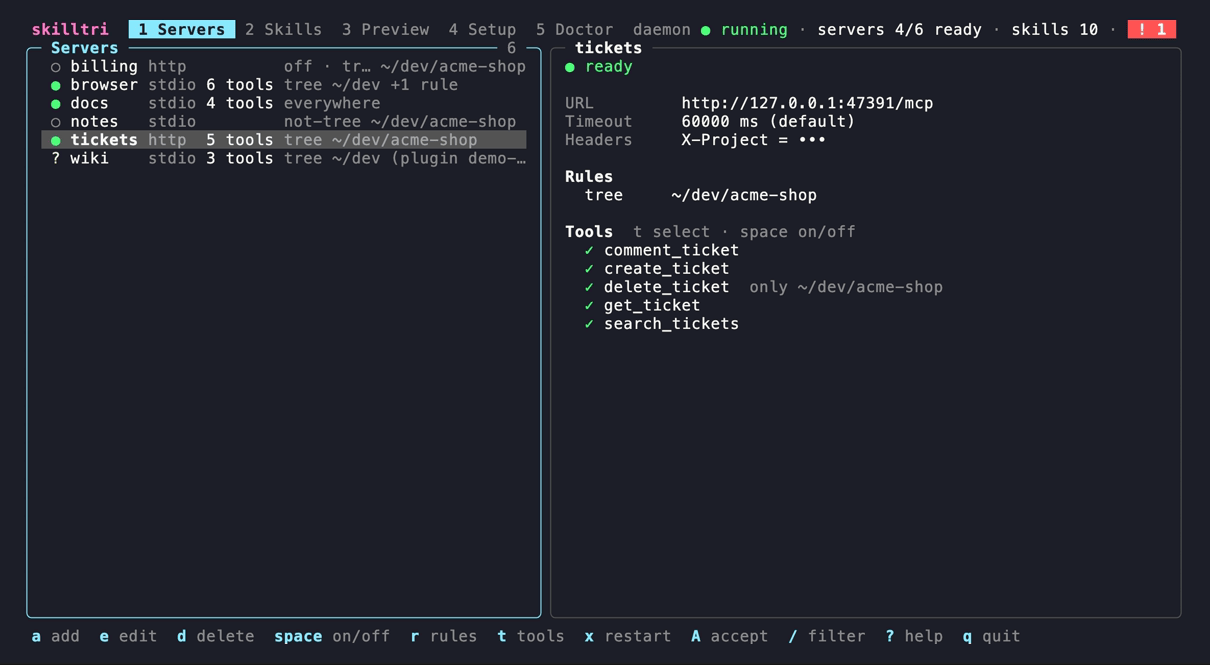
Servers: status, transport, tool count and the rules summary per server; the selected server with its own rules and its tools, one of them limited to a single folder.
Status: v0.1.0, macOS and Linux. See Not supported yet.
Why
- A plain MCP gateway (such as 1MCP) exposes every server everywhere. Work, client and private projects need different servers, and should not see each other's tools.
- Skills live in harness-specific folders (
~/.claude/skills,.agents/skills, plugin caches). A user-level folder cannot differ per session, so "everywhere except this project" is impossible. - Skills from git repos and marketplaces should stay up to date without manual pulls.
skilltri replaces the gateway and the harness-specific skill folders with one config and one set of rules.
How it works
 harness (Claude Code, Codex, …)                       skilltri daemon
 started in ~/dev/acme-shop                            (one per user, Unix socket)
 ├─ MCP: skilltri mcp  ── stdio ── thin shim ── socket ──► sessions, rules, downstream servers
 │                                                         ├─ stdio servers (started on demand)
 │                                                         └─ Streamable HTTP servers
 └─ skills: CLAUDE_CODE_PLUGIN_DIRS=~/.cache/skilltri/views/<set>/claude-code/…
            (set by the shell hook or `skilltri run` before the harness starts)
skilltri daemonholds the connections to the downstream MCP servers, fetches skill sources on a schedule, builds the skill views and reloads the config when it changes. It listens on a Unix socket in the state dir. You can install it as a login service (skilltri daemon install); otherwise the firstskilltri mcpstarts it in the background.skilltri mcpis the one MCP server you register in each harness. It is a thin stdio process: it tells the daemon the session folder and relays the JSON-RPC stream. The daemon exposes only the servers and tools whose rules match that folder, as<server>_<tool>, and sendstools/list_changedwhen a config change alters a session's set. Tools, prompts and resources are passed through.- The session folder is
--cwd DIRor$SKILLTRI_CWDif given, else the single MCP root the client sends, else the working directory ofskilltri mcp(harnesses start stdio servers in the project folder). - Claude Code skills come in through views: for a folder, skilltri computes the active skills and builds a directory of generated plugins under
~/.cache/skilltri/views/(symlinks to the real skill folders, so plugin namespaces such asreview-kit:code-reviewsurvive). The shell hook exportsCLAUDE_CODE_PLUGIN_DIRSpointing there on everycd. The view lives outside the project because Claude Code also reads skills from parent folders, which would breakonlyandnot-treerules. .agents/skillsharnesses (Codex, Gemini CLI, OpenCode, Cursor, Copilot CLI, Amp) have no way to redirect their skill folder yet, so their adapters are opt-in and fall back to symlinks in<session folder>/.agents/skills/, recorded in.agents/skills/.skilltri.json, added to.git/info/excludeand removed again when they no longer apply. Links are only made inside a git work tree, never in$HOMEor above it. Because these harnesses read parent folders too, a link in a project is also seen from its subfolders.- MCP fallback: for harnesses without a native view,
skilltri mcplists the active skills in its server instructions and offersskilltri_load_skillandskilltri_read_skill_file. It switches this off for sessions that already get a native view, so skills never show up twice.
Folder rules
Every MCP server, tool, skill source, plugin and skill can carry rules. A rule is a path plus one of four modes:
| Mode | Active when the session folder is … |
|---|---|
only |
exactly this folder |
tree |
this folder or any folder below it |
not |
any folder except exactly this one |
not-tree |
any folder except this one and the folders below it |
- No rules = active everywhere.
- Excludes win.
only/treeare includes,not/not-treeare excludes. An item is active if it has no includes or at least one include matches, and no exclude matches. - The nearest level decides. The levels are source → plugin → skill and server → tool. Each level has an on/off switch, and an item is active only if all its ancestors are on. Its rules are those of the nearest level that has any: a skill's own rules replace its plugin's, which replace the source's.
- Paths are compared after
~expansion, cleaning and symlink resolution, so~/devand/Users/you/devmatch. Matching is path-only.
Examples:
| Rules on the item | Active in ~/dev/acme-shop |
in ~/dev/acme-shop/api |
in ~/dev/side-project |
|---|---|---|---|
| none | yes | yes | yes |
tree ~/dev/acme-shop |
yes | yes | no |
only ~/dev/acme-shop |
yes | no | no |
tree ~/dev + not-tree ~/dev/side-project |
yes | yes | no |
not ~/dev/acme-shop |
no | yes | yes |
skilltri rule add server/tickets tree ~/dev/acme-shop
skilltri rule add server/tickets/tool/delete_ticket only ~/dev/acme-shop
skilltri rule add source/demo-market/plugin/review-kit not-tree ~/dev/side-project
skilltri which ~/dev/acme-shop     # what a session there gets, and which rule decided
Targets are server/NAME[/tool/TOOL] and source/NAME[/plugin/ENTRY|/skill/ID] (ENTRY is the plugin's name in the marketplace, the ID of a plugin skill is <plugin>:<skill>). In the TUI, r opens the rules editor on the selected item.
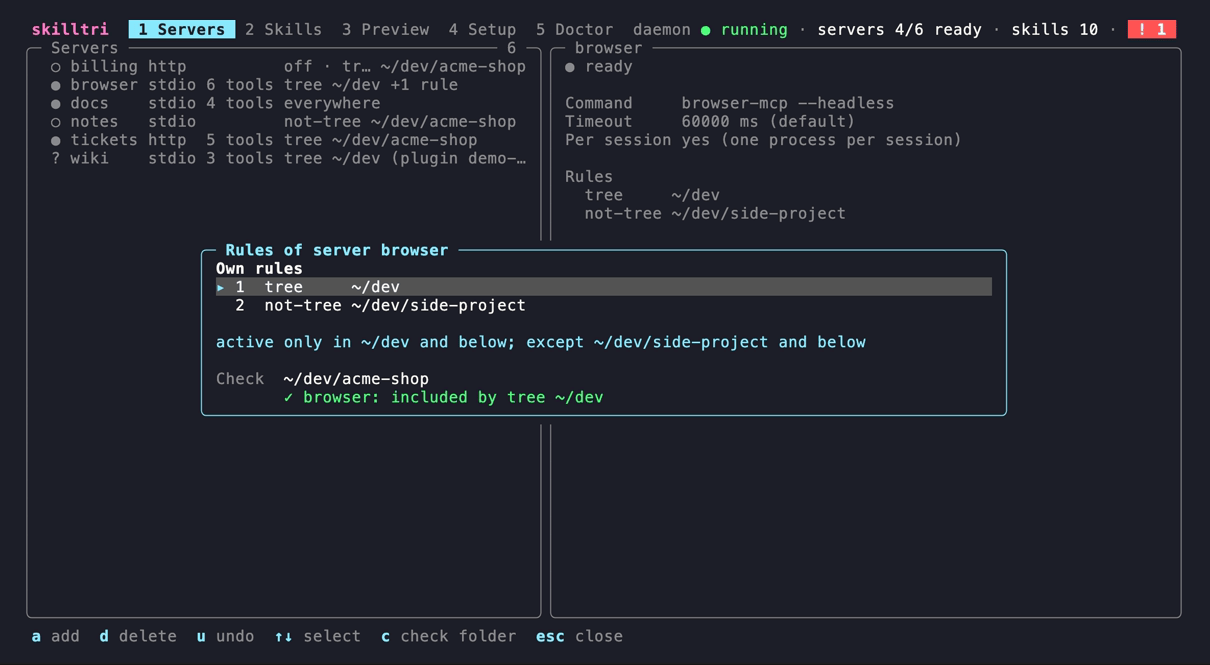
The rules editor: the server's own rules, what they mean in plain words, and a check that shows which rule decides for a folder.
Skill sources
| Type | What | Updates |
|---|---|---|
local |
any folder you point at, or ~/.config/skilltri/skills/ (skilltri skill new NAME creates a skill there and the source local for it; n in the Skills tab) |
none, read live |
git |
GitHub shorthand owner/repo or any git URL, optional --ref (branch, tag or commit) and --subpath; may contain many skills |
fetched by the daemon |
marketplace |
a repo or folder with .claude-plugin/marketplace.json |
fetched by the daemon, then the plugins are resolved again |
skilltri source add local my-skills ~/skills
skilltri source add git team-skills acme/team-skills --ref main --subpath skills
skilltri source add marketplace demo-market acme/demo-market --plugins disabled
skilltri enable source/demo-market/plugin/review-kit
skilltri update                    # fetch all git and marketplace sources now
- Discovery: every folder with a
SKILL.mdbelow the source (or its subpath) is a skill, following the agentskills.io format (nameofa-z,0-9and-, at most 64 characters, matching the folder name;descriptionat most 1024 characters). Invalid frontmatter is a warning in Doctor, not an error. - Updates: the daemon fetches every
gitandmarketplacesource once an hour by default;--every 30mchanges the interval per source,--every 0means manual only (skilltri update [source…], or u/U in the Skills tab). - Pinning: a
--refthat is a full commit SHA is pinned and never moves. A lock file in the state dir records the fetched commit and a content hash per skill, so Doctor notices local changes to a checkout. - Marketplace plugins: relative paths,
github,url(git) andgit-subdirplugin sources are supported. From each plugin skilltri takesskills/plus the extra paths of askillskey inplugin.json; plugin skills keep their namespace (review-kit:code-review). Plugins are on by default;--plugins disabledturns them off unless you enable them one by one, so plugins added upstream later stay off. Disabled plugins are never fetched. - Plugin MCP servers (a plugin's
.mcp.json) are listed as available, off. Switching one on (skilltri plugin-server enable SOURCE/PLUGIN/SERVER, or E in the Skills tab) makes it a normal gateway server with a copy of the plugin's effective rules. If an update later changes its definition (command, args, URL, env), the server keeps running the old definition and is marked needs review until you accept the change (skilltri plugin-server accept NAME, or A in the Servers tab). A server that runs code from the plugin folder is also marked when the plugin's checkout moves to another commit. - Hooks, subagents, LSP servers,
bin/and settings of plugins are not taken over.
Setup guide
This walks you from nothing to a working setup. Each step ends with a check, so you know it worked before you move on. Nothing in steps 1–3 touches your harnesses, so you can try skilltri next to your current setup first.
Requirements
- macOS or Linux
gitonPATH(for git and marketplace sources)- One or more agent harnesses: Claude Code, Codex CLI, Gemini CLI, opencode, Cursor, GitHub Copilot CLI or Amp
1. Install
brew install baeroe/tap/skilltri
Or with Go (1.26+): go install github.com/baeroe/skilltri@latest. From a checkout: make install (builds to ~/.local/bin/skilltri).
Check: skilltri version prints the version.
2. Add your MCP servers
Coming from 1MCP, import its config:
skilltri import 1mcp # reads ~/.config/1mcp/mcp.json, or: skilltri import 1mcp path/to/mcp.json
Header values always go to the keyring. Env values go there only when the key looks like a credential (contains token, key, secret, password or auth); other env values stay in config.json. 1MCP tags are not imported (use folder rules instead), and sse servers are skipped.
Otherwise add servers in the TUI: run skilltri, press a in the Servers tab, fill in the form. A secret can go straight into the keyring: put the cursor on an env or header line and press ctrl+k.
Check: skilltri shows your servers in the Servers tab. They start the first time a session needs them.
3. Add your skills
Coming from Claude Code marketplaces and user skills:
skilltri import claude                # marketplaces (only the plugins you had enabled stay on) + copies of ~/.claude/skills
skilltri update                       # fetches the git repositories
The import prints what to clean up in Claude Code later; it does not change anything there.
Other sources:
skilltri source add git team-skills owner/repo           # a git repository with SKILL.md folders
skilltri source add marketplace market owner/marketplace  # a Claude plugin marketplace
skilltri source add local mine ~/my-skills                # a folder on disk
skilltri skill new commit-message                         # a new local skill; edit the SKILL.md it prints
skilltri update
Check: the Skills tab lists the sources with their skills; a source with a problem shows its error there.
4. Set folder rules
Decide where each server and skill is active. In the TUI select a server, source, plugin or skill and press r; or on the command line:
skilltri rule add server/tickets tree ~/dev/acme-shop          # only in this project and below
skilltri rule add source/team-skills not-tree ~/dev/private    # everywhere except here
Check: skilltri which ~/dev/acme-shop (or the Preview tab) shows what is active in that folder and which rule decided it.
5. Start the daemon as a service
skilltri daemon install # launchd agent on macOS, systemd user unit on Linux
Without this, the first skilltri mcp starts the daemon on demand; the service keeps it running across logins.
Check: skilltri status shows daemon: running.
6. Register skilltri in your harnesses
Register skilltri mcp once per harness. This is the only MCP server the harness needs.
| Harness | Register |
|---|---|
| Claude Code | claude mcp add --scope user skilltri -- skilltri mcp |
| Codex CLI | codex mcp add skilltri -- skilltri mcp |
| Gemini CLI | gemini mcp add -s user skilltri skilltri mcp |
| opencode | in ~/.config/opencode/opencode.json: "mcp": {"skilltri": {"type": "local", "command": ["skilltri", "mcp"], "enabled": true}} |
| Cursor | in ~/.cursor/mcp.json: "mcpServers": {"skilltri": {"type": "stdio", "command": "skilltri", "args": ["mcp"]}} |
The Setup tab shows these snippets with the absolute path of your binary and copies them with c. If a harness does not find skilltri on its PATH, use the absolute path (which skilltri).
Then remove the old entries from each harness's config: the 1MCP entry (Doctor reports "1MCP still registered") and every server that skilltri now serves, or it runs twice (Doctor and the Setup tab report such duplicates).
Check: start the harness in a project folder and list its MCP tools (/mcp in Claude Code). You see <server>_<tool> names for the servers active in that folder, plus skilltri's own skilltri_* tools.
7. Deliver skills natively
Add the shell hook to your rc file, so harnesses started from a shell get the folder's skills as native skills:
eval "$(skilltri shell-init zsh)"     # ~/.zshrc
eval "$(skilltri shell-init bash)"    # ~/.bashrc
skilltri shell-init fish | source     # ~/.config/fish/config.fish
Open a new shell afterwards. The hook runs on every cd, and again at the next prompt when the config or the skill catalog changed.
- Claude Code gets the skills as plugins (
<plugin>:<skill>, local and git skills underskilltri:). Nothing else to do. - Codex CLI, Gemini CLI, opencode, Cursor, GitHub Copilot CLI, Amp read
.agents/skills. Enable their adapter:skilltri adapter enable codex(or space on the adapter in the Setup tab). skilltri then links the active skills into.agents/skillsof git repositories youcdinto and keeps them out of git. - Without the hook, start the harness through skilltri:
skilltri run claude-code(orcodex,gemini-cli,opencode,cursor,github-copilot,amp). - Harnesses without either still get the skills through the MCP fallback (
skilltri_load_skill).
After moving your Claude Code plugins to skilltri, uninstall them in Claude Code (claude plugin uninstall <plugin>@<marketplace>, as printed by the import), or their skills show up twice. Doctor lists the duplicates.
Check: in a project folder, skilltri env prints CLAUDE_CODE_PLUGIN_DIRS=…, and a new Claude Code session there lists the skills you expect.
8. Decide what agents may change
skilltri's own tools (see Agent tools) let agents read and change skilltri. The default is write. Choose in the Setup tab (space on "Agent access") between off, read and write. Every change an agent makes is logged:
skilltri audit
9. Final check
skilltri doctor
It reports problems with the config, the daemon, sources, skills, views, duplicates, harness registrations, the shell hook and adapters, each with a fix.
Uninstall
skilltri daemon uninstall
brew uninstall skilltri
rm -rf ~/.config/skilltri ~/.local/state/skilltri ~/.local/share/skilltri ~/.cache/skilltri
Remove the skilltri entry from your harnesses and the shell-init line from your rc file. Secrets that skilltri stored are in the keyring under the service skilltri (delete them with skilltri secret delete NAME before uninstalling, or in your keychain app).
TUI
skilltri opens the TUI (skilltri --tab NAME opens a tab directly). The header shows the tabs (1–5) and status chips (daemon, ready servers, skills, warnings), the footer the keys of the current view. ? opens all keys, R reloads config, catalog and status, Esc closes a dialog, q quits. Colors come from your terminal's ANSI palette. Below 90 columns the panes are stacked.
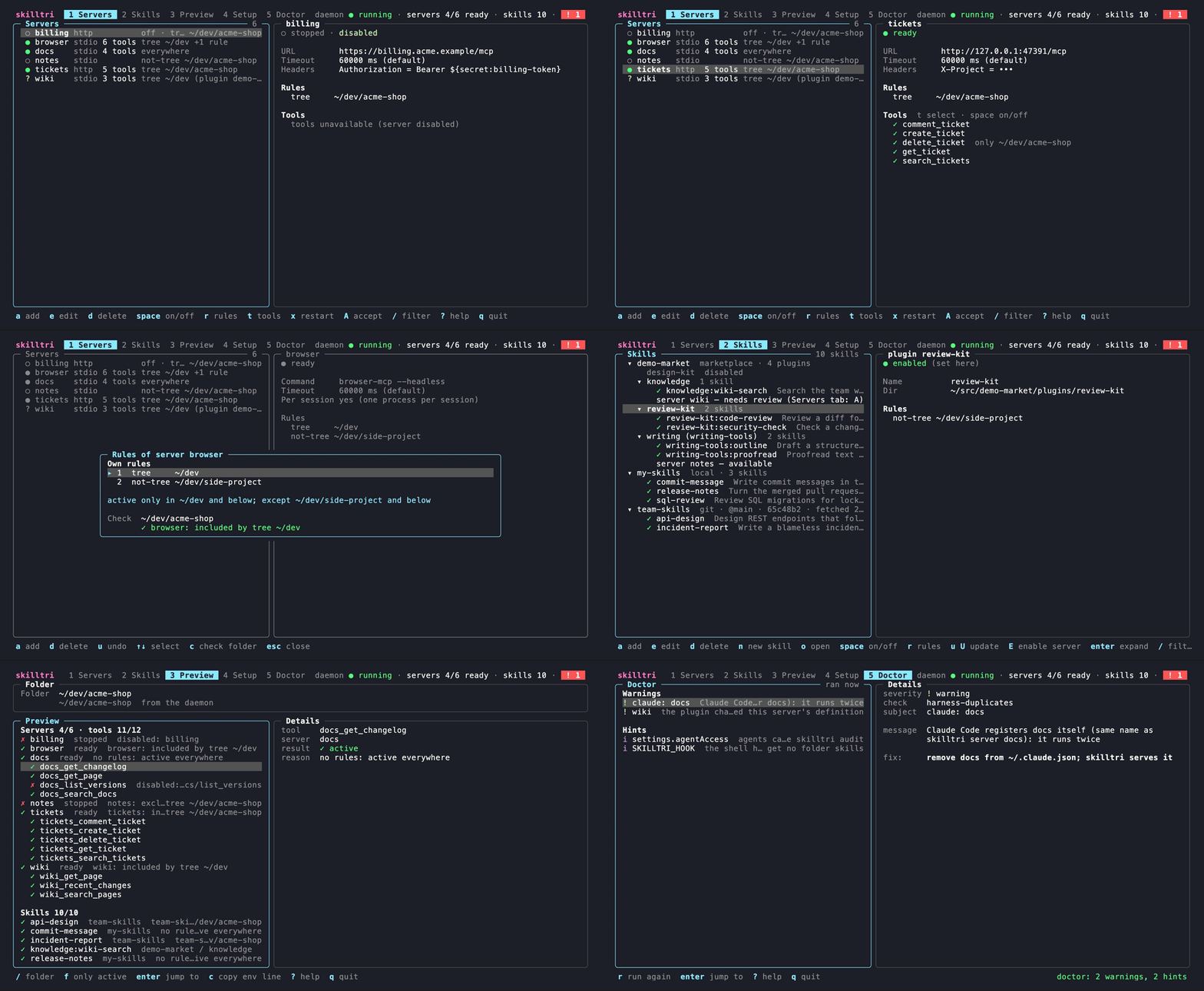
Servers, a server's rules, skills, the preview for a folder and the doctor, with demo data.
| View | What you see | Keys |
|---|---|---|
| Servers | The servers with status (● ready, ○ dim: switched off or not running, ○ yellow: starting, ! error, ? needs review), transport, tool count and rules summary; details with URL or command, timeout, headers (secrets masked), rules, tools and the last errors. | a add · e edit · d delete · space on/off · r rules · t select tools (then space on/off, r rules) · x restart · A accept a plugin server change · / filter |
| Skills | The tree source → plugin → skill with type, ref, commit and last fetch, disabled plugins, warnings and plugin servers; details with the skill's folder, description and the rules that apply (own or inherited). | a add source · e edit · d delete · n new local skill · o open SKILL.md in $EDITOR · space on/off · r rules · u update source · U update all · E enable plugin server · enter expand · / filter |
| Preview | Pick a folder (default: the TUI's working directory) and see the effective servers, tools and skills, each with the rule and level that decided. | / folder · f only active / show all · enter jump to the item · c copy the env line |
| Setup | Registration snippets per harness (✓ when registered, with detected duplicates), the shell hook line per shell, the daemon service, the adapters, the agent access level and the importers. | c copy · i/x install/uninstall the service · s stop the daemon · space adapter on/off, agent access off → read → write · enter preview an import |
| Doctor | The results of skilltri doctor, grouped by severity, with the fix for the selected finding. |
r run again · enter jump to the item |
The rules editor (r) adds rules with a (mode with ←→, folder completion with Tab, Ctrl+S to add), deletes with d, undoes with u and checks a folder with c.
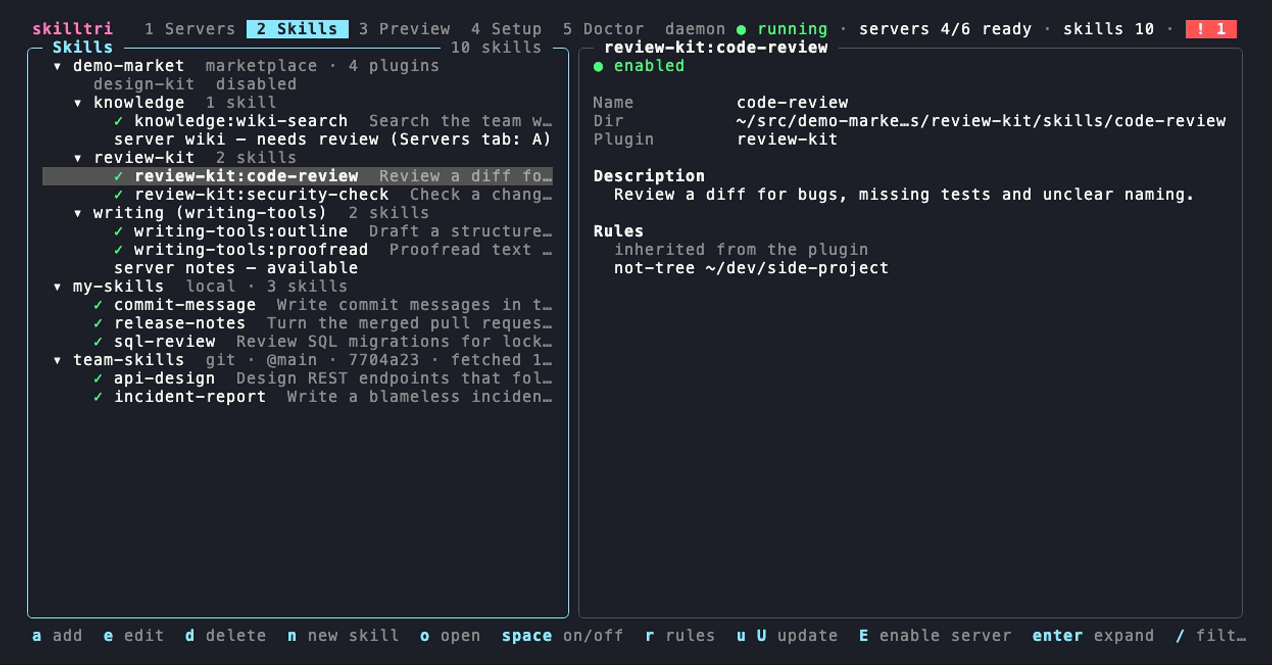
Skills: a marketplace with one disabled plugin, a plugin server waiting for review and one still off, a local and a git source; the selected skill inherits its plugin's rule.
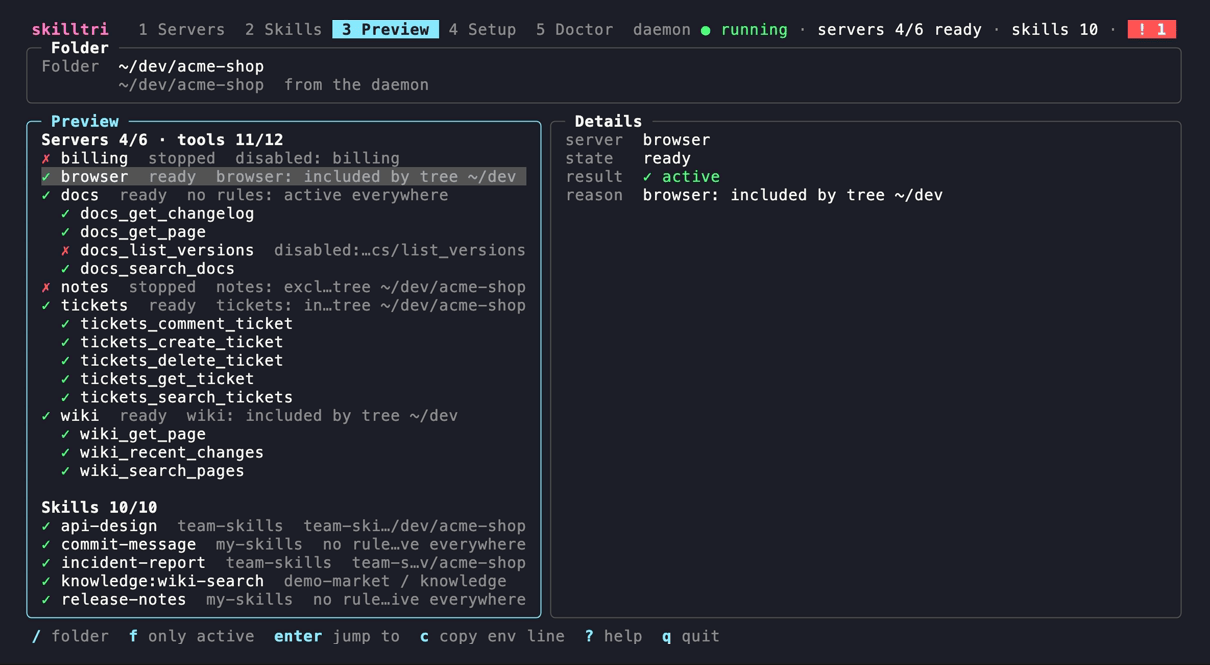
Preview: what a session in ~/dev/acme-shop gets, and why.
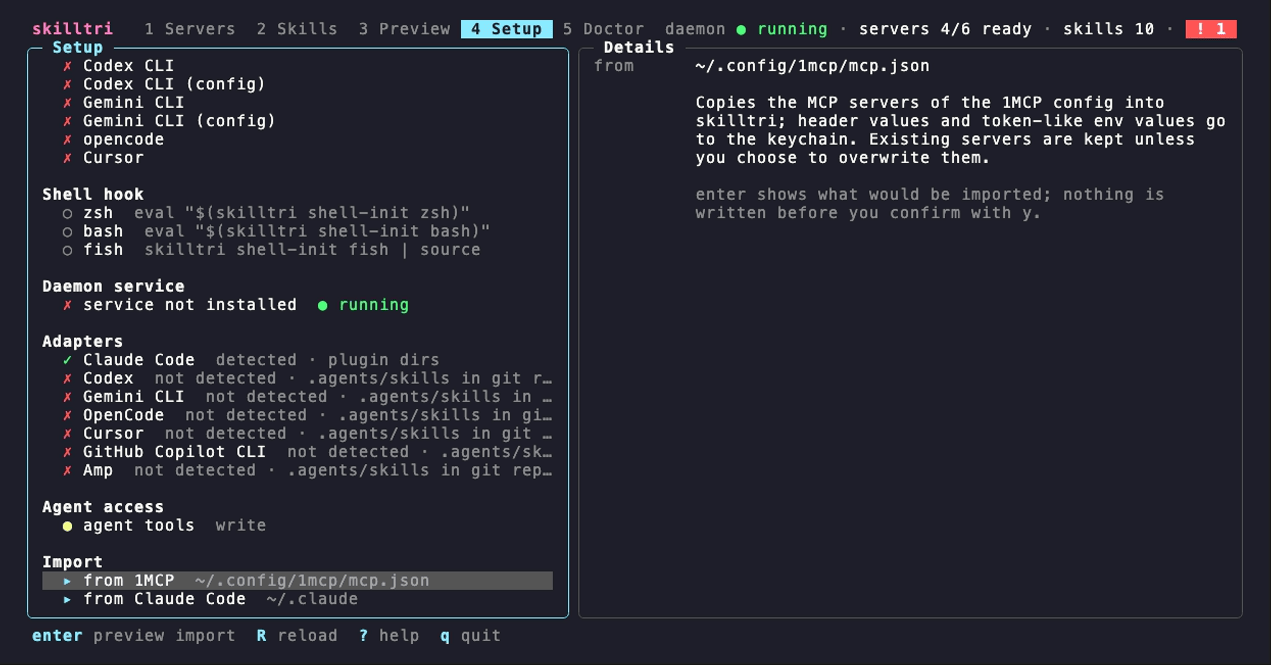
Setup: Claude Code is registered (with one duplicate server), the zsh hook line for ~/.zshrc, the adapters with the harnesses they detected, and agents with write access.
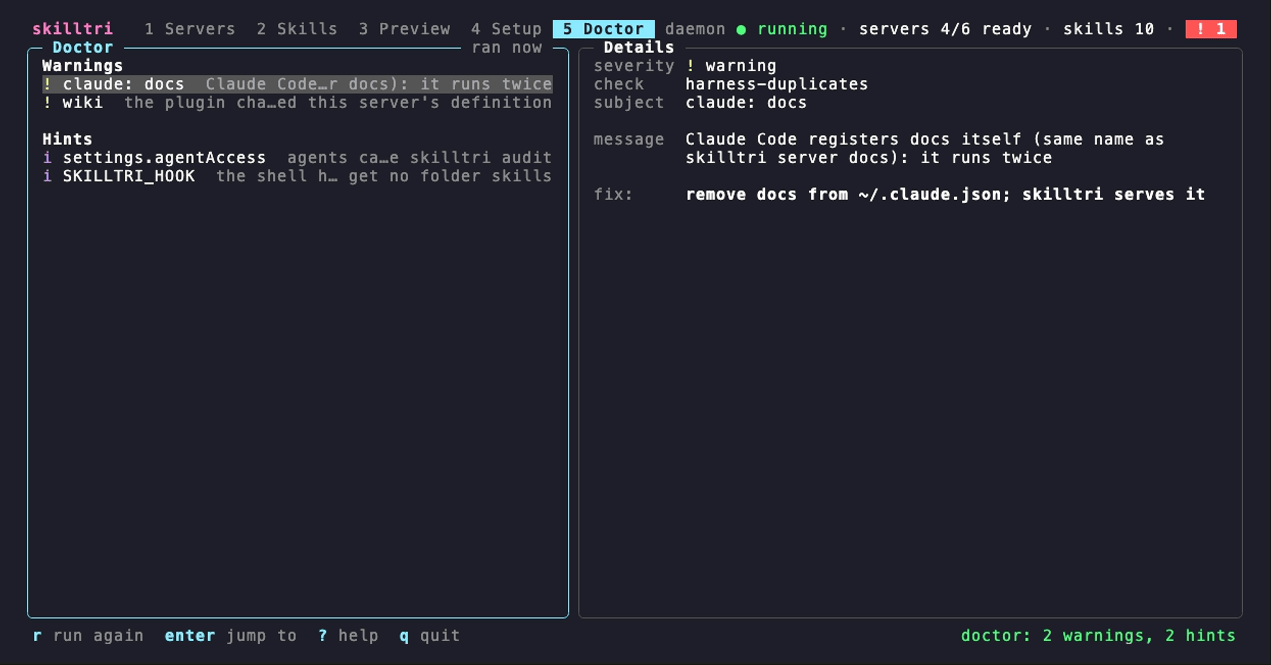
Doctor: a server that Claude Code also registers itself, a plugin server waiting for review, the reminder that agents can change skilltri, and the missing shell hook.
Agent tools
Besides the tools of your servers, every session gets skilltri's own management tools (skilltri_*), so you can ask an agent to set skilltri up for you: "add the docs server only for ~/dev/acme-shop", "why is the tickets server not active here?", "write a skill for our release checklist". A change reaches every running session within seconds (the daemon watches the config), no harness restart needed.
| Tool | What it does |
|---|---|
skilltri_get_status |
daemon, servers with state and errors, sources with commit and error, sessions, the access level |
skilltri_which |
what a session in a folder gets, and why |
skilltri_list_servers |
servers with command or URL, args, env and headers (values masked), rules and tool settings |
skilltri_list_skills |
catalog skills with description, source, enabled and active state, rules |
skilltri_list_sources |
sources with type, location, ref, interval, rules, plugins, commit and error |
skilltri_read_skill |
the SKILL.md and file list of any catalog skill, active or not |
skilltri_run_doctor |
the skilltri doctor findings for the session's folder |
skilltri_add_server, skilltri_update_server, skilltri_remove_server |
manage servers (the name skilltri is reserved) |
skilltri_restart_server |
stop every instance of a server; the next use starts it fresh |
skilltri_enable_plugin_server, skilltri_accept_plugin_server |
take over servers bundled with marketplace plugins |
skilltri_set_enabled |
switch a server, tool, source, plugin or skill on or off |
skilltri_add_rule, skilltri_remove_rule, skilltri_set_rules |
edit folder rules |
skilltri_set_adapter |
switch a harness adapter on or off |
skilltri_add_source, skilltri_remove_source, skilltri_update_sources |
manage skill sources and fetch them now |
skilltri_new_skill, skilltri_write_skill |
create a skill in ~/.config/skilltri/skills/, rewrite the SKILL.md of a skill from a local source (git and marketplace skills are refused) |
settings.agentAccess decides which of them sessions get. Switch it in the Setup tab (space on "agent tools") or in config.json:
| Level | Tools |
|---|---|
write (default) |
all of them |
read |
the read-only ones (status, which, list, read skill, doctor) |
off |
none |
The skill fallback tools (skilltri_load_skill, skilltri_read_skill_file) do not depend on this setting. No tool can change agentAccess itself, and no tool reads or writes the keyring: agents see ${secret:NAME} references and ••• for literal env and header values, and they set values as references or literals.
Security: write lets an agent add a stdio server, and its command runs as you in the skilltri daemon, outside the harness's sandbox and permission prompts. Treat an agent with write access like a shell: keep write for agents you trust (or switch to read), and check skilltri audit for what they changed. Skills from git and marketplace sources are third-party content: skilltri_read_skill says so in a first line, and skilltri_write_skill writes only real files inside a local source folder (no symlinks out of it, never into skilltri's checkouts).
Every call of a changing tool is appended to audit.jsonl in the state folder (time, tool, target, a summary without env or header values, client, folder, result). skilltri audit [-n N] [--json] shows the last N entries (default 20); skilltri doctor reminds you while agents have write access.
skilltri MCP questions
What tools does skilltri MCP provide?
It exposes 12 tools, including skilltri_get_status, skilltri_which, skilltri_list_servers, skilltri_list_skills, skilltri_list_sources.
Can I restrict certain tools to specific projects?
Yes, you can use folder rules like 'only', 'tree', 'not', and 'not-tree' to decide which tools and servers are active in a given directory.
How are skills updated from git repositories?
The skilltri daemon fetches git and marketplace skill sources on a schedule, defaulting to once an hour.
How do I install skilltri?
You can install it via Homebrew using 'brew install baeroe/tap/skilltri' or via Go using 'go install github.com/baeroe/skilltri@latest'.