
Ocean Brain MCP server
Commit Nov 8, 2026Allows an AI client to access and manage a self-hosted knowledge base of connected notes, properties, and project views.
Also known as baealex/ocean-brain
- Stars
- 15
- Tools
- —
- Downloads, 30 days
- —
- Latest version
- —
- Last commit
- Nov 8, 2026
- License
- MIT
What is Ocean Brain MCP?
Ocean Brain allows an AI client to access and manage a self-hosted knowledge base of connected notes, properties, and project views.
Summary generated from the project's README
About Ocean Brain MCP server
Managing a self-hosted knowledge base of connected notes and project views is what Ocean Brain enables for researchers and writers. This tool allows an AI client to interact with a workspace containing backlinks, tags, typed properties, and various organizational views like boards, tables, and calendars. Users can host the service locally using Node.js or Docker, securing the instance with a password and a session secret.
Developers use this server to bridge their personal writing space with AI workflows. The system supports complex organization through saved views, view groups, and note templates. It handles local image assets and allows for exporting content as Markdown or HTML. Integration settings provide granular control, allowing you to set specific read, create, edit, or delete permissions for different connections to ensure your data remains organized and secure.
What you can do with it
- 1Organize research through connectionsAsk the AI to link new research findings to existing notes using backlinks and tags.
- 2Manage project tasks with viewsInstruct the AI to create a new board view to track the status of project decisions.
- 3Structure unstructured writingHave the AI apply typed properties and tags to a collection of raw meeting notes.
- 4Retrieve specific informationRequest the AI to find a specific note using semantic search or by its date in the calendar.
Written from the project's README. Every use case is checked against a quote from it.
Configuration
OCEAN_BRAIN_ALLOW_INSECURE_NO_AUTHOCEAN_BRAIN_PASSWORDOCEAN_BRAIN_SESSION_SECRET
Automated checks
Ran Nov 14, 2026Full report →Not verified yet. A server needs a score of 80, no serious finding, and enough data for us to check. How checks work · What to fix for more points

- Source repository linked and reachablebaealex/ocean-brain is public and reachablegithub.com/baealex/ocean-brain ↗Pass
- Package names this repository as its sourceNot checked
- Build provenance (Sigstore attestation)Not checked
- Open source license (OSI)MITspdx.org/licenses/MIT.html ↗Pass
- Commit or release in the last yearLast commit or release 2026-11-08github.com/baealex/ocean-brain ↗Pass
- OpenSSF ScorecardNot checked
- Package name not close to a popular packageNot checked
- No critical advisory in the package or its dependenciesNot checked
- No hidden instructions to the model0 tool descriptions and the README read; no override phrases, credential paths or hidden charactersPass
- Destructive tools are labelledNot checked
- Remote endpoint answers the MCP handshakeNot checked
README
View on GitHubOcean Brain
A self-hosted writing space for connected notes.
The editor comes first. Capture a note in the browser, connect it to other notes as the thought develops, and keep writing. Incoming references become backlinks automatically. Tags, properties, saved views, and the graph are there when the notes need more structure.
Ocean Brain works well for project decisions, research trails, meeting notes, learning notes, and ideas that are not finished yet.
Try the live demo · Quick start
The demo keeps workspace edits in your browser. It does not include server-backed features such as note snapshots or MCP access.
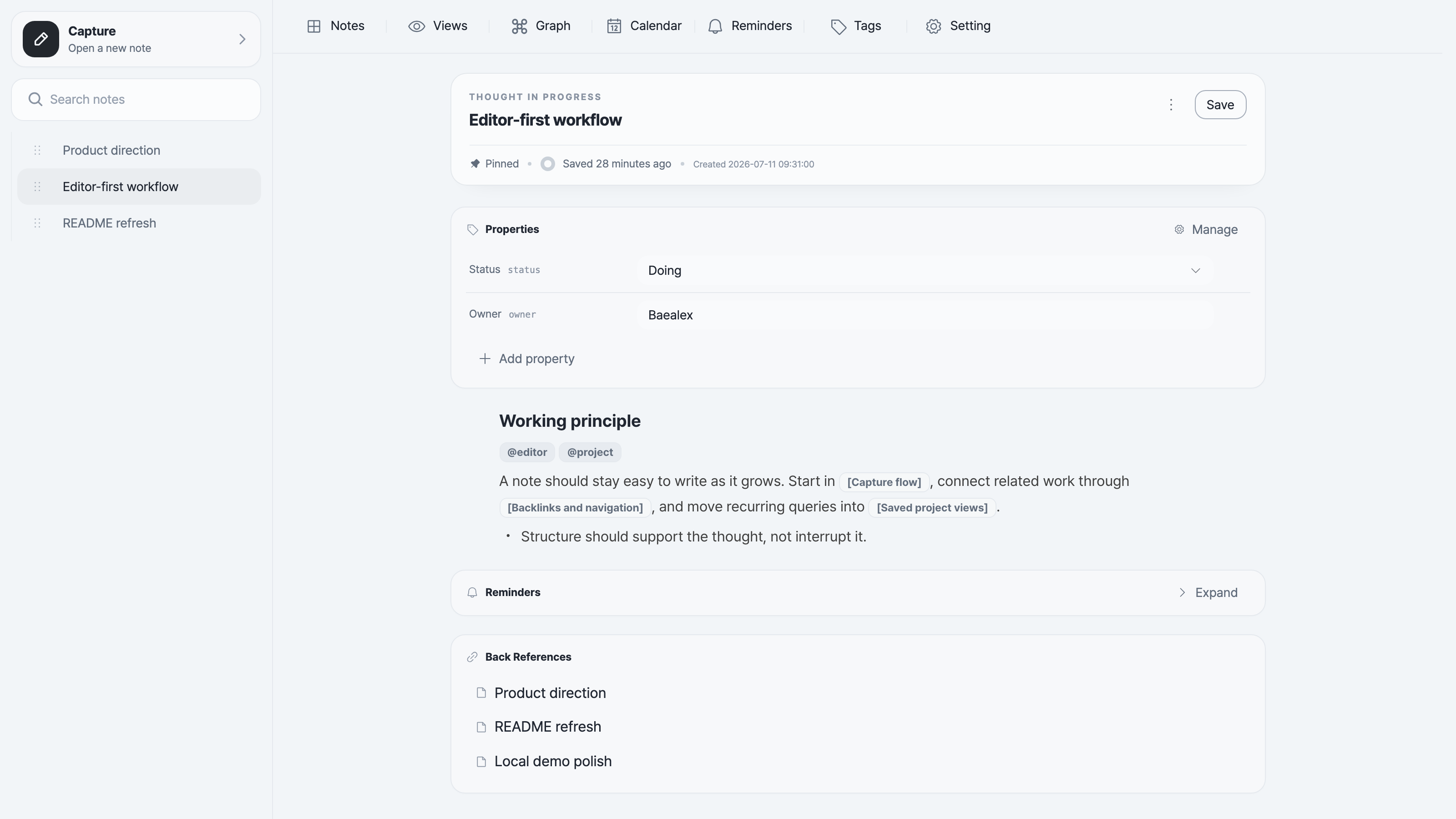
How notes grow
- Write first. Use the block editor and
/commands without deciding the final structure up front. - Connect as you go. Reference notes by title, follow backlinks, or step out into the graph when a thread gets larger.
- Add structure when it helps. Use tags and typed properties to define saved views. Each view has its own filters, sorting, and display format: list, table, board, or calendar. Organize related views into view groups.
- Bring context together. Use
/viewin a note to link an existing saved view alongside your writing. Its filters and results stay shared with the original view. - Create in context. Add notes with matching tags, property defaults, and board status. Choose an existing note as a view's default template to reuse its outline and properties.
- Find the work again. Search the workspace, pin active notes, set reminders, or find notes by date in the calendar.
Notes can be copied as Markdown or downloaded as Markdown or HTML. Local image assets can be bundled with an export when the document needs to stand on its own.
Quick start
These commands enable password mode and bind Ocean Brain to your own machine. Choose a strong password; each example generates a session secret for the current run.
npx
With Node.js 22.13+ or a newer LTS release installed:
OCEAN_BRAIN_PASSWORD='choose-a-strong-password' \
OCEAN_BRAIN_SESSION_SECRET="$(openssl rand -hex 32)" \
HOST=127.0.0.1 \
PORT=6683 \
npx ocean-brain serve
Open http://localhost:6683. Notes and images persist under ~/.ocean-brain.
For a stable session secret, storage settings, open mode, and the complete serve and mcp command reference, see the npm CLI guide.
Docker
docker run --rm \
  -e OCEAN_BRAIN_PASSWORD='choose-a-strong-password' \
  -e OCEAN_BRAIN_SESSION_SECRET="$(openssl rand -hex 32)" \
  -p 127.0.0.1:6683:6683 \
  baealex/ocean-brain:latest
Open http://localhost:6683. This trial is disposable when the container stops.
For a stable session secret, persistent volumes, open mode, exact version tags, and backups, see the Docker guide.
Development
Source development uses Node.js 22.13+, pnpm 10.25.0, and a packages/* workspace. Run pnpm install to set up dependencies, then start the development server in local-only open mode:
OCEAN_BRAIN_ALLOW_INSECURE_NO_AUTH=true \
HOST=127.0.0.1 \
pnpm dev
Use password mode instead when the development server must be reachable beyond your own machine. See DEV_CONVENTION.md and GIT_CONVENTION.md before making changes.
License
Ocean Brain is available under the MIT License.
Integrations
Manage the built-in MCP integration and independently hosted apps in Settings → Integrations, with separate credentials and read/create/edit/delete permissions for each connection. External apps can add an optional page and top-bar shortcut; they run on their own service. Built-in keyword and semantic search remain native features. See the integration guide for connection setup and runnable API examples.
Ocean Brain MCP questions
How can I run Ocean Brain using npx?
You can run it by setting the OCEAN_BRAIN_PASSWORD, OCEAN_BRAIN_SESSION_SECRET, HOST, and PORT environment variables and executing npx ocean-brain serve.
Where are my notes and images stored?
When running via npx, your notes and images persist in the ~/.ocean-brain directory.
Does the live demo include MCP access?
No, the live demo keeps workspace edits in your browser and does not include server-backed features like MCP access.
Can I manage permissions for external integrations?
Yes, you can manage built-in MCP integration and independently hosted apps with separate credentials and specific read/create/edit/delete permissions.