
Azure Functions MCP server
Commit Oct 13, 2026Provides samples for building and deploying custom remote MCP servers to the cloud with Azure Functions in Python.
Also known as Azure-Samples/remote-mcp-functions-python
- Stars
- 125
- Tools
- —
- Downloads, 30 days
- —
- Latest version
- —
- Last commit
- Oct 13, 2026
- License
- MIT
What is Azure Functions MCP?
Azure Functions provides samples for building and deploying custom remote MCP servers to the cloud with Azure Functions in Python.
Summary generated from the project's README
About Azure Functions MCP server
Deploying custom Model Context Protocol servers to the cloud using Python is the primary purpose of these samples. Developers can use these templates to move MCP functionality from local environments to Azure Functions. The repository provides the necessary code and configuration to build, debug locally, and deploy to the cloud using the Azure Developer CLI.
Security is handled through built-in authentication with Microsoft Entra, and advanced users can implement API Management or network isolation via VNET. The collection includes specific implementations for MCP Tools, Resources, and Prompts. To use these samples, you need Python 3.13 or higher, Azure Functions Core Tools, and the Azure Developer CLI for deployment.
Different project samples allow for various capabilities such as QR code generation, code review checklists, and weather application demos. These templates serve as a foundation for anyone needing to host remote MCP capabilities within the Azure ecosystem.
Written from the project's README. Every use case is checked against a quote from it.
Automated checks
Ran Nov 14, 2026Full report →Not verified yet. A server needs a score of 80, no serious finding, and enough data for us to check. How checks work · What to fix for more points

- Source repository linked and reachableazure-samples/remote-mcp-functions-python is public and reachablegithub.com/azure-samples/remote-mcp-functions-python ↗Pass
- Package names this repository as its sourceNot checked
- Build provenance (Sigstore attestation)Not checked
- Open source license (OSI)MITspdx.org/licenses/MIT.html ↗Pass
- Commit or release in the last yearLast commit or release 2026-10-13github.com/azure-samples/remote-mcp-functions-python ↗Pass
- OpenSSF ScorecardNot checked
- Package name not close to a popular packageNot checked
- No critical advisory in the package or its dependenciesNot checked
- No hidden instructions to the model0 tool descriptions and the README read; no override phrases, credential paths or hidden charactersPass
- Destructive tools are labelledNot checked
- Remote endpoint answers the MCP handshakeNot checked
README
View on GitHubGetting Started with Remote MCP Servers using Azure Functions (Python)
This repo has a collection of samples to help you easily build and deploy a custom remote MCP server to the cloud using Azure Functions. You can clone/restore/run on your local machine with debugging, and azd up to have a server in the cloud in a couple minutes.
All sample MCP servers are configured with built-in authentication using Microsoft Entra as the identity provider.
You can also use API Management to secure the server, as well as network isolation using VNET.
If you're looking for samples in more languages check out the .NET/C# and Node.js/TypeScript versions.

Prerequisites
- Python version 3.13 or higher
- Azure Functions Core Tools >=
4.8.0 - Azure Developer CLI 1.23.x or above (for deployment)
- Docker (for the Azurite storage emulator)
- Visual Studio Code (recommended)
- Azure Functions extension
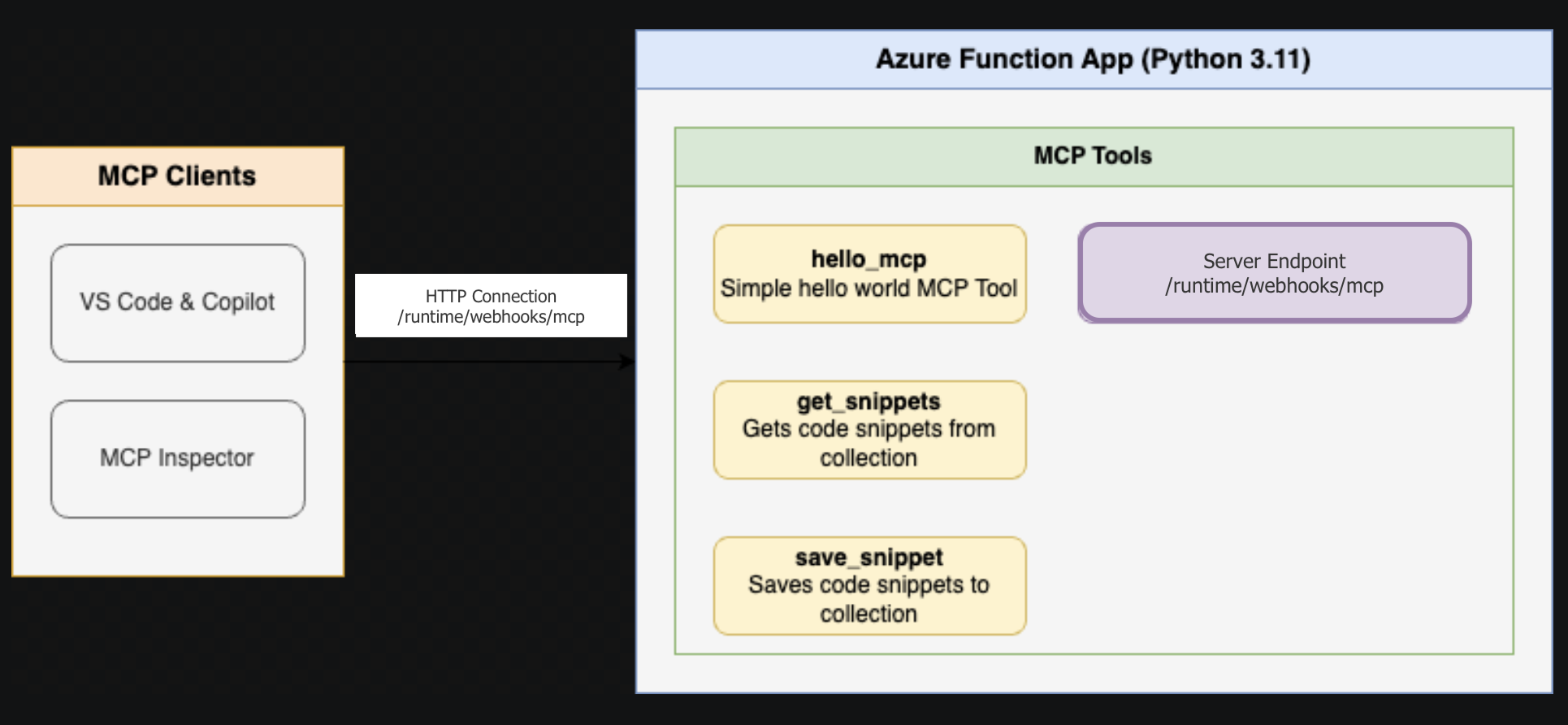
Below is the architecture diagram for the Remote MCP Server using Azure Functions:
Samples in this repo
Each project README has instructions for running locally, connecting to the MCP server, deploying to the cloud, and more.
| Project | Description | Getting Started |
|---|---|---|
| FunctionsMcpTool | MCP Tools — snippet CRUD, QR code generation, structured metadata, batch operations | README |
| FunctionsMcpResources | MCP Resources — snippet resource template, server info resource | README |
| FunctionsMcpPrompts | MCP Prompts — code review checklist, summarize content, generate docs | README |
| McpWeatherApp | Weather App — MCP App demo with interactive UI | README |
Next Steps
- Learn more about the Azure Functions MCP extension
- Learn more about built-in MCP auth
- Follow our blog posts on Azure SDK Blog and Tech Community for updates.
Azure Functions MCP questions
What language and version do I need for these Azure Functions MCP samples?
The samples require Python 3.13 or higher, plus Azure Functions Core Tools 4.8.0+ and Azure Developer CLI 1.23.x or above for deployment.
How do I deploy the remote MCP server to the cloud?
You can deploy with the Azure Developer CLI using the azd up command, which provisions a server in the cloud in a couple of minutes.
How is authentication handled for these MCP servers?
All sample MCP servers use built-in authentication with Microsoft Entra as the identity provider, and API Management or VNET isolation can add further security.
What sample MCP servers are included in the repo?
The repo includes FunctionsMcpTool for tools, FunctionsMcpResources for resources, FunctionsMcpPrompts for prompts, and McpWeatherApp for an interactive MCP App demo.
Can I run the MCP server locally before deploying?
Yes, you can clone, restore, and run the samples on your local machine with debugging before deploying to Azure.