
Enables retrieval practice for coding agents by asking multiple-choice questions about recent code changes to reinforce learning.
Also known as atomicreps/cli, cli
- Stars
- 0
- Tools
- —
- Downloads, 30 days
- —
- Latest version
- 0.1.0
- Last commit
- Oct 6, 2026
- License
- MIT
What is atomicreps MCP?
atomicreps enables retrieval practice for coding agents by asking multiple-choice questions about recent code changes to reinforce learning.
Summary generated from the project's README
About atomicreps MCP server
Atomic Reps is a tool designed to help developers reinforce their coding knowledge through retrieval practice. It works by presenting multiple-choice questions to users immediately after a coding agent completes a task that involves file changes. This process turns active development sessions into learning opportunities by testing memory on recent code modifications.
The server integrates with various MCP clients including Claude Code, GitHub Copilot, Cursor, Windsurf, and Codex. Users set up the server via a terminal wizard using Node 24 or higher, which requires creating a free account and authenticating through a web browser. Once connected, the server manages the frequency, difficulty, and specific topics of the questions to maintain a controlled learning pace.
Developers can customize their experience using tools like rep, answer, me, and settings. The system tracks progress through streaks and summaries while allowing users to mute specific topics or adjust intensity levels. It prioritizes privacy by only sending catalog handles and metadata rather than actual code contents or prompts.
What you can do with it
- 1Reinforce recent code changesAsk the AI to present a multiple-choice question about a bug fix or code modification just completed.
- 2Track learning progressView your current learning streak, skills, and session summaries to monitor improvement.
- 3Customize study topicsMute specific programming topics or sub-skills that you do not wish to practice.
- 4Manage difficulty and frequencyAdjust how often questions appear and the level of difficulty for the retrieval practice.
Written from the project's README. Every use case is checked against a quote from it.
How to install atomicreps MCP
Formats verified 10 Nov 2026Add to CursorAdd to GooseInstall atomicreps MCP in Claude Code
$ claude mcp add cli -- npx -y atomicrepsInstall atomicreps MCP in Cursor
~/.cursor/mcp.json
{
  "mcpServers": {
    "cli": {
      "command": "npx",
      "args": [
        "-y",
        "atomicreps"
      ]
    }
  }
}Install atomicreps MCP in VS Code
.vscode/mcp.json
{
  "servers": {
    "cli": {
      "type": "stdio",
      "command": "npx",
      "args": [
        "-y",
        "atomicreps"
      ]
    }
  }
}Install atomicreps MCP in VS Code CLI
$ code --add-mcp '{"name":"cli","type":"stdio","command":"npx","args":["-y","atomicreps"]}'Install atomicreps MCP in Claude Desktop
claude_desktop_config.json
{
  "mcpServers": {
    "cli": {
      "command": "npx",
      "args": [
        "-y",
        "atomicreps"
      ]
    }
  }
}Install atomicreps MCP in Codex
$ codex mcp add cli -- npx -y atomicrepsInstall atomicreps MCP in Codex config.toml
~/.codex/config.toml
[mcp_servers.cli]
command = "npx"
args = ["-y", "atomicreps"]
Install atomicreps MCP in Gemini CLI
$ gemini mcp add -s user cli npx -- -y atomicrepsInstall atomicreps MCP in Gemini settings.json
~/.gemini/settings.json
{
  "mcpServers": {
    "cli": {
      "command": "npx",
      "args": [
        "-y",
        "atomicreps"
      ]
    }
  }
}Automated checks
Ran Nov 15, 2026Full report →Passed our automated checks. That is not a security audit: read the code and give the server the narrowest access it needs. How checks work

- Source repository linked and reachableatomicreps/cli is public and reachablegithub.com/atomicreps/cli ↗Pass
- Package names this repository as its sourceatomicreps names atomicreps/cli as sourcenpmjs.com/package/atomicreps ↗Pass
- Build provenance (Sigstore attestation)No build attestation published for this releaseNot checked
- Open source license (OSI)MITspdx.org/licenses/MIT.html ↗Pass
- Commit or release in the last yearLast commit or release 2026-10-06github.com/atomicreps/cli ↗Pass
- OpenSSF ScorecardNot checked
- Package name not close to a popular packageNo popular package one edit away from atomicrepsPass
- No critical advisory in the package or its dependencies1 resolved dependencies checked; no critical advisoryosv.dev ↗Pass
- No hidden instructions to the model0 tool descriptions and the README read; no override phrases, credential paths or hidden charactersPass
- Destructive tools are labelledNot checked
- Remote endpoint answers the MCP handshakeHTTPS endpoint answered 401 (sign-in required)Pass
README
View on GitHubatomicreps


One short question about the thing you just built. Works inside Claude Code, GitHub Copilot, Cursor, Windsurf, Codex, or any MCP client.
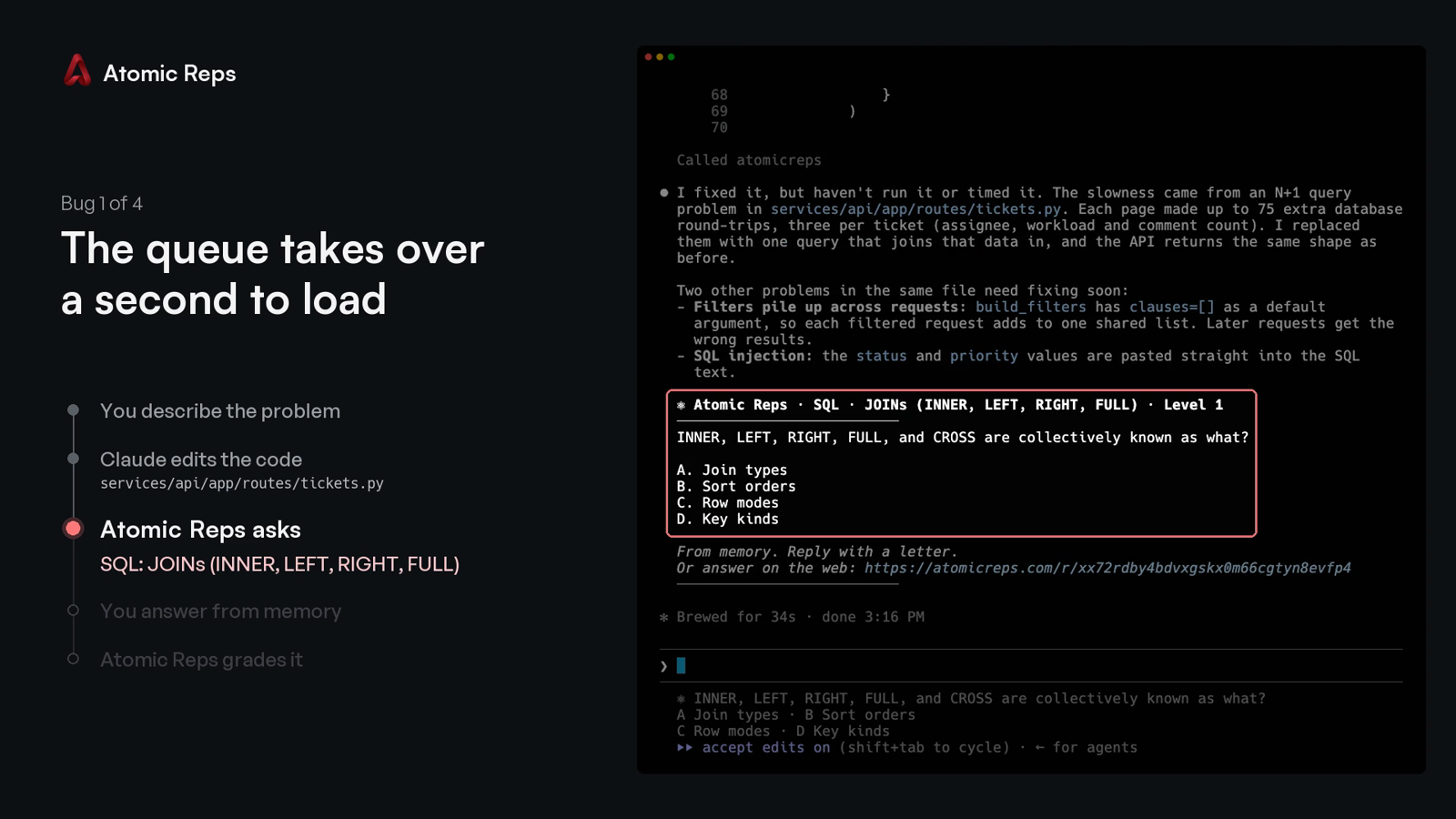
You describe a bug, your coding agent changes the code, and Atomic Reps asks you one multiple-choice question about that change. You answer with a letter, from memory, and the server grades it.
The two-minute demo: four bugs fixed in Claude Code, one question after each.
https://github.com/user-attachments/assets/521c1bb3-9f75-4c25-8b71-ed763de7debc
Quick start
Requires Node 24+ and a free account. On an older Node, every command prints the version it needs instead of starting.
npx atomicreps
The first run is a setup wizard:
- Pick what to practise, how often, and how hard.
- Sign in: the terminal prints a code, and you type it at atomicreps.com/connect.
- Pick your editors.
connectwrites only the entries you tick.
Then go back to work. When your agent finishes a task that changed files, the question appears after its answer:
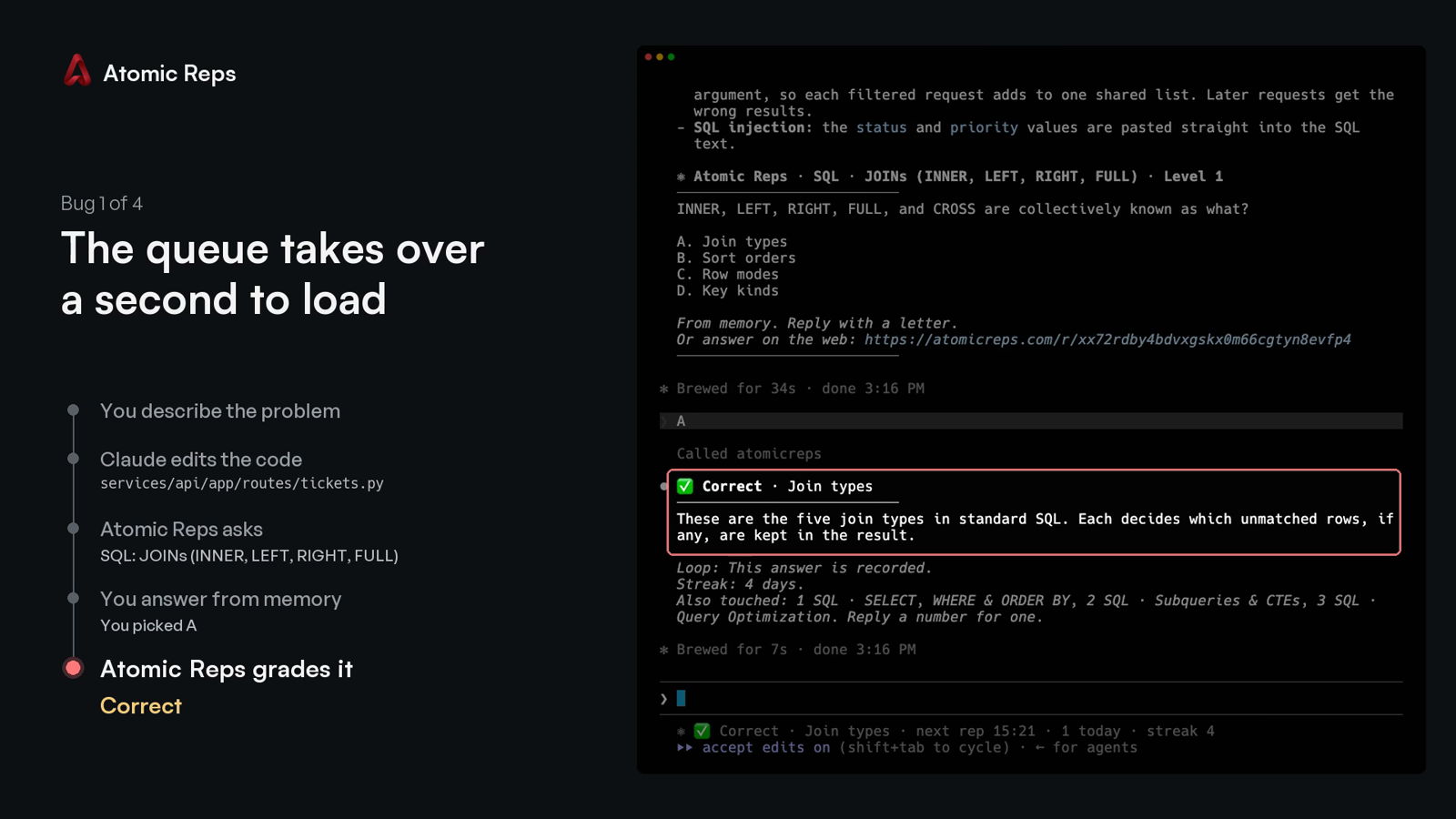
Type the letter. The verdict comes back with a one-line explanation, and the next line names up to three other topics the session touched:
Every run after the first opens the terminal screen: your streak, this session, your topics, mutes and rate.
Commands
npx atomicreps            the terminal screen; the setup wizard on the first run
npx atomicreps setup      the setup wizard again: areas, topics, how often, how hard
npx atomicreps login      sign in from a browser with a typed code
npx atomicreps connect    register the server with your editor
npx atomicreps connect --pin   pin the launch args to this installed version, for a command you can commit
npx atomicreps mcp        the stdio MCP server process (what the editor launches)
npx atomicreps doctor     token, server ping, version, when the next rep may come, allowlist
npx atomicreps why        the last ten times a question could have appeared, and why it did or did not
npx atomicreps logout     forget the token on this machine
npx atomicreps logout --purge   also forget your reps and status, and offer to undo connect
Add --alpha to any command to use staging. It keeps its own token and cache,
so you can be signed in to both staging and production at once.
Plain connect writes npx -y atomicreps mcp, which always resolves to
whatever is latest at launch. connect --pin writes npx -y atomicreps@<version> mcp instead, the version this CLI is running, so an
organisation can review one exact command and commit it rather than trusting
npx to fetch the same thing twice.
Claude Code
npx atomicreps connect offers four Claude Code rows:
- Claude Code registers the server at user scope.
- …and a question at the end of each turn adds a
Stophook and aUserPromptSubmithook to~/.claude/settings.json. When Claude finishes a turn that changed files, the question prints in your terminal without Claude taking an extra turn, and the letter you type next is graded. Hooks you already have stay. - …and allow its four tools adds
rep,answer,meandsettingstopermissions.allow, so the first question does not stop on a permission prompt. - …and a Claude Code status line shows the open question under the prompt. A status line you already have keeps printing first.
Without connect, the server alone:
claude mcp add --scope user atomicreps -- npx -y atomicreps mcp
GitHub Copilot
npx atomicreps connect offers VS Code and Copilot CLI as rows. Without it:
code --add-mcp '{"name":"atomicreps","type":"stdio","command":"npx","args":["-y","atomicreps","mcp"]}'
copilot mcp add atomicreps -- npx -y atomicreps mcp
Copilot in JetBrains, Visual Studio, Xcode and Eclipse reads the same entry
from its own mcp.json (Settings, then MCP). A team can
commit it as .vscode/mcp.json so every clone has it:
{
  "servers": {
    "atomicreps": { "type": "stdio", "command": "npx", "args": ["-y", "atomicreps", "mcp"] }
  }
}
Copilot reads the server's instructions and calls rep when a task ends,
the same as Cursor and Codex. Approve the four tools once and they stay
approved.
Cursor, Windsurf, Codex and other clients
connect adds one entry to ~/.cursor/mcp.json or
~/.codeium/windsurf/mcp_config.json, and runs codex mcp add for Codex.
Anything already in those files stays. By hand:
codex mcp add atomicreps -- npx -y atomicreps mcp
{
  "mcpServers": {
    "atomicreps": { "command": "npx", "args": ["-y", "atomicreps", "mcp"] }
  }
}
Any other MCP client takes the same command: npx -y atomicreps mcp. The
"I'll set it up myself" row in connect prints it and writes nothing.
How a rep is served
When your coding agent finishes a task, it calls rep once with a few words
for what changed. The server picks one question, or nothing, and your agent
shows it to you unchanged. Reply with a letter, or ignore it.
Under the verdict, one line names up to three other things the session touched. A number asks about one of them. "Never Swift" mutes a topic permanently. "Not this topic" mutes it for thirty days. "Unmute Swift" removes the mute. "How am I doing" prints your summary.
The server enforces the pace, not the agent. It sets a minimum gap between
automatic reps, a daily cap, and mute and off. It refuses an answer typed
within seconds of the question. It never includes the answer key in a rep.
Every failure returns no rep rather than an error; doctor says why.
Tools
| tool | what it does |
|---|---|
rep({ touched?, ask?, topic?, kind?, exclude? }) |
one question, one insight, or nothing; ask takes a handle from an offer |
answer({ pick, id? }) |
the verdict, the explanation, and the offer line |
me({ show? }) |
summary, skills, reps, streak or mutes |
settings({ intensity?, topics?, levels?, prefer?, mute?, muteMinutes?, days?, unmute?, dialog? }) |
the rate, the pinned topics, the difficulty range, the preferred areas, mutes, the dialog |
Handles are topic or topic.subskill (react.hooks_core). Fifty sub-skill
slugs repeat across topics, so the topic is always part of the name.
settings({ dialog: true }) asks for the letter in your editor's native
dialog instead of the chat. It blocks the turn, so it is a setting, never the
default.
Privacy
What leaves your machine on a rep call: catalog handles with small weights.
Also package, file extension and folder names the public catalog already
knows. Your agent's touched words are matched to handles on your machine;
the words themselves are never sent. An unknown package name is dropped. A
private name (@acme/react-internal) is sent as its public alias (react).
We never send your code, a file's contents, or a prompt. npx atomicreps setup prints the exact payload for your repo, before you sign in.
npx atomicreps mcp forwards each JSON-RPC message from your editor to the
Atomic Reps server with your token. The answer comes back the same way.
ATOMICREPS_API is honoured only for an Atomic Reps or loopback address,
since your token goes wherever it points. Anything else is ignored and
reported by doctor; set ATOMICREPS_UNSAFE_ORIGIN=1 to override.
Login
npx atomicreps prints a code. Type it at atomicreps.com/connect while
signed in; a forwarded link approves nothing. The token is saved in
~/.config/atomicreps/config.json (mode 0600), prefixed arep_ so secret
scanners find it. You can revoke it from your account page. logout forgets
it; logout --purge also deletes the reps and status this machine cached, then
lists every editor entry connect wrote (both channels) and removes the ones you
leave ticked.
The trust boundary, and how to report a vulnerability: SECURITY.md.
Check it yourself
dist/cli.js is built from these files and nothing else. The package has no
runtime dependencies.
npm install
npm run build    # writes dist/cli.js from src
npm test         # the behaviour described above, as tests
To compare with what npm serves: npm pack atomicreps, then read its
dist/cli.js beside the one you just built. Everything the client sends is in
src/api.ts. Everything it reads from your repository is in src/infer.ts.
MIT.
atomicreps MCP questions
How do I add atomicreps MCP to Claude Code?
Run claude mcp add cli -- npx -y atomicreps in your terminal. Add --scope user to make it available in every project.
How do I add atomicreps MCP to Cursor?
Open ~/.cursor/mcp.json and add the server under mcpServers, using the Cursor config shown in the install section above.
How does Atomic Reps work with my coding agent?
When your agent changes code, the server asks a multiple-choice question about that change. You answer with a letter from memory and the server grades it.
Does the server send my actual code to the service?
No, the server never sends your code, file contents, or prompts. It only uses catalog handles and package/folder names to match topics.
Which editors and AI clients are supported?
It works with Claude Code, GitHub Copilot, Cursor, Windsurf, Codex, and any other MCP client.
How do I set up Atomic Reps?
You can start by running npx atomicreps, which launches a setup wizard to pick practice areas, frequency, and difficulty.