
Generates visual architecture diagrams and concurrency bottleneck estimates from any codebase using static analysis.
Also known as askuma/workflow-generator, workflow-generator, workflow-generator-mcp
- Stars
- 0
- Tools
- —
- Downloads, 30 days
- —
- Latest version
- 0.5.0
- Last commit
- Oct 26, 2026
- License
- MIT
What is Workflow Generator MCP?
Workflow Generator generates visual architecture diagrams and concurrency bottleneck estimates from any codebase using static analysis.
Summary generated from the project's README
About Workflow Generator MCP server
Visualizing system architecture and identifying performance bottlenecks from a codebase is what Workflow Generator enables for developers. By performing static analysis on projects written in Python, Node.js, Go, Java, Rust, or Ruby, it produces a comprehensive WORKFLOW.html report. This report includes a dark-mode visual diagram, a dependency graph, and estimates for concurrency ceilings and practical throughput.
Users can run this as a standalone CLI tool or connect it to MCP-compatible clients like Claude Desktop, Cursor, VS Code, or Zed. The server provides two primary tools: generate_workflow for creating the full HTML report and analyze_workflow for retrieving a structured JSON summary. It automatically ignores vendored directories like node_modules or venv to ensure accuracy. For deeper insights, you can provide an access log to overlay real request counts onto the dependency graph, and the tool even generates a k6 load-test script to verify its static-analysis estimates against real-world measurements.
What you can do with it
- 1Generate visual system diagramsAsk the AI to create a visual representation of how all components in your project interact.
- 2Estimate concurrency limitsDetermine the maximum number of concurrent requests your current architecture can handle.
- 3Identify performance bottlenecksFind the specific layers in your stack that are limiting your system throughput.
- 4Map codebase dependenciesVisualize the relationship between source files and external services like databases or LLM providers.
Written from the project's README. Every use case is checked against a quote from it.
How to install Workflow Generator MCP
Formats verified 10 Nov 2026Add to CursorAdd to GooseInstall Workflow Generator MCP in Claude Code
$ claude mcp add workflow-generator -- uvx workflow-generator-mcpInstall Workflow Generator MCP in Cursor
~/.cursor/mcp.json
{
  "mcpServers": {
    "workflow-generator": {
      "command": "uvx",
      "args": [
        "workflow-generator-mcp"
      ]
    }
  }
}Install Workflow Generator MCP in VS Code
.vscode/mcp.json
{
  "servers": {
    "workflow-generator": {
      "type": "stdio",
      "command": "uvx",
      "args": [
        "workflow-generator-mcp"
      ]
    }
  }
}Install Workflow Generator MCP in VS Code CLI
$ code --add-mcp '{"name":"workflow-generator","type":"stdio","command":"uvx","args":["workflow-generator-mcp"]}'Install Workflow Generator MCP in Claude Desktop
claude_desktop_config.json
{
  "mcpServers": {
    "workflow-generator": {
      "command": "uvx",
      "args": [
        "workflow-generator-mcp"
      ]
    }
  }
}Install Workflow Generator MCP in Codex
$ codex mcp add workflow-generator -- uvx workflow-generator-mcpInstall Workflow Generator MCP in Codex config.toml
~/.codex/config.toml
[mcp_servers.workflow-generator]
command = "uvx"
args = ["workflow-generator-mcp"]
Install Workflow Generator MCP in Gemini CLI
$ gemini mcp add -s user workflow-generator uvx -- workflow-generator-mcpInstall Workflow Generator MCP in Gemini settings.json
~/.gemini/settings.json
{
  "mcpServers": {
    "workflow-generator": {
      "command": "uvx",
      "args": [
        "workflow-generator-mcp"
      ]
    }
  }
}Automated checks
Ran Nov 14, 2026Full report →Passed our automated checks. That is not a security audit: read the code and give the server the narrowest access it needs. How checks work

- Source repository linked and reachableaskuma/workflow-generator is public and reachablegithub.com/askuma/workflow-generator ↗Pass
- Package names this repository as its sourceworkflow-generator-mcp names askuma/workflow-generator as sourcepypi.org/project/workflow-generator-mcp/ ↗Pass
- Build provenance (Sigstore attestation)Sigstore attestation for workflow-generator-mcppypi.org/project/workflow-generator-mcp/ ↗Pass
- Open source license (OSI)MITspdx.org/licenses/MIT.html ↗Pass
- Commit or release in the last yearLast commit or release 2026-10-26github.com/askuma/workflow-generator ↗Pass
- OpenSSF ScorecardNot checked
- Package name not close to a popular packageNo popular package one edit away from workflow-generator-mcpPass
- No critical advisory in the package or its dependencies29 resolved dependencies checked; no critical advisoryosv.dev ↗Pass
- No hidden instructions to the model0 tool descriptions and the README read; no override phrases, credential paths or hidden charactersPass
- Destructive tools are labelledNot checked
- Remote endpoint answers the MCP handshakeNot checked
README
View on GitHubworkflow-generator
Scan any project and generate WORKFLOW.html — a dark-mode visual system diagram showing every component, how they talk to each other, and where your throughput ceiling actually is.
Works with Python, Node.js, Go, Java, Rust, Ruby, and mixed projects. No external dependencies for the core scanner.
Vendored and generated directories (node_modules, venv, site-packages, dist, …) are never scanned,
and capacity figures are clearly labeled as static-analysis estimates.
Live demo → — generated from fastapi/full-stack-fastapi-template, unmodified.
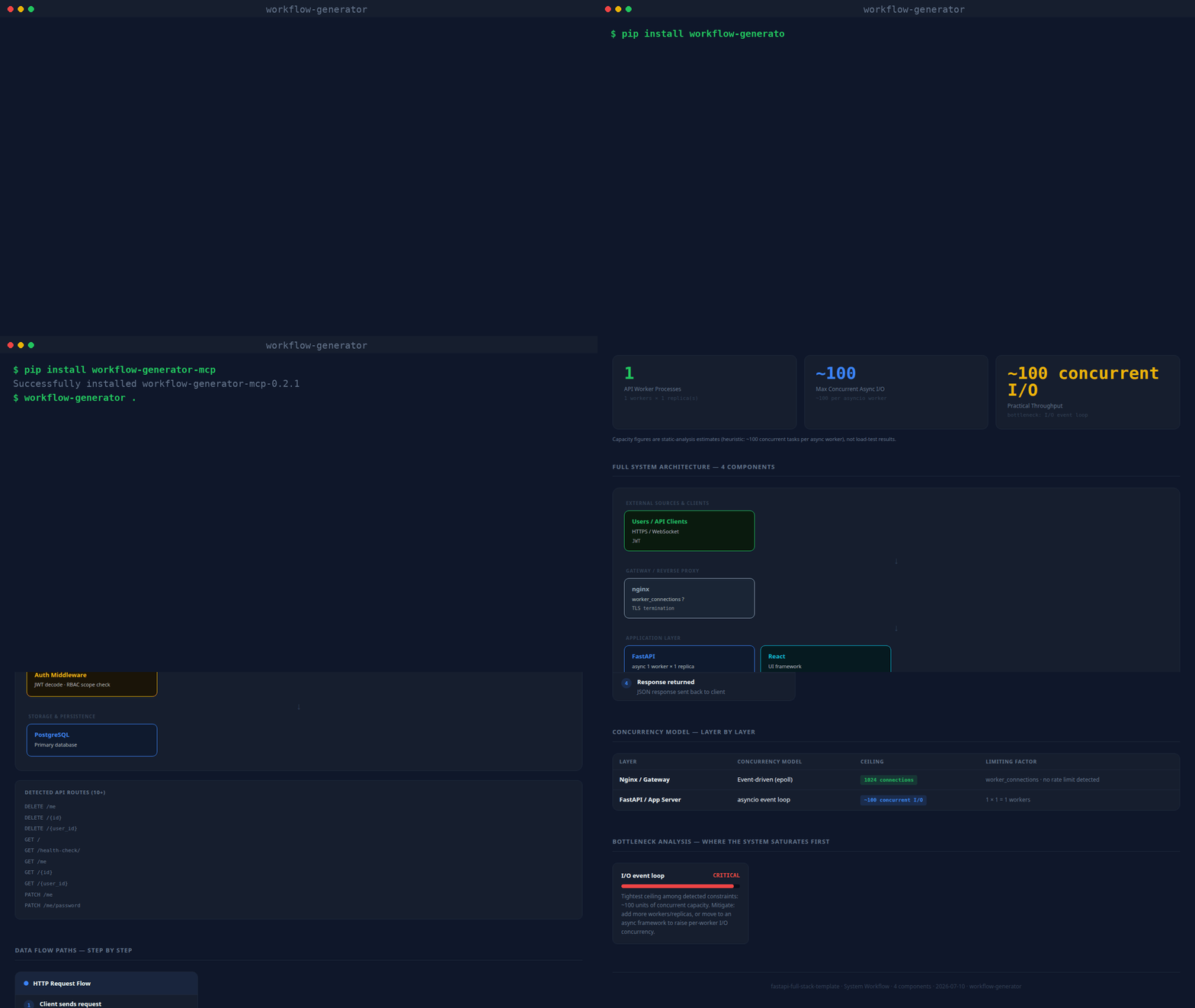
(real CLI output, unscripted — static screenshot if you'd rather not autoplay)
What it produces
Every generated page contains:
| Section | What you get |
|---|---|
| Stat row | Workers · Concurrent I/O ceiling · Semaphore limit · Rate limit · Practical throughput |
| Architecture diagram | Layered flow: external sources → gateway → API → queues → AI → storage |
| Data flow cards | Write path, read/query path, background jobs — inferred from what's detected |
| Concurrency table | Every layer: model · ceiling · limiting factor |
| Bottleneck analysis | Ranked CRITICAL → LOW with mitigation notes |
| Codebase dependency graph | Force-directed module/import graph — click a node to isolate its neighbors, hover for file details. Import-direction edges are clearly distinguished from real observed traffic (see below) |
| Guided tour | Spotlight walkthrough of every section, shown automatically the first time a report is opened; replay anytime with the ? button |
Codebase dependency graph
Every source file (Python, JS/TS, Go, Java, Rust, Ruby) becomes a node; every real import becomes
an edge — resolved with a language-appropriate parser (Python's ast module, regex for JS/TS/Go/
Java/Rust/Ruby), not guessed. Files that match an already-detected component (an LLM call, a
database client, a queue) get an edge to that component too, so you can see exactly which files
talk to Redis, OpenAI, etc. Large repos (350+ files) are automatically aggregated into
directory-level nodes so the graph stays readable; override with --graph-detail files or
--graph-detail dirs.
Test files (tests/, test_*.py, conftest.py, *.spec.ts, *_test.go, …) get their own
Test Graph section below the main one, showing which modules and services each test reaches.
Fixtures and test doubles name every service they exercise, so keeping them in the main graph
buries the real dependency structure under service edges.
Both sections have a Flow | Graph toggle over the same nodes and edges. Flow (the default up to 80 nodes) is a left-to-right layered diagram: columns are dependency depth from the sources (HTTP entry and files nothing imports), every detected service is its own node in the last column, and import cycles are drawn dashed. Graph is the force-directed view. Moving dots show data going both ways: a filled dot is the call/request, a hollow dot the return/response. On graphs with more than 60 edges, only the paths of the clicked or hovered node animate. Search, "hide isolated" and the selected node are shared between the two views.
The older layered Full System Architecture diagram is collapsed by default, since the Architecture Map covers the same ground.
By default the graph only shows what the code says (import direction, static "this file calls
Redis"), which is honest but not the same as real traffic. Pass --access-log /path/to/access.log
(any combined/common log format) to overlay real observed request counts onto the HTTP-entry
edges — and the generated report includes a ready-to-run k6 load-test script
covering up to 5 detected routes, so the "Practical throughput" number can be checked against a
real measurement instead of only a static-analysis estimate.
What it detects
| Category | Examples |
|---|---|
| API frameworks | FastAPI, Flask, Django, Express, Nest.js, Gin |
| Gateways | nginx, Caddy, Traefik (with rate limits + worker_connections) |
| LLM providers | OpenAI, Anthropic Claude, Cohere, AWS Bedrock |
| Vector stores | Qdrant, Pinecone, Weaviate, ChromaDB, pgvector, FAISS, Milvus |
| Databases | PostgreSQL, MySQL, MongoDB, SQLite, Redis |
| Queues | Celery, BullMQ, Kafka, RabbitMQ, RQ, AWS SQS |
| Async primitives | asyncio.Semaphore, run_in_executor, asyncio.gather, asyncio.Lock |
| Workers | --workers N (uvicorn/gunicorn), replicas: (docker-compose), PM2 instances |
| External sources | Jira, Azure DevOps, Slack, GitHub, Stripe, Salesforce, Twilio |
| Evaluation | TruLens, RAGAS, LangSmith |
Install
pip (CLI + MCP server)
pip install workflow-generator-mcp

workflow-generator . WORKFLOW.html       # CLI: scan and write the report
workflow-generator-mcp                    # stdio MCP server
With pip installed, any MCP host config reduces to:
{
  "mcpServers": {
    "workflow-generator": { "command": "workflow-generator-mcp" }
  }
}
Claude Code (skill)
mkdir -p ~/.claude/skills
git clone https://github.com/askuma/workflow-generator.git ~/.claude/skills/workflow-generator
Then in any Claude Code session:
/workflow-generator
/workflow-generator /path/to/project
MCP server (Claude Desktop, VS Code, Cursor, Zed, Windsurf, Continue)
1. Install the dependency:
pip install mcp
2. Add to your MCP host config (replace ~ with your actual home path):
~/Library/Application Support/Claude/claude_desktop_config.json (Mac)
%APPDATA%\Claude\claude_desktop_config.json (Windows)
{
  "mcpServers": {
    "workflow-generator": {
      "command": "python3",
      "args": ["~/.claude/skills/workflow-generator/mcp/server.py"]
    }
  }
}
.vscode/mcp.json
{
  "servers": {
    "workflow-generator": {
      "type": "stdio",
      "command": "python3",
      "args": ["~/.claude/skills/workflow-generator/mcp/server.py"]
    }
  }
}
~/.cursor/mcp.json
{
  "mcpServers": {
    "workflow-generator": {
      "command": "python3",
      "args": ["~/.claude/skills/workflow-generator/mcp/server.py"]
    }
  }
}
.zed/settings.json
{
  "context_servers": {
    "workflow-generator": {
      "command": {
        "path": "python3",
        "args": ["~/.claude/skills/workflow-generator/mcp/server.py"]
      }
    }
  }
}
~/.windsurf/mcp_config.json
{
  "mcpServers": {
    "workflow-generator": {
      "command": "python3",
      "args": ["~/.claude/skills/workflow-generator/mcp/server.py"]
    }
  }
}
3. Restart your tool, then ask:
generate a workflow diagram for this project
how many concurrent requests can this handle?
show me the system architecture
MCP tools exposed:
generate_workflow— scans project, writesWORKFLOW.html, optionally opens in browseranalyze_workflow— returns structured JSON summary (no file written)
Command line (standalone)
No install needed beyond Python 3.8+:
python3 ~/.claude/skills/workflow-generator/scripts/analyze.py . ~/WORKFLOW.html
# then open ~/WORKFLOW.html
Optional flags:
--access-log /path/to/access.log   # overlay real request counts onto the dependency graph
--graph-detail auto|files|dirs     # force file-level or directory-level graph nodes (default: auto)
Example output (terminal)
Written: /your/project/WORKFLOW.html
Framework: FastAPI · Workers: 8 · Concurrent I/O: ~800
Practical throughput: ~50–200 req/min
Bottleneck: OpenAI (LLM latency 3–30s per call)
Gateway: nginx · 2 rate limit zone(s)
LLM: OpenAI · eval: TruLens RAG Triad
Storage: Qdrant, Redis
External sources: Jira, Azure DevOps, Slack
Repo layout
workflow-generator/
├── SKILL.md                        ← Claude Code skill definition
├── INSTALL.md                      ← detailed per-platform install guide
├── workflow_generator_mcp/
│   ├── analyze.py                  ← core scanner + HTML renderer (stdlib only)
│   └── server.py                   ← MCP stdio server (package form)
├── scripts/
│   └── analyze.py                  ← thin compatibility shim -> workflow_generator_mcp/analyze.py
├── tests/                          ← pytest suite for the scanner
├── mcp/
│   ├── server.py                   ← MCP stdio server
│   └── requirements.txt            ← pip install mcp
└── copilot/
    ├── index.js                    ← GitHub Copilot Extension (Express)
    ├── package.json
    └── openai_function.json
License
MIT
Workflow Generator MCP questions
How do I add Workflow Generator MCP to Claude Code?
Run claude mcp add workflow-generator -- uvx workflow-generator-mcp in your terminal. Add --scope user to make it available in every project.
How do I add Workflow Generator MCP to Cursor?
Open ~/.cursor/mcp.json and add the server under mcpServers, using the Cursor config shown in the install section above.
What programming languages are supported?
The scanner works with Python, Node.js, Go, Java, Rust, Ruby, and mixed projects.
Does it scan node_modules or virtual environments?
No, vendored and generated directories like node_modules, venv, and site-packages are excluded from the scan.
How accurate are the capacity figures?
Capacity figures are provided as estimates based on static analysis.
Can I overlay real traffic data on the graph?
Yes, you can pass an access log path to overlay real observed request counts onto the HTTP-entry edges.