
Generate Tech Stack MCP server
✓ VerifiedScans codebases to generate a visual HTML inventory of languages, frameworks, databases, and infrastructure.
Also known as askuma/generate-tech-stack, generate-tech-stack, generate-tech-stack-mcp
- Stars
- 0
- Tools
- —
- Downloads, 30 days
- 93
- Latest version
- 0.2.2
- Last commit
- Jul 27, 2026
- License
- MIT
What is Generate Tech Stack MCP?
Generate Tech Stack scans codebases to generate a visual HTML inventory of languages, frameworks, databases, and infrastructure.
Summary generated from the project's README
About Generate Tech Stack MCP server
Creating a visual inventory of a codebase's dependencies is what this tool enables for developers. It scans project files like requirements.txt, package.json, and Dockerfiles to identify languages, frameworks, databases, and infrastructure. The result is a self-contained TECH_STACK.html file featuring an architecture diagram, bar charts, and categorized tool cards with a guided tour and theme toggle.
Users can deploy this as a Claude Code skill, a GitHub Copilot Extension, or a standard MCP server via stdio. It works locally through a pip installation or as a remote extension. When using the MCP server with clients like Claude Desktop, Cursor, or Zed, you can trigger the generate_tech_stack tool to write the report or use list_tech_stack to receive a JSON summary without creating a file. The core analysis script runs on Python 3.8+ without any third-party dependencies.
What you can do with it
- 1Generate a visual architecture reportAsk the AI to scan your current directory and create a themed HTML page showing all your project tools.
- 2Retrieve a lightweight JSON summaryRequest a text-based overview of your technology stack without generating a full HTML file.
Written from the project's README. Every use case is checked against a quote from it.
How to install Generate Tech Stack MCP
Formats verified 10 Nov 2026Add to CursorAdd to GooseInstall Generate Tech Stack MCP in Claude Code
$ claude mcp add generate-tech-stack -- uvx generate-tech-stack-mcpInstall Generate Tech Stack MCP in Cursor
~/.cursor/mcp.json
{
  "mcpServers": {
    "generate-tech-stack": {
      "command": "uvx",
      "args": [
        "generate-tech-stack-mcp"
      ]
    }
  }
}Install Generate Tech Stack MCP in VS Code
.vscode/mcp.json
{
  "servers": {
    "generate-tech-stack": {
      "type": "stdio",
      "command": "uvx",
      "args": [
        "generate-tech-stack-mcp"
      ]
    }
  }
}Install Generate Tech Stack MCP in VS Code CLI
$ code --add-mcp '{"name":"generate-tech-stack","type":"stdio","command":"uvx","args":["generate-tech-stack-mcp"]}'Install Generate Tech Stack MCP in Claude Desktop
claude_desktop_config.json
{
  "mcpServers": {
    "generate-tech-stack": {
      "command": "uvx",
      "args": [
        "generate-tech-stack-mcp"
      ]
    }
  }
}Install Generate Tech Stack MCP in Codex
$ codex mcp add generate-tech-stack -- uvx generate-tech-stack-mcpInstall Generate Tech Stack MCP in Codex config.toml
~/.codex/config.toml
[mcp_servers.generate-tech-stack]
command = "uvx"
args = ["generate-tech-stack-mcp"]
Install Generate Tech Stack MCP in Gemini CLI
$ gemini mcp add -s user generate-tech-stack uvx -- generate-tech-stack-mcpInstall Generate Tech Stack MCP in Gemini settings.json
~/.gemini/settings.json
{
  "mcpServers": {
    "generate-tech-stack": {
      "command": "uvx",
      "args": [
        "generate-tech-stack-mcp"
      ]
    }
  }
}Automated checks
Ran Nov 15, 2026Full report →Passed our automated checks. That is not a security audit: read the code and give the server the narrowest access it needs. How checks work

- Source repository linked and reachableaskuma/generate-tech-stack is public and reachablegithub.com/askuma/generate-tech-stack ↗Pass
- Package names this repository as its sourcegenerate-tech-stack-mcp names askuma/generate-tech-stack as sourcepypi.org/project/generate-tech-stack-mcp/ ↗Pass
- Build provenance (Sigstore attestation)Sigstore attestation for generate-tech-stack-mcppypi.org/project/generate-tech-stack-mcp/ ↗Pass
- Open source license (OSI)MITspdx.org/licenses/MIT.html ↗Pass
- Commit or release in the last yearLast commit or release 2026-07-27github.com/askuma/generate-tech-stack ↗Pass
- OpenSSF ScorecardNot checked
- Package name not close to a popular packageNo popular package one edit away from generate-tech-stack-mcpPass
- No critical advisory in the package or its dependencies29 resolved dependencies checked; no critical advisoryosv.dev ↗Pass
- No hidden instructions to the model0 tool descriptions and the README read; no override phrases, credential paths or hidden charactersPass
- Destructive tools are labelledNot checked
- Remote endpoint answers the MCP handshakeNot checked
README
View on GitHubgenerate-tech-stack
Scan any project and generate a visual TECH_STACK.html page — light/dark theme, auto-adapting, zero config.
Works as a Claude Code skill, MCP server, or GitHub Copilot Extension.
Live demo → — generated from fastapi/full-stack-fastapi-template, unmodified.
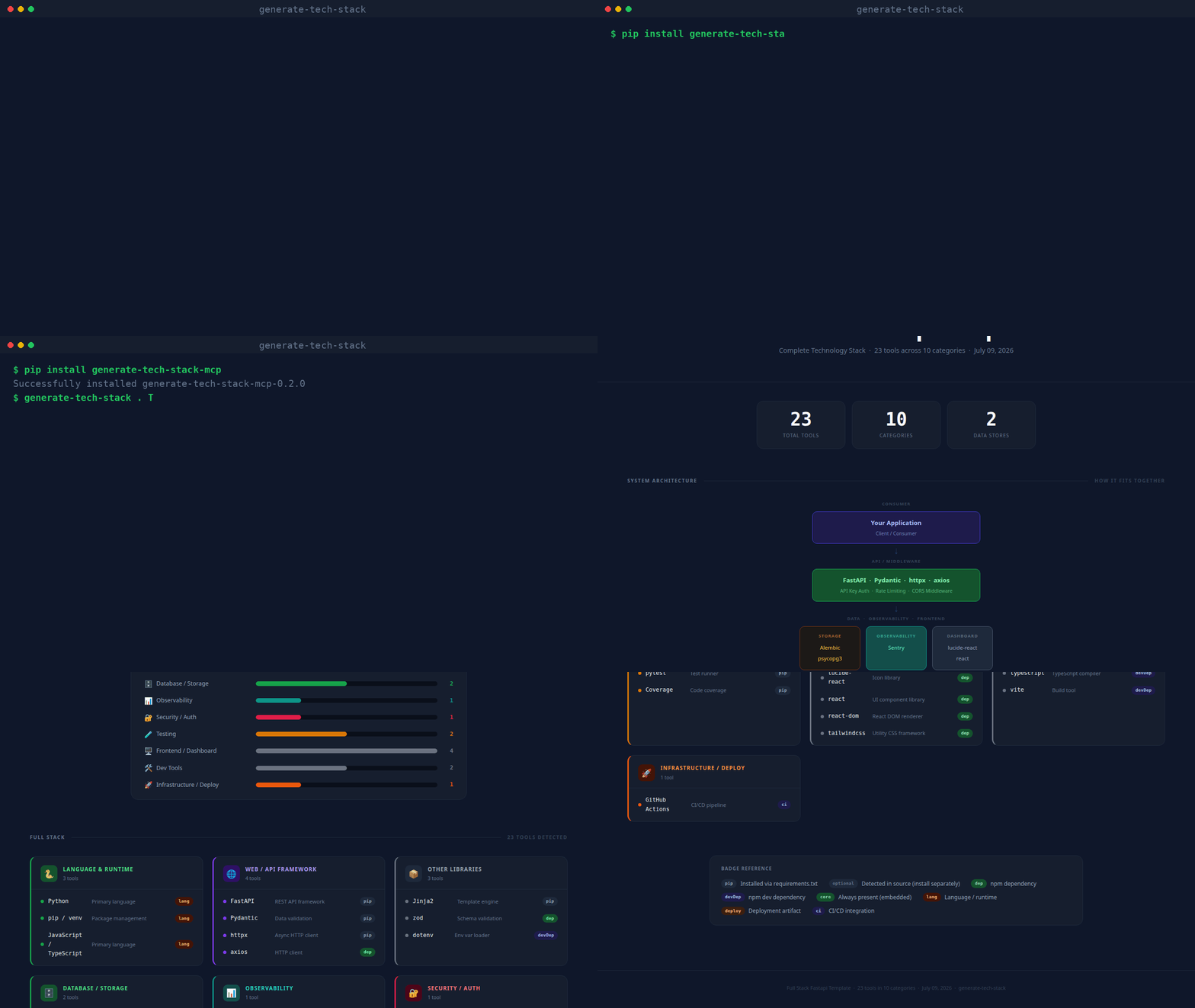
(real CLI output, unscripted — static screenshot if you'd rather not autoplay)
What it produces
Every generated page contains:
| Section | Description |
|---|---|
| Stat row | Total tools · Categories · AI Backends · Data Stores |
| Architecture diagram | Layered flow diagram (Consumer → API → AI/NLP → Data/Obs/Frontend) |
| Bar chart | Horizontal bars per category, colour-matched |
| Tool cards | One card per category; each tool shows a dot, name, description, and badge |
| Badge legend | Explains pip, dep, optional, core, deploy, ci, etc. |
| Footer | Project name · tool count · generation date |
| Guided tour | Spotlight walkthrough of every section, shown automatically the first time a report is opened; replay anytime with the ? button |
| Theme toggle | Sun/moon button next to the tour button switches between dark and light mode |
Repository layout
~/.claude/skills/generate-tech-stack/
├── SKILL.md                  ← Claude Code skill definition
├── INSTALL.md                ← detailed per-platform installation guide
├── README.md                 ← this file
├── scripts/
│   └── analyze.py            ← core scanner + HTML renderer (no dependencies)
├── mcp/
│   ├── server.py             ← MCP stdio server (pip install mcp)
│   └── requirements.txt
└── copilot/
    ├── index.js              ← GitHub Copilot Extension (Express)
    ├── package.json
    └── openai_function.json  ← OpenAI / Antigravity function definition
Usage
pip (CLI + MCP server)
pip install generate-tech-stack-mcp

generate-tech-stack . TECH_STACK.html    # CLI: scan and write the report
generate-tech-stack-mcp                   # stdio MCP server
With pip installed, any MCP host config reduces to:
{
  "mcpServers": {
    "generate-tech-stack": { "command": "generate-tech-stack-mcp" }
  }
}
Claude Code
/generate-tech-stack
Run it from any project directory. The skill calls scripts/analyze.py and opens the result in your browser.
MCP (Claude Desktop, VS Code, Cursor, Zed, Windsurf, Continue)
pip install mcp
Add to your host's MCP config (replace the path with your actual home directory):
{
  "mcpServers": {
    "generate-tech-stack": {
      "command": "python3",
      "args": ["/home/<you>/.claude/skills/generate-tech-stack/mcp/server.py"]
    }
  }
}
Then ask: generate my tech stack or /generate-tech-stack.
MCP tools exposed:
generate_tech_stack— scans a project, writesTECH_STACK.html, opens in browserlist_tech_stack— returns a JSON summary, no file written
GitHub Copilot Extension
cd copilot
npm install
npm start        # listens on port 3000
ngrok http 3000  # expose for GitHub to reach
Register a GitHub App with Copilot Extension enabled, set the Agent URL to https://your-url/agent, and install it on your account. Then in Copilot Chat:
@generate-tech-stack /generate-tech-stack
@generate-tech-stack /generate-tech-stack /path/to/project
Command line (standalone)
python3 ~/.claude/skills/generate-tech-stack/scripts/analyze.py /path/to/project
# output: /path/to/project/TECH_STACK.html

# custom output path:
python3 scripts/analyze.py . ~/Desktop/TECH_STACK.html
analyze.py has no third-party dependencies — just Python 3.8+.
What gets detected
| Source file | Detected tools |
|---|---|
requirements.txt / pyproject.toml |
Python packages (web, DB, AI, testing, observability, security…) |
package.json |
Node / npm packages (frameworks, frontend, DB drivers, tooling) |
go.mod |
Go language |
Cargo.toml |
Rust language |
pom.xml / build.gradle |
Java / Kotlin |
Gemfile |
Ruby |
composer.json |
PHP |
**/*.py source |
Optional/dynamic SDKs via importlib.find_spec() patterns |
docker-compose.yml / .env |
PostgreSQL, Redis, MongoDB, SQLite connection strings |
Dockerfile |
Docker |
docker-compose.yml |
Docker Compose |
.github/workflows/ |
GitHub Actions |
.gitlab-ci.yml |
GitLab CI |
alembic.ini |
Alembic migrations |
nginx.conf / Caddyfile |
Reverse proxy |
tsconfig.json / src/**/*.ts |
TypeScript |
Detected categories
| Category | Colour | Examples |
|---|---|---|
| Language & Runtime | Green | Python, Go, Rust, TypeScript |
| Web / API Framework | Purple | FastAPI, Express, Django, Next.js |
| Database / Storage | Green | SQLAlchemy, Prisma, Redis, ChromaDB |
| AI SDKs | Blue | OpenAI, Anthropic, LangChain, GuardrailsAI, NVIDIA NeMo, Presidio |
| NLP / ML | Teal | spaCy, Transformers, Sentence Transformers |
| Observability | Teal | Prometheus, OpenTelemetry, Sentry, Loguru |
| Testing | Yellow | pytest, Jest, Cypress, Playwright |
| Security / Auth | Rose | PyJWT, bcrypt, Authlib, Helmet |
| Infrastructure / Deploy | Orange | Docker, Kubernetes, Celery, Boto3 |
| Frontend / Dashboard | Gray | React, Vue, Tailwind, Recharts |
| Messaging / Comms | Blue | Kafka, RabbitMQ, Socket.io |
| Dev Tools | Gray | ESLint, Prettier, Vite, TypeScript |
Design
Dark by default with a light-mode toggle (top-right corner, no persistence — resets to dark on reload). Fonts: IBM Plex Sans (body) + JetBrains Mono (code/badges), loaded from Google Fonts. Vanilla JS powers the guided tour and theme toggle only — everything else is plain HTML + CSS. Self-contained single file, opens in any browser offline.
See also
- INSTALL.md — per-platform setup instructions
- SKILL.md — Claude Code skill specification
Generate Tech Stack MCP questions
How do I add Generate Tech Stack MCP to Claude Code?
Run claude mcp add generate-tech-stack -- uvx generate-tech-stack-mcp in your terminal. Add --scope user to make it available in every project.
How do I add Generate Tech Stack MCP to Cursor?
Open ~/.cursor/mcp.json and add the server under mcpServers, using the Cursor config shown in the install section above.
What kind of output does the server produce?
It generates a visual TECH_STACK.html page featuring an architecture diagram, bar charts, tool cards, and a guided tour.
Does the generated report require an internet connection to view?
Yes, the report is a self-contained single file that can be opened in any browser offline.