
Google Analytics Agent MCP server
Commit Nov 7, 2026Inspect Google Analytics 4 properties through data quality audits, funnel analysis, segment comparisons, and property configuration management.
Also known as arcbaslow/google-analytics-agent
- Stars
- 0
- Tools
- —
- Downloads, 30 days
- —
- Latest version
- —
- Last commit
- Nov 7, 2026
- License
- MIT
What is Google Analytics Agent MCP?
Google Analytics Agent inspects Google Analytics 4 properties through data quality audits, funnel analysis, segment comparisons, and property configuration management.
Summary generated from the project's README
About Google Analytics Agent MCP server
Data analysts and marketing operations teams can use this tool to perform deep inspections of Google Analytics 4 properties. It combines the Data and Admin APIs to generate prioritized audit reports that cover data quality, event coverage, and property configuration. By analyzing web streams, the server can infer website context, platform details, and industry verticals to provide more relevant insights.
Users interact with the server through an MCP client or a Python CLI. Setting up the server requires Python 3.10 or higher and valid Google credentials, typically managed via Application Default Credentials or OAuth desktop clients. The server provides read tools for audits, funnels, and segments, while write tools for administrative changes include a preview-first workflow to ensure safety.
Beyond standard reporting, the tool supports advanced exploration like real-time queries, same-property date comparisons, and advertising conversion reports. It can also export evidence through BigQuery aggregate queries. The system distinguishes itself by providing confidence labels based on data quality checks and offering benchmark annotations across nine different verticals.
What you can do with it
- 1Perform data quality auditsRequest a comprehensive report to check for sampling, missing values, and event coverage within a GA4 property.
- 2Analyze user conversion funnelsExamine specific ordered event journeys to see how users move through a defined sequence of steps.
- 3Manage property configurationsInspect or propose changes to streams, audiences, custom definitions, and key events.
- 4Compare property segmentsRun comparisons between different groups or dates within the same property to identify trends.
Written from the project's README. Every use case is checked against a quote from it.
README
View on GitHubGoogle Analytics Agent
GA4 data quality, funnels and property management.




Quick start | How an audit runs | Example output | MCP server | Tests | Contributing
A Python CLI and MCP server for inspecting Google Analytics 4 properties. It combines the Data and Admin APIs with website context, configurable funnels, segment comparisons and benchmark annotations, then produces a prioritized audit report.
What you can do
| Area | Included capabilities |
|---|---|
| Data quality | Sampling, missing values, event coverage, confidence labels, field discovery and Core compatibility checks |
| Journeys | Ordered event funnels, cohort breakdowns and attribution analysis |
| Context | Website, platform and vertical inference from the property's web stream |
| Configuration | Streams, audiences, custom definitions, key events and event rules |
| Reporting | Markdown, HTML and optional PDF audits; saved report and segment definitions |
| Integration | Python adapters, /ga4 skills and an MCP server with preview-first write tools |
| Exploration | Uncached realtime, same-property group/date comparisons and alpha advertising conversion reports |
| Export evidence | Optional BigQuery aggregate queries with dry-run defaults and byte caps |
How an audit runs
flowchart LR
  A["Property context<br/>web stream, site, vertical"] --> B["Data quality"]
  A --> C["Property config"]
  B --> D["Events<br/>up to 7 days"]
  C --> D
  D --> E["Funnel"]
  D --> F["Key events"]
  D --> G["Segments"]
  F --> H{"Key events<br/>configured?"}
  H -- yes --> I["Attribution"]
  H -- no --> J["Attribution skipped"]
  E & G & I & J --> K["Report with<br/>confidence label"]
  classDef step fill:#fdf3e6,stroke:#d97706,color:#17202a
  class A,B,C,D,E,F,G,H,I,J,K step
Quality and property checks run side by side, then events. Funnel, key events and segments run in parallel after that. Funnel steps come from --funnel-steps, or from the e-commerce events the events check found when at least four of them fire; otherwise the funnel is skipped. The report's confidence label comes from the quality check.
Installation
Requires Python 3.10+, Google Analytics Data client 0.18.16+ and Admin client 0.23.0+ (both below 1.0). Reporting identity requires Admin 0.25.0+; older supported clients return status: unsupported for that read. For the source CLI:
git clone https://github.com/arcbaslow/google-analytics-agent.git
cd google-analytics-agent
python -m venv .venv
Activate with source .venv/bin/activate on macOS/Linux or .venv\Scripts\Activate.ps1 in Windows PowerShell, then:
python -m pip install -e ".[dev]"
For just the published MCP package, use python -m pip install "google-analytics-agent[mcp]". The [mcp] extra is required to run the server. PDF export uses the optional [pdf] extra and WeasyPrint system libraries; Markdown and HTML do not require them. See setup.
Quick start
Live queries require property access and Google credentials. The default path uses gcloud Application Default Credentials:
python scripts/ga4_auth.py --adc
# Run the printed gcloud command, then:
python scripts/ga4_auth.py --check
python scripts/ga4_auth.py --properties
python scripts/ga4_auth.py --quota-project YOUR_CLOUD_PROJECT_ID
Use a Cloud project with the Analytics Data and Admin APIs enabled. Replace the example property ID with one returned by --properties:
python scripts/ga4_audit.py --property 123456789 --days 28 --output audit.md
python scripts/ga4_funnel.py --property 123456789 --steps sign_up,begin_checkout,purchase --days 28 --json
Use any ordered event list relevant to the property. The e-commerce funnel is also available as --preset ecomm. A Cloud OAuth desktop-client fallback is available through ga4_auth.py --oauth --client-secret-file client.json.
Example output
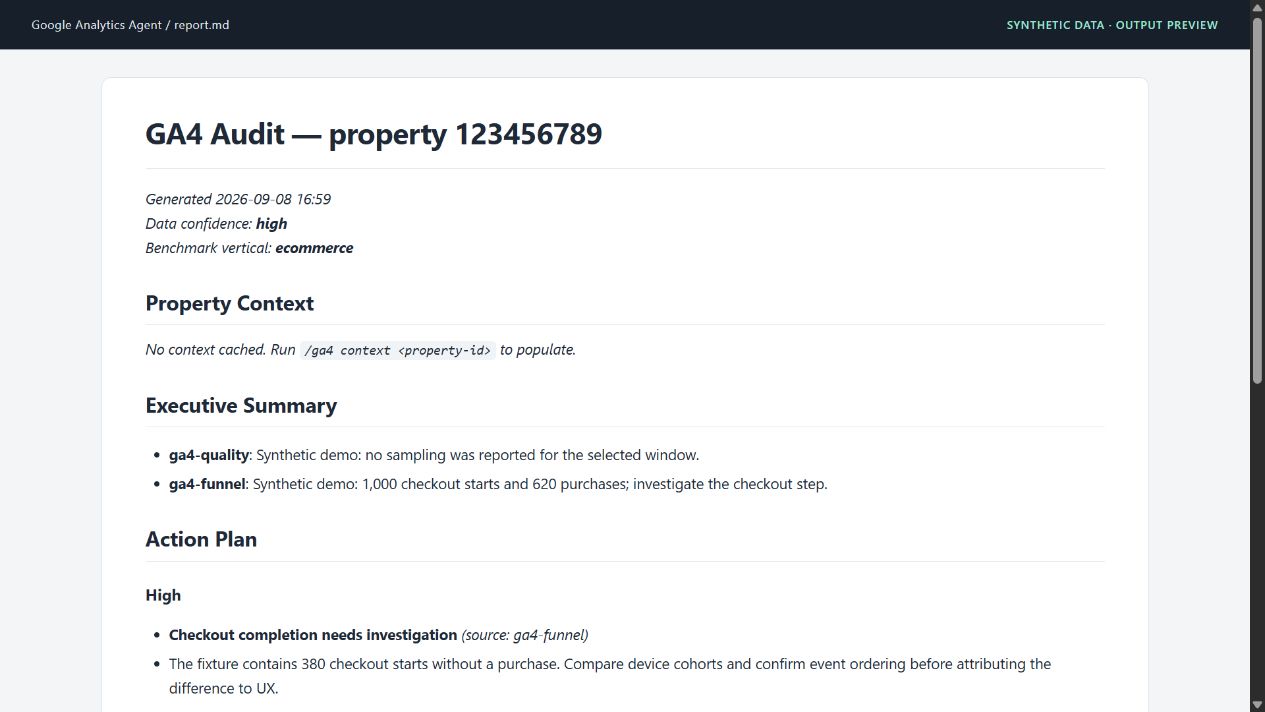
This is the toolkit's Markdown report rendered for documentation, with synthetic data. Generate it without a property or credentials:
python scripts/ga4_report.py --property 123456789 --inputs examples/demo/quality.json,examples/demo/funnel.json --format md --confidence high --vertical ecommerce --output audit.md
Inspect the generated report and source fixtures. The longer sample audit is a separately authored illustration.
MCP server
For an MCP client that supports mcpServers configuration:
{
  "mcpServers": {
    "ga4": {
      "command": "uvx",
      "args": ["--from", "google-analytics-agent[mcp]", "ga4-mcp"]
    }
  }
}
Authenticate on the machine running the server before querying it. uvx installs the available registry version; to run the current checkout, install .[mcp] and set the client's command to the absolute path of .venv/bin/ga4-mcp (or .venv\Scripts\ga4-mcp.exe on Windows).
Use ga4_data.py --property 123 --metadata --json to discover report fields, or --check-compatibility --metrics sessions --dimensions date --json for an explicit Core compatibility check. MCP exposes these as report_metadata and check_compatibility. See report fields.
Read tools cover audits, reports, context, funnels, events, quality and property configuration. MCP write tools return previews. confirm=true cannot supply terminal approval. Use propose_admin_write to prepare an expiring, single-use proposal, then run its approval command yourself and answer y/N. See the approval workflow and registered tools.
Everyday commands
python scripts/ga4_data.py --property 123456789 --report eventCount --dimensions eventName --days 28 --json
python scripts/ga4_events.py --property 123456789 --list-events --days 7 --json
python scripts/ga4_admin.py --property 123456789 --streams --json
python scripts/ga4_admin.py --property 123456789 --key-events --json
python scripts/ga4_definitions.py --list-segments
python scripts/ga4_benchmarks.py --list-verticals
The router provides /ga4 audit, /ga4 funnel, /ga4 events, /ga4 audiences and other agent commands. AGENTS.md documents the equivalent Python calls for other runtimes.
Additional adapters have separate, explicit contracts:
- Realtime and comparisons: minute ranges or named groups/dates within one property.
- Advertising conversions: alpha conversion-action metadata, models and report-section verification.
- BigQuery evidence: optional
.[bigquery]client; parameter, consent, freshness and funnel aggregates. Execution can incur query charges and requires--executeafter a dry-run check. - Annotations and history: dated context, with private actor/snapshot fields omitted. History is a read that requires edit scope.
- Audience templates: offline public-filter proposals; creation still requires separate approval.
Configuration writes
Admin writes require the appropriate property role and analytics.edit scope; print the sign-in command with python scripts/ga4_auth.py --adc --write. Every ga4_admin.py write prints the proposed change and asks y/N in an interactive terminal before any API call. Cancellation, EOF and piped input refuse the operation. There is no bypass flag; approve each write separately.
Interpreting an audit
Cacheable Data/Admin reads use a 15-minute cache isolated by resolved identity and scopes. Successful Admin writes invalidate all property queries; context has a separate 24-hour expiry. Explicit exploration, advertising, history and BigQuery reads are uncached. Responses pass through PII scrubbing, which cannot guarantee that every identifying value is removed. Partial reports expose complete: false and must not be presented as totals.
The bundled benchmark bands cover nine verticals. They are directional estimates stored in the repository, not live market measurements. Benchmark tables and comparisons are labeled source_status: unverified_heuristic; their p25/p50/p75 names are legacy band labels, not verified population percentiles. Do not present them as evidence of industry performance or use them alone to set severity. See the source review. Confidence labels describe the observed data-quality conditions; they do not establish causality. The audit supports arbitrary event journeys, although the legacy HTML template still uses an e-commerce heading.
Tests
python -m ruff check scripts/
python -m ruff format --check scripts/
python -m mypy
python -m pytest scripts/ -q --cov=scripts --cov-report=term-missing --cov-fail-under=93
CI runs on Python 3.10–3.13 with a 93% production-only coverage floor, excluding test modules. Minimum/current Analytics clients are checked separately. Tests use mocked transport and real SDK messages, plus synthetic in-memory SQL execution for BigQuery. They need no live GA4 property or BigQuery job. Offline integration tests do not establish live permissions, eligibility or API behavior. See the verification record.
Repository map
| Path | Purpose |
|---|---|
| scripts/ | Data/Admin adapters, MCP server, report renderer and tests |
| agents/, skills/ | Specialist analysis and /ga4 routing |
| examples/demo/ | Synthetic report inputs and generated Markdown |
| docs/ | Setup, releases and verification |
Releases
v0.5.2 - see the release notes for this release and the changelog for project history.
GitHub Releases include downloadable artifacts and checksums. Package-registry publication is a separate, opt-in workflow; a GitHub release does not imply that the same version is available on PyPI or npm. Maintainers can follow the release guide.
Contributing
Read CONTRIBUTING.md, run the checks above, and include a minimal reproduction for bugs. Report vulnerabilities through SECURITY.md.
Related tools
| Project | Use it for |
|---|---|
| Google Ads Agents | Paid media audits, tracking checks and reviewed changes. |
| Search Console Agent | Search performance, indexing and page experience. |
| Meta Ads Agents | Campaign performance, creative fatigue and event health. |
| GTM Diff | Review the changes in your Google Tag Manager exports. |
| Figma Taxonomy Gen | Turn interactive designs into a reviewable tracking plan. |
Maintained by Good Labs - measurement implementation, tracking plans and analytics audits.
License
MIT © Dilshat Rakhimov. This is an independent project; it is not an official product of the platform vendors.
Google Analytics Agent MCP questions
What can I do with the Google Analytics Agent?
You can perform data quality checks, analyze event funnels and cohorts, infer website context, manage property configurations, and generate Markdown or HTML audit reports.
How do I install the MCP server component?
You can install the MCP server by using the command: python -m pip install "google-analytics-agent[mcp]".
Does the server allow writing changes to my Google Analytics property?
Yes, it includes write tools that return previews, and you can use the propose_admin_write tool to prepare a single-use proposal for manual approval.