
Argos MCP server
Commit Nov 12, 2026Provides audited, read-only SQL access to PostgreSQL, MySQL, SQLite, and SQL Server for AI clients with field redaction and SSH tunnel support.
Also known as AraneaDev/argos
- Stars
- 4
- Tools
- —
- Downloads, 30 days
- —
- Latest version
- —
- Last commit
- Nov 12, 2026
- License
- MIT
What is Argos MCP?
Argos provides audited, read-only SQL access to PostgreSQL, MySQL, SQLite, and SQL Server for AI clients with field redaction and SSH tunnel support.
Summary generated from the project's README
About Argos MCP server
Querying production databases through an AI client with full visibility and security is what Argos enables. It provides audited, read-only SQL access to PostgreSQL, MySQL, SQLite, and SQL Server, including Azure SQL via the Azure CLI. Developers can use it locally with Claude Code to inspect schemas and run queries through a dedicated interface pane that tracks every interaction.
Security is central to the design, featuring field redaction for sensitive columns like emails or phone numbers and strict query validation to prevent complex or stacked statements. It supports encrypted connections through SSH tunnels with pinned host keys for bastion host access. The server maintains an audit log of every query, recording the database, statement hash, and outcome without storing sensitive values. Users can manage connections and security settings at runtime using tools like sql_add_database without needing to restart the server.
What you can do with it
- 1Analyze customer revenue trendsAsk the AI to identify top customers by revenue and compare growth rates across quarters.
- 2Monitor real-time signup patternsRequest a summary of recent user signups and any recurring error patterns detected in the data.
- 3Audit database query performanceUse the tool to evaluate product catalog queries and receive specific optimization suggestions.
Written from the project's README. Every use case is checked against a quote from it.
Configuration
AZURE_CONFIG_DIR
Automated checks
Ran Nov 14, 2026Full report →Not verified yet. A server needs a score of 80, no serious finding, and enough data for us to check. How checks work · What to fix for more points

- Source repository linked and reachablearaneadev/argos is public and reachablegithub.com/araneadev/argos ↗Pass
- Package names this repository as its sourceNot checked
- Build provenance (Sigstore attestation)Not checked
- Open source license (OSI)MITspdx.org/licenses/MIT.html ↗Pass
- Commit or release in the last yearLast commit or release 2026-11-12github.com/araneadev/argos ↗Pass
- OpenSSF ScorecardNot checked
- Package name not close to a popular packageNot checked
- No critical advisory in the package or its dependenciesNot checked
- No hidden instructions to the model0 tool descriptions and the README read; no override phrases, credential paths or hidden charactersPass
- Destructive tools are labelledNot checked
- Remote endpoint answers the MCP handshakeNot checked
README
View on GitHubArgos
A hundred eyes on your databases, and none of them blink: beside Claude Code, and in front of every query it runs.










Argos Panoptes (Ἄργος Πανόπτης) is the giant of Greek myth with a hundred eyes, set by Hera to guard Io. Only some of his eyes slept at a time, so he was never fully asleep and nothing passed him unseen. Panoptes means "all-seeing".
TL;DR: Argos lets Claude Code query PostgreSQL, MySQL, SQLite and SQL Server through one
MCP server. Every request passes validation, access controls and redaction, and leaves an audit
record, before it reaches the database. In Claude Code, /argos opens a pane beside your
session: your connections and their schema, every query Claude runs with its full result, and
an editor for your own queries, which are always read-only.
Argos speaks any MCP client, not just Claude Code, and connects to databases you already run, directly or through an SSH tunnel.
Status: pre-release. Argos is not yet published to npm, and the publish step in the release workflow is deliberately dormant. The source is public on GitHub, so install from source (see Installation). Any
npm install -g argos-mcpcommand you find elsewhere will not resolve yet.
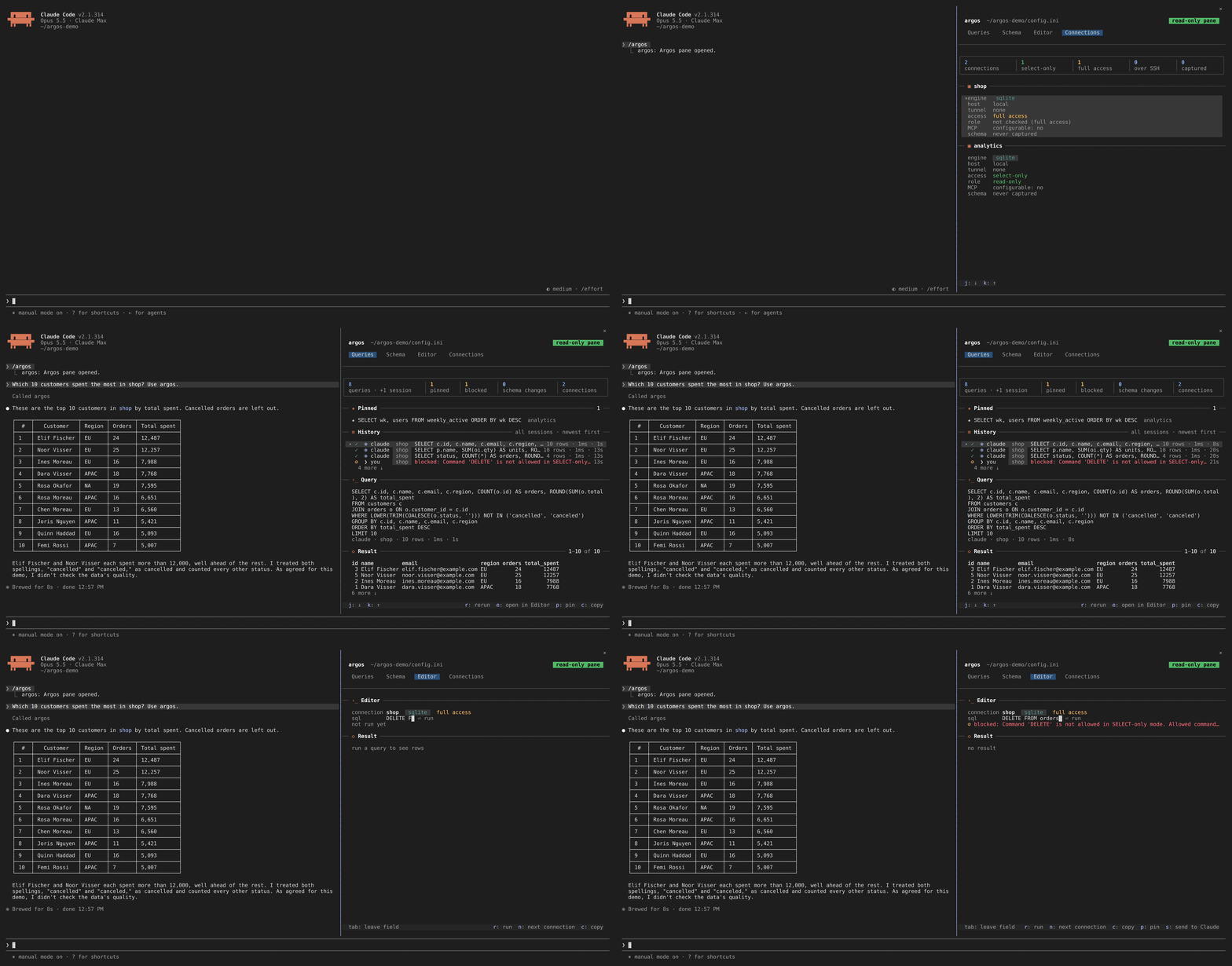
A Claude Code session: /argos opening the pane, a question about the shop database whose
query lands in Queries with its full result, a look at orders in Schema, and the Editor
refusing a DELETE on a connection that allows writes.
Features
- The pane:
/argosopens your databases beside the chat on four tabs: Queries (every query Claude or you ran, across sessions, with its full result, pins and reruns), Schema (tables with their keys and relations), Editor (your own queries) and Connections - Pane queries are always read-only: whatever a connection allows Claude, what you run from the pane opens read-only at the database where the engine supports it, behind the same SELECT-only check the server uses
- SELECT-only mode: production-safe read-only access per connection, which the model cannot relax from a session
- Query validation: bound parameters, stacked statements refused, comment- and literal-aware parsing, complexity limits
- Field redaction: emails, phone numbers and other protected columns are masked before a result reaches Claude, or the pane
- Audit logging: one record per query: database, statement hash, duration, outcome, never the values
- Schema changes reach Claude: when a connection's schema changed since Argos last looked, the next query says what changed, so Claude doesn't work from an old picture of the tables
- Column names checked before a query runs: a SELECT that names a column the cached schema doesn't have is not run; Claude gets a "did you mean" and the table's columns instead, and an unknown-name error from the database gets the same correction appended (how it decides)
- SSH tunnels: encrypted connections through bastion hosts, with a pinned host key
- Four engines: PostgreSQL, MySQL/MariaDB (including Azure), SQLite, and SQL Server (including Azure SQL with passwordless sign-in through the Azure CLI)
- Performance tools: connection pooling, schema caching, batches with transactions, and EXPLAIN plans with dialect-specific advice
- Runtime configuration: add, update and lock connections through MCP tools, without a restart, and never with write access the model granted itself
Installation
Requirements: Node.js >= 24.15 and the Claude Code CLI.
Connecting to Azure SQL with authentication=azure-cli additionally needs the
Azure CLI on PATH
and a completed az login; nothing else does.
1. Build
git clone https://github.com/AraneaDev/argos.git
cd argos
npm install
npm run build
2. Configure databases
npm run setup
Interactive wizard for adding database connections, security settings, and SSH tunnels. It writes a config.ini, by convention at ~/.config/argos/config.ini, though any path works. You can also add databases at runtime with the sql_add_database tool.
3. Register with Claude Code
claude mcp add argos --scope user -- \
  node "$(pwd)/dist/cli.js" serve --config "$HOME/.config/argos/config.ini"
Scopes:
| Scope | Flag | Where it lives | Use when |
|---|---|---|---|
| User | --scope user |
~/.claude.json |
You want Argos in every project (most common) |
| Project | --scope project |
.mcp.json in the repo |
You want to share it with your team via git |
| Local | (default) | Per-project, private | You're just trying it out |
4. Install the pane
node dist/cli.js install-plugin --config "$HOME/.config/argos/config.ini"            # preview
node dist/cli.js install-plugin --config "$HOME/.config/argos/config.ini" --execute  # install
Use the same config.ini you registered the server with: the pane reads the history the server
writes beside it. Start a new Claude Code session afterwards.
5. Verify
claude mcp list
You should see argos listed as connected. Its tools appear in Claude Code as mcp__argos__sql_query, mcp__argos__sql_get_schema, and so on, and /argos opens the pane.
Removing it
claude plugin uninstall argos
claude plugin marketplace remove argos
claude mcp remove argos --scope user
Quick start
Ask Claude about your data in plain words, and watch the queries land in the pane:
- "Show me the top 10 customers by revenue this quarter, including their growth rate compared to last quarter"
- "How many signups in the last 24 hours, and any error patterns?"
- "Analyze the performance of our product catalog queries and suggest optimizations"
- "Generate test data scenarios based on our current user demographics"
Claude reads the schema first, then queries; each result comes back to it as a short table, and in full to you in the pane.
The pane
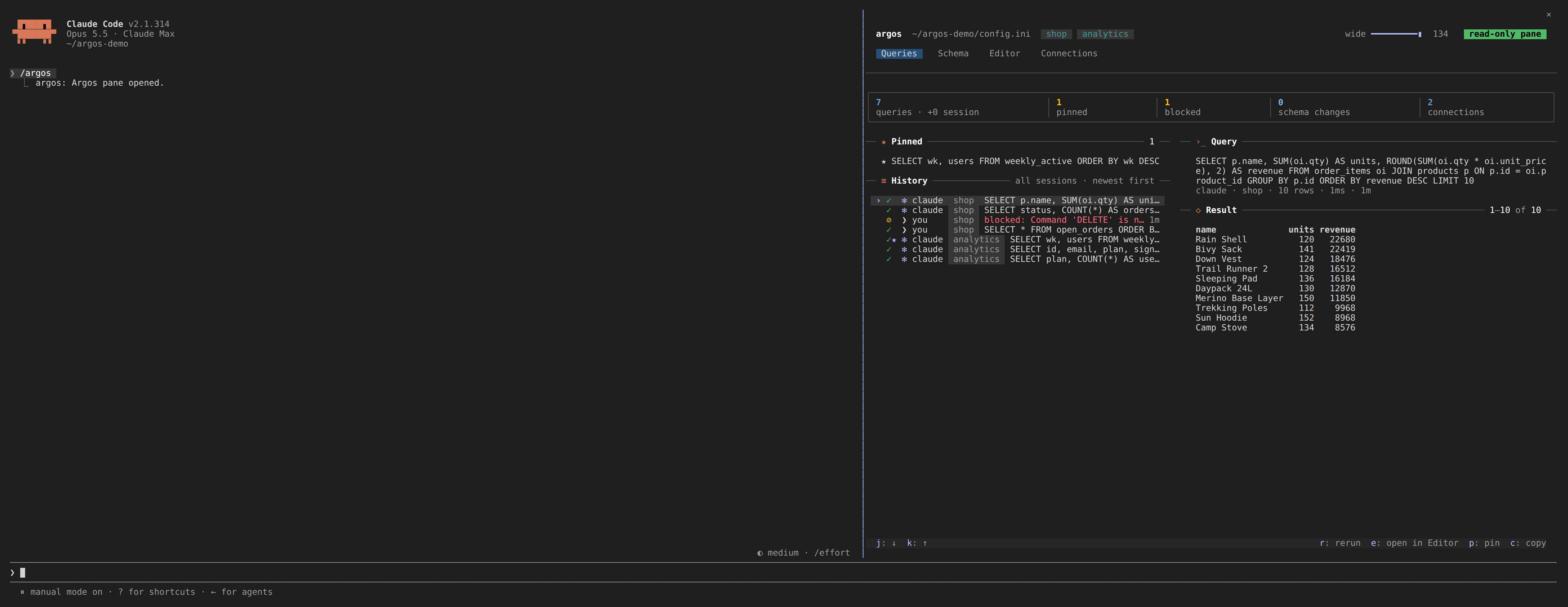
Queries: every query Claude or you ran, newest first and kept across sessions, with the selected
one's SQL and its full result. r reruns it read-only, p pins it, c copies the result as
markdown, CSV or JSON, and s puts one of your own results into your next message to Claude.
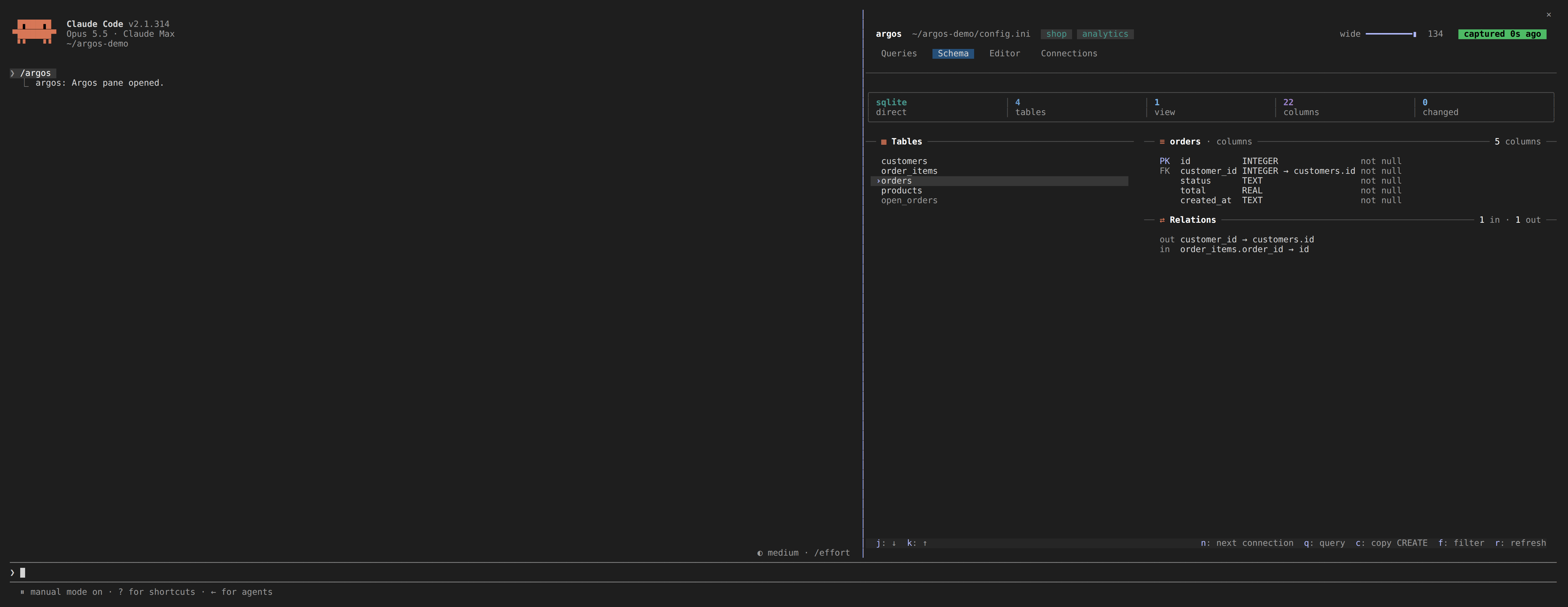
Schema: each connection's tables and views, the open table's columns with their keys, and its relations in and out.
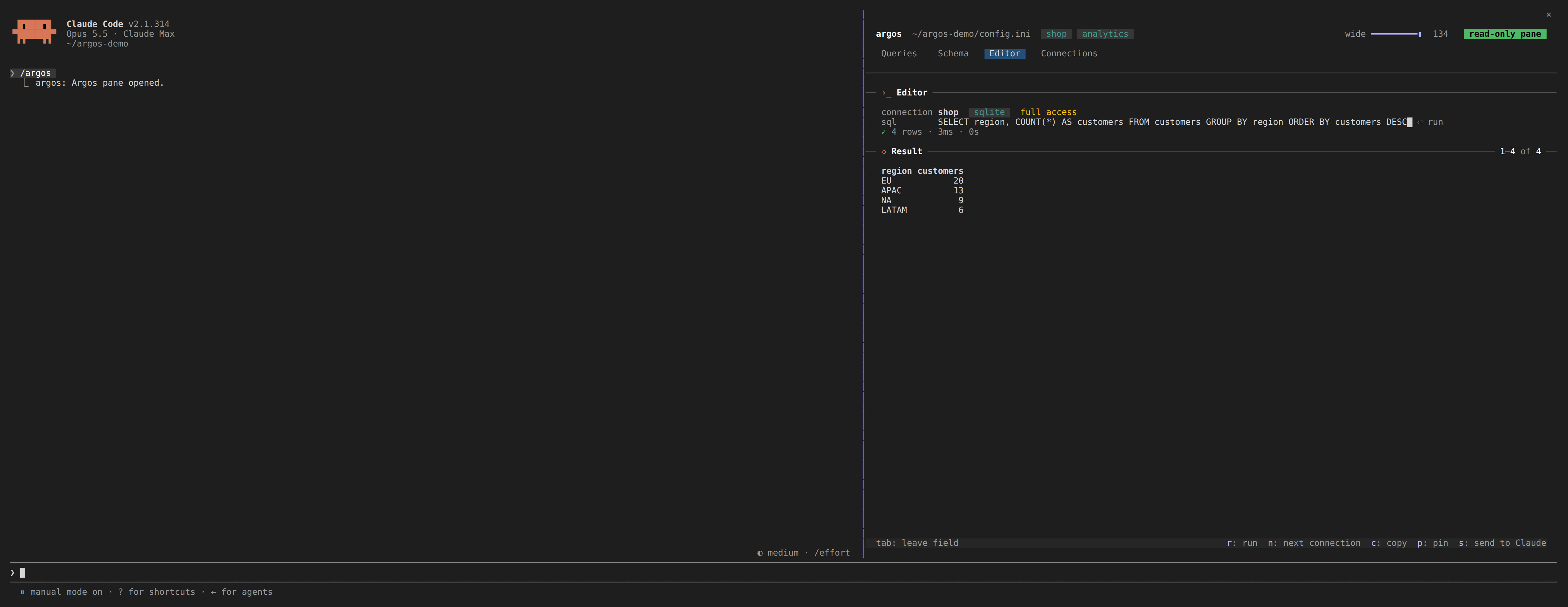
Editor: type SQL against any connection and run it. A write is refused with the reason, even on a connection that allows Claude to write.
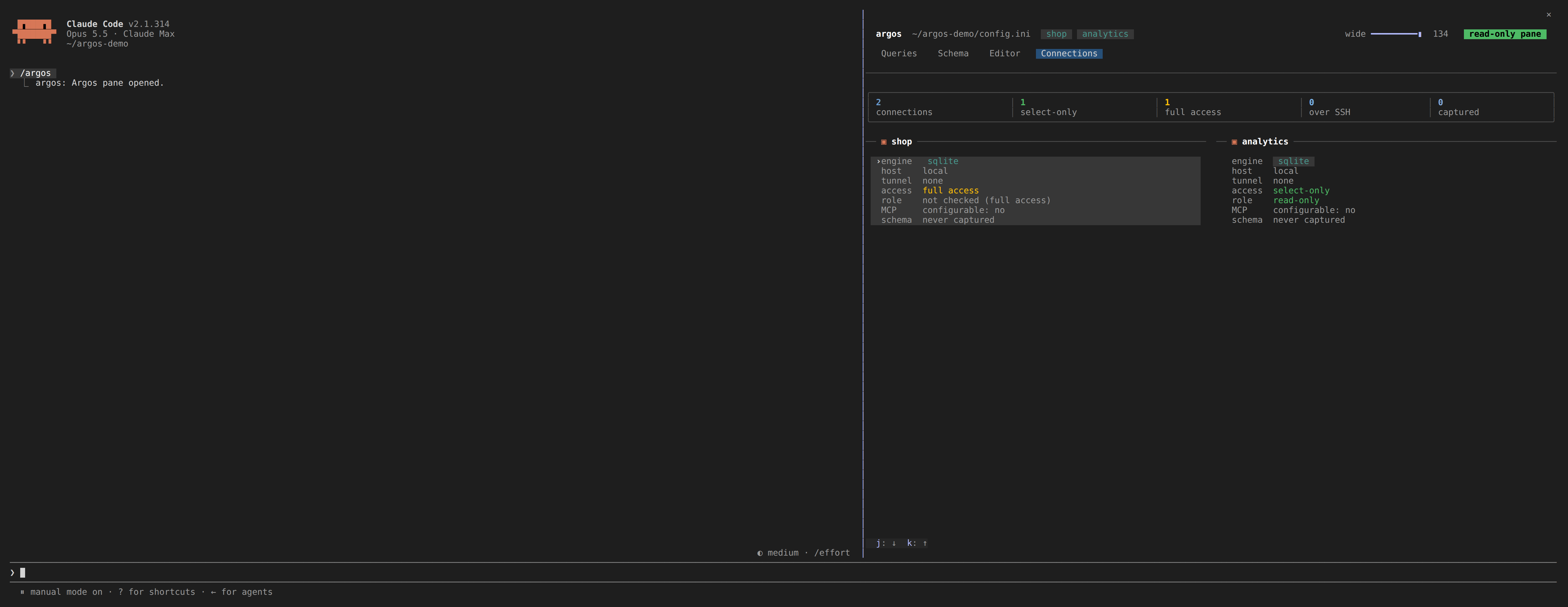
Connections: each database with its engine, host, tunnel, access and schema age.
Every tab, key, setting and limit is in the pane guide.
CLI
| Command | Description |
|---|---|
argos serve |
Start the Argos MCP server on stdio (this is what Claude Code invokes) |
argos setup |
Run the interactive configuration wizard |
argos install-plugin |
Install the Claude Code pane (preview; --execute to install) |
argos connections |
List the configured connections as JSON |
argos schema <db> [--refresh] |
Print a database's schema as JSON |
argos query <db> --sql <sql> |
Run a read-only query and record it in the history |
argos history, argos result <id> |
Page through the history and a saved result |
argos pin, argos unpin <id>, argos pins |
Manage pinned queries |
argos help |
Show usage (also what plain argos does) |
argos version |
Show the version |
The pane runs the JSON commands for you; they are there for scripts too. argos is exposed as a
bin entry, so npm link (or a global install) puts it on your PATH.
Configuration examples
Production PostgreSQL with SSH
[database.production]
type=postgresql
host=internal-db.company.local
port=5432
database=production_app
username=readonly_user
password=secure_random_password
ssl=true
select_only=true
timeout=15000

# SSH Tunnel Configuration
ssh_host=bastion.company.com
ssh_port=22
ssh_username=tunnel_user
ssh_private_key=/secure/path/ssh_key
# Required: without a pinned fingerprint the tunnel refuses to connect, rather
# than trusting whatever host key it is offered. Get it from the bastion with
#   ssh-keygen -lf /etc/ssh/ssh_host_ed25519_key.pub
ssh_host_fingerprint=SHA256:47DEQpj8HBSa+/TImW+5JCeuQeRkm5NMpJWZG3hSuFU

[security]
max_joins=5
max_subqueries=3
max_complexity_score=50
Azure SQL without a password
The Azure CLI's own sign-in is the credential, so no secret is written to
config.ini at all.
[database.azure_sql]
type=mssql
host=your-server.database.windows.net
port=1433
database=your_database_name
authentication=azure-cli
select_only=true

# Only when the server's tenant is not the CLI's active context, which is the
# usual case for an account with access to several tenants. Must be the GUID.
# azure_tenant_id=00000000-0000-0000-0000-000000000000
Needs az login beforehand, and the signed-in identity mapped as a database
user. Map a dedicated reader identity, or a group, with db_datareader only:
CREATE USER [argos-readers] FROM EXTERNAL PROVIDER;
ALTER ROLE db_datareader ADD MEMBER [argos-readers];
Do not let Argos sign in as the server's Entra admin: the admin is a member of
db_owner in every user database and enters each one as dbo, so the only thing
between the agent and a DELETE is Argos's filter. Argos checks this on connect
and warns (see the database role check).
Encryption and certificate verification are forced on for this mode, because an
access token is a bearer credential and an unverified connection hands it to
whoever answers.
A separate Azure identity for the agent
The Azure CLI keeps its sign-in in a profile directory, ~/.azure unless
AZURE_CONFIG_DIR says otherwise. Sign the reader identity in to a profile of
its own, and start Argos with that variable, so the agent never uses your own,
possibly admin, login:
export AZURE_CONFIG_DIR="$HOME/.azure-claude-ro"
az login            # as the reader identity
claude mcp add argos --scope user -e AZURE_CONFIG_DIR="$HOME/.azure-claude-ro" -- \
  node "$(pwd)/dist/cli.js" serve --config "$HOME/.config/argos/config.ini"
Your own shell keeps ~/.azure and your own login. To give one database its own
profile instead of the whole server, set azure_config_dir on it:
[database.azure_sql]
type=mssql
host=your-server.database.windows.net
database=your_database_name
authentication=azure-cli
azure_config_dir=~/.azure-claude-ro
Then check who Argos is from inside a session, with sql_query:
SELECT USER_NAME() AS db_user, IS_ROLEMEMBER('db_owner') AS is_owner,
       IS_ROLEMEMBER('db_datawriter') AS is_writer;
db_user should be the reader, and both flags 0. sql_test_connection runs
the same check and says so.
See the SQL Server guide for the details, including unattended use.
Azure Database for PostgreSQL without a password
The same Azure CLI sign-in works for Azure Database for PostgreSQL. The Entra access token is the password, fetched fresh for every new connection because it is valid for 5 to 60 minutes.
[database.azure_pg]
type=postgresql
host=your-server.postgres.database.azure.com
port=5432
database=your_database_name
username=argos-readers
authentication=azure-cli
select_only=true
# azure_tenant_id=00000000-0000-0000-0000-000000000000
username is the Entra user or group as mapped in the database with
pgaadauth_create_principal. TLS with certificate verification is forced, for
the same reason as for Azure SQL. See the
PostgreSQL guide.
Multi-Database Analytics Setup
[database.transactions]
type=postgresql
host=transactions-db.company.com
database=transactions
select_only=true

[database.users]
type=mysql
host=users-db.company.com
database=users
select_only=true

[database.analytics]
type=sqlite
file=./data/analytics.sqlite
select_only=false

[database.local_cache]
type=sqlite
file=./data/cache.sqlite
select_only=false
mcp_configurable=true

[extension]
max_rows=1000
query_timeout=30000
Safety model
- Query validation: SQL injection prevention and syntax analysis
- Complexity limits: resource-intensive queries are refused
- SELECT-only mode: Argos refuses anything but a read. The filter is a second net: the
database role is the boundary, so for a
select_onlydatabase Argos asks the database once per connection whether its role can write, and warns insql_test_connection,sql_list_databasesand the pane when it can. Setrequire_readonly_role=trueto refuse such a connection instead - Read-only pane: what you run from the pane opens read-only at the database (SQLite read-only mode, a read-only PostgreSQL or MySQL session) behind the SELECT-only check; SQL Server has no session-level equivalent and relies on the check. The pane guide says exactly what each engine guarantees
- Connection encryption: SSL/TLS and SSH tunnel support
- Audit logging: comprehensive security event tracking
- Field redaction: automatic masking of sensitive data in query results
Field Redaction
Automatically mask, replace, or partially obscure sensitive fields (emails, phone numbers, SSNs, etc.) in query results before they reach Claude, the pane, or other clients. Redaction is configured per-database in config.ini:
[database.production]
type=postgresql
host=prod-db.company.com
database=app_db
username=readonly_user
password=secure_pass
select_only=true

# Field Redaction
redaction_enabled=true
redaction_rules=*email*:partial_mask,*phone*:full_mask,ssn:replace:[PROTECTED]
redaction_case_sensitive=false
redaction_log_access=true
Redaction types:
| Type | Example Input | Example Output |
|---|---|---|
partial_mask |
john.doe@example.com |
j******.e@*****.com |
full_mask |
555-123-4567 |
********** (capped at 10) |
replace |
123-45-6789 |
[PROTECTED] |
custom |
Regex-based | Custom pattern |
Field patterns: exact match (email), wildcard (*email*), or regex (/^user_.+$/).
What this gives you towards compliance
Argos is not certified against any standard, and no library can be. Compliance is a property of your deployment. What it provides is the controls and the evidence that such a regime asks for:
- Read-only enforcement that cannot be relaxed from a session
- Field redaction, so protected columns never reach the model
- An audit record per query: timestamp, database, statement hash, duration, outcome, with no values and no SQL
- Secrets scrubbed from logs and error messages
- Owner-only file modes on the log, the audit records, the configuration and the pane's history
The pane's history (.argos/ beside your config.ini) holds query text and redacted results
for up to 30 days, so it is git-ignored and owner-only.
Runtime database management
Argos supports runtime database management through dedicated MCP tools. This allows you to add, update, and remove database connections without restarting the server.
| Tool | Description | Requirements |
|---|---|---|
sql_add_database |
Add new database connections at runtime via MCP | None |
sql_update_database |
Update existing database settings via MCP | mcp_configurable=true on the target database |
sql_remove_database |
Remove database connections via MCP | mcp_configurable=true on the target database |
sql_get_config |
View database configuration (passwords are automatically redacted) | None |
sql_set_mcp_configurable |
Lock a database from MCP changes | One-way operation: can only lock (false), unlocking requires manual config edit |
- Set
mcp_configurable=truein your database config to allow MCP-driven updates and removal. - The
sql_set_mcp_configurabletool is a one-way lock: once set tofalse, the database can no longer be modified or removed via MCP. Unlocking requires a manual edit to the configuration file. - The
sql_get_configtool always redacts passwords and other sensitive fields before returning configuration data. - Databases added at runtime via
sql_add_databasehavemcp_configurable=trueby default, and are alwaysselect_only=true. Granting write access requires editingconfig.iniby hand, so the model cannot grant it to itself.
Performance
Query time is your database's, not Argos's. It adds validation and formatting
around a normal client connection. sql_get_metrics reports the latency it
actually observed (min, max, avg, p95), and sql_analyze_performance returns the
execution plan with dialect-specific advice when something is slow.
- Connection pooling: reuse database connections efficiently
- Schema caching: captured once per database, checked cheaply for changes at most once a minute
- Result streaming: large result sets never fully materialise in memory
- Batch operations: several queries in one call, optionally in one transaction
Architecture
graph TB
 Claude[Claude Code] --> MCP[MCP Protocol]
 MCP --> Security[Security Layer]
 Security --> Connection[Connection Manager]
 Connection --> Adapters[Database Adapters]

 Adapters --> PostgreSQL[(PostgreSQL)]
 Adapters --> MySQL[(MySQL)]
 Adapters --> SQLite[(SQLite)]
 Adapters --> MSSQL[(SQL Server)]

 Security --> SSH[SSH Tunneling]
 SSH --> Bastion[Bastion Host]
 Bastion --> RemoteDB[(Remote Database)]

 Connection --> History[(.argos history)]
 Pane[Claude Code pane] --> CLI[argos CLI, read-only]
 CLI --> Security
 CLI --> History
The pane cannot reach the MCP server over stdio, so it runs the argos CLI, which reads the same
config.ini and history and goes through the same security, redaction and audit layers.
Documentation
Getting started
- 5-Minute Quick Start: get running fast
- Installation Guide: detailed setup instructions
- First Database Tutorial: connect your first database
- Claude Integration: register with Claude Code
- The Claude Code pane: every tab, key and setting
Architecture and design
- System Architecture: how it all works together
- Security Architecture: defense-in-depth security model
- Database Layer: adapter pattern implementation
API reference
- MCP Tools Reference: complete tool documentation
- TypeScript API: developer API reference
- Configuration Reference: all configuration options
Advanced guides
- Multi-Database Setup: managing multiple databases
- SSH Tunneling: secure remote access
- Security Hardening: production security guide
- Performance Tuning: optimization strategies
Development
git clone https://github.com/AraneaDev/argos.git
cd argos
npm install
npm run dev
npm test           # the server and CLI (jest)
npm run test:mod   # the Claude Code pane (vitest)
npm run validate   # everything CI runs
The README and pane guide images come from node tools/capture/shoot.mjs, which drives an
isolated Claude Code session on demo data; see tools/capture/.
Layers
The source is layered, and a lower layer may never depend on a higher one:
| layer | directory | may depend on |
|---|---|---|
types |
src/types |
nothing in src |
utils |
src/utils |
types |
adapters |
src/database |
types, utils |
domain |
src/classes, src/schema, src/pane |
types, utils, adapters |
mcp-tools |
src/tools |
everything below |
cli |
src/cli, src/setup |
everything below, and nothing depends on it |
Nothing in src imports from tests or examples, and the pane (plugin/) imports nothing from
src: it talks to the CLI's JSON.
These rules are not enforced by CI. They are a design constraint, checked by hand or by whatever analysis tool you point at the checkout, so read the table before adding an import that reaches upward. A cycle between layers is the signal that something belongs in a lower one.