
An agent-native application SDK that compiles YAML-defined schemas, views, and procedures into native SQL and typed TypeScript.
Also known as aotter/mantle, @aotter/mantle
- Stars
- 5
- Tools
- —
- Downloads, 30 days
- 2,696
- Latest version
- —
- Last commit
- Nov 15, 2026
- License
- Apache-2.0
What is Mantle MCP?
Mantle is an agent-native application SDK that compiles YAML-defined schemas, views, and procedures into native SQL and typed TypeScript.
Summary generated from the project's README
About Mantle MCP server
Developers building data-driven applications can use Mantle to transform YAML-defined schemas, views, and procedures into native SQL and typed TypeScript. Instead of manually writing every database interaction, you declare your business logic and data models in manifests, which the SDK then compiles for targets like Cloudflare Workers or Bun. This approach allows you to maintain full ownership of your application's routing, frontend, and authentication while benefiting from automated code generation.
Setting up the environment requires Node.js 22.22 or newer and pnpm 9 or higher. You can initialize a new project using the CLI or add the Mantle skill to a coding agent to assist with implementation. The system provides several built-in interfaces, including an Admin console at /admin, REST endpoints, and MCP tools at /mcp or /mcp/admin. It supports various database targets such as Cloudflare D1, Cloudflare Postgres, Bun SQLite, and Bun Postgres, ensuring that authorization and row-level rules are enforced server-side across all connected interfaces.
What you can do with it
- 1Automate application scaffoldingAn AI coding agent can plan and implement a full purchasing application based on a natural language description.
- 2Generate typed database operationsConvert YAML manifests into production-ready SQL and TypeScript code for specific cloud or local environments.
- 3Expose business logic to AI agentsProvide remote AI clients with authorized access to domain-specific tools and administrative operations via MCP.
- 4Manage data through an admin interfaceCreate a functional workspace for administrators to review, approve, or reject records using a model-driven UI.
Written from the project's README. Every use case is checked against a quote from it.
How to install Mantle MCP
Formats verified 10 Nov 2026Add to CursorAdd to GooseInstall Mantle MCP in Claude Code
$ claude mcp add mantle -- npx -y @aotter/mantleInstall Mantle MCP in Cursor
~/.cursor/mcp.json
{
  "mcpServers": {
    "mantle": {
      "command": "npx",
      "args": [
        "-y",
        "@aotter/mantle"
      ]
    }
  }
}Install Mantle MCP in VS Code
.vscode/mcp.json
{
  "servers": {
    "mantle": {
      "type": "stdio",
      "command": "npx",
      "args": [
        "-y",
        "@aotter/mantle"
      ]
    }
  }
}Install Mantle MCP in VS Code CLI
$ code --add-mcp '{"name":"mantle","type":"stdio","command":"npx","args":["-y","@aotter/mantle"]}'Install Mantle MCP in Claude Desktop
claude_desktop_config.json
{
  "mcpServers": {
    "mantle": {
      "command": "npx",
      "args": [
        "-y",
        "@aotter/mantle"
      ]
    }
  }
}Install Mantle MCP in Codex
$ codex mcp add mantle -- npx -y @aotter/mantleInstall Mantle MCP in Codex config.toml
~/.codex/config.toml
[mcp_servers.mantle]
command = "npx"
args = ["-y", "@aotter/mantle"]
Install Mantle MCP in Gemini CLI
$ gemini mcp add -s user mantle npx -- -y @aotter/mantleInstall Mantle MCP in Gemini settings.json
~/.gemini/settings.json
{
  "mcpServers": {
    "mantle": {
      "command": "npx",
      "args": [
        "-y",
        "@aotter/mantle"
      ]
    }
  }
}Automated checks
Ran Nov 12, 2026Full report →Passed our automated checks. That is not a security audit: read the code and give the server the narrowest access it needs. How checks work

- Source repository linked and reachablePass
- Open source license (OSI)Pass
- Commit or release in the last yearPass
- Package name not close to a popular packagePass
- Remote endpoint uses HTTPSNot checked
- Destructive tools are labelledNot checked
- No hidden instructions to the modelPass
- No critical advisory in the package or its dependenciesNot checked
README
View on GitHubMantle is an SDK for building data-driven applications. Declare Schemas, Views, Procedures, and Triggers in YAML; compile them into native SQL and typed TypeScript for Cloudflare Workers or Bun. Add an Admin console, REST, MCP, or public pages around the same models and operations, with authorization and row rules enforced server-side.
Your app owns its routes, frontend, auth configuration, database handles, and migrations.
Get started
Build with an agent
Install the Mantle skill in your coding agent:
npx skills add aotter/mantle@mantle
Describe what you want to build:
Use Mantle to build a purchasing app with employee requests, admin approvals, and budget checks.
The skill guides planning, implementation, acceptance, and performance checks
using mantle help from your app’s installed version.
See agent setup for supported editors and plugins.
Start an application yourself
Use Node.js 22.22+ and pnpm 9+, and pin the SDK version:
npx @aotter/mantle@0.2.1 init my-app
cd my-app
pnpm install
pnpm exec mantle help
The shell includes an Admin console at /admin, REST, MCP at /mcp,
Admin MCP at /mcp/admin, email-code sign-in, admin and user roles,
and local acceptance tooling. Its README.md covers manifests, bindings,
local auth, initializing an empty database, and startup. init writes app-owned code once;
cloud resources and deployment remain yours.
Follow the Worker quickstart →
Adding Mantle to an existing app? Keep your entry point and database; generate only the operations you need. Using ChatGPT Sites? Read Mantle on ChatGPT Sites.
See what you build
In the Purchasing workflow, employees submit requests and administrators approve or reject them. Approval spends the budget and records the decision atomically. The same operations serve application interfaces, Admin actions, and MCP tools.
An Admin workspace shaped by your model
The Approvals workspace groups requests and the pending queue. Declared approval and rejection actions control transitions; generic editing is disabled.
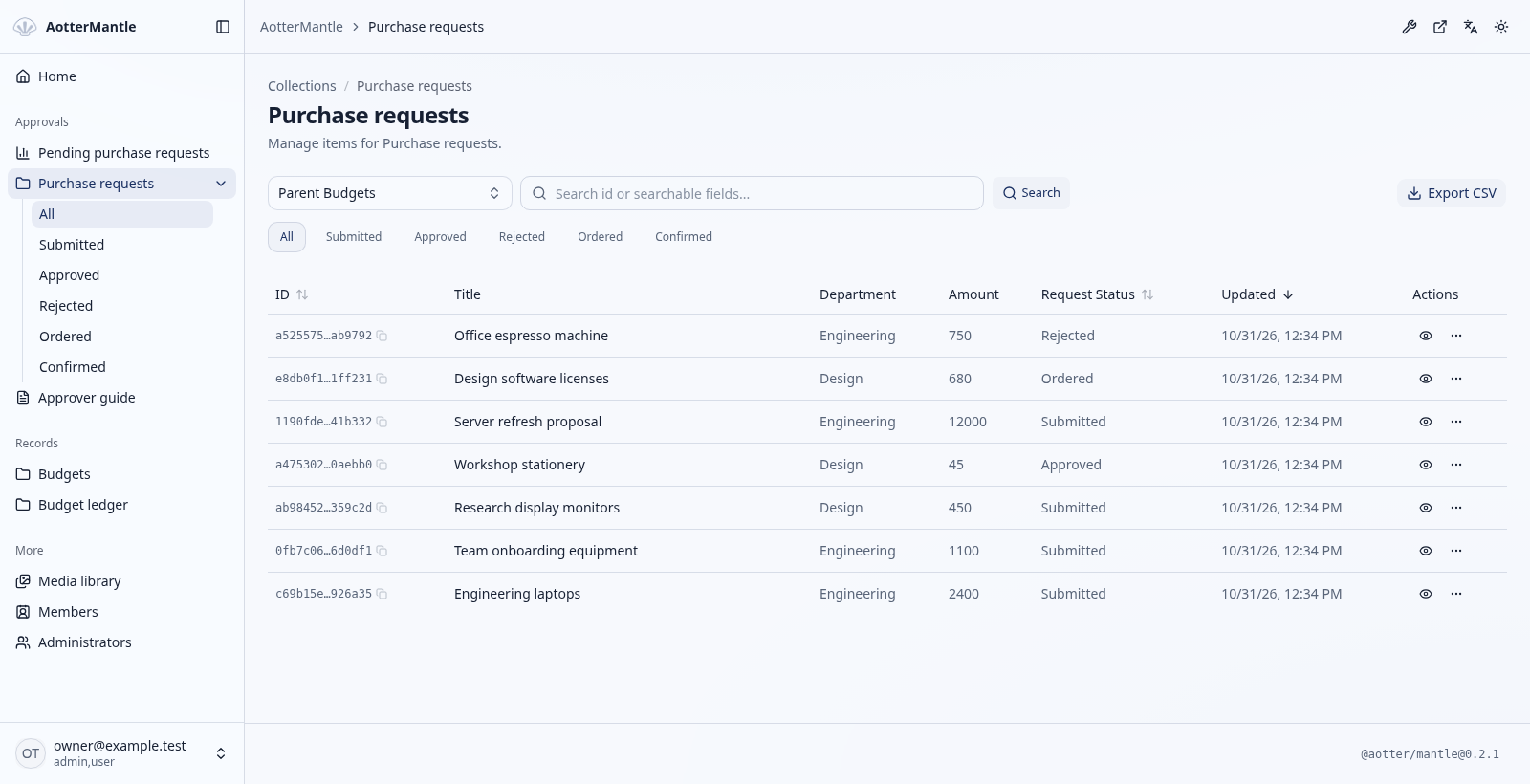
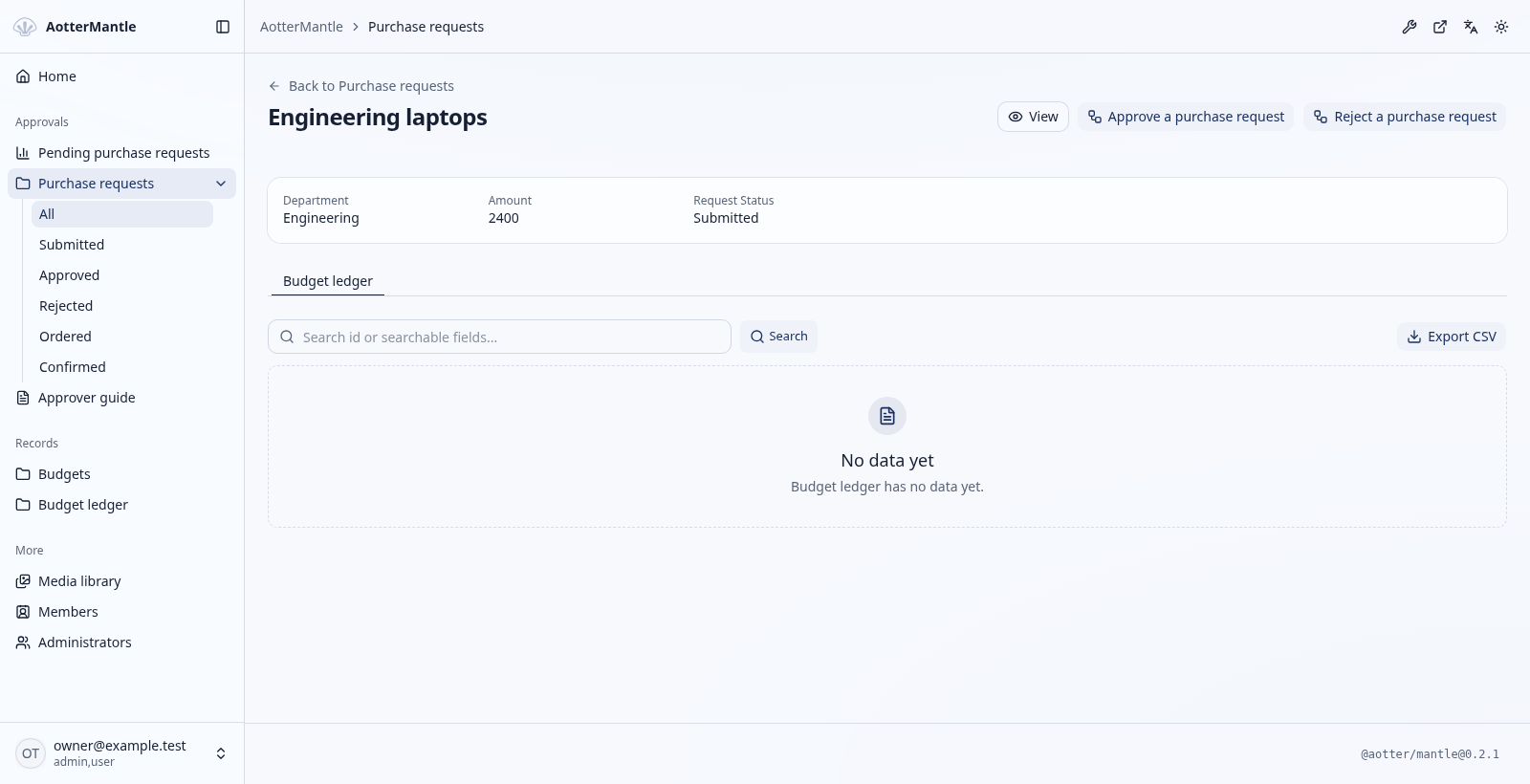
Approval uses the version the administrator reviewed. A changed request or invalid state is a conflict; exceeding the budget rolls back the decision, deduction, and ledger write. Supplier orders happen only after commit.
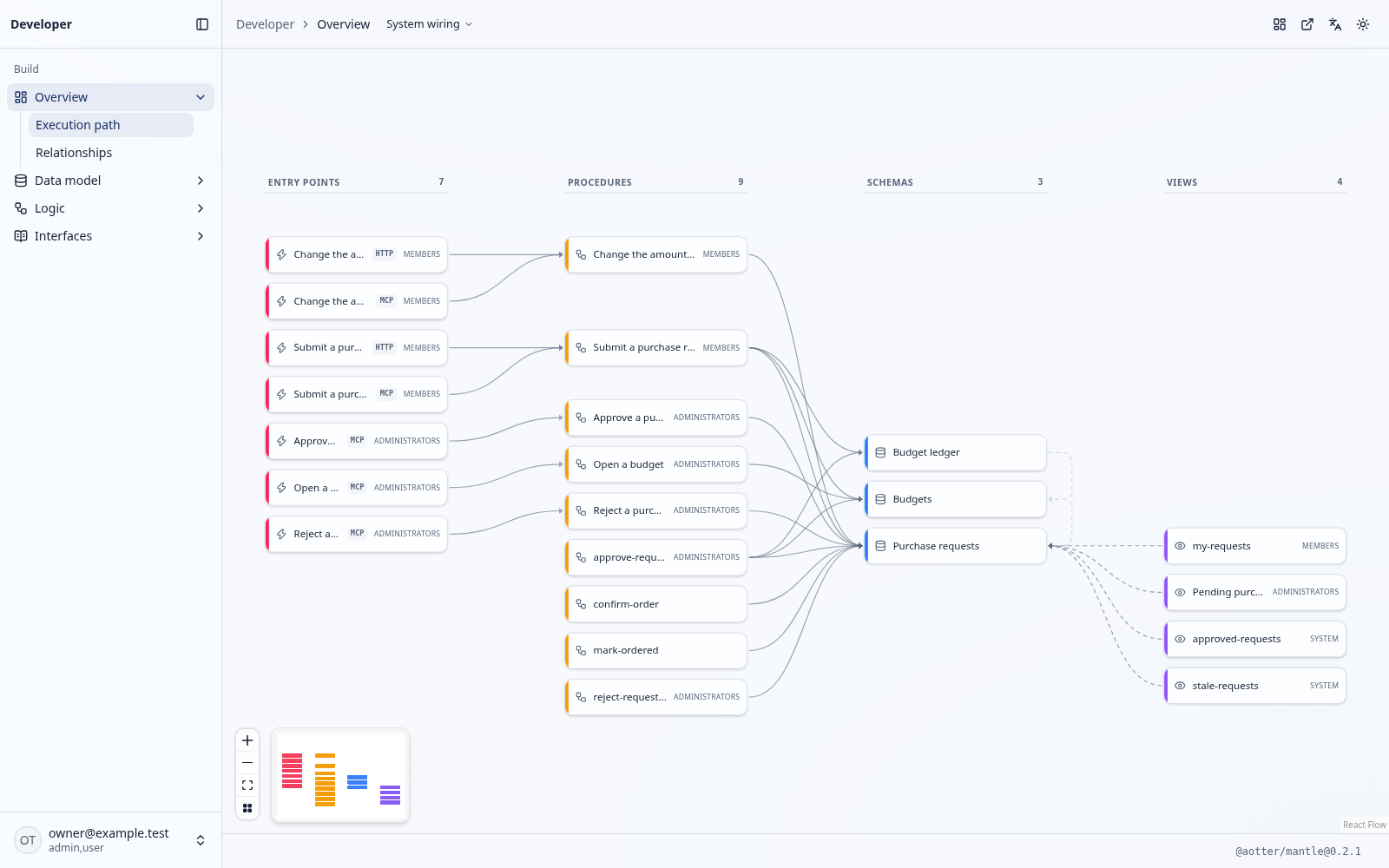
Follow the system wiring
At /admin/dev, trace Triggers through Procedures to their Schemas and Views,
and inspect HTTP, MCP, and WebMCP interfaces. SQL operations show their writes;
ref-handler internals stay in application code.
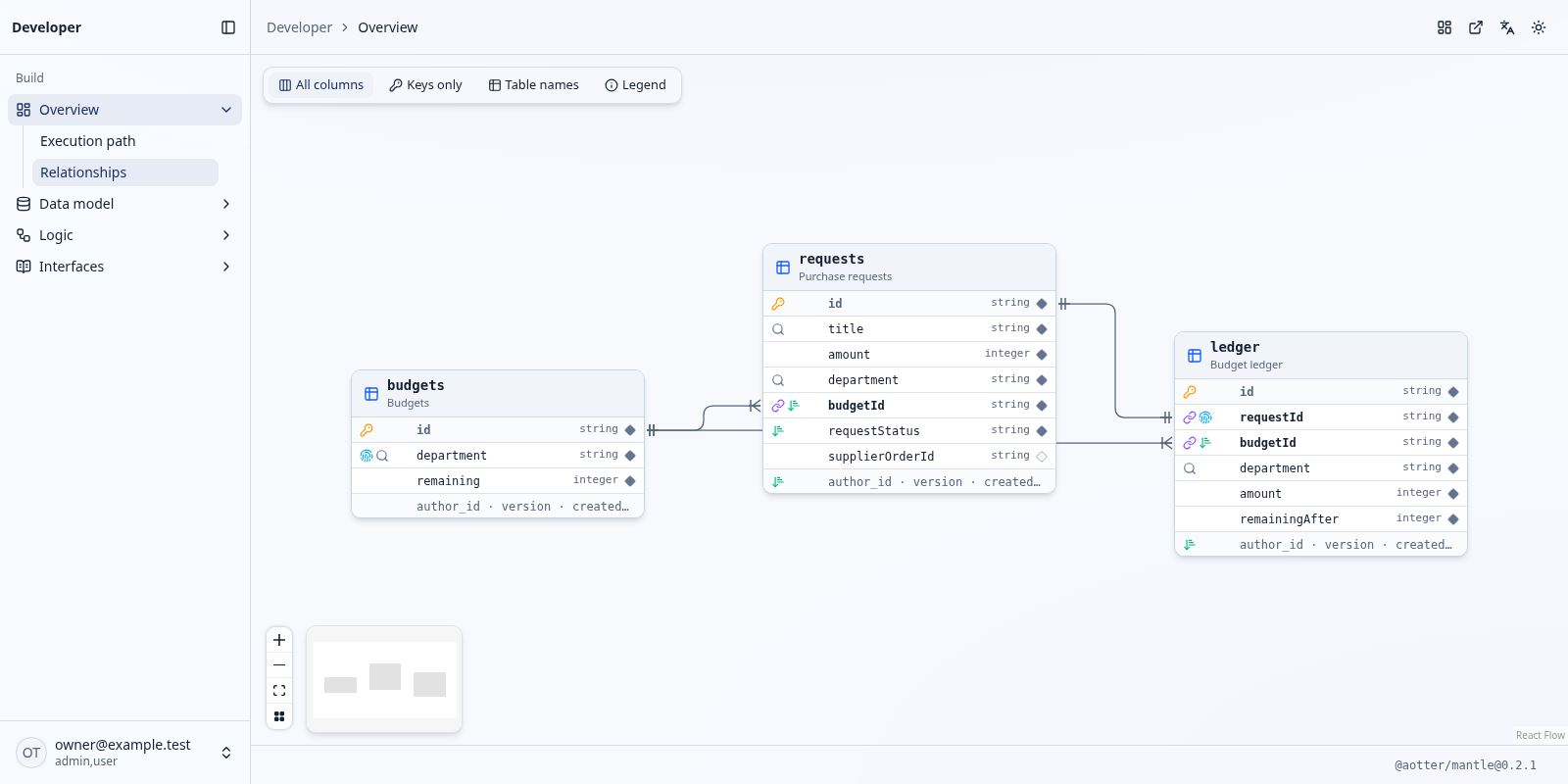
Explore the data model
Each budget has many purchase requests and ledger entries. Each approved request has at most one ledger entry. The ER diagram shows these declared references, fields, keys, and indexes.
Inspect the operation behind the button
In approve-request-write, the request update, budget deduction, and ledger insert commit together. Stale versions, invalid transitions, or failed budget checks roll back all three.
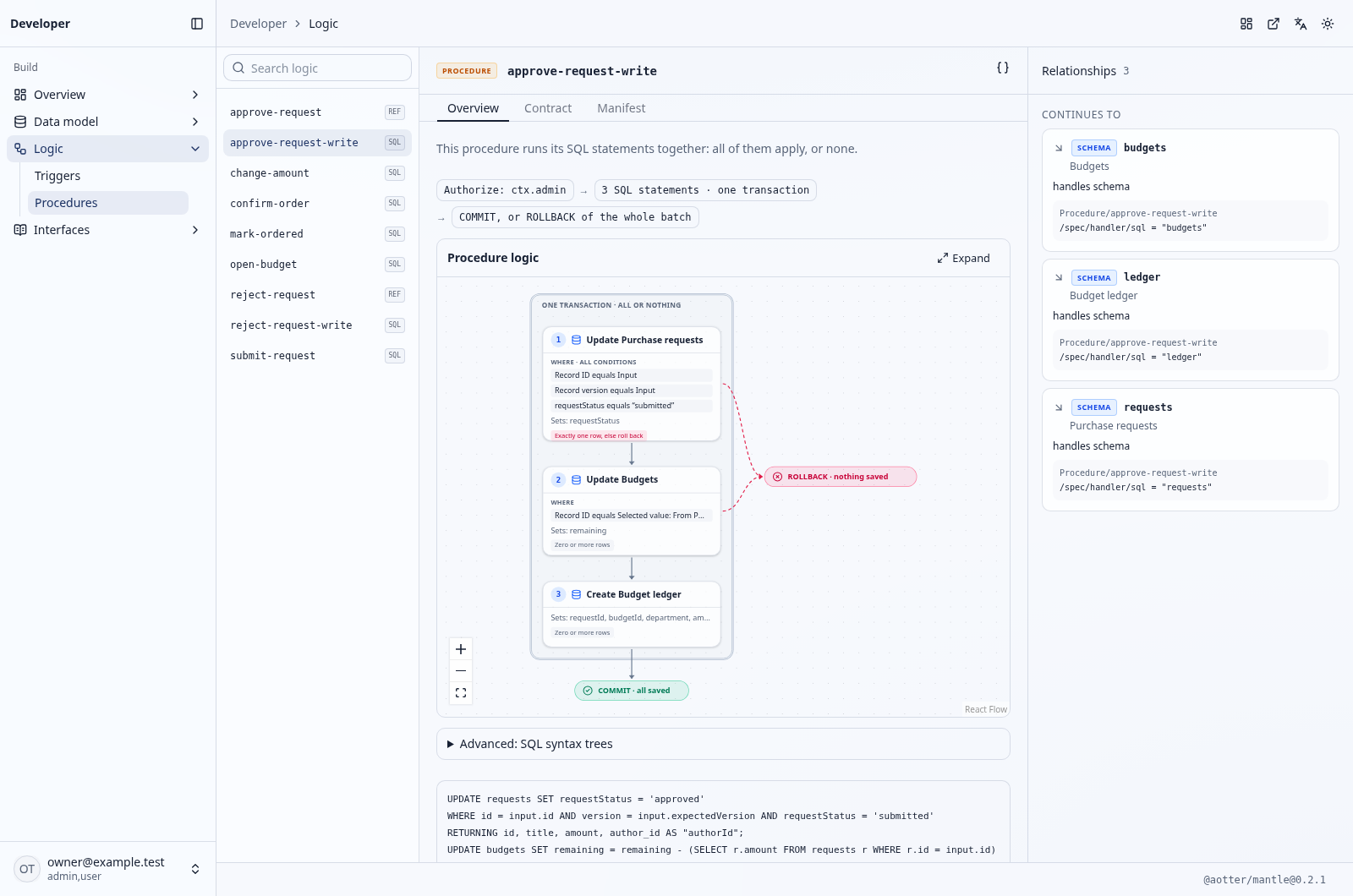
Screenshot sources and reproduction.
Four atoms, connected interfaces
| Atom | Declare | Connects to |
|---|---|---|
| Schema | Fields, references, indexes, lifecycle, row scope, and locks | Database storage, typed Store, Admin records, and the relationship diagram |
| View | A SQL read with inputs, authorization, and a selected surface | Typed queries; selected REST, MCP, or Admin reads |
| Procedure | A business action using SQL or an application handler | Typed writes, validation, and declared Admin actions |
| Trigger | An HTTP or MCP entry point for a Procedure | An authorized, validated call to the same operation |
Operation authorization applies across Admin, REST, and MCP. Generated queries and caller-bound Store writes enforce row rules. Explore the four atoms.
From model to working application
- Give your team a working Admin. Collections, related records, publishing, reports, and business actions follow the model. Customize navigation, pages, fields, and record regions with application-owned React. Admin guide.
- Keep business guarantees close to the data. SQL Procedures commit their statements atomically; explicit version checks reject stale writes. Schema locks protect sealed content, including from admin callers. Procedures.
- Connect agents through MCP and Admin MCP. Expose domain tools and privileged operations from the same model. Remote clients authenticate to the app; Admin's WebMCP tools use the signed-in browser session. MCP and WebMCP.
- Publish pages from the same content. Add public Views and the optional
web()module forllms.txt, sitemaps, Markdown alternates, and canonical head tags. Your app renders its HTML. Public pages.
A small manifest, a working queue
This View supplies the pending queue in Admin and is also available through Admin MCP:
apiVersion: cms.mantle.aotter.net/v2
kind: View
metadata: { name: pending-requests }
spec:
  title: Pending purchase requests
  surface: admin
  requires: { auth: { all: [ctx.admin] } }
  sql: |
    SELECT id, title, amount, department, version
    FROM requests WHERE requestStatus = 'submitted'
    ORDER BY created_at, id
Generate native SQL and TypeScript from your manifests:
pnpm exec mantle generate cloudflare-d1 generated manifests/*.yaml --admin
Pass your database handle and verified caller to the generated operations.
Mount the interfaces your app selects. generate writes generated/ and
selected Wrangler build settings.
Project layout and CLI.
Targets, databases and packages
| Start with | Add when you need |
|---|---|
@aotter/mantle |
Native generated queries, typed Store, compiler and the mantle CLI. |
Target cloudflare-d1 or cloudflare-postgres |
App-owned Worker routing and D1 or postgres.js/Hyperdrive handles. |
Target bun-sqlite or bun-postgres |
App-owned Bun server using bun:sqlite or Bun.SQL. |
@aotter/mantle/auth |
Sign-in, admin roles, and OAuth for MCP. |
| Service composition | Mount selected interfaces inside your application. |
Manifest SQL uses PostgreSQL syntax and compiles for the selected target. PostgreSQL uses Bun.SQL on Bun and postgres.js on Workers; other native handles need an application-owned adapter. Upgrading from 0.1.x: the upgrade guide; an existing PostgreSQL service also reads the release notes.
| Package | Purpose |
|---|---|
@aotter/mantle |
Native SDK, private compiler, generator and CLI; selected driver, auth, REST, MCP, web and site/media primitives. |
@aotter/mantle-ui |
Pure UI: generic interaction controller, React components, visual kit and design tokens. No SDK dependency. |
@aotter/mantle-admin |
Admin app library and thin server, preview and Admin MCP App. Uses UI and public SDK contracts; the SDK remains a peer. |
FAQ
What is Mantle?
An SDK for data-driven applications. Declare models and business operations; compile them into typed SQL queries, and connect Admin, APIs, agent tools, or public pages as needed.
Is Mantle a framework?
No. Your app owns its entry point, routing, and auth. It calls generated
operations with its database handle and verified caller, and mounts selected
interfaces. init writes a starting shell once; generate maintains generated
files and Wrangler build settings.
How is Mantle different from an ORM or a headless CMS?
You declare SQL reads and business actions in manifests. Mantle compiles them with row policy, single-row write checks, and atomic Procedures. Publishing, Admin, and public pages use the same model inside your app and database.
Which databases and hosts does Mantle support?
Four targets: cloudflare-d1 for D1, cloudflare-postgres for PostgreSQL via
postgres.js (usually with Hyperdrive), bun-sqlite for bun:sqlite, and
bun-postgres for Bun.SQL. Manifest SQL compiles for the selected dialect.
How do AI agents use Mantle?
Coding agents use the skill, mantle help, and compiler diagnostics. Runtime
agents call declared tools at /mcp or /mcp/admin, with authorization, row
policy, and input checks enforced on each call. /mcp exposes public MCP
Triggers; /mcp/admin exposes admin tools to admin roles. See
MCP and agents.
Can Mantle serve llms.txt, a sitemap and Markdown pages?
Yes. The optional web() module uses public Views for these outputs and
canonical head tags. Unpublished drafts stay hidden; your app renders the HTML.
For JSON-LD and languages, see
Public pages: SEO, AEO and languages.
Does Mantle run migrations?
No. Apply the generated schema.sql to an empty database for the first
install. After that, migrations belong to the application and its native tool.
Documentation
- Handbook — concepts, setup, and task guides.
- Build with an agent —
mantle init,mantle helpand role-only acceptance. - Public pages: SEO, AEO and languages —
llms.txt, sitemap, Markdown alternates, JSON-LD and hreflang. - Manifest feature reference — capabilities and their authoring fields.
- SDK and package API — installation, typed bindings, and optional modules.
- Examples — whole services, and the runnable reference service.
- Upgrading from 0.1.x — for a coding agent doing the move.
- Releases — changes and upgrade notes.
Contributing
See Contributing for development and review, Support for questions and bugs, and Security for private vulnerability reports. Contributors follow the Code of Conduct.
Apache 2.0. See LICENSE.
Mantle MCP questions
How do I add Mantle MCP to Claude Code?
Run claude mcp add mantle -- npx -y @aotter/mantle in your terminal. Add --scope user to make it available in every project.
How do I add Mantle MCP to Cursor?
Open ~/.cursor/mcp.json and add the server under mcpServers, using the Cursor config shown in the install section above.
What is Mantle?
It is an SDK for data-driven applications where you declare models and business operations to compile into typed SQL queries and connect various interfaces.
Is Mantle a framework?
No, your application retains ownership of its entry point, routing, and authentication, while calling generated operations.
How do AI agents use Mantle?
Coding agents use the Mantle skill and compiler diagnostics, while runtime agents call declared tools via MCP endpoints with enforced authorization and row policies.
Which databases and hosts does Mantle support?
It supports Cloudflare D1, Cloudflare PostgreSQL, Bun SQLite, and Bun PostgreSQL.