
Provides a local-first coordination bus for fleets of AI agents to manage presence, work claims, shared plans, and task status via a WebSocket hub.
Also known as anulum/synapse-channel, synapse-channel
- Stars
- 1
- Tools
- —
- Downloads, 30 days
- 3,142
- Latest version
- 0.99.52
- Last commit
- Nov 15, 2026
- License
- AGPL-3.0
What is SYNAPSE CHANNEL MCP?
SYNAPSE CHANNEL provides a local-first coordination bus for fleets of AI agents to manage presence, work claims, shared plans, and task status via a WebSocket hub.
Summary generated from the project's README
About SYNAPSE CHANNEL MCP server
SYNAPSE CHANNEL acts as a local-first coordination bus designed for fleets of AI agents working in parallel. It functions as a centralized WebSocket hub that serves as the single source of truth for agent presence, work claims, shared plans, and task status. This system is built for developers managing multiple agents across a single repository or an entire ecosystem of projects.
The server runs entirely on the local machine using Python 3.11 or newer and relies on the websockets library for transport. It includes a bundled MCP server that exposes specific verbs like send, claim, release, and handoff as tools, while providing read-only access to the board and agents through MCP resources. Users can connect model workers via any OpenAI-compatible endpoint, such as a local Ollama server, or use a rule-based fallback for offline operations.
What distinguishes this tool is its ability to prevent overlapping authority through file-scope claims. By using Git hooks and provider hooks, the hub can refuse a second agent's attempt to claim a file that is already being modified, ensuring that agents do not diverge or create conflicting changes.
What you can do with it
- 1Prevent overlapping file editsAn AI agent can claim a specific file scope to ensure no other agent attempts to modify the same files simultaneously.
- 2Manage multi-agent task handoffsA developer can instruct an agent to transfer its current task to another available agent in the fleet.
- 3Monitor agent fleet statusAn operator can use the hub to observe which agents are currently present and what specific work they have claimed.
- 4Coordinate parallel coding agentsMultiple agents can work on the same repository while the hub enforces documented mutation boundaries.
Written from the project's README. Every use case is checked against a quote from it.
How to install SYNAPSE CHANNEL MCP
Formats verified 10 Nov 2026Add to CursorAdd to GooseInstall SYNAPSE CHANNEL MCP in Claude Code
$ claude mcp add synapse-channel -- uvx synapse-channelInstall SYNAPSE CHANNEL MCP in Cursor
~/.cursor/mcp.json
{
  "mcpServers": {
    "synapse-channel": {
      "command": "uvx",
      "args": [
        "synapse-channel"
      ]
    }
  }
}Install SYNAPSE CHANNEL MCP in VS Code
.vscode/mcp.json
{
  "servers": {
    "synapse-channel": {
      "type": "stdio",
      "command": "uvx",
      "args": [
        "synapse-channel"
      ]
    }
  }
}Install SYNAPSE CHANNEL MCP in VS Code CLI
$ code --add-mcp '{"name":"synapse-channel","type":"stdio","command":"uvx","args":["synapse-channel"]}'Install SYNAPSE CHANNEL MCP in Claude Desktop
claude_desktop_config.json
{
  "mcpServers": {
    "synapse-channel": {
      "command": "uvx",
      "args": [
        "synapse-channel"
      ]
    }
  }
}Install SYNAPSE CHANNEL MCP in Codex
$ codex mcp add synapse-channel -- uvx synapse-channelInstall SYNAPSE CHANNEL MCP in Codex config.toml
~/.codex/config.toml
[mcp_servers.synapse-channel]
command = "uvx"
args = ["synapse-channel"]
Install SYNAPSE CHANNEL MCP in Gemini CLI
$ gemini mcp add -s user synapse-channel uvx -- synapse-channelInstall SYNAPSE CHANNEL MCP in Gemini settings.json
~/.gemini/settings.json
{
  "mcpServers": {
    "synapse-channel": {
      "command": "uvx",
      "args": [
        "synapse-channel"
      ]
    }
  }
}Configuration
HUB_ID
| Name | Description | |
|---|---|---|
| HUB_ID | — |
Automated checks
Ran Nov 13, 2026Full report →Passed our automated checks. That is not a security audit: read the code and give the server the narrowest access it needs. How checks work

- Source repository linked and reachableanulum/synapse-channel is public and reachablegithub.com/anulum/synapse-channel ↗Pass
- Package names this repository as its sourcesynapse-channel names anulum/synapse-channel as sourcepypi.org/project/synapse-channel/ ↗Pass
- Build provenance (Sigstore attestation)Sigstore attestation for synapse-channelpypi.org/project/synapse-channel/ ↗Pass
- Open source license (OSI)AGPL-3.0spdx.org/licenses/AGPL-3.0.html ↗Pass
- Commit or release in the last yearLast commit or release 2026-11-13github.com/anulum/synapse-channel ↗Pass
- OpenSSF ScorecardOpenSSF Scorecard 7.1 / 10; weakest: Code-Review 0, Dangerous-Workflow 0, Fuzzing 0scorecard.dev/viewer/?uri=github.com/anulum/synapse-channel ↗Pass
- Package name not close to a popular packageNo popular package one edit away from synapse-channelPass
- No critical advisory in the package or its dependenciesthe package checked; no critical advisoryosv.dev ↗Pass
- No hidden instructions to the model0 tool descriptions and the README read; no override phrases, credential paths or hidden charactersPass
- Destructive tools are labelledNot checked
- Remote endpoint answers the MCP handshakeNot checked
README
View on GitHubA local-first coordination bus for a fleet of AI agents working in parallel — within a single repository or spread across a whole ecosystem of them. One WebSocket hub is the shared source of truth for presence, work claims, chat, task status, and resource offers: agents address each other across projects and share one plan, while file-scope claims keep the agents in any one repository from receiving overlapping live authority. Documented provider hooks and the staged Git gate enforce that authority only on their covered mutation surfaces.
See it refuse, crash and recover
python -m pip install synapse-channel && synapse demo --recovery
Two scripted agents share one hub and one throwaway Git repository; no model or provider is called. In about 40 seconds the real hub shows that:
- the second agent's overlapping file claim is refused;
- its attempt to hand itself the first agent's task is refused;
- the first agent writes half of its change and crashes without releasing;
- while that lease is live, the second agent can neither claim nor write the file;
- when the lease runs out, the second agent claims the file under a new epoch, and the restarted first agent's release is refused;
- result verification reports the half-written file as not done;
- the second agent finishes the change, its own test passes, and the hub accepts the release.
Each step prints what the hub or the verifier answered. The run writes
recovery-demo.json with the package version, both lease epochs and both
verification verdicts. synapse demo without the flag runs the shorter
claim, conflict, handoff and receipt story.
Watch the presentation

Watch the SYNAPSE CHANNEL presentation on YouTube (8 minutes; starts from the beginning).
New here? Read Why SYNAPSE CHANNEL — a five-minute read on what it is, what you build on it, how it differs from the tools next to it, and why coordination becomes the bottleneck once you run more than one agent.
Project lineage: SYNAPSE CHANNEL dates back to September 2025.
The bus requires Python 3.11 or newer and is transport-light (websockets),
hub-centric by design
(one place owns presence, leases, and history), and runs entirely on the local
machine. Model workers reply on-channel through any OpenAI-compatible endpoint,
including a local Ollama server, with a deterministic rule-based fallback for
offline use.
The bundled synapse mcp server uses the Model Context Protocol (MCP) to expose
send, durable inbox, status, claim, release,
handoff, and task verbs as MCP tools plus the board, agents, and resources as
read-only MCP resources. Host interoperability depends on the installed host
version, transport and configuration; see the exact support boundaries in the
integration catalogue. The A2A HTTP surface has
its separately stated partial qualification. The base runtime uses websockets
on Python 3.11 or newer; adapters use their declared optional
extras (pip install 'synapse-channel[mcp]'). See the MCP guide and the separately
qualified authenticated HTTP profile.
Scoped execution outcomes distinguish A2A/MCP exchanges, wake transport and worker process exits from external business effects. Unknown outcomes require inquiry or operator recovery; reconnect does not automatically repeat work.
python -m pip install synapse-channel && synapse demo
Group and Project Map
SYNAPSE CHANNEL is the coordination layer of the Agentic Coordination, Assurance and Continuity Systems group: independent projects for running AI agents as accountable engineering participants. The bus is where the agents meet, and this repository holds the canonical map of the group.
| Part of the map | Repositories and purpose |
|---|---|
| Coordination | SYNAPSE-CHANNEL, SYNAPSE-CHANNEL-FLEET and SYNAPSE-POLICY-CHECK-ACTION: the coordination bus, its multi-machine operation and its release-policy check in CI. |
| Assurance | DIRECTOR-AI, DIRECTOR-CLASS-AI, DIRECTOR-AI-CLOUD and RIGOR-FOUNDRY: grounded answers, action control, the hosted control plane and evidence-bound repository audits. |
| Continuity | REMANENTIA and REMANENTIA-PORTAL: memory that survives the session, and customer identity and entitlements. |
| Supporting tools | HushLine: command-output filtering. Emerging tools are not designed yet. |
Each project has its own development, versioning and release lifecycle; none requires the whole group. The group and project map gives every repository's function and current status and explains what each line on the schematic means.
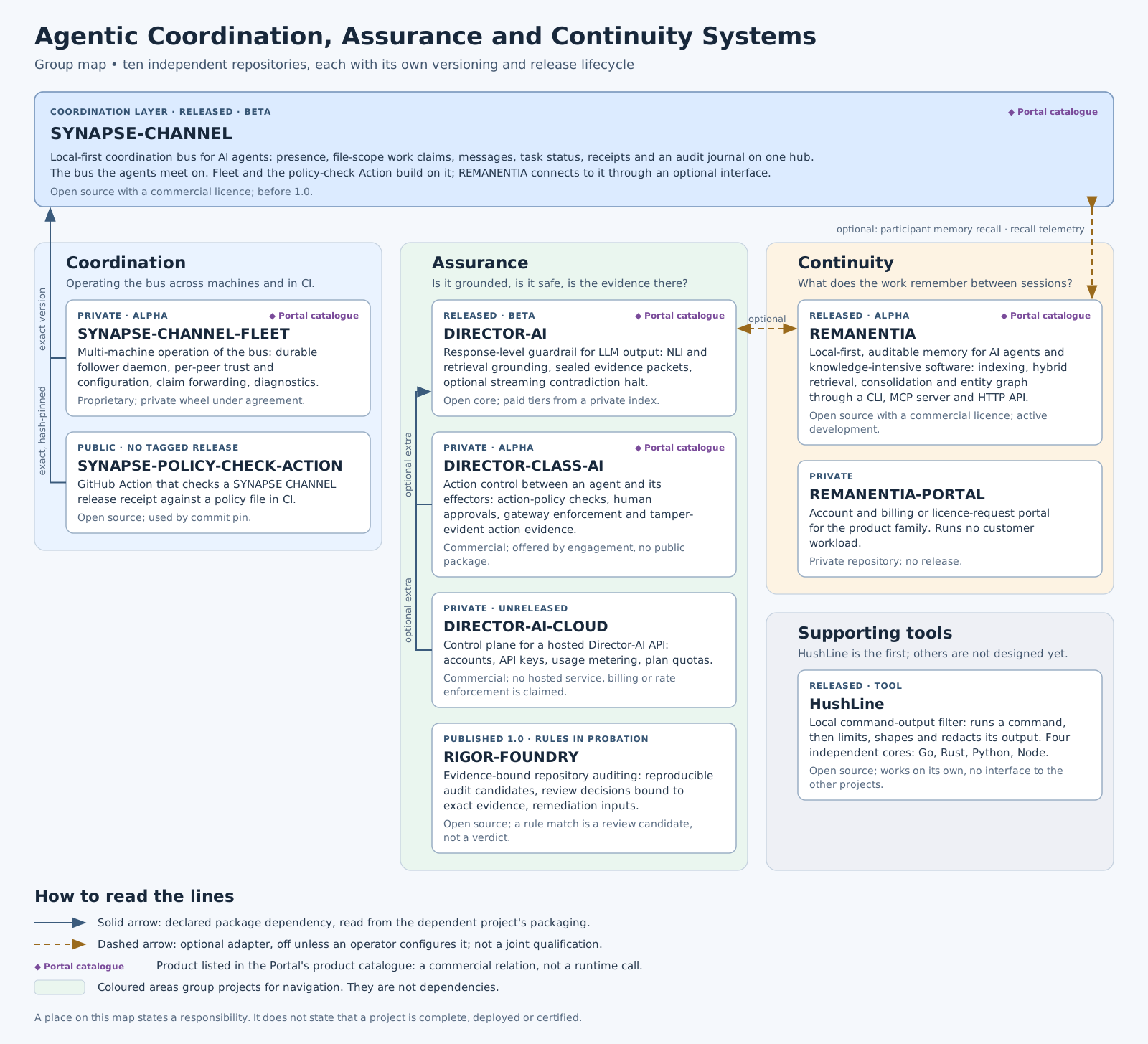
Full-size SVG · PNG · JPG
Coordinate. Observe. Govern.
Synapse's daily promise is three explicit loops:
- Coordinate declared work and surface collisions:
synapse git-init,synapse git-claim,synapse git-claim-check --staged,synapse task, andsyn ackturn work scope, dependencies, and evidence into shared state instead of side-channel notes. - Observe the fleet from durable state:
synapse who,synapse state,synapse dashboard,synapse event-query, and observed peer rows show who is present, what is claimed, what changed, and which peer-hub facts are advisory. - Govern risky actions with evidence: policy checks, approvals, release receipts, Merkle roots, ACL surfaces, federation, and encryption-key commands make operator decisions auditable. Governance surfaces report by default; operators decide what blocks a merge, release, or cross-hub action.
- Protect the durable log at rest with optional SQLCipher page encryption for the live hub event store (plus whole-file AES-GCM envelopes for relay logs, A2A state, cursors, and archives). See SQLCipher live event store below.
What it does, surface by surface
Seven shipped coordination surfaces, each named by the command or doc that delivers it today:
-
Claim before edit.
synapse git-initinstalls claim-aware Git hooks;synapse git-claimrecords an exact worktree, branch, and path scope so an overlapping claim can be refused before files diverge. -
Block unclaimed native file edits. Provider file-edit claim hooks adapt Claude Code
Edit|Write, Codexapply_patch, Gemini CLIreplace|write_file, and KimiEdit|Writeto one live-claim decision engine. -
Share the plan.
synapse taskandsynapse boardkeep task state, dependencies, and ready work on the hub instead of in separate agent notes. -
Hand work over without an ownership gap. Atomic handoff moves the held task, scope, status, and checkpoint to an online recipient without a release-and-reclaim window.
-
Expose a dark seat. After 30 continuous seconds without the owner's exact waiter, the hub emits one
dark_seat_alertfor affected claims or assigned work, including the permanent-arm remedy; it does not release or reassign work automatically. -
Read the fleet from one cockpit.
synapse dashboardserves the local command centre, exact-status task columns, claims, conflicts, security posture, and an optional durable event feed; the read-only Studio projection adds no new hub authority. -
Connect existing agent protocols at the edge.
synapse mcpexposes coordination tools and read-only resources over stdio; the A2A bridge exposes a local Agent Card and HTTP+JSON surface while keeping its partial validation boundary explicit.
At a glance
graph LR
    A1["Agent"] --> H
    A2["Agent"] --> H
    A3["Worker"] --> H
    SUP["Supervisor"] --> H
    H["SynapseHub<br/>single source of truth"] --> CL["Claims & leases<br/>scope · epoch · checkpoint"]
    H --> BB["Blackboard<br/>plan + progress"]
    H --> CAP["Capabilities<br/>cards + routing"]
    H --> LOG["Event log (SQLite WAL)<br/>durable · optional SQLCipher at rest"]
A claim leases a declared unit of work with a file scope, so the hub refuses conflicting declared scopes held by another owner. Provider hooks and the staged Git gate enforce that authority on their documented surfaces; they do not sandbox every filesystem or external side effect. Plans, handoffs, checkpoints, and a stall supervisor keep the work moving. With a configured journal, restart restores unexpired leases from validated retained records; expiry, retention and integrity quarantine limit what can be restored.
Core and Optional Layers
SYNAPSE CHANNEL ships as one installable package, but the public surface is tiered so the lean bus stays clear:
| Layer | Taxonomy tier | What belongs there |
|---|---|---|
| Local coordination core | stable |
The hub, send/wait/listen/arm, claims, tasks, locks, status, board, init, and fleet bootstrap commands used for daily coordination. |
| Edge adapters | adapter |
MCP, A2A, git hooks, tmux/provider bridges, shell hooks, ingestion, and worker seats that connect existing tools to the bus. |
| Operator analysis | analysis |
Doctor, state, dashboard, causality, multihub, reliability, trust graph, directory, accounting, fleet scorecard export, manifests, and event queries. These are inspection-focused groups; explicit controls may change state or configuration, persist records, or export. Consult each verb's effects and permissions. |
| Governance and integrity | governance |
Policy checks, approvals, ACL/role surfaces, federation, Merkle roots, release receipts, reproduction, compaction, encrypt-key / SQLCipher key operations. |
| Lab surfaces | experimental |
Benchmarking, participant fabric, route-task, sandbox, workflow, TTL advice, memory recall, auto-action, and resource bidding. |
The authoritative map is synapse_channel.surface_taxonomy
and the generated operator view is Public surface and stability.
Adapters and lab surfaces can be installed and used from the same package, but
the base dependency floor remains websockets on Python 3.11 or newer. A tier or profile label grants no authority and does not promise read-only behaviour.
Six measurable discovery profiles keep those layers explicit without hiding or
removing commands: first-use, core, adapters, governance, labs, and
all. Inspect any profile without starting a hub or optional process:
synapse commands --profile first-use
synapse commands --profile first-use --json
The JSON contract records three first-use concepts and three shell commands, against a hard limit of eight concepts, with zero optional extras and zero implicitly started persistent services. Profile inspection is read-only; optional capabilities activate only through their documented package extra and command or flag, and deactivate by stopping that exact process or omitting the opt-in. See installation profiles.
Optional Participant memory recall
participant ask, participant exchange, and participant convene can wrap
their seats with bounded, read-only recall from REMANENTIA's lightweight HTTP
API. Recall is disabled unless --memory-url is present; no memory process is
started implicitly. Tokens are accepted only through --memory-token-file, and
recalled snippets enter TurnRequest.context inside a data-only fence while the
operator prompt remains unchanged.
synapse participant ask claude "review this design" \
  --memory-url http://127.0.0.1:8001 \
  --memory-token-file /run/secrets/remanentia
Current HTTP results omit REMANENTIA's honesty axes, so every recalled hit is shown as boundary data; similarity is relevance evidence, not truth evidence. No-hit and unavailable states remain visible without failing the provider turn. See Participant memory recall for setup, limits, CLI flags, library use, and audit boundaries.
Coming: Studio — the dashboard is growing into an operator Studio: a control plane that answers, at a glance, what is happening, what is at risk, and what is safe to do next. The instrument-panel design system,
/studioreference, live/studio/commandshell, security-posture panel, and event-log LiveFeed have shipped. Local-first and read-only by default — an organisation-level workbench is planned as a separate layer.
Install
python -m pip install synapse-channel       # the release from PyPI
python -m pip install -e ".[dev]"           # or an editable dev checkout
# optional: live hub event-store page encryption (SQLCipher)
python -m pip install 'synapse-channel[sqlcipher]'
SYNAPSE CHANNEL MCP questions
How do I add SYNAPSE CHANNEL MCP to Claude Code?
Run claude mcp add synapse-channel -- uvx synapse-channel in your terminal. Add --scope user to make it available in every project.
How do I add SYNAPSE CHANNEL MCP to Cursor?
Open ~/.cursor/mcp.json and add the server under mcpServers, using the Cursor config shown in the install section above.
What can SYNAPSE CHANNEL coordinate?
It acts as a shared source of truth for agent presence, file-scope claims, shared plans, task status, and resource offers.
How does it prevent agents from editing the same files?
It uses file-scope claims to ensure that the hub refuses overlapping live claims, preventing agents from receiving overlapping authority.
Does it work with local AI models?
Yes, model workers can reply through any OpenAI-compatible endpoint, including local Ollama servers.
What is the MCP integration like?
The bundled MCP server exposes verbs like send, status, claim, release, and handoff as tools, and provides read-only resources like the board and agents.