
Lets an AI client create, edit, validate, and troubleshoot Mijia smart-home automation rules on a local Mijia hub gateway.
Also known as allocnode/oh-my-sage, oh-my-sage-mcp
- Stars
- 135
- Tools
- —
- Downloads, 30 days
- —
- Latest version
- —
- Last commit
- Nov 7, 2026
- License
- MIT
What is Oh My Sage MCP?
Oh My Sage lets an AI client create, edit, validate, and troubleshoot Mijia smart-home automation rules on a local Mijia hub gateway.
Summary generated from the project's README
About Oh My Sage MCP server
Managing Mijia smart home automation through natural language is what this server enables for users with a Mijia central hub gateway. By connecting to a local gateway via its IP address and a one-time login code, an AI agent can read your existing devices and rules to propose, validate, and implement new automation logic. It works with various AI clients like Claude Code, Cursor, and Kimi Code, or through a dedicated web interface.
Users can perform complex tasks such as modifying specific rule nodes, searching for device usage across all automations, or troubleshooting why a specific rule failed by reading execution logs. The server includes 32 tools to handle device details, variable management, and rule drafting. To ensure reliability, it performs structural and capability checks against the MIOT Spec before any changes are written to the gateway. It supports local resident deployment or Docker for shared access across multiple machines.
Written from the project's README. Every use case is checked against a quote from it.
How to install Oh My Sage MCP
Formats verified 10 Nov 2026Install Oh My Sage MCP in Claude Code
$ claude mcp add oh-my-sage -- npx -y oh-my-sage-mcpInstall Oh My Sage MCP in Cursor
~/.cursor/mcp.json
{
  "mcpServers": {
    "oh-my-sage": {
      "command": "npx",
      "args": [
        "-y",
        "oh-my-sage-mcp"
      ]
    }
  }
}Install Oh My Sage MCP in VS Code
.vscode/mcp.json
{
  "servers": {
    "oh-my-sage": {
      "type": "stdio",
      "command": "npx",
      "args": [
        "-y",
        "oh-my-sage-mcp"
      ]
    }
  }
}Install Oh My Sage MCP in Claude Desktop
claude_desktop_config.json
{
  "mcpServers": {
    "oh-my-sage": {
      "command": "npx",
      "args": [
        "-y",
        "oh-my-sage-mcp"
      ]
    }
  }
}Install Oh My Sage MCP in Codex
~/.codex/config.toml
[mcp_servers.oh-my-sage]
command = "npx"
args = ["-y", "oh-my-sage-mcp"]
Install Oh My Sage MCP in Gemini CLI
~/.gemini/settings.json
{
  "mcpServers": {
    "oh-my-sage": {
      "command": "npx",
      "args": [
        "-y",
        "oh-my-sage-mcp"
      ]
    }
  }
}Configuration
GATEWAY_URLLLM_API_KEYLLM_BASE_URLLLM_MODEL
| Name | Description | |
|---|---|---|
| GATEWAY_URL | — | |
| LLM_API_KEY | — | |
| LLM_BASE_URL | — | |
| LLM_MODEL | — |
Automated checks
Ran Nov 12, 2026Full report →Passed our automated checks. That is not a security audit: read the code and give the server the narrowest access it needs. How checks work

- Source repository linked and reachablePass
- Open source license (OSI)Pass
- Commit or release in the last yearPass
- Package name not close to a popular packagePass
- Remote endpoint uses HTTPSNot checked
- Destructive tools are labelledNot checked
- No hidden instructions to the modelPass
- No critical advisory in the package or its dependenciesNot checked
README
View on GitHubOh My Sage
用说话的方式,创建和修改米家自动化极客版规则


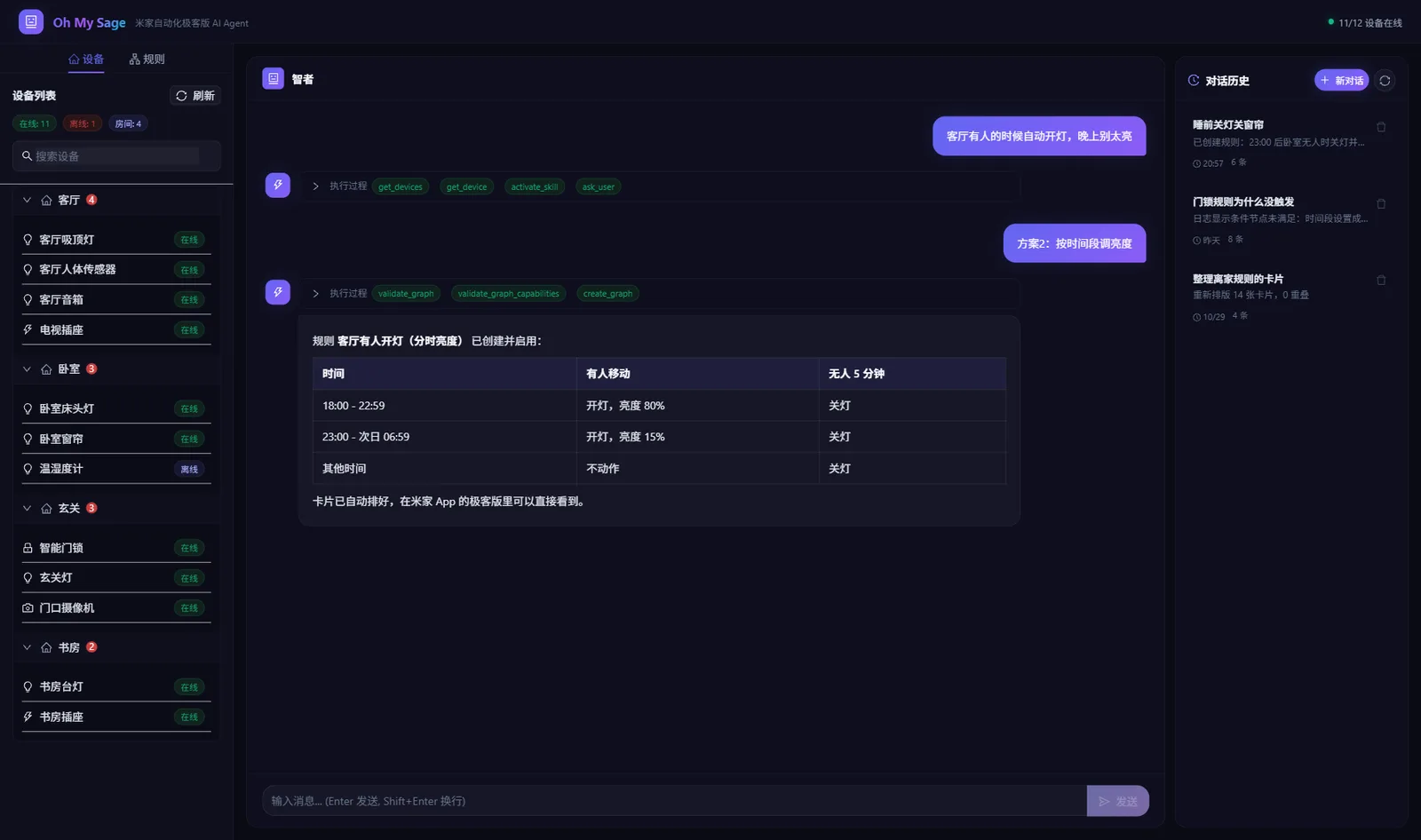
Oh My Sage 直接连接局域网里的米家中枢网关。你说想要什么效果,它去读你家的设备和已有规则,给出方案,你确认后自动校验并写进网关,在米家 App 的极客版里立刻能看到。
可以在任何支持 MCP 的 AI Agent 里用(腾讯 WorkBuddy、TRAE、Qoder、通义灵码、Kimi Code、Claude Code、Cursor、OpenCode、Codex 等),也可以打开自带的网页版直接聊天。
它能做什么
| 你说 | 它会做什么 |
|---|---|
| 「客厅有人的时候自动开灯,晚上别太亮」 | 找到人体传感器和灯,读出它们支持的属性,给出两三个方案让你选,选完校验并创建规则 |
| 「冰箱门提醒太吵了,最高音量从 60 降到 50,其他别动」 | 在全部规则里定位那一个节点,只改这一行,其余节点原样保留 |
| 「哪些规则用到了玄关灯?」 | 扫描所有规则,列出引用这个设备的规则和节点 |
| 「回家开灯昨晚为什么没触发?」 | 读网关执行日志,告诉你流程停在了哪个节点 |
| 「离家规则的卡片乱成一团,整理一下」 | 检查重叠和穿过卡片的连线,按连接关系重新排版 |
| 「sleepMode 这个变量没用了,删掉」 | 先扫描全部规则,还有规则在用就拒绝,并告诉你是哪几条 |
第一项网页版和 AI Agent 都能做,其余几项目前只在 AI Agent 里提供。
快速开始
准备
- 一台米家中枢网关,在米家 App 里开启「自动化极客版」。
- 网关的局域网 IP:米家 App → 中枢网关(多个时选主中枢)→ 右上角「···」→「自动化极客版」,页面上能看到。同一个页面还会显示 6 位登录码,连接时再来取,它只能用一次。
- Node.js 20 或更高版本,终端里运行
node -v能看到版本号即可。
安装(两条命令)
把 <网关 IP> 换成你的网关 IP,在终端里依次运行:
npx -y add-mcp oh-my-sage-mcp -g -n oh-my-sage --env GATEWAY_URL=http://<网关 IP>
npx -y skills add allocnode/oh-my-sage --skill mijia-automation -g
- 第一条把 MCP Server 加进 AI Agent 的配置,会列出你电脑上装的 AI Agent,勾选要用的那几个。
- 第二条安装规则 Skill,AI 创建和修改规则时要参考它,同样勾选你的 AI Agent。
装完重启 AI Agent,在米家 App 里取一个新的登录码,对它说:
帮我连接米家网关,登录码是 <登录码>
连上以后直接提需求,比如「客厅有人的时候自动开灯,晚上别太亮」。
在 AI Agent 的 MCP 设置里选「手动添加」或「编辑 JSON」,粘贴:
{
  "mcpServers": {
    "oh-my-sage": {
      "command": "npx",
      "args": ["-y", "oh-my-sage-mcp"],
      "env": { "GATEWAY_URL": "http://<网关 IP>" }
    }
  }
}
不支持 Skill 的 AI Agent,可以把 SKILL.md 的内容贴进它的规则文件(比如 AGENTS.md)。其他客户端的写法见 部署指南。
不想每次重启都输登录码
上面的方式由 AI Agent 按需启动 MCP Server,AI Agent 一退出连接就断了。改成常驻服务后,网关只登录一次,所有 AI Agent 共用。
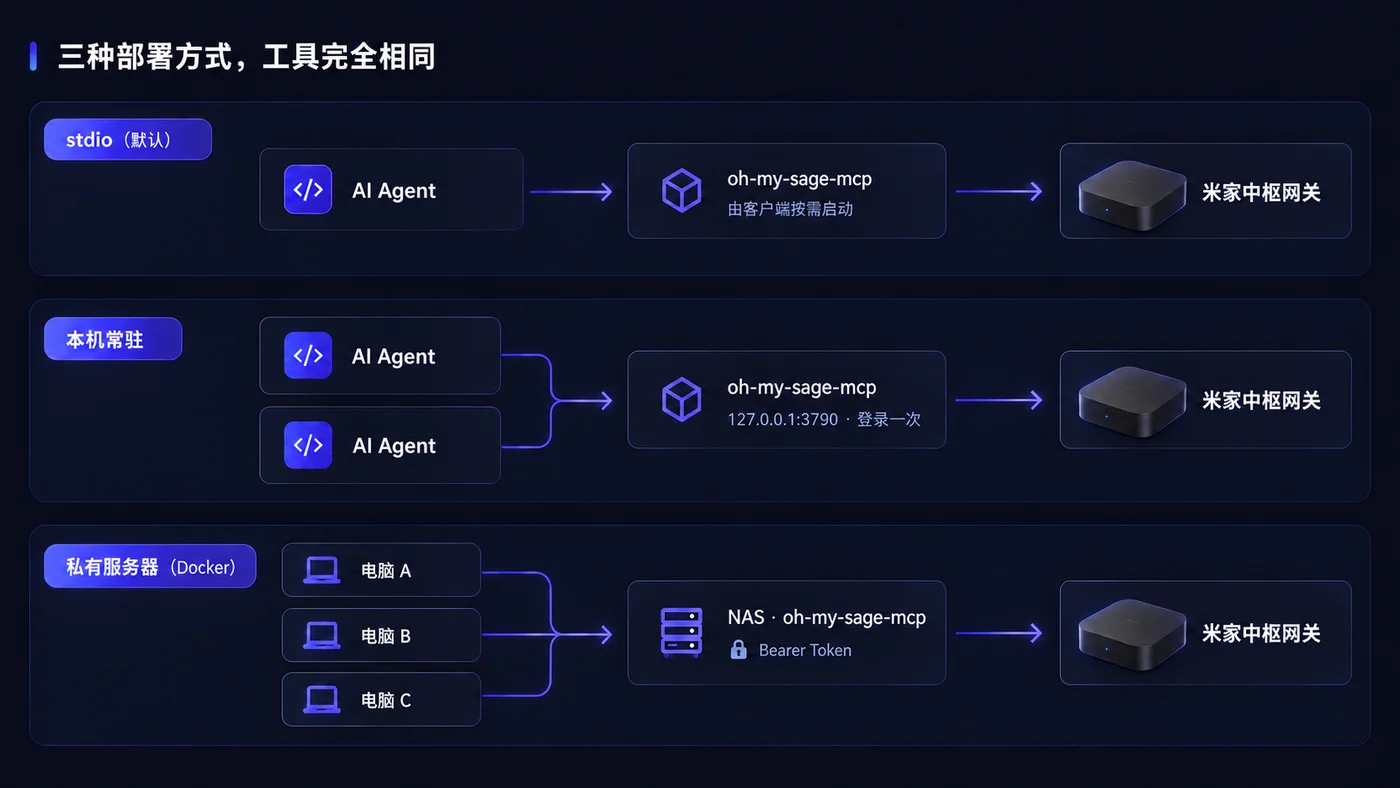
本机常驻(自己一台电脑用):
npm install -g oh-my-sage-mcp

# Windows(PowerShell,不需要管理员权限)
powershell -ExecutionPolicy Bypass -File "$(npm root -g)/oh-my-sage-mcp/deploy/install-local.ps1" -GatewayUrl "http://<网关 IP>"
# macOS / Linux
bash "$(npm root -g)/oh-my-sage-mcp/deploy/install-local.sh" -g "http://<网关 IP>"

# 把 AI Agent 的配置换成连接这个服务
npx -y add-mcp http://127.0.0.1:3790/mcp -g -n oh-my-sage
服务开机登录后自动运行,只对本机开放。
私有服务器 / NAS(几台电脑共用,或者用豆包工作这类云端 AI Agent):在服务器上用 Docker 部署,步骤见 部署指南。部署好后,每台电脑运行:
npx -y add-mcp http://<服务器 IP>:3790/mcp -g -n oh-my-sage --header "Authorization: Bearer <访问密码>"
升级与卸载
| 用法 | 升级 | 卸载 |
|---|---|---|
| 按需启动 | 自动,每次启动都会用 npm 上的最新版 | 删掉 AI Agent 配置里的 oh-my-sage |
| 本机常驻 | npm install -g oh-my-sage-mcp,再运行一次安装脚本 |
安装脚本加 -Uninstall(Windows)或 -u 运行,再 npm uninstall -g oh-my-sage-mcp |
| 私有服务器 | 见 部署指南 | 在 deploy 目录运行 docker compose down |
Skill 升级:npx -y skills update mijia-automation -g;卸载:npx -y skills remove mijia-automation -g。每个版本的改动见 Releases。
网页版
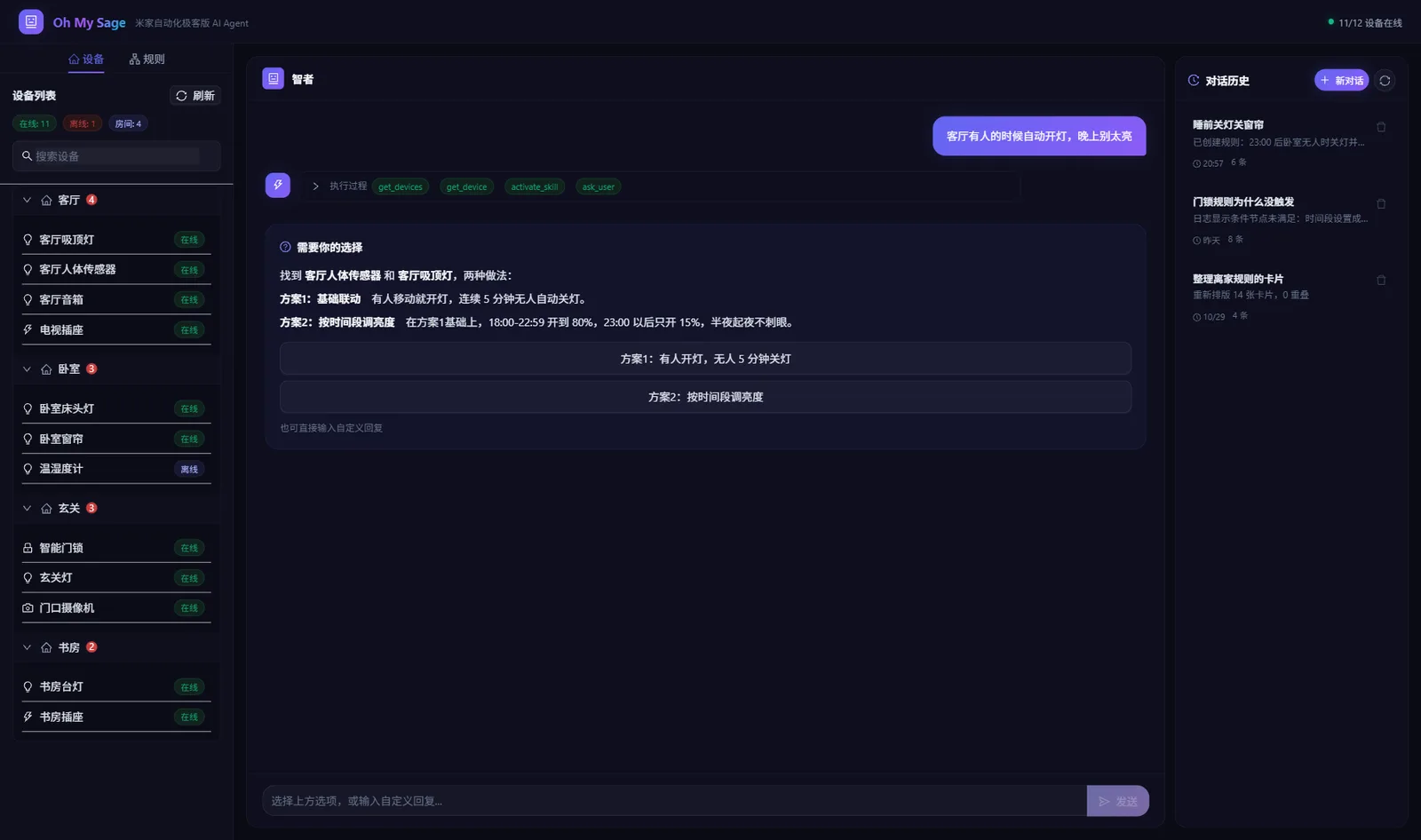
网页版要下载仓库运行,需要 Git:
git clone https://github.com/allocnode/oh-my-sage.git
cd oh-my-sage
npm install
cp .env.example .env    # Windows PowerShell:Copy-Item .env.example .env
编辑 .env,填好这四项:
LLM_BASE_URL=https://api.deepseek.com/v1
LLM_MODEL=deepseek-flash
LLM_API_KEY=<你的 API Key>
GATEWAY_URL=http://<网关 IP>
| 服务商 | LLM_BASE_URL |
LLM_MODEL 示例 |
|---|---|---|
| DeepSeek | https://api.deepseek.com/v1 |
deepseek-flash |
| 通义千问 | https://dashscope.aliyuncs.com/compatible-mode/v1 |
qwen3.8-flash |
| Kimi | https://api.moonshot.cn/v1 |
kimi-k3.1-pro |
| 智谱 GLM | https://open.bigmodel.cn/api/paas/v4 |
glm-5.3-flashx |
| 豆包(火山方舟) | https://ark.cn-beijing.volces.com/api/v3 |
doubao-seed-2-1-pro-260628 |
| OpenAI | https://api.openai.com/v1 |
gpt-6.1-terra |
| 本地 Ollama | http://localhost:11434/v1 |
你已拉取的模型名 |
任何 OpenAI 兼容接口都可以。然后运行 npm run dev,浏览器打开 http://localhost:3000 ,输入登录码即可。长期使用可以 npm run build 后用 npm start 启动。更新:git pull、npm install 后重启。
网页版没有账号系统,不要把它暴露到公网。
写入前一定校验
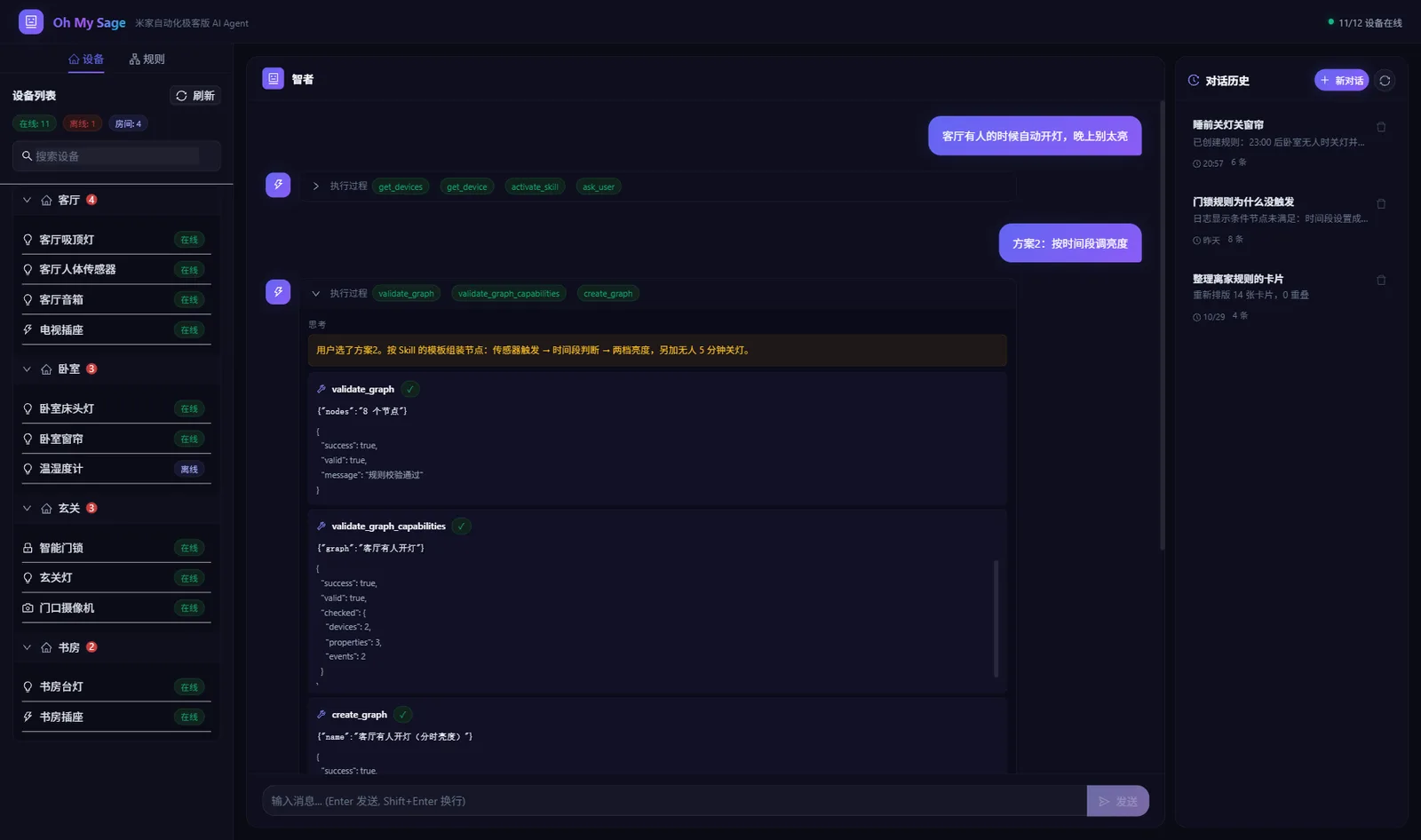
写入网关之前固定做两项检查,任意一项不通过就不写入,并把原因交给 AI 修正:
- 结构校验:节点之间的连线是否完整,端口是否接对
- 设备能力校验:按设备真实的 MIOT Spec 核对属性是否存在、能不能写、取值是否在范围内,引用的变量是否存在
读写规则用一行一个节点的紧凑文本,设备直接写名称,修改只提交变化的几行,并带上读取时的 hash,规则在这期间被改过就拒绝写入:
t   at 20:00:00 -> chk
chk get 客厅吸顶灯 2/1 = true -> off
off set 客厅吸顶灯 2/1 = false
完整语法见 规则文本格式。
MCP 工具列表
共 32 个工具。创建和修改规则的工具需要配合 mijia-automation Skill。
安全说明
- 只在局域网里连网关,通信用网关自己的登录码认证和加密,不经过云端。唯一的公网请求是校验设备能力时从
miot-spec.org读取设备型号的公开定义;网页版另外会把对话发给你配置的大模型接口。 - 常驻服务监听非本机地址时必须设置访问密码(
MCP_AUTH_TOKEN),否则拒绝启动。 - 排障用的
mijia_call_api只开放只读方法,不能绕过校验写网关。 - 删除前有检查:变量还被规则使用时拒绝删除;删除规则时一起清理它自己的变量。
常见问题
登录码提示错误,但我确定没输错? 登录码只能用一次,不管成功还是失败,用过就作废了。取一个新的再试。
AI Agent 里看不到 oh-my-sage,或者显示连接失败?
终端里运行 npx -y oh-my-sage-mcp --version。能打印版本号,问题在 AI Agent 的配置;报错的话,多半是 Node.js 低于 20,或者访问不了 npm。
连不上网关?
确认电脑(或服务器)和网关在同一个局域网,地址是 http:// 加网关 IP,并且「自动化极客版」已开启。
AI 说创建规则需要 Skill? 运行安装里的第二条命令,再重启 AI Agent。
参与贡献
欢迎提 Issue 和 Pull Request。提交前请运行 npm run lint 和 npm run test:unit,测试不会连接真实网关。
.agents/skills/mijia-automation/  规则 Skill
src/core/     共用核心:网关客户端、工具、校验、排版
src/mcp/      MCP Server(stdio / Streamable HTTP)
src/app/ src/components/ src/server/  网页版
deploy/       常驻服务脚本与 Docker,见 deploy/README.md
License
致谢
Vercel AI SDK · Next.js · Ant Design · Model Context Protocol
Oh My Sage MCP questions
How do I add Oh My Sage MCP to Claude Code?
Run claude mcp add oh-my-sage -- npx -y oh-my-sage-mcp in your terminal. Add --scope user to make it available in every project.
How do I add Oh My Sage MCP to Cursor?
Open ~/.cursor/mcp.json and add the server under mcpServers, using the Cursor config shown in the install section above.
How do I connect Oh My Sage to my Mijia gateway?
Give the AI your gateway's LAN IP via GATEWAY_URL and a 6-digit one-time login code from the Mijia App, then ask the agent to connect with that code.
Can Oh My Sage modify an existing automation rule without rewriting it?
Yes, it makes incremental patches that only change the affected nodes and preserves the rest, rejecting the write if the rule changed meanwhile.
Does Oh My Sage validate rules before writing them to the gateway?
Yes, it checks node connections and port wiring, then verifies device properties against the real MIOT Spec and refuses to write if either check fails.
Why does my Mijia login code get rejected?
The login code is single-use; it expires whether the attempt succeeds or fails, so fetch a new one from the Mijia App and retry.
Can I use Oh My Sage over the network or share it across computers?
Yes, you can run it as a background service locally or deploy it via Docker on a private server or NAS; non-local listeners require an access token.