
Bruster MCP server
Commit Nov 13, 2026Control native webviews to navigate pages, fill forms, inspect the DOM, and capture screenshots via MCP or a JSON-lines API.
Also known as aliilyas/bruster
- Stars
- 4
- Tools
- —
- Downloads, 30 days
- —
- Latest version
- 0.3.2
- Last commit
- Nov 13, 2026
- License
- MIT
What is Bruster MCP?
Bruster controls native webviews to navigate pages, fill forms, inspect the DOM, and capture screenshots via MCP or a JSON-lines API.
Summary generated from the project's README
About Bruster MCP server
Automating web interactions through native webviews is what Bruster enables for developers and AI agents. This Rust-based tool allows users to navigate web pages, fill out forms, inspect the DOM, and capture screenshots using either the Model Context Protocol or a JSON-lines API. It operates locally on macOS via WKWebView, Linux via WebKitGTK, and Windows via WebView2, providing a lightweight alternative to Node.js-based automation frameworks.
Users can integrate the server into Claude Desktop or Cursor by configuring the command in their local settings files. For those requiring persistent sessions, the tool supports saving cookies and storage through specific profile flags. It also includes a built-in test runner that uses a compact line-oriented DSL to execute repeatable UI checks and assertions without needing Python or Node.js installed on the system.
What you can do with it
- 1Agent-driven web navigationAn AI agent can use the MCP server to interact with live websites by navigating URLs and inspecting page content.
- 2Visual verification of web pagesYou can instruct an AI client to take a screenshot of a specific web element or page to confirm its appearance.
Written from the project's README. Every use case is checked against a quote from it.
Automated checks
Ran Nov 14, 2026Full report →Not verified yet. A server needs a score of 80, no serious finding, and enough data for us to check. How checks work · What to fix for more points

- Source repository linked and reachablealiilyas/bruster is public and reachablegithub.com/aliilyas/bruster ↗Pass
- Package names this repository as its sourceNot checked
- Build provenance (Sigstore attestation)Not checked
- Open source license (OSI)MITspdx.org/licenses/MIT.html ↗Pass
- Commit or release in the last yearLast commit or release 2026-11-13github.com/aliilyas/bruster ↗Pass
- OpenSSF ScorecardNot checked
- Package name not close to a popular packageNot checked
- No critical advisory in the package or its dependenciesNot checked
- No hidden instructions to the model0 tool descriptions and the README read; no override phrases, credential paths or hidden charactersPass
- Destructive tools are labelledNot checked
- Remote endpoint answers the MCP handshakeNot checked
README
View on GitHub








Bruster is an open-source Rust browser automation tool and Model Context Protocol (MCP) server. Control native webviews from AI agents, Python scripts, or your own test runner through MCP or a JSON-lines API. No Node.js required.
Documentation · UI testing · MCP setup · Compare with Playwright · Benchmarks · Releases
Navigate pages, inspect the DOM, fill forms, take screenshots, and manage tabs
and persistent sessions on macOS (WKWebView), Linux (WebKitGTK), and Windows
(WebView2). Bruster fits native-webview scripts, focused smoke tests, and
agent-driven workflows. Run .bru tests with the built-in runner or use your own.
For AI tools: documentation index · full CLI and API reference.
Demo
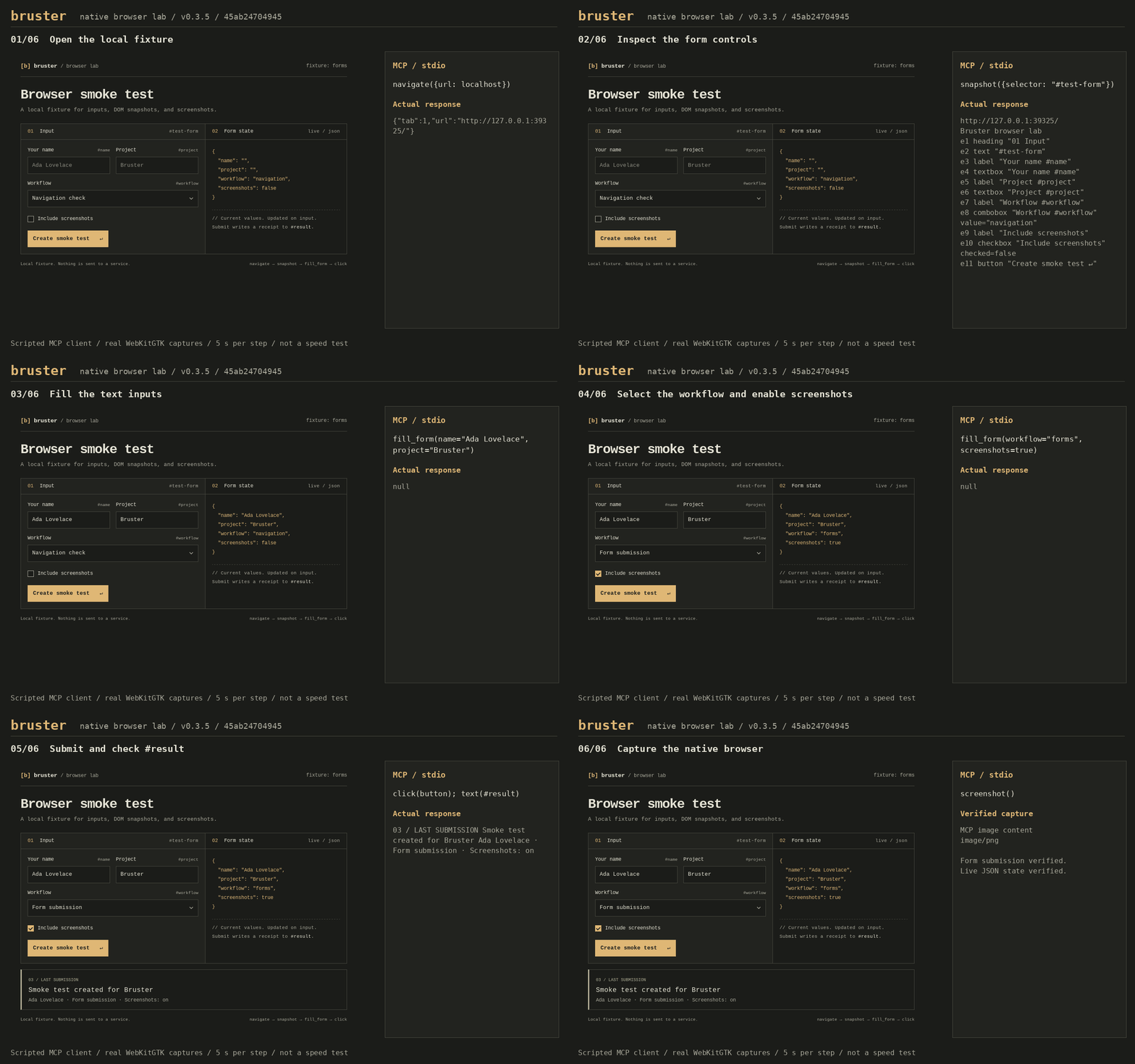
Scripted MCP session with real WebKitGTK captures. Try the demo.
Install
On macOS and Linux:
curl -fsSL https://raw.githubusercontent.com/aliilyas/bruster/main/install.sh | sh
export PATH="$HOME/.local/bin:$PATH"
Linux also needs WebKitGTK 4.1. On Ubuntu or Debian:
sudo apt install libwebkit2gtk-4.1-0
Without a desktop display, also install xvfb and xauth.
Other Linux distributions.
On Windows, download an archive from Releases and install the WebView2 runtime.
Docker Hub
The Docker image includes the Linux browser runtime and virtual display for amd64 and arm64:
docker run --rm -i ilyastmn/bruster:latest
Starts an MCP server over stdio. Docker client setup.
MCP
Add this server to Claude Desktop's claude_desktop_config.json or Cursor's .cursor/mcp.json:
{
  "mcpServers": {
    "bruster": {
      "command": "bruster",
      "args": ["--mcp", "--quiet"]
    }
  }
}
Use the executable's absolute path if your client cannot find bruster.
Add --visible to watch the browser or --profile ./profile to save cookies and storage.
Setup for other clients and troubleshooting.
JSON lines
Run bruster, then send requests on stdin, waiting for each response before the next request:
{"id":1,"method":"navigate","params":{"url":"https://example.com"}}
{"id":2,"method":"snapshot","params":{"format":"text"}}
{"id":3,"method":"screenshot","params":{"path":"example.png"}}
{"id":4,"method":"close"}
Responses carry the matching id; page events also arrive on stdout.
Protocol and API reference.
UI tests with the .bru DSL
Bruster includes a compact, line-oriented DSL for repeatable UI checks. It handles
browser startup, waits, assertions, and failure evidence so you can focus on the
flow being tested. Write a login.bru file:
base_url "http://localhost:3000"

test "opens the dashboard"
  navigate "/login"
  fill "#email" "tester@example.com"
  fill "#password" "test-password"
  click "button[type=submit]"
  expect url "/dashboard"
  expect text "h1" "Dashboard"
end
Run bruster test login.bru. Assertions retry until their deadline; each test
gets a fresh browser and profile. Failures include source lines, screenshots,
and page diagnostics. The runner writes a JSON report and returns a nonzero exit
code on failure. No Node.js or Python is needed to run tests.
Use before_each for shared setup and --base-url to run the same tests against
another environment. The time savings are in authoring and debugging tests.
The runner is available in source builds from main; older release binaries may
not include bruster test yet.
UI testing guide · Beginner course: 20 lessons · DSL reference · Runnable local example · Website and demo example tests · Web automation testing tutorial
Limitations
Bruster uses WKWebView on macOS, WebKitGTK on Linux, and WebView2 on Windows. Input events are synthetic; cross-origin iframes and OS-level controls aren't supported. See the full limitations when choosing a browser backend.
Development
Build with cargo build --release --locked.
See Contributing for dependencies, tests, and documentation changes.
Dependency security checks: daily RustSec, cargo-deny, OSV-Scanner, and Trivy scans, plus Dependabot and Socket setup.
License
Bruster MCP questions
What operating systems does Bruster support?
Bruster supports macOS (using WKWebView), Linux (using WebKitGTK), and Windows (using WebView2).
Can I save my browser session and cookies?
Yes, you can use the --profile flag to save cookies and storage.