
Provides a tamper-evident, SHA-256 hash-chained audit trail and observability for AI agents to track LLM calls, tool usage, and costs.
Also known as agentkitai/agentlens, @agentkitai/agentlens-mcp
- Stars
- 25
- Tools
- 22
- Downloads, 30 days
- 224
- Latest version
- 0.13.7
- Last commit
- Oct 25, 2026
- License
- MIT
What is AgentLens MCP?
AgentLens provides a tamper-evident, SHA-256 hash-chained audit trail and observability for AI agents to track LLM calls, tool usage, and costs. It exposes 22 tools, such as agentlens_session_start, agentlens_log_event, agentlens_session_end.
Summary generated from the project's README
About AgentLens MCP server
AgentLens acts as a flight recorder for AI agents, providing a verifiable audit trail for every LLM call, tool invocation, and error. It is designed for developers and organizations needing to meet record-keeping obligations like the EU AI Act Article 12. The system uses SHA-256 hash-chaining to create an append-only log where any attempt to alter or reorder records will break the cryptographic verification.
Users can deploy the server locally using Docker or npx with a zero-config SQLite setup, or run a full production stack with Postgres and Redis. Integration is flexible, supporting Python auto-instrumentation for nine providers, OpenTelemetry for any GenAI agent, and a dedicated MCP server for clients like Claude Desktop or Cursor. The platform includes a real-time web dashboard for monitoring session timelines, cost analytics, and agent health scores.
What you can do with it
- 1Verify audit log integrityAn auditor can check if any agent events have been modified by running a cryptographic verification on the hash chain.
- 2Monitor AI operational costsDevelopers can track token usage and estimated spending per session or model to prevent budget overruns.
- 3Observe MCP client activityUsers of Claude Desktop or Cursor can use the MCP server to capture tool calls and sessions directly.
- 4Automate LLM call trackingPython developers can capture all interactions with providers like OpenAI or Anthropic using a single line of code.
Written from the project's README. Every use case is checked against a quote from it.
How to install AgentLens MCP
Formats verified 10 Nov 2026Add to CursorAdd to GooseInstall AgentLens MCP in Claude Code
$ claude mcp add agentlens -- npx -y @agentkitai/agentlens-mcpInstall AgentLens MCP in Cursor
~/.cursor/mcp.json
{
  "mcpServers": {
    "agentlens": {
      "command": "npx",
      "args": [
        "-y",
        "@agentkitai/agentlens-mcp"
      ]
    }
  }
}Install AgentLens MCP in VS Code
.vscode/mcp.json
{
  "servers": {
    "agentlens": {
      "type": "stdio",
      "command": "npx",
      "args": [
        "-y",
        "@agentkitai/agentlens-mcp"
      ]
    }
  }
}Install AgentLens MCP in VS Code CLI
$ code --add-mcp '{"name":"agentlens","type":"stdio","command":"npx","args":["-y","@agentkitai/agentlens-mcp"]}'Install AgentLens MCP in Claude Desktop
claude_desktop_config.json
{
  "mcpServers": {
    "agentlens": {
      "command": "npx",
      "args": [
        "-y",
        "@agentkitai/agentlens-mcp"
      ]
    }
  }
}Install AgentLens MCP in Codex
$ codex mcp add agentlens -- npx -y @agentkitai/agentlens-mcpInstall AgentLens MCP in Codex config.toml
~/.codex/config.toml
[mcp_servers.agentlens]
command = "npx"
args = ["-y", "@agentkitai/agentlens-mcp"]
Install AgentLens MCP in Gemini CLI
$ gemini mcp add -s user agentlens npx -- -y @agentkitai/agentlens-mcpInstall AgentLens MCP in Gemini settings.json
~/.gemini/settings.json
{
  "mcpServers": {
    "agentlens": {
      "command": "npx",
      "args": [
        "-y",
        "@agentkitai/agentlens-mcp"
      ]
    }
  }
}Started by HostedMCP on 16 Nov 2026
We ran this command for @agentkitai/agentlens-mcp 0.13.7 in an isolated container with no network and no keys. It answered and listed 22 tools.
AgentLens MCP tools 22
Read from the server with tools/listagentlens_session_startStart a new AgentLens monitoring session. Returns a sessionId to use for subsequent events.
agentlens_log_eventLog an event to an active AgentLens session.
agentlens_session_endEnd an active AgentLens monitoring session.
agentlens_query_eventsQuery events from an AgentLens session.
agentlens_log_llm_callLog a complete LLM call (request + response) to an active AgentLens session. Emits paired llm_call and llm_response events.
agentlens_reflectAnalyze behavioral patterns from agent sessions — error patterns, tool sequences, cost analysis, and performance trends. **When to use:** To identify recurring errors and their root causes (error_patterns), to understand cost drivers and optimize model usage (cost_analysis), to discover common tool usage chains and their success rates (tool_sequences), or to track performance over time (performance_trends). **What it returns:** A list of structured insights with type, summary, data, and confidence score, plus metadata about how many sessions/events were analyzed. Each analysis type returns different data shapes. **Example:** agentlens_reflect({ analysis: "error_patterns", agentId: "my-agent", from: "2026-01-01" }) → returns recurring error patterns with counts, first/last seen, and affected sessions.
agentlens_optimizeGet cost optimization recommendations. Analyzes LLM call patterns and suggests cheaper model alternatives. **When to use:** To identify cost-saving opportunities by switching expensive models to cheaper alternatives for tasks that don't require the most capable model. Analyzes call complexity (simple/moderate/complex) and success rates. **What it returns:** A list of model switch recommendations with estimated monthly savings, confidence levels, and success rate comparisons. Sorted by potential savings. **Example:** agentlens_optimize({ period: 7 }) → returns recommendations like "Switch gpt-4o → gpt-4o-mini for SIMPLE tasks, saving $89/month".
agentlens_contextRetrieve cross-session context for a topic — related session summaries and lessons ranked by relevance. **When to use:** At the start of a session to load relevant history, when building a system prompt with past experience, when starting work on a topic the agent has handled before, or to audit what happened with a specific topic. **What it returns:** Related sessions (with summaries, key events, and relevance scores) and related lessons, all ranked by relevance to the topic. Includes an overall summary. **Example:** agentlens_context({ topic: "database migrations", limit: 5 }) → returns past sessions about DB migrations with key events, plus any lessons learned about migrations.
agentlens_healthCheck the health score of the current agent. Returns overall score (0-100), trend, and dimension breakdown. **When to use:** To assess the current health and performance of the agent, to check if error rates or latency are degrading, or to get a quick overview of agent reliability metrics. **What it returns:** An overall health score (0-100), a trend indicator (improving/stable/degrading), and a breakdown by five dimensions: error rate, cost efficiency, tool success, latency, and completion rate. **Example:** agentlens_health({ window: 7 }) → returns health score with dimension breakdown for the last 7 days.
agentlens_replayReplay a past session as a structured, human-readable timeline. **When to use:** To review what happened in a previous session — understand failures, decision patterns, timing, or cost accumulation. Great for debugging or post-mortem analysis. **What it returns:** A session header (agent, status, duration, cost, event counts) followed by numbered, timestamped steps with event type icons and context annotations. **Parameters:** - sessionId (required): The session to replay - fromStep/toStep: Replay a specific step range - eventTypes: Comma-separated filter (e.g., "llm_call,tool_call") - summaryOnly: Set true to get just the summary header (fast for large sessions) **Example:** agentlens_replay({ sessionId: "ses_abc123", summaryOnly: true }) → returns session summary without steps.
agentlens_benchmarkManage A/B benchmarks: create, list, check status, get results, and control lifecycle. **When to use:** To set up controlled experiments comparing different agent configurations (models, prompts, parameters), track which variant performs better, and get statistical results. **Workflow:** 1. `create` — Define a benchmark with 2+ variants and metrics 2. Tag sessions with variant tags during data collection 3. `start` — Transition benchmark to running 4. `status` — Check progress (session counts per variant) 5. `results` — Get statistical comparison with p-values 6. `complete` — Finalize the benchmark **Actions:** - `create`: Set up a new benchmark (name, variants[], metrics[]) - `list`: List benchmarks, optionally filter by status - `status`: Get benchmark detail with per-variant session counts - `results`: Get formatted comparison table with statistical analysis - `start`: Transition benchmark to running state - `complete`: Transition benchmark to completed state **Example:** agentlens_benchmark({ action: "create", name: "GPT-4o vs Claude", variants: [{name: "gpt4o", tag: "v-gpt4o"}, {name: "claude", tag: "v-claude"}], metrics: ["cost", "latency", "success_rate"] })
agentlens_guardrailsCheck guardrail status for the current agent. Returns active guardrail rules, their current state, and recent trigger history. **When to use:** To check what guardrails are protecting this agent, whether any have been triggered recently, and what conditions/actions are configured. **What it returns:** A list of configured guardrail rules with their status (enabled/disabled, trigger count, last trigger time) and recent trigger history. **Example:** agentlens_guardrails({}) → returns all guardrail rules and their status.
| agentlens_session_start | Start a new AgentLens monitoring session. Returns a sessionId to use for subsequent events. | |
| agentlens_log_event | Log an event to an active AgentLens session. | |
| agentlens_session_end | End an active AgentLens monitoring session. | |
| agentlens_query_events | Query events from an AgentLens session. | |
| agentlens_log_llm_call | Log a complete LLM call (request + response) to an active AgentLens session. Emits paired llm_call and llm_response events. | |
| agentlens_reflect | Analyze behavioral patterns from agent sessions — error patterns, tool sequences, cost analysis, and performance trends. **When to use:** To identify recurring errors and their root causes (error_patterns), to understand cost drivers and optimize model usage (cost_analysis), to discover common tool usage chains and their success rates (tool_sequences), or to track performance over time (performance_trends). **What it returns:** A list of structured insights with type, summary, data, and confidence score, plus metadata about how many sessions/events were analyzed. Each analysis type returns different data shapes. **Example:** agentlens_reflect({ analysis: "error_patterns", agentId: "my-agent", from: "2026-01-01" }) → returns recurring error patterns with counts, first/last seen, and affected sessions. | |
| agentlens_optimize | Get cost optimization recommendations. Analyzes LLM call patterns and suggests cheaper model alternatives. **When to use:** To identify cost-saving opportunities by switching expensive models to cheaper alternatives for tasks that don't require the most capable model. Analyzes call complexity (simple/moderate/complex) and success rates. **What it returns:** A list of model switch recommendations with estimated monthly savings, confidence levels, and success rate comparisons. Sorted by potential savings. **Example:** agentlens_optimize({ period: 7 }) → returns recommendations like "Switch gpt-4o → gpt-4o-mini for SIMPLE tasks, saving $89/month". | |
| agentlens_context | Retrieve cross-session context for a topic — related session summaries and lessons ranked by relevance. **When to use:** At the start of a session to load relevant history, when building a system prompt with past experience, when starting work on a topic the agent has handled before, or to audit what happened with a specific topic. **What it returns:** Related sessions (with summaries, key events, and relevance scores) and related lessons, all ranked by relevance to the topic. Includes an overall summary. **Example:** agentlens_context({ topic: "database migrations", limit: 5 }) → returns past sessions about DB migrations with key events, plus any lessons learned about migrations. | |
| agentlens_health | Check the health score of the current agent. Returns overall score (0-100), trend, and dimension breakdown. **When to use:** To assess the current health and performance of the agent, to check if error rates or latency are degrading, or to get a quick overview of agent reliability metrics. **What it returns:** An overall health score (0-100), a trend indicator (improving/stable/degrading), and a breakdown by five dimensions: error rate, cost efficiency, tool success, latency, and completion rate. **Example:** agentlens_health({ window: 7 }) → returns health score with dimension breakdown for the last 7 days. | |
| agentlens_replay | Replay a past session as a structured, human-readable timeline. **When to use:** To review what happened in a previous session — understand failures, decision patterns, timing, or cost accumulation. Great for debugging or post-mortem analysis. **What it returns:** A session header (agent, status, duration, cost, event counts) followed by numbered, timestamped steps with event type icons and context annotations. **Parameters:** - sessionId (required): The session to replay - fromStep/toStep: Replay a specific step range - eventTypes: Comma-separated filter (e.g., "llm_call,tool_call") - summaryOnly: Set true to get just the summary header (fast for large sessions) **Example:** agentlens_replay({ sessionId: "ses_abc123", summaryOnly: true }) → returns session summary without steps. | |
| agentlens_benchmark | Manage A/B benchmarks: create, list, check status, get results, and control lifecycle. **When to use:** To set up controlled experiments comparing different agent configurations (models, prompts, parameters), track which variant performs better, and get statistical results. **Workflow:** 1. `create` — Define a benchmark with 2+ variants and metrics 2. Tag sessions with variant tags during data collection 3. `start` — Transition benchmark to running 4. `status` — Check progress (session counts per variant) 5. `results` — Get statistical comparison with p-values 6. `complete` — Finalize the benchmark **Actions:** - `create`: Set up a new benchmark (name, variants[], metrics[]) - `list`: List benchmarks, optionally filter by status - `status`: Get benchmark detail with per-variant session counts - `results`: Get formatted comparison table with statistical analysis - `start`: Transition benchmark to running state - `complete`: Transition benchmark to completed state **Example:** agentlens_benchmark({ action: "create", name: "GPT-4o vs Claude", variants: [{name: "gpt4o", tag: "v-gpt4o"}, {name: "claude", tag: "v-claude"}], metrics: ["cost", "latency", "success_rate"] }) | |
| agentlens_guardrails | Check guardrail status for the current agent. Returns active guardrail rules, their current state, and recent trigger history. **When to use:** To check what guardrails are protecting this agent, whether any have been triggered recently, and what conditions/actions are configured. **What it returns:** A list of configured guardrail rules with their status (enabled/disabled, trigger count, last trigger time) and recent trigger history. **Example:** agentlens_guardrails({}) → returns all guardrail rules and their status. |
Show all 22 toolsShow fewer tools
agentlens_discoverDiscover available agent capabilities in the network. **When to use:** Before delegating a task, to find agents that can handle a specific task type. Returns ranked results with trust scores, estimated cost, and latency. **Example:** agentlens_discover({ action: "discover", taskType: "code-review", minTrustScore: 70, limit: 5 })
agentlens_delegateDelegate a task to another agent in the AgentLens network. **When to use:** When you've discovered an agent capable of handling a specific task (via agentlens_discover) and want to delegate work to it. **Example:** agentlens_delegate({ action: "delegate", targetAgentId: "anon-abc123", taskType: "translation", input: { text: "Hello", targetLang: "es" } })
agentlens_sessionsBrowse and inspect AgentLens sessions. **When to use:** To find past sessions, inspect session details, or view a timeline of events within a session. Useful for debugging, auditing, or reviewing agent activity. **Actions:** - `list`: List sessions with optional filters (agentId, status, date range, tags) - `detail`: Get full session detail with aggregates - `timeline`: Get timestamped event list for a session **Example:** agentlens_sessions({ action: "list", agentId: "my-agent", status: "completed", limit: 10 })
agentlens_agentsList, inspect, and manage AgentLens agents. **When to use:** To see which agents are registered, check agent details and error rates, or unpause a paused agent. **Actions:** - `list`: List all agents with error rates - `detail`: Get agent detail by ID - `unpause`: Clear paused state for an agent **Example:** agentlens_agents({ action: "list" })
agentlens_alertsManage alert rules and view alert history. **When to use:** To create alerting rules for error rates, costs, or latency thresholds; manage existing rules; or review past alert triggers. **Actions:** - `list`: List all alert rules - `create`: Create a new alert rule - `update`: Update an existing alert rule - `delete`: Delete an alert rule - `history`: View recent alert triggers **Example:** agentlens_alerts({ action: "create", name: "High error rate", condition: "error_rate_above", threshold: 0.1, windowMinutes: 60 })
agentlens_analyticsQuery operational analytics: metrics, costs, agent performance, and tool usage. **When to use:** To understand system performance trends, cost breakdowns, agent activity, or tool usage patterns over time. **Actions:** - `metrics`: Get bucketed metrics with optional range/date filters - `costs`: Get cost breakdown - `agents`: Get per-agent metrics - `tools`: Get tool usage statistics **Example:** agentlens_analytics({ action: "metrics", range: "24h" })
agentlens_cost_budgetsManage cost budgets and anomaly detection. **When to use:** To create/manage spending limits, check budget utilization, or configure cost anomaly detection. **Actions:** - `list`: List all cost budgets - `create`: Create a new budget - `update`: Update an existing budget - `delete`: Delete a budget - `status`: Check spend vs limit for a budget - `anomaly_config`: Get anomaly detection configuration - `anomaly_update`: Update anomaly detection settings **Example:** agentlens_cost_budgets({ action: "create", scope: "global", period: "daily", limitUsd: 10, onBreach: "alert" })
agentlens_statsGet storage statistics and system overview metrics. **When to use:** To check database/storage utilization or get a high-level system overview. **Actions:** - `storage`: Get storage stats (database size, event counts, etc.) - `overview`: Get overview metrics (active sessions, agents, recent activity) **Example:** agentlens_stats({ action: "storage" })
agentlens_trustGet trust scores for agents. **When to use:** To check the trust/reliability score of an agent before delegating tasks or to monitor agent reputation. **Actions:** - `score`: Get trust score for a specific agent **Example:** agentlens_trust({ action: "score", agentId: "my-agent" })
agentlens_promptsManage prompt templates and versions. **Actions:** - `list`: List prompt templates (optional category, search filters) - `get`: Get a template with all versions by ID - `create`: Create a new prompt template with initial content - `update`: Create a new version of an existing template - `analytics`: Get per-version metrics for a template - `fingerprints`: List auto-discovered prompt fingerprints **Example:** agentlens_prompts({ action: "list", category: "system" })
| agentlens_discover | Discover available agent capabilities in the network. **When to use:** Before delegating a task, to find agents that can handle a specific task type. Returns ranked results with trust scores, estimated cost, and latency. **Example:** agentlens_discover({ action: "discover", taskType: "code-review", minTrustScore: 70, limit: 5 }) | |
| agentlens_delegate | Delegate a task to another agent in the AgentLens network. **When to use:** When you've discovered an agent capable of handling a specific task (via agentlens_discover) and want to delegate work to it. **Example:** agentlens_delegate({ action: "delegate", targetAgentId: "anon-abc123", taskType: "translation", input: { text: "Hello", targetLang: "es" } }) | |
| agentlens_sessions | Browse and inspect AgentLens sessions. **When to use:** To find past sessions, inspect session details, or view a timeline of events within a session. Useful for debugging, auditing, or reviewing agent activity. **Actions:** - `list`: List sessions with optional filters (agentId, status, date range, tags) - `detail`: Get full session detail with aggregates - `timeline`: Get timestamped event list for a session **Example:** agentlens_sessions({ action: "list", agentId: "my-agent", status: "completed", limit: 10 }) | |
| agentlens_agents | List, inspect, and manage AgentLens agents. **When to use:** To see which agents are registered, check agent details and error rates, or unpause a paused agent. **Actions:** - `list`: List all agents with error rates - `detail`: Get agent detail by ID - `unpause`: Clear paused state for an agent **Example:** agentlens_agents({ action: "list" }) | |
| agentlens_alerts | Manage alert rules and view alert history. **When to use:** To create alerting rules for error rates, costs, or latency thresholds; manage existing rules; or review past alert triggers. **Actions:** - `list`: List all alert rules - `create`: Create a new alert rule - `update`: Update an existing alert rule - `delete`: Delete an alert rule - `history`: View recent alert triggers **Example:** agentlens_alerts({ action: "create", name: "High error rate", condition: "error_rate_above", threshold: 0.1, windowMinutes: 60 }) | |
| agentlens_analytics | Query operational analytics: metrics, costs, agent performance, and tool usage. **When to use:** To understand system performance trends, cost breakdowns, agent activity, or tool usage patterns over time. **Actions:** - `metrics`: Get bucketed metrics with optional range/date filters - `costs`: Get cost breakdown - `agents`: Get per-agent metrics - `tools`: Get tool usage statistics **Example:** agentlens_analytics({ action: "metrics", range: "24h" }) | |
| agentlens_cost_budgets | Manage cost budgets and anomaly detection. **When to use:** To create/manage spending limits, check budget utilization, or configure cost anomaly detection. **Actions:** - `list`: List all cost budgets - `create`: Create a new budget - `update`: Update an existing budget - `delete`: Delete a budget - `status`: Check spend vs limit for a budget - `anomaly_config`: Get anomaly detection configuration - `anomaly_update`: Update anomaly detection settings **Example:** agentlens_cost_budgets({ action: "create", scope: "global", period: "daily", limitUsd: 10, onBreach: "alert" }) | |
| agentlens_stats | Get storage statistics and system overview metrics. **When to use:** To check database/storage utilization or get a high-level system overview. **Actions:** - `storage`: Get storage stats (database size, event counts, etc.) - `overview`: Get overview metrics (active sessions, agents, recent activity) **Example:** agentlens_stats({ action: "storage" }) | |
| agentlens_trust | Get trust scores for agents. **When to use:** To check the trust/reliability score of an agent before delegating tasks or to monitor agent reputation. **Actions:** - `score`: Get trust score for a specific agent **Example:** agentlens_trust({ action: "score", agentId: "my-agent" }) | |
| agentlens_prompts | Manage prompt templates and versions. **Actions:** - `list`: List prompt templates (optional category, search filters) - `get`: Get a template with all versions by ID - `create`: Create a new prompt template with initial content - `update`: Create a new version of an existing template - `analytics`: Get per-version metrics for a template - `fingerprints`: List auto-discovered prompt fingerprints **Example:** agentlens_prompts({ action: "list", category: "system" }) |
Configuration
AGENTLENS_API_KEYAGENTLENS_API_URLOTEL_EXPORTER_OTLP_ENDPOINTOTEL_EXPORTER_OTLP_TRACES_ENDPOINT
| Name | Description | |
|---|---|---|
| AGENTLENS_API_KEY | — | |
| AGENTLENS_API_URL | — | |
| OTEL_EXPORTER_OTLP_ENDPOINT | — | |
| OTEL_EXPORTER_OTLP_TRACES_ENDPOINT | — |
Automated checks
Ran Nov 16, 2026Full report →Passed our automated checks. That is not a security audit: read the code and give the server the narrowest access it needs. How checks work

- Source repository linked and reachableagentkitai/agentlens is public and reachablegithub.com/agentkitai/agentlens ↗Pass
- Package names this repository as its source@agentkitai/agentlens-mcp names agentkitai/agentlens as sourcenpmjs.com/package/@agentkitai/agentlens-mcp ↗Pass
- Build provenance (Sigstore attestation)No build attestation published for this releaseNot checked
- Open source license (OSI)MITspdx.org/licenses/MIT.html ↗Pass
- Commit or release in the last yearLast commit or release 2026-10-25github.com/agentkitai/agentlens ↗Pass
- OpenSSF ScorecardNot checked
- Package name not close to a popular packageNo popular package one edit away from @agentkitai/agentlens-mcpPass
- No critical advisory in the package or its dependencies102 resolved dependencies checked; no critical advisoryosv.dev ↗Pass
- No hidden instructions to the model22 tool descriptions and the README read; no override phrases, credential paths or hidden charactersPass
- Destructive tools are labelledNo tool named like delete, drop or execPass
- Remote endpoint answers the MCP handshakeNot checked
README
View on GitHub📑 Table of Contents
- Tamper-Evident by Design
- Quick Start
- Architecture
- Integration Guides
- Key Features
- Dashboard
- AgentLens Cloud
- Packages
- API Overview
- CLI
- Development
- Contributing
- AgentKit Ecosystem
- License
AgentLens is a flight recorder for AI agents. It captures every LLM call, tool invocation, approval decision, and error — then presents it through a queryable API and real-time web dashboard.
🔒 Tamper-evident by design
What sets AgentLens apart from other observability tools: every event is SHA-256 hash-chained to the one before it, the same way git commits and blockchains are linked. The audit log is append-only and cryptographically verifiable — alter, delete, or reorder a single record after the fact and verification fails, pointing at the exact event that broke. Purpose-built for the record-keeping obligations of EU AI Act Article 12 and the emerging IETF Agent Audit Trail work.
See it for yourself in 30 seconds (needs Docker):
git clone https://github.com/agentkitai/agentlens && cd agentlens
./demo/aha.sh
1/5  Starting AgentLens (SQLite, zero-config)…   ✓ up at http://localhost:3400
2/5  Ingesting a 5-event agent trace…            ✓ 5 events ingested
3/5  Verifying the hash chain…                    ✓ CHAIN VALID — no tampering detected
4/5  Tampering with one event in the database…   ✓ altered llm_call (changed the logged model)
5/5  Re-verifying the hash chain…                 ✗ CHAIN BROKEN — tampering detected ✅
The demo ingests a real trace, verifies the chain (passes), edits one record directly in the database behind the audit log's back, then re-verifies (fails). Auditors get a signed, verifiable JSON snapshot from GET /api/audit/verify/export.
Five ways to integrate — pick what fits your stack:
| Integration | Language | Effort | Capture |
|---|---|---|---|
| 🔭 OpenTelemetry | Any | Point your OTLP exporter | Any gen_ai.*-instrumented agent — no AgentLens SDK |
| 🤖 OpenClaw Plugin | OpenClaw | Copy & enable | Every Anthropic call — prompts, tokens, cost, tools — zero code |
| 🐍 Python Auto-Instrumentation | Python | 1 line | Every OpenAI / Anthropic / LangChain call — deterministic |
| 🔌 MCP Server | Any (MCP) | Config block | Tool calls, sessions, events from Claude Desktop / Cursor |
| 📦 SDK | Python, TypeScript | Code | Full control — log events, query analytics, build integrations |
🚀 Quick Start
One command — server + dashboard on SQLite, zero config:
docker run -p 3400:3400 -e AUTH_DISABLED=true -e JWT_SECRET=dev-secret ghcr.io/agentkitai/agentlens
# Open http://localhost:3400
Or without Docker:
npx @agentkitai/agentlens-server
# http://localhost:3400 with SQLite — zero config
AUTH_DISABLED=trueis for a quick local trial (JWT_SECRETis still required by the hardened image). For anything shared, dropAUTH_DISABLED, set a realJWT_SECRET, and create an API key (below).
Full stack (Postgres + Redis, auth, TLS) — runs from source:
git clone https://github.com/agentkitai/agentlens && cd agentlens
cp .env.example .env
docker compose up
# production overlay (auth, restart policies):
docker compose -f docker-compose.yml -f docker-compose.prod.yml up
Create an API Key
curl -X POST http://localhost:3400/api/keys \
  -H "Content-Type: application/json" \
  -d '{"name": "my-agent"}'
Save the als_... key from the response — it's shown only once. Then head to the Integration Guides to instrument your agent.
🏗️ Architecture
graph TB
    subgraph Agents["Your AI Agents"]
        PY["Python App<br/>(OpenAI, Anthropic, LangChain)"]
        MCP_C["MCP Client<br/>(Claude Desktop, Cursor)"]
        TS["TypeScript App"]
        OC["OpenClaw Plugin"]
    end

    PY -->|"agentlensai.init()<br/>auto-instrumentation"| SERVER
    MCP_C -->|MCP Protocol| MCP_S["@agentkitai/agentlens-mcp"]
    MCP_S -->|HTTP| SERVER
    TS -->|"@agentkitai/agentlens-sdk"| SERVER
    OC -->|HTTP| SERVER

    subgraph Server["@agentkitai/agentlens-server"]
        direction TB
        INGEST[Ingest Engine]
        QUERY[Query Engine]
        ALERT[Alert Engine]
        LLM_A[LLM Analytics]
        HEALTH[Health Scoring]
        COST[Cost Optimizer]
        REPLAY[Session Replay]
        BENCH[Benchmark Engine]
        GUARD[Guardrails]
    end

    SERVER --> DB[(SQLite / Postgres)]
    SERVER --> DASH["Dashboard<br/>(React SPA)"]

    EXT["AgentGate / FormBridge"] -->|Webhook| SERVER
🔧 Integration Guides
🔭 OpenTelemetry (any GenAI agent — no SDK)
If your agent is already instrumented with the OpenTelemetry GenAI semantic conventions — via OpenLLMetry, OpenInference, or the official OTel instrumentations — just point its OTLP exporter at AgentLens. No AgentLens SDK required.
# Send standard OTLP/HTTP to AgentLens (JSON or protobuf, /v1/traces)
export OTEL_EXPORTER_OTLP_ENDPOINT=http://localhost:3400
export OTEL_EXPORTER_OTLP_TRACES_ENDPOINT=http://localhost:3400/v1/traces
AgentLens maps gen_ai.* spans into its model and into the tamper-evident audit log:
OTel GenAI span (gen_ai.operation.name) |
Becomes |
|---|---|
chat / text_completion / generate_content |
a paired llm_call + llm_response (model, provider, messages, usage.input_tokens/output_tokens, finish reason, latency, cost) |
execute_tool |
tool_call (gen_ai.tool.name, gen_ai.tool.call.id, arguments) |
embeddings |
embedding event with token usage |
invoke_agent / create_agent |
agent-invocation event |
Each OTel trace maps to a session (or gen_ai.conversation.id if present), and every event is hash-chained like any other — so traces from any GenAI framework get the same verifiable audit trail. Set OTLP_AUTH_TOKEN to require a bearer token on the OTLP endpoints in production.
Cost with no SDK: OTel GenAI instrumentation reports tokens but rarely cost. AgentLens reconstructs
costUsdfrom the model's per-1M-token pricing (fuzzy-matched on the model id), so OTel-only agents get the same cost analytics as SDK-instrumented ones — no per-call cost attribute required.
🤖 OpenClaw Plugin
If you're running OpenClaw, the AgentLens plugin captures every Anthropic API call automatically — prompts, completions, token usage, costs, latency, and tool calls.
cp -r packages/relay-plugin /usr/lib/node_modules/openclaw/extensions/agentlens-relay
openclaw config patch '{"plugins":{"entries":{"agentlens-relay":{"enabled":true}}}}'
openclaw gateway restart
Set AGENTLENS_URL if your AgentLens instance isn't on localhost:3400. See the plugin README for details.
🐍 Python Auto-Instrumentation
One line — every LLM call captured automatically across 9 providers (OpenAI, Anthropic, LiteLLM, AWS Bedrock, Google Vertex AI, Google Gemini, Mistral AI, Cohere, Ollama):
pip install agentlensai[all-providers]
import agentlensai

agentlensai.init(
    url="http://localhost:3400",
    api_key="als_your_key",
    agent_id="my-agent",
)
# Every LLM call is now captured automatically
Key guarantees: ✅ Deterministic · ✅ Fail-safe · ✅ Non-blocking · ✅ Privacy (init(redact=True))
🔌 MCP Integration
For Claude Desktop, Cursor, or any MCP client — add to your config:
{
  "mcpServers": {
    "agentlens": {
      "command": "npx",
      "args": ["@agentkitai/agentlens-mcp"],
      "env": {
        "AGENTLENS_API_URL": "http://localhost:3400",
        "AGENTLENS_API_KEY": "als_your_key_here"
      }
    }
  }
}
AgentLens ships 22 MCP tools — covering core observability, intelligence & analytics, and operations. Full MCP tool reference →
📦 Programmatic SDK
Python:
pip install agentlensai
from agentlensai import AgentLensClient
client = AgentLensClient("http://localhost:3400", api_key="als_your_key")
sessions = client.get_sessions()
analytics = client.get_llm_analytics()
TypeScript:
npm install @agentkitai/agentlens-sdk
import { AgentLensClient } from '@agentkitai/agentlens-sdk';
const client = new AgentLensClient({ baseUrl: 'http://localhost:3400', apiKey: 'als_your_key' });
const sessions = await client.getSessions();
✨ Key Features
- 🐍 Python Auto-Instrumentation —
agentlensai.init()captures every LLM call across 9 providers automatically. Deterministic — no reliance on LLM behavior. - 🔌 MCP-Native — Ships as an MCP server. Works with Claude Desktop, Cursor, and any MCP client.
- 🔭 OpenTelemetry GenAI — Ingests
gen_ai.*OTLP traces from any OTel-instrumented agent (OpenLLMetry, OpenInference, official OTel) — no AgentLens SDK required. - 🧠 LLM Call Tracking — Full prompt/completion visibility, token usage, cost aggregation, latency measurement, and privacy redaction.
- 📊 Real-Time Dashboard — Session timelines, event explorer, LLM analytics, cost tracking, and alerting.
- 🔒 Tamper-Evident Audit Trail — Append-only event storage with SHA-256 hash chains per session.
- 💰 Cost Tracking — Track token usage and estimated costs per session, per agent, per model. Alert on cost spikes.
- 🚨 Alerting — Configurable rules for error rate, cost threshold, latency anomalies, and inactivity.
- ❤️🩹 Health Scores — 5-dimension health scoring with trend tracking.
- 💡 Cost Optimization — Complexity-aware model recommendation engine with projected savings.
- 📼 Session Replay — Step-through any past session with full context reconstruction.
- ⚖️ A/B Benchmarking — Statistical comparison of agent variants using Welch's t-test and chi-squared analysis.
- 🛡️ Guardrails — Automated safety rules with dry-run mode for safe testing.
- 🔌 Framework Plugins — LangChain, CrewAI, AutoGen, Semantic Kernel — auto-detection, fail-safe, non-blocking.
- 🔗 AgentKit Ecosystem — Integrations with AgentGate, FormBridge, Lore, and AgentEval.
- 🔒 Tenant Isolation — Multi-tenant support with per-tenant data scoping and API key binding.
- 🏠 Self-Hosted — SQLite by default, no external dependencies. MIT licensed.
📸 Dashboard
AgentLens ships with a real-time web dashboard for monitoring your agents.
Overview — At-a-Glance Metrics
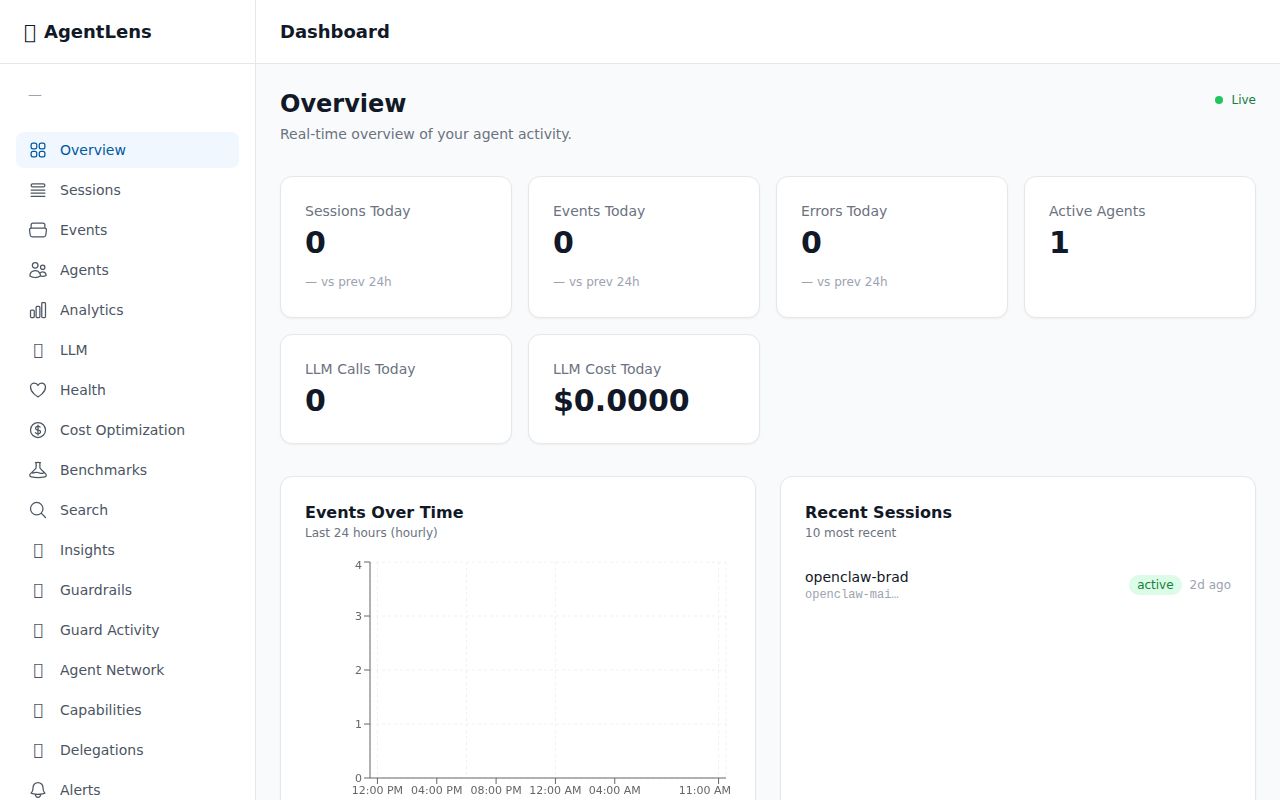
The overview page shows live metrics — sessions, events, errors, and active agents — with a 24-hour event timeline chart, recent sessions with status badges, and a recent errors feed.
Sessions — Track Every Agent Run
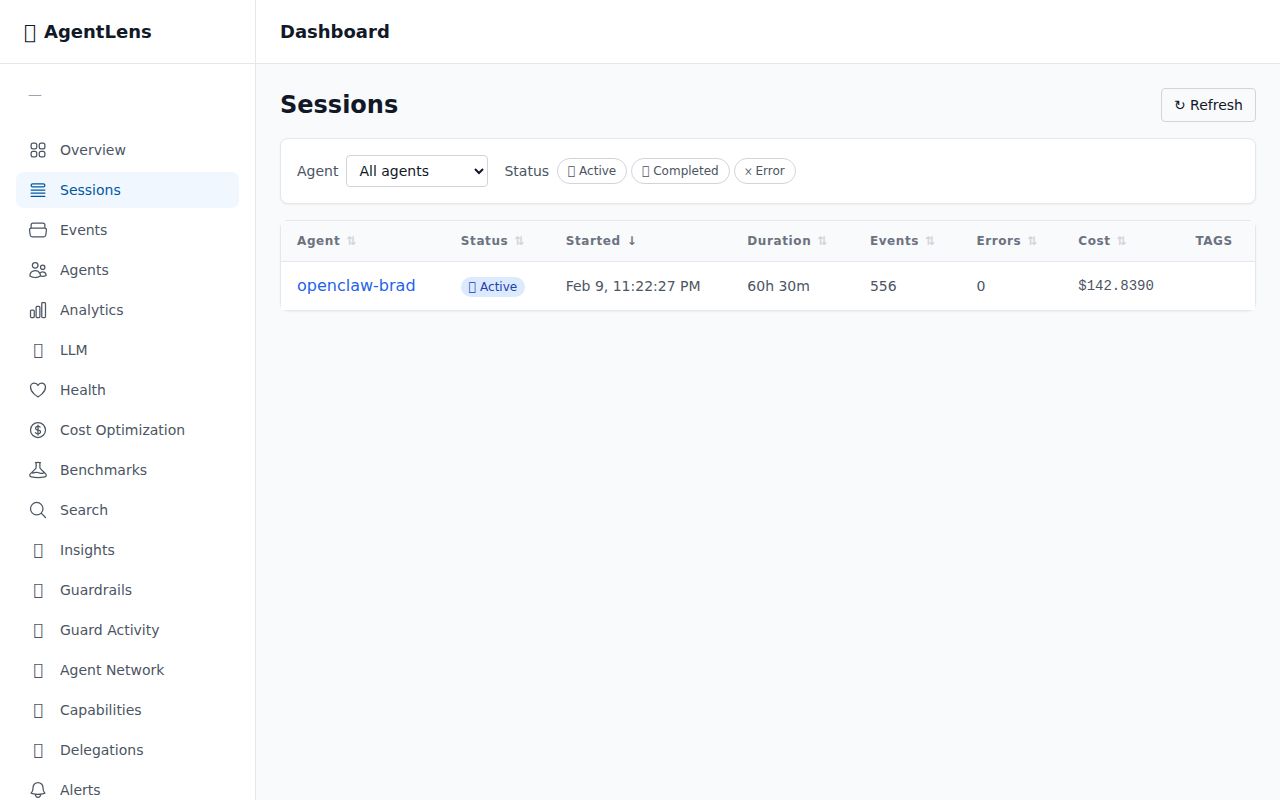
Every agent session with sortable columns: agent name, status, start time, duration, event count, error count, and total cost.
Session Detail — Timeline & Hash Chain
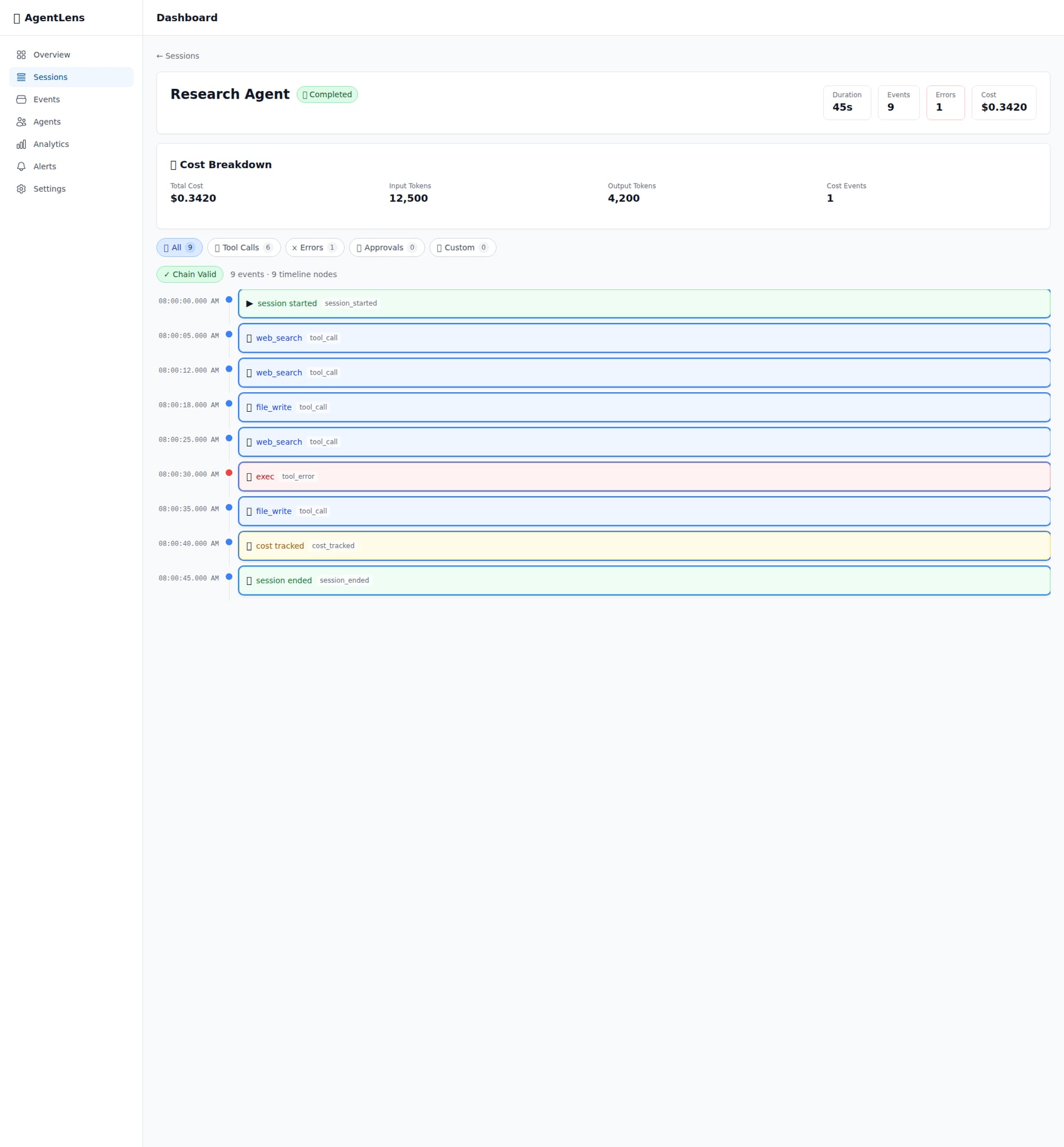
Full event timeline with tamper-evident hash chain verification. Filter by event type, view cost breakdown.
Events Explorer — Search & Filter Everything
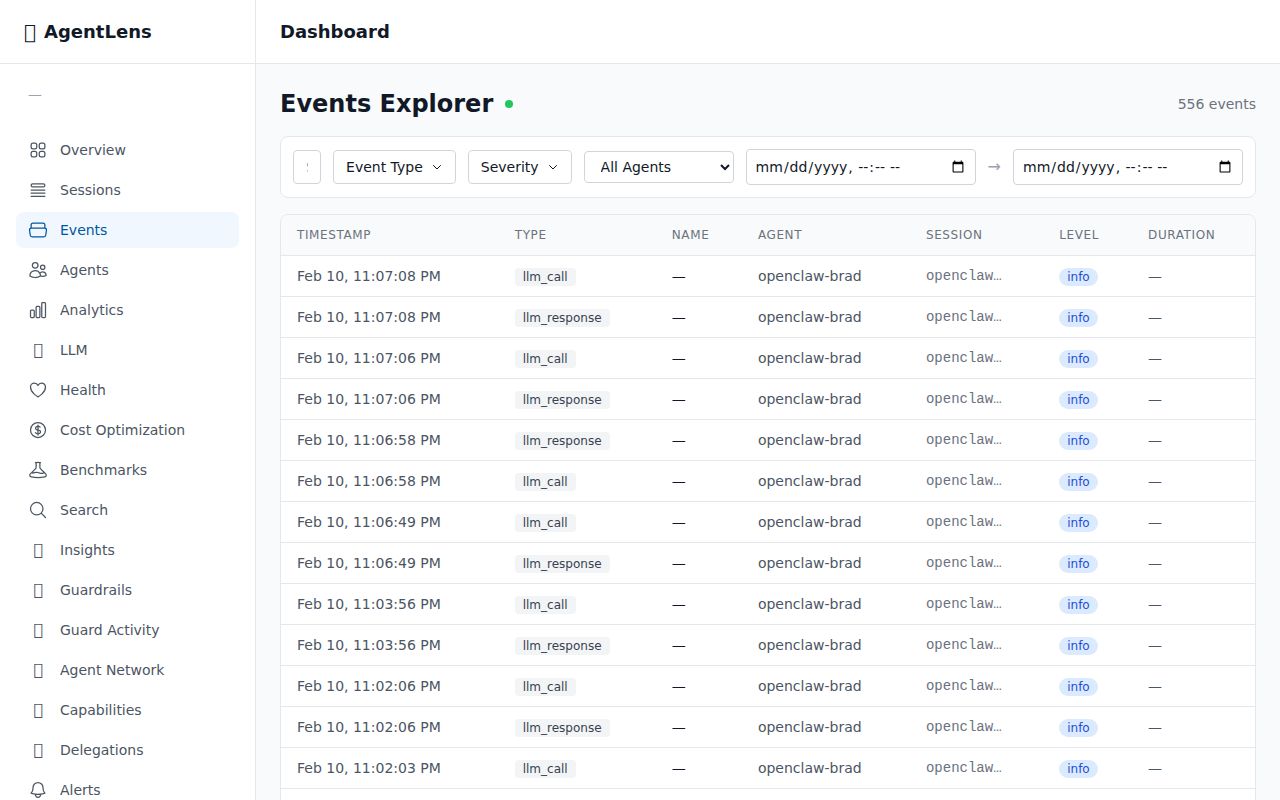
Searchable, filterable view of every event across all sessions.
🧠 LLM Analytics — Prompt & Cost Tracking
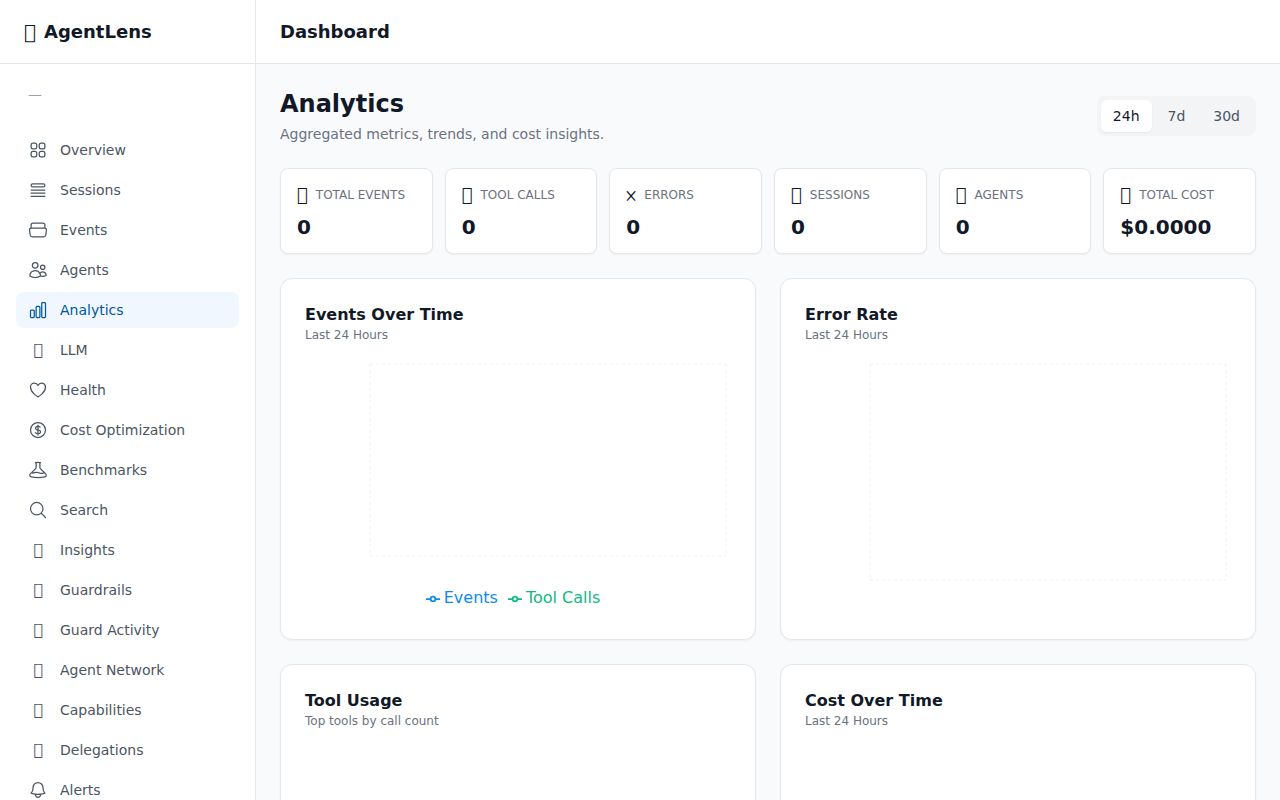
Total LLM calls, cost, latency, and token usage across all agents with model comparison.
🧠 Session Timeline — LLM Call Pairing
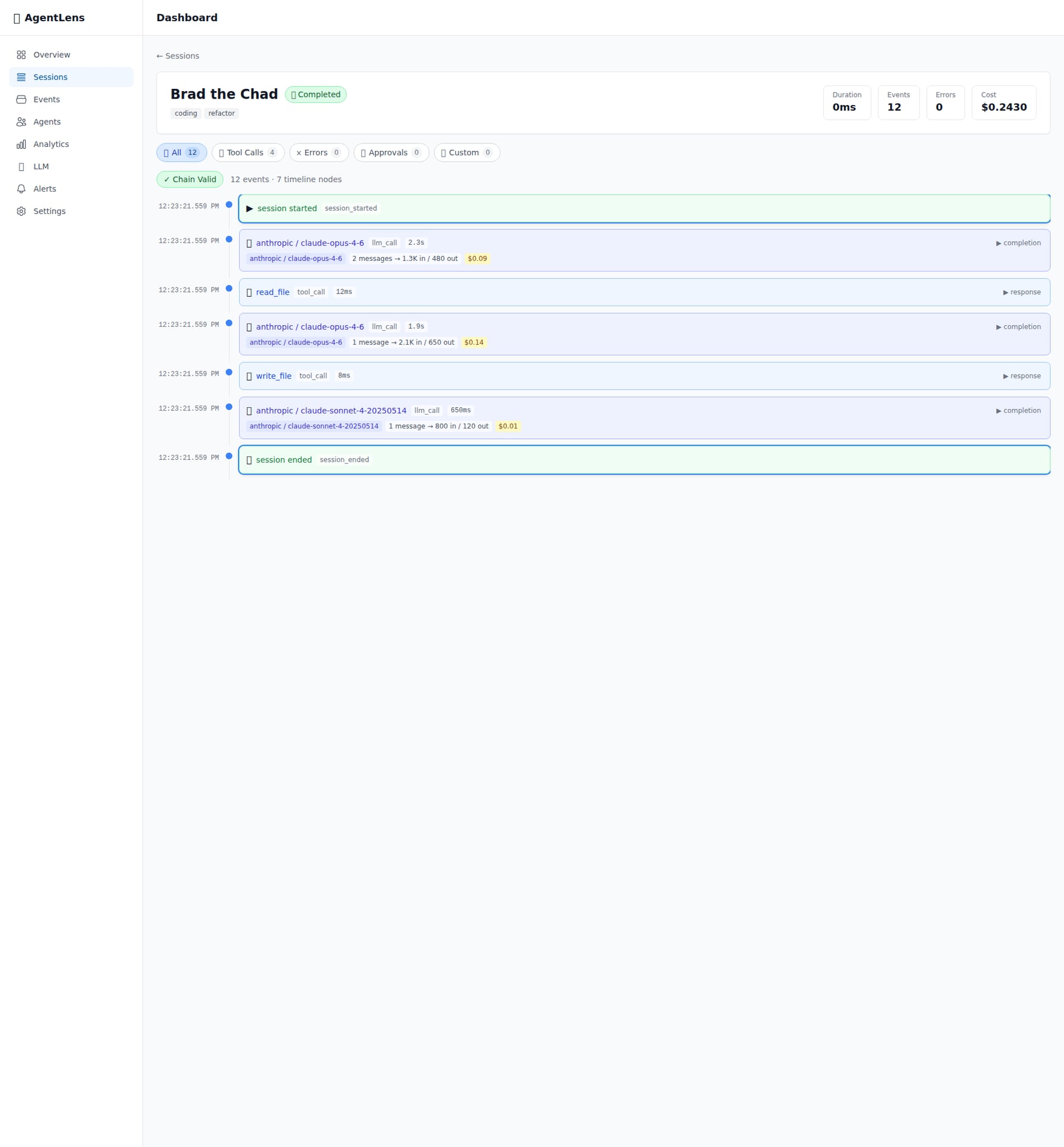
LLM calls in session timeline with model, tokens, cost, and latency.
💬 Prompt Detail — Chat Bubble Viewer
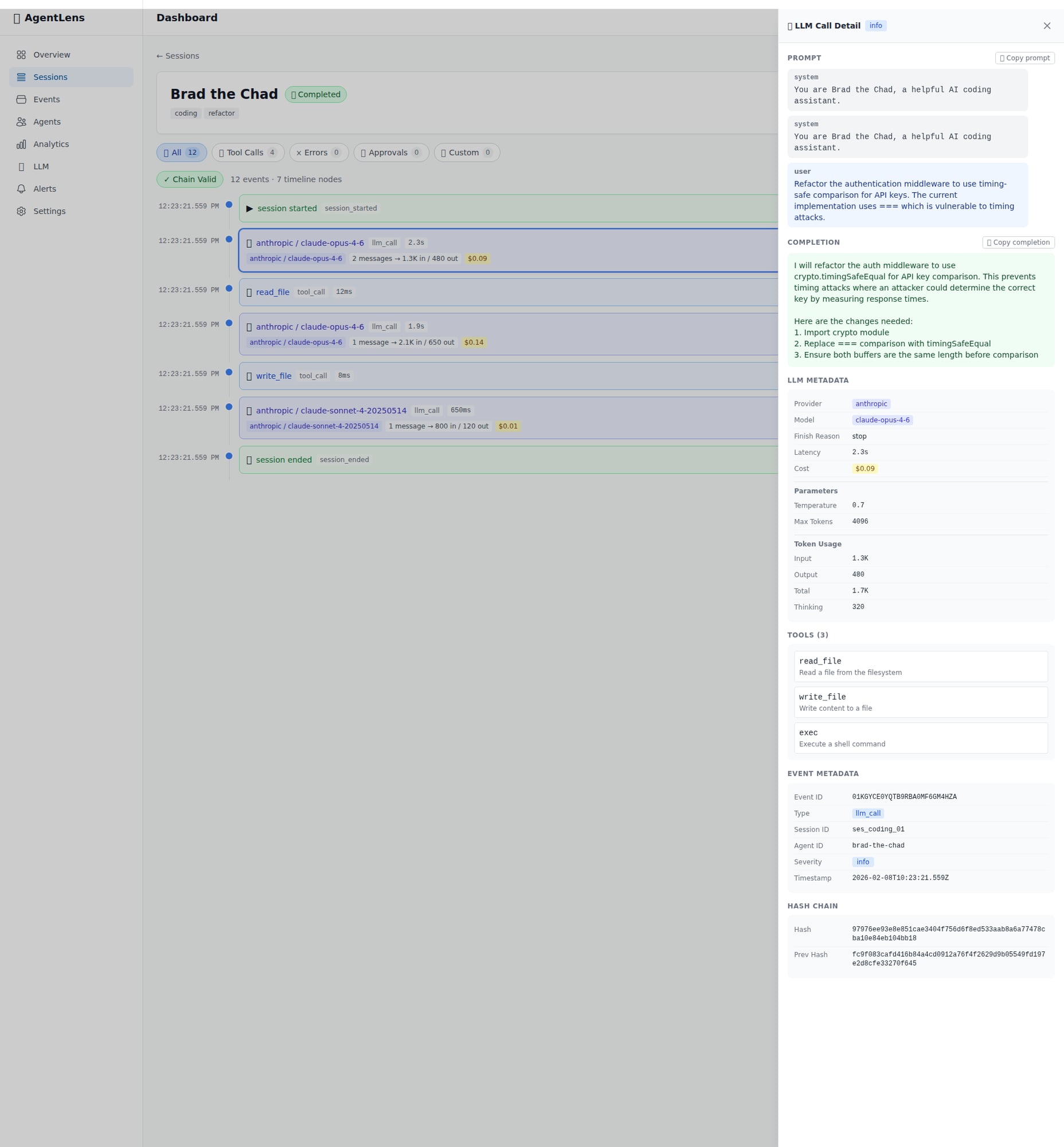
Full prompt and completion in a chat-bubble style viewer with metadata panel.
❤️🩹 Health Overview — Agent Reliability
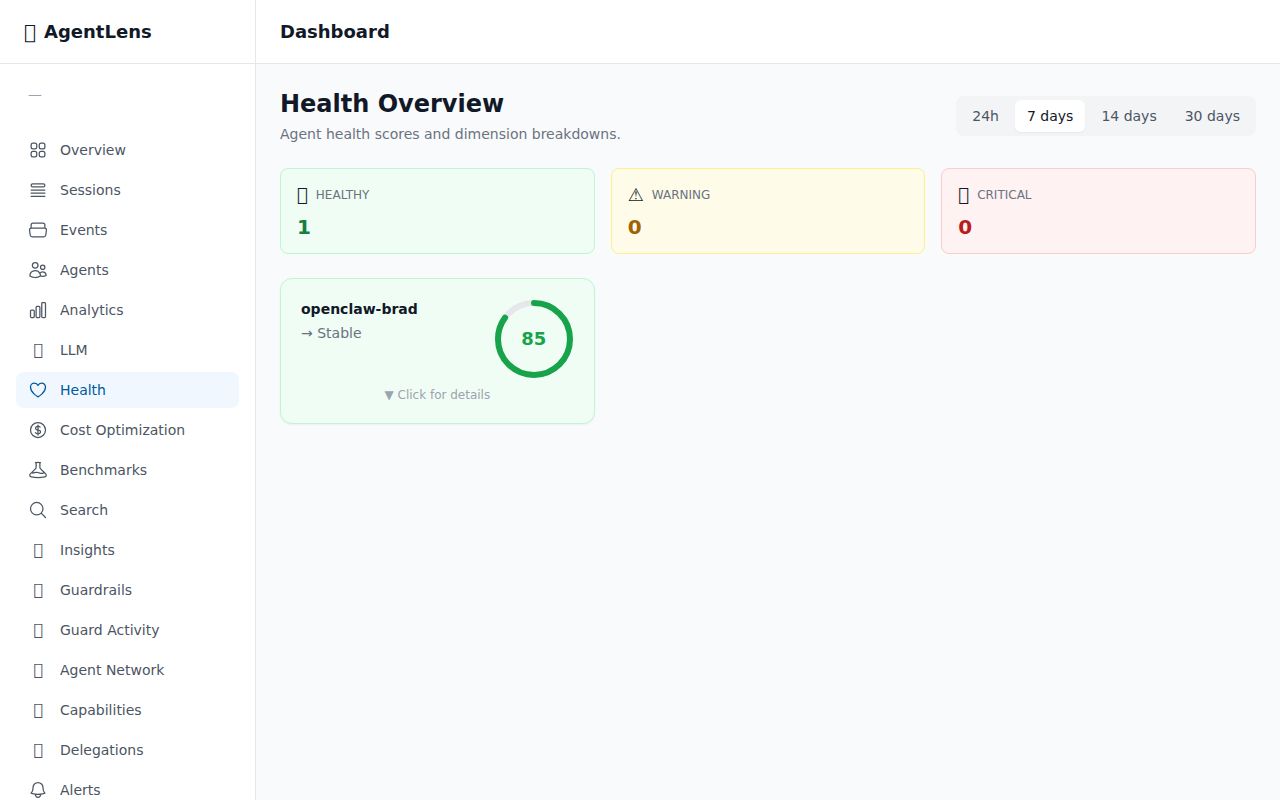
5-dimension health score for every agent with trend tracking.
💡 Cost Optimization — Model Recommendations
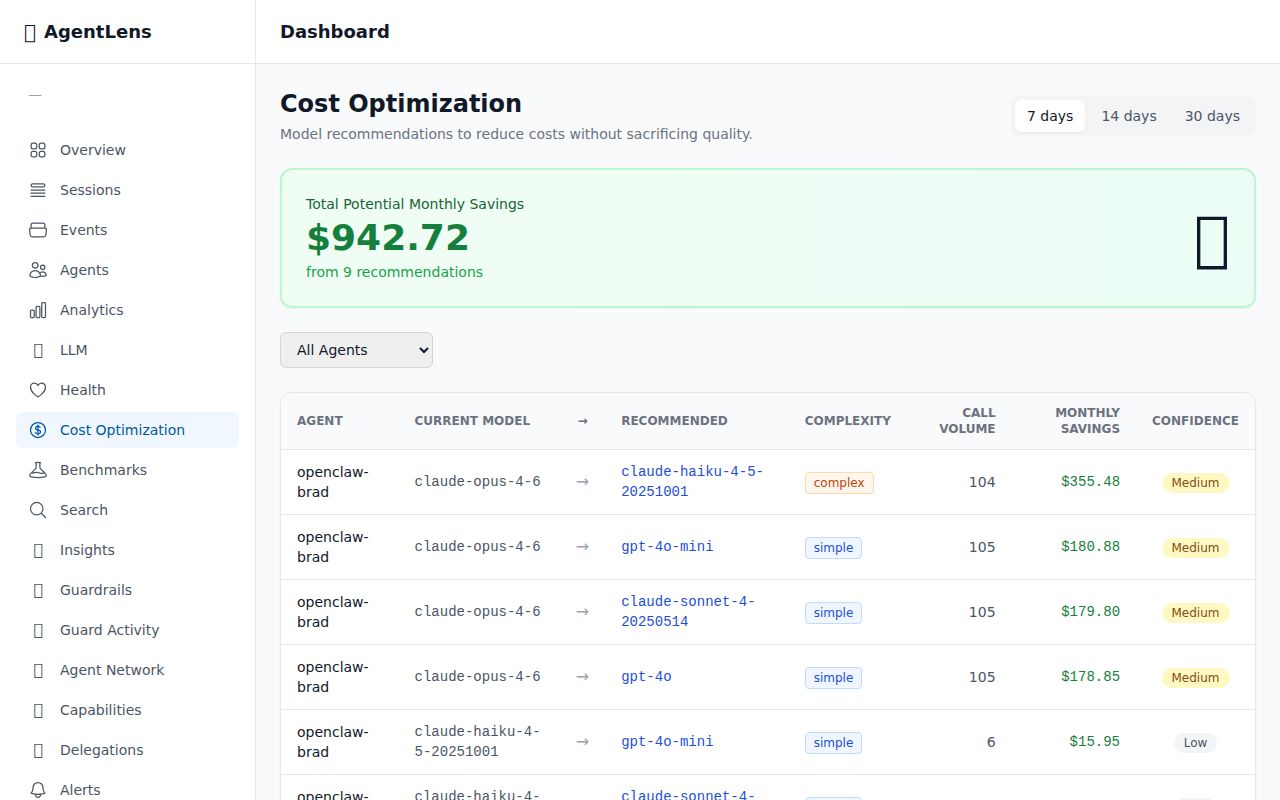
Analyzes LLM call patterns and recommends cheaper model alternatives with confidence levels.
📼 Session Replay — Step-Through Debugger
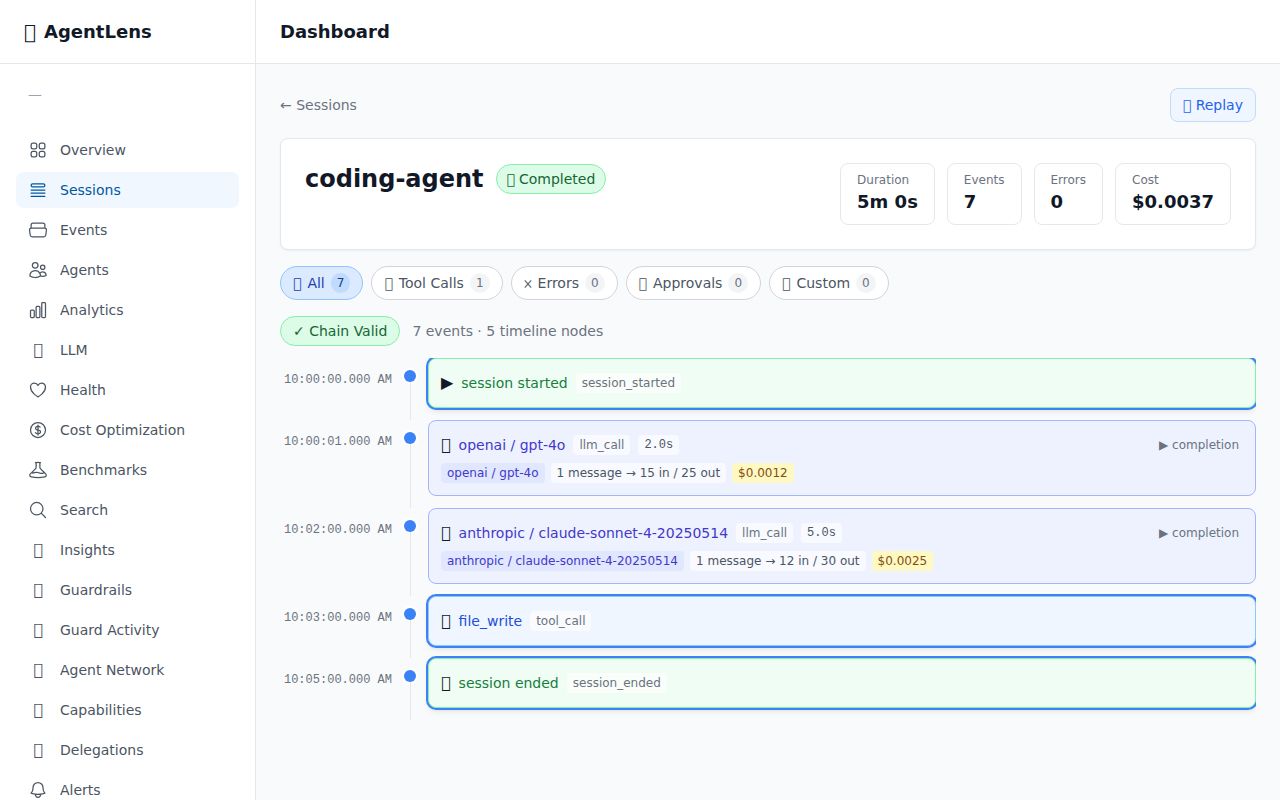
Step through any past session event by event with full context reconstruction.
⚖️ Benchmarks — A/B Testing for Agents
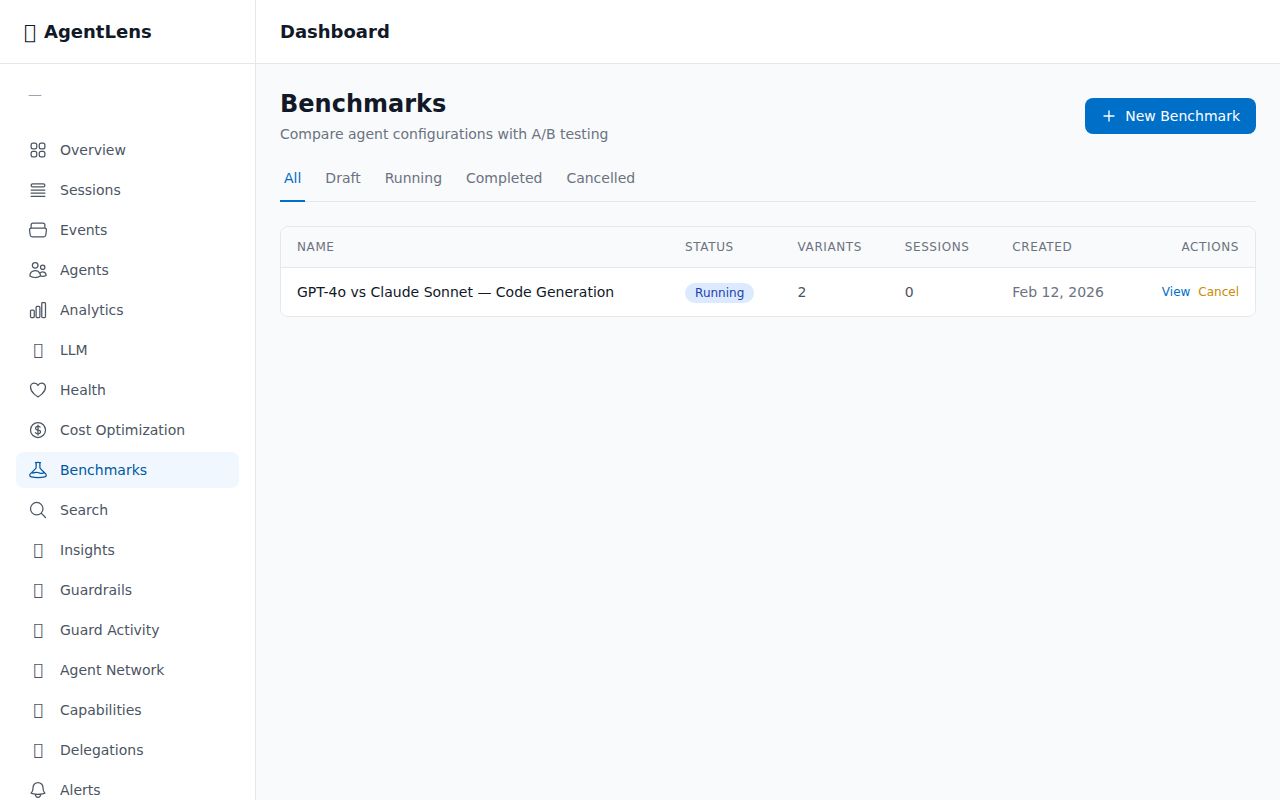
Create and manage A/B experiments with statistical significance testing.
🛡️ Guardrails — Automated Safety Rules
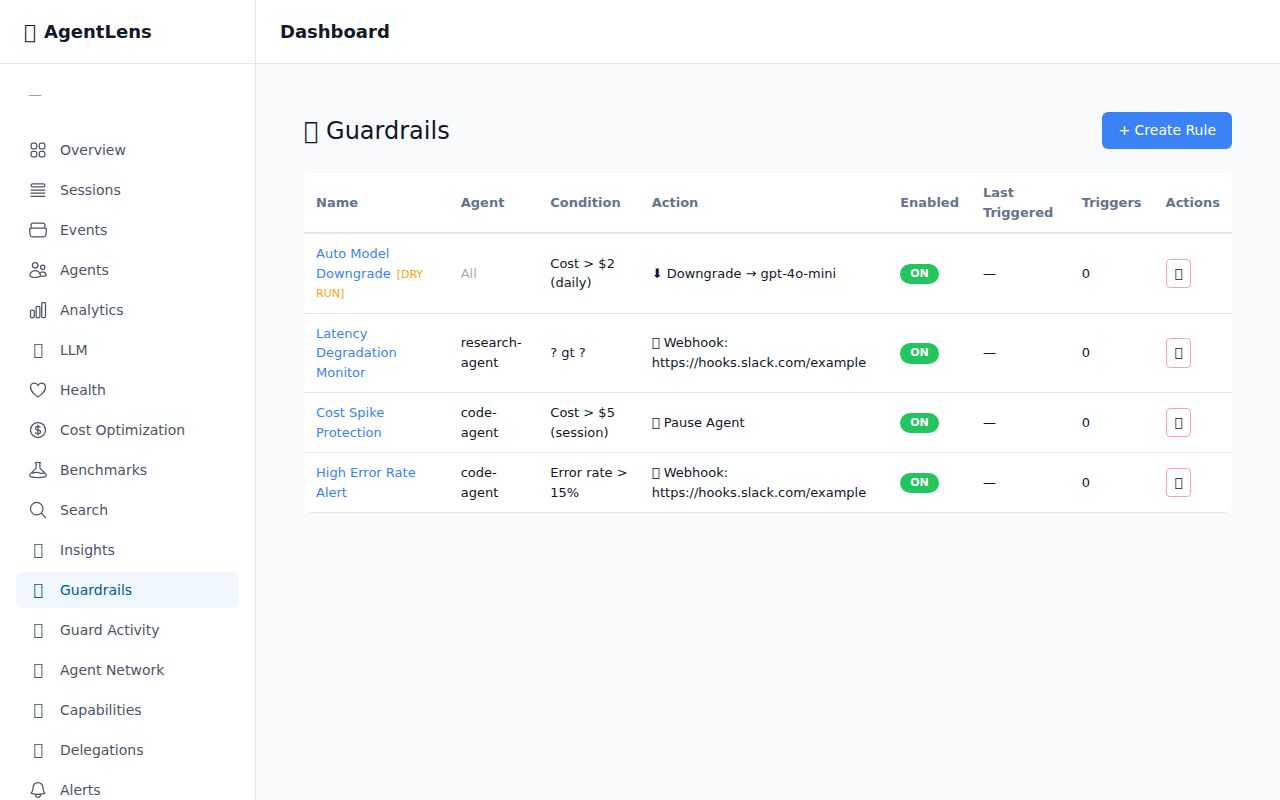
Create and manage automated safety rules with trigger history and activity feed.
☁️ AgentLens Cloud
Don't want to self-host? AgentLens Cloud is a fully managed SaaS — same SDK, zero infrastructure:
import agentlensai
agentlensai.init(cloud=True, api_key="als_cloud_your_key_here", agent_id="my-agent")
- Same SDK, one parameter change — switch
url=tocloud=True - Managed Postgres — multi-tenant with row-level security
- Team features — organizations, RBAC, audit logs
- No server to run — dashboard at app.agentlens.ai
📖 Cloud Setup Guide · Migration Guide · Troubleshooting
📦 Packages
Python (PyPI)
| Package | Description | PyPI |
|---|---|---|
agentlensai |
Python SDK + auto-instrumentation for 9 LLM providers |  |
TypeScript / Node.js (npm)
| Package | Description | npm |
|---|---|---|
@agentkitai/agentlens-server |
Hono API server + dashboard serving |  |
@agentkitai/agentlens-mcp |
MCP server for agent instrumentation |  |
@agentkitai/agentlens-sdk |
Programmatic TypeScript client |  |
@agentkitai/agentlens-core |
Shared types, schemas, hash chain utilities |  |
@agentkitai/agentlens-cli |
Command-line interface |  |
@agentkitai/agentlens-dashboard |
React web dashboard (bundled with server) | private |
🔌 API Overview
| Endpoint | Description |
|---|---|
POST /api/events |
Ingest events (batch) |
GET /api/events |
Query events with filters |
GET /api/sessions |
List sessions |
GET /api/sessions/:id/timeline |
Session timeline with hash chain verification |
GET /api/analytics |
Bucketed metrics over time |
⌨️ CLI
npx @agentkitai/agentlens-cli health                          # Overview of all agents
npx @agentkitai/agentlens-cli health --agent my-agent          # Detailed health with dimensions
npx @agentkitai/agentlens-cli optimize                          # Cost optimization recommendations
Both commands support --format json for machine-readable output. See agentlens health --help for all options.
🛠️ Development
git clone https://github.com/agentkitai/agentlens.git
cd agentlens
pnpm install

pnpm typecheck && pnpm test && pnpm lint  # Run all checks
pnpm dev                                   # Start dev server
Requirements: Node.js ≥ 20.0.0 · pnpm ≥ 10.0.0
🤝 Contributing
We welcome contributions! See CONTRIBUTING.md for setup instructions, coding standards, and the PR process.
🧰 AgentKit Ecosystem
| Project | Description | |
|---|---|---|
| AgentLens | Observability & tamper-evident audit trail for AI agents | ⬅️ you are here |
| AgentGate | Human-in-the-loop approval gateway + reactive guardrails | |
| Lore | Cross-agent memory and lesson sharing | |
| AgentEval | Testing & evaluation framework | |
| FormBridge | Agent-human mixed-mode forms |
📄 License
AgentLens MCP questions
How do I add AgentLens MCP to Claude Code?
Run claude mcp add agentlens -- npx -y @agentkitai/agentlens-mcp in your terminal. Add --scope user to make it available in every project.
How do I add AgentLens MCP to Cursor?
Open ~/.cursor/mcp.json and add the server under mcpServers, using the Cursor config shown in the install section above.
What tools does AgentLens MCP provide?
It exposes 22 tools, including agentlens_session_start, agentlens_log_event, agentlens_session_end, agentlens_query_events, agentlens_log_llm_call.
What makes AgentLens tamper-evident?
Every event is SHA-256 hash-chained to the previous one, creating an append-only audit log that is cryptographically verifiable.
Does AgentLens track LLM costs?
Yes, it tracks token usage and reconstructs estimated costs from model pricing to provide cost analytics and alerts on spikes.