
Lets an AI client draft LinkedIn and Google Ads campaigns, build matched audiences, and pull performance reports.
Also known as adwarp-dev/adwarp
- Stars
- 25
- Tools
- —
- Downloads, 30 days
- 1,127
- Latest version
- 0.5.0
- Last commit
- Nov 11, 2026
- License
- MIT
What is Adwarp MCP?
Adwarp lets an AI client draft LinkedIn and Google Ads campaigns, build matched audiences, and pull performance reports.
Summary generated from the project's README
About Adwarp MCP server
Go-to-market teams can manage LinkedIn and Google Ads campaigns through natural language by connecting this server to AI clients like Claude, Cursor, or Gemini. The tool automates the heavy lifting of digital advertising, from estimating audience reach to building matched audiences from CSV files, Salesforce, or HubSpot lists. It handles the creation of campaign groups, targeting, and keywords in a single atomic operation to ensure data integrity.
Safety is a core principle, as all LinkedIn entities are created as drafts and Google entities are created in a paused state. This prevents accidental spending, requiring an explicit command to go live. Users can also perform competitor intelligence by reading public ad libraries or use the change journal to analyze performance lift after making adjustments. The system works locally via stdio or can be accessed through a hosted HTTP endpoint, requiring OAuth credentials and API access for the respective advertising platforms.
What you can do with it
- 1Estimate audience reachAsk the AI to determine how many specific professional profiles can be reached before committing a budget.
- 2Sync CRM data to audiencesConvert target accounts from Salesforce or HubSpot directly into matched audiences for LinkedIn.
- 3Analyze competitor strategiesResearch what offers and creative assets your main competitors are currently using in their advertisements.
- 4Automate performance reportingRequest periodic summaries that compare current advertising performance against previous time periods.
Written from the project's README. Every use case is checked against a quote from it.
How to install Adwarp MCP
Formats verified 10 Nov 2026Add to CursorAdd to GooseInstall Adwarp MCP in Claude Code
$ claude mcp add --env 'ADWARP_LINKEDIN_CLIENT_SECRET=<YOUR_ADWARP_LINKEDIN_CLIENT_SECRET>' --env 'ADWARP_LINKEDIN_REFRESH_TOKEN=<YOUR_ADWARP_LINKEDIN_REFRESH_TOKEN>' adwarp -- npx -y adwarpInstall Adwarp MCP in Cursor
~/.cursor/mcp.json
{
  "mcpServers": {
    "adwarp": {
      "command": "npx",
      "args": [
        "-y",
        "adwarp"
      ],
      "env": {
        "ADWARP_LINKEDIN_CLIENT_SECRET": "<YOUR_ADWARP_LINKEDIN_CLIENT_SECRET>",
        "ADWARP_LINKEDIN_REFRESH_TOKEN": "<YOUR_ADWARP_LINKEDIN_REFRESH_TOKEN>"
      }
    }
  }
}Install Adwarp MCP in VS Code
.vscode/mcp.json
{
  "servers": {
    "adwarp": {
      "type": "stdio",
      "command": "npx",
      "args": [
        "-y",
        "adwarp"
      ],
      "env": {
        "ADWARP_LINKEDIN_CLIENT_SECRET": "<YOUR_ADWARP_LINKEDIN_CLIENT_SECRET>",
        "ADWARP_LINKEDIN_REFRESH_TOKEN": "<YOUR_ADWARP_LINKEDIN_REFRESH_TOKEN>"
      }
    }
  }
}Install Adwarp MCP in VS Code CLI
$ code --add-mcp '{"name":"adwarp","type":"stdio","command":"npx","args":["-y","adwarp"],"env":{"ADWARP_LINKEDIN_CLIENT_SECRET":"<YOUR_ADWARP_LINKEDIN_CLIENT_SECRET>","ADWARP_LINKEDIN_REFRESH_TOKEN":"<YOUR_ADWARP_LINKEDIN_REFRESH_TOKEN>"}}'Install Adwarp MCP in Claude Desktop
claude_desktop_config.json
{
  "mcpServers": {
    "adwarp": {
      "command": "npx",
      "args": [
        "-y",
        "adwarp"
      ],
      "env": {
        "ADWARP_LINKEDIN_CLIENT_SECRET": "<YOUR_ADWARP_LINKEDIN_CLIENT_SECRET>",
        "ADWARP_LINKEDIN_REFRESH_TOKEN": "<YOUR_ADWARP_LINKEDIN_REFRESH_TOKEN>"
      }
    }
  }
}Install Adwarp MCP in Codex
$ codex mcp add adwarp --env 'ADWARP_LINKEDIN_CLIENT_SECRET=<YOUR_ADWARP_LINKEDIN_CLIENT_SECRET>' --env 'ADWARP_LINKEDIN_REFRESH_TOKEN=<YOUR_ADWARP_LINKEDIN_REFRESH_TOKEN>' -- npx -y adwarpInstall Adwarp MCP in Codex config.toml
~/.codex/config.toml
[mcp_servers.adwarp]
command = "npx"
args = ["-y", "adwarp"]

[mcp_servers.adwarp.env]
ADWARP_LINKEDIN_CLIENT_SECRET = "<YOUR_ADWARP_LINKEDIN_CLIENT_SECRET>"
ADWARP_LINKEDIN_REFRESH_TOKEN = "<YOUR_ADWARP_LINKEDIN_REFRESH_TOKEN>"
Install Adwarp MCP in Gemini CLI
$ gemini mcp add -s user -e 'ADWARP_LINKEDIN_CLIENT_SECRET=<YOUR_ADWARP_LINKEDIN_CLIENT_SECRET>' -e 'ADWARP_LINKEDIN_REFRESH_TOKEN=<YOUR_ADWARP_LINKEDIN_REFRESH_TOKEN>' adwarp npx -- -y adwarpInstall Adwarp MCP in Gemini settings.json
~/.gemini/settings.json
{
  "mcpServers": {
    "adwarp": {
      "command": "npx",
      "args": [
        "-y",
        "adwarp"
      ],
      "env": {
        "ADWARP_LINKEDIN_CLIENT_SECRET": "<YOUR_ADWARP_LINKEDIN_CLIENT_SECRET>",
        "ADWARP_LINKEDIN_REFRESH_TOKEN": "<YOUR_ADWARP_LINKEDIN_REFRESH_TOKEN>"
      }
    }
  }
}Configuration
ADWARP_LINKEDIN_CLIENT_SECRETSecretLinkedIn app Client Secret. Leave unset to use ~/.adwarp
ADWARP_LINKEDIN_REFRESH_TOKENSecretRefresh token from adwarp auth login. Leave unset to use ~/.adwarp
ADWARP_LINKEDIN_CLIENT_IDLinkedIn app Client ID. Leave unset to use ~/.adwarp from adwarp auth login
ADWARP_LINKEDIN_DEFAULT_ACCOUNT_IDLinkedIn ad account used when a call omits one
| Name | Description | |
|---|---|---|
| ADWARP_LINKEDIN_CLIENT_SECRET | LinkedIn app Client Secret. Leave unset to use ~/.adwarp | Secret |
| ADWARP_LINKEDIN_REFRESH_TOKEN | Refresh token from adwarp auth login. Leave unset to use ~/.adwarp | Secret |
| ADWARP_LINKEDIN_CLIENT_ID | LinkedIn app Client ID. Leave unset to use ~/.adwarp from adwarp auth login | |
| ADWARP_LINKEDIN_DEFAULT_ACCOUNT_ID | LinkedIn ad account used when a call omits one |
Automated checks
Ran Nov 12, 2026Full report →Passed our automated checks. That is not a security audit: read the code and give the server the narrowest access it needs. How checks work

- Source repository linked and reachablePass
- Open source license (OSI)Pass
- Commit or release in the last yearPass
- Package name not close to a popular packagePass
- Remote endpoint uses HTTPSPass
- Destructive tools are labelledNot checked
- No hidden instructions to the modelPass
- No critical advisory in the package or its dependenciesPass
README
View on GitHub
Adwarp


Website · Docs · Install guide · npm package
Adwarp (formerly Liam) is the open-source ad agent for LinkedIn Ads and Google Ads. Create campaigns by talking to Claude (MCP) or from a CLI. Built for go-to-market teams who want to spin up many campaigns from a contact list and a brief, then add creative images themselves. Everything starts switched off: LinkedIn entities are created as drafts and Google entities as paused. A LinkedIn campaign goes live only when you explicitly ask Adwarp to turn it on or switch it on yourself in Campaign Manager, and Google campaigns can only be switched on in the Google Ads UI.
Unofficial and not affiliated with or endorsed by LinkedIn or Google.
Covers creation, matched audiences (including building one straight from Salesforce or HubSpot), conversion selection, performance reporting/insights, competitor ad intelligence, and a change journal with before/after lift. See ROADMAP.md for what's shipped and what's planned next.
Use cases
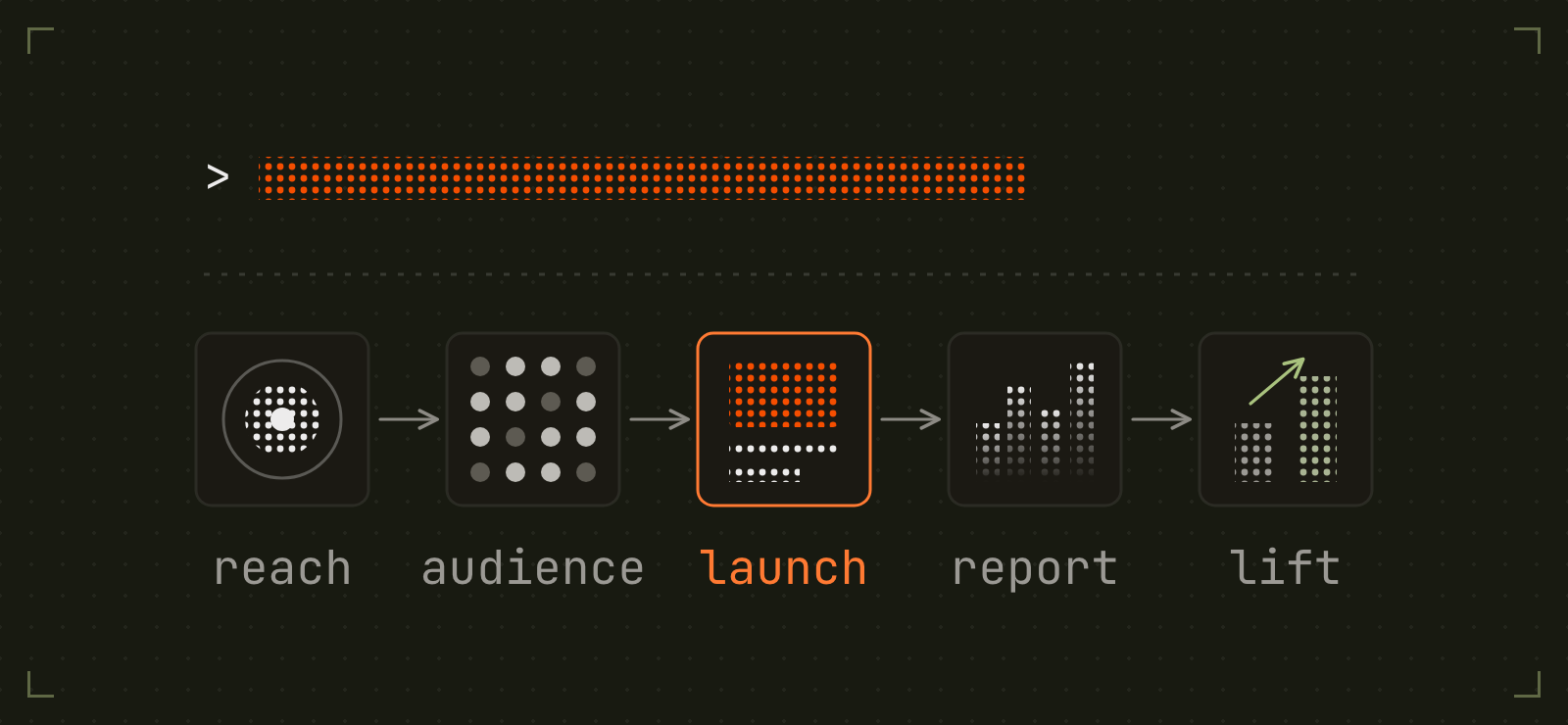
Once Adwarp is connected, you talk to your assistant in plain language. Real requests it handles today, roughly in the order a campaign comes together:
- "How many VPs of demand gen at US SaaS companies can we reach?" (resolves targeting facets, estimates reach before any money is involved)
- "Upload this CSV as a matched audience." (auto-cleans columns, hashes emails, keeps names, companies and titles for LinkedIn's people match, converts company domains to URLs)
- "Build an audience from Salesforce: every contact on an account flagged as a target." (SOQL straight to a matched audience)
- "Turn our HubSpot target accounts list into a LinkedIn audience." (a HubSpot list or search straight to a matched audience of contacts or companies)
- "Launch a draft campaign for that audience, $100/day, tracking the demo-booked conversion." (campaign group + campaign + draft ads in one call)
- "What ads is our biggest competitor running right now, and what offers are they pushing?" (reads the public Ad Library: copy, formats, and EU targeting metadata for any company)
- "How did retargeting do last month vs the month before?" (trend report with deltas)
- "Which ads should I pause this week?" (account rollup with top/bottom performers and flags, then pauses the ads you pick, leaving the rest of each ad group running)
- "Rewrite the copy on the losing ad." (delete + recreate as a fresh draft; LinkedIn ignores edits to a live ad's post)
- "Did the new headline actually help?" (change journal + before/after lift)
Adwarp resolves the details and reports back the ids. Every capability is also an adwarp
CLI command for scripted or batch use.
Put it on a loop
There is no scheduler in Adwarp. Use the one in whatever client you drive it from. Some loops that work well:
- "Every Monday at 9am, pull last week's performance summary, compare it to the week before, and flag anything that moved more than 20%." (a Claude Code scheduled agent)
- "Every Friday, check what new ads our top three competitors shipped this week and summarize the angles."
- "Check the audience match status every few hours and tell me when it clears 300 members." (the minimum for a matched audience to serve)
- Or skip the assistant entirely and put the CLI in cron:
0 9 * * 1 adwarp report summary -p last_7_days
Hierarchy mapping (the two platforms disagree)
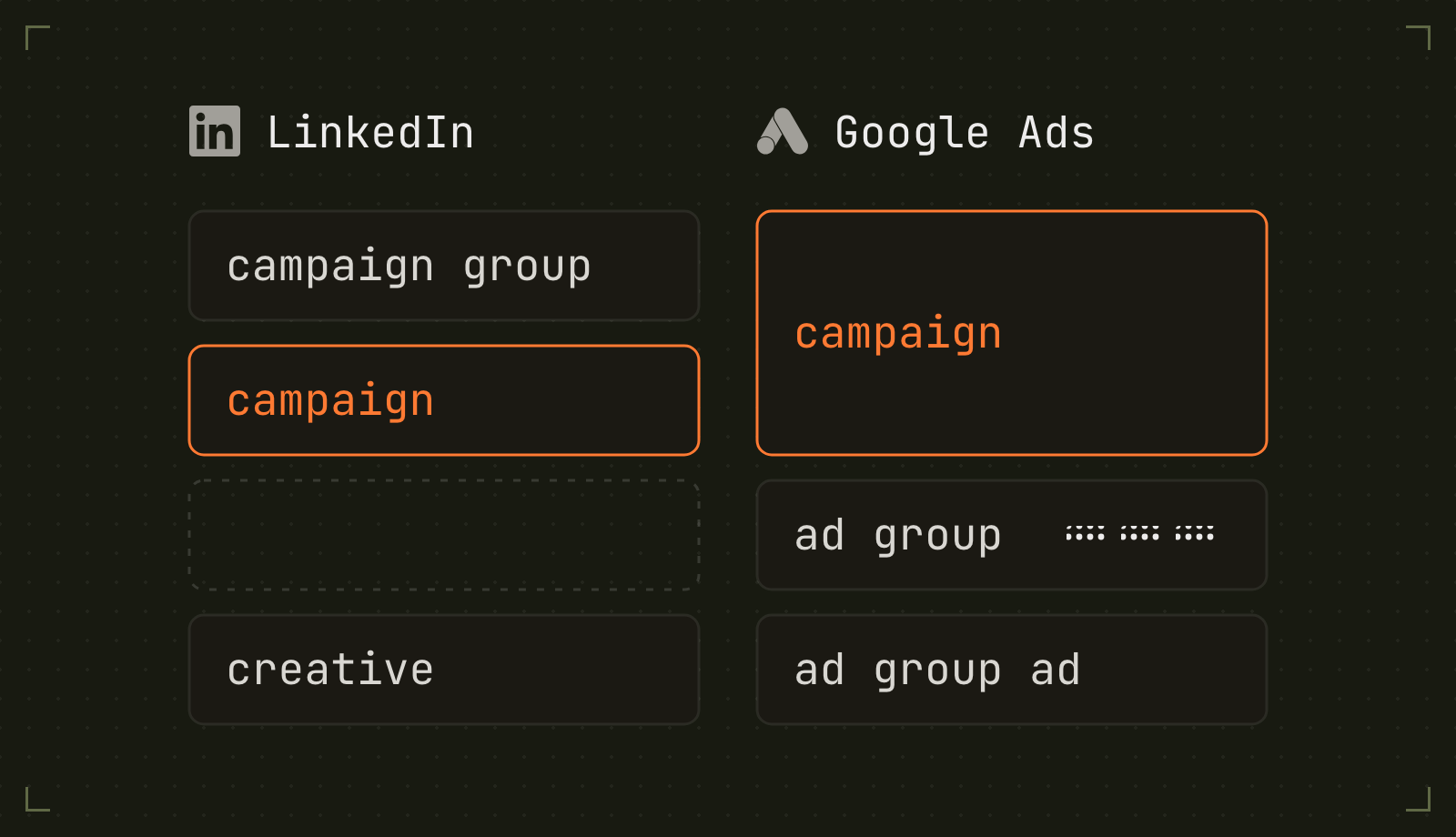
LinkedIn's names are shifted one level from everyone else's, which is the single most common source of confusion when working across both:
| Common term | LinkedIn entity | Google Ads entity | Holds |
|---|---|---|---|
| Campaign | Campaign Group | (none) | status, total/shared budget |
| Ad group | Campaign | Campaign | targeting, budget, bid, schedule, format |
| (none) | (none) | Ad group | keywords and the ads that answer them |
| Ad | Creative | Ad group ad | the rendered ad |
| Audience | DMP Segment | User list | attached to targeting |
So a LinkedIn "campaign" and a Google "campaign" are not the same thing: Google's campaign holds the budget and targeting (LinkedIn's campaign group plus campaign), and its ad group holds keywords.
Google Ads
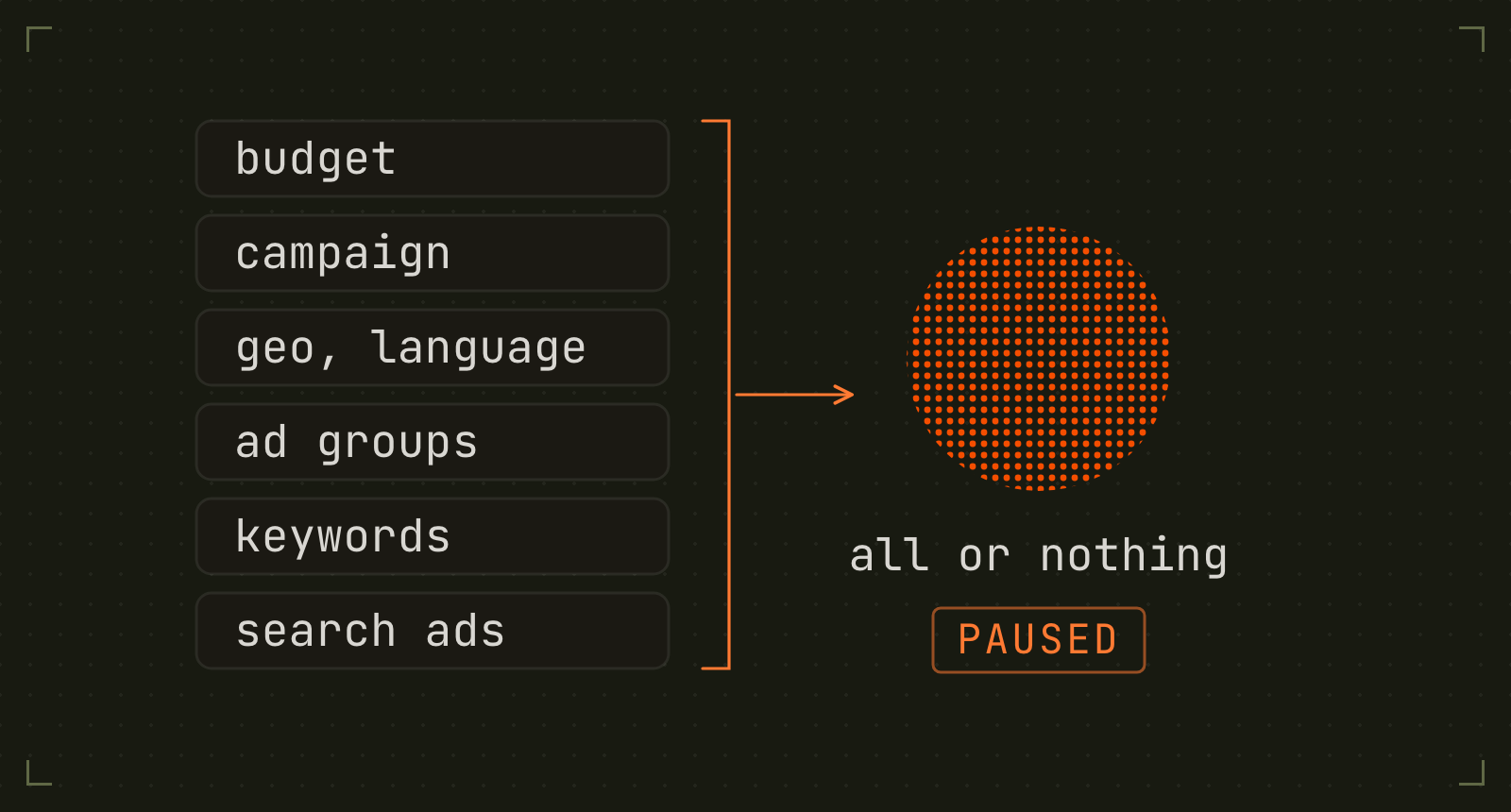
Search campaigns only, creation-first. What is there today:
adwarp google auth login
adwarp google accounts list                       # proves the token and OAuth client work
adwarp google keywords "revops automation" --url https://example.com/product
adwarp google conversions list
adwarp google launch --brief examples/google-brief.json           # dry run
adwarp google launch --brief examples/google-brief.json --apply   # create it, paused
adwarp google campaigns list
adwarp google report perf keyword -p last_30_days
A launch creates the budget, campaign, geo and language targeting, ad groups, keywords, and responsive search ads in one atomic mutate: it either lands whole or not at all, so a failure cannot leave half a campaign behind. Every write is validated server-side first, which is a genuine dry run rather than a local guess.
Three house rules are hard-coded, because all three default the wrong way in the UI and quietly waste B2B budget:
- Search network only. Display expansion and search partners off.
- Physical presence only. "US" means people in the US, not people anywhere who searched about it.
- Manual CPC to start. Smart bidding with no conversion history spends unpredictably. Switch in the UI once there is data.
Setup
Google Ads needs a Google Cloud project with Google Ads API access and an OAuth client. You don't need a developer token. Google sunset developer tokens on September 9, 2026, and access now belongs to the Cloud project that owns your OAuth client. Adwarp doesn't send one.
-
API access. Enable the Google Ads API in a Cloud project with billing set up (that's Test access), then apply for Explorer under Upgrade access level on the Google Ads API Overview page. Most applications are approved automatically. Explorer allows 2,880 production operations a day, which covers campaign creation and reporting.
Explorer is not enough for
adwarp google keywords. Explorer blocks KeywordPlanIdeaService, so keyword research needs Basic access (15,000 operations a day), which needs brand verification first. -
An OAuth client in the same project. Use the "Desktop app" type, which accepts any
localhostredirect.For the consent screen, do not leave it in "Testing". That status issues refresh tokens that stop working after 7 days. For Basic access, set it to External + In production and complete brand verification: Google's brand verification guide requires that for Basic, even where other Google docs say Internal apps skip verification. For Explorer only, Internal (Workspace orgs) also works.
If you set Adwarp up before the sunset, your token's access level moved to the
Cloud projects that used it in the 90 days before, and Adwarp now ignores
developerToken in google.json.
Then write ~/.adwarp/google.json:
{
  "clientId": "....apps.googleusercontent.com",
  "clientSecret": "...",
  "loginCustomerId": "1234567890",
  "defaultCustomerId": "0987654321",
  "defaultConversionActionNames": ["Demo Booked"]
}
loginCustomerId is the manager account and is only needed when you reach the
target account through one. Run adwarp google auth login and you are set.
Set up Google Ads in the docs has the same
steps, plus the ADWARP_GOOGLE_* environment variables.
Packages
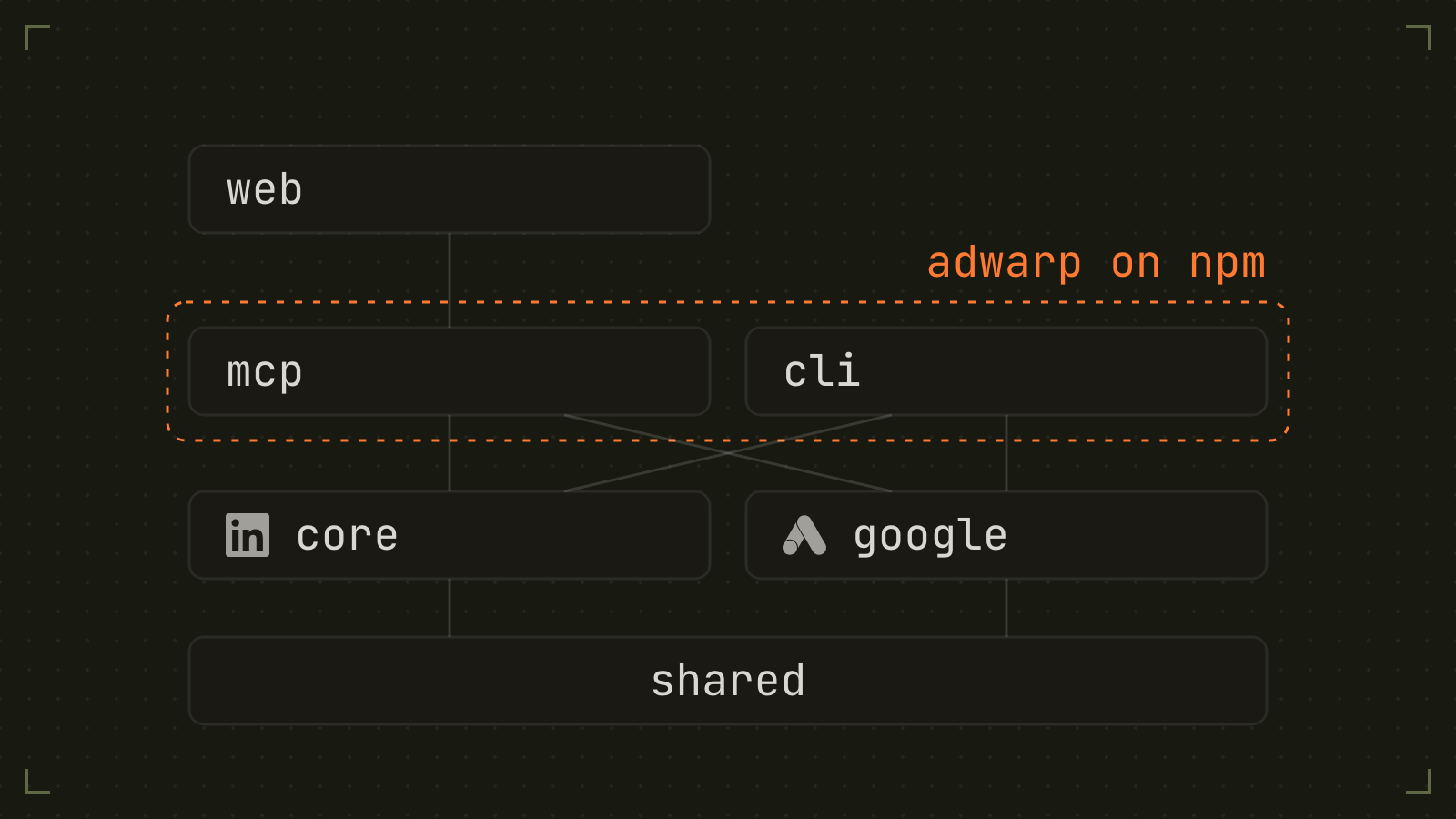
@adwarp/shared: the platform-neutral layer: OAuth, credential stores, retry policy, the change journal, period and KPI math.@adwarp/core: LinkedIn REST client, resource modules, CSV + SHA256 hashing, Salesforce and HubSpot readers.@adwarp/google: Google Ads REST client, GAQL reads, atomic mutate builder, Search campaign creation.@adwarp/mcp: MCP server (stdio for local; reused by the hosted app). Primary interface.@adwarp/cli: theadwarpCLI over the same engines, for scripted batch runs.@adwarp/web: Next.js app that hosts the MCP over HTTP on Vercel, athttps://mcp.adwarp.dev/api/mcp. It serves no pages: its other paths redirect to adwarp.dev.adwarp: the published npm package. Bundles the CLI and the MCP server behind theadwarp,adwarp-mcpandliamcommands.
How it works
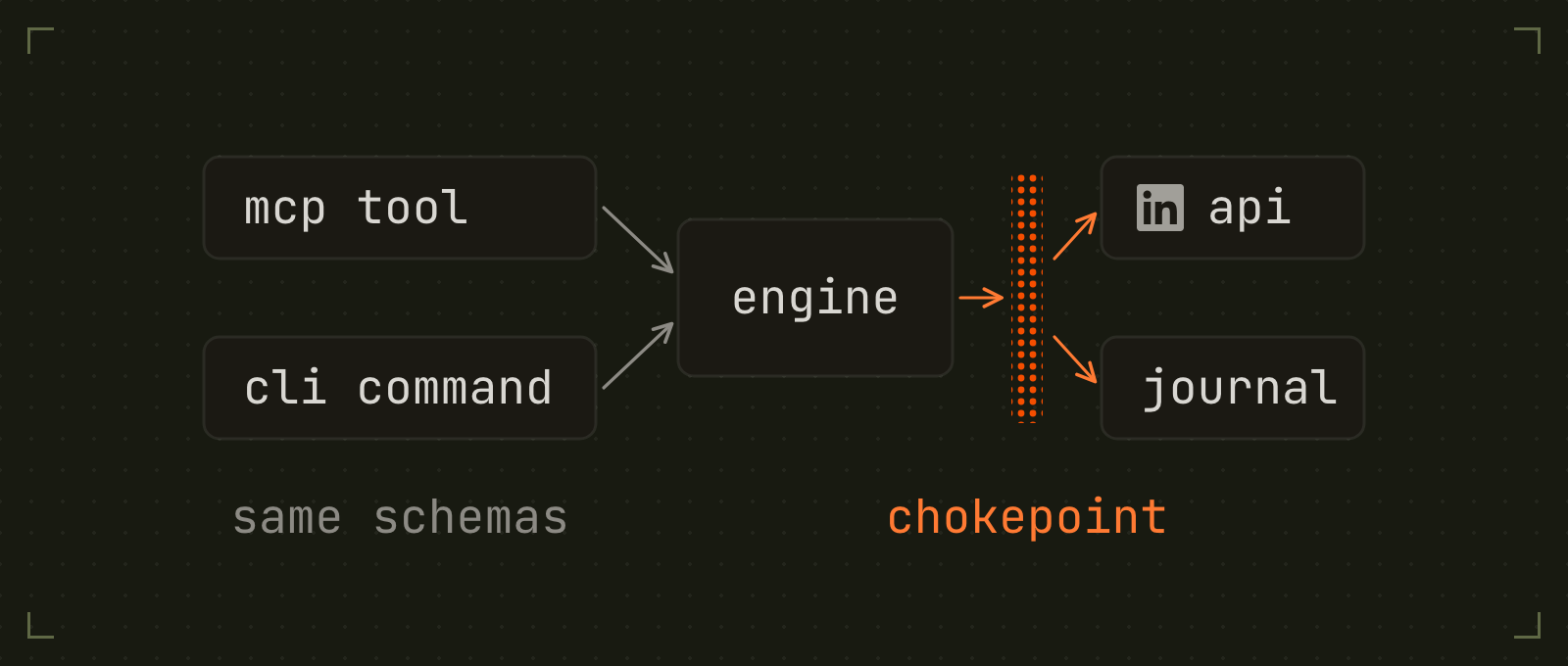
Both interfaces are thin layers over the same engine. Every MCP tool and CLI command builds
a client via createLinkedInAds() (core/src/client.ts), which loads config plus an
auto-refreshing OAuth token provider, then calls a typed resource module
(campaigns.ts, audience.ts, report.ts, ...) that wraps LinkedIn's versioned REST API
(LinkedIn-Version pinned in config). Input shapes live as zod schemas in
core/src/schemas.ts and are reused verbatim as the MCP tool input schemas, so the CLI and
MCP can never drift apart.
The drafts-first safety rule is enforced at creation: campaign groups, campaigns, and
creatives default to DRAFT status, and going live is always an explicit request (a
status of ACTIVE, campaigns update --status ACTIVE --apply, or ad resume --apply). On Google, no
create schema can express an enabled status at all. Every write also passes through one HTTP chokepoint that appends to a
local change journal (~/.adwarp/changelog.jsonl) for later lift analysis.
AGENTS.md has the full architecture notes and the LinkedIn API gotchas (restli encoding, required fields, DMP audience flow) learned from live testing.
Install
The install guide on adwarp.dev has these steps too, with a setup page for each client: Claude Code, Claude Desktop, Cursor, Codex, Gemini, the CLI, and, through your own endpoint, Meta Muse and Grok Bot.
There are two ways to install Adwarp:
- As an MCP server, registered with Claude Code, Claude Desktop, Cursor, Codex, or other MCP clients that can run a local server, so you create campaigns by talking to your assistant. Run it locally, or skip the always-on install entirely and connect to the hosted endpoint with your own credentials.
- As a terminal CLI, a global
adwarpcommand for running everything from your terminal, scripts, or cron.
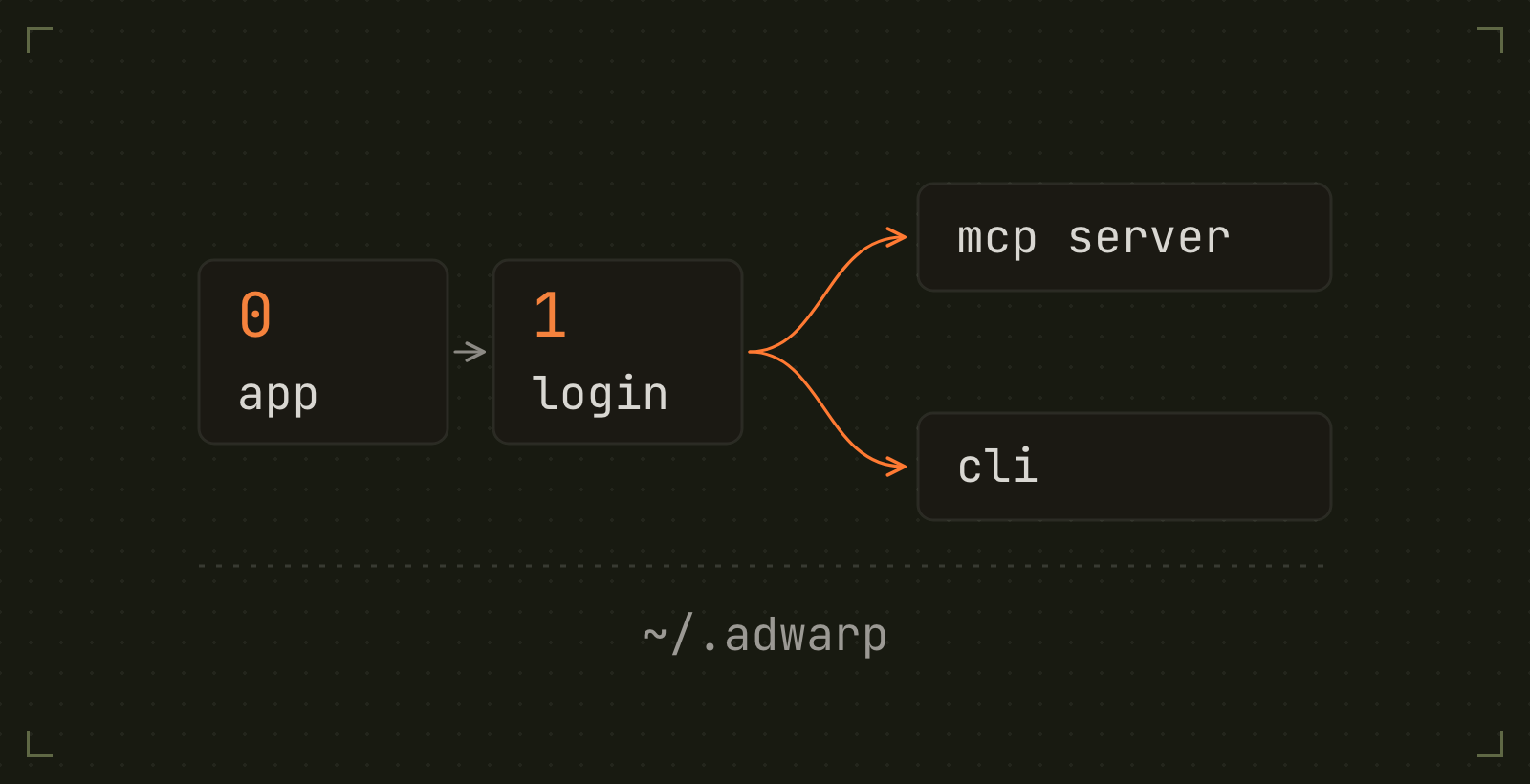
Both run against your own LinkedIn developer app, so your credentials and your ad
account stay yours. Both come from the same npm package, adwarp. The first two steps
are shared: create a LinkedIn app (step 0) and authenticate (step 1). After that, pick
your path, or do both; they read the same ~/.adwarp credentials.
Step 0: create a LinkedIn app (once)
-
Create an app at https://www.linkedin.com/developers/apps. It must be associated with your company's LinkedIn Page.
-
On the Products tab, request access:
Product Needed for Required? Advertising API campaigns, ads, targeting, reporting, conversions Yes Audiences uploading CSV contact/company lists as matched audiences Only for audience upload LinkedIn Ad Library competitor ad metadata via the official API Required for competitor discovery; no browser fallback -
On the Auth tab, add
http://localhost:53682/callbackas an authorized redirect URL, and note your Client ID and Client Secret. -
Once the Advertising API is approved, map your ad account under Products → Advertising API → View Ad Accounts. Skip this and
accounts listcomes back empty.
OAuth scopes. adwarp auth login requests rw_ads (create and edit campaigns),
r_ads_reporting (reporting), rw_conversions (conversion tracking), and
w_organization_social (image ads create a post owned by your LinkedIn Page). If you add
a product or scope later, run auth login again; a token refresh keeps only the scopes
you originally granted.
Step 1: authenticate (once, both paths)
Requires Node.js 20+.
# App credentials (alternatively set ADWARP_LINKEDIN_CLIENT_ID / ADWARP_LINKEDIN_CLIENT_SECRET env vars)
mkdir -p ~/.adwarp
echo '{ "clientId": "...", "clientSecret": "...", "linkedinVersion": "202605" }' > ~/.adwarp/config.json

npx -y adwarp auth login      # opens the browser; tokens land in ~/.adwarp
npx -y adwarp accounts list   # verify, then set defaultAccountId in config.json
Option 1: install as an MCP server
Register the server with your MCP client; it reads the ~/.adwarp credentials from step 1.
Claude Code
claude mcp add adwarp -- npx -y adwarp mcp
Claude Desktop, Cursor, or other MCP clients that can run a local server, in the client's MCP config JSON:
{
  "mcpServers": {
    "adwarp": { "command": "npx", "args": ["-y", "adwarp", "mcp"] }
  }
}
adwarp mcp and the adwarp-mcp command start the same server. Prefer Docker? The root
Dockerfile builds an image of the same server; see
Run it in Docker.
Ask for something read-only to confirm it works: "List my ad accounts" or "How did my account do in the last 30 days?"
Hosted MCP: connect with your own credentials, nothing to deploy
The hosted MCP server at
https://mcp.adwarp.dev/api/mcp
is multi-tenant, bring-your-own-credentials: you pass your LinkedIn developer app's
details as request headers, and every call runs against your app and your ad account.
The server holds no state for you: credentials are used in memory to call LinkedIn and
never logged or persisted. The original address, https://liam-mcp.vercel.app/api/mcp,
still works and serves the same endpoint, so existing connections need no change. The
hosted endpoint docs have the full reference.
| Header | Value | Required? |
|---|---|---|
X-Adwarp-Linkedin-Client-Id |
your LinkedIn app's Client ID | Yes |
X-Adwarp-Linkedin-Client-Secret |
your LinkedIn app's Client Secret | Yes |
X-Adwarp-Linkedin-Refresh-Token |
a refresh token from your auth login (~365d) |
Yes |
X-Adwarp-Linkedin-Account-Id |
numeric ad account id used when a call omits one | No |
X-Adwarp-Linkedin-Version |
API version pin (YYYYMM), defaults to the server's | No |
Do step 0 and step 1 above once (the LinkedIn app and the local auth login; LinkedIn's
OAuth consent has to happen in your browser, so the token mint is the one local step).
Then print the ready-to-run connect command:
npx -y adwarp auth export --mcp
# claude mcp add --transport http adwarp https://mcp.adwarp.dev/api/mcp \
#   --header "X-Adwarp-Linkedin-Client-Id: …" \
#   --header "X-Adwarp-Linkedin-Client-Secret: …" \
#   --header "X-Adwarp-Linkedin-Refresh-Token: …" \
#   --header "X-Adwarp-Linkedin-Account-Id: …"
Other MCP clients that can send custom headers connect the same way (for clients without
native HTTP transport: npx mcp-remote <url> --header "X-Adwarp-Linkedin-Client-Id: …" …).
Verify with a read-only call ("list my ad accounts"), and from then on the connection is
just a URL plus headers, usable from machines that never cloned this repo.
Know the trade-off: your client secret and refresh token travel with every request to that server, so only point them at a deployment you trust, or self-host the identical endpoint (next section). The same scopes that manage ads can also switch them on, so treat these credentials like an ad account password.
Hosted limitations (all by design, they need local resources): upload_audience_csv
reads a CSV path on the server, audience_from_salesforce needs your local sf CLI,
audience_from_hubspot is not registered there (its HubSpot token stays on your machine),
competitor-ads scraping falls back to API-only metadata (no browser), and the change
journal / lift tools need the local ~/.adwarp/changelog.jsonl. Run those through the
local MCP server or CLI.
Put a skill on top. The clean split for teams: your MCP client's config holds the credentials (the headers above), and a small skill or system prompt holds your playbook: default ad account, naming conventions, standing exclusions, house rules like "audience expansion always off". The paid ads skills are working examples; copy one, swap in your defaults, and your assistant drives the hosted tools with your rules. Credentials never belong in a skill file.
Self-host the same endpoint on Vercel
Run your own instance so credentials never touch shared infrastructure, and so you also get a private env-configured tenant:
- Get your env values locally:
npx -y adwarp auth export. - Deploy
apps/webto Vercel (set the project Root Directory toapps/web). - In Vercel project settings, add the env vars that
auth exportprinted (ADWARP_LINKEDIN_CLIENT_ID,ADWARP_LINKEDIN_CLIENT_SECRET,ADWARP_LINKEDIN_REFRESH_TOKEN,ADWARP_LINKEDIN_VERSION, and a strongMCP_AUTH_TOKEN). In Vercel's Deployment Protection settings, disable Vercel Authentication for production (or add a protection-bypass secret); otherwise MCP clients can't reach the endpoint. - Your MCP endpoint is
https://<your-app>.vercel.app/api/mcp. Connect with the secret in the header:
claude mcp add --transport http adwarp https://<your-app>.vercel.app/api/mcp \
  --header "Authorization: Bearer <MCP_AUTH_TOKEN>"
Requests carrying MCP_AUTH_TOKEN use the env credentials (your tenant). Requests
carrying the X-Adwarp-Linkedin-* headers above use the caller's credentials instead, so one
self-hosted instance can serve your whole team, each member on their own LinkedIn app. The app
serves only the endpoint. Its other paths, such as / and /docs, redirect to adwarp.dev.
Option 2: install the terminal CLI
Install the package globally for an adwarp command, or run any single command with
npx -y adwarp <command>:
npm install -g adwarp
adwarp accounts list
Coming from Liam? liam still works as an alias for adwarp: the package installs both
names, so existing scripts and cron jobs keep running.
A sensible first session:
adwarp targeting search titles "demand generation"   # resolve targeting URNs
adwarp report summary -p last_30_days                # account rollup + flags
adwarp launch --brief examples/brief.json            # creates DRAFTS only
The full CLI reference is below.
From source
For contributors, or to run changes that are not released yet. Requires git and pnpm too.
git clone https://github.com/adwarp-dev/adwarp.git
cd adwarp
pnpm install && pnpm -r build

node packages/cli/dist/index.js accounts list
claude mcp add adwarp -- node /abs/path/adwarp/packages/mcp/dist/index.js
Or paste this prompt and let your assistant do the setup
Copy the whole block into Claude (or any capable assistant with terminal access) and it will walk you through everything above, one step at a time:
You are helping me set up Adwarp, an open-source LinkedIn Ad Manager from
https://github.com/adwarp-dev/adwarp. It runs locally as an MCP server and a CLI,
both from the npm package "adwarp".
Everything it creates on LinkedIn starts as a draft, so nothing spends money until I
explicitly turn it on.

Walk me through the setup one step at a time. Run commands for me where you can,
show me exactly what to click where you cannot, and wait for my confirmation
before moving to the next step.

1. Check that Node.js 20 or newer is installed. Help me install it if it is
   missing.
2. Help me create a LinkedIn developer app at
   https://www.linkedin.com/developers/apps (it must be associated with my
   company's LinkedIn Page):
   a. On the Products tab, request access to the "Advertising API" product.
      This is the only required product; approval can take a while.
   b. Optional: also request "Audiences" if I want to upload CSV contact or
      company lists as matched audiences.
   c. Optional: also request "LinkedIn Ad Library" if I want competitor ad
      metadata through the official API.
   d. On the Auth tab, add http://localhost:53682/callback as an authorized
      redirect URL, and show me where the Client ID and Client Secret live.
3. Create ~/.adwarp/config.json containing my clientId, clientSecret, and
   "linkedinVersion": "202605".
4. Run "npx -y adwarp auth login". My browser opens LinkedIn's
   consent screen; after I approve, tokens are stored in ~/.adwarp/credentials.json.
5. Verify with "npx -y adwarp accounts list". If no accounts
   show up, remind me to map my ad account in the Developer Portal under
   Products > Advertising API > View Ad Accounts. Then set my account id as
   "defaultAccountId" in ~/.adwarp/config.json.
6. Register the MCP server with the assistant I use:
   - Claude Code: claude mcp add adwarp -- npx -y adwarp mcp
   - Claude Desktop or another client: add {"command": "npx", "args":
     ["-y", "adwarp", "mcp"]} under mcpServers in its config.
7. Confirm the tools load, then show me one read-only call working, for example
   list_ad_accounts or a last_30_days performance summary.

If any step fails, show me the exact error and fix it with me before moving on.
Adwarp MCP questions
How do I add Adwarp MCP to Claude Code?
Run claude mcp add --env 'ADWARP_LINKEDIN_CLIENT_SECRET=<YOUR_ADWARP_LINKEDIN_CLIENT_SECRET>' --env 'ADWARP_LINKEDIN_REFRESH_TOKEN=<YOUR_ADWARP_LINKEDIN_REFRESH_TOKEN>' adwarp -- npx -y adwarp in your terminal. Add --scope user to make it available in every project.
How do I add Adwarp MCP to Cursor?
Open ~/.cursor/mcp.json and add the server under mcpServers, using the Cursor config shown in the install section above.
Does Adwarp require a Google Ads developer token?
No. Adwarp does not send a developer token; access belongs to the Google Cloud project that owns your OAuth client.
Are campaigns created by Adwarp live immediately?
No. LinkedIn entities are created as drafts and Google entities as paused; going live is always an explicit request.
What types of Google Ads campaigns can Adwarp create?
Search campaigns only, created in a single atomic mutate so nothing is left half-built.
Can Adwarp build audiences from Salesforce or HubSpot?
Yes, it can turn a Salesforce SOQL query or a HubSpot list or search into a matched audience.
How does Adwarp connect to Claude or other AI clients?
It runs as an MCP server over stdio locally, or hosted over HTTP, and every capability is also an adwarp CLI command.