
Microsoft Ads MCP server
Commit Nov 13, 2026Lets an AI client read Microsoft Advertising reports and draft campaign changes for approval.
Also known as adkit/microsoft-ads-mcp, microsoft-ads-mcp
- Stars
- 0
- Tools
- 9
- Downloads, 30 days
- —
- Latest version
- 1.0.1
- Last commit
- Nov 13, 2026
- License
- MIT
What is Microsoft Ads MCP?
Microsoft Ads lets an AI client read Microsoft Advertising reports and draft campaign changes for approval. It exposes 9 tools, such as adkit_projects, adkit_status, adkit_setup.
Summary generated from the project's README
About Microsoft Ads MCP server
Managing Bing advertising campaigns through an AI interface is possible with this hosted MCP server. It allows users to connect Microsoft Advertising accounts to AI clients like Claude, ChatGPT, Cursor, and Codex to read performance reports and propose campaign modifications. Because the server is hosted by AdKit, setup involves adding a specific remote address to your AI application rather than managing local configurations.
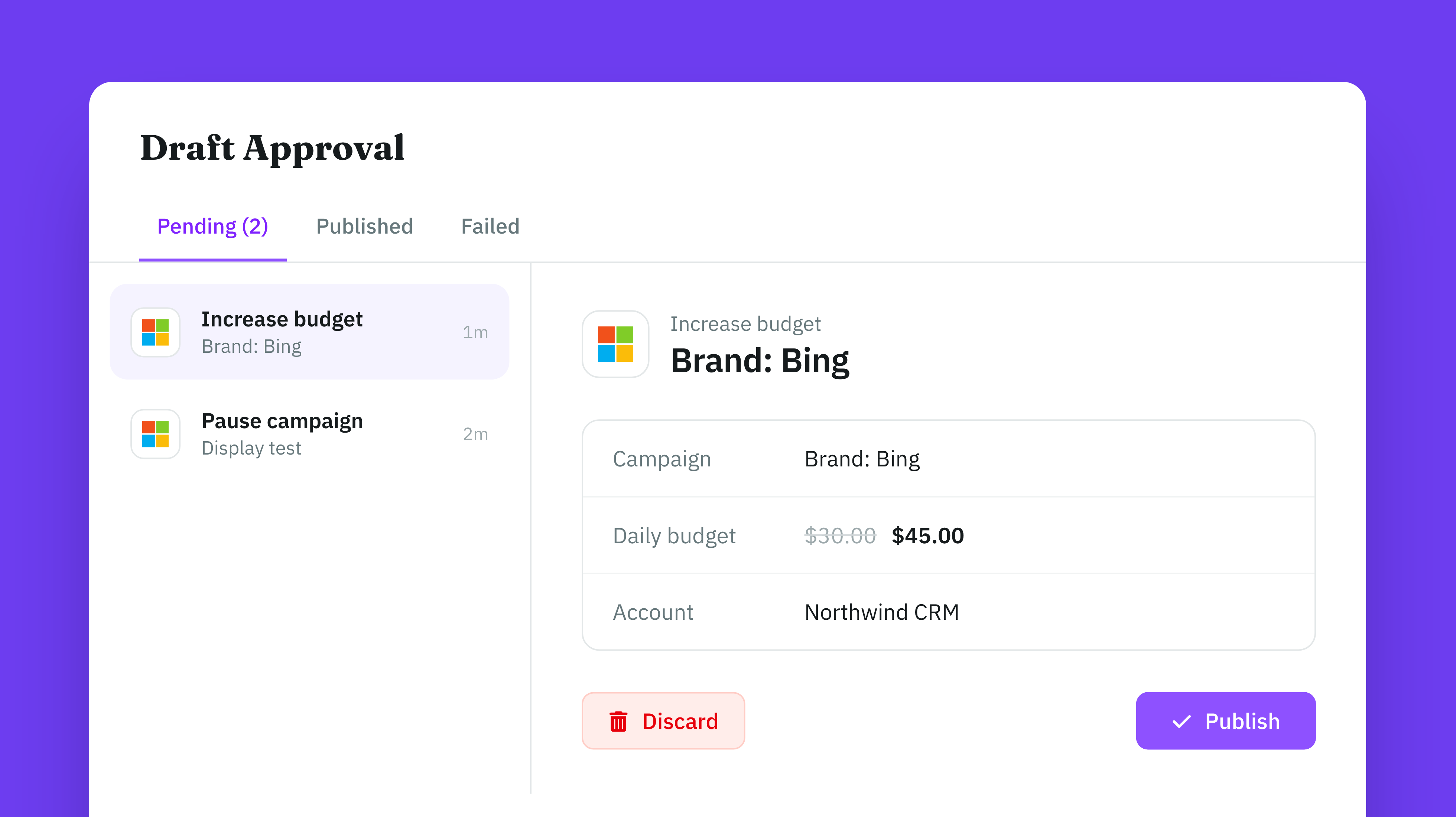
To use these tools, you must have an AdKit account and enable Advanced Platform Access within your project settings. The system operates with a safety-first approach where every modification, such as budget changes or pausing campaigns, is saved as a draft first. No changes are applied to your live Microsoft Ads account until you manually approve them through the AdKit Draft Approval screen or via a specific command. This ensures that the AI cannot spend your budget without your explicit permission.
What you can do with it
- 1Analyze campaign performanceAsk your AI client to retrieve and summarize how your Bing campaigns performed during a specific timeframe.
- 2Draft budget adjustmentsInstruct the AI to lower a specific campaign budget and save the change as a draft for your review.
- 3Review and publish changesUse the interface to look over pending campaign edits before making them live on the platform.
Written from the project's README. Every use case is checked against a quote from it.
How to install Microsoft Ads MCP
Formats verified 10 Nov 2026Add to CursorAdd to GooseInstall Microsoft Ads MCP in Claude Code
$ claude mcp add --transport http microsoft-ads-mcp https://mcp.adkit.so/microsoft-adsInstall Microsoft Ads MCP in Cursor
~/.cursor/mcp.json
{
  "mcpServers": {
    "microsoft-ads-mcp": {
      "url": "https://mcp.adkit.so/microsoft-ads"
    }
  }
}Install Microsoft Ads MCP in VS Code
.vscode/mcp.json
{
  "servers": {
    "microsoft-ads-mcp": {
      "type": "http",
      "url": "https://mcp.adkit.so/microsoft-ads"
    }
  }
}Install Microsoft Ads MCP in VS Code CLI
$ code --add-mcp '{"name":"microsoft-ads-mcp","type":"http","url":"https://mcp.adkit.so/microsoft-ads"}'Install Microsoft Ads MCP in Codex
$ codex mcp add microsoft-ads-mcp --url https://mcp.adkit.so/microsoft-adsInstall Microsoft Ads MCP in Codex config.toml
~/.codex/config.toml
[mcp_servers.microsoft-ads-mcp]
url = "https://mcp.adkit.so/microsoft-ads"
Install Microsoft Ads MCP in Gemini CLI
$ gemini mcp add -s user --transport http microsoft-ads-mcp https://mcp.adkit.so/microsoft-adsInstall Microsoft Ads MCP in Gemini settings.json
~/.gemini/settings.json
{
  "mcpServers": {
    "microsoft-ads-mcp": {
      "url": "https://mcp.adkit.so/microsoft-ads",
      "type": "http"
    }
  }
}Microsoft Ads MCP tools 9
Detected from the READMEadkit_projectsadkit_statusadkit_setupadkit_drafts_readadkit_drafts_updateadkit_drafts_deleteadkit_drafts_publishadkit_helpadkit_feedback
| adkit_projects | — | |
| adkit_status | — | |
| adkit_setup | — | |
| adkit_drafts_read | — | |
| adkit_drafts_update | — | |
| adkit_drafts_delete | — | |
| adkit_drafts_publish | — | |
| adkit_help | — | |
| adkit_feedback | — |
Automated checks
Ran Nov 14, 2026Full report →Not verified yet. A server needs a score of 80, no serious finding, and enough data for us to check. How checks work · What to fix for more points

- Source repository linked and reachableadkit/microsoft-ads-mcp is public and reachablegithub.com/adkit/microsoft-ads-mcp ↗Pass
- Package names this repository as its sourceNot checked
- Build provenance (Sigstore attestation)Not checked
- Open source license (OSI)MITspdx.org/licenses/MIT.html ↗Pass
- Commit or release in the last yearLast commit or release 2026-11-13github.com/adkit/microsoft-ads-mcp ↗Pass
- OpenSSF ScorecardNot checked
- Package name not close to a popular packageNot checked
- No critical advisory in the package or its dependenciesNot checked
- No hidden instructions to the model9 tool descriptions and the README read; no override phrases, credential paths or hidden charactersPass
- Destructive tools are labelledNo tool named like delete, drop or execPass
- Remote endpoint answers the MCP handshakeHTTPS endpoint answered 401 (sign-in required)Pass
README
View on GitHubMicrosoft Ads MCP Server



Connect Microsoft Ads (Bing Ads) to Claude, ChatGPT, Cursor, Codex or any AI app that supports MCP. AdKit hosts the server, so you only add an address to your AI app.
- MCP address:
https://mcp.adkit.so/microsoft-ads - Website: AdKit
Beta: Your AI writes Microsoft Advertising API requests and AdKit sends them. It can do what the API allows, with more steps than on Meta or Google. Turn on Advanced Platform Access in your AdKit project (Agent Permissions) first.
Every change is saved as a draft first, so your AI can't spend money on its own. Nothing goes live on Microsoft Ads until you approve it.
What you can do
- Connect your Microsoft Advertising accounts
- Read campaigns and reports through the Microsoft Advertising API
- Save campaign changes as drafts, then publish them after you approve
Example prompts
- "How did my Bing campaigns perform last week?"
- "Lower the budget of the ‘Brand’ campaign to $20 a day. Save it as a draft."
Set up
You need an AdKit account. On first use, you sign in to AdKit and connect your Microsoft Ads account.
There are two ways to connect:
- All platforms: the main AdKit connector. One connection for Google, Meta, TikTok, LinkedIn, Microsoft, Reddit, X and Pinterest. Pick this if you run ads on more than Microsoft Ads.
- Microsoft Ads only: the address above. Your AI only sees the Microsoft Ads tools.
Claude (web and desktop)
- All platforms: install AdKit from the Claude directory, in one click.
- Microsoft Ads only: Settings → Connectors → Add custom connector → paste
https://mcp.adkit.so/microsoft-ads.
ChatGPT
- All platforms: add the AdKit app, in one click.
- Microsoft Ads only: Settings → Connectors → Add custom connector → paste
https://mcp.adkit.so/microsoft-ads.
Claude Code
As a plugin:
/plugin marketplace add adkit/microsoft-ads-mcp
/plugin install microsoft-ads@adkit-microsoft-ads
Or as an MCP server only:
claude mcp add --transport http adkit-microsoft-ads https://mcp.adkit.so/microsoft-ads
Gemini CLI
gemini extensions install https://github.com/adkit/microsoft-ads-mcp
Cursor
Add to ~/.cursor/mcp.json:
{
  "mcpServers": {
    "adkit-microsoft-ads": {
      "url": "https://mcp.adkit.so/microsoft-ads"
    }
  }
}
Codex
Add to ~/.codex/config.toml:
[mcp_servers.adkit-microsoft-ads]
url = "https://mcp.adkit.so/microsoft-ads"
In Claude Code, Gemini CLI, Cursor and Codex, use https://mcp.adkit.so instead to connect all platforms.
Tools
| What | Tools |
|---|---|
| Ad accounts | microsoft_ads_accounts_connect, microsoft_ads_accounts_disconnect, microsoft_ads_accounts_read |
| Direct API requests | microsoft_ads_platform_api_request_mutate |
Every AdKit connector also has these tools:
| Tool | What it does |
|---|---|
adkit_projects |
List your AdKit projects and pick one |
adkit_status |
Show the connected ad accounts |
adkit_setup |
Get the link to connect an ad account |
adkit_drafts_read |
List saved drafts, or read one |
adkit_drafts_update |
Edit a draft before it goes live |
adkit_drafts_delete |
Delete a draft |
adkit_drafts_publish |
Publish drafts after you approve them |
adkit_help |
Look up fields, limits and examples |
adkit_feedback |
Report a bug or a missing feature |
FAQ
What is the Microsoft Ads MCP server?
A hosted MCP server from AdKit. It lets Claude, ChatGPT, Cursor, Codex and other AI apps work on your Microsoft Ads account: Microsoft Advertising (Bing Ads) reports and campaign changes through its API, in beta.
Is the Microsoft Ads MCP server free?
It is included in every AdKit plan. Plans start at $29 a month, with a 7-day free trial. See pricing.
Can my AI change my Microsoft Ads without asking me?
No. Every create, edit or pause is saved as a draft. It goes live only after you approve it, on AdKit's Draft Approval page or by telling your AI to publish it.
Do I need an API key or a developer token?
No. You sign in to AdKit in your browser and connect your Microsoft Ads account there. You also need to turn on Advanced Platform Access in your AdKit project (Agent Permissions), because this beta sends requests through the platform API.
Can I manage several Microsoft Ads accounts?
Yes. Connect several accounts and keep each client in its own AdKit project. How many projects you get depends on your plan.
Which AI apps does it work with?
Claude, ChatGPT, Claude Code, Gemini CLI, Cursor, Codex and any app that supports remote MCP servers with OAuth sign-in.
Other ad platforms
- Meta Ads MCP Server
- Google Ads MCP Server
- TikTok Ads MCP Server
- LinkedIn Ads MCP Server
- Reddit Ads MCP Server
- X Ads MCP Server
- Pinterest Ads MCP Server
- All platforms in one connector
Support and policies
- Help: adkit.so/support or contact@adkit.so
- Privacy, Terms, Security, Support
Docs server
docs-server/ is a small local MCP server that answers questions about AdKit from this README: setup per AI app, hosted tools, ad platforms, example prompts and the FAQ. It needs no login and does not manage ads; for that, connect the hosted server above. Run it with npm start or the Dockerfile.
License
MIT
Microsoft Ads MCP questions
How do I add Microsoft Ads MCP to Claude Code?
Run claude mcp add --transport http microsoft-ads-mcp https://mcp.adkit.so/microsoft-ads in your terminal. Add --scope user to make it available in every project.
How do I add Microsoft Ads MCP to Cursor?
Open ~/.cursor/mcp.json and add the server under mcpServers, using the Cursor config shown in the install section above.
What tools does Microsoft Ads MCP provide?
It exposes 9 tools, including adkit_projects, adkit_status, adkit_setup, adkit_drafts_read, adkit_drafts_update.
Can my AI change my Microsoft Ads without asking me?
No, all changes are saved as drafts first and only go live after you approve them.
Do I need an API key or a developer token?
No, you simply sign in to AdKit in your browser to connect your Microsoft Ads account.
Is the Microsoft Ads MCP server free?
It is included in AdKit plans, which start at $29 per month and offer a 7-day free trial.
Can I manage several Microsoft Ads accounts?
Yes, you can connect multiple accounts and organize clients into separate AdKit projects.