
Provides AI agents with a local, sovereign semantic memory layer using hybrid search, knowledge graphs, and a Markdown-based wiki.
Also known as AdelElo13/neuromcp
- Stars
- 4
- Tools
- —
- Downloads, 30 days
- —
- Latest version
- 0.30.2
- Last commit
- Oct 15, 2026
- License
- —
What is neuromcp MCP?
neuromcp provides AI agents with a local, sovereign semantic memory layer using hybrid search, knowledge graphs, and a Markdown-based wiki.
Summary generated from the project's README
About neuromcp MCP server
neuromcp provides a sovereign memory layer for AI agents, allowing models like Claude, GPT, Gemini, and Ollama to maintain persistent, searchable knowledge stored entirely on your local machine. It functions as an MCP server that uses a hybrid retrieval system combining vector search with nomic-embed-text, BM25 full-text search, and knowledge graph links. This setup ensures that your data remains private and portable across different MCP-compatible clients such as Claude Desktop, Cursor, Windsurf, and LibreChat.
The system operates through two primary components: a local SQLite database for hybrid search and a Markdown-based wiki that serves as a compiled knowledge base. Users can set up the environment using the npx neuromcp-init command, which automatically detects clients and configures the wiki. For troubleshooting, the npx neuromcp-doctor command can diagnose issues with the daemon, Ollama, or the database. This architecture allows agents to retain context across sessions without relying on cloud-based memory products or external API keys.
What you can do with it
- 1Maintain cross-model memoryA developer can switch between different LLMs while ensuring their personal preferences and past decisions remain accessible.
- 2Automated knowledge consolidationThe system can automatically summarize raw session logs into structured Markdown files to build a project-aware context.
- 3Local-first data privacyUsers can run an AI agent with full memory capabilities without any data leaving their local hardware.
- 4Context injection for agentsAn AI agent can automatically receive a knowledge map and user profile at the start of a new session.
Written from the project's README. Every use case is checked against a quote from it.
How to install neuromcp MCP
Formats verified 10 Nov 2026Add to CursorAdd to GooseInstall neuromcp MCP in Claude Code
$ claude mcp add neuromcp -- npx -y neuromcpInstall neuromcp MCP in Cursor
~/.cursor/mcp.json
{
  "mcpServers": {
    "neuromcp": {
      "command": "npx",
      "args": [
        "-y",
        "neuromcp"
      ]
    }
  }
}Install neuromcp MCP in VS Code
.vscode/mcp.json
{
  "servers": {
    "neuromcp": {
      "type": "stdio",
      "command": "npx",
      "args": [
        "-y",
        "neuromcp"
      ]
    }
  }
}Install neuromcp MCP in VS Code CLI
$ code --add-mcp '{"name":"neuromcp","type":"stdio","command":"npx","args":["-y","neuromcp"]}'Install neuromcp MCP in Claude Desktop
claude_desktop_config.json
{
  "mcpServers": {
    "neuromcp": {
      "command": "npx",
      "args": [
        "-y",
        "neuromcp"
      ]
    }
  }
}Install neuromcp MCP in Codex
$ codex mcp add neuromcp -- npx -y neuromcpInstall neuromcp MCP in Codex config.toml
~/.codex/config.toml
[mcp_servers.neuromcp]
command = "npx"
args = ["-y", "neuromcp"]
Install neuromcp MCP in Gemini CLI
$ gemini mcp add -s user neuromcp npx -- -y neuromcpInstall neuromcp MCP in Gemini settings.json
~/.gemini/settings.json
{
  "mcpServers": {
    "neuromcp": {
      "command": "npx",
      "args": [
        "-y",
        "neuromcp"
      ]
    }
  }
}Configuration
NEUROMCP_DB_PATHNEUROMCP_EMBEDDING_PROVIDERNEUROMCP_NAMESPACE
| Name | Description | |
|---|---|---|
| NEUROMCP_DB_PATH | — | |
| NEUROMCP_EMBEDDING_PROVIDER | — | |
| NEUROMCP_NAMESPACE | — |
Automated checks
Ran Nov 14, 2026Full report →Passed our automated checks. That is not a security audit: read the code and give the server the narrowest access it needs. How checks work · What to fix for more points

- Source repository linked and reachableadelelo13/neuromcp is public and reachablegithub.com/adelelo13/neuromcp ↗Pass
- Package names this repository as its sourceneuromcp names adelelo13/neuromcp as sourcenpmjs.com/package/neuromcp ↗Pass
- Build provenance (Sigstore attestation)Sigstore attestation for neuromcpnpmjs.com/package/neuromcp/v/0.30.2#provenance ↗Pass
- Open source license (OSI)No licenseFinding
- Commit or release in the last yearLast commit or release 2026-10-15github.com/adelelo13/neuromcp ↗Pass
- OpenSSF ScorecardNot checked
- Package name not close to a popular packageNo popular package one edit away from neuromcpPass
- No critical advisory in the package or its dependencies153 resolved dependencies checked; no critical advisoryosv.dev ↗Pass
- No hidden instructions to the model0 tool descriptions and the README read; no override phrases, credential paths or hidden charactersPass
- Destructive tools are labelledNot checked
- Remote endpoint answers the MCP handshakeNot checked
README
View on GitHubneuromcp — Sovereign Memory for AI agents
Any model. Your memory. Stays local.
neuromcp is the first Sovereign Memory layer for AI: an open-source MCP server that gives Claude, GPT, Gemini, and Ollama persistent, searchable memory — stored entirely on your machine. No API keys. No cloud sync. No subscription required to remember who you are.
Sovereign Memory = data that you own outright, lives on hardware you control, and is portable across every model you use. Cloud memory products own your data; Sovereign Memory means you do.




npx neuromcp-init # one command: detects your MCP clients, writes configs, sets up the wiki
Or run the bare server without any setup: npx neuromcp. Something not
working? npx neuromcp-doctor diagnoses the daemon, Ollama, embeddings
and the database in one run.
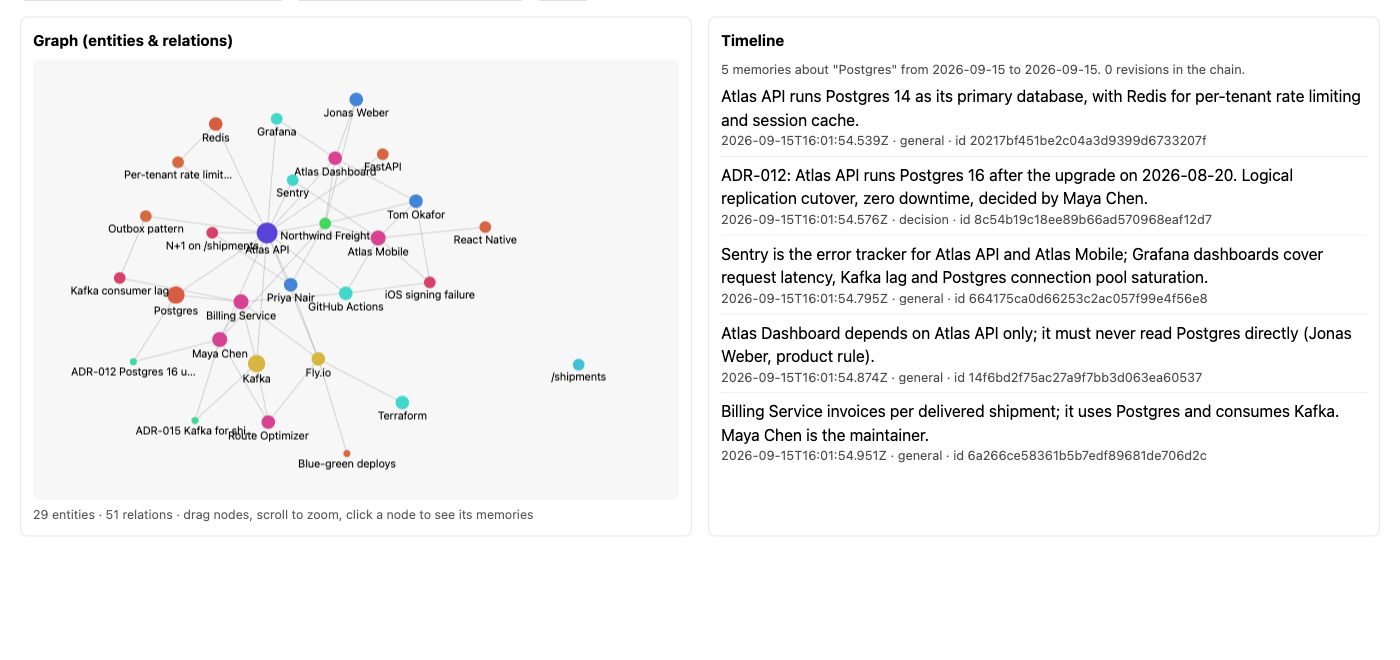
The built-in memory browser: the most-connected entities in a namespace
and the relations between them, as a force-directed graph you can drag,
zoom and click — served from localhost, never from a cloud. See
Memory browser & Obsidian.
Why neuromcp
The LLM is a commodity. Your memory is the moat. GPT-5, Claude 4, Gemini — they all converge. The model you use next year will differ. The memory of every conversation, decision, and preference you build is yours. neuromcp keeps that layer on your machine and makes it portable across any MCP-compatible client.
Local-first is a design choice, not a limitation. No telemetry. No data leaves your laptop. No vendor has a copy of your conversations. Audit every line of code that touches your memory. SQLite + local embeddings; everything fits on one disk.
One install. Every client. Claude Desktop, Cursor, Windsurf, Codex CLI, Continue, LibreChat, Open WebUI — neuromcp speaks MCP, so it works wherever MCP is supported. Switch models tomorrow; your memory follows.
Real recall, not keyword matching. Hybrid retrieval combines vector search (nomic-embed-text, 768-dim), BM25 full-text, graph links, and a learned usefulness prior. At 500 distractors on LongMemEval, R@5 holds at 93.3%. Your context window gets the right memory, not just the most recent.
LongMemEval-S accuracy
| Run | Score | Sample | Config |
|---|---|---|---|
| v7 (current) | 96.08% (98/102) | n=102 | Opus generator + Opus judge, single-model |
| v6 | 95.10% (97/102) | n=102 | Same as v7, prior hint set |
Repro: OMB_ANSWER_LLM=claude OMB_ANSWER_MODEL=opus OMB_JUDGE_LLM=claude OMB_JUDGE_MODEL=opus uv run omb run --dataset longmemeval -s s -m neuromcp -c "single-session-user,single-session-assistant,multi-session,temporal-reasoning,knowledge-update,single-session-preference" --query-limit 17
Sample size honesty. n=102 (17 per category × 6 categories). Wilson 95% CI for 98/102 ≈ 90.5–98.7%. Full 500q run with the same config is the next milestone before any "top-tier" claim.
Benchmarks (v0.18.0)
Oracle split (clean — easy mode)
| Mode | R@5 | R@10 | Hit Rate |
|---|---|---|---|
| Extracted (hybrid) | 100% | 100% | 100% |
Oracle-split LongMemEval isolates the correct memory in a small corpus. Every local MCP memory system claims ~99% here. It measures "does the ranker work on clean inputs" — nothing more.
Distractor split (v0.18.0, honest)
Same 30 questions + 1000 random distractor memories drawn from other questions' haystacks. The correct memory now competes against real noise.
| Embedder | Distractors | N | R@5 | R@10 | MRR |
|---|---|---|---|---|---|
Ollama nomic-embed-text |
0 (oracle) | 30 | 100% | 100% | 100% |
Ollama nomic-embed-text |
200 | 5 | 100% | 100% | 100% |
Ollama nomic-embed-text |
500 | 30 | 93.3% | 93.3% | 80.3% |
Ollama nomic-embed-text |
1000 | 5 | 100% | 100% | 74% |
Reproduce: npx tsx eval/longmemeval-distractor-runner.ts --limit 5 --distractors 1000
Sample sizes. The 500-distractor row is n=30 (Wilson 95% CI for 28/30 ≈ 78-99% R@5). The 1000-distractor row is n=5 — preliminary, Wilson 95% CI [57%, 100%]. The 1000-distractor n=30 run takes ~36 min on a single Ollama instance; cached-distractor batching is v0.19.0 work. Treat 500-distractor numbers as defensible, 1000-distractor as directionally positive but underpowered.
Head-to-head comparison is explicit v0.19.0 work. Hindsight (local OSS MCP, ~94.6% LongMemEval claimed) and Mem0/Zep publish their own numbers on their own harnesses. Until we run all of them against the same corpus + embedder, calling any local MCP server "state of the art" is marketing, not measurement. neuromcp publishes its numbers with sample-size caveats so you can judge direction; don't read absolute superiority into them yet.
Hybrid ranker (BM25 + vector + attention + graph + usefulness prior) keeps R@5 = 100% at 1000:1 distractor:target ratio on the observed sample. MRR drops to 74% because the correct memory is sometimes not rank-1 but always rank ≤ 5 in what we saw. Earlier v0.18.0 numbers (R@5 23%) were from a test FakeEmbedder — fixed in v0.18.1.
What this benchmark does NOT prove: end-to-end answer correctness, long-horizon multi-session reasoning, or superiority over commercial cloud systems (Mem0, Zep) on their own benchmarks. Those comparisons need their numbers on the same distractor split, which hasn't been published.
Why
AI agents forget everything between sessions. Existing solutions either store flat key-value pairs (useless for real knowledge) or require cloud infrastructure and API keys.
neuromcp gives you two layers of memory:
- MCP Server — hybrid search (vector + full-text + graph), verbatim recall, memory governance, automatic consolidation, all in a single SQLite file
- Wiki Knowledge Base — compiled Markdown knowledge that survives crashes, compounds over sessions, and gives your agent project-aware context at every startup
Inspired by Karpathy's LLM Wiki, Mastra's Observational Memory, and Zep's temporal knowledge graphs — but simpler than all of them. No vector DB, no embeddings pipeline, no cloud. Just Markdown files + Git + hooks.
Architecture
~/.neuromcp/
├── memory.db               ← SQLite: hybrid search, MCP tools
├── wiki/                   ← Compiled knowledge (git-tracked)
│   ├── index.md            ← Routekaart — LLM reads this FIRST
│   ├── schema.md           ← Operating rules for the LLM
│   ├── log.md              ← Append-only changelog
│   ├── people/             ← User profiles, preferences
│   ├── projects/           ← Project knowledge (stack, auth, URLs)
│   ├── systems/            ← Infrastructure (tools, MCP servers)
│   ├── patterns/           ← Reusable patterns (error fixes, routing)
│   ├── decisions/          ← Architecture decisions with context
│   └── skills/             ← Repeatable procedures
└── raw/sessions/           ← Raw session logs (auto-generated)
How the wiki works
| When | What happens |
|---|---|
| Session start | Hook injects index.md + user profile + auto-detected project page (~1300 tokens) |
| During session | LLM updates wiki pages when learning something persistent |
| Every 8 tool calls | Hook reminds LLM to update the wiki |
| Session end | Hook writes raw session log + git auto-commits all wiki changes |
| Crash | Checkpoint every 5 tool calls to file. Git history for rollback. |
Self-healing consolidation pipeline (v0.15.0+)
Every ~4h the launchd agent runs run-consolidation.sh, which
orchestrates four steps end-to-end:
consolidate-sessions.py— batches raw sessions per project, asks Claude for a factual summary, and fact-checks it against the raw sources. When the auditor flags specific unsupported claims the consolidator now auto-strips those lines and re-audits once — so one speculative sentence no longer kills a whole batch.rescue-rejected.py— any batch that still fails is parsed, the unsupported claims are removed, and the cleaned summary is appended to its wiki page. Pure text surgery, no LLM calls.entity-linker.py— cross-links every page: a bare-word mention of another registered entity (people/, projects/, systems/) is added to the page'srelated:frontmatter. Makes the wiki act like a graph without a separate graph database.rebuild-index.py— regeneratesindex.mdand per-category-index.mdfiles. Categories over 10 pages are auto-split so the session-start router stays compact as the wiki scales.
The pipeline is idempotent — safe to re-run at any time.
What the LLM knows at session start
Schema (operating rules) → How to maintain the wiki
Index (knowledge map)    → What knowledge exists
User profile             → Who you are, how you work
Project page             → Current project details (auto-detected from cwd)
Last session             → What happened last time
Quick Start
One command (recommended)
npx neuromcp-init
Detects your installed MCP clients (Claude Desktop, Claude Code, Cursor,
Windsurf), writes the neuromcp entry into each config (with a backup of
the original), initializes the wiki + hooks, and checks whether Ollama is
available. --dry-run previews everything without writing.
For GUI clients (Claude Desktop, Codex Desktop) install permanently
first: npm install -g neuromcp && neuromcp-init. Only a permanent
install lets init write the absolute node + script paths those clients
need — from the bare-npx cache (garbage-collected) it deliberately
falls back to a PATH-dependent npx entry, which GUI clients usually
cannot resolve.
Manual steps (what init does under the hood)
1. Start the MCP server
npx neuromcp
2. Initialize the wiki + hooks (required for closed-loop attribution)
npx neuromcp-init-wiki
This creates the wiki structure, installs hooks (Claude Code) and rules (other editors), and configures everything automatically. Without this step, npx neuromcp still runs as a plain MCP server with 46 tools, but the critic hook that closes the attribution loop is not installed — retrieval works but usefulness scores never accumulate. Safe to run multiple times — won't overwrite existing config.
Editor Compatibility
neuromcp works with any MCP-compatible editor. Two tiers of integration:
| Feature | Claude Code | Cursor / Windsurf / Cline / Copilot / JetBrains / Zed |
|---|---|---|
| MCP tools (46) | Full | Full |
| Context at session start | Hooks (automatic) | Rules (LLM-driven, best-effort) |
| Persist at session end | Hooks (automatic) | Rules (LLM-driven, best-effort) |
| Wiki reminders | Every 8 tool calls | No |
| Crash-resilient checkpoints | Yes | No |
Claude Code gets the full experience via native hooks — context injection and persistence happen automatically, even if the LLM forgets.
Other editors get rules files that instruct the LLM to call neuromcp tools at session start/end. This depends on LLM compliance — it works well in practice but is not guaranteed like hooks.
# Auto-detect installed editors
npx neuromcp-init-wiki

# Target a specific editor
npx neuromcp-init-wiki --editor cursor

# Install rules for all supported editors
npx neuromcp-init-wiki --editor all
Supported editors: cursor, windsurf, cline, copilot (VS Code), jetbrains, zed
Recommended: Add Ollama for real semantic search
ollama pull nomic-embed-text
neuromcp auto-detects it. No config needed.
Non-English memories: use a multilingual embedder
nomic-embed-text is English-centric. On a real Dutch memory store (2,402
memories, 40 paraphrased Dutch queries, 15 off-topic queries) it found the
right memory in the top 5 only 2.5% of the time, and off-topic queries scored
higher than true matches. bge-m3 (multilingual, 1024-dim) on the same data:
| embedder | Recall@5 | MRR@10 | relevant vs off-topic separable (AUROC) |
|---|---|---|---|
| nomic-embed-text | 2.5% | 0.03 | 0.08 |
| bge-m3 | 65% | 0.47 | 0.99 |
To switch an existing install:
ollama pull bge-m3
npx neuromcp-reembed                 # dry run on a copy
npx neuromcp-reembed --apply         # rebuild the index (keeps a backup)
Run the reembed with NEUROMCP_EMBEDDING_MODEL=bge-m3 set. After that every
client on the default auto setting follows the model the index was built
with, so nothing else needs configuring. With bge-m3, search_memory also
applies a calibrated relevance floor (0.45) so off-topic queries return
nothing instead of noise; keyword (FTS) and knowledge-graph hits always pass.
Keep NEUROMCP_RERANKER=none for non-English memories: the bundled
cross-encoder (ms-marco-MiniLM-L-6-v2) is English-only and dropped MRR on
the Dutch benchmark above from 0.46 to 0.18.
Upgrading
npm install -g neuromcp@latest
npx neuromcp-init-wiki        # updates installed hooks; safe to re-run
npx neuromcp-doctor check     # confirms hooks, daemon and embeddings
neuromcp-init-wiki copies the Claude Code hooks once; until 0.30.0 it never
touched them again, so hook fixes did not reach existing installs. Re-running
it now updates every hook that is an unmodified older neuromcp version (a
backup is kept next to each one), migrates old .js hooks to .cjs (leaving a
forwarding stub at the old path) and leaves hooks you edited alone — it lists
them, and --update-hooks replaces those too. neuromcp-doctor check reports
outdated hooks.
Installation
The reliable way is npm install -g neuromcp && neuromcp-init — it
writes the entry below into every detected client config (with a backup
first). Run init from the permanent install, not via bare npx: from the
npx cache it deliberately falls back to a PATH-dependent entry that GUI
clients usually cannot resolve. The manual form is:
Claude Code
// ~/.claude.json → mcpServers
{
  "neuromcp": {
    "type": "stdio",
    "command": "npx",
    "args": ["-y", "neuromcp"]
  }
}
npx is fine here because Claude Code runs from your terminal and
inherits your PATH.
Claude Desktop / Codex Desktop / any GUI client
GUI apps are started by the window manager, not by a login shell, so
they inherit a minimal PATH that usually has neither node nor npx
(nvm, fnm, Volta and Homebrew all install outside /usr/bin). Use
absolute paths — this is exactly what neuromcp-init writes since 0.29.3:
// ~/Library/Application Support/Claude/claude_desktop_config.json
{
  "mcpServers": {
    "neuromcp": {
      "command": "/opt/homebrew/opt/node@22/bin/node",
      "args": ["/opt/homebrew/lib/node_modules/neuromcp/bin/neuromcp.mjs"]
    }
  }
}
Find your own two paths with:
which node                      # → "command"
npm root -g                     # → "args": ["<that>/neuromcp/bin/neuromcp.mjs"]
(bin/neuromcp.mjs keeps its #!/usr/bin/env node shebang, so running it
straight from a terminal still works.)
Cursor / Windsurf / Cline
Same format — add to your editor's MCP settings. Copy-paste configs for
every client live in examples/.
Shared daemon (recommended when you run multiple clients)
By default each client spawns its own neuromcp process. One shared
background daemon serves them all instead — one database connection, one
embedding pipeline, no cold start per client:
npx neuromcp-enable-daemon --port 3200 # macOS launchd agent; verify with: curl -s http://127.0.0.1:3200/health
Then point clients at the daemon:
// Claude Code (~/.claude.json) — native HTTP transport
{ "neuromcp": { "type": "http", "url": "http://127.0.0.1:3200/mcp" } }

// Claude Desktop — stdio-only, bridge via neuromcp-connect.
// The bridge waits for the daemon on cold boot (plain mcp-remote exits
// fatally when the client starts before the daemon has bound its port,
// leaving a permanent "Server disconnected").
{ "neuromcp": { "command": "npx", "args": ["-y", "--package=neuromcp", "neuromcp-connect", "http://127.0.0.1:3200/mcp"] } }
The daemon binds loopback only, rejects non-allowlisted Host and
Origin headers (DNS-rebinding defense), and is unauthenticated by
design inside that boundary. Uninstall: npx neuromcp-enable-daemon --uninstall.
Platform support
| Component | macOS | Linux | Windows |
|---|---|---|---|
| MCP server (stdio + HTTP) | ✅ | ✅ (CI) | ⚠️ untested — native deps ship win-x64 prebuilds, reports welcome |
Shared daemon autostart (enable-daemon) |
✅ launchd | manual systemd | ❌ |
Auto-consolidation (enable-consolidation) |
✅ launchd | cron snippet | ❌ |
| Claude Code hooks | ✅ | ✅ | ⚠️ untested |
Per-project isolation
// .mcp.json in project root
{
  "mcpServers": {
    "neuromcp": {
      "type": "stdio",
      "command": "npx",
      "args": ["-y", "neuromcp"],
      "env": {
        "NEUROMCP_DB_PATH": ".neuromcp/memory.db",
        "NEUROMCP_NAMESPACE": "my-project"
      }
    }
  }
}
Memory browser & Obsidian
Memory you cannot see is memory you cannot trust. neuromcp ships two ways to look at what your agents actually know — both local, both read-only.
Built-in web view
When the shared daemon
is running, open http://127.0.0.1:<port>/ui (default port 3200):
- Graph — the top entities in a namespace and the relations between them, as a force-directed canvas. Drag nodes, scroll to zoom, click a node to list the memories linked to it (current memories only; superseded ones are hidden unless you ask for them).
- Timeline — type a topic and see how the facts about it evolved over time, including which memory superseded which.
The UI is a single page with no external assets (strict CSP, no CDN), and
it is only served on loopback: bind the daemon to a non-loopback host and
the /ui and /api/* routes are disabled entirely.
Obsidian graph of the wiki
The wiki (~/.neuromcp/wiki) is plain Markdown, so it opens directly as an
Obsidian vault. Obsidian draws its graph from
[[wikilinks]] while neuromcp keeps relationships in frontmatter, so run
the bridge once (idempotent, --dry-run supported):
npx neuromcp-obsidian-bridge
neuromcp-init-wiki also seeds a minimal wiki/.obsidian/ (colour groups
per page type, no plugins) — only if none exists; an existing vault
setup is never touched. Details: docs/OBSIDIAN.md.
MCP Surface
46 tools across 8 families — the full auto-generated reference with
every parameter lives in docs/TOOLS.md (regenerated
from the actual registrations on every change; CI fails when it drifts).
| Family | Tools | Highlights |
|---|---|---|
| Core memory | 11 | store_memory (dedup + contradiction detection + surprise scoring), search_memory (hybrid RRF + explain metadata), recall_answer (extractive cited answers with gap-analysis), search_all |
| Knowledge graph | 6 | create_entity, create_relation, query_graph, compute_centrality (PageRank) |
| Episodes | 10 | start_episode/end_episode, clustering, memory_timeline |
| Multi-agent | 9 | register_agent, find_expert, review queues, memory transfer |
| Verbatim store | 3 | exact-recall FTS on raw text, never summarized or pruned |
| Wiki | 3 | wiki_ingest, wiki_lint, wiki_briefing |
| Attribution & usefulness | 3 | log_retrieval, cite_memories — closes the usefulness-prior loop |
| Reflection | 1 | generate_reflection |
Picking the right retrieval tool: search_memory returns ranked raw
memories; recall_answer synthesizes a cited extractive answer (or
honestly says not_in_memory); recall_memory is a plain ID/filter
lookup with no semantics; search_all adds the verbatim store to the
sweep.
Resources (13)
| URI | Description |
|---|---|
memory://stats |
Global statistics |
memory://recent |
Last 20 memories |
memory://namespaces |
All namespaces with counts |
memory://health |
Server health + metrics |
memory://stats/{namespace} |
Per-namespace stats |
memory://recent/{namespace} |
Recent in namespace |
memory://id/{id} |
Single memory by ID |
memory://tag/{tag} |
Memories by tag |
memory://namespace/{ns} |
All in namespace |
memory://consolidation/log |
Recent consolidation entries |
memory://operations |
Active/recent operations |
Prompts (3)
| Prompt | Description |
|---|---|
memory_context_for_task |
Search relevant memories and format as LLM context |
review_memory_candidate |
Show proposed memory alongside near-duplicates |
consolidation_dry_run |
Preview consolidation without applying |
Wiki Knowledge Base
The wiki is the compiled, human-readable knowledge layer. It replaces the chaos of session logs with structured, interlinked Markdown pages.
Why a wiki instead of more vector search?
| Traditional RAG | neuromcp Wiki |
|---|---|
| Re-derives answers every query | Knowledge compiled once, refined over time |
| Chunking artifacts, retrieval noise | Human-readable pages with source citations |
| Vector DB, embedding pipeline | Plain Markdown + Git |
| Black box retrieval | Auditable, editable, portable |
| Knowledge evaporates | Knowledge compounds |
Wiki page format
---
title: My Project
type: project
created: 2026-04-06
updated: 2026-04-06
confidence: high
related: [other-project, oauth-setup]
---

# My Project

Description, stack, auth, deployment details...
How to use
The wiki works automatically once hooks are installed. The LLM:
- Reads
index.mdat session start to know what knowledge exists - Reads specific pages when relevant to the current task
- Updates pages when learning something new
- Gets reminded every 8 tool calls if the wiki needs updating
You can also browse and edit the wiki manually — it's just Markdown files.
neuromcp MCP questions
How do I add neuromcp MCP to Claude Code?
Run claude mcp add neuromcp -- npx -y neuromcp in your terminal. Add --scope user to make it available in every project.
How do I add neuromcp MCP to Cursor?
Open ~/.cursor/mcp.json and add the server under mcpServers, using the Cursor config shown in the install section above.
Does neuromcp require an API key or cloud subscription?
No, it is a sovereign memory layer that stores everything locally on your machine with no API keys or cloud sync required.
How does the memory retrieval work?
It uses hybrid retrieval that combines vector search, BM25 full-text search, graph links, and a learned usefulness prior.
Which AI clients are compatible with neuromcp?
It works with any MCP-compatible client including Claude Desktop, Cursor, Windsurf, Codex CLI, Continue, LibreChat, and Open WebUI.