
DBine MCP server
Commit Nov 16, 2026Lets an AI client manage over 130 SQL and NoSQL databases, perform schema comparisons, and execute cross-engine migrations.
Also known as addlayer-io/dbine
- Stars
- 39
- Tools
- —
- Downloads, 30 days
- —
- Latest version
- —
- Last commit
- Nov 16, 2026
- License
- Apache-2.0
What is DBine MCP?
DBine lets an AI client manage over 130 SQL and NoSQL databases, perform schema comparisons, and execute cross-engine migrations.
Summary generated from the project's README
About DBine MCP server
Managing diverse data environments is what DBine enables for developers and database administrators. This desktop application provides a single workbench to interact with over 130 different SQL and NoSQL databases, including relational, document, graph, and time-series engines. It runs locally on Windows, macOS, and Linux, allowing users to connect to cloud services like AWS RDS, Google Cloud SQL, and Azure Database using native IAM credentials.
Users can organize connections into nested, colored folders and import existing configurations from tools like DBeaver or DataGrip. The software supports complex networking through SSH tunnels and integrates with various secret managers such as HashiCorp Vault, 1Password, and AWS Secrets Manager to handle credentials securely. Beyond simple querying, the tool provides advanced features like schema comparison, cross-engine migrations, and a live profiler to monitor query performance and server activity.
What you can do with it
- 1Migrate data between different enginesA developer can use the tool to move data or structures from one database type to another.
- 2Analyze live query performanceAn administrator can monitor all queries running on a database in real time to identify bottlenecks.
- 3Securely manage database credentialsTeams can pull sensitive connection details directly from enterprise secret management systems.
- 4Import existing database connectionsUsers can quickly migrate their workspace by importing settings from other popular database management tools.
Written from the project's README. Every use case is checked against a quote from it.
Configuration
DBINE_GOOGLE_CLIENT_ID
Automated checks
Ran Nov 14, 2026Full report →Not verified yet. A server needs a score of 80, no serious finding, and enough data for us to check. How checks work · What to fix for more points

- Source repository linked and reachableaddlayer-io/dbine is public and reachablegithub.com/addlayer-io/dbine ↗Pass
- Package names this repository as its sourceNot checked
- Build provenance (Sigstore attestation)Not checked
- Open source license (OSI)Apache-2.0spdx.org/licenses/Apache-2.0.html ↗Pass
- Commit or release in the last yearLast commit or release 2026-11-13github.com/addlayer-io/dbine ↗Pass
- OpenSSF ScorecardOpenSSF Scorecard 7.3 / 10; weakest: Maintained 0, Code-Review 0, Contributors 3scorecard.dev/viewer/?uri=github.com/addlayer-io/dbine ↗Pass
- Package name not close to a popular packageNot checked
- No critical advisory in the package or its dependenciesNot checked
- No hidden instructions to the model0 tool descriptions and the README read; no override phrases, credential paths or hidden charactersPass
- Destructive tools are labelledNot checked
- Remote endpoint answers the MCP handshakeNot checked
README
View on GitHubDBine






DBine is a desktop multi-engine database manager from AddLayer. One app works with 130+ databases and cloud services: relational, analytical, document, key-value, graph, time-series and search databases. It runs on Windows, macOS and Linux.

Install
- macOS (Homebrew):
brew install --cask addlayer-io/tap/dbine - Windows (winget):
winget install AddLayer.DBine(it installs the version published in winget; DBine then updates itself to the latest). - Linux:
.flatpak,.AppImage,.deband.rpmpackages in Releases. - All platforms: installers on dbine.com.
More options in Download.
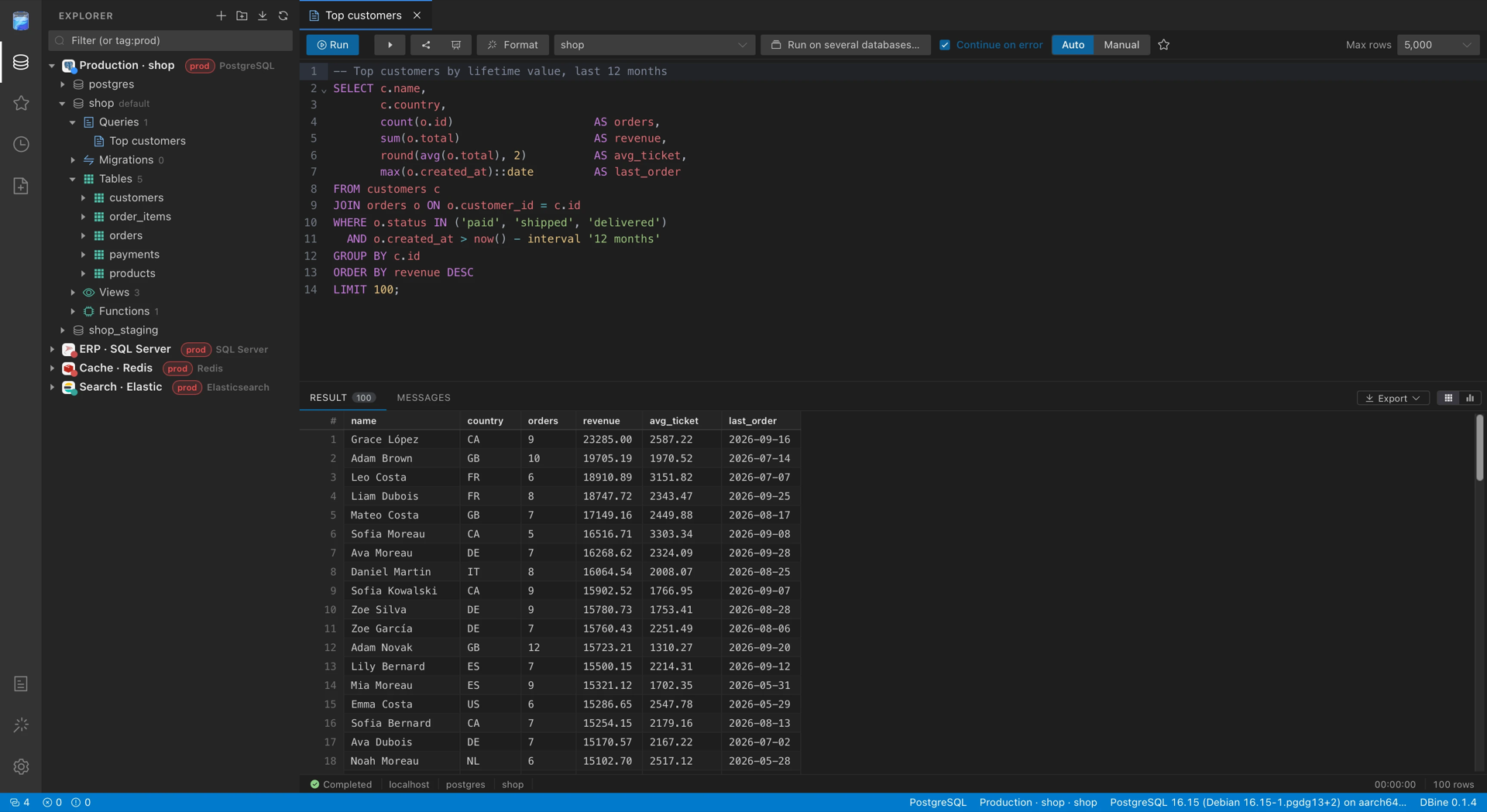
It is built with Tauri 2, a Rust core and a Vue 3 + Element Plus UI. The interface is a VS Code-style workbench. Each engine is its own crate and queries are organized inside each database.
What it does
Explorer and connections
- Tree per connection and per database. The first node of each database is Queries, with that database's saved queries. This way loose tabs don't pile up. Below come the engine's own objects: tables, views, routines, collections, indexes, keys, nodes…
- Explorer cache. When a connection opens, databases, objects and columns
appear instantly with what was there last time, and the server updates them
(the server always wins). It only stores names and structure.
Details:
docs/explorer-cache.md. - Folders and groups, for example per client or per environment. They can be nested and colored, and servers are moved between them by dragging.
- Import connections from DBeaver, DbGate, DataGrip / JetBrains, Azure Data Studio and SSMS, or by pasting connection URLs. DBine reads those tools' files, shows what it found and saves the ones you pick. Passwords go straight to the system keychain, without passing through the interface. From DBeaver and DbGate the SSH tunnel comes along.
- SSH tunnels: any connection to a network engine can go through an SSH
server, even through a chain of bastions, with a password, a private key or
the SSH agent, or from a
Hostof~/.ssh/config, withProxyJumpandProxyCommand. Each server's fingerprint is verified againstknown_hostsor confirmed the first time. The password and the key passphrase never go into the state file or the logs. Everything opened on a connection shares a single tunnel, which reopens by itself if it drops. Details:docs/ssh-tunnels.md. - Cloud sign-in for managed PostgreSQL and MySQL: AWS IAM (RDS, Aurora),
Google Cloud IAM (Cloud SQL, AlloyDB) and Microsoft Entra ID (Azure
Database). DBine makes a new token before every connection from the
computer's own credentials (AWS profiles and SSO, gcloud, az), so short-lived
tokens are never pasted; they stay in memory only. Details:
docs/cloud-authentication.md. - Passwords from a command or a secret manager: any secret field of any
engine, and the SSH tunnel's, can come from a command, 1Password, HashiCorp
Vault (or OpenBao), AWS Secrets Manager, AWS Parameter Store, Azure Key
Vault, Google Secret Manager, a KeePass database, Zoho Vault, Bitwarden,
Bitwarden Secrets Manager, CyberArk (Conjur and the Central Credential
Provider) or Delinea Secret Server, resolved at each connection and kept in
memory only; also database credentials HashiCorp Vault makes for the
connection (revoked when it closes). A definition that came
from elsewhere (an import, a restored backup) runs only after it's
confirmed on the computer. Details:
docs/secret-sources.md. - Copy connection string: a saved connection as the string an
application uses, in the formats of its engine (URI, ADO.NET, JDBC,
SQLAlchemy, ODBC, libpq, Node.js, Go), with its TLS and sign-in settings,
for any database. The password goes in only when asked for, resolved at
copy time; otherwise a placeholder. Details:
docs/connection-strings.md. - Database context menu:
- new query, new table with a designer (and modify an existing one), new objects from templates;
- ER diagram, generate script, export or import the database, run a script file;
- compare schemas, migrate, clone or sync, and Profiler;
- create or delete the database, copy its name or the server's;
- create a database with each engine's advanced options (collation,
files, replicas, retention…), with the script in view. Details:
docs/create-databases.md.
- Create and drop schemas, with their owner and permissions in the same
script, which is reviewed before running it. Details:
docs/schemas.md. - Read-only connections: DBine blocks everything that isn't a read.
Monitor and Profiler
- Server monitor, by right-clicking the connection: CPU, memory, sessions and activity, on the engines that expose them.
- Processes, in the Monitor: the live list of sessions and running
queries, with filters, highlighted locks, and the option to cancel a query
or terminate a session. Details:
docs/processes.md. - Profiler, by right-clicking a database: a tab with all the queries any
client runs on that database, live, like SQL Server's Profiler. For each one
it shows the time, the duration, the text, the database, the user, the
client, the rows and the error, with filters and the option to open it in a
query.
- If the engine records every query (Extended Events in SQL Server,
system.profilein MongoDB, query histories or logs), DBine reads what's new every second. If it only shows what is currently running, it samples every 100 ms, and the tab warns that shorter queries may not appear. - If the engine needs something enabled to capture, DBine enables it on start, shows it in yellow and restores it on stop or on close. On read-only connections it changes nothing on the server.
- CPU, reads and writes of each query, on the engines that report those figures and in their own unit (pages, blocks, rows, bytes, documents or keys). When identical queries are grouped, the average, minimum, p95 and maximum are shown, and they can also be used to filter.
- Per-engine details:
docs/engine-support.md.
- If the engine records every query (Extended Events in SQL Server,
Editor and results
- Saved queries. They save themselves as you type. Each tab has its own
session, so
SETs, temporary tables and transactions persist between runs. - Preview tabs, as in VS Code. Double-clicking a tab shows its query or object in the tree, and "Go to database" opens that database's menu.
- Several windows in the same instance, from the Dock, the taskbar or the
menu. They share connections, queries and settings. Details:
docs/windows.md. - CodeMirror 6 editor, with each engine's dialect and table and column autocompletion. It runs the selection or the statement under the cursor, and it can be cancelled with each engine's native mechanism.
- Script execution on every engine: the script is split statement by
statement respecting each engine's terminators, server messages arrive live
and in order, errors come with their code and line, there are manual
transactions per tab where the engine has them, and cancelling keeps the
session. Details:
docs/script-execution.md. - Cell editing: when a cell is modified, the update code is generated in the engine's language. DBine doesn't run it: it appends it to the query and you decide.
- Add rows and documents: new rows are added to the pending changes
together with edits and deletions, and the insert code comes out in each
engine's language (SQL, Redis commands,
insertMany, Cypher…). Document engines add one or several documents from a JSON editor, also in empty collections. - Virtualized grid with several results per run, messages and a cell viewer (with formatted JSON).
- Result tabs: earlier runs keep their results in tabs with their query and time; a pinned result isn't replaced by later runs. They're kept, encrypted on your computer, when DBine closes or crashes, and each editor shows them again when it opens. Details: docs/query-editor.md.
- Column filters on a table's data (values, ranges, nulls, text). They are applied on the server, with each engine's own filter.
- Copy results in 10 formats: with or without headers, CSV, JSON, JSON Lines, YAML, INSERT, UPDATE, Mongo inserts… The default format for ⌘C is configurable.
- Export results to CSV (with
,, with;or for Excel), TSV, JSON, JSONL, SQL, XLSX and XML. The export reruns the full query in streaming, so it isn't limited to the rows on screen. - Charts of results with Apache ECharts.
- JSON tree view of results, designed for document databases and available on every engine: it unfolds nested fields and JSON columns, with search in keys and values, types per field and large arrays grouped.
- Graphical execution plans, in the style of Management Studio: estimated, actual or both, with zoom, panning and full screen.
- Search the database: a text in object names, column names and the code
of views, routines and triggers, with results as it progresses. Details:
docs/search.md. - Run on several databases: the editor's code on several databases of a
connection at once, with the results together in one grid with a
basecolumn. Details:docs/multi-database-queries.md. - Code quality: the editor flags slow queries, results that are probably
not the expected ones and changes that affect more rows than intended, with
the rules of each engine family, without querying the database. Details:
docs/code-quality.md. - Query builder: builds a
SELECT(or its CQL equivalent) on a canvas with tables, joins, aggregates, ordering and filters, with the engine's SQL. Details:docs/query-builder.md. - Optimize query: equivalent rewrites by rules and by AI, indexes suggested
from the plan and a read-only comparison of times and results. Details:
docs/query-optimizer.md.
Design and structure
-
Table designer adapted to each engine. In Mongo it designs collections, with validation; in each engine it uses its own types, identities, indexes and keys.
-
ER diagram of the database:
- with relationships, search and filtering by one or several schemas;
- with a "keys only" mode, minimap and export to SVG or PNG;
- with automatic layout that handles hundreds of tables.
-
Script generator for the database, choosing what to include: DROP, CREATE, indexes, foreign keys, views and routines, data and triggers. It comes out in the right order for restoring, with each engine's adjustments (for example,
IDENTITY_INSERTin SQL Server or resynchronizing sequences in PostgreSQL). -
Migrate, clone and sync databases: "Migrate…" in a database's menu moves its tables and data to another database, even of another engine. Only the modes that work for that pair of engines are enabled:
- Migrate (convert), between any pair of engines: converts types, default values, keys, indexes and names, shows a report of every change and copies the data.
- Clone, between databases of the same engine: leaves the target identical to the source, with schemas, types, partitions, indexes, constraints, sequences, views, routines and triggers. On SQL Server and Azure SQL, and on PostgreSQL, TimescaleDB, KingbaseES, AlloyDB, Cloud SQL, Aurora, EDB and Fujitsu.
- Sync, on tables that already exist in the target: compares by key and inserts, updates and deletes only the rows that differ, in one transaction per table. On SQL Server and Azure SQL, and on PostgreSQL, TimescaleDB, YugabyteDB, KingbaseES, AlloyDB, Cloud SQL, Aurora, EDB and Fujitsu, with PostgreSQL 11 or later.
- The copy uses each engine's native bulk load (INSERT BULK, binary COPY, LOAD DATA, DuckDB's Appender…) or batched INSERT where there is none. It moves several tables at once with bounded memory and shows the progress and rows per second of each. The source is opened read-only and the data arrives without loss.
- If the app closes midway, the run is resumed later without copying the already finished tables again.
- Saved migrations: each database has a "Migrations" node with the ones started from it. The configuration saves itself and travels with cloud sync, and each run is kept in its history so it can be reopened, resumed or repeated.
Details:
docs/migration.md. -
Compare schemas: "Compare schemas…" in a database's menu shows two databases side by side, in the style of WinMerge. They can be on different connections, and even on different engines.
- It compares tables, views, procedures, functions and triggers. It highlights what differs in columns, indexes, foreign keys and the primary key, and the lines of code that differ.
- With the
→and←arrows, changes are passed from one side to the other, per object or per column, with undo. - An object can also be deleted from one side without passing it from the other, and before running you see what depends on it.
- "Sync" generates the script of that side's engine (
CREATE,ALTER,DROP) in the right order, and warns if something may lose data or fail. It opens as a query or runs with confirmation. - It points out columns and tables that look renamed, so they're renamed and keep their data instead of being dropped and added. With the AI it also finds renames whose names don't look alike, and the assistant can review the script, measuring its risks with reads you approve, or summarize it.
Details:
docs/schema-compare.md. -
Compare data: compares the rows of two tables or collections, on the same connection, on different connections or on different engines. It pairs them by the primary key, or by the columns you choose, and compares values by what they are worth and not by how each engine returns them.
- It compares whole tables, millions of rows included: big ones go through a local DuckDB database, encrypted and deleted when the comparison ends. It shows the rows read as it goes and can be cancelled.
- It shows the rows that differ, with each value marked, and the ones that are on one side only. For each row you choose which way it goes: update, insert or delete. Deletions are never chosen automatically.
- It generates one script per side that changes, in its engine's language, which can be copied, opened in a query or run. Then it compares again.
- It warns if the two tables aren't the same, if there are duplicate keys or if more than 1,000,000 rows differ (the script then covers the first ones). Read-only connections reject the script.
- It compares on every engine. Applying the changes depends on what the target allows writing: Drill, for example, has no INSERT, UPDATE or DELETE.
- With the AI it explains what the differences have in common (a time zone, a rounding, a sync running late), filters them from a request in words and suggests a key for a table without one. The AI gets counts, names and types, never the rows.
Details:
docs/data-compare.md. -
Clone table: from the explorer, a table, collection or index is cloned next to the original, with a name carrying the date and time that can be changed.
- It copies columns, primary key, constraints, indexes and foreign keys, and the data with the transfer engine, preserving identities. It can also clone the structure only.
- The clone comes out exact or it isn't created: if something can't be copied identically, or if you stop it, what was created is deleted. The original table is never touched.
- It is available on every engine with tables or collections that have rows
of their own. Not on graph or key-value engines, ksqlDB, CouchDB or
InfluxDB 2 and 3. Details:
docs/engine-support.md.
-
Import CSV, TSV, JSON, JSONL, XLSX and XML into a new or existing table, with column mapping.
-
Run a large script file in parts, for example to restore a dump.
-
Test data: fills a table with made-up but plausible rows, respecting keys, lengths and foreign keys. Details:
docs/test-data.md. -
Document the database: a data dictionary in HTML or Markdown, with tables, keys, indexes, routine code, dependencies and an entity-relationship diagram. Details:
docs/database-docs.md. -
Data subset: copies some rows of a table to another database, with the parent rows they need, and masks personal data. Details:
docs/data-subset.md.
Administration
-
Users and permissions: a tab with the server's users and roles (or the database's, where they are per database). For each one it shows its roles and its permissions, direct or inherited from a role, including denied ones.
- Users and roles are created, passwords are changed, login is enabled or disabled, and permissions on the database, a schema or an object are granted or revoked.
- Each change becomes an engine script that is reviewed before running it. The password doesn't appear in the preview and these scripts are not kept in the history.
- It is available on the vast majority of engines. The ones without their
own users don't have it, such as SQLite, DuckDB or DynamoDB. Details:
docs/users-and-permissions.md.
-
Actions according to the user's permissions: before offering backups, restores, the Profiler, terminating sessions, creating or deleting databases or managing users, DBine asks the server whether the connected user can do it. If they can't, the action appears disabled and says which permission is missing. If the engine doesn't allow knowing it for certain, it stays enabled.
-
Backups, in one tab per database:
- DBine copies on every engine: a local script with the structure and, if you want, the data, with its history on this machine, which is restored into the same database or another one;
- server backups where the engine has them (SQL Server, Oracle, SAP HANA, ClickHouse, Snowflake, BigQuery, Elasticsearch, Redis, among others), with their history and the script to make, restore or delete a backup, which is reviewed before running it.
Details:
docs/backups.md. -
Scheduled tasks: scripts, exports, schema comparisons, backups, database documentation and emails that run by themselves with DBine closed, with a system notification, history and prior approval of anything that changes data. Details:
docs/scheduled-tasks.md. -
Server jobs: each server's own scheduled work next to DBine's tasks — SQL Server Agent, Oracle DBMS_SCHEDULER, pg_cron, pgAgent, TimescaleDB, Snowflake tasks, Databricks jobs, MySQL events and more — with their steps and run history, and run now, stop, enable or script them where the engine allows it. Details:
docs/server-jobs.md. -
Health check: reviews a database and lists what deserves attention by severity, with each engine's own checks and fix scripts that are reviewed before running them. Details:
docs/health-check.md. -
Database properties: shows what the engine reports about a database and changes what it allows, with the script and the warnings in view. Details:
docs/database-properties.md.
Script library
A DBA's reusable scripts ("Reindex a table", "Blocking sessions"…) are kept in their own view, with the ⭐:
- Per engine, not per database: each script belongs to one or more engines, so a MongoDB script doesn't get mixed with a SQL Server one.
- On opening, it is copied into a query of the active database and asks for
its
{{parameters}}, with suggestions from that database's tables. - Organization: folders and search.
- Import and export: brings in the folder of
.sqlfiles you already have in one go, and exports it the same way.
Details: docs/library.md.
Cloud sync
A backup of connections, folders, queries, preferences and passwords. It is stored end-to-end encrypted with a passphrase chosen by the user (XChaCha20-Poly1305 + Argon2id) and stays in their own account:
- Google Drive, in the app's private folder;
- OneDrive, in the app's folder;
- or any folder, such as iCloud or Dropbox.
It syncs by itself, resolves conflicts without losing data and allows
recovering everything on another machine. AddLayer has no servers for this and
never sees the data. Details: docs/sync.md.
DBine MCP questions
Can I import connections from other database tools?
Yes, you can import connections from DBeaver, DbGate, DataGrip / JetBrains, Azure Data Studio, and SSMS.
How does DBine handle sensitive passwords?
Passwords are sent directly to the system keychain without passing through the interface, and secrets can be resolved from managers like 1Password or HashiCorp Vault.
Does DBine support cloud authentication?
Yes, it supports cloud sign-in for managed PostgreSQL and MySQL using AWS IAM, Google Cloud IAM, and Microsoft Entra ID.