
Lets an AI client read GitHub repositories, issues, pull requests, and commits using a read-only connection.
Also known as AbdulMuhaiminKhan/github-mcp, github-mcp, github-mcp-readonly
- Stars
- 0
- Tools
- —
- Downloads, 30 days
- —
- Latest version
- 1.2.0
- Last commit
- Oct 8, 2026
- License
- MIT
What is GitHub MCP?
GitHub lets an AI client read GitHub repositories, issues, pull requests, and commits using a read-only connection.
Summary generated from the project's README
About GitHub MCP server
Developers who need to query GitHub data through an AI client can use this read-only MCP server to inspect repositories, issues, pull requests, and commits. It operates over stdio and connects to the GitHub REST API using a fine-grained, read-only token that remains secure within the server process. The server is designed with a focus on precision, providing schema-validated inputs and handling rate limits through retries and ETag caching to ensure efficient communication.
This implementation includes six specific tools: list_repositories, get_repository, list_open_issues, search_issues, list_pull_requests, and get_recent_commits. It distinguishes itself through highly optimized tool descriptions and input handling, such as allowing bare repository names instead of requiring the full owner/repo format. The server also provides exact totals for list tools and detailed error messages to help the AI model recover from incorrect calls.
What you can do with it
- 1Audit repository activityAsk the AI to find the most recent code changes within a specific project.
- 2Manage project issuesRequest a list of all currently active issues that have not yet been resolved.
- 3Search for specific discussionsFind issues across your repositories using specific keywords or search queries.
- 4Review pull requestsRetrieve a list of all pending pull requests for a given repository.
Written from the project's README. Every use case is checked against a quote from it.
How to install GitHub MCP
Formats verified 10 Nov 2026Add to CursorAdd to GooseInstall GitHub MCP in Claude Code
$ claude mcp add --env 'GITHUB_TOKEN=<YOUR_GITHUB_TOKEN>' github-mcp -- uvx github-mcp-readonlyInstall GitHub MCP in Cursor
~/.cursor/mcp.json
{
  "mcpServers": {
    "github-mcp": {
      "command": "uvx",
      "args": [
        "github-mcp-readonly"
      ],
      "env": {
        "GITHUB_TOKEN": "<YOUR_GITHUB_TOKEN>"
      }
    }
  }
}Install GitHub MCP in VS Code
.vscode/mcp.json
{
  "servers": {
    "github-mcp": {
      "type": "stdio",
      "command": "uvx",
      "args": [
        "github-mcp-readonly"
      ],
      "env": {
        "GITHUB_TOKEN": "<YOUR_GITHUB_TOKEN>"
      }
    }
  }
}Install GitHub MCP in VS Code CLI
$ code --add-mcp '{"name":"github-mcp","type":"stdio","command":"uvx","args":["github-mcp-readonly"],"env":{"GITHUB_TOKEN":"<YOUR_GITHUB_TOKEN>"}}'Install GitHub MCP in Claude Desktop
claude_desktop_config.json
{
  "mcpServers": {
    "github-mcp": {
      "command": "uvx",
      "args": [
        "github-mcp-readonly"
      ],
      "env": {
        "GITHUB_TOKEN": "<YOUR_GITHUB_TOKEN>"
      }
    }
  }
}Install GitHub MCP in Codex
$ codex mcp add github-mcp --env 'GITHUB_TOKEN=<YOUR_GITHUB_TOKEN>' -- uvx github-mcp-readonlyInstall GitHub MCP in Codex config.toml
~/.codex/config.toml
[mcp_servers.github-mcp]
command = "uvx"
args = ["github-mcp-readonly"]

[mcp_servers.github-mcp.env]
GITHUB_TOKEN = "<YOUR_GITHUB_TOKEN>"
Install GitHub MCP in Gemini CLI
$ gemini mcp add -s user -e 'GITHUB_TOKEN=<YOUR_GITHUB_TOKEN>' github-mcp uvx -- github-mcp-readonlyInstall GitHub MCP in Gemini settings.json
~/.gemini/settings.json
{
  "mcpServers": {
    "github-mcp": {
      "command": "uvx",
      "args": [
        "github-mcp-readonly"
      ],
      "env": {
        "GITHUB_TOKEN": "<YOUR_GITHUB_TOKEN>"
      }
    }
  }
}Configuration
GITHUB_TOKENRequiredSecretFine-grained GitHub token with read-only access (Metadata, Contents, Issues, Pull requests).
GITHUB_MCP_TOOLSETTool descriptions to serve: v2 (default, optimized), v1 or v1b (benchmark baselines).
| Name | Description | |
|---|---|---|
| GITHUB_TOKEN | Fine-grained GitHub token with read-only access (Metadata, Contents, Issues, Pull requests). | RequiredSecret |
| GITHUB_MCP_TOOLSET | Tool descriptions to serve: v2 (default, optimized), v1 or v1b (benchmark baselines). |
Automated checks
Ran Nov 14, 2026Full report →Passed our automated checks. That is not a security audit: read the code and give the server the narrowest access it needs. How checks work

- Source repository linked and reachableabdulmuhaiminkhan/github-mcp is public and reachablegithub.com/abdulmuhaiminkhan/github-mcp ↗Pass
- Package names this repository as its sourcegithub-mcp-readonly names abdulmuhaiminkhan/github-mcp as sourcepypi.org/project/github-mcp-readonly/ ↗Pass
- Build provenance (Sigstore attestation)Sigstore attestation for github-mcp-readonlypypi.org/project/github-mcp-readonly/ ↗Pass
- Open source license (OSI)MITspdx.org/licenses/MIT.html ↗Pass
- Commit or release in the last yearLast commit or release 2026-10-08github.com/abdulmuhaiminkhan/github-mcp ↗Pass
- OpenSSF ScorecardNot checked
- Package name not close to a popular packageNo popular package one edit away from github-mcp-readonlyPass
- No critical advisory in the package or its dependencies32 resolved dependencies checked; no critical advisoryosv.dev ↗Pass
- No hidden instructions to the model0 tool descriptions and the README read; no override phrases, credential paths or hidden charactersPass
- Destructive tools are labelledNot checked
- Remote endpoint answers the MCP handshakeNot checked
README
View on GitHubGitHub MCP Server: Teaching an AI to Pick the Right Tool




A read-only Model Context Protocol server that lets Claude (or any MCP client) answer questions about my GitHub repos, issues, pull requests and commits. It comes with a benchmark that measures how often the model picks the right tool with the right arguments.
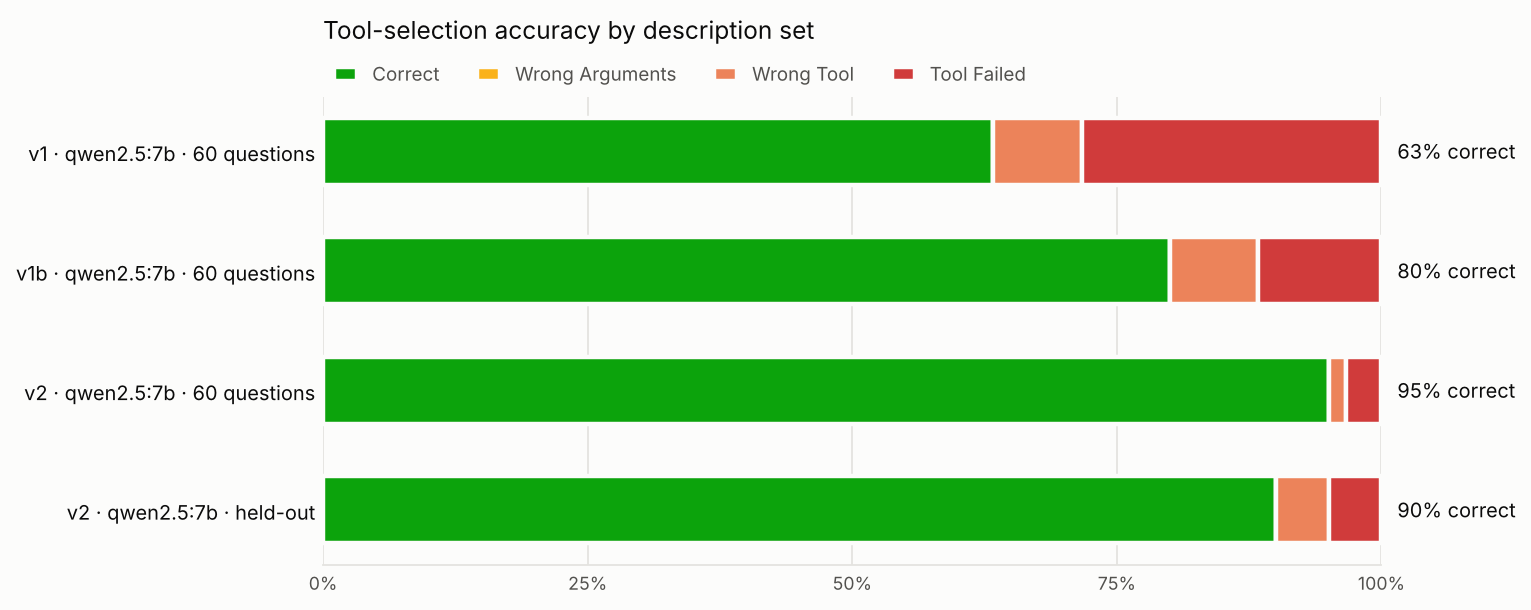
Rewriting the tool descriptions took a local 7B model from 63% to 95% correct, and from 60% to 90% on held-out questions it was never tuned on. An ablation shows where those 32 points came from, and most of them were not the prose:
| Change | Points | What it was |
|---|---|---|
Accept bare repo names (mcp-bench-app, not only owner/mcp-bench-app) |
+17 | input handling in the server |
Write the range (1-50) into the limit parameter's description |
+8 | one parameter sentence |
| Rewrite the tool descriptions (when to use, when NOT to, and the alternative) | +7 | the tool wording |
Every miss left in v2 is the model asking for something the API doesn't offer: merged PRs, sorting by stars, or closed issues from the open-issues tool. Better wording can't fix those. The next step is to support them in the schema.
Explore every question in the results dashboard →
What I built
- MCP server (Python,
mcpSDK 2.x) with 6 read-only tools over stdio:list_repositories,get_repository,list_open_issues,search_issues,list_pull_requests,get_recent_commits. - Least-privilege access: a fine-grained, read-only GitHub token and
readOnlyHintannotations. The token stays in the server process and never reaches the model. - Production behaviour: schema-validated inputs, retries with backoff and jitter, primary and secondary rate-limit handling, ETag caching (304s don't count against the rate limit), exact totals for list tools, and error messages that tell the model how to recover.
- A benchmark with known answers: a seed script creates two repos with 15 issues, 5 pull requests and commits from two authors. A fake GitHub API serves the same data offline, so the benchmark also runs in CI with no token.
- Three evaluations: tool selection with argument grading (60 questions), a held-out set (20), and multi-step agent runs whose final answers are checked against the seeded facts (13).
- An ablation (
v1 → v1b → v2) that separates input handling from description wording. - An automatic description optimizer that rewrites descriptions from failures and keeps a change only if held-out accuracy doesn't drop.
- A harness that benchmarks any MCP server, not just this one (examples/).
- A results dashboard (docs/) with every question, call and error from the runs.
- Tests and CI on Python 3.10–3.13 (ruff, mypy, pytest, and an oracle check that the harness scores 100% when the right call is made).
Architecture
flowchart LR
    U[User] -->|question| C["Claude Desktop<br/>(MCP client)"]
    C <-->|"JSON-RPC over stdio<br/>tools/list · tools/call"| S["github-mcp<br/>Python MCP server"]
    S -->|"HTTPS · read-only token<br/>ETags · retries"| G[(GitHub REST API)]
    E["eval/run_eval.py"] -.->|"same MCP protocol"| S
    E -.->|"question + tool schemas"| L["LLM under test<br/>(Ollama or Claude)"]
    S -.->|"GITHUB_API_URL (CI)"| F[("fake GitHub<br/>seeded repos")]
| Layer | Responsibility |
|---|---|
server.py |
Registers tools, validates arguments, returns compact JSON with exact totals |
descriptions.py |
Versioned descriptions (v1 baseline, v1b ablation, v2 optimized, or a JSON file) |
github_client.py |
Auth, pagination, retries, rate limits, ETag cache, typed errors |
eval/ |
Benchmark runner, argument grader, seed script, fake GitHub, optimizer, chart, dashboard export |
Evaluation
Method. Each question goes to the model with the server's own tool list, exactly what Claude Desktop sends. The harness executes the chosen call through MCP and grades it:
- ✅ Correct: expected tool, call succeeded, arguments match (e.g. "last 3 days" →
since_days=3) - 🟡 Wrong Arguments: right tool, call succeeded, but an argument is wrong or missing
- ⚠️ Wrong Tool: a different tool, or no tool
- ❌ Tool Failed: right tool, but the call returned an error
There are 60 questions (10 per tool, a third of them in deliberate overlap zones between tools), plus 20 held-out questions written after v2 was frozen and never used for tuning. The data is the seeded benchmark repos on real GitHub, and the model runs locally with Ollama at temperature 0, 3 runs per configuration, medians reported. The three runs differed by at most 2 points on the main set and 5 on held-out.
| Configuration (qwen2.5:7b) | Correct | Wrong Arguments | Wrong Tool | Tool Failed | Input tokens |
|---|---|---|---|---|---|
| v1: vague descriptions | 63% | 0% | 8% | 28% | 614 |
| v1b: v1 + bare repo names | 80% | 0% | 8% | 12% | 614 |
| v2: rewritten descriptions | 95% | 0% | 2% | 3% | 1533 |
| v1 on held-out questions | 60% | 5% | 15% | 20% | 613 |
| v2 on held-out questions | 90% | 0% | 5% | 5% | 1532 |
The offline run against the fake GitHub gave the same picture (65% / 82% / 95%).
A second model, llama3.1:8b, same questions and settings:
| Configuration (llama3.1:8b) | Correct | Wrong Arguments | Wrong Tool | Tool Failed | Input tokens |
|---|---|---|---|---|---|
| v1: vague descriptions | 32% | 7% | 12% | 50% | 643 |
| v1b: v1 + bare repo names | 47% | 7% | 12% | 35% | 643 |
| v2: rewritten descriptions | 92% | 5% | 2% | 2% | 1559 |
| v2 on held-out questions | 95% | 0% | 0% | 5% | 1558 |
Llama picked the right tool 88% of the time even on v1. It failed on arguments: it asked for
limit=100 on tools capped at 50 again and again, and passed owner/repo where a bare name was
expected. The fixes that helped qwen (bare names, the stated limit range) helped llama even more, so the
lesson carries across models: spell out argument constraints, not just what the tool does.
Agent mode (13 multi-step questions, answers checked against the seeded data): v1 62%, v2 69%. With 13 questions one answer is 8 points, so that difference is within noise (offline it went the other way).
Cost of better descriptions: v2 adds about 920 input tokens to every request (614 → 1533).
Raw results, one JSON row per question per run: eval/results/.
Benchmark your own MCP server
The harness isn't tied to this server. Give it the command that starts any stdio MCP server and a JSONL file of questions:
python eval/run_eval.py --server "npx -y @modelcontextprotocol/server-filesystem ." \
    --questions my_questions.jsonl --domain "the user's files" --backend ollama --runs 3
examples/ has a small notes server with 10 questions and the question format.
Decision File
1. Why the model picked the wrong tool
Every wrong-tool pick from the v1b run (3 of 3 runs each), and what v2 did about it:
| Question | Expected → chosen | Root cause | After v2 |
|---|---|---|---|
| "What's the exact name of my portfolio website repo?" | list_repositories → get_repository |
v1's "Gets info about a repo" invited guessing a name (portfolio-website) instead of listing |
fixed |
| "Which repos haven't I pushed to in a long time?" | list_repositories → get_recent_commits |
"Gets recent activity for a repo" sounded like the answer; nothing said repos can be sorted by last push | fixed |
| "What topics are tagged on mcp-bench-app?" | get_repository → search_issues |
"Searches GitHub" read as a catch-all for anything about a repo | fixed |
| "What's the newest issue someone opened on mcp-bench-app?" | list_open_issues → search_issues |
The model reached for search and invented query syntax (created:desc) |
fixed |
| "Which issues have been closed in mcp-bench-app?" | search_issues → list_open_issues |
The model passed state: "closed" to the open-issues tool, trusting its own argument over the tool's name |
still wrong, also on held-out |
2. What the ablation showed
With an oracle that always picks the right tool, v1 scores 83%: all 10 bare-name questions fail because v1
requires owner/name. So part of any v1 → v2 gain was always going to be input handling. v1b (v1 text +
bare names) separates the two:
- v1 → v1b: +17 points. All 10 bare-name questions went from ❌ to ✅. The wording didn't change at all.
- v1b → v2: +15 points, from 9 questions:
- 5 were one parameter sentence. v1's
limitsaid "How many." The model asked for 100, the schema allows 50, and the call failed. v2 says "(1-50)" and those 5 questions pass. - 4 were the tool wording: the first four rows of the table above.
- 5 were one parameter sentence. v1's
The model rarely picked the wrong tool even with vague descriptions (92% right tool on v1). Most of the failures came from calls the server rejected.
3. What I changed
- Each description states what it returns, when to use it, and when NOT to use it, naming the
alternative, e.g.
list_open_issues: "Do NOT use for closed issues, keyword search, or issues across all repos (use search_issues), or for pull requests (use list_pull_requests)." - Boundaries are mutually exclusive along one axis each: open vs closed, one repo vs all repos, keyword vs none, metadata vs history, issues vs PRs.
- Every parameter documents its format and range with an example. This turned out to matter more than the tool text.
- Behaviour fixes, reported separately: bare repo names resolve to the user's repo, and list tools return exact totals instead of a page-sized count.
- Error messages carry a next step ("Call list_repositories to check the exact name").
4. The automatic optimizer overfit, and the guard caught it
eval/optimize.py shows a model its training failures, asks it to rewrite the descriptions, and keeps a
candidate only if training accuracy rises and held-out accuracy doesn't drop. Starting from v1, with
qwen2.5:7b rewriting its own tools (offline data, 4 iterations):
| Iteration | Train (60) | Held-out (20) | Kept |
|---|---|---|---|
| 0 (v1) | 65% | 60% | baseline |
| 1 | 70% | 55% | no |
| 2 | 67% | 50% | no |
| 3 | 72% | 40% | no |
| 4 | 72% | 40% | no |
Every rewrite raised training accuracy and lowered held-out accuracy, so the guard rejected all of them. The 7B model wrote descriptions that fit the questions it had just seen, not the tools. Without the held-out check, iteration 3 would have looked like a 7-point win. The hand-written v2 is what generalized.
5. What's left, and trade-offs
- The 3 remaining v2 misses all ask for something the API doesn't have:
state: "merged"for pull requests,sort: "stars"for repos, andstate: "closed"on the open-issues tool. I didn't reword around them, because that would tune to these exact questions. The right fix is in the schema: acceptmerged(filter onmerged_at), sort by stars client-side, and let the issues tool take a state. - Longer descriptions cost about 920 tokens per request. That's worth it at 6 tools. With dozens of tools I'd move to tool search and deferred loading.
- Agent mode needs more questions before its numbers mean anything (13 is too few).
- Pagination stops at 500 items per list (5 pages); totals beyond that are reported as lower bounds.
Use it
From Claude Desktop, add this to claude_desktop_config.json (or point command at a local install, as in
this example):
{
  "mcpServers": {
    "github": {
      "command": "uvx",
      "args": ["--from", "git+https://github.com/AbdulMuhaiminKhan/github-mcp", "github-mcp"],
      "env": { "GITHUB_TOKEN": "github_pat_... (fine-grained, read-only)" }
    }
  }
}
Or with Docker: docker build -t github-mcp ., then
claude_desktop_config.docker.example.json.
GUIDE.md covers token permissions, the seed script and the full eval workflow
(WINDOWS.md for PowerShell).
Run the benchmark yourself
python3 -m venv .venv && source .venv/bin/activate
pip install -e '.[dev,eval,plot]'
pytest -q

# No token needed: the offline benchmark repos and a free local model
ollama pull qwen2.5:7b
python eval/run_eval.py --fake-github --toolset v1 --runs 3
python eval/run_eval.py --fake-github --toolset v2 --runs 3
python eval/run_eval.py --fake-github --toolset v2 --questions eval/heldout.jsonl
python eval/run_eval.py --fake-github --mode agent --toolset v2

# Against real GitHub: seed the repos once (see GUIDE.md), then drop --fake-github
python eval/seed_repos.py

# Rebuild the chart and the dashboard from your results
python eval/plot_results.py eval/results/select-*.jsonl -o docs/results.png
python eval/export_dashboard.py
Tech
Python 3.10+ · MCP Python SDK 2.x · httpx · pydantic · GitHub REST API · pytest · ruff · mypy · GitHub Actions · Ollama / Anthropic API for evaluation · matplotlib · vanilla JS dashboard
GitHub MCP questions
How do I add GitHub MCP to Claude Code?
Run claude mcp add --env 'GITHUB_TOKEN=<YOUR_GITHUB_TOKEN>' github-mcp -- uvx github-mcp-readonly in your terminal. Add --scope user to make it available in every project.
How do I add GitHub MCP to Cursor?
Open ~/.cursor/mcp.json and add the server under mcpServers, using the Cursor config shown in the install section above.
Is this server read-write or read-only?
The server provides least-privilege, read-only access to GitHub data.
What specific GitHub data can the AI access?
The server provides tools to list repositories, get repository details, list open issues, search issues, list pull requests, and get recent commits.
Does the server support searching for closed issues?
No, the current implementation of the open-issues tool does not support closed issues; the model may attempt to pass a closed state which will fail.