
Generates read-only acceptance reports for Git changes to verify what was modified and which checks were executed by an AI agent.
Also known as 2648782102/proofpack-cli, proofpack-cli
- Stars
- 1
- Tools
- —
- Downloads, 30 days
- —
- Latest version
- 0.3.2
- Last commit
- Nov 9, 2026
- License
- MIT
What is Proofpack MCP?
Proofpack generates read-only acceptance reports for Git changes to verify what was modified and which checks were executed by an AI agent.
Summary generated from the project's README
About Proofpack MCP server
Proofpack provides developers with an evidence receipt for code changes made by AI agents. It generates read-only acceptance reports that detail what Git can see, which specific checks were executed, and which tasks remain unverified. This tool helps individuals confirm exactly what was modified and what testing actually occurred after a coding task is finished.
The server runs locally as a host-launched subprocess via the proofpack-mcp stdio entrypoint, requiring no accounts, cloud services, or model APIs. When used through an MCP host, it provides a single proofpack_check tool that performs read-only Git inspection to generate Markdown or JSON reports without executing project commands or writing files. For users running the CLI directly, the tool can execute specific commands using the --run flag, which uses the local shell and user privileges.
Unlike automated testers, Proofpack does not claim a change is correct or safe to merge. It focuses on separating observed facts from heuristic prompts and unchecked work, ensuring developers know the limits of the verification performed.
What you can do with it
- 1Verify AI code changesGenerate a report to see which files were modified and what the diff summary looks like after an agent finishes a task.
- 2Document executed test commandsRun specific test suites and record their exit status and timing in a formal acceptance report.
- 3Identify untested code areasDetermine which parts of the development process, such as linting or dependency audits, were skipped during the session.
- 4Share sanitized verification resultsCreate a safe version of a report that removes sensitive paths and command text before sharing it with others.
Written from the project's README. Every use case is checked against a quote from it.
How to install Proofpack MCP
Formats verified 10 Nov 2026Add to CursorAdd to GooseInstall Proofpack MCP in Claude Code
$ claude mcp add proofpack-cli -- npx -y proofpack-cliInstall Proofpack MCP in Cursor
~/.cursor/mcp.json
{
  "mcpServers": {
    "proofpack-cli": {
      "command": "npx",
      "args": [
        "-y",
        "proofpack-cli"
      ]
    }
  }
}Install Proofpack MCP in VS Code
.vscode/mcp.json
{
  "servers": {
    "proofpack-cli": {
      "type": "stdio",
      "command": "npx",
      "args": [
        "-y",
        "proofpack-cli"
      ]
    }
  }
}Install Proofpack MCP in VS Code CLI
$ code --add-mcp '{"name":"proofpack-cli","type":"stdio","command":"npx","args":["-y","proofpack-cli"]}'Install Proofpack MCP in Claude Desktop
claude_desktop_config.json
{
  "mcpServers": {
    "proofpack-cli": {
      "command": "npx",
      "args": [
        "-y",
        "proofpack-cli"
      ]
    }
  }
}Install Proofpack MCP in Codex
$ codex mcp add proofpack-cli -- npx -y proofpack-cliInstall Proofpack MCP in Codex config.toml
~/.codex/config.toml
[mcp_servers.proofpack-cli]
command = "npx"
args = ["-y", "proofpack-cli"]
Install Proofpack MCP in Gemini CLI
$ gemini mcp add -s user proofpack-cli npx -- -y proofpack-cliInstall Proofpack MCP in Gemini settings.json
~/.gemini/settings.json
{
  "mcpServers": {
    "proofpack-cli": {
      "command": "npx",
      "args": [
        "-y",
        "proofpack-cli"
      ]
    }
  }
}Automated checks
Ran Nov 14, 2026Full report →Passed our automated checks. That is not a security audit: read the code and give the server the narrowest access it needs. How checks work

- Source repository linked and reachable2648782102/proofpack-cli is public and reachablegithub.com/2648782102/proofpack-cli ↗Pass
- Package names this repository as its sourceproofpack-cli names 2648782102/proofpack-cli as sourcenpmjs.com/package/proofpack-cli ↗Pass
- Build provenance (Sigstore attestation)No build attestation published for this releaseNot checked
- Open source license (OSI)MITspdx.org/licenses/MIT.html ↗Pass
- Commit or release in the last yearLast commit or release 2026-11-09github.com/2648782102/proofpack-cli ↗Pass
- OpenSSF ScorecardNot checked
- Package name not close to a popular packageNo popular package one edit away from proofpack-cliPass
- No critical advisory in the package or its dependencies1 resolved dependencies checked; no critical advisoryosv.dev ↗Pass
- No hidden instructions to the model0 tool descriptions and the README read; no override phrases, credential paths or hidden charactersPass
- Destructive tools are labelledNot checked
- Remote endpoint answers the MCP handshakeNot checked
README
View on GitHubProofpack
An evidence receipt for AI-assisted code changes.
After a coding agent says "done", Proofpack shows what Git can see, which checks actually ran, and what remains unchecked. It runs locally, needs no account, and never gives a "safe to merge" verdict.
npx -y --package=proofpack-cli@0.3.2 proofpack check --run "npm test"
The command prints a Markdown report to stdout. Default inspection is read-only; npm test runs only because it was explicitly supplied with --run.
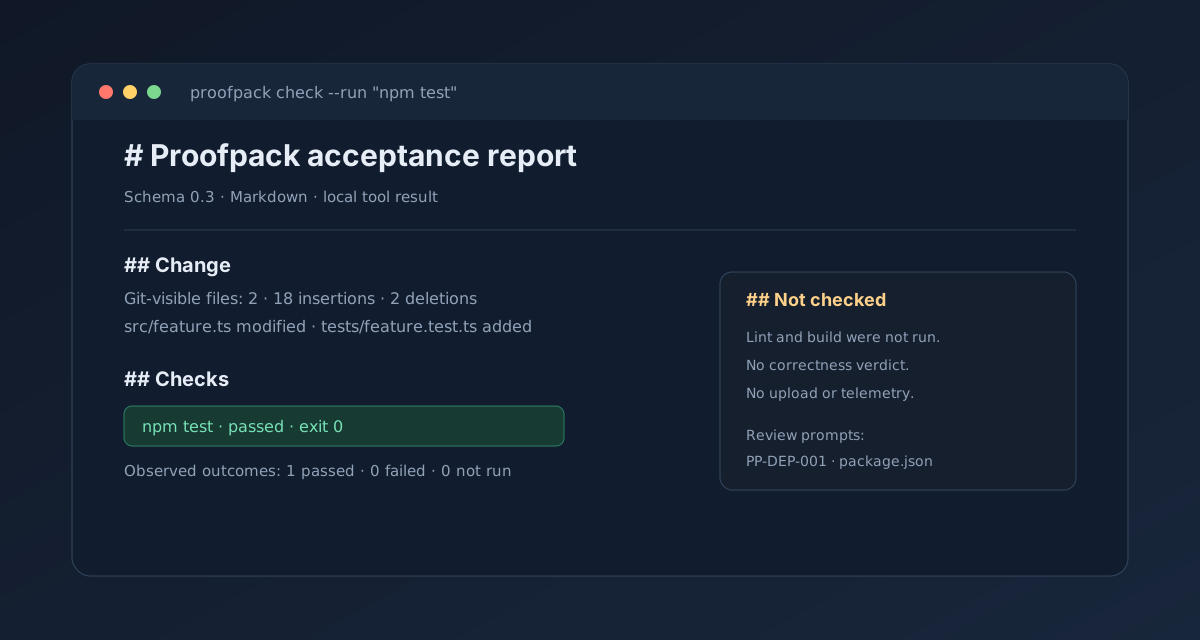
## Change
- Git-visible files: 2
- Diff summary: 18 insertions · 2 deletions

## Checks
- Explicit commands requested: 1
- Observed outcomes: 1 passed · 0 failed · 0 not run
- npm test: passed · exit 0

## Not checked
- Lint, build, dependency audits, and runtime behavior were not run.
Repository: 2648782102/proofpack-cli · npm: proofpack-cli · Release: v0.3.2
What it is for
Proofpack helps an individual developer answer three questions after a coding task: what changed, what checks actually ran, and what remains unchecked. It records Git change facts, explicit command evidence, and heuristic review prompts; it does not claim that a change is correct.
The report separates observed facts, heuristic prompts, and unchecked work. A passing command is evidence of that invocation only.
Product principles
- One command, one readable report.
- Local by default; no account, daemon, model API, or upload.
- Observed facts, heuristic prompts, and unchecked work are separated.
- No project command runs unless the user explicitly supplies
--run. - Git inspection is read-only; explicitly run commands use the user's shell and privileges without a sandbox.
Current distribution shapes
The 0.3.2 package contains both the proofpack CLI and the proofpack-mcp stdio entrypoint. MCP is a host-launched local subprocess, not a cloud service or a host plugin. See docs/MCP.md for the protocol contract and host configuration.
MCP quick start
After installing the package in a project, configure an MCP host to launch the local binary:
{
  "mcpServers": {
    "proofpack": {
      "command": "npx",
      "args": ["-y", "--package=proofpack-cli@0.3.2", "proofpack-mcp"]
    }
  }
}
The host then sees one read-only proofpack_check tool. It generates a Markdown or JSON acceptance report without executing project commands or writing files.
Install and first use
Use npm without a global install:
npx -y --package=proofpack-cli@0.3.2 proofpack check
Or install the package in a project:
npm install --save-dev proofpack-cli@0.3.2
npx proofpack check
The CLI binary is named proofpack; the MCP binary is named proofpack-mcp.
This prints a Markdown report to stdout without changing the working tree, running project commands, or making network requests. To save it, pass an explicit path:
npx -y --package=proofpack-cli@0.3.2 proofpack check --output .proofpack/review.md
Explicit checks
npx -y --package=proofpack-cli@0.3.2 proofpack check --run "npm test" --run "npm run lint"
npx -y --package=proofpack-cli@0.3.2 proofpack check --run "npm test" --format json
npx -y --package=proofpack-cli@0.3.2 proofpack check --run "npm test" --format markdown,json --output .proofpack/review.md
Each command is previewed before execution, run sequentially from the repository root through the user's shell, and recorded with timing, exit status, bounded stdout/stderr, truncation, and best-effort redaction. --timeout <seconds> defaults to 120 and applies per command. Multiple formats require --output and write sibling .md / .json files.
Commands are not sandboxed and can modify the working tree. Review every command and its output before sharing a report. Passing checks are evidence of those invocations only, not proof of correctness or security.
Branch/base and sharing
npx -y --package=proofpack-cli@0.3.2 proofpack check --base main
npx -y --package=proofpack-cli@0.3.2 proofpack check --run "npm test" --share-safe --output .proofpack/share.md
npx -y --package=proofpack-cli@0.3.2 proofpack check --output .proofpack/review.md --open
To render the report in Simplified Chinese, pass --lang zh-CN or set PROOFPACK_LANG=zh-CN. The default is English. This changes Markdown and JSON text fields only; schema keys, status values, paths, command stdout, and rule IDs stay unchanged.
npx -y --package=proofpack-cli@0.3.2 proofpack check --lang zh-CN
--base compares committed, staged, and working-tree changes against a resolved Git ref and excludes untracked files from that view. --share-safe omits branch, HEAD, base commit, file paths, output destination, command text, command output, and prompt evidence from both Markdown and JSON; status, counts, timings, and limitations remain. --open is opt-in, requires a written Markdown report, and uses the system opener. It never uploads the report.
Review even share-safe reports before sharing: omission is best-effort and aggregate metadata may still be sensitive.
What it does not do
Proofpack does not discover or run package scripts automatically, infer test or build results, review code with an AI, assign a correctness score, approve changes, upload reports, collect telemetry, or sandbox explicit --run commands. Commands supplied with --run use the current user's shell and privileges.
The MCP adapter is narrower still: its single proofpack_check tool performs read-only Git inspection and does not execute project commands, write report files, open applications, make network requests, or invoke a model.
Early development: repository-local init, sandboxed execution, CI-result import, and agent-trace import are not implemented. See roadmap and MCP contract.
Development
Requirements: Node.js 24 or newer.
npm install
npm run dev -- check
npm run check
npm test
npm run build
Documents
- Product requirements
- User experience
- CLI contract
- MCP contract
- Architecture
- Security and privacy
- Open-source references
- Roadmap
- Development handoff
- Release checklist
- 0.3.1 release notes
- 0.3.2 release notes
- Distribution and promotion
- 30-second demo script
- Changelog
- Decisions
License
MIT. See LICENSE.
Proofpack MCP questions
How do I add Proofpack MCP to Claude Code?
Run claude mcp add proofpack-cli -- npx -y proofpack-cli in your terminal. Add --scope user to make it available in every project.
How do I add Proofpack MCP to Cursor?
Open ~/.cursor/mcp.json and add the server under mcpServers, using the Cursor config shown in the install section above.
Does Proofpack execute project commands through MCP?
No, the MCP adapter is limited to read-only Git inspection and does not execute project commands, write files, or make network requests.
Is Proofpack a cloud service?
No, it is a local tool that runs as a host-launched subprocess and requires no account or cloud connection.
Does Proofpack guarantee that code changes are correct?
No, it only provides evidence of what changed and what commands were run; it does not claim correctness or provide a safe-to-merge verdict.
Can I run specific tests with Proofpack?
Yes, you can use the --run flag to explicitly supply commands like npm test to be recorded in the report.