
MaxGraph MCP server
Commit Nov 4, 2026Provides self-hosted persistent memory for AI agents using a knowledge graph and hybrid semantic search to maintain project context across sessions.
Also known as RuMemory/maxgraph
- Stars
- 3
- Tools
- —
- Downloads, 30 days
- —
- Latest version
- 1.9.5
- Last commit
- Nov 4, 2026
- License
- —
What is MaxGraph MCP?
MaxGraph provides self-hosted persistent memory for AI agents using a knowledge graph and hybrid semantic search to maintain project context across sessions.
Summary generated from the project's README
About MaxGraph MCP server
MaxGraph provides self-hosted persistent memory for AI agents by utilizing a knowledge graph and hybrid semantic search. It allows developers to maintain project context, such as decisions, bugs, and open tasks, across different sessions. Unlike standard chat histories, this system stores information as organized project memory that remains accessible even after a dialogue ends. It is designed for users of Claude, Cursor, DeepSeek, and other MCP-compatible clients.
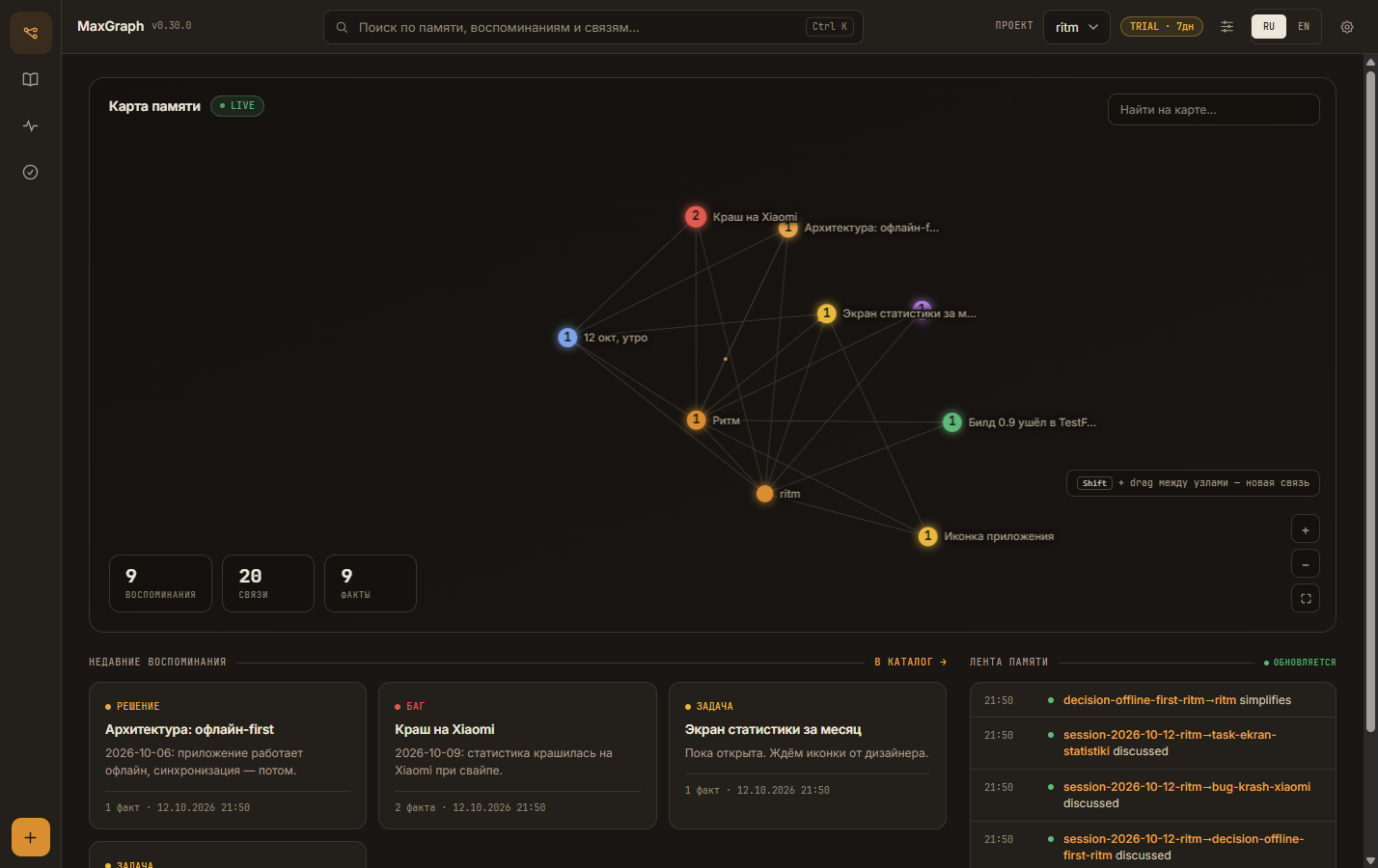
The server runs locally on Windows, macOS, or Linux, storing data as plain text files on your computer to ensure privacy and offline availability. You can connect it to various environments using specific methods, such as a marketplace plugin for Claude Code, a deep link for Cursor, or a Bearer token via HTTP for VS Code and Cline. A dedicated dashboard allows you to view the memory map, search entries, and manage the event feed manually.
By providing a concise summary at the start of every session, the tool helps agents avoid repeating work and can reduce token usage by approximately 43 percent. The system organizes information into distinct projects to prevent mixing different work contexts like personal notes and professional code.
What you can do with it
- 1Maintain long-term project contextAn AI agent can remember specific technical decisions and bugs across multiple different chat sessions.
- 2Reduce token consumptionDevelopers can save on API costs by using summaries instead of re-reading entire histories.
- 3Automated agent setupYou can instruct an AI agent to handle the entire installation and configuration process itself.
Written from the project's README. Every use case is checked against a quote from it.
How to install MaxGraph MCP
Formats verified 10 Nov 2026Install MaxGraph MCP in Claude Code
$ claude mcp add --env MEMORY_TOKEN=<YOUR_MEMORY_TOKEN> maxgraph -- docker run -i --rm ghcr.io/rumemory/maxgraph:1.9.5Install MaxGraph MCP in Cursor
~/.cursor/mcp.json
{
  "mcpServers": {
    "maxgraph": {
      "command": "docker",
      "args": [
        "run",
        "-i",
        "--rm",
        "ghcr.io/rumemory/maxgraph:1.9.5"
      ],
      "env": {
        "MEMORY_TOKEN": "<YOUR_MEMORY_TOKEN>"
      }
    }
  }
}Install MaxGraph MCP in VS Code
.vscode/mcp.json
{
  "servers": {
    "maxgraph": {
      "type": "stdio",
      "command": "docker",
      "args": [
        "run",
        "-i",
        "--rm",
        "ghcr.io/rumemory/maxgraph:1.9.5"
      ],
      "env": {
        "MEMORY_TOKEN": "<YOUR_MEMORY_TOKEN>"
      }
    }
  }
}Install MaxGraph MCP in Claude Desktop
claude_desktop_config.json
{
  "mcpServers": {
    "maxgraph": {
      "command": "docker",
      "args": [
        "run",
        "-i",
        "--rm",
        "ghcr.io/rumemory/maxgraph:1.9.5"
      ],
      "env": {
        "MEMORY_TOKEN": "<YOUR_MEMORY_TOKEN>"
      }
    }
  }
}Install MaxGraph MCP in Codex
~/.codex/config.toml
[mcp_servers.maxgraph]
command = "docker"
args = ["run", "-i", "--rm", "ghcr.io/rumemory/maxgraph:1.9.5"]

[mcp_servers.maxgraph.env]
MEMORY_TOKEN = "<YOUR_MEMORY_TOKEN>"
Install MaxGraph MCP in Gemini CLI
~/.gemini/settings.json
{
  "mcpServers": {
    "maxgraph": {
      "command": "docker",
      "args": [
        "run",
        "-i",
        "--rm",
        "ghcr.io/rumemory/maxgraph:1.9.5"
      ],
      "env": {
        "MEMORY_TOKEN": "<YOUR_MEMORY_TOKEN>"
      }
    }
  }
}Configuration
MEMORY_TOKENRequiredSecretAccess token for the server (choose any strong value; the dashboard and MCP clients use the same one)
| Name | Description | |
|---|---|---|
| MEMORY_TOKEN | Access token for the server (choose any strong value; the dashboard and MCP clients use the same one) | RequiredSecret |
Automated checks
Ran Nov 13, 2026Full report →Not verified yet. A server needs a score of 80, no serious finding, and enough data for us to check. How checks work

- Source repository linked and reachablerumemory/maxgraph is public and reachablegithub.com/rumemory/maxgraph ↗Pass
- Package names this repository as its sourceNot checked
- Build provenance (Sigstore attestation)Not checked
- Open source license (OSI)No licenseFinding
- Commit or release in the last yearLast commit or release 2026-11-04github.com/rumemory/maxgraph ↗Pass
- OpenSSF ScorecardNot checked
- Package name not close to a popular packageNot checked
- No critical advisory in the package or its dependenciesNot checked
- No hidden instructions to the model0 tool descriptions and the README read; no override phrases, credential paths or hidden charactersPass
- Destructive tools are labelledNot checked
- Remote endpoint answers the MCP handshakeNot checked
README
View on GitHubПамять ChatGPT и Claude помнит тебя: имя, вкусы, привычки. MaxGraph помнит твою работу — решения, баги, открытые задачи, итоги сессий. Ставится один раз, и контекст проекта есть у всех твоих агентов: Claude, Cursor, DeepSeek и любых других с поддержкой MCP или REST.
| Возможность | Что даёт |
|---|---|
| 🧠 Память проекта | Решения, баги и открытые задачи — с датами, отдельно от чата. Закрыл диалог — записи остались. |
| 🚀 Старт без разгона | Каждая сессия начинается с короткой выжимки по проекту: агент сразу в курсе и не делает одну работу дважды. |
| 🔍 Семантический поиск | Находит нужное по смыслу, а не по точным словам. |
| 👀 Всё видно глазами | Дашборд: карта памяти, поиск, лента. Любую запись можно проверить, поправить или удалить. |
| 🪶 Экономия токенов | История не перечитывается целиком — примерно −43 % токенов при работе с MaxGraph. |
Как это работает
Ничего нового учить не придётся: работаешь с агентом как обычно, память появляется сама.
- Работаешь как обычно. Агент сам записывает важное из твоей работы: решения, баги, итоги.
- Всё хранится локально. Обычные текстовые файлы на твоём компьютере, интернет не нужен. Дашборд показывает каждую запись.
- Новая сессия — агент уже в курсе. Он получает выжимку по проекту и продолжает с того места, где ты остановился.
Память делится на проекты: рабочий код, личные заметки и фриланс не смешиваются.
Установка
Самый простой способ — попросить своего ИИ-агента. Вставь ему в чат:
Установи MaxGraph: https://github.com/RuMemory/maxgraph — сделай всё сам по AGENTS.md. Скажи, когда память заработает.
Агент сам склонирует репозиторий, запустит установщик, подключит память и проверит, что она пишется.
Руками — одна команда (Docker не требуется):
git clone https://github.com/RuMemory/maxgraph && cd maxgraph
bash install.sh --yes       # Linux / macOS
# Windows (PowerShell)
powershell -NoProfile -ExecutionPolicy Bypass -File .\install.ps1 -Yes
Дальше программа работает сама: иконка в трее, автозапуск с системой, автообновления.
Подключение в один шаг
Сервер уже запущен? Дальше одна команда или одна ссылка:
- Claude Code — плагин из нашего маркетплейса, токен спросит при установке:
claude plugin marketplace add RuMemory/maxgraph claude plugin install maxgraph@maxgraph - Cursor — вставь в адресную строку браузера (после установки замени
PASTE_TOKEN_HEREна свой токен в Settings → MCP):cursor://anysphere.cursor-deeplink/mcp/install?name=maxgraph&config=eyJ1cmwiOiJodHRwOi8vbG9jYWxob3N0Ojg3ODcvbWNwIiwiaGVhZGVycyI6eyJBdXRob3JpemF0aW9uIjoiQmVhcmVyIFBBU1RFX1RPS0VOX0hFUkUifX0= - VS Code — вставь в адресную строку браузера (токен подставляется в settings):
vscode:mcp/install?%7B%22name%22%3A%22maxgraph%22%2C%22type%22%3A%22http%22%2C%22url%22%3A%22http%3A%2F%2Flocalhost%3A8787%2Fmcp%22%2C%22headers%22%3A%7B%22Authorization%22%3A%22Bearer%20PASTE_TOKEN_HERE%22%7D%7D - Cline и другие агенты — дай агенту файл AGENTS.md, он поставит и подключит сам.
Подробности по каждому клиенту: docs/PAIRING.md.
С кем работает
| Клиент | Как подключить |
|---|---|
| Claude Desktop / Claude Code | Плагин из маркетплейса, одна команда |
| Cursor / VS Code | Ссылка в один клик, выше |
| Cline / Continue | MCP streamable-http + Bearer |
| ChatGPT / OpenAI-совместимые | REST API или агент-адаптер |
| Kimi, GLM, Qwen, Hermes, DeepSeek | REST API — любой HTTP-клиент |
Готовые примеры настройки под каждый клиент: docs/PROVIDERS.md. Пользуешься другим агентом? Если он умеет подключать внешние инструменты, MaxGraph к нему подключится.
Цены
7 дней бесплатно, без карты. Триал начинается с первого запуска, включать ничего не нужно. Дальше один тариф со всем включённым, разовый платёж без автосписаний:
| Срок | Цена | В месяц |
|---|---|---|
| 1 месяц | 149 ₽ | 149 ₽ |
| 3 месяца | 399 ₽ | ≈ 133 ₽ |
| 6 месяцев | 749 ₽ | ≈ 125 ₽ |
| 12 месяцев | 1 299 ₽ | ≈ 108 ₽ |
Когда триал закончится, перестанет работать только запись новых фактов. Дашборд, поиск и выгрузка остаются, накопленная память никуда не денется.
Купить и активировать: rezon-ai.ru
Пригласи друга
У MaxGraph есть реферальная программа. Друг покупает со скидкой −20 %, а ты получаешь +10 % к скидке на продление за каждого приглашённого, вплоть до −50 %. Твоя ссылка и статистика переходов — в дашборде, раздел «Система».
Приватность
Все записи хранятся только на твоём компьютере и работают офлайн. Это обычные текстовые файлы в папке data/: их можно открыть, прочитать и скопировать в любой момент. Из дашборда всё выгружается одним файлом (экспорт в NDJSON).
Ссылки
- Сайт и покупка: rezon-ai.ru
- Блог: rezon-ai.ru/blog — статьи про память агентов, MCP и экономию токенов
- Telegram: t.me/maxgraph_mcp — новости и релизы
Документы: PROTOCOL · API · PROVIDERS · PAIRING · DEPLOY-LAN
Поддержать
MaxGraph живёт на поддержку пользователей. Если проект оказался полезным, можно просто сказать спасибо: rezon-ai.ru#donate. Разовый перевод 99, 249 или 499 ₽, без подписки и автосписаний.
Лицензия
BSL-1.1: исходный код открыт. Личное и внутреннее использование — бесплатно. Продажа MaxGraph как сервиса — по коммерческой лицензии. Каждая версия становится MIT через четыре года после публикации.
Ключевые слова
mcp server ai memory llm context knowledge graph persistent memory for ai agents model context protocol memory for claude code claude code plugin cursor memory vscode mcp chatgpt memory agent memory context engineering semantic search long-term memory for llm self-hosted ai память для нейросети память для ИИ-агентов MCP сервер памяти граф знаний долговременная память ИИ экономия токенов память для Claude память для ChatGPT память для Cursor локальная память для ИИ
MaxGraph MCP questions
How do I add MaxGraph MCP to Claude Code?
Run claude mcp add --env MEMORY_TOKEN=<YOUR_MEMORY_TOKEN> maxgraph -- docker run -i --rm ghcr.io/rumemory/maxgraph:1.9.5 in your terminal. Add --scope user to make it available in every project.
How do I add MaxGraph MCP to Cursor?
Open ~/.cursor/mcp.json and add the server under mcpServers, using the Cursor config shown in the install section above.
How does MaxGraph help with token usage?
It prevents the need to re-read entire histories by providing summaries, reducing token consumption by approximately 43%.
Where is my data stored?
All records are stored locally on your computer as plain text files in a data folder, ensuring privacy and offline capability.
Is there a free trial available?
Yes, there is a 7-day free trial that starts upon the first launch without requiring a credit card.