
A local-first automation runtime that provides a decision layer for AI agents to safely automate tasks across GitHub, Slack, Gmail, and 45+ services.
Also known as Oolab-labs/patchwork-os
- Stars
- 33
- Tools
- —
- Downloads, 30 days
- —
- Latest version
- —
- Last commit
- Nov 13, 2026
- License
- MIT
What is Patchwork OS MCP?
Patchwork OS is a local-first automation runtime that provides a decision layer for AI agents to safely automate tasks across GitHub, Slack, Gmail, and 45+ services.
Summary generated from the project's README
About Patchwork OS MCP server
Patchwork OS serves as a local-first automation runtime designed for developers and technical operators who need to manage AI agents interacting with real-world systems. It functions as a decision layer that sits between an agent's intent and its execution, allowing users to govern actions across GitHub, Slack, Gmail, and over 45 other services. By classifying actions based on their potential blast radius, the system can automatically pause high-risk or non-reversible tasks for human approval.
Users can deploy this as a standalone IDE bridge providing 180 MCP tools for editors like VS Code or Cursor, or as a full automation runtime using YAML recipes and workers. The setup requires Node 22.5+, a terminal, and a model driver such as the Claude CLI or an API key. While the runtime and all credentials remain on your local machine, the system communicates with your chosen model provider and authorized service connectors. It offers distinct profiles, including a governed mode that enforces an approval queue and a compatibility mode for unrestricted automation.
What you can do with it
- 1Review high-risk agent actionsAn AI agent can be configured to pause and request permission before performing any non-reversible write operations.
- 2Automate daily information synthesisYou can run a morning brief recipe that aggregates data from Gmail, Google Calendar, GitHub, and Linear into a single Markdown summary.
- 3Manage agent autonomy levelsDevelopers can assign specific identities to agents and allow them to earn more independence based on their successful track record.
- 4Enhance IDE capabilities with MCPUse the IDE bridge to provide an AI assistant with specialized tools for diagnostics, refactoring, and terminal access.
Written from the project's README. Every use case is checked against a quote from it.
How to install Patchwork OS MCP
Formats verified 10 Nov 2026Install Patchwork OS MCP in Claude Code
$ claude mcp add patchwork-os -- npx -y patchwork-osInstall Patchwork OS MCP in Cursor
~/.cursor/mcp.json
{
  "mcpServers": {
    "patchwork-os": {
      "command": "npx",
      "args": [
        "-y",
        "patchwork-os"
      ]
    }
  }
}Install Patchwork OS MCP in VS Code
.vscode/mcp.json
{
  "servers": {
    "patchwork-os": {
      "type": "stdio",
      "command": "npx",
      "args": [
        "-y",
        "patchwork-os"
      ]
    }
  }
}Install Patchwork OS MCP in Claude Desktop
claude_desktop_config.json
{
  "mcpServers": {
    "patchwork-os": {
      "command": "npx",
      "args": [
        "-y",
        "patchwork-os"
      ]
    }
  }
}Install Patchwork OS MCP in Codex
~/.codex/config.toml
[mcp_servers.patchwork-os]
command = "npx"
args = ["-y", "patchwork-os"]
Install Patchwork OS MCP in Gemini CLI
~/.gemini/settings.json
{
  "mcpServers": {
    "patchwork-os": {
      "command": "npx",
      "args": [
        "-y",
        "patchwork-os"
      ]
    }
  }
}Automated checks
Ran Nov 13, 2026Full report →Passed our automated checks. That is not a security audit: read the code and give the server the narrowest access it needs. How checks work

- Source repository linked and reachableoolab-labs/patchwork-os is public and reachablegithub.com/oolab-labs/patchwork-os ↗Pass
- Package names this repository as its sourcepatchwork-os names oolab-labs/patchwork-os as sourcenpmjs.com/package/patchwork-os ↗Pass
- Build provenance (Sigstore attestation)Sigstore attestation for patchwork-osnpmjs.com/package/patchwork-os/v/1.2.7#provenance ↗Pass
- Open source license (OSI)MITspdx.org/licenses/MIT.html ↗Pass
- Commit or release in the last yearLast commit or release 2026-11-13github.com/oolab-labs/patchwork-os ↗Pass
- OpenSSF ScorecardNot checked
- Package name not close to a popular packageNo popular package one edit away from patchwork-osPass
- No critical advisory in the package or its dependenciesNot checked
- No hidden instructions to the model0 tool descriptions and the README read; no override phrases, credential paths or hidden charactersPass
- Destructive tools are labelledNot checked
- Remote endpoint answers the MCP handshakeNot checked
README
View on GitHubPatchwork OS


You don't have an automation problem. You have a decision problem.
Every AI-agent horror story ends the same way: an action nobody stopped to question. Patchwork OS is the layer between the agent's impulse and the action — a local-first runtime where your AI can automate real work across your editor, GitHub, Slack, Gmail, and 45+ services, while anything consequential can be made to stop and ask you first.
Who it's for: developers and technical operators who already run agents against real systems — a repo that ships, an inbox that matters, a production service — and who want a record of what was allowed and why. It expects a terminal, a Node install, and comfort editing YAML.
Three ideas, one runtime:
-
Ask before acting. Every action is classified by blast radius — can it be undone, and how much breaks if it's wrong? Reversible things flow freely. Risky things wait in an approval queue with the evidence attached: what exactly will run, why it fired, and what happens if it's wrong.
-
Trust is earned, never assumed. Workers — named agents with jobs — start supervised and earn independence from their track record, per action type. Good at filing issues ≠ allowed to push code. One bad high-stakes action outweighs a hundred trivial successes. You set the ceiling; the math never raises it for them.
-
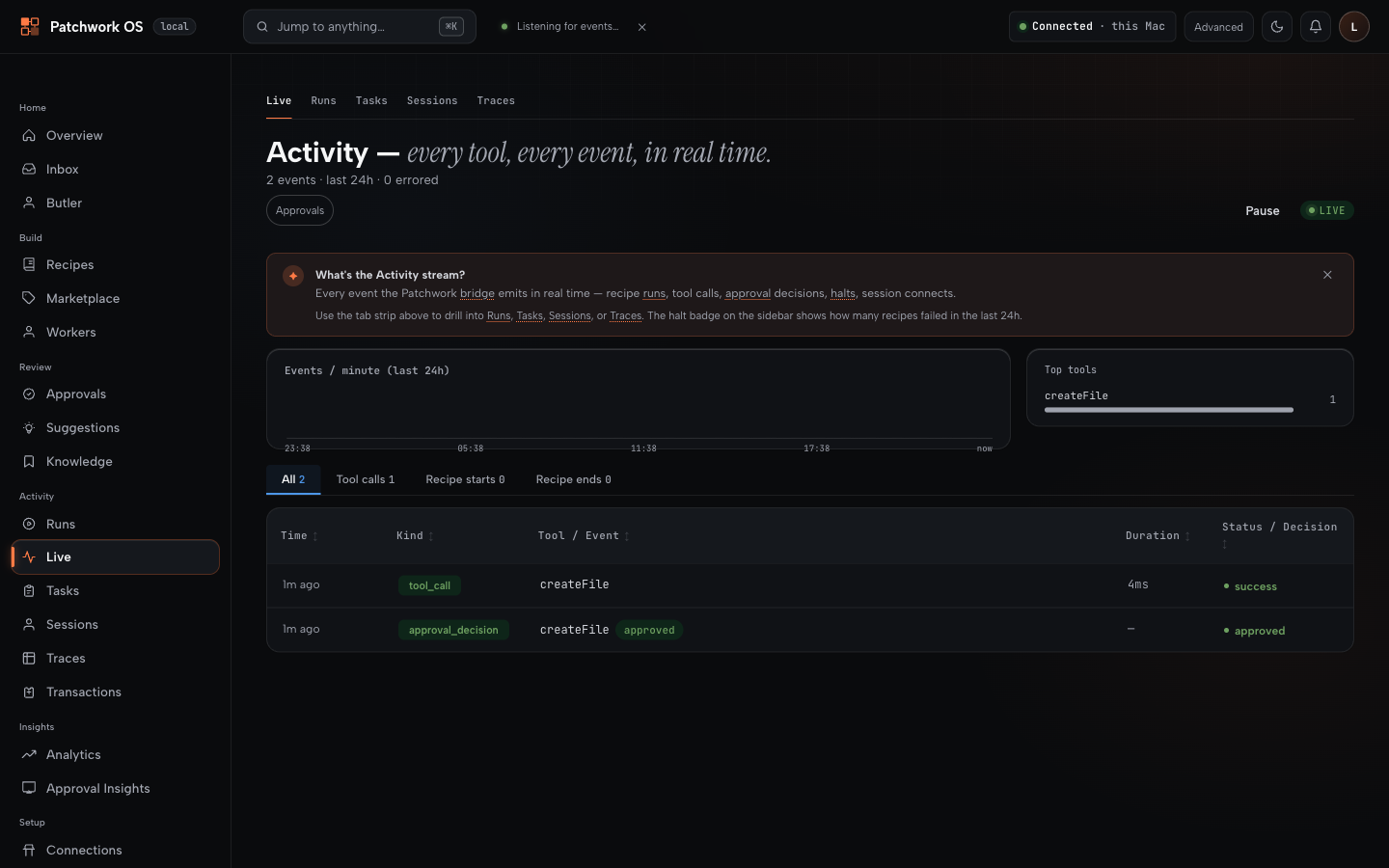
Every decision leaves a receipt. What was done, why it was allowed, and how it turned out — durable, replayable, explainable via
patchwork judgments, the dashboard's traces page, andpatchwork gate explain. When you approve something, you find out later whether you were right.
An agent wants to write a file. With the gate on, it waits — and shows you exactly what it would do:
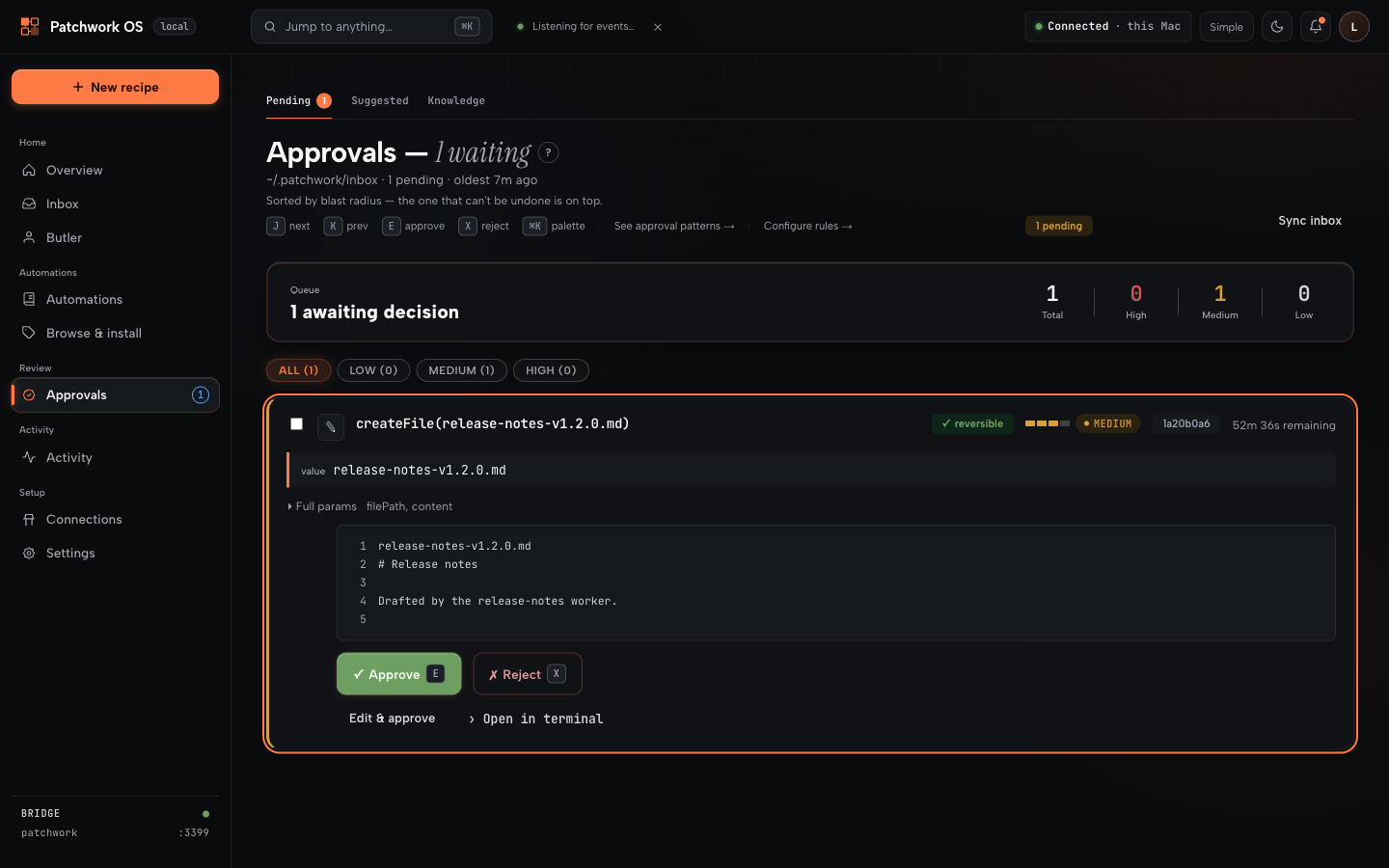
You approve. The call proceeds, and both halves are on the record:
Status: stable 1.2
Version 1.2.6, published to npm as latest. The decision layer, recipes, connectors and IDE bridge all work and are dogfooded daily. Interfaces can still change between minor versions and some surfaces are rougher than others. Pin an exact version if you are building on it.
Whether the safety features are on depends on how you installed. This matters more than any other line in this README:
- New install:
patchwork-os initon a machine with no~/.patchwork/config.jsonwritesprofile: governed. The gate is on from the first run. - Existing install: upgrading never changes your profile. An existing config stays as it is; opt in with
patchwork profile governedand restart the bridge. - No config at all (starting the bridge without
init): thecompatprofile, where nothing is gated.
Run patchwork doctor to see what is enforced on your machine right now. Trust its output over this table.
| Feature | governed (new init) |
compat (existing config, or none) |
|---|---|---|
| Approval queue | on at high, for automated triggers (cron, webhook, file-watch, git-hook) as well as manual runs |
off unless --approval-gate high or all, and then manual runs only |
| Non-reversible writes | ask for approval whatever their tier | follow the tier threshold |
| Agent steps | contained: read-only tools, no network or shell | full access unless a step sets sandbox: true |
Recipe plugins (servers:) |
load only if listed in plugins.allow |
any entry loads, in-process |
| A tool nothing is registered under | the run halts | the step is skipped |
Kill switch (patchwork panic) |
available; fails closed if its state is unreadable | available; fails open |
| Worker autonomy ramp | on for worker-owned recipes (runs need a driver, e.g. --driver subprocess) |
off unless PATCHWORK_FLAG_WORKER_AUTONOMY=1 (same driver requirement) |
| Telemetry | off | off; opt in explicitly (details) |
Under compat, a fresh bridge is an automation runtime, and it becomes a decision layer when you switch the gate on. Everything above about "stops and asks you first" describes the gate when it is on.
The loop
trigger → recipe/worker → reversible?           → runs
                        → risky, gate on        → approval queue → your yes → receipt
                        → risky, gate off       → runs
                        → forbidden by policy   → refused (no approval unlocks it)
patchwork panic blocks every write-tier tool call across all running bridges, immediately. Reads keep working, and in-flight reasoning is not killed — it is a write block, not a full stop.
Install
npm install -g patchwork-os@beta
patchwork-os init
init scaffolds ~/.patchwork, seeds local-only recipes, and registers Patchwork's PreToolUse hook in ~/.claude/settings.json. Restart Claude Code afterwards — it reads hooks at session start.
Prereqs: Node 22.5+. macOS, Linux, and native Windows (no WSL).
Two things worth knowing before you start:
- Use a global install, not
npx.npxdoes not persist the binary, so the very next command in any guide will not be found. - The web dashboard is not in the npm package. It's a Next.js app that needs its own build, so it ships with the repo:
Everything below works from the CLI without it. The dashboard is where approvals, traces and connector setup are pleasant rather than possible.git clone https://github.com/Oolab-labs/patchwork-os && cd patchwork-os/dashboard npm install && npm run build && npm start # http://localhost:3200
First run: zero connectors
Prove the runtime works before wiring any service to it. daily-status touches only git and local files — no accounts, no network:
patchwork recipe run daily-status
It reads your commits since yesterday plus ~/.patchwork/planned.md, and writes a Markdown digest to ~/.patchwork/inbox/daily-status-<date>.md. If that file exists, your install is sound.
Useful neighbours: patchwork recipe list, patchwork status, patchwork recipe doctor <name> when something misbehaves.
Morning Brief: the connected workflow
patchwork-os init --with-connectors   # seeds the connector-backed recipes
patchwork connect gmail
patchwork connect google-calendar
patchwork connect github
patchwork connect linear
patchwork recipe run morning-brief
The recipe pulls unread mail, today's calendar, your open GitHub issues and PRs, Linear issues, and local git activity, then has a model summarise them into one Markdown brief in ~/.patchwork/inbox/. Its email step is triage — it lists what needs an answer; it does not compose or send replies. Nothing leaves your machine except the API calls to the services you connected.
All four connectors are required as written — no step is guarded, so a missing one halts the run. Drop the steps you don't want, or start from daily-status and add sources one at a time.
Requires a working model driver (--driver subprocess with the Claude CLI on PATH, or an API key). patchwork recipe preflight templates/recipes/morning-brief.yaml lists exactly what a recipe needs before you run it.
Two ways to run this
As an automation runtime — recipes, workers, connectors, the decision layer. Needs ~/.patchwork and a model driver; an editor is optional.
patchwork start # bridge + Claude + dashboard
patchwork start launches claude --ide alongside the bridge, so it expects the Claude CLI on your PATH. Use patchwork start --no-dashboard, or run the bridge alone with patchwork --workspace ., if you don't want that.
On a global npm install there is no dashboard/ to start, so it logs a dashboard warning and carries on with bridge + Claude; pass --no-dashboard to silence it. From a repo clone it starts all three.
As a standalone IDE bridge — 180 MCP tools giving Claude Code eyes and hands in your editor: diagnostics, LSP navigation, refactoring with risk analysis, debugger, terminal, git/GitHub, file ops. No ~/.patchwork, no recipes, no gate.
npm install -g patchwork-os
claude-ide-bridge install-extension     # VS Code / Cursor / Windsurf / Antigravity
claude-ide-bridge --workspace .
claude --ide                            # in another terminal
JetBrains via a companion plugin. Claude Desktop, Gemini CLI, Codex CLI, Grok Build, and claude.ai connect over stdio or HTTP. Use the bridge alone forever if that's all you need; the runtime is an optional layer on top.
claude --ide can't find an IDE? Set CLAUDE_CODE_IDE_SKIP_VALID_CHECK=true (init does this for you).
What "local-first" does and doesn't mean
On your machine: the runtime, every recipe and worker, all credentials and connector tokens, the approval queue, and every log and decision receipt under ~/.patchwork/. Nothing is uploaded, and no Patchwork-operated server sits in any path.
Over the network, necessarily: calls to whatever model you point it at (Anthropic, OpenAI, Google, xAI) and to every connector you authorise (Gmail, GitHub, Slack…). Prompts, and whatever context a step feeds them, go to that model provider. Choosing a local Ollama endpoint keeps inference on your machine too; connector calls still leave it, because that is what a connector is.
Only if you opt in: anonymous analytics.
Other boundaries worth knowing: runCommand executes only allowlisted commands, sendHttpRequest blocks private and loopback ranges, and file tools refuse symlink escapes out of the workspace. Remote deployments must sit behind TLS with OAuth 2.0 — see docs/remote-access.md.
What's here
-
Decision layer — approval queue · blast-radius action classes · worker trust ramp · kill switch · decision receipts
-
Automation — YAML recipes · cron/file/git/test/webhook triggers · event hooks · multi-model (Claude, GPT, Gemini, Grok, Ollama)
-
Connectors — 45+, all writes governed by your policy: GitHub, Slack, Gmail, Calendar, Drive, Linear, Jira, Sentry, Notion, Stripe, PagerDuty, Datadog, …
-
IDE bridge — 180 MCP tools · VS Code-family extension · JetBrains plugin · plugins hot-reload (write tools mid-session)
-
Oversight — web dashboard · mobile push approvals (PWA) · halts/judgments CLI · trace memory across sessions
-
Deployment — your laptop · headless VPS with OAuth 2.0 (guide) · native Windows
Recipes are plain YAML: a trigger (cron, file save, git commit, test run, or any webhook — iPhone Shortcut, Stream Deck, Home Assistant) plus steps. Share them like dotfiles, install them from the marketplace, or let the dashboard generate one from a sentence.
Workers are recipes with an identity and a track record. A worker that triages failing CI starts by only proposing ("this looks like a real break — file an issue?"). Confirm its filings were real and it earns a longer leash — for that job only. It can be demoted in one bad day. You can cap any worker permanently with one line of YAML.
Why not Zapier / an MCP server / a hosted assistant? Honest tradeoffs: documents/comparison.md.
Docs
Docs index · Platform reference · Recipes & triggers · Worker autonomy · Plugin authoring · Architecture · Windows · ADRs
Telemetry
Off by default; nothing is sent unless you opt in. If you do: aggregate counts and latencies only — never paths, prompts, file contents, arguments, or anything from ~/.patchwork/. Details & source.
Contributing & support
Issues · Discussions · CONTRIBUTING.md
⭐ If this saved you a config file or a blown deploy, a star is the only signal I get that it's helping.
MIT © Oolab Labs — what that covers · name and marks
Patchwork OS MCP questions
How do I add Patchwork OS MCP to Claude Code?
Run claude mcp add patchwork-os -- npx -y patchwork-os in your terminal. Add --scope user to make it available in every project.
How do I add Patchwork OS MCP to Cursor?
Open ~/.cursor/mcp.json and add the server under mcpServers, using the Cursor config shown in the install section above.
How does the approval process work?
Risky actions are classified by blast radius and placed in an approval queue where you can review the evidence, what will run, and the potential impact before deciding.
Is my data uploaded to a server?
No, the runtime, recipes, workers, credentials, and decision logs are all stored locally on your machine under ~/.patchwork/.
What happens if I need to stop all agent actions immediately?
You can use the 'patchwork panic' command to immediately block every write-tier tool call across all running bridges.