
webhooks-cc MCP server
Commit Nov 14, 2026Lets AI agents manage webhook endpoints, inspect incoming requests, replay payloads, and share local sites through natural language.
Also known as kroqdotdev/webhooks-cc, @webhooks-cc/mcp
- Stars
- 3
- Tools
- —
- Downloads, 30 days
- —
- Latest version
- —
- Last commit
- Nov 14, 2026
- License
- AGPL-3.0
What is webhooks-cc MCP?
webhooks-cc lets AI agents manage webhook endpoints, inspect incoming requests, replay payloads, and share local sites through natural language.
Summary generated from the project's README
About webhooks-cc MCP server
Managing webhook endpoints and inspecting incoming requests through natural language is what this MCP server enables for developers using AI coding agents. By connecting to tools like Claude Code, Cursor, or VS Code, an agent can create new endpoints, send test payloads, and replay captured requests to a local server. It provides a bridge between your AI assistant and the webhooks.cc infrastructure, allowing for real-time debugging without manual dashboard navigation.
Users set up the server by providing an API key via the WHK_API_KEY environment variable. The server exposes 57 tools that allow an agent to manage the full lifecycle of a webhook, from initial creation to sharing a local site via a public link. This setup is particularly useful for testing payment integrations or CI/CD hooks where you need to see exact headers, bodies, and signatures from providers like Stripe or GitHub.
What you can do with it
- 1Test payment integrationsAn AI agent can create a specific endpoint to inspect the payload structure of a Stripe event.
- 2Debug CI/CD workflowsYou can ask an agent to monitor exactly what data GitHub sends during a deployment or pull request.
- 3Simulate error handlingAn agent can configure an endpoint to return specific error codes to test how your application handles retries.
- 4Replay requests to local developmentYou can instruct an AI to take a captured webhook and send it directly to your local server for testing.
Written from the project's README. Every use case is checked against a quote from it.
How to install webhooks-cc MCP
Formats verified 10 Nov 2026Install webhooks-cc MCP in Claude Code
$ claude mcp add webhooks-cc -- npx -y @webhooks-cc/mcpInstall webhooks-cc MCP in Cursor
~/.cursor/mcp.json
{
  "mcpServers": {
    "webhooks-cc": {
      "command": "npx",
      "args": [
        "-y",
        "@webhooks-cc/mcp"
      ]
    }
  }
}Install webhooks-cc MCP in VS Code
.vscode/mcp.json
{
  "servers": {
    "webhooks-cc": {
      "type": "stdio",
      "command": "npx",
      "args": [
        "-y",
        "@webhooks-cc/mcp"
      ]
    }
  }
}Install webhooks-cc MCP in Claude Desktop
claude_desktop_config.json
{
  "mcpServers": {
    "webhooks-cc": {
      "command": "npx",
      "args": [
        "-y",
        "@webhooks-cc/mcp"
      ]
    }
  }
}Install webhooks-cc MCP in Codex
~/.codex/config.toml
[mcp_servers.webhooks-cc]
command = "npx"
args = ["-y", "@webhooks-cc/mcp"]
Install webhooks-cc MCP in Gemini CLI
~/.gemini/settings.json
{
  "mcpServers": {
    "webhooks-cc": {
      "command": "npx",
      "args": [
        "-y",
        "@webhooks-cc/mcp"
      ]
    }
  }
}README
View on GitHubwebhooks.cc
Inspect and debug webhooks and email without deploying to production.
Get a unique URL, point your webhook there, and see every request in real time. No signup required. Every endpoint also has an email address at mailhooks.cc that captures mail the same way.
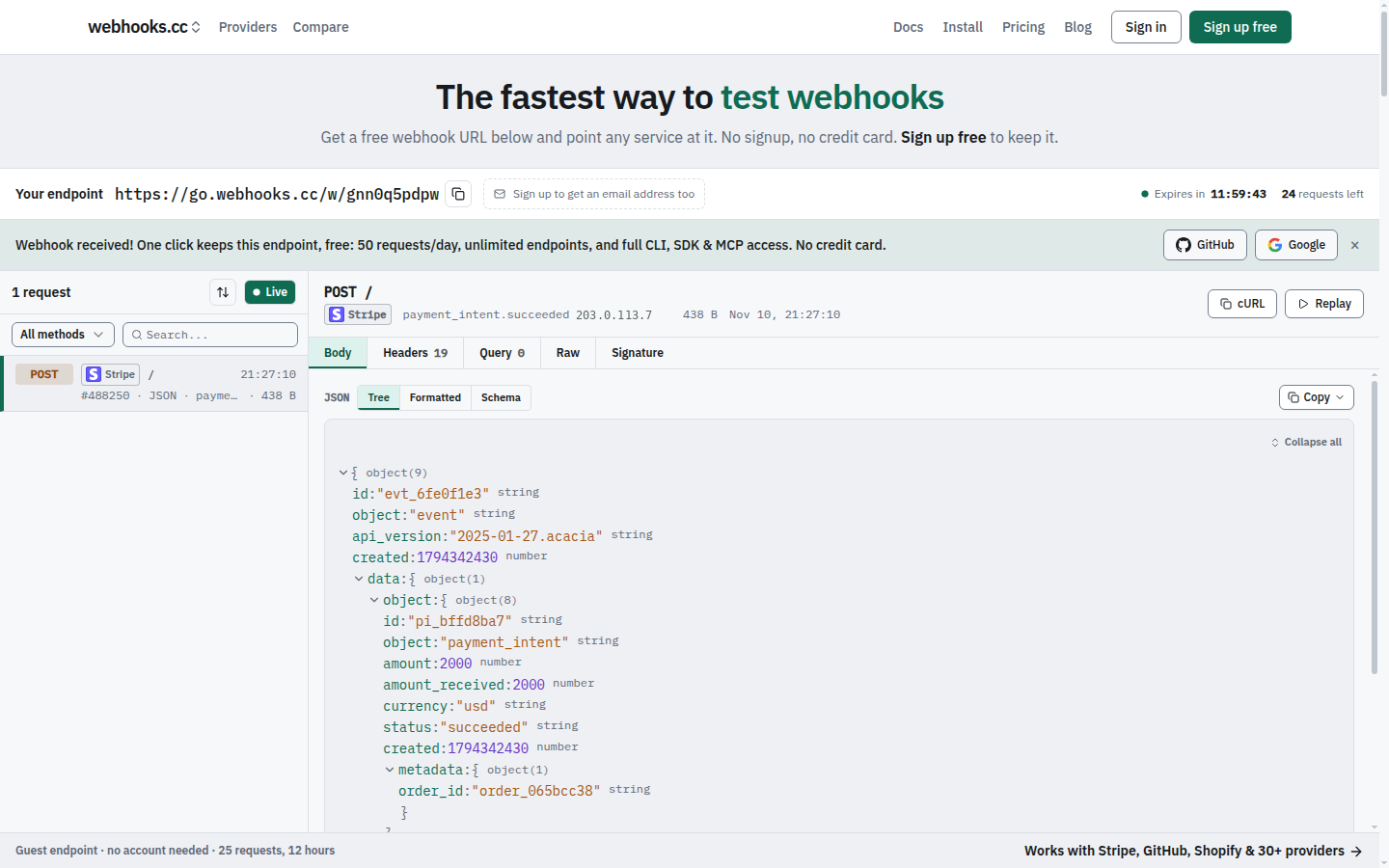
Getting Started
- Visit webhooks.cc
- Copy your unique webhook URL
- Send a test request:
curl -X POST https://go.webhooks.cc/w/<slug> -d '{"test": true}' - Watch it appear in the dashboard
Features
- Capture requests: store incoming webhooks with headers, body, query parameters and metadata
- Capture email: every endpoint receives mail at
{slug}@mailhooks.cc, with parsed fields, attachments and authentication results - Inspect in real time: see requests the moment they arrive
- Configure responses: return custom status codes, headers and bodies, chosen by rules, to test error paths
- Verify signatures: check provider signatures (Stripe, GitHub, Shopify and more) on captured requests
- Forward: tunnel webhooks to localhost during development (with
--live, the sender gets your local app's answer), or forward them to other URLs, chat and file drops - Share localhost: put the site on your machine at a public link on sharehooks.cc with
whk share - CLI with interactive TUI: manage endpoints, tunnel and stream requests from your terminal
- SDKs for TypeScript, Python and Go: wait for and assert on webhooks in tests and CI, and share a local port from code
- MCP server: connect AI coding agents (Claude Code, Cursor, VS Code, Codex) to your webhooks
Use Cases
Testing payment integrations: point Stripe's test webhooks at your endpoint. Inspect the payload structure before writing handlers.
Debugging CI/CD hooks: see exactly what GitHub sends when a push, PR, or deployment occurs.
Developing locally: forward production-like webhooks to localhost without exposing your machine to the internet.
Mocking failure scenarios: configure your endpoint to return 500 errors and test your retry logic.
Pricing
Free: 50 requests a day, 7-day retention. Enough for development and testing.
Pro ($8/month): 100,000 requests a month, 31-day retention.
Business ($29/month): 250,000 requests a month, 90-day retention, attachment parsing, custom inbound domains and file drops.
Teams share endpoints under a per-seat subscription. See plans and limits for details.
Install
CLI
curl -fsSL https://webhooks.cc/install.sh | sh
# or
brew install kroqdotdev/tap/whk
# without root: any directory you can write to (created when missing)
curl -fsSL https://webhooks.cc/install.sh | WHK_INSTALL_DIR="$HOME/.local/bin" sh
With WHK_INSTALL_DIR, put that directory on your PATH (the installer prints the line to add) before running whk.
Then launch interactive terminal:
whk
SDK
npm install @webhooks-cc/sdk
MCP server
# Claude Code
claude mcp add -s user webhooks-cc -e WHK_API_KEY=whcc_... -- npx -y @webhooks-cc/mcp

# Cursor, VS Code, Devin Desktop (formerly Windsurf), Claude Desktop
npx @webhooks-cc/mcp setup cursor --api-key whcc_...
See webhooks.cc/installation for all install methods, one-click buttons, and setup guides.
CLI
Run whk to launch the interactive TUI:
$ whk

  webhooks.cc

  ● Logged in as you@example.com

  ▸ Tunnel    Forward webhooks to localhost
    Listen    Stream incoming requests
    Create    Create a new endpoint
    Endpoints Manage your endpoints
    Auth      Login / logout
    Update    Check for updates
All commands also work directly from the command line:
whk tunnel 8080                       # Forward webhooks to localhost:8080
whk share 3000                        # Share localhost:3000 at https://<name>.sharehooks.cc
whk listen <slug>                     # Stream incoming requests
whk create my-endpoint                # Create a new endpoint
whk list                              # List your endpoints
whk replay <request-id> --to :3000    # Replay a captured request
Pass --nogui or set WHK_NOGUI=1 to skip the TUI and print help.
SDK
import { WebhooksCC, matchMethod, matchHeader, matchAll } from "@webhooks-cc/sdk";

const client = new WebhooksCC({ apiKey: "whcc_..." });

const endpoint = await client.endpoints.create({ name: "my-webhook" });
console.log(endpoint.url);

// Wait for a matching request with human-readable timeout
const req = await client.requests.waitFor(endpoint.slug, {
  timeout: "30s",
  match: matchAll(matchMethod("POST"), matchHeader("stripe-signature")),
});

// Replay captured requests to your local server
await client.requests.replay(req.id, "http://localhost:3000/webhooks");
MCP server
The @webhooks-cc/mcp package exposes 57 tools (54 on the remote server) that let AI agents manage endpoints, inspect webhooks, send test payloads, replay requests, and share a local site at a public link through natural language.
You: "Create a webhook endpoint for testing Stripe"
Agent: Created endpoint "stripe-test" at https://go.webhooks.cc/w/abc123

You: "Send a test checkout.session.completed event"
Agent: Sent POST to stripe-test

You: "Replay that to my local server"
Agent: Replayed to http://localhost:3000/webhooks: 200 OK
See packages/mcp/README.md for full setup and tool reference.
Why the code is public
webhooks.cc holds other people's webhooks and email, so the code that handles them should be open to inspection. You can read exactly how a request is captured, stored, forwarded and deleted, and check that the service does what it says. The repository is also where security scanning, dependency updates and bug reports happen in the open.
webhooks.cc is built and run by one developer. The hosted service at webhooks.cc is the product; the repository is not a community project.
Issues and contributions
- Bugs and feature requests are welcome as issues.
- Questions about your account, billing or data go to webhooks.cc/support, never to a public issue.
- Security vulnerabilities are reported privately, see SECURITY.md.
- Pull requests are accepted only from people who have signed the Contributor License Agreement. Open an issue first: most changes are made in-house, and a pull request may be closed or reimplemented. See CONTRIBUTING.md.
License
This project uses a split license:
- AGPL-3.0: the web app, receiver, email-capture SMTP host, tunnel edge, attachment parser and database schema (
apps/web/,apps/receiver-rs/,apps/mx-rs/,apps/edge-rs/,apps/parser-rs/,supabase/). See LICENSE. - MIT: the CLI and its tunnel protocol crate, the TypeScript, Python and Go SDKs, the MCP server, the Zapier and Make apps, and the Claude Code plugin (
apps/cli-rs/,crates/tunnel/,packages/sdk/,packages/sdk-python/,packages/sdk-go/,packages/mcp/,packages/zapier-app/,packages/make-app/,plugins/). See theLICENSEfile in each directory.
The CLI, SDKs and MCP server are MIT so you can use them freely in your own projects, open or closed.
webhooks-cc MCP questions
How do I add webhooks-cc MCP to Claude Code?
Run claude mcp add webhooks-cc -- npx -y @webhooks-cc/mcp in your terminal. Add --scope user to make it available in every project.
How do I add webhooks-cc MCP to Cursor?
Open ~/.cursor/mcp.json and add the server under mcpServers, using the Cursor config shown in the install section above.
What can the MCP server do?
It allows AI agents to manage endpoints, inspect webhooks, send test payloads, replay requests, and share local sites via natural language.
Can I test email incoming requests?
Yes, every endpoint has a corresponding email address at mailhooks.cc that captures mail with parsed fields and attachments.