
chatwatch MCPサーバー
コミット 2026年11月11日Azure app registrationや管理者による同意を必要とせず、ローカルのChromeセッションを操作することで、AIエージェントがMicrosoft Teamsのチャットを読み取り、応答することを可能にします。
別名 xxxxDev/chatwatch
- スター
- 1
- ツール
- 11
- ダウンロード数(30日間)
- —
- 最新バージョン
- —
- 最終コミット
- 2026年11月11日
- ライセンス
- MIT
chatwatch MCPとは
chatwatchはMCPサーバーです。 Azure app registrationや管理者による同意を必要とせず、ローカルのChromeセッションを操作することで、AIエージェントがMicrosoft Teamsのチャットを読み取り、応答することを可能にします。. 11個のツールを提供しており、teams_list_chats, teams_read_messages, teams_wait_for_messagesなどがあります。
プロジェクトのREADMEから生成された概要
chatwatch MCP server について
chatwatchは、ローカルのChromeセッションを操作することで、AIクライアント内からのMicrosoft Teamsチャット操作の自動化を実現します。複雑なAzure app registrationや管理者による同意を必要とする代わりに、このツールは既存のTeamsウェブログインを利用して、エージェントによるメッセージの読み取りと応答を可能にします。お使いのコンピュータ上でローカルに動作し、Claude Code、Codex、CursorなどのMCPクライアントと連携します。
ユーザーは主に2つの方法でチャットとやり取りできます。MCPツールを介してデータを取得する方法、または新しいメッセージを特定のコマンドやURLに送信するプッシュハンドラーを使用する方法です。制御を維持するために、サーバーには送信モードシステムが組み込まれています。エージェントの返信をローカルページに保持して手動で承認する'draft'モード、または即座に送信する'auto'モードを設定できます。また、システムはChromeセッションのライブビューを提供するため、手動でクリック、スクロール、入力を行うことでサインイン状態を管理できます。
できること
- 1チャット返信の下書きAIエージェントにメッセージを監視させ、確認用の返信案を作成させます。
- 2メッセージ監視の自動化特定の期間、特定の着信情報を待機するようにエージェントに指示します。
- 3外部ハンドラーとの統合受信したTeamsメッセージを、処理のためにカスタムのローカルコマンドやWeb URLにルーティングします。
プロジェクトの README から作成されています。すべてのユースケースは、その引用と照らし合わせて確認されています。
chatwatch MCPツール 11
READMEから検出teams_list_chatsteams_read_messagesteams_wait_for_messagesteams_send_messageteams_get_attachmentsteams_list_draftssentdraftrefusednot_sentmaybe_sent
| teams_list_chats | — | |
| teams_read_messages | — | |
| teams_wait_for_messages | — | |
| teams_send_message | — | |
| teams_get_attachments | — | |
| teams_list_drafts | — | |
| sent | — | |
| draft | — | |
| refused | — | |
| not_sent | — | |
| maybe_sent | — |
自動チェック
実行日 2026年11月14日完全なレポート →まだ検証されていません。サーバーには80点のスコア、重大な問題がないこと、および検証に必要な十分なデータが必要です。 チェックの仕組み · 点数を上げるための改善点

- ソースリポジトリがリンクされており、アクセス可能xxxxdev/chatwatch is public and reachablegithub.com/xxxxdev/chatwatch ↗合格
- パッケージがこのリポジトリをソースとして指定未チェック
- ビルドの来歴 (Sigstore 証明)未チェック
- オープンソースライセンス (OSI)MITspdx.org/licenses/MIT.html ↗合格
- 過去1年以内にコミットまたはリリースありLast commit or release 2026-11-11github.com/xxxxdev/chatwatch ↗合格
- OpenSSF Scorecard未チェック
- パッケージ名が有名なパッケージに酷似していない未チェック
- パッケージおよびその依存関係に重大な勧告なし未チェック
- モデルへの隠れた指示がない11 tool descriptions and the README read; no override phrases, credential paths or hidden characters合格
- 破壊的なツールがラベル付けされているNo tool named like delete, drop or exec合格
- リモートエンドポイントが MCP ハンドシェイクに応答未チェック
README
GitHubで見るWhat it is
chatwatch runs on your own computer, as your user, with your Teams sign-in. Your agents work with your chats through MCP tools or push handlers, and every send passes the chat's send mode before anything reaches Teams.
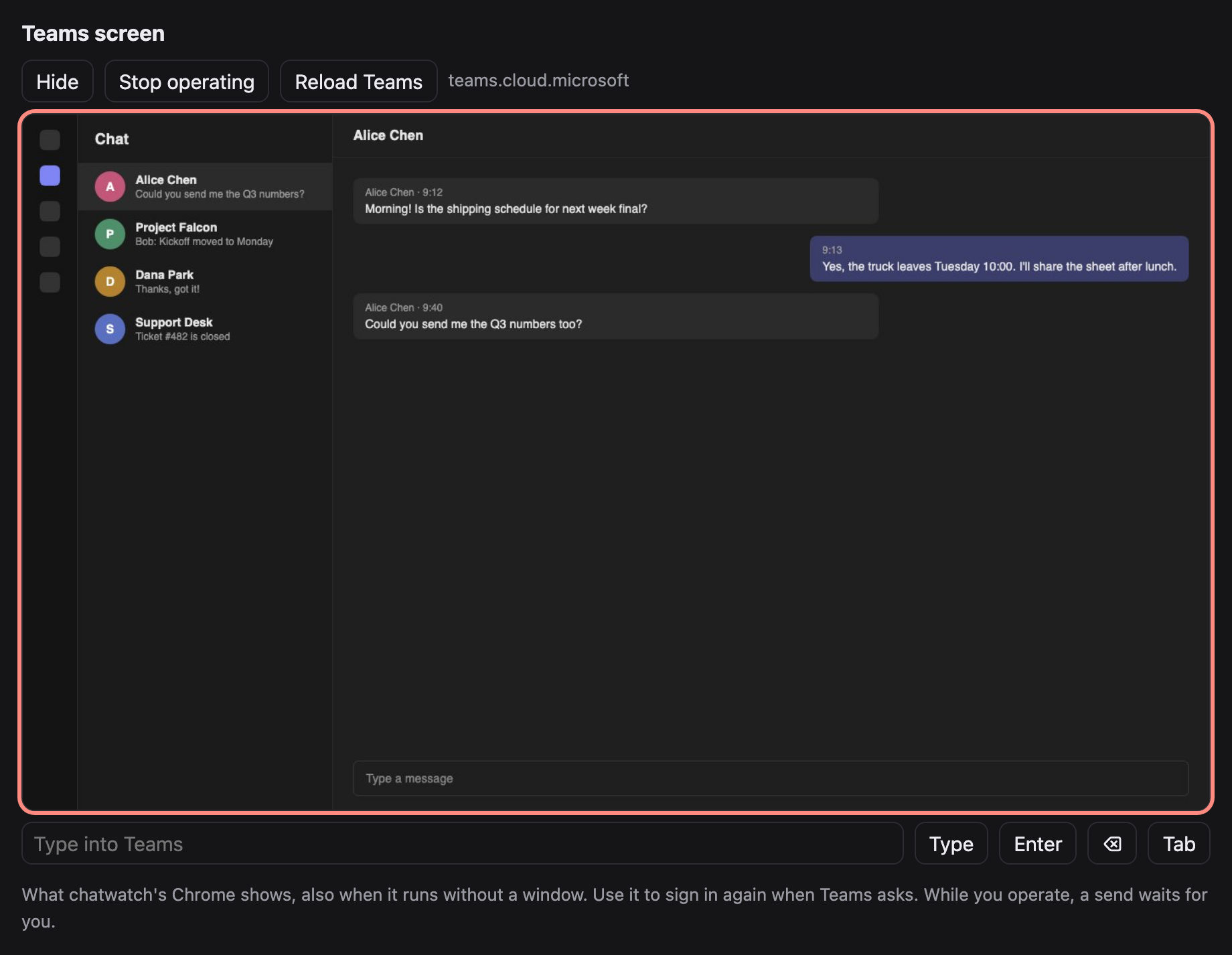
The Teams tab, seen on chatwatch's local page (made-up chats).
Features
- Pull (MCP): any MCP client (Claude Code, Codex, Cursor, …) gets tools to list chats, read messages, wait for new ones, fetch attachments and send.
- Push (handlers): each new batch of messages in a chat goes to a command or URL you choose; its answer is sent back to the chat.
- You stay in control: every chat has a send mode.
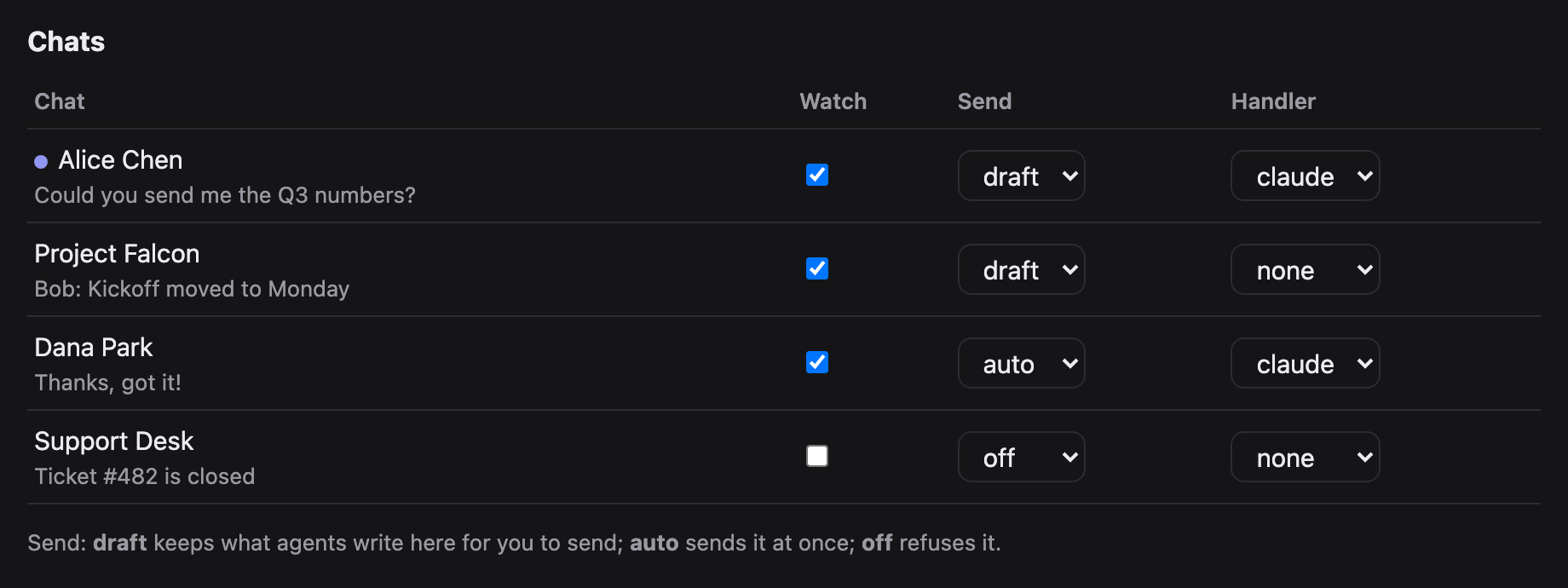
draft(the default) keeps what an agent writes on the local page until you send or discard it;autosends at once;offrefuses. - Nothing is marked read by watching. New messages are read through Teams' own chat service API from inside the tab, so chats stay unread. Sending opens the chat, which marks it read (Teams does that; it cannot be avoided).
- See Teams on the page. A live view of chatwatch's Chrome, also when it runs without a window: click, scroll and type in it to sign in again when Teams asks.
- The Teams token never leaves the tab. It is used inside the page and is never returned to Python, printed or saved.
Requirements
- Python 3.9 or later. chatwatch uses the standard library only, so there is nothing else to install.
- Chrome, Chromium or Edge. If chatwatch does not find it, set
CHATWATCH_CHROMEto its executable. - A Microsoft Teams account you can sign in to on the Teams web page.
- For the pull tools, an MCP client such as Claude Code, Codex or Cursor.
Quick start
git clone https://github.com/xxxxDev/chatwatch.git chatwatch && cd chatwatch
pip install .                    # or run python3 -m chatwatch from this folder

# 1. Sign in to Teams once, in chatwatch's own Chrome profile
chatwatch browser --show         # sign in, then close the window

# 2. Run the watcher (starts Chrome headless) and open the page
chatwatch serve
chatwatch open                   # prints http://127.0.0.1:8766/#key=...

# 3. Give your agent the tools
claude mcp add teams -- chatwatch mcp
How it fits together
flowchart LR
    agent["Your agent<br/>Claude Code, Codex,<br/>any MCP client"]
    handler["Your handler<br/>a command or URL"]
    mcp["chatwatch mcp"]
    serve["chatwatch serve"]
    mode{"Send mode<br/>of the chat"}
    page["Local page<br/>you send or discard"]
    tab["Teams tab in<br/>chatwatch's Chrome"]
    teams[("Microsoft Teams")]

    agent -- "MCP tools" --> mcp
    mcp -- "local API + key" --> serve
    serve -- "new messages" --> handler
    handler -- "reply" --> serve
    serve -- "read through the chat API,<br/>never marks read" --> tab
    serve -- "send" --> mode
    mode -- "auto" --> tab
    mode -- "draft" --> page
    page -- "you approve" --> tab
    mode -- "off" --> refused["refused"]
    page -. "live view" .- tab
    tab <--> teams
An agent works with chats in one of two ways. Through MCP it asks for chats and messages and sends when it decides to. Through a handler each new batch of messages is pushed to it, and its answer is sent back. Either way, every send passes the chat's send mode before anything reaches Teams.
The page
chatwatch open prints the page's address with its key; open it in your browser. It refreshes itself every few seconds.
- Pause / Resume (top): the emergency stop, see Push handlers.
- Teams screen: see below.
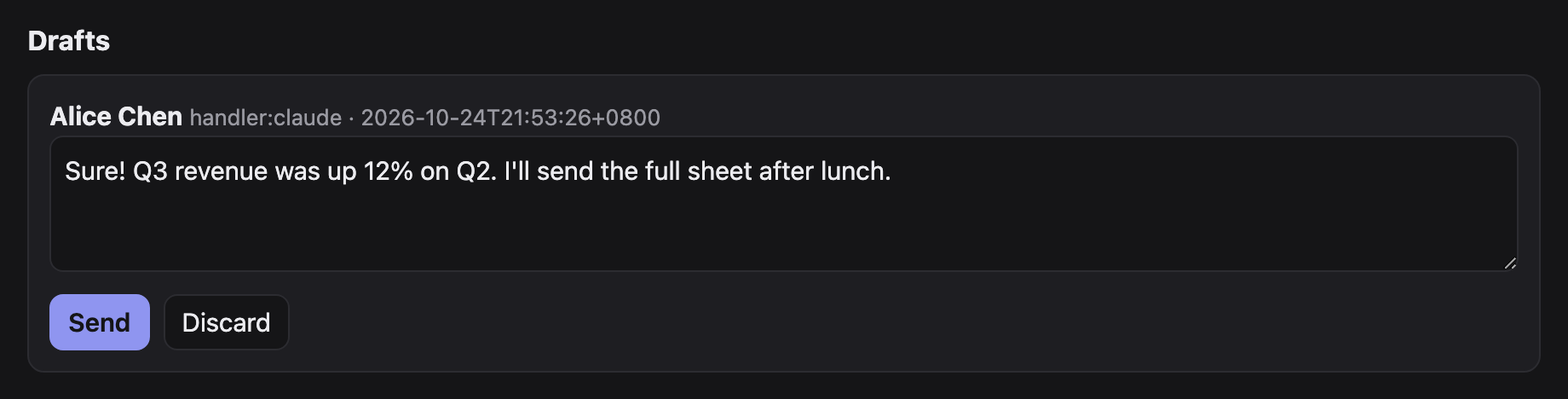
- Drafts: every reply waiting for you. Edit the text, then Send or Discard. A draft whose earlier send may have gone out asks you to tick I checked the chat first, so nothing is sent twice by mistake.
- Chats: each chat Teams lists, with a dot when unread. Per chat: Watch (record its new messages and pass them on), Send (
draft,autooroff;autoasks you to confirm) and Handler (where its new messages are pushed; handlers come fromconfig.json). - Recent: the last 30 events: new messages, sends, drafts, refusals and errors.
Teams screen
On the page, Show under Teams screen displays what the Teams tab shows. Start operating sends your clicks, scrolling and typing to it (on a phone, use the text box and the Enter, ⌫ and Tab buttons); Reload Teams reloads the tab. A send waits while you operate, and your input waits for a send in progress. Only the Teams tab (or the Microsoft sign-in page it goes to) is shown; there is no address bar.
MCP tools
| Tool | What it does |
|---|---|
teams_list_chats |
Chats with title, id, preview, unread flag and their settings |
teams_read_messages |
Last n messages of a chat, without marking it read |
teams_wait_for_messages |
New incoming messages after an event number, waiting up to 60 s |
teams_send_message |
Text and files to a chat, under its send mode |
teams_get_attachments |
Download the pictures and files of given messages |
teams_list_drafts |
Replies waiting for you on the page |
teams_send_message answers with a status:
sent: it is in the chat.draft: waiting for you on the page.refused: sending is off for this chat.not_sent: nothing went out; trying again is safe.maybe_sent: send was pressed but the message was not seen; do not resend before someone checks the chat.
A chat is named by its title, a part of the title that matches only one chat, or its id.
Push handlers
Define handlers in ~/.chatwatch/config.json and pick one per chat on the page:
{
  "handlers": {
    "claude": {"command": ["claude", "-p", "--output-format", "text",
                "Answer this Teams chat. The messages are JSON on stdin."]},
    "my-bot": {"url": "http://127.0.0.1:9000/teams", "timeout": 300}
  }
}
A command gets the batch as JSON on stdin; a URL gets it POSTed:
{"chat_id": "19:...", "chat": "Alice", "kind": "OneOnOneChat", "send": "draft",
 "messages": [{"mid": "...", "author": "Alice", "time": "...", "text": "Hi"}]}
It answers with plain text (the reply) or JSON {"text": "...", "files": ["/abs/path"]}. An empty answer sends nothing. The reply follows the chat's send mode. In auto, a send that certainly did not go is tried again after 20 s, 60 s and 180 s, then kept as a draft; one that may have gone is kept as a draft marked for checking, never resent by itself.
Two bots answering each other on auto never stop. Keep bot chats on draft. Pause on the page is the emergency stop: nothing is read, queued handler work is skipped, and while paused every auto chat behaves as draft. A reply that comes back after its chat was paused, unwatched or given another handler waits as a draft.
Using it with an agent
With the MCP tools added, ask your agent in plain words, for example:
Check my Teams chats for anything new from Alice and draft a reply.
Wait for new Teams messages for the next 10 minutes and answer the questions about the shipping schedule.
The agent lists chats, reads, waits and sends with the tools above. On a draft chat its replies wait on the page; switch a chat to auto only when you trust what it sends there.
Starting, stopping and signing in again
chatwatch serveruns in the foreground; stop it with Ctrl+C. Chrome keeps running;chatwatch browser stopcloses it.- When Teams signs you out, reading stops with
NO_TEAMS_TOKEN. Sign in again on the page's Teams screen, or close Chrome and runchatwatch browser --show. - Settings, drafts and the sign-in stay in
~/.chatwatchacross restarts. Messages that arrived while chatwatch was stopped are passed on when it starts again (up to the last 20 per chat); those that arrived while it was paused are not, so no late automatic reply goes out after a pause.
Troubleshooting
| Message | What to do |
|---|---|
chatwatch is not running at ... |
Start chatwatch serve. |
NO_TEAMS_TOKEN, CHAT_API_401 |
Teams signed out: sign in again (above). |
Chrome not found |
Set CHATWATCH_CHROME to Chrome's executable. |
no chat matches / several chats match |
Use the exact title or the chat id from teams_list_chats. |
DRAFT_NOT_EMPTY |
Someone left text in that chat's message box; clear it on the Teams screen. |
CHAT_NOT_FOUND, NO_COMPOSE_BOX, NO_SEND_BUTTON |
Teams is still loading or its page changed; look at the Teams screen, then try again. |
TYPED_TEXT_MISMATCH, SEND_NOT_TAKEN |
Nothing was sent; trying again is safe. |
maybe_sent |
Look at the chat before sending again. |
the Teams tab is busy sending |
Your input on the Teams screen waited for a send; try again. |
Command line
chatwatch chats
chatwatch read "Alice" 10
chatwatch send "Alice" "Hello" ./report.pdf     # sends now, whatever the mode: you are the person
chatwatch set "Alice" --watch on --send auto --handler claude
Settings
| Variable | Default | |
|---|---|---|
CHATWATCH_HOME |
~/.chatwatch |
config, state, events, drafts, API key, Chrome profile |
CHATWATCH_PORT |
8766 |
page and local API |
CHATWATCH_CDP_PORT |
9334 |
DevTools port of chatwatch's Chrome |
CHATWATCH_CDP |
use a Chrome you already run with --remote-debugging-port |
|
CHATWATCH_CHROME |
path to the Chrome executable | |
CHATWATCH_POLL |
4 |
seconds between checks |
CHATWATCH_URL |
http://127.0.0.1:8766 |
address of the running chatwatch serve that chatwatch mcp talks to; when unset, its port follows CHATWATCH_PORT |
How it works
teams.py reads through the chat service API inside the Teams tab and sends by pasting the whole text into the compose box (a synthetic paste keeps line breaks; typing key by key now and then lost a key), attaching files through the file chooser, pressing send, and waiting for the message to appear. service.py polls, records events, runs handlers and applies send modes. http_api.py serves the page and the local API; mcp.py is a stdio MCP server that talks to that API. cdp.py is a small DevTools client.
Teams changes its web page from time to time; the selectors in teams.py then need updating.
Limits
- Chats only, not channel posts.
- Chats are found among those Teams lists in its sidebar.
- Sending marks the chat read; watching does not.
- It depends on the Teams web page. When Teams changes it, reading or sending can stop until
teams.pyis updated; the error names the step that failed.
Security
The page and API listen on 127.0.0.1 only and need the key in ~/.chatwatch/api-key. Agents read what other people write to you, and in an auto chat what they write goes out at once. Read SECURITY.md before connecting an agent, and use it to report a problem.
Contributing
See CONTRIBUTING.md before you open an issue or a pull request. Changes are listed in CHANGELOG.md and ideas for later in docs/ROADMAP.md.
License
The code is under the MIT License.
chatwatch is an independent project. It is not made by, affiliated with or endorsed by Microsoft. Microsoft Teams is a trademark of Microsoft.
Made by V-AX.
chatwatch MCPのよくある質問
chatwatch MCPが提供するツールは
11個のツールを提供しており、teams_list_chats, teams_read_messages, teams_wait_for_messages, teams_send_message, teams_get_attachmentsなどがあります。
chatwatchはAzure app registrationや管理者による同意が必要ですか?
いいえ、既存のTeamsセッションを使用したChromeタブを操作するため、Azure app registration、管理者による同意、またはボットアカウントは必要ありません。
AIエージェントがメッセージを自動送信するかどうかを制御するにはどうすればよいですか?
チャットごとに送信モードを設定できます。'draft'モードはメッセージをローカルページに保持して承認を待機し、'auto'モードは即座に送信、'off'モードは送信を拒否します。
チャットを監視すると、Microsoft Teams上で既読になりますか?
いいえ、新しいメッセージはタブ内のTeamsチャットサービスAPIを通じて読み取られるため、実際にメッセージを送信するまでチャットは未読のまま維持されます。
chatwatchを実行するためのシステム要件は何ですか?
Python 3.9以降と、Chrome、Chromium、またはEdgeなどのブラウザが必要です。