
受動態、weasel words(曖昧な表現)、AI生成特有のパターンなどの文章の問題を分析し、執筆の質を向上させます。
別名 theserverlessdev/wsc, wsc, wsc-mcp
- スター
- 9
- ツール
- 4
- ダウンロード数(30日間)
- —
- 最新バージョン
- 2.2.2
- 最終コミット
- 2026年11月11日
- ライセンス
- MIT
Writing Style Checker MCPとは
Writing Style CheckerはMCPサーバーです。 受動態、weasel words(曖昧な表現)、AI生成特有のパターンなどの文章の問題を分析し、執筆の質を向上させます。. 4個のツールを提供しており、check_text, fix_duplicates, list_word_listsなどがあります。
プロジェクトのREADMEから生成された概要
Writing Style Checker MCP server について
Writing Style Checkerは、AI生成テキストによく見られる特定の執筆上の問題やパターンを特定するために設計された、文章のリンターとして機能します。受動態、weasel words、不要な副詞、ヘッジング(ぼかし表現)、名詞化、長い文章などをフラグ立てすることで、ライターの品質向上を支援します。また、AI特有の兆候を検知する専用の検出器も備えており、機械生成コンテンツに過剰に含まれる特定の単語や構造的パターンを特定します。
開発者は、streamable HTTPトランスポートを使用したリモート MCP server を介してこのサービスを統合するか、wsc-mcp npm パッケージを通じてローカルの stdio ベースの server をインストールできます。ローカル版では、ディスク上のファイルを直接分析するための追加の check_file ツールが提供されます。ユーザーは .wscrc.json 設定ファイルを使用して、特定の単語リストや閾値の有効化、無効化、または変更といった検出ルールのカスタマイズが可能です。
できること
- 1AI生成の執筆パターンの検出テキストがAIによって書かれたことを示唆する特定の単語や文構造を特定するよう、アシスタントに依頼します。
- 2重複する単語の整理テキストブロック内にある隣接した重複単語を削除するよう、クライアントに指示します。
- 3ローカルのMarkdownファイルの監査コンピュータ上の特定のファイルをAIに読み込ませ、文章の問題を分析させます。
- 4一般的な文章品質のレビュー受動態、weasel words、不要な副詞をチェックするために、段落を提出します。
プロジェクトの README から作成されています。すべてのユースケースは、その引用と照らし合わせて確認されています。
Writing Style Checker MCPのインストール方法
フォーマット検証日 2026年11月10日Cursor に追加Gooseに追加Claude CodeにWriting Style Checker MCPをインストール
$ claude mcp add wsc -- npx -y wsc-mcpCursorにWriting Style Checker MCPをインストール
~/.cursor/mcp.json
{
  "mcpServers": {
    "wsc": {
      "command": "npx",
      "args": [
        "-y",
        "wsc-mcp"
      ]
    }
  }
}VS CodeにWriting Style Checker MCPをインストール
.vscode/mcp.json
{
  "servers": {
    "wsc": {
      "type": "stdio",
      "command": "npx",
      "args": [
        "-y",
        "wsc-mcp"
      ]
    }
  }
}VS Code CLIにWriting Style Checker MCPをインストール
$ code --add-mcp '{"name":"wsc","type":"stdio","command":"npx","args":["-y","wsc-mcp"]}'Claude DesktopにWriting Style Checker MCPをインストール
claude_desktop_config.json
{
  "mcpServers": {
    "wsc": {
      "command": "npx",
      "args": [
        "-y",
        "wsc-mcp"
      ]
    }
  }
}CodexにWriting Style Checker MCPをインストール
$ codex mcp add wsc -- npx -y wsc-mcpCodex config.tomlにWriting Style Checker MCPをインストール
~/.codex/config.toml
[mcp_servers.wsc]
command = "npx"
args = ["-y", "wsc-mcp"]
Gemini CLIにWriting Style Checker MCPをインストール
$ gemini mcp add -s user wsc npx -- -y wsc-mcpGemini settings.jsonにWriting Style Checker MCPをインストール
~/.gemini/settings.json
{
  "mcpServers": {
    "wsc": {
      "command": "npx",
      "args": [
        "-y",
        "wsc-mcp"
      ]
    }
  }
}Writing Style Checker MCPツール 4
READMEから検出check_textfix_duplicateslist_word_listscheck_file
| check_text | — | |
| fix_duplicates | — | |
| list_word_lists | — | |
| check_file | — |
自動チェック
実行日 2026年11月12日完全なレポート →自動チェックに合格しました。これはセキュリティ監査ではありません。コードを読み、サーバーに必要最小限のアクセス権を与えてください。 チェックの仕組み

- ソースリポジトリがリンクされており、アクセス可能合格
- オープンソースライセンス (OSI)合格
- 過去1年以内にコミットまたはリリースあり合格
- パッケージ名が有名なパッケージに酷似していない合格
- リモートエンドポイントがHTTPSを使用合格
- 破壊的なツールがラベル付けされている合格
- モデルへの隠れた指示がない合格
- パッケージおよびその依存関係に重大な勧告なし合格
README
GitHubで見るWriting Style Checker


A prose linter and AI-slop detector. WSC finds AI tells — words, phrases, and sentence structures overrepresented in AI-generated text, each flag backed by a published corpus study. It also catches classic writing issues: weasel words, passive voice, duplicate words, long sentences, nominalizations, hedging, and filler adverbs. Available as a web editor, HTTP API, MCP server, CLI, and GitHub Action.
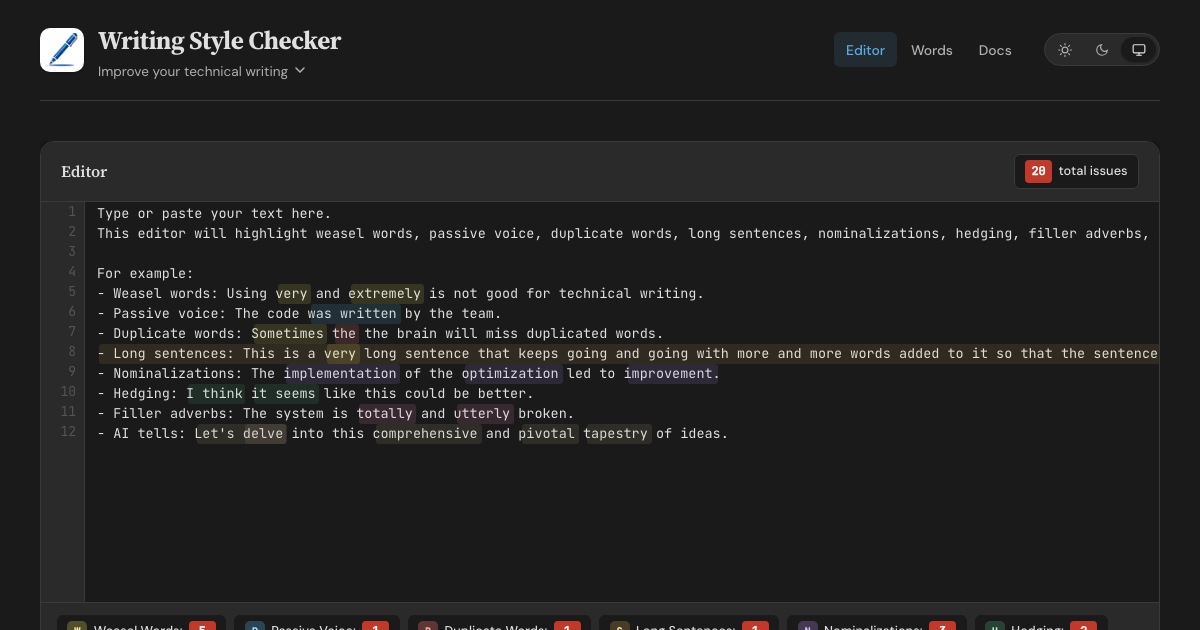
Features
- Web Editor - Real-time highlighting with inline fix buttons for all 8 detectors
- HTTP API - POST text with optional config, retrieve structured JSON responses
- MCP Server (Remote) - Connect AI assistants via Streamable HTTP transport
- MCP Server (Local) - Stdio-based server via
wsc-mcpon npm - CLI - Check files from the command line via
wsc-lint - GitHub Action - Run checks in CI with
::warningannotations - Configurable - Customize detectors with
.wscrc.jsonfiles
What WSC is (and isn't)
WSC flags patterns that research on AI-generated text finds overrepresented, and cites a source for every flag. It does not, and cannot, prove authorship. Classifier-based detectors carry a documented false-accusation risk: a Stanford study found that seven of them misflagged 61% of essays written by non-native English speakers. WSC avoids that trap by design — every flag is a specific, explainable edit that improves the text no matter who, or what, wrote it.
Detection Rules
| Detector | Items | Description |
|---|---|---|
| Weasel Words | 95 words/phrases | Vague terms like "very", "basically", "arguably", "numerous" |
| Passive Voice | 260 irregular verbs | Auxiliary verbs + past participles (regular -ed + irregular) |
| Duplicate Words | — | Adjacent repeated words across whitespace, case-insensitive |
| Long Sentences | threshold: 30 words | Sentences exceeding a configurable word count |
| Nominalizations | 245 word pairs | Nouns replaceable with verbs ("utilization" → "use") |
| Hedging | 100 phrases | Phrases that weaken assertions ("I think", "it seems") |
| Filler Adverbs | 139 words | Adverbs adding emphasis without substance ("totally", "utterly") |
| AI Tells | 98 words (+111 inflected forms) + 83 phrases + 12 structural patterns | Words, phrases, and sentence constructions overrepresented in AI-generated text (delve, rich tapestry, It's not just X — it's Y) |
Word lists sourced from Matt Might's shell scripts and expanded with additional entries. AI tells draw on published corpus studies: Kobak et al. 2025 (Science Advances), Juzek & Ward 2025 (COLING), Liang et al. 2024 (Stanford), and Reinhart et al. 2025 (PNAS). Wikipedia's editor-maintained Signs of AI writing catalogue and AI-detection vendor reports round out the sources.
Configuration
Create a .wscrc.json to customize detectors. All tools (API, MCP, CLI) support it.
{
  "$schema": "https://wsc.theserverless.dev/schema.json",
  "ignore": ["CHANGELOG.md", "docs/vendor/**"],
  "detectors": {
    "weaselWords": {
      "enabled": true,
      "add": ["synergy", "leverage"],
      "remove": ["very"]
    },
    "longSentences": { "maxWords": 25 },
    "adverbs": { "enabled": false }
  }
}
Every field is optional. Missing fields use defaults. JSON Schema provides autocompletion in VS Code.
ignore is an array of glob patterns relative to the working directory. The GitHub Action uses the repository root. The CLI adds these patterns to its built-in **/node_modules/** and **/.git/** skips, together with the Action exclude input and the CLI --ignore flag.
API Usage
POST /api/check
Analyze text for writing style issues. Accepts optional config object.
curl -X POST https://wsc.theserverless.dev/api/check \
  -H "Content-Type: application/json" \
  -d '{"text":"The code was written very quickly."}'
Response:
{
  "summary": {
    "total": 2,
    "weaselWords": 1,
    "passiveVoice": 1,
    "duplicateWords": 0,
    "longSentences": 0,
    "nominalizations": 0,
    "hedging": 0,
    "adverbs": 0
  },
  "issues": {
    "weaselWords": [{ "word": "very", "index": 21, "line": 1, "column": 22, "context": "..." }],
    "passiveVoice": [{ "phrase": "was written", "index": 9, "line": 1, "column": 10, "context": "..." }],
    "duplicateWords": [],
    "longSentences": [],
    "nominalizations": [],
    "hedging": [],
    "adverbs": []
  },
  "meta": { "characterCount": 34, "wordCount": 6, "sentenceCount": 1, "processingTimeMs": 2 }
}
With config:
curl -X POST https://wsc.theserverless.dev/api/check \
  -H "Content-Type: application/json" \
  -d '{"text":"The code was written very quickly.", "config":{"detectors":{"weaselWords":{"enabled":false}}}}'
GET /api/check
Returns API documentation as JSON.
GET /api/detectors
Returns the list of all 8 detectors with descriptions, configurability, and word counts.
GET /health
Runs a smoke test with known text and returns {"status":"healthy"} or 503.
Limits: Max 100,000 characters per request. CORS enabled for all origins.
MCP Server
The Writing Style Checker is available as an MCP server, letting AI assistants check your writing directly.
Tools
| Tool | Description |
|---|---|
check_text |
Analyze text for all 8 writing style issues. Accepts optional config. |
fix_duplicates |
Remove duplicate adjacent words and return cleaned text |
list_word_lists |
Return info about all detector word lists |
check_file |
(Local only) Read a file from disk and analyze it. Auto-discovers .wscrc.json. |
Remote MCP Server
Connect any MCP client to the hosted server - no installation required.
{
  "mcpServers": {
    "writing-style-checker": {
      "type": "url",
      "url": "https://wsc.theserverless.dev/mcp"
    }
  }
}
Local MCP Server (stdio)
Install via npm for local usage. Includes check_file for analyzing files on disk with auto-discovery of .wscrc.json.
npx wsc-mcp
Claude Desktop / Claude Code config:
{
  "mcpServers": {
    "writing-style-checker": {
      "command": "npx",
      "args": ["wsc-mcp"]
    }
  }
}
See the wsc-mcp npm page for full documentation.
CLI
Check files from the command line.
# Check all markdown files
npx wsc-lint check "**/*.md"

# Read from stdin
echo "The code was written very quickly." | npx wsc-lint check --stdin

# JSON output for scripting
npx wsc-lint check "**/*.md" --format json

# GitHub Actions annotations
npx wsc-lint check "**/*.md" --format github

# Create a config file
npx wsc-lint init
See the wsc-lint README for full documentation.
GitHub Action
- uses: theserverlessdev/wsc@v1
  with:
    files: '**/*.md'
    max-warnings: 20
    exclude: |
      CHANGELOG.md
      vendor/**
| Input | Default | Description |
|---|---|---|
files |
**/*.md |
Glob pattern for files to check |
config |
— | Path to .wscrc.json config file |
max-warnings |
unlimited | Max warnings before failing |
only-changed |
false |
On a pull request, check changed files that match files. If none match, skip the check. Other events check files. |
exclude |
— | Glob patterns to skip. Separate with a comma or a new line. Adds to config ignore. |
Privacy
The web editor runs in your browser - we never send text to any server. The API and MCP endpoints only process text you explicitly send to them.
Project Structure
.
├── src/
│   ├── core/                    # Shared detection engine
│   │   ├── detector.ts          # 8 detection algorithms
│   │   ├── words.ts             # Word/phrase lists (800+ entries)
│   │   ├── config.ts            # Config types, merging, validation
│   │   ├── config-node.ts       # Node-only: file loading, discovery
│   │   ├── analyzer.ts          # Unified analyzeText() entry point
│   │   └── index.ts             # Public API exports
│   ├── docs/                    # Documentation content (Markdown files)
│   ├── mcp/
│   │   └── handler.ts           # MCP JSON-RPC 2.0 handler
│   ├── lib/
│   │   ├── App.svelte           # Main editor page component
│   │   ├── stores/theme.ts      # Theme store (light/dark/system)
│   │   └── components/          # UI components (StatsBar, ConfigPanel, etc.)
│   ├── routes/
│   │   ├── +layout.svelte       # Shared layout (header, nav, footer)
│   │   ├── api/check/+server.ts # HTTP API endpoint
│   │   ├── mcp/+server.ts       # MCP endpoint
│   │   ├── health/+server.ts    # Health check endpoint
│   │   ├── docs/+page.svelte    # Documentation page
│   │   └── words/+page.svelte   # Word library browser
│   └── styles/
│       └── main.scss            # Global styles (light + dark themes)
├── mcp-server/                  # Standalone stdio MCP server (npm: wsc-mcp)
├── cli/                         # CLI tool (npm: wsc-lint)
├── action/                      # GitHub Action (composite)
├── tests/                       # 341 tests across 18 files
├── static/
│   ├── schema.json              # JSON Schema for .wscrc.json
│   ├── llms.txt                 # AI/LLM discovery file
│   └── llms-full.txt            # Detailed LLM context
├── wrangler.toml                # Cloudflare Workers config
└── svelte.config.js             # SvelteKit configuration
Local Development
git clone https://github.com/theserverlessdev/wsc.git
cd wsc
npm install
npm run dev
Visit http://localhost:5173. The API is at /api/check, MCP at /mcp, health at /health.
Commands
| Command | Description |
|---|---|
npm run dev |
Start dev server |
npm run build |
Build for production |
npm run check |
Type check with svelte-check |
npm test |
Run all 341 tests |
npm run test:coverage |
Coverage report |
Deployment
Deployed as a Cloudflare Worker at wsc.theserverless.dev.
npm run build
npx wrangler deploy
Contributing
See CONTRIBUTING.md for development setup, testing, and pull request guidelines.
For substantial changes, please open an issue first.
Acknowledgements
- Matt Might for the original shell scripts
- Built with SvelteKit and Svelte 5, deployed on Cloudflare Workers
- Logo made with DiffusionBee
License
Writing Style Checker MCPのよくある質問
Writing Style Checker MCPをClaude Codeに追加するには
ターミナルでclaude mcp add wsc -- npx -y wsc-mcpを実行します。すべてのプロジェクトで利用するには--scope userを追加します。
Writing Style Checker MCPをCursorに追加するには
~/.cursor/mcp.jsonを開き、上記のインストールセクションに示すCursor設定を使ってmcpServersの下にサーバーを追加します。
Writing Style Checker MCPが提供するツールは
4個のツールを提供しており、check_text, fix_duplicates, list_word_lists, check_fileなどがあります。
このツールでテキストがAIによって書かれたことを証明できますか?
いいえ、執筆者を証明するものではありません。代わりに、AI生成テキストに多く見られる特定のパターンや単語をフラグ立てし、根拠のある修正案を提示します。
検出ルールをカスタマイズできますか?
はい、.wscrc.json 設定ファイルを使用して検出器をカスタマイズできます。
ウェブエディタを使用する場合、テキストのプライバシーは守られますか?
はい、ウェブエディタは完全にブラウザ内で動作するため、テキストがサーバーに送信されることはありません。