
SyncSo MCPサーバー
コミット 2026年10月16日ライブミュージック、演劇、クラス、マーケット、ナイトライフなど、ニューヨーク市のイベントへのリアルタイムなアクセスをAIエージェントに提供します。
別名 SyncSo-Inc/syncso
- スター
- 2
- ツール
- —
- ダウンロード数(30日間)
- —
- 最新バージョン
- 2.0.0
- 最終コミット
- 2026年10月16日
- ライセンス
- MIT
SyncSo MCPとは
SyncSoはMCPサーバーです。 ライブミュージック、演劇、クラス、マーケット、ナイトライフなど、ニューヨーク市のイベントへのリアルタイムなアクセスをAIエージェントに提供します。.
プロジェクトのREADMEから生成された概要
SyncSo MCP server について
SyncSoは、ニューヨーク市で発生するローカルな出来事に関するリアルタイムデータをAIエージェントに提供します。標準的な言語モデルはガイドブックのような静的な学習データに依存していますが、このMCP serverは、音楽、演劇、コメディ、マーケット、クラス、ナイトライフのライブデータベースにエージェントを接続します。従来のデータセットには含まれていない可能性のある、イベントの日時、価格、予約リンクなどの具体的な詳細を配信します。
開発者は、Claude Desktop、Claude Code、Cursor、Windsurf、VS Codeを含むさまざまな環境にこのサービスを統合できます。接続は、リモートのMCP URLを介するか、スキルファイルを追加することで確立されます。認証にはsyncso.comでのサインインが必要で、すべてのアカウントに毎月の無料検索枠が含まれています。システムは、情報を取得するためにfind_things_to_doとget_detailsという2つの主要なツールを使用します。現在はニューヨーク市のみの対応ですが、将来的に他の都市へ拡大するように設計されています。
できること
- 1訪問者のためのローカルアクティビティの計画火曜日に訪問する親のために、特定のアクティビティを探すようエージェントに依頼します。
- 2即時のローカルエンターテインメントの検索今後4時間以内に開催される無料の屋外イベントのリストをリクエストします。
- 3将来の社交的な外出のスケジューリングカップルが3週間前に予約できるアクティビティをエージェントに探させます。
- 4ニッチなローカルイベントの発見陶芸クラスやナイトマーケットのような小規模なイベントを検索します。
プロジェクトの README から作成されています。すべてのユースケースは、その引用と照らし合わせて確認されています。
SyncSo MCPのインストール方法
フォーマット検証日 2026年11月10日Cursor に追加Gooseに追加Claude CodeにSyncSo MCPをインストール
$ claude mcp add --transport http syncso https://rtdb.syncso.com/partner/mcpCursorにSyncSo MCPをインストール
~/.cursor/mcp.json
{
  "mcpServers": {
    "syncso": {
      "url": "https://rtdb.syncso.com/partner/mcp"
    }
  }
}VS CodeにSyncSo MCPをインストール
.vscode/mcp.json
{
  "servers": {
    "syncso": {
      "type": "http",
      "url": "https://rtdb.syncso.com/partner/mcp"
    }
  }
}VS Code CLIにSyncSo MCPをインストール
$ code --add-mcp '{"name":"syncso","type":"http","url":"https://rtdb.syncso.com/partner/mcp"}'CodexにSyncSo MCPをインストール
$ codex mcp add syncso --url https://rtdb.syncso.com/partner/mcpCodex config.tomlにSyncSo MCPをインストール
~/.codex/config.toml
[mcp_servers.syncso]
url = "https://rtdb.syncso.com/partner/mcp"
Gemini CLIにSyncSo MCPをインストール
$ gemini mcp add -s user --transport http syncso https://rtdb.syncso.com/partner/mcpGemini settings.jsonにSyncSo MCPをインストール
~/.gemini/settings.json
{
  "mcpServers": {
    "syncso": {
      "url": "https://rtdb.syncso.com/partner/mcp",
      "type": "http"
    }
  }
}自動チェック
実行日 2026年11月14日完全なレポート →まだ検証されていません。サーバーには80点のスコア、重大な問題がないこと、および検証に必要な十分なデータが必要です。 チェックの仕組み · 点数を上げるための改善点

- ソースリポジトリがリンクされており、アクセス可能syncso-inc/syncso is public and reachablegithub.com/syncso-inc/syncso ↗合格
- パッケージがこのリポジトリをソースとして指定未チェック
- ビルドの来歴 (Sigstore 証明)未チェック
- オープンソースライセンス (OSI)MITspdx.org/licenses/MIT.html ↗合格
- 過去1年以内にコミットまたはリリースありLast commit or release 2026-10-16github.com/syncso-inc/syncso ↗合格
- OpenSSF Scorecard未チェック
- パッケージ名が有名なパッケージに酷似していない未チェック
- パッケージおよびその依存関係に重大な勧告なし未チェック
- モデルへの隠れた指示がない0 tool descriptions and the README read; no override phrases, credential paths or hidden characters合格
- 破壊的なツールがラベル付けされている未チェック
- リモートエンドポイントが MCP ハンドシェイクに応答HTTPS endpoint answered 401 (sign-in required)合格
README
GitHubで見るSyncSo
Let your agents understand what's happening locally, in real time.
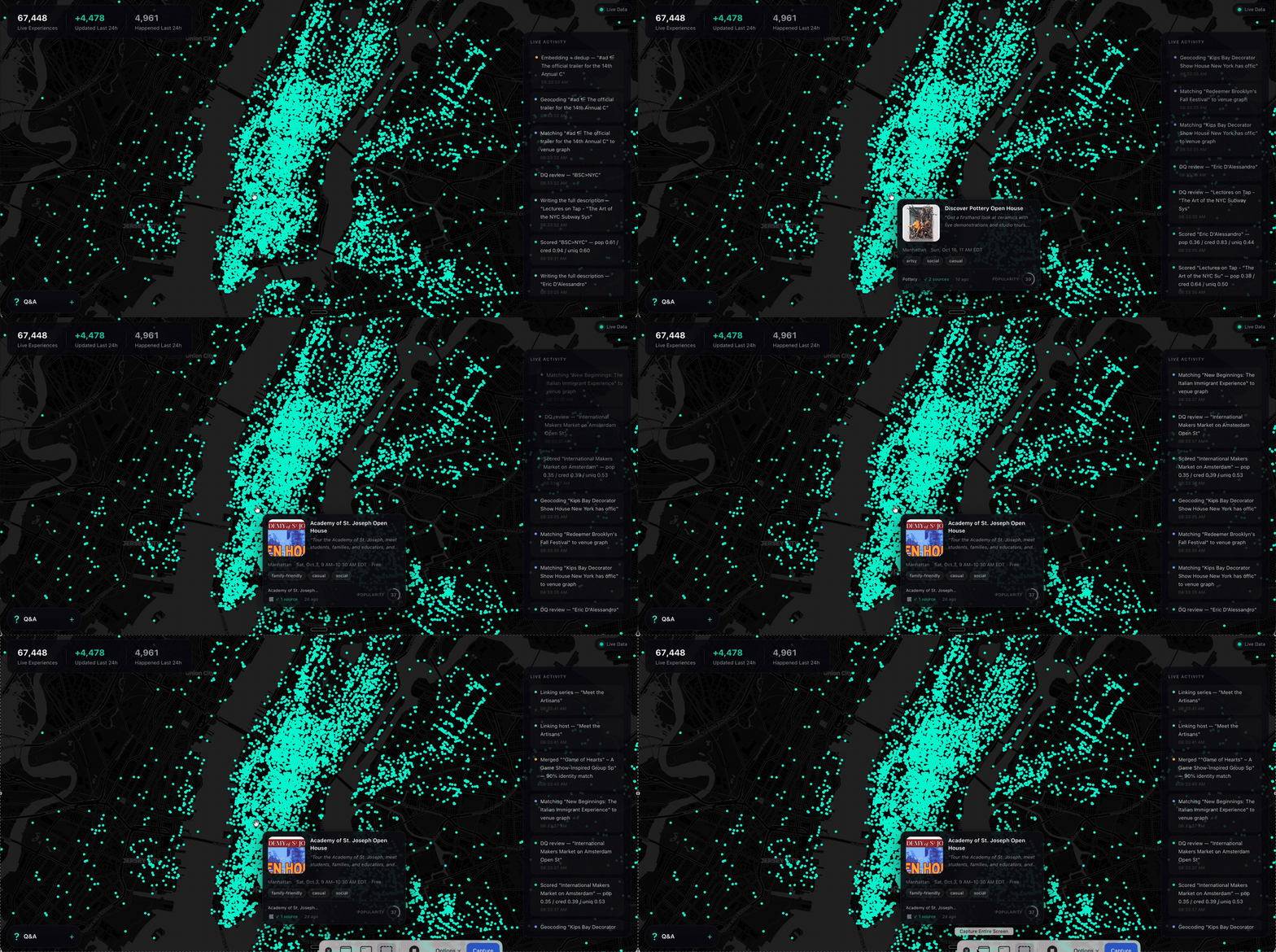
Ask a model what to do in New York and it names the Whitney. It is not wrong. It is just answering from a guidebook, because that is what it has — a city as a list of places, frozen whenever the training run ended.
What it does not have is everything going on inside those places, and the thousand rooms that never make a guidebook. The Tuesday gig. The pottery class with two seats left. The night market under the bridge. Your model has never heard of any of it.
SyncSo is that missing half: live music, theater, comedy, film, art, sports, festivals, markets, food and drink, classes, tours, nightlife — the whole surface of a city, each thing carrying its dates, times, prices, booking links and images. Not one category. Not the famous parts.
Which means your agent can finally take the questions it used to hand back. Where to take a visiting parent on a Tuesday. What a couple could book three weeks out. What is free, outdoors, and happening in the next four hours. Real answers, with a link to book them.
Install
One catalogue, two doors. Assistants that speak MCP connect to
https://rtdb.syncso.com/partner/mcp. Anything else reads the skill file at
https://syncso.com/SKILL.md. Both open the same account: the first search
asks the person to sign in once at syncso.com, and every account starts with
a free monthly allowance of searches.
Claude
In Claude.ai or the Claude desktop app: Settings → Connectors → Add custom connector, paste the MCP URL, and ask. Claude also lists SyncSo in its directory, where it is one click.
In Claude Code, connect the MCP server:
claude mcp add --transport http syncso https://rtdb.syncso.com/partner/mcp
or install the skill as a plugin, which keeps itself current:
claude plugin marketplace add SyncSo-Inc/syncso
claude plugin install syncso@syncso
ChatGPT
Coming to the ChatGPT app directory. Until it is listed: Settings → Apps & Connectors → Advanced → Developer mode, add a connector, paste the MCP URL. Developer mode is not available on every plan.
Cursor, Windsurf, VS Code and other MCP clients
Add SyncSo to the client's MCP configuration:
{
  "mcpServers": {
    "syncso": { "url": "https://rtdb.syncso.com/partner/mcp" }
  }
}
OpenClaw
openclaw skills install @liangstl/syncso
Also on ClawHub, where
clawhub install syncso does the same.
Coding agents that read skill folders
Claude Code, Codex, Cursor, Copilot and the rest, one command:
npx skills add SyncSo-Inc/syncso
Anything else
Tell your assistant:
Set up SyncSo from https://syncso.com/SKILL.md
The file carries the guidance and the tool definitions, works with anything that can call a tool and make an HTTPS request, and the copy at that URL is always the current one. A person using it gets their sign-in code at syncso.com/connect.
Two tools do the work, find_things_to_do and get_details. That is the
whole surface.
Coverage
New York only, for now. More cities over the coming months.
Within it, everything: every category above, from the institutions down to the one-night thing in a room above a bar. Ask about anywhere else and the skill tells your model to say so rather than invent an answer — the same refusal to guess that makes the New York answers worth trusting.
Links
- syncso.com — what SyncSo is
- syncso.com/connect — where your user gets their code
- syncso.com/SKILL.md — the skill itself, always the current copy (also in this repo)
Questions
Something missing, wrong, or not working the way this page says? Open an issue, or email hello@syncso.com. And if there is a city you want open, tell us.
License
MIT. See LICENSE.
SyncSo MCPのよくある質問
SyncSo MCPをClaude Codeに追加するには
ターミナルでclaude mcp add --transport http syncso https://rtdb.syncso.com/partner/mcpを実行します。すべてのプロジェクトで利用するには--scope userを追加します。
SyncSo MCPをCursorに追加するには
~/.cursor/mcp.jsonを開き、上記のインストールセクションに示すCursor設定を使ってmcpServersの下にサーバーを追加します。
SyncSoはどのエリアをカバーしていますか?
現在はニューヨークのみをカバーしていますが、今後数ヶ月以内に他の都市への拡大を予定しています。
利用料金はいくらですか?
すべてのアカウントに、毎月の無料検索枠が含まれています。
どのような情報を見つけることができますか?
ライブミュージック、演劇、コメディ、映画、アート、スポーツ、フェスティバル、マーケット、飲食、クラス、ツアー、ナイトライフに関する詳細情報を見つけることができます。