
Conduct AI MCPとは
Claude CodeやCursorなどのAIクライアントにおいて、AIエージェントの管理、ワークフローの実行、およびチームのセキュリティポリシーの適用を行います。
プロジェクトのREADMEから生成された概要
Conduct AI MCP server について
Conduct AIは、エンジニアリングチームがAIエージェントを管理し、開発環境全体でセキュリティポリシーを適用することを可能にします。開発者はプレイブックからエージェントをインストールし、プロジェクトの管理や、コマンドラインインターフェースを使用したエンドツーエンドのテストを実行できます。このシステムはLinux、macOS、Windowsでローカルに動作し、Pythonのインストールと、conduct loginコマンドによる認証用のConduct AIダッシュボードで生成されたエージェントトークンが必要です。
セキュリティチームはConductGuardを使用して、Claude Code、Cursor、WindsurfなどのクライアントにおけるAIツールの使用を制御できます。conduct guard syncを実行することで、CLIがPreToolUseフックとMCP serverをインストールし、チームのルールを自動的に適用します。このセットアップにより、定義済みのポリシーに基づいて、ツール呼び出しのブロック、警告、または監査が可能になります。また、セキュリティイベントをOWASP Agentic Top 10にマッピングするツールや、conduct verifyコマンドを使用してCI環境でコンプライアンスを確認する機能も提供しています。
できること
- 1エージェント・フリートのデプロイ開発者は単一のコマンドを使用して、特定のレポジトリ向けの一連のエージェントを迅速にセットアップできます。
- 2セキュリティポリシーの適用セキュリティ管理者は、開発者のマシンにポリシーを自動的に同期することで、許可されていないツールの操作を防止できます。
- 3AIセキュリティコンプライアンスの検証チームは、最近のセキュリティイベントをOWASP Agentic Top 10と照らし合わせて確認し、安全基準が満たされていることを保証できます。
- 4エージェント・ワークフローのテスト開発者は合成テストペイロードをトリガーして、インストールされたエージェントが正しく機能しているかを確認できます。
プロジェクトの README から作成されています。すべてのユースケースは、その引用と照らし合わせて確認されています。
Conduct AI MCPのインストール方法
フォーマット検証日 2026年11月10日Cursor に追加Gooseに追加Claude CodeにConduct AI MCPをインストール
$ claude mcp add conduct-cli -- uvx conduct-cliCursorにConduct AI MCPをインストール
~/.cursor/mcp.json
{
  "mcpServers": {
    "conduct-cli": {
      "command": "uvx",
      "args": [
        "conduct-cli"
      ]
    }
  }
}VS CodeにConduct AI MCPをインストール
.vscode/mcp.json
{
  "servers": {
    "conduct-cli": {
      "type": "stdio",
      "command": "uvx",
      "args": [
        "conduct-cli"
      ]
    }
  }
}VS Code CLIにConduct AI MCPをインストール
$ code --add-mcp '{"name":"conduct-cli","type":"stdio","command":"uvx","args":["conduct-cli"]}'Claude DesktopにConduct AI MCPをインストール
claude_desktop_config.json
{
  "mcpServers": {
    "conduct-cli": {
      "command": "uvx",
      "args": [
        "conduct-cli"
      ]
    }
  }
}CodexにConduct AI MCPをインストール
$ codex mcp add conduct-cli -- uvx conduct-cliCodex config.tomlにConduct AI MCPをインストール
~/.codex/config.toml
[mcp_servers.conduct-cli]
command = "uvx"
args = ["conduct-cli"]
Gemini CLIにConduct AI MCPをインストール
$ gemini mcp add -s user conduct-cli uvx -- conduct-cliGemini settings.jsonにConduct AI MCPをインストール
~/.gemini/settings.json
{
  "mcpServers": {
    "conduct-cli": {
      "command": "uvx",
      "args": [
        "conduct-cli"
      ]
    }
  }
}自動チェック
実行日 2026年11月15日完全なレポート →自動チェックに合格しました。これはセキュリティ監査ではありません。コードを読み、サーバーに必要最小限のアクセス権を与えてください。 チェックの仕組み · 点数を上げるための改善点

- ソースリポジトリがリンクされており、アクセス可能sseshachala/conduct-cli is public and reachablegithub.com/sseshachala/conduct-cli ↗合格
- パッケージがこのリポジトリをソースとして指定conduct-cli names https://github.com/sseshachala/conductai/issues as its sourcepypi.org/project/conduct-cli/ ↗検出事項
- ビルドの来歴 (Sigstore 証明)Sigstore attestation for conduct-clipypi.org/project/conduct-cli/ ↗合格
- オープンソースライセンス (OSI)No license検出事項
- 過去1年以内にコミットまたはリリースありLast commit or release 2026-08-13github.com/sseshachala/conduct-cli ↗合格
- OpenSSF Scorecard未チェック
- パッケージ名が有名なパッケージに酷似していないNo popular package one edit away from conduct-cli合格
- パッケージおよびその依存関係に重大な勧告なし6 resolved dependencies checked; no critical advisoryosv.dev ↗合格
- モデルへの隠れた指示がない0 tool descriptions and the README read; no override phrases, credential paths or hidden characters合格
- 破壊的なツールがラベル付けされている未チェック
- リモートエンドポイントが MCP ハンドシェイクに応答未チェック
README
GitHubで見るconduct-cli
Official CLI for Conduct AI — install AI agents, manage projects, run end-to-end tests, and enforce team AI policies with ConductGuard.
Runs on Linux, macOS, and Windows. Python 3.9–3.12.
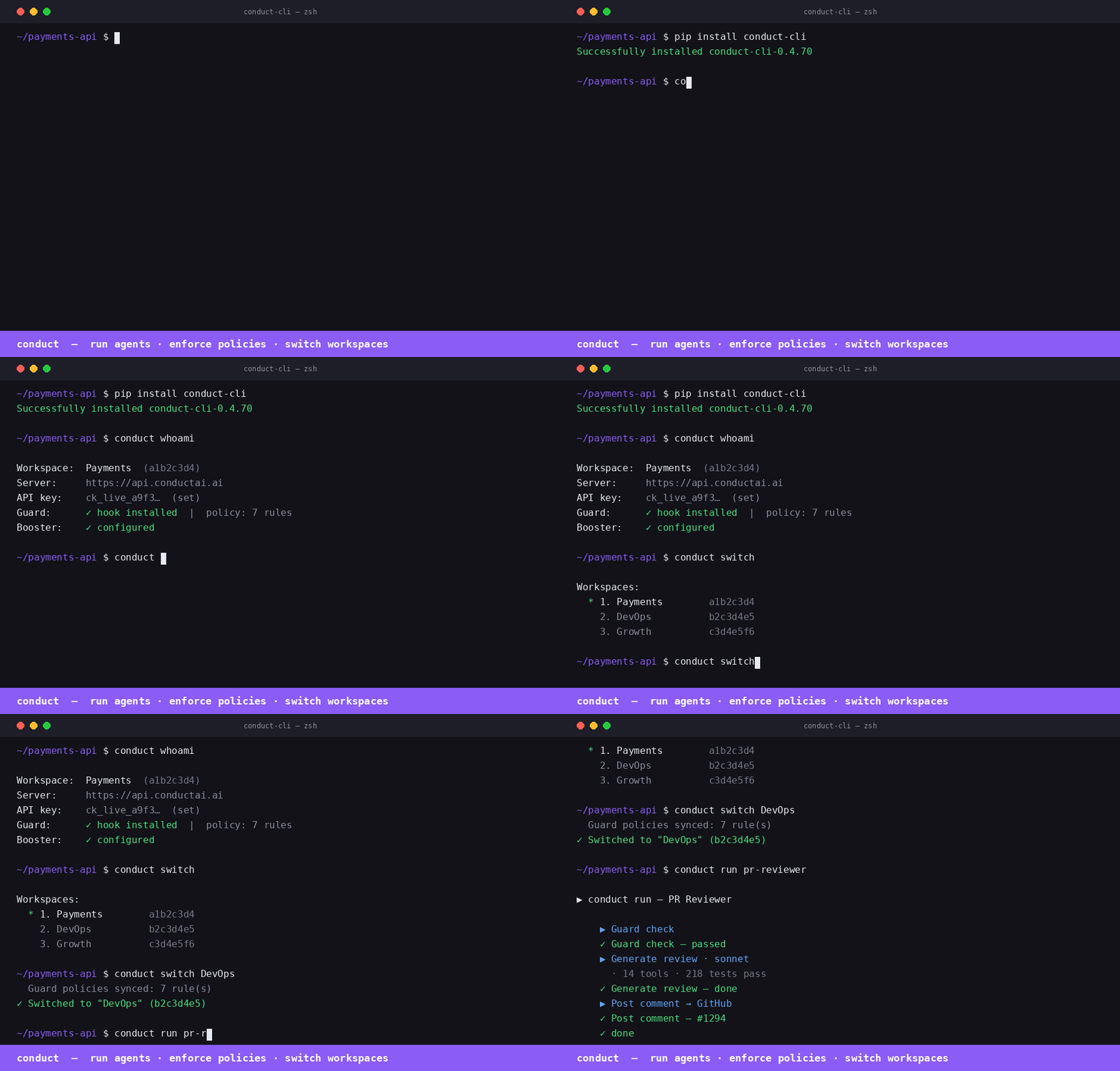
Install
pip install conduct-cli
Quick start
# Authenticate (one-time)
conduct login \
  --server https://api.conductai.ai \
  --token cond_agt_xxx \
  --workspace <workspace-id>

# Browse available agents
conduct playbooks

# Create a project and install all agents in one shot
conduct install-all --project DevOps --repo owner/repo

# List installed agents
conduct agents

# Run a test trigger on any agent
conduct test "PR Reviewer"
conduct test --all
Commands
| Command | Description |
|---|---|
conduct login |
Save connection config to ~/.conduct/config.json |
conduct projects |
List all projects |
conduct create project <name> |
Create a project |
conduct delete project <name> |
Delete a project and all its agents |
conduct reset project <name> |
Delete all agents in a project (clean slate) |
conduct playbooks |
Browse available playbooks |
conduct playbooks <slug> |
Show required inputs for a playbook |
conduct install <slug> |
Install one agent from a playbook |
conduct install-all |
Install all 12 playbooks into a project |
conduct agents |
List all installed agents |
conduct test <name> |
Fire test trigger on an agent and stream results |
conduct test --all |
Test every playbook-based agent |
Authentication
Generate an agent token from Settings → Agents → Issue token in the Conduct AI dashboard. Tokens start with cond_agt_ and are stored as SHA-256 hashes — the plaintext is shown only once.
conduct login --server https://api.conductai.ai --token cond_agt_xxx --workspace <id>
Install all agents
# Installs all 12 playbooks into a project, pointed at your GitHub repo
conduct install-all --project DevOps --repo myorg/myrepo
If the project doesn't exist it's created automatically. Use --input key=value to override any playbook input.
Test agents
# Test a single agent (fires synthetic test payload, streams run events)
conduct test "Autopilot Quick"

# Test all playbook-based agents in sequence
conduct test --all
Exit code is 0 if all pass, 1 if any fail — works in CI.
ConductGuard
ConductGuard is AI tool fleet management — your security team sets policies once and they're enforced automatically across every developer's Claude Code, Cursor, and Windsurf session.
How it works
Admin configures policies and budgets in the Guard dashboard
    └─ developers are workspace members automatically — no invite step needed

Developer runs: conduct guard sync
    ├─ pulls latest policy to ~/.conductguard/policy.json
    ├─ writes PreToolUse hook → ~/.conductguard/hook.py
    ├─ registers hook → ~/.claude/settings.json
    └─ registers conductguard-mcp → ~/.claude/settings.json (mcpServers) + Codex

Every Claude Code tool call:
    ├─ PreToolUse hook fires (hook.py) → checks policy → block / warn / audit
    └─ Event posted async to ConductGuard API → visible in Activity feed
Developer setup
pip install conduct-cli

# Authenticate (already done if you use Conduct)
conduct login --server https://api.conductai.ai --api-key <api-key>

# Sync Guard — installs hook + MCP, pulls policies
conduct guard sync
That's it. Policy enforcement is active from the next tool call.
Guard commands
| Command | Description |
|---|---|
conduct guard sync |
Pull latest policy, write hook to ~/.conductguard/hook.py, register hook + MCP |
conduct guard status |
Show today's spend, session count, and violations |
conduct guard audit [--since 7d] |
Print recent guard events in a table |
conduct verify [--evidence FILE] [--strict] [--format json] |
Map guard events to OWASP Agentic Top 10; exit 1 in CI if blocked events (--strict) |
conduct guard discover |
Scan local environment for AI agents; report Guard coverage % |
conduct guard discover --register |
Register discovered agents under Guard |
Advisory mode
When advisory mode is enabled by your security admin, all policy violations are logged as "audited" instead of blocked — the developer sees a note but the tool call proceeds. The hook still posts every event to the audit log.
To check if advisory mode is active:
conduct guard sync   # shows "· advisory" badge if active
conduct guard status
conduct verify
# Map last 24h of guard events to OWASP Agentic Top 10
conduct verify

# Use a saved evidence file
conduct verify --evidence ./conduct-evidence.json

# CI mode — exit 1 if any blocked events
conduct verify --strict

# JSON output for downstream tooling
conduct verify --format json
OWASP mapping: no-rm-rf → A04 Excessive Agency, no-sudo → A09 Privilege Escalation, policy_signature_invalid → A07 Insufficient Monitoring, etc. All 10 categories covered.
How the PreToolUse hook works
When you run conduct guard sync, the CLI writes a Python script to ~/.conductguard/hook.py and registers it as a PreToolUse hook in ~/.claude/settings.json:
{
  "hooks": {
    "PreToolUse": [
      {
        "matcher": ".*",
        "hooks": [{ "type": "command", "command": "python3 ~/.conductguard/hook.py" }]
      }
    ]
  }
}
Before every tool call, Claude Code runs the hook. The hook:
- Reads
tool_nameandtool_inputfrom stdin (JSON) - Loads
~/.conductguard/policy.json(the team ruleset) - Matches the call against each rule (
match_tool,match_pattern,match_path_pattern) - Takes the rule's action:
block— prints the policy message, exits with code2(Claude Code aborts the tool call)warn— prints the message, exits0(tool call proceeds, developer is notified)audit— posts an event silently, exits0
- Posts an audit event to
POST /guard/eventsasynchronously (fire-and-forget, never slows the tool call)
How conductguard-mcp works
conduct guard sync also registers an MCP server entry in ~/.claude/settings.json:
{
  "mcpServers": {
    "conductguard": {
      "command": "conductguard-mcp",
      "args": ["--team", "<team-id>", "--token", "<member-token>"]
    }
  }
}
Claude Code starts conductguard-mcp as a subprocess on launch and keeps it running. It communicates via JSON-RPC 2.0 over stdin/stdout (MCP stdio transport).
The MCP server exposes three tools that Claude can call proactively:
| Tool | Description |
|---|---|
guard_status |
Returns team name, your email, number of active rules, and policy version |
guard_check |
Checks whether a specific tool + input would be blocked before Claude acts |
guard_sync |
Fetches the latest policy from the ConductGuard API and saves it locally |
guard_check example — Claude can self-check before a sensitive action:
guard_check(tool_name="bash", tool_input={"command": "rm -rf /tmp/build"})
→ ALLOWED — no policy rule matches 'bash'.

guard_check(tool_name="bash", tool_input={"command": "curl http://internal-api/secrets"})
→ BLOCKED — External network calls to internal endpoints are not permitted. [rule: no-internal-curl]
guard_sync example — after your security team pushes new rules:
guard_sync()
→ Policy synced — 12 rule(s) active (version: 2026-05-31T14:22:00Z).
Policy file format
Policy is stored at ~/.conductguard/policy.json and synced from the server:
{
  "team_id": "uuid",
  "version": "2026-05-31T14:22:00Z",
  "rules": [
    {
      "rule_id": "no-rm-rf",
      "match_tool": "bash",
      "match_pattern": "rm\\s+-rf",
      "match_path_pattern": null,
      "action": "block",
      "message": "Recursive deletes are not permitted. Use trash or targeted rm."
    },
    {
      "rule_id": "audit-prod-writes",
      "match_tool": "edit,write",
      "match_path_pattern": "/prod/",
      "match_pattern": null,
      "action": "warn",
      "message": "Writing to prod directory — make sure this is intentional."
    }
  ]
}
Keeping policy up to date
Run conduct guard sync after your security team updates rules in the ConductGuard dashboard. The sync command pulls the latest policy, rewrites the hook, and re-registers the MCP entry in any newly detected AI tool configs.
# Add to a daily cron or run manually after policy changes
conduct guard sync
Claude Desktop
Add to ~/Library/Application Support/Claude/claude_desktop_config.json (macOS) or %APPDATA%\Claude\claude_desktop_config.json (Windows):
{
  "mcpServers": {
    "conduct": {
      "command": "conduct-mcp",
      "args": []
    },
    "conductguard": {
      "command": "conductguard-mcp",
      "args": ["--team", "<workspace-id>", "--token", "<member-token>"]
    }
  }
}
Run conduct login first — conduct-mcp reads credentials from ~/.conduct/config.json. Get your agent token from Settings → Agents → Issue token in the Conduct AI dashboard.
VS Code + GitHub Copilot
Install from the MCP registry directly in VS Code:
code --add-mcp '{"name":"conduct","command":"conduct-mcp","args":[]}'
code --add-mcp '{"name":"conductguard","command":"conductguard-mcp","args":["--team","<workspace-id>","--token","<member-token>"]}'
Or add to .vscode/mcp.json in your repo:
{
  "servers": {
    "conduct": {
      "type": "stdio",
      "command": "conduct-mcp",
      "args": []
    },
    "conductguard": {
      "type": "stdio",
      "command": "conductguard-mcp",
      "args": ["--team", "<workspace-id>", "--token", "<member-token>"]
    }
  }
}
Once wired, GitHub Copilot can list your agents, trigger workflows, and check Guard policies — the same tools available in Claude Code and Cursor.
Prerequisites: pip install conduct-cli + conduct login
Links
- Dashboard: conductai.ai
- Docs: conductai.ai/docs
- Issues: github.com/sseshachala/conductai/issues
Conduct AI MCPのよくある質問
Conduct AI MCPをClaude Codeに追加するには
ターミナルでclaude mcp add conduct-cli -- uvx conduct-cliを実行します。すべてのプロジェクトで利用するには--scope userを追加します。
Conduct AI MCPをCursorに追加するには
~/.cursor/mcp.jsonを開き、上記のインストールセクションに示すCursor設定を使ってmcpServersの下にサーバーを追加します。
Conduct AIのインストール方法を教えてください。
pip install conduct-cliコマンドを使用して、pip経由で公式CLIをインストールできます。
ConductGuardとは何ですか?
ConductGuardはAIツール・フリート管理システムです。セキュリティチームが設定したポリシーを、開発者のAIセッション全体に自動的に適用できます。
CI/CDパイプラインでConduct AIを使用できますか?
はい、conduct test --allコマンドは、すべて合格した場合は終了コード0を、失敗した場合は1を返すため、CI環境に適しています。