
テキストの書き起こしデータを操作することで、AIクライアントによる動画ファイルの文字起こしや編集を可能にします。フィラー(言い淀み)の削除や、ポーズ(間)の短縮などが含まれます。
別名 SilverNine/trimscript
- スター
- 0
- ツール
- —
- ダウンロード数(30日間)
- 85
- 最新バージョン
- 0.1.0
- 最終コミット
- 2026年10月10日
- ライセンス
- MIT
TrimScript MCPとは
TrimScriptはMCPサーバーです。 テキストの書き起こしデータを操作することで、AIクライアントによる動画ファイルの文字起こしや編集を可能にします。フィラー(言い淀み)の削除や、ポーズ(間)の短縮などが含まれます。.
プロジェクトのREADMEから生成された概要
TrimScript MCP server について
TrimScriptの主な機能は、テキストの書き起こしデータを操作して動画ファイルを編集することです。ポッドキャスト、チュートリアル、講演などの音声コンテンツのクリエイター向けに設計されており、不要なセクションの削除、umやuhといったフィラーの除去、長いポーズの短縮が可能です。whisper.cppとffmpegを使用してローカル環境で動作するため、リモートサーバーへのアップロードやアカウント作成を行うことなく、メディアのプライバシーを保持できます。
開発者は、このserverをClaude CodeやCodexなどのMCPクライアントと統合して、編集プロセスを自動化できます。接続すると、AIエージェントが文字起こしを読み取り、具体的なカットやテキストの修正を提案します。これらの編集は、勝手に適用されるのではなく、エディタ上に提案として表示され、ユーザーが承認する仕組みになっています。システムは、MP4、WAV、SRT/VTT字幕、およびFinal Cut ProやDaVinci Resolveでのプロフェッショナルなワークフローに対応するFCPXMLを含む、さまざまなエクスポート形式をサポートしています。
できること
- 1冗長なビデオセグメントの削除AIエージェントに対し、やり直した導入部分や繰り返されたデモを特定し、削除を提案するよう指示します。
- 2フィラー除去の自動化単一のコマンドを使用して、録音に含まれるumやuhなどのすべてのフィラーを削除します。
- 3文字起こしミスの修正音声認識エンジンが聞き間違えた特定の単語を修正するよう、コーディングエージェントに指示します。
- 4不自然な沈黙の短縮テンポを良くするために、1秒以上のポーズをすべて短縮するコマンドを適用します。
プロジェクトの README から作成されています。すべてのユースケースは、その引用と照らし合わせて確認されています。
TrimScript MCPのインストール方法
フォーマット検証日 2026年11月10日Cursor に追加Gooseに追加Claude CodeにTrimScript MCPをインストール
$ claude mcp add trimscript -- uvx trimscriptCursorにTrimScript MCPをインストール
~/.cursor/mcp.json
{
  "mcpServers": {
    "trimscript": {
      "command": "uvx",
      "args": [
        "trimscript"
      ]
    }
  }
}VS CodeにTrimScript MCPをインストール
.vscode/mcp.json
{
  "servers": {
    "trimscript": {
      "type": "stdio",
      "command": "uvx",
      "args": [
        "trimscript"
      ]
    }
  }
}VS Code CLIにTrimScript MCPをインストール
$ code --add-mcp '{"name":"trimscript","type":"stdio","command":"uvx","args":["trimscript"]}'Claude DesktopにTrimScript MCPをインストール
claude_desktop_config.json
{
  "mcpServers": {
    "trimscript": {
      "command": "uvx",
      "args": [
        "trimscript"
      ]
    }
  }
}CodexにTrimScript MCPをインストール
$ codex mcp add trimscript -- uvx trimscriptCodex config.tomlにTrimScript MCPをインストール
~/.codex/config.toml
[mcp_servers.trimscript]
command = "uvx"
args = ["trimscript"]
Gemini CLIにTrimScript MCPをインストール
$ gemini mcp add -s user trimscript uvx -- trimscriptGemini settings.jsonにTrimScript MCPをインストール
~/.gemini/settings.json
{
  "mcpServers": {
    "trimscript": {
      "command": "uvx",
      "args": [
        "trimscript"
      ]
    }
  }
}自動チェック
実行日 2026年11月15日完全なレポート →自動チェックに合格しました。これはセキュリティ監査ではありません。コードを読み、サーバーに必要最小限のアクセス権を与えてください。 チェックの仕組み

- ソースリポジトリがリンクされており、アクセス可能silvernine/trimscript is public and reachablegithub.com/silvernine/trimscript ↗合格
- パッケージがこのリポジトリをソースとして指定trimscript names silvernine/trimscript as sourcepypi.org/project/trimscript/ ↗合格
- ビルドの来歴 (Sigstore 証明)Sigstore attestation for trimscriptpypi.org/project/trimscript/ ↗合格
- オープンソースライセンス (OSI)MITspdx.org/licenses/MIT.html ↗合格
- 過去1年以内にコミットまたはリリースありLast commit or release 2026-10-10github.com/silvernine/trimscript ↗合格
- OpenSSF Scorecard未チェック
- パッケージ名が有名なパッケージに酷似していないNo popular package one edit away from trimscript合格
- パッケージおよびその依存関係に重大な勧告なし53 resolved dependencies checked; no critical advisoryosv.dev ↗合格
- モデルへの隠れた指示がない0 tool descriptions and the README read; no override phrases, credential paths or hidden characters合格
- 破壊的なツールがラベル付けされている未チェック
- リモートエンドポイントが MCP ハンドシェイクに応答未チェック
README
GitHubで見るTrimScript

Edit video by editing the transcript. Runs on your machine. Free and open source. AI edits arrive as suggestions you approve.
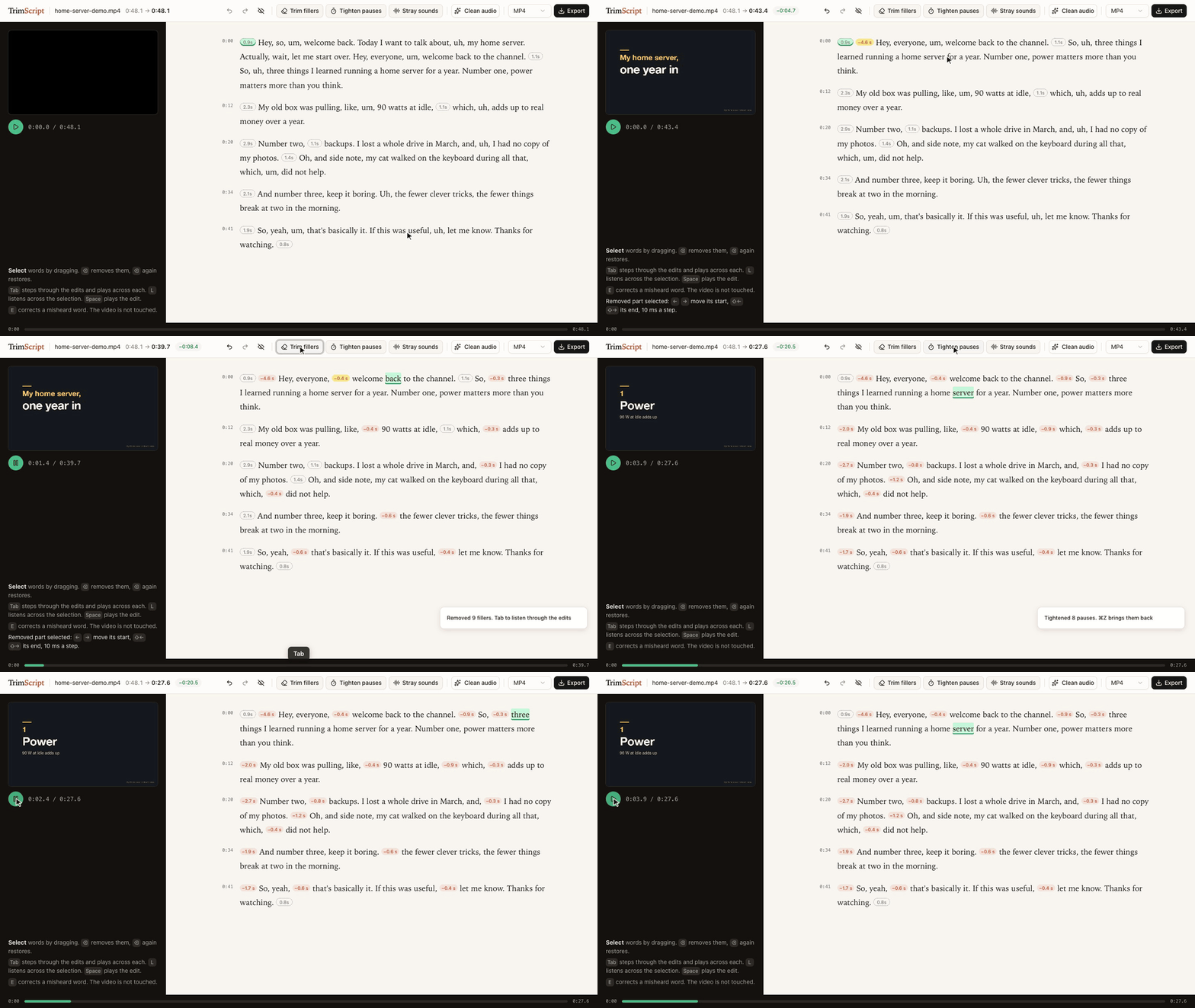
Delete the restarted intro, Trim fillers, Tab through the edits to listen, Tighten pauses: 48.1 s down to 27.6 s. The demo talk is synthetic: script and slides written for this demo, voice generated with Dia.
▶ Watch the 50-second demo: the same edit, then Claude Code suggesting cuts through the MCP server.
uvx trimscript open my-video.mp4
Needs uv and ffmpeg (brew install ffmpeg, apt install ffmpeg, winget install ffmpeg). Transcription, editing and export run on your machine: no account, no upload. If you connect a coding agent, that agent (and the model service behind it) reads the transcript.
Status: early. Developed on macOS with Apple Silicon. CI runs every push end to end on macOS, Linux and Windows (transcribe, remove, export); the editor itself has only been used on macOS so far.
What it does
- Transcribes locally with whisper.cpp, prompted to keep every "um" and "uh" instead of tidying them away. English only for now. The first run downloads the model (about 470 MB).
- Delete text, and the video skips it. Select words, press ⌫. The removed part folds into a small label with the seconds it saves, so the page reads like the finished edit. Select the label and press ⌫ to bring it back, or show all removed text with one switch. The preview skips removed parts as it plays.
- Trim fillers removes every um and uh in one go, and Tighten pauses shortens every pause over a second, keeping a little silence. Then press Tab to step through the edits and hear a second and a half on either side of each; ⌫ brings one back, ⌘Z brings them all back.
- Stray sounds jumps to voice between words that has no word in the transcript (a sound the recognizer skipped, a breath, half a word) and plays it. You listen and decide.
- Fine-tune any join by 10 ms with the arrow keys, listening across it each time.
- Clean audio: noise, level, gentle compression and loudness to -14 LUFS in one switch. The recording length never changes.
- Fix misheard words (E) without touching the media. Captions use the corrected text.
- Export MP4, WAV, SRT/VTT captions, or FCPXML to keep editing in Final Cut Pro or DaVinci Resolve with every edit point still adjustable.
- Nothing is destroyed. Your edit is one readable JSON file next to the video. The original file is never modified, and exports never overwrite it.
Use it with your coding agent
TrimScript ships an MCP server, so Claude Code, Codex or any MCP client can read the transcript and propose edits. Agent edits never apply silently: they show up in the open editor as suggestions with a reason, and you decide.
claude mcp add trimscript -- uvx trimscript mcp
Then ask things like:
- "In my-video.mp4 I restart the demo halfway through. Suggest removing the first attempt."
- "The speaker's product is called Acme, fix it wherever the transcript misheard it."
Tools: transcribe, get_transcript, suggest_removal, correct_text, list_edits, withdraw, enhance_voice, export.
The same actions are on the command line:
trimscript transcribe talk.mp4
trimscript show talk.mp4 --words      # transcript with item ids
trimscript remove talk.mp4 w120 w188 --reason "repeats the intro"
trimscript fillers talk.mp4            # remove every um and uh
trimscript pauses talk.mp4             # tighten pauses over a second
trimscript accept talk.mp4             # accept the agent's suggestions
trimscript export talk.mp4 -o talk-edit.mp4
Keyboard
| Key | Does |
|---|---|
| drag, Shift+click | select words |
| ⌫ | remove the selection, or restore it if it is already removed |
| Space | play the edit |
| double-click | play from that word |
| Tab / Shift+Tab | next / previous suggestion (or edit, when none wait), and listen across it |
| Enter / Shift+Enter | accept / reject the selected suggestion; a selection accepts every suggestion inside it |
| L | listen across the selection or a removed part |
| ← → / Shift+← → | move the start / end of a selected removed part by 10 ms |
| E | correct the text of the selection |
| ⌘Z / Shift+⌘Z | undo / redo |
How it works
- Every removed part covers a run of transcript items (words, fillers, pauses). The time to remove is derived from the words, so the preview and the export always agree.
- Edit points land midway between words, or keep a little silence when they meet a pause. Recognizers tend to stretch the last word of a sentence over the silence after it; TrimScript pulls word edges back to where the voice actually ends.
- Exports split on whole video frames and slice audio to about a millisecond, so sound never drifts from picture however many edits there are.
- The editor, the CLI and the MCP server all read and write the same project file. Edit from anywhere; the open editor updates live. Undo in the editor only reverts the editor's own change.
Tested on real talks
Three single-speaker talks from 38C3. For each: transcribe, trim fillers, tighten pauses, export with Clean audio on, then transcribe the export again with a larger model (Whisper large-v3-turbo) to check what is left.
| LoRa mesh | ACE up the sleeve | Going Long | |
|---|---|---|---|
| length | 32.9 min | 40.2 min | 36.2 min |
| removed (fillers trimmed, pauses tightened) | 5.2 min | 3.4 min | 6.5 min |
| fillers still heard in the export | 9 | 11 | 31 |
| export length vs. plan | -0.20 s | -0.16 s | -0.10 s |
| loudness | -14.1 LUFS | -14.3 LUFS | -14.3 LUFS |
| transcription | 1.2 min | 1.8 min | 1.7 min |
- 582 fillers trimmed across the three talks; 51 could still be heard after export. Filler counts are what the recognizer heard, not a judgment of any speaker.
- 3.0 to 4.5% of kept words read differently in the second transcript. Most of them sit away from any edit point: two different recognizers hearing jargon differently, not edits clipping words.
- Measured on an M1 Pro. Method and raw numbers: spikes/e2e-real.
Talks: "Building Your First LoRa Mesh Network From Scratch" by WillCrash, "ACE up the sleeve: Hacking into Apple's new USB-C Controller" by stacksmashing, and "Going Long! Sending weird signals over long haul optical networks" by Ben Cartwright-Cox. Recorded by the C3VOC at 38C3 and published on media.ccc.de under CC BY 4.0. The recordings are not part of this repository and were not modified; only measurements are reported. The speakers have not reviewed or endorsed TrimScript.
Scope
Editing recorded speech through its transcript is a long-standing idea, in research since at least Whittaker and Amento's "Semantic Speech Editing" (CHI 2004) and Berthouzoz, Li and Agrawala's "Tools for Placing Cuts and Transitions in Interview Video" (SIGGRAPH 2012), and in many editors since. TrimScript is a small, independent, local take on it for spoken-word recordings: talks, tutorials, podcasts, interviews.
It has no multitrack timeline, screen recorder, voice cloning or collaboration. Export FCPXML when you need a full editor.
Credits
- whisper.cpp and the Whisper small.en weights by OpenAI, MIT, run through pywhispercpp, MIT
- Optional: Parakeet TDT 0.6B v2 by NVIDIA, CC BY 4.0, in the MLX conversion by mlx-community, run through parakeet-mlx, Apache 2.0 (
trimscript[parakeet],--engine parakeet) - noisereduce, MIT
- FFmpeg, called as a separate program and not distributed with TrimScript
- Editor UI: React, shadcn/ui components on Radix UI, Tailwind CSS, Sonner, clsx and tailwind-merge (MIT), class-variance-authority (Apache 2.0), Lucide icons (ISC, some derived from Feather, MIT). Full license texts ship with the package in THIRD_PARTY_NOTICES.md and
src/trimscript/static/THIRD_PARTY_LICENSES.txt. - Demo voice: Dia by Nari Labs, Apache 2.0
Trademarks
Final Cut Pro is a trademark of Apple Inc. DaVinci Resolve is a trademark of Blackmagic Design. Claude Code is a trademark of Anthropic. Codex is a trademark of OpenAI. They are named only to say what TrimScript works with. TrimScript is an independent project and is not affiliated with, sponsored by or endorsed by any of these companies.
License
MIT. See LICENSE.
TrimScript MCPのよくある質問
TrimScript MCPをClaude Codeに追加するには
ターミナルでclaude mcp add trimscript -- uvx trimscriptを実行します。すべてのプロジェクトで利用するには--scope userを追加します。
TrimScript MCPをCursorに追加するには
~/.cursor/mcp.jsonを開き、上記のインストールセクションに示すCursor設定を使ってmcpServersの下にサーバーを追加します。
AIによる編集プロセスはどのように機能しますか?
エージェントによる編集は、理由とともにエディタ上に提案として表示されます。これらをユーザーが手動で承認または拒否できます。
TrimScriptは動画をクラウドにアップロードしますか?
いいえ、文字起こし、編集、エクスポートはすべてローカル環境で実行されます。アカウント作成やファイルのアップロードは不要です。
どのようなファイル形式でエクスポートできますか?
MP4、WAV、SRT/VTT字幕、またはFinal Cut ProやDaVinci Resolveなどのプロフェッショナル向けエディタで使用できるFCPXML形式でエクスポート可能です。
Claude Codeで使用できますか?
はい、TrimScriptはMCP serverを提供しており、Claude Codeやその他のMCPクライアントが文字起こしを読み取り、編集を提案できるようにします。