
37Studio MCPサーバー
コミット 2026年11月13日ブランドに合わせた動画の作成、編集、および複数のプラットフォームへの投稿を行う、AIビデオスタジオ兼ソーシャルメディア管理ツールです。
別名 Shaitrish/37studio
- スター
- 164
- ツール
- —
- ダウンロード数(30日間)
- —
- 最新バージョン
- —
- 最終コミット
- 2026年11月13日
- ライセンス
- MIT
37Studio MCPとは
ブランドに合わせた動画の作成、編集、および複数のプラットフォームへの投稿を行う、AIビデオスタジオ兼ソーシャルメディア管理ツールです。
プロジェクトのREADMEから生成された概要
37Studio MCP server について
37studioは、ローカルデスクトップからブランド動画の制作とソーシャルメディアの運用を可能にします。このツールを使用すると、ウェブサイトやフォルダからブランドライブラリとナレッジベースを構築でき、それをもとにエディターエージェントがアニメーション化されたHyperFramesコンポジションを作成します。Anthropic、OpenAI、ElevenLabsなどのプロバイダーから独自のAPIキーを持ち込んで使用するローカルファーストなスタジオとして機能するため、月額サブスクリプションによる上乗せ料金なしで、プロバイダーに直接支払う形になります。
開発者やクリエイターは、MCP serverを通じてワークフロー全体を制御し、Claude Code、Claude Desktop、Cursorなどのクライアントと接続できます。この統合により、チャットインターフェースを通じてブランド、キャンペーン、動画、投稿スケジュールの管理が可能になります。システムは、faster-whisperによる長い録音データの文字起こしから、YouTube、TikTok、Instagramを含む9つの異なるプラットフォームへのコンテンツ投稿まで、あらゆるプロセスを処理します。また、ソーシャルメディアでのエンゲージメントを単一のインボックスに集約し、コメントやメッセージの管理を容易にします。
できること
- 1コミュニティ管理の一元化さまざまなソーシャルネットワークからの受信メッセージやコメントを、一つの統合された場所で管理します。
- 2長尺動画の再利用長い動画録画を、ソーシャルメディア向けの短く魅力的なクリップへと変換します。
プロジェクトの README から作成されています。すべてのユースケースは、その引用と照らし合わせて確認されています。
自動チェック
実行日 2026年11月14日完全なレポート →まだ検証されていません。サーバーには80点のスコア、重大な問題がないこと、および検証に必要な十分なデータが必要です。 チェックの仕組み · 点数を上げるための改善点

- ソースリポジトリがリンクされており、アクセス可能shaitrish/37studio is public and reachablegithub.com/shaitrish/37studio ↗合格
- パッケージがこのリポジトリをソースとして指定未チェック
- ビルドの来歴 (Sigstore 証明)未チェック
- オープンソースライセンス (OSI)MITspdx.org/licenses/MIT.html ↗合格
- 過去1年以内にコミットまたはリリースありLast commit or release 2026-11-12github.com/shaitrish/37studio ↗合格
- OpenSSF Scorecard未チェック
- パッケージ名が有名なパッケージに酷似していない未チェック
- パッケージおよびその依存関係に重大な勧告なし未チェック
- モデルへの隠れた指示がない0 tool descriptions and the README read; no override phrases, credential paths or hidden characters合格
- 破壊的なツールがラベル付けされている未チェック
- リモートエンドポイントが MCP ハンドシェイクに応答未チェック
README
GitHubで見る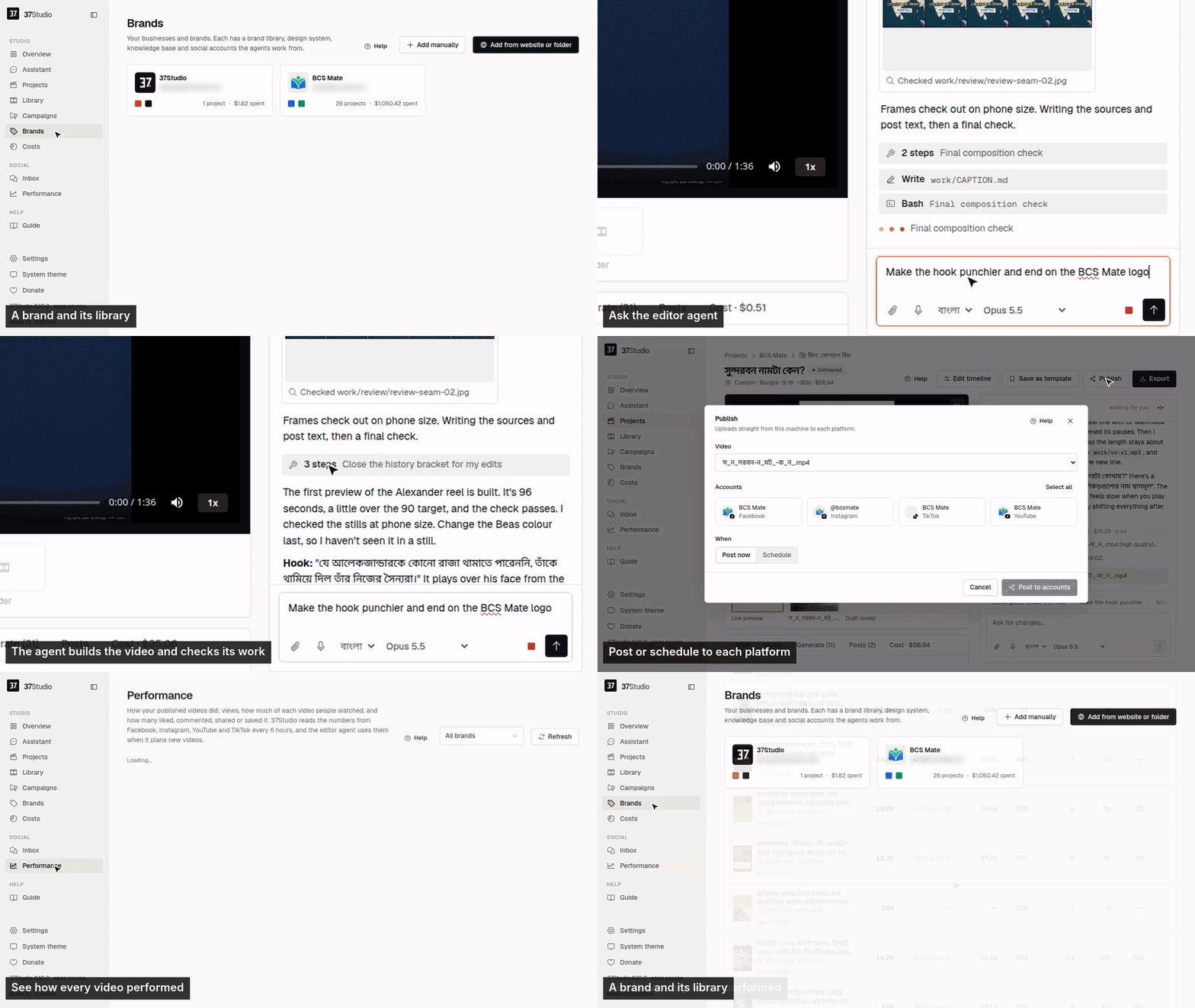
37Studio makes videos for a business and runs its social accounts, from one app on your own computer. Add a brand from its website and it builds a brand library and a knowledge base. Brief a video and Claude Code, the editor agent, builds it as a HyperFrames composition in that brand, checks its own frames and renders it on your machine. Publish it to the brand's accounts with a caption written for each platform, now, on a schedule or on Autopilot. Messages and comments land in one inbox with replies drafted from the knowledge base.
You bring your own keys (a Claude plan or an Anthropic API key; optionally OpenAI, xAI, OpenRouter, Gemini, fal.ai or ElevenLabs) and pay the providers directly. It is free and open source under the MIT License, made by Shaitrish in Dhaka.
Install
Desktop app (Windows 10/11 and Linux). Download it from studio.shaitrish.com/desktop:
- Windows: open the installer. It needs no admin rights and adds 37Studio to the Start menu and desktop. Windows may say it protected your PC, because the app isn't signed yet: More info → Run anyway.
- Ubuntu 24.04+ / Debian 13+:
sudo apt install ./37studio_*_amd64.deb(it brings ffmpeg and Python).
Then install the tools the agent uses. Overview → Finish setup in the app lists anything missing:
winget install Git.Git Gyan.FFmpeg OpenJS.NodeJS.LTS Python.Python.3.13   # Windows only
npm install -g @anthropic-ai/claude-code    # Node.js 22+; on Linux with sudo
docs/desktop.md covers other Linux, the .zip, building it yourself and troubleshooting.
Docker (macOS, or a server). Every tool comes bundled. On your computer, install Docker Desktop, unzip 37studio.zip and double-click start.bat, start.command or start.sh. For a team, or replies and Autopilot around the clock, run it on a Linux server with HTTPS and a password. docs/docker.md has both, plus building from source and every setting.
One-Click Deploy

First steps
- Add your Claude key in Settings → AI services (an Anthropic API key, or a Claude plan token from
claude setup-token). - Add a brand from its website or a folder. In 5 to 10 minutes its library, design system and knowledge base are ready.
- Make a video. New video asks what to make; the agent builds it while you watch, and takes changes in plain words.
- Connect accounts on the brand's Social tab (how), then Publish now, on a schedule, or with Autopilot.
The user guide, also inside the app as Guide, covers every screen.
What it does
- Brand library from a website or folder. Paste a URL, or pick the brand's own project folder, and get its logos, people, photos, fonts and exact colours sorted and captioned, plus a design system (
design.md) and a knowledge base (knowledge.md). - An editor agent. Claude Opus 5.5 builds each video as an animated HyperFrames composition, checks its own frames and takes changes in plain words. Edit by hand on a real timeline when you want to.
- Many kinds of output. Hook reels, captioned clips, motion-graphics explainers, podcast clips, promo ads, square and portrait posts, and thumbnails. Save any finished video as a template for the next one.
- Long recordings into many videos. A 2-hour class becomes ten reels. Transcription runs locally with faster-whisper: free, private, about 100 languages. YouTube and Google Drive links import directly.
- Generated media. Gemini images; video clips from Gemini or, through fal.ai, Seedance, Kling, Veo, Wan and others; ElevenLabs voiceover, sound effects and music. Each brand can keep its own voices, cloned from a short recording of the founder or presenter, with a default per language; ask the agent for a voice by name, or to switch a finished video to it. The agent asks before media on one project costs more than the limit in Settings → Spending, and keeps a person or product consistent by reusing one reference image across shots. The agent uses them only when the footage and brand library can't do the job, and says what it made.
- Publishing and Autopilot. Post to any mix of a brand's accounts on nine platforms now or on a schedule, or let a content plan make a fresh video before every slot and wait for one-click approval.
- One inbox. Messenger, Instagram and WhatsApp messages and Facebook and Instagram comments, with replies drafted in the customer's language, following the brand's own rules. Off, drafts to approve, or fully automatic, per brand.
- Performance. Views, how much of each video people watched, likes, comments, shares, saves and engagement for every video on the brand's Facebook, Instagram, YouTube and TikTok, best and worst on top. The editor agent reads the same numbers before it plans the next video.
- Assistant and MCP. Run everything by chatting with the Assistant in the sidebar, or from your own AI agent (Claude Code, Claude Desktop, Cursor) through 37Studio's MCP server: brands, campaigns, videos, publishing, Autopilot, settings and connections.
- Real costs. Every project, campaign and brand shows its AI spend in your currency. No markup: you pay the AI providers directly.
Platforms
| Platform | Publishes | Inbox | You connect with |
|---|---|---|---|
| Facebook Pages | Reels and Page videos | Messenger, comments | Facebook Login through your own Meta app |
| Instagram (Business or Creator) | Reels | Messages, comments | The same sign-in as Facebook |
| YouTube | Videos | Your own Google OAuth client | |
| TikTok | Videos, or to the creator's drafts | Your own TikTok app | |
| Videos to your profile; company Pages with LinkedIn's approval | Your own LinkedIn app | ||
| X | Video posts | Your own X app | |
| Video Pins, on the boards you pick | Your own Pinterest app | ||
| Bluesky | Video posts | Handle and an app password | |
| Mastodon | Video posts | Server URL and an access token | |
| Messages | A WhatsApp Business API number and a Cloudflare Tunnel to your copy (or your own relay) |
Not possible: Threads (its API only takes a video from a public URL, which a local-first app doesn't have), Facebook Groups and personal profiles (Meta removed it), Reddit and Snapchat (no usable public video-posting API). Setup for each one: docs/platforms.md.
How it works
Browser ──► 37studio (Go, one binary) ──► SQLite + data/ (brands, projects, encrypted tokens and keys)
             ├─ claude -p, the editor agent ──► ffmpeg · npx hyperframes · 37studio gen / transcribe / clip
             ├─ hyperframes render (Chrome + ffmpeg) ──► out/*.mp4, *.png
             ├─ post queue ──► Facebook · Instagram · YouTube · TikTok · LinkedIn · X · Pinterest · Bluesky · Mastodon
             └─ inbox loop ──► Messenger, Instagram (Graph API) · WhatsApp (webhook through your tunnel, or your own relay)
Claude Code does the editing, HyperFrames renders, Go serves and React is the UI. Any MCP client (Claude Code, Claude Desktop, Cursor) can run the whole app through its MCP server at http://localhost:8080/mcp: claude mcp add --transport http 37studio http://localhost:8080/mcp. docs/architecture.md has the job flow, the agent harness, a code map and the release process.
What leaves my computer? Calls to the AI providers you set up, uploads to the platforms you connect, and the update check (GitHub Releases). Nothing is sent to Shaitrish. Questions and problems: the guide's Troubleshooting, or open an issue.
Support the project
37Studio is free and stays free. If it saves you time, you can donate by US bank transfer or bKash, star the repo, or share what you made with it. Want it set up for you? Shaitrish does paid setup over a screen share: message us on WhatsApp.
Contributing
Bug reports, ideas and pull requests are welcome: CONTRIBUTING.md covers running it from source and the checks to run. Report security problems privately, as SECURITY.md describes.
License
MIT © Shaitrish. The open-source tools 37Studio bundles (HyperFrames, ffmpeg, faster-whisper and others) keep their own licenses. Claude Code is Anthropic's software, used under Anthropic's terms.
37Studio MCPのよくある質問
どのプラットフォームに投稿できますか?
Facebook、Instagram、YouTube、TikTok、LinkedIn、X、Pinterest、Bluesky、Mastodonに投稿可能です。
独自のAIモデルを使用できますか?
はい、Claude、OpenAI、xAI、OpenRouter、Gemini、fal.ai、ElevenLabsの独自のAPIキーを使用できます。
ソーシャルメディアのメッセージ管理はできますか?
はい、Messenger、Instagram、WhatsAppのメッセージやコメントを管理できる統合インボックスを備えており、返信の下書き作成も可能です。