
モッドの検索、依存関係の解決、r2modmanプロファイルの書き出しを行うことで、Thunderstoreのモッドパックの構築と管理を支援します。
別名 packwarden-dev/packwarden, @packwarden-dev/thunderstore-mcp
- スター
- 0
- ツール
- 5
- ダウンロード数(30日間)
- —
- 最新バージョン
- 0.1.0
- 最終コミット
- 2026年10月26日
- ライセンス
- MIT
PackWarden MCPとは
モッドの検索、依存関係の解決、r2modmanプロファイルの書き出しを行うことで、Thunderstoreのモッドパックの構築と管理を支援します。 5個のツールを提供しており、list_communities, search_mods, resolve_dependenciesなどがあります。
プロジェクトのREADMEから生成された概要
PackWarden MCP server について
Packwardenは、Lethal Company、Risk of Rain 2、Valheimなどのゲーム向けに、Thunderstoreのモッドパックを構築・管理することをAIアシスタントを利用する開発者に可能にします。このMCP serverは公開されているThunderstore APIに接続し、モッドの検索、複雑な依存関係ツリーの管理、およびバージョン切れやファイルの欠落といった既存のモッドリストの問題の監査を支援します。Claude DesktopやCursorではNode.jsを介してローカルで動作し、streamable HTTPモードを使用してリモートサービスとして実行することも可能です。
ユーザーは、所有者やカテゴリ別にコンテンツを見つけるsearch_modsや、完全な推移的依存関係を計算するresolve_dependenciesなどの特定のツールを使用します。また、サーバーはcheck_pack_healthを実行して、競合や非推奨のパッケージを特定できます。パックの準備が整うと、export_r2modman_profileがr2modmanやThunderstore Mod Managerで使用できる .r2z ファイルを生成します。システムは速度向上のためにローカルキャッシュを使用しますが、Lethal Companyのような大規模なコミュニティでは、ロードに多大なメモリと時間を要する場合があります。
できること
- 1複雑な依存関係の解決特定のモッドを動作させるために必要なすべてのパッケージとバージョンを計算します。
- 2モッドリストの健全性監査モッドのリストを確認し、古いバージョン、不足している依存関係、または重複したエントリを見つけます。
- 3コミュニティコンテンツの検索キーワード、所有者、またはカテゴリを使用して、特定のゲームコミュニティ内のモッドを特定します。
プロジェクトの README から作成されています。すべてのユースケースは、その引用と照らし合わせて確認されています。
PackWarden MCPのインストール方法
フォーマット検証日 2026年11月10日Cursor に追加Gooseに追加Claude CodeにPackWarden MCPをインストール
$ claude mcp add packwarden -- npx -y @packwarden-dev/thunderstore-mcpCursorにPackWarden MCPをインストール
~/.cursor/mcp.json
{
  "mcpServers": {
    "packwarden": {
      "command": "npx",
      "args": [
        "-y",
        "@packwarden-dev/thunderstore-mcp"
      ]
    }
  }
}VS CodeにPackWarden MCPをインストール
.vscode/mcp.json
{
  "servers": {
    "packwarden": {
      "type": "stdio",
      "command": "npx",
      "args": [
        "-y",
        "@packwarden-dev/thunderstore-mcp"
      ]
    }
  }
}VS Code CLIにPackWarden MCPをインストール
$ code --add-mcp '{"name":"packwarden","type":"stdio","command":"npx","args":["-y","@packwarden-dev/thunderstore-mcp"]}'Claude DesktopにPackWarden MCPをインストール
claude_desktop_config.json
{
  "mcpServers": {
    "packwarden": {
      "command": "npx",
      "args": [
        "-y",
        "@packwarden-dev/thunderstore-mcp"
      ]
    }
  }
}CodexにPackWarden MCPをインストール
$ codex mcp add packwarden -- npx -y @packwarden-dev/thunderstore-mcpCodex config.tomlにPackWarden MCPをインストール
~/.codex/config.toml
[mcp_servers.packwarden]
command = "npx"
args = ["-y", "@packwarden-dev/thunderstore-mcp"]
Gemini CLIにPackWarden MCPをインストール
$ gemini mcp add -s user packwarden npx -- -y @packwarden-dev/thunderstore-mcpGemini settings.jsonにPackWarden MCPをインストール
~/.gemini/settings.json
{
  "mcpServers": {
    "packwarden": {
      "command": "npx",
      "args": [
        "-y",
        "@packwarden-dev/thunderstore-mcp"
      ]
    }
  }
}PackWarden MCPツール 5
READMEから検出list_communitiessearch_modsresolve_dependenciescheck_pack_healthexport_r2modman_profile
| list_communities | — | |
| search_mods | — | |
| resolve_dependencies | — | |
| check_pack_health | — | |
| export_r2modman_profile | — |
設定
TEST_COMMUNITYTSMCP_EXPORT_DIR
| 名前 | 説明 | 種類 |
|---|---|---|
| TEST_COMMUNITY | — | |
| TSMCP_EXPORT_DIR | — |
自動チェック
実行日 2026年11月13日完全なレポート →自動チェックに合格しました。これはセキュリティ監査ではありません。コードを読み、サーバーに必要最小限のアクセス権を与えてください。 チェックの仕組み

- ソースリポジトリがリンクされており、アクセス可能合格
- オープンソースライセンス (OSI)合格
- 過去1年以内にコミットまたはリリースあり合格
- パッケージ名が有名なパッケージに酷似していない合格
- リモートエンドポイントがHTTPSを使用未チェック
- 破壊的なツールがラベル付けされている合格
- モデルへの隠れた指示がない合格
- パッケージおよびその依存関係に重大な勧告なし合格
README
GitHubで見るPackWarden — Thunderstore Mod-Pack MCP Server (v0.1.0)
PackWarden is not affiliated with or endorsed by Thunderstore. "Thunderstore" is used only to describe compatibility. Mod data comes from the public Thunderstore API (https://thunderstore.io).
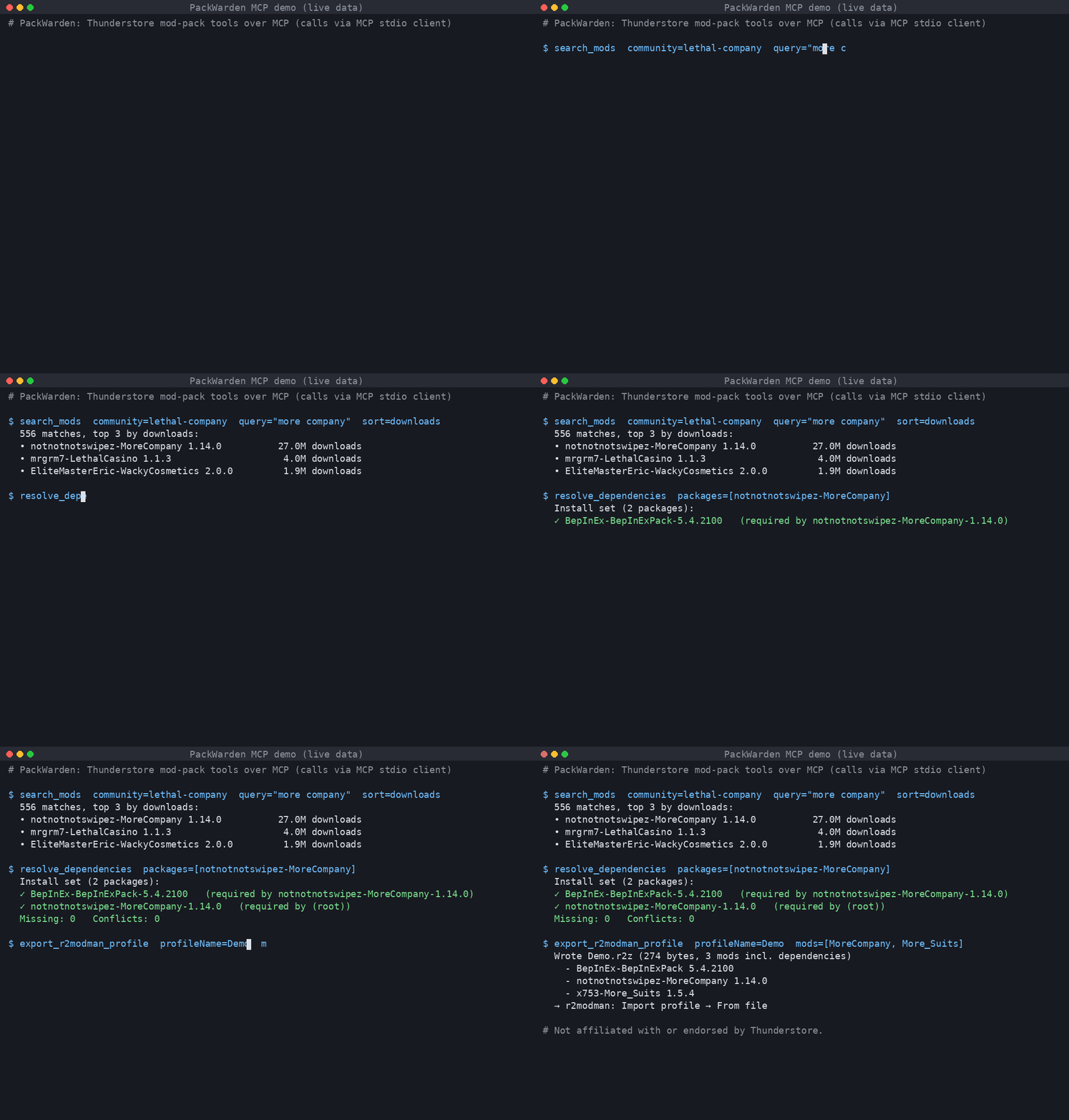
Live output: searching Lethal Company mods, resolving MoreCompany's dependencies, and exporting an r2modman .r2z profile.
An MCP server that helps AI assistants build and maintain Thunderstore mod packs (Lethal Company, Risk of Rain 2, Valheim, and every other Thunderstore community).
Tools
| Tool | What it does |
|---|---|
list_communities |
List Thunderstore game communities (identifier + name). |
search_mods |
Search a community by name/owner/description/category; sort by relevance, downloads, rating, updated. |
resolve_dependencies |
Full transitive dependency closure for one or more packages/versions; final install set, missing deps, multi-version pins, optional tree. |
check_pack_health |
Audit a mod list: not found, removed version, deprecated, outdated, missing deps, dependency version conflicts, duplicates, NSFW. |
export_r2modman_profile |
Write an .r2z profile (r2modman / Thunderstore Mod Manager "Import profile → From file"), optionally with deps and config files. Nothing is uploaded. |
Mods are referenced as Owner-Name (latest) or Owner-Name-1.2.3.
Install
Requires Node.js ≥ 18.17.
git clone <repo> thunderstore-mcp && cd thunderstore-mcp
npm install && npm run build
Claude Desktop
Edit claude_desktop_config.json (macOS: ~/Library/Application Support/Claude/, Windows: %APPDATA%\Claude\):
{
  "mcpServers": {
    "thunderstore": {
      "command": "node",
      "args": ["/absolute/path/to/thunderstore-mcp/dist/main.js"],
      "env": { "TSMCP_EXPORT_DIR": "/absolute/path/for/profiles" }
    }
  }
}
Restart Claude Desktop.
Cursor
~/.cursor/mcp.json (global) or .cursor/mcp.json (project):
{
  "mcpServers": {
    "thunderstore": {
      "command": "node",
      "args": ["/absolute/path/to/thunderstore-mcp/dist/main.js"]
    }
  }
}
Streamable HTTP (remote / self-hosted)
npm run start:http            # http://127.0.0.1:3333/mcp
PORT=8080 HOST=0.0.0.0 node dist/main.js --http
Cursor: { "mcpServers": { "thunderstore": { "url": "http://127.0.0.1:3333/mcp" } } }.
The HTTP mode is stateless (POST-only, JSON responses) and has no auth. Put it behind a reverse proxy with TLS and auth before exposing it.
Configuration (env)
| Var | Default | Meaning |
|---|---|---|
TSMCP_CACHE_DIR |
~/.cache/thunderstore-mcp |
Slim package-index cache |
TSMCP_LIST_TTL_MS |
3600000 (1h) |
Package-list freshness |
TSMCP_MIN_INTERVAL_MS |
1000 |
Minimum gap between outbound requests |
TSMCP_EXPORT_DIR |
./exports |
Where .r2z files are written |
TSMCP_CONTACT |
support@packwarden.dev |
Contact put in the User-Agent. Override if you run your own copy. |
TSMCP_BRAND |
PackWarden |
Brand in server name/User-Agent |
TSMCP_BASE_URL |
https://thunderstore.io |
API base |
Be a good API citizen
- One full package list download per community per TTL, then conditional requests (
If-Modified-Since). Results are cached on disk as a slim index. - Outbound requests are serialized (concurrency 1) and spaced ≥1s apart. On 429/5xx the client backs off and honours
Retry-After. - Identifying User-Agent with a contact address.
- If the network fails, the server keeps serving stale cache.
Tests (live API)
npm test                         # default community: valheim
TEST_COMMUNITY=valheim npm test
Tests cover stdio and streamable HTTP end-to-end against the live Thunderstore API.
Limitations
- Large communities are heavy. The first load of Lethal Company is about 330 MB of JSON, takes about 14 s, and uses about 1.4 GB of RAM. After that, loads from cache take about 3 s.
- Resolution follows r2modman behaviour (highest requested version wins). It does not do semver range solving, because Thunderstore pins exact versions.
- No profile code sharing, which would need an upload to Thunderstore. Only file export is supported.
- Search is local keyword scoring, not Thunderstore's own search ranking.
PackWarden MCPのよくある質問
PackWarden MCPをClaude Codeに追加するには
ターミナルでclaude mcp add packwarden -- npx -y @packwarden-dev/thunderstore-mcpを実行します。すべてのプロジェクトで利用するには--scope userを追加します。
PackWarden MCPをCursorに追加するには
~/.cursor/mcp.jsonを開き、上記のインストールセクションに示すCursor設定を使ってmcpServersの下にサーバーを追加します。
PackWarden MCPが提供するツールは
5個のツールを提供しており、list_communities, search_mods, resolve_dependencies, check_pack_health, export_r2modman_profileなどがあります。
どのゲームに対応していますか?
Lethal Company、Risk of Rain 2、Valheimを含む、すべてのThunderstoreコミュニティに対応しています。
モッドリストを書き出すにはどうすればよいですか?
このサーバーは、r2modmanやThunderstore Mod Managerにインポート可能な .r2z プロファイルを書き出すことができます。
大規模なコミュニティを利用する場合のハードウェア要件は?
Lethal Companyのような大規模なコミュニティをロードする場合、約1.4 GBのRAMが必要となり、初回ロードに約14秒かかります。