AIエージェントを使用して、Raindrop.ioのブックマーク検索、コレクションの確認、および整理プランの作成を行います。
別名 KingPsychopath/raindrop-cli, raindrop-cli, @machineyearn/raindrop-cli
- スター
- 2
- ツール
- —
- ダウンロード数(30日間)
- —
- 最新バージョン
- 0.2.1
- 最終コミット
- 2026年11月3日
- ライセンス
- MIT
rdrop MCPとは
rdropはMCPサーバーです。 AIエージェントを使用して、Raindrop.ioのブックマーク検索、コレクションの確認、および整理プランの作成を行います。.
プロジェクトのREADMEから生成された概要
rdrop MCP server について
rdrop for Raindrop.ioは、コマンドラインツールやAIエージェントを使用して、Raindrop.ioのブックマークライブラリを管理、検索、整理するための手段を提供します。ネイティブなGo製CLIおよびMCP serverとして機能し、コレクションの確認、クリーンアップが必要な箇所の特定、整理プランの生成が可能です。ユーザーはターミナルを介して、あるいはClaudeやCodexなどのAIクライアントを接続することで、複雑な読み取りやプランニングタスクを実行できます。
このserverを使用するには、プライベートな設定ファイルに保存されたRaindropトークンを提供する必要があります。システムはプロバイダーに依存しない設計となっており、ホストされたモデルに接続することも、QwenやLayaのようなローカルオプションを実行することも可能です。安全性に重点を置いており、新しいタグの追加やコレクションの移動などの提案された変更は、アカウントに実際に適用される前にdry-runプロセスを通じて確認できます。これにより、再編成プロセス中も既存のタグやノートが損なわれないことが保証されます。
できること
- 1ライブラリのクリーンアップ監査レポートを実行して、注意が必要なブックマークや再整理が必要なブックマークを特定します。
- 2CLIによるコレクションの検索と管理シェルコマンドを使用して、特定の種類のリンクを検索したり、コレクションツリーを管理したりします。
- 3提案された変更の安全な確認整理プランを確定する前に、どのブックマークやタグが変更されるかを正確に検証します。
プロジェクトの README から作成されています。すべてのユースケースは、その引用と照らし合わせて確認されています。
rdrop MCPのインストール方法
フォーマット検証日 2026年11月10日Cursor に追加Gooseに追加Claude Codeにrdrop MCPをインストール
$ claude mcp add --env 'RAINDROP_TOKEN=<YOUR_RAINDROP_TOKEN>' raindrop-cli -- npx -y @machineyearn/raindrop-cliCursorにrdrop MCPをインストール
~/.cursor/mcp.json
{
  "mcpServers": {
    "raindrop-cli": {
      "command": "npx",
      "args": [
        "-y",
        "@machineyearn/raindrop-cli"
      ],
      "env": {
        "RAINDROP_TOKEN": "<YOUR_RAINDROP_TOKEN>"
      }
    }
  }
}VS Codeにrdrop MCPをインストール
.vscode/mcp.json
{
  "servers": {
    "raindrop-cli": {
      "type": "stdio",
      "command": "npx",
      "args": [
        "-y",
        "@machineyearn/raindrop-cli"
      ],
      "env": {
        "RAINDROP_TOKEN": "<YOUR_RAINDROP_TOKEN>"
      }
    }
  }
}VS Code CLIにrdrop MCPをインストール
$ code --add-mcp '{"name":"raindrop-cli","type":"stdio","command":"npx","args":["-y","@machineyearn/raindrop-cli"],"env":{"RAINDROP_TOKEN":"<YOUR_RAINDROP_TOKEN>"}}'Claude Desktopにrdrop MCPをインストール
claude_desktop_config.json
{
  "mcpServers": {
    "raindrop-cli": {
      "command": "npx",
      "args": [
        "-y",
        "@machineyearn/raindrop-cli"
      ],
      "env": {
        "RAINDROP_TOKEN": "<YOUR_RAINDROP_TOKEN>"
      }
    }
  }
}Codexにrdrop MCPをインストール
$ codex mcp add raindrop-cli --env 'RAINDROP_TOKEN=<YOUR_RAINDROP_TOKEN>' -- npx -y @machineyearn/raindrop-cliCodex config.tomlにrdrop MCPをインストール
~/.codex/config.toml
[mcp_servers.raindrop-cli]
command = "npx"
args = ["-y", "@machineyearn/raindrop-cli"]

[mcp_servers.raindrop-cli.env]
RAINDROP_TOKEN = "<YOUR_RAINDROP_TOKEN>"
Gemini CLIにrdrop MCPをインストール
$ gemini mcp add -s user -e 'RAINDROP_TOKEN=<YOUR_RAINDROP_TOKEN>' raindrop-cli npx -- -y @machineyearn/raindrop-cliGemini settings.jsonにrdrop MCPをインストール
~/.gemini/settings.json
{
  "mcpServers": {
    "raindrop-cli": {
      "command": "npx",
      "args": [
        "-y",
        "@machineyearn/raindrop-cli"
      ],
      "env": {
        "RAINDROP_TOKEN": "<YOUR_RAINDROP_TOKEN>"
      }
    }
  }
}設定
RAINDROP_TOKENシークレットRaindrop.io API token. Alternatively configure the private rdrop env/token file; see setup.
| 名前 | 説明 | 種類 |
|---|---|---|
| RAINDROP_TOKEN | Raindrop.io API token. Alternatively configure the private rdrop env/token file; see setup. | シークレット |
自動チェック
実行日 2026年11月13日完全なレポート →自動チェックに合格しました。これはセキュリティ監査ではありません。コードを読み、サーバーに必要最小限のアクセス権を与えてください。 チェックの仕組み

- ソースリポジトリがリンクされており、アクセス可能kingpsychopath/raindrop-cli is public and reachablegithub.com/kingpsychopath/raindrop-cli ↗合格
- パッケージがこのリポジトリをソースとして指定@machineyearn/raindrop-cli names kingpsychopath/raindrop-cli as sourcenpmjs.com/package/@machineyearn/raindrop-cli ↗合格
- ビルドの来歴 (Sigstore 証明)No build attestation published for this release未チェック
- オープンソースライセンス (OSI)MITspdx.org/licenses/MIT.html ↗合格
- 過去1年以内にコミットまたはリリースありLast commit or release 2026-11-03github.com/kingpsychopath/raindrop-cli ↗合格
- OpenSSF Scorecard未チェック
- パッケージ名が有名なパッケージに酷似していないNo popular package one edit away from @machineyearn/raindrop-cli合格
- パッケージおよびその依存関係に重大な勧告なし7 resolved dependencies checked; no critical advisoryosv.dev ↗合格
- モデルへの隠れた指示がない0 tool descriptions and the README read; no override phrases, credential paths or hidden characters合格
- 破壊的なツールがラベル付けされている未チェック
- リモートエンドポイントが MCP ハンドシェイクに応答未チェック
README
GitHubで見るrdrop for Raindrop.io
Find, review and organize your saved links. Keep your tags. Bring your own AI.


Turn a growing Raindrop.io library into something easier to use. Search saved links, inspect collections, find cleanup opportunities and review suggestions before making changes. Use it from your terminal or let your favorite agent do the reading and planning.
A Raindrop.io CLI, MCP server and reviewed bookmark organizer from Machineyearn, built as an independent integration.
- Your organization stays yours. Start with the tags and collections you already created; preserve existing tags when applying a plan.
- Changes you can inspect. See exact bookmarks, proposed tags and destinations, then dry-run the plan before applying it.
- AI that fits your workflow. Connect Codex or Claude, use a hosted tool-capable model, or run local Qwen and Laya.
- A useful CLI without AI. Search, edit, export, manage highlights and collections, and build shell pipelines.
Get started
1. Install
brew install machineyearningengineer/tap/rdrop
# Or Node 22+, with optional dependencies enabled:
npm install --global @machineyearn/raindrop-cli@0.2.1
rdrop version
Prefer no global install? Use npx --yes @machineyearn/raindrop-cli@0.2.1 COMMAND. Native downloads cover macOS, Linux and Windows on Intel/AMD and ARM. Builds and checksums.
2. Connect Raindrop
Create a token in your Raindrop integration settings. Add it to the private file ~/.config/rdrop/env:
RAINDROP_TOKEN=your_token_here
Give the directory permissions 700 and the file 600, then run rdrop doctor. Keep the token out of chat and Git. Setup and troubleshooting.
3. Ask your agent
Copy this into Codex, Claude or your preferred coding agent. It can help with setup too:
Set up https://github.com/machineyearningengineer/raindrop-cli so you can help
manage my Raindrop library. Use its plugin/MCP when available, otherwise
use the CLI. Check installation and authentication; have me add the token
privately. Use the existing model and configured services first.

Start with a cleanup report and a small sample. Use my existing tags and
collections. Choose useful tools for search, content, classification and
planning; connect extra model providers, Executor or ACP only if needed.
Show the exact proposed changes and a dry-run. Preserve my tags and notes,
flag uncertain suggestions, and apply only the exact plan I approve.
Connect an agent, or start in your shell with rdrop collections --tree, rdrop search 'type:article #go' --json and rdrop cleanup report --json.
Choose your workflow
| You want to… | Start here |
|---|---|
| Find links, manage collections or export your library | Shell commands |
| Use Codex, Claude or another MCP client | Client setup and plugins |
| Ask a model to inspect your library and propose changes | Run a model directly |
| Use Raindrop's semantic search and AI-assisted reads | Official MCP tools |
| Classify selected bookmarks with Jev, Laya or Clef | Decision providers |
| Run portable Raindrop tools in Executor | Executor setup |
Organize with a plan
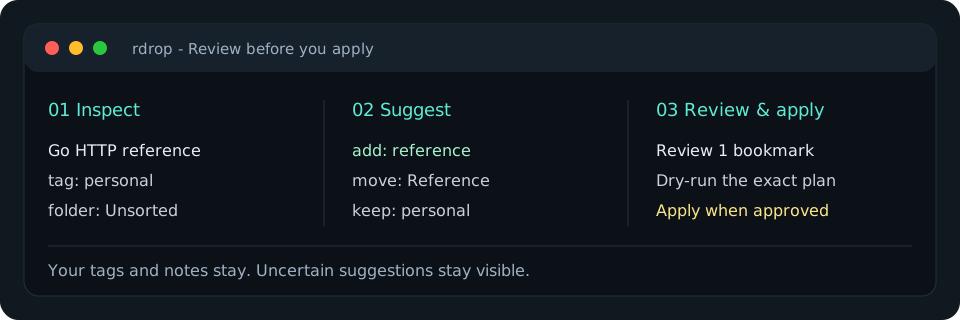
Begin with a report and select the exact bookmarks you want to review:
rdrop cleanup report --json > cleanup-report.json
rdrop context --ids 101,102 > library-context.json
jq 'del(.snapshots)' library-context.json > model-context.json
The model view contains your existing tag names, collection paths and bookmark metadata. Keep the original context private: its snapshots are used to detect edits before applying. Ask any model or rule engine for the proposal format, then validate it:
rdrop organize plan --context library-context.json --proposal proposal.json > organization.json
jq '.plan // error("No accepted changes")' organization.json > reviewed-plan.json
# Review accepted changes, needsReview and unmentioned items.
rdrop cleanup apply reviewed-plan.json --dry-run
rdrop cleanup apply reviewed-plan.json --yes
Plans keep existing tags and can combine new tags with a collection move. Unknown names and destinations fail validation; new tags need explicit naming rules. Account, digest and snapshots are checked before writing. Concurrent edits or partial failures need inspection and a fresh plan. Organizing and recovery.
Use your agent
The Codex and Claude plugin bundles a shared organizing skill and a read-only MCP connection. Install instructions also cover direct setup for other local clients.
rdrop connect mcp                         # client configuration, without tokens
rdrop mcp serve                           # read-only tools over stdio
rdrop mcp tools --search 'organize tags'   # discover relevant schemas offline
rdrop mcp tools --name raindrop_context    # inspect one exact schema
rdrop mcp serve --official                # also include Raindrop's hosted AI reads
Default tools read and plan. Enable writes only for an authorized host that enforces review. The official extension imports documented read tools; its plan limits and service availability still apply. Coverage and comparison with the official server.
You can also run a model directly:
# With your model API key in a private environment:
rdrop agent --model your-tool-capable-model --json \
  'Review the first page of untagged bookmarks. Use existing tags and propose a plan.' > agent-result.json
The model receives actual tool results and returns a response plus exact generated plans. Step, call and time limits bound the run. Local Chat Completions servers and hosted Responses APIs are supported. Jev, Laya and Cloudflare Clef provide typed category decisions; uncertainty stays visible. Model setup and exact commands.
Verified and maintained
A real Qwen/Laya loop classified bookmarks, generated a plan and applied it to a disposable test library while preserving existing tags and notes. The local Executor deployment passed connected-account health and live read checks. Repeat the verification, including its limits: this smoke check is not an accuracy benchmark, and Jev/Clef live inference requires provider credentials.
The product focuses on Raindrop. Model providers and proposal formats are agnostic; Obsidian and other note sources remain future options.
For developers
The public name is rdrop for Raindrop.io. Stable technical identifiers are the raindrop-cli repository, @machineyearn/raindrop-cli npm package, rdrop command and raindrop@machineyearn plugin. Storage support currently focuses on Raindrop.io; model and agent connections are provider-neutral.
A native Go CLI, local MCP server and direct model loop share the command implementation. The REST client, model clients and planning code use the standard library; MCP uses the official Go SDK. ACP configuration supplies this server to an existing ACP agent. Executor offers a smaller portable REST adapter. Docker is available as a packaging option.
make check               # Go checks, build and generated-doc parity
make check-integrations  # npm, Executor and Laya contracts
make assets              # regenerate the terminal graphic
rdrop MCPのよくある質問
rdrop MCPをClaude Codeに追加するには
ターミナルでclaude mcp add --env 'RAINDROP_TOKEN=<YOUR_RAINDROP_TOKEN>' raindrop-cli -- npx -y @machineyearn/raindrop-cliを実行します。すべてのプロジェクトで利用するには--scope userを追加します。
rdrop MCPをCursorに追加するには
~/.cursor/mcp.jsonを開き、上記のインストールセクションに示すCursor設定を使ってmcpServersの下にサーバーを追加します。
既存のタグは保持されますか?
はい。このツールは既存のタグやコレクションをベースに動作するように設計されており、整理プランを適用する際もそれらを保持します。
適用前に変更内容を確認する方法はありますか?
クリーンアッププランの適用時にdry-runフラグを使用することで、実際に実行することなく提案された変更内容を確認できます。