
リポジトリやビルド手順を介さず、AIエージェントから直接静的サイトやファイルをHTTPS URLへデプロイします。
別名 hostsmith/mcp-server, @hostsmith/mcp-server
- スター
- 0
- ツール
- 16
- ダウンロード数(30日間)
- 1,637
- 最新バージョン
- 1.8.0
- 最終コミット
- 2026年11月14日
- ライセンス
- MIT
Hostsmith MCPとは
HostsmithはMCPサーバーです。 リポジトリやビルド手順を介さず、AIエージェントから直接静的サイトやファイルをHTTPS URLへデプロイします。. 16個のツールを提供しており、list_sites, get_site, create_siteなどがあります。
プロジェクトのREADMEから生成された概要
Hostsmith MCP server について
このMCP serverは、AIエージェントから直接、静的ウェブサイトやファイルを公開されたHTTPS URLへデプロイすることを可能にします。リポジトリ、ビルド設定、またはCIパイプラインを管理することなく、生成されたファイルを数秒で公開ウェブページに変換できます。このサーバーは、エージェントがHTMLレポート、デモ、またはワンペーパーを即座にホストできる、アーティファクト優先のワークフロー向けに設計されています。
ユーザーは、Claude Desktop、claude.ai、Cursor、またはClaude CodeやWindsurfなどのツール向けのstdio経由で接続できます。認証はOAuth 2.0を通じて行われ、静的なトークンではなくブラウザベースの認可フローが必要です。このサーバーは、npxによるローカルインストールと、ホストされたURL経由のリモート接続の両方をサポートしています。サイトの作成、削除、一覧表示、リダイレクトやファイルデプロイの管理など、サイト管理に関するきめ細かな制御を提供します。また、特定のアーキテクチャ要件を満たすために、USまたはEUのデータレジデンシーを選択することも可能です。
できること
- 1生成されたウェブデモの公開AIエージェントが生成したHTMLファイルを受け取り、即座にプレビュー可能なライブURLにホストできます。
- 2HTMLレポートの即時デプロイ開発者はClaude Codeを使用して、データレポートを公開されたHTTPSアドレスへ直接配信できます。
- 3サイトのリダイレクトルールの管理カスタムドメインに対する特定のURLリダイレクトルールを追加、更新、または削除するようエージェントに指示できます。
- 4大容量バイナリアップロードの処理このサーバーは、大きなファイルやバイナリの直接アップロードを管理するための専用ツールを提供します。
プロジェクトの README から作成されています。すべてのユースケースは、その引用と照らし合わせて確認されています。
Hostsmith MCPのインストール方法
フォーマット検証日 2026年11月10日Cursor に追加Gooseに追加Claude CodeにHostsmith MCPをインストール
$ claude mcp add mcp-server -- npx -y @hostsmith/mcp-serverCursorにHostsmith MCPをインストール
~/.cursor/mcp.json
{
  "mcpServers": {
    "mcp-server": {
      "command": "npx",
      "args": [
        "-y",
        "@hostsmith/mcp-server"
      ]
    }
  }
}VS CodeにHostsmith MCPをインストール
.vscode/mcp.json
{
  "servers": {
    "mcp-server": {
      "type": "stdio",
      "command": "npx",
      "args": [
        "-y",
        "@hostsmith/mcp-server"
      ]
    }
  }
}VS Code CLIにHostsmith MCPをインストール
$ code --add-mcp '{"name":"mcp-server","type":"stdio","command":"npx","args":["-y","@hostsmith/mcp-server"]}'Claude DesktopにHostsmith MCPをインストール
claude_desktop_config.json
{
  "mcpServers": {
    "mcp-server": {
      "command": "npx",
      "args": [
        "-y",
        "@hostsmith/mcp-server"
      ]
    }
  }
}CodexにHostsmith MCPをインストール
$ codex mcp add mcp-server -- npx -y @hostsmith/mcp-serverCodex config.tomlにHostsmith MCPをインストール
~/.codex/config.toml
[mcp_servers.mcp-server]
command = "npx"
args = ["-y", "@hostsmith/mcp-server"]
Gemini CLIにHostsmith MCPをインストール
$ gemini mcp add -s user mcp-server npx -- -y @hostsmith/mcp-serverGemini settings.jsonにHostsmith MCPをインストール
~/.gemini/settings.json
{
  "mcpServers": {
    "mcp-server": {
      "command": "npx",
      "args": [
        "-y",
        "@hostsmith/mcp-server"
      ]
    }
  }
}Hostsmith MCPツール 16
READMEから検出list_sitesget_sitecreate_sitedelete_sitelist_domainsget_accountdeploy_filesdeploy_create_uploaddeploy_finalizelist_redirectsset_redirectsedit_redirects
| list_sites | — | |
| get_site | — | |
| create_site | — | |
| delete_site | — | |
| list_domains | — | |
| get_account | — | |
| deploy_files | — | |
| deploy_create_upload | — | |
| deploy_finalize | — | |
| list_redirects | — | |
| set_redirects | — | |
| edit_redirects | — |
16個のツールをすべて表示ツールを折りたたむ
add_redirectdelete_redirectswitch_file_redirectstest_redirect
| add_redirect | — | |
| delete_redirect | — | |
| switch_file_redirects | — | |
| test_redirect | — |
設定
HOSTSMITH_API_DOMAINOverride the upstream API domain across both partitions; 'us.api.' and 'eu.api.' are prepended to this value.
HOSTSMITH_BASE_URLOverride the API base URL with a single fixed value, bypassing partition selection entirely.
HOSTSMITH_URLHostsmith app URL (OAuth endpoints).
| 名前 | 説明 | 種類 |
|---|---|---|
| HOSTSMITH_API_DOMAIN | Override the upstream API domain across both partitions; 'us.api.' and 'eu.api.' are prepended to this value. | |
| HOSTSMITH_BASE_URL | Override the API base URL with a single fixed value, bypassing partition selection entirely. | |
| HOSTSMITH_URL | Hostsmith app URL (OAuth endpoints). |
自動チェック
実行日 2026年11月13日完全なレポート →自動チェックに合格しました。これはセキュリティ監査ではありません。コードを読み、サーバーに必要最小限のアクセス権を与えてください。 チェックの仕組み

- ソースリポジトリがリンクされており、アクセス可能合格
- オープンソースライセンス (OSI)合格
- 過去1年以内にコミットまたはリリースあり合格
- パッケージ名が有名なパッケージに酷似していない合格
- リモートエンドポイントがHTTPSを使用合格
- 破壊的なツールがラベル付けされている未チェック
- モデルへの隠れた指示がない合格
- パッケージおよびその依存関係に重大な勧告なし合格
README
GitHubで見る@hostsmith/mcp-server



Official Model Context Protocol server for the Hostsmith hosting platform.
Static hosting for agents - give it a file, get a live URL. Claude Code shipping an HTML report. Cursor previewing a generated demo. Claude publishing a one-pager from claude.ai or Desktop. One MCP call → public HTTPS URL in seconds. No repo, no CI, no build step. Custom domains, private sites, EU or US data residency.
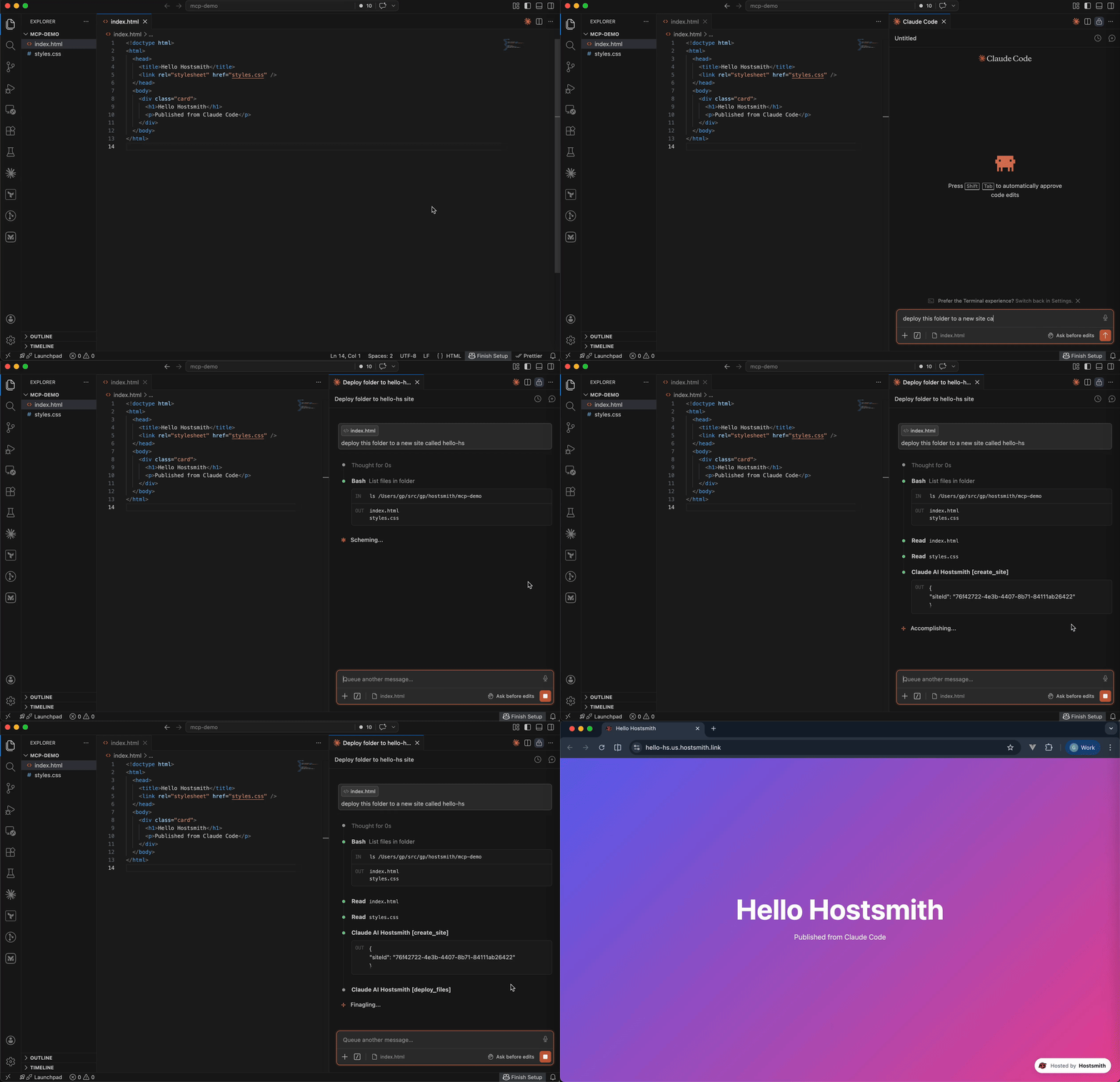
Why Hostsmith
- Artifact-first. No repo, no build config - drop a file (or have the agent generate one), get a URL.
- Built for agents. MCP-native, OAuth-scoped, structured tool descriptions agents can chain.
- EU or US data residency. Pick where the user's data lives, architecturally - not via a checkbox.
Tools
| Tool | Description |
|---|---|
list_sites |
List all sites in your account for a given data partition |
get_site |
Get details of a specific site |
create_site |
Create a new site, or a redirect host |
delete_site |
Delete a site |
list_domains |
List available domains (shared and custom) |
get_account |
Get account info, subscription plan, and usage |
deploy_files |
Deploy inline file contents to a site |
deploy_create_upload |
Start a direct upload for binaries / large files |
deploy_finalize |
Commit a deploy started with deploy_create_upload |
list_redirects |
List a site's redirect rules, in the order they are checked |
set_redirects |
Replace a site's user redirect rules, from rules or _redirects text |
edit_redirects |
Add, update and delete user redirect rules in one batch |
add_redirect |
Add one user redirect rule |
delete_redirect |
Delete one user redirect rule |
switch_file_redirects |
Switch the live deploy's _redirects rules off or back on |
test_redirect |
Test a path against the live or draft redirect rules |
Redirects apply only on your organization's own custom domains. User rules, kept on the hostname and changed through these tools, are checked before the live deploy's _redirects.
To forward a hostname with no content of its own, such as a retired domain or a campaign link, create a redirect host: create_site with kind: "redirect", then add its rules. A redirect host serves only its rules and takes no deploys. It doesn't count toward your plan's site limit; an organization can have up to 50.
Usage
Authentication is via OAuth 2.0. Static access tokens are not supported.
Claude (claude.ai, Desktop, Cowork, mobile)
Add Hostsmith once as a custom connector and it works in every Claude app on your account.
-
In Claude, open Customize > Connectors, click + Add, then Add custom connector.
-
Enter
Hostsmithas the name and paste the MCP server URL:https://mcp.hostsmith.net/mcp -
Click Continue, finish adding the connector, then connect it. Claude opens Hostsmith in your browser to authorize the connector against your Hostsmith account.
Free Claude plans allow one custom connector. On Team and Enterprise plans, an owner adds the connector under Organization settings > Connectors, and each member then clicks Connect next to Hostsmith under Customize > Connectors to sign in with their own Hostsmith account.
Claude asks for your approval before each tool call. To change that, open Hostsmith under Customize > Connectors and set its Tool permissions.
To revoke, open Hostsmith under Customize > Connectors, click ⋯, then Remove (Team and Enterprise owners: Organization settings > Connectors). To force a re-auth, click Disconnect, then Connect.
Stdio (Claude Code, Cursor, Cline, Windsurf, Zed)
Add this entry to your MCP client's config:
{
  "mcpServers": {
    "hostsmith": {
      "command": "npx",
      "args": ["-y", "@hostsmith/mcp-server"]
    }
  }
}
The first tool call triggers an OAuth flow in your browser to authorize the server against your Hostsmith account.
Remote URL (other clients)
Any MCP client that supports remote Streamable HTTP transport can point directly at the hosted server:
{
  "mcpServers": {
    "hostsmith": {
      "url": "https://mcp.hostsmith.net/mcp"
    }
  }
}
The client handles the OAuth flow automatically - you'll be redirected to Hostsmith to authorize access.
Claude Code can use the hosted server directly too:
claude mcp add --transport http hostsmith https://mcp.hostsmith.net/mcp
Cursor (one-click install)

Click the badge to add the remote Hostsmith server (https://mcp.hostsmith.net/mcp) to Cursor. The first tool call triggers OAuth in your browser.
Local HTTP (self-hosted)
Run the server in HTTP mode and have your MCP client perform OAuth against it:
npx @hostsmith/mcp-server http
{
  "mcpServers": {
    "hostsmith": {
      "url": "http://localhost:3100/mcp"
    }
  }
}
Embedding the HTTP handler
createFetchHandler returns a Web-Standard (req: Request) => Promise<Response> handler, for hosting the server in your own runtime (a Lambda, an edge worker, a Node server). It reads no environment variables; pass the configuration:
import { createFetchHandler } from "@hostsmith/mcp-server";

const handler = createFetchHandler({
  hostsmithUrl: "https://hostsmith.net",
  mcpBaseUrl: "https://mcp.example.com",
  // Optional: called for every authenticated MCP request with that
  // request's new McpServer and the access token's decoded claims,
  // before the server handles the request.
  onServer: async (server, { claims }) => {
    // e.g. attach your own instrumentation to `server`
  },
});
onServer is awaited. If it throws, the error is logged and the request is handled as if there were no hook. The claims are decoded, not verified; the Hostsmith API verifies the token on every tool call. Hostsmith's hosted server at mcp.hostsmith.net uses this hook for its usage analytics. The package itself contains no analytics client and sends no telemetry, and the CLI passes no hook.
Environment variables
| Variable | Default | Description |
|---|---|---|
HOSTSMITH_URL |
https://hostsmith.net |
Hostsmith app URL (OAuth endpoints). |
HOSTSMITH_API_DOMAIN |
- | Override the upstream API domain across both partitions. The server prepends us.api. and eu.api. to the value you set. Example: HOSTSMITH_API_DOMAIN=staging.example.com routes calls to https://us.api.staging.example.com and https://eu.api.staging.example.com. Use this to point at a staging or proxied API host. |
HOSTSMITH_BASE_URL |
- | Override the API base URL with a single fixed value, bypassing partition selection entirely. |
PORT |
3100 |
HTTP server port. |
MCP_BASE_URL |
http://localhost:$PORT |
Public URL of the MCP server, used in OAuth metadata. |
Network access
The MCP transport and OAuth flow run in your client's app process and need no agent-sandbox configuration - if your MCP client connected, those paths are working.
The one place sandboxed agents commonly fail is the upload PUT during deploy_create_upload + deploy_finalize: the bytes go from the agent's shell to the partition API host. From the agent terminal, allow outbound HTTPS (port 443) to:
us.api.hostsmith.net(for sites in theuspartition)eu.api.hostsmith.net(for sites in theeupartition)
Sandbox-specific snippets (Cursor sandbox.json, Claude Code settings.json, Codex config.toml, generic firewall guidance) live in the Network access docs.
The server's own calls to the Hostsmith API identify themselves with User-Agent: hostsmith-mcp-server/<version> hostsmith-js-sdk/<version>.
Troubleshooting
- Tool calls return 401: the OAuth session expired. Reconnect from your MCP client to re-authorize.
- OAuth redirect loops: confirm
MCP_BASE_URLmatches the URL your MCP client uses to reach the server. - Wrong partition: tool calls accept an explicit
partitionarg; if you omit it, the partition is inferred from your access token. - Upload PUT fails (DNS, refused, proxy, timeout): the agent's shell can't reach the partition API host. See Network access.
- Inspect the install:
npx @modelcontextprotocol/inspector npx -y @hostsmith/mcp-server httpto browse tools interactively.
Documentation
Deeper material lives at hostsmith.net/docs/mcp.
Contributing
See CONTRIBUTING.md (including the Releases section for the version-stamping flow). Security issues: see SECURITY.md.
License
Hostsmith MCPのよくある質問
Hostsmith MCPをClaude Codeに追加するには
ターミナルでclaude mcp add mcp-server -- npx -y @hostsmith/mcp-serverを実行します。すべてのプロジェクトで利用するには--scope userを追加します。
Hostsmith MCPをCursorに追加するには
~/.cursor/mcp.jsonを開き、上記のインストールセクションに示すCursor設定を使ってmcpServersの下にサーバーを追加します。
Hostsmith MCPが提供するツールは
16個のツールを提供しており、list_sites, get_site, create_site, delete_site, list_domainsなどがあります。
データの保存場所を選択できますか?
はい、サイトのデータレジデンシーとしてEUまたはUSを選択できます。