
Factorly MCPサーバー
コミット 2026年11月1日MCP server、REST API、CLIコマンドをラップし、暗号化された認証情報の注入とガバナンスルールによってエージェントのツールチェーンを管理します。
別名 factorly-dev/factorly
- スター
- 24
- ツール
- 2
- ダウンロード数(30日間)
- —
- 最新バージョン
- —
- 最終コミット
- 2026年11月1日
- ライセンス
- GPL-3.0
Factorly MCPとは
FactorlyはMCPサーバーです。 MCP server、REST API、CLIコマンドをラップし、暗号化された認証情報の注入とガバナンスルールによってエージェントのツールチェーンを管理します。. 2個のツールを提供しており、tokens, credentialsなどがあります。
プロジェクトのREADMEから生成された概要
Factorly MCP server について
Factorlyは、AIエージェント向けのツールチェーンを管理するために設計されたローカルランタイムとして機能します。開発者は、MCP server、REST API、CLIコマンドを統一された設定にラップできます。エージェントとツールの間に介在することで、APIキーやトークンなどの機密情報がエージェントから隠蔽されることを保証し、最終的なツールのレスポンスのみを提供します。この構成は、セキュリティと実行の厳格な制御を維持しながら、エージェントに機能を提供する必要がある開発者に最適です。
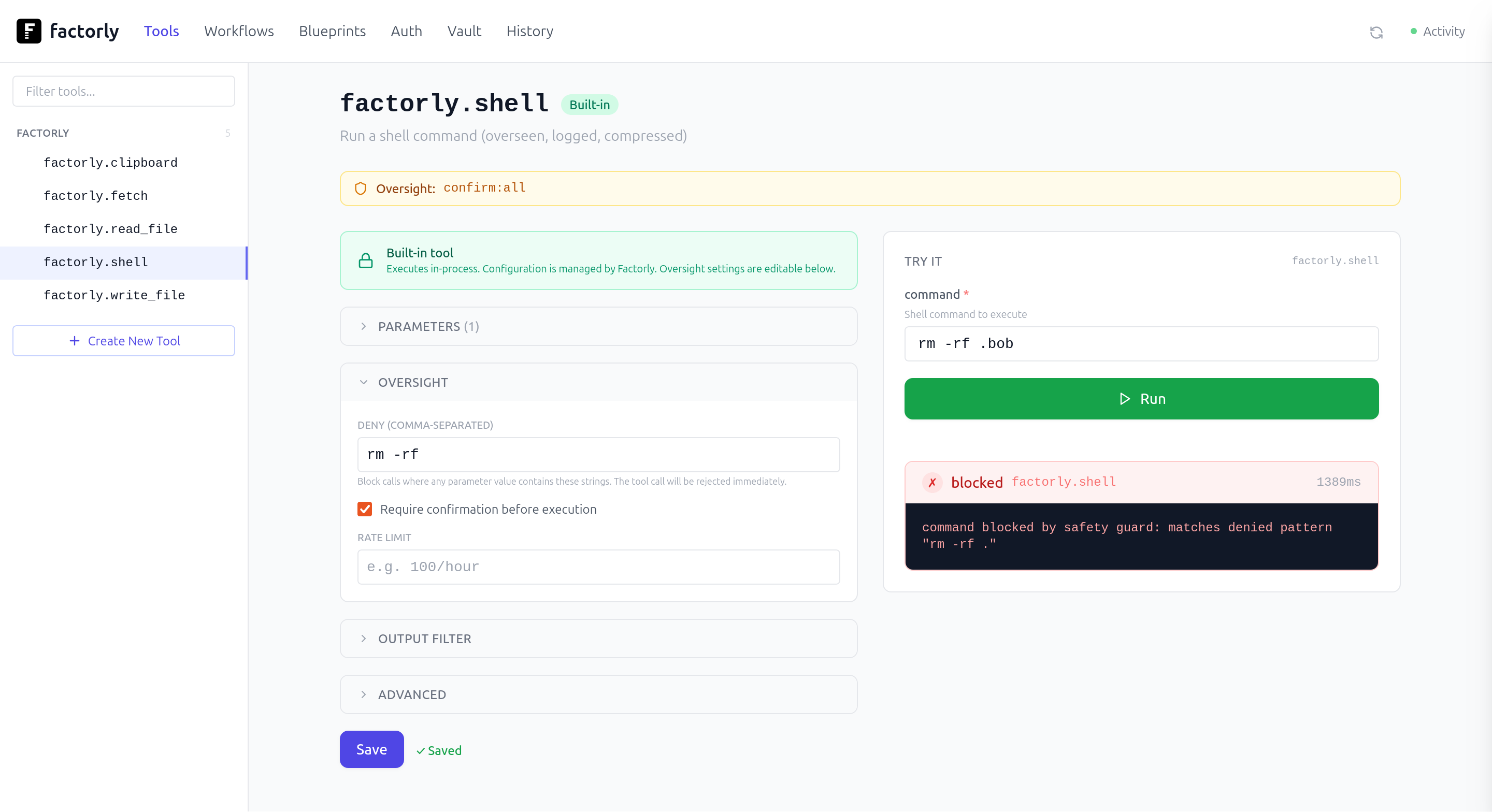
ユーザーは、Homebrew、npm、pip、またはGo経由でサービスをインストールできます。システムには、認証情報注入のための暗号化されたvaultと、エージェントにデプロイする前にツールをテストするためのWeb UIが含まれています。GitHub、Slack、Stripeなどのサービス向けに40以上のブループリントをサポートしています。設定が完了すると、ランタイムはClaude Code、Cursor、Codexなどのクライアントと同期し、ワークフロー、ツール名、監査ログを含む単一のMCP serverインターフェースをそれらに提供します。
できること
- 1安全な認証情報管理実際の認証トークンを公開することなく、エージェントにGitHubへのアクセス権を提供します。
- 2既存のMCP serverのラップシンプルなコマンドを使用して、既存のあらゆるMCP serverを即座にエージェントで利用可能にします。
プロジェクトの README から作成されています。すべてのユースケースは、その引用と照らし合わせて確認されています。
Factorly MCPツール 2
READMEから検出tokenscredentials
| tokens | — | |
| credentials | — |
自動チェック
実行日 2026年11月14日完全なレポート →まだ検証されていません。サーバーには80点のスコア、重大な問題がないこと、および検証に必要な十分なデータが必要です。 チェックの仕組み · 点数を上げるための改善点

- ソースリポジトリがリンクされており、アクセス可能factorly-dev/factorly is public and reachablegithub.com/factorly-dev/factorly ↗合格
- パッケージがこのリポジトリをソースとして指定未チェック
- ビルドの来歴 (Sigstore 証明)未チェック
- オープンソースライセンス (OSI)GPL-3.0spdx.org/licenses/GPL-3.0.html ↗合格
- 過去1年以内にコミットまたはリリースありLast commit or release 2026-11-01github.com/factorly-dev/factorly ↗合格
- OpenSSF Scorecard未チェック
- パッケージ名が有名なパッケージに酷似していない未チェック
- パッケージおよびその依存関係に重大な勧告なし未チェック
- モデルへの隠れた指示がない2 tool descriptions and the README read; no override phrases, credential paths or hidden characters合格
- 破壊的なツールがラベル付けされているNo tool named like delete, drop or exec合格
- リモートエンドポイントが MCP ハンドシェイクに応答未チェック
README
GitHubで見る░█▀▀░█▀█░█▀▀░▀█▀░█▀█░█▀▄░█░░█░█
░█▀▀░█▀█░█░░░░█░░█░█░█▀▄░█░░░█░
░▀░░░▀░▀░▀▀▀░░▀░░▀▀▀░▀░▀░▀▀▀░▀░
Factorly





Build what your agent can do.
Define tools, compose workflows, test and run them. MCP servers, REST APIs, and CLI commands in one config, one UI, one audit log.
Factorly is a local runtime for agent tool chains. It manages tool calls, injects credentials from an encrypted vault, enforces governance rules, and logs everything. Your agent sees workflows, tools, and data. It never receives your credentials, only the tool's response. Secrets stay secret.
Install
Install with your package manager of choice:
brew install factorly-dev/tap/factorly
  # or: npm install -g factorly
  # or: pip install factorly
  # or: go install github.com/factorly-dev/factorly@latest
Quick Start
Zero config: wrap any existing MCP server and it's instantly callable through Factorly:
factorly wrap -- npx -y @modelcontextprotocol/server-everything
Then set up a project: install a blueprint, store credentials, and sync with your agent:
# 1. Create a project config + install a blueprint (41 services: GitHub, Slack, Stripe, Linear, Gmail, ...)
factorly init
factorly blueprint install github

# 2. Store credentials in the encrypted vault (or: factorly auth login github)
factorly vault set GITHUB_TOKEN ghp_xxxxxxxxxxxx

# 3. Confirm it's wired up
factorly tools status

# 4. Connect to your agent (auto-detects Claude Code, Cursor, Codex), then reload it
factorly sync

# 5. Optional — browse, edit, and try tools in the UI
factorly ui
Your agent connects to Factorly as a single MCP server or CLI and sees every tool you've configured. Your agent never possesses the credential — Factorly resolves {{vault:KEY}} references at call time and only the resolved request leaves the box. Full walkthrough: Getting Started.
What It Does
Define — one config, every protocol, 40+ blueprints included
Test — Try tools in the UI, see the response, iterate before giving your agent access
Compose — workflows with per-step policies, deterministic sequences
Govern — vault, policies, audit log. Built in, not bolted on.
┌────────────┐       ┌────────────┐       ┌────────────┐
│            │       │            │       │            │
│ Your Agent │──────▶│  Factorly  │──────▶│ Your Tools │
│            │       │            │       │            │
└────────────┘       └────────────┘       └────────────┘
  Sees:                Vault               REST APIs
  - tool names         Governance          CLI commands
  - workflows          Audit log           MCP servers
  - data               Rate limits

  Never sees:
  - API keys
  - tokens
  - credentials
Docs
- Getting Started
- Configuration
- CLI Reference
- Web UI
- Workflows
- Expressions
- Output Filters
- Blueprints
- Vault
- OAuth
- Logging
- OpenAPI Import
- Examples
License
Factorly MCPのよくある質問
Factorly MCPが提供するツールは
2個のツールを提供しており、tokens, credentialsなどがあります。
既存のMCP serverをFactorlyでラップするにはどうすればよいですか?
factorly wrap -- [command] というコマンドを使用することで、既存のあらゆるMCP serverをラップできます。
AIエージェントにAPIキーや認証情報が見えてしまうことはありますか?
いいえ、エージェントに認証情報が渡されることはなく、ツールのレスポンスのみが渡されます。Factorlyは呼び出し時にvaultの参照を解決します。
ブループリントではどのようなサービスが利用可能ですか?
Factorlyには、GitHub、Slack、Stripe、Linear、Gmailなど、40以上のサービスに対応したブループリントが含まれています。