
GuildBridge MCPサーバー
コミット 2026年9月7日認証と権限管理に基づき、AIエージェントがDiscordサーバー内のメッセージの読み取り、検索、投稿を可能にします。
別名 dend/guildbridge
- スター
- 16
- ツール
- 7
- ダウンロード数(30日間)
- —
- 最新バージョン
- —
- 最終コミット
- 2026年9月7日
- ライセンス
- MIT
GuildBridge MCPとは
GuildBridgeはMCPサーバーです。 認証と権限管理に基づき、AIエージェントがDiscordサーバー内のメッセージの読み取り、検索、投稿を可能にします。. 7個のツールを提供しており、list_guilds, list_channels, get_channel_infoなどがあります。
プロジェクトのREADMEから生成された概要
GuildBridge MCP server について
GuildBridgeは、AIエージェントをDiscordの会話に接続することを、開発者やコミュニティマネージャーに提供します。Cloudflare WorkersにデプロイされるこのリモートMCP serverは、認証済みで権限を考慮したDiscordサーバーへのアクセスを提供します。これにより、AIクライアントはメッセージの読み取り、検索、投稿を通じて、議論が行われているコミュニティと直接やり取りできるようになります。
ユーザーは、特定のエンドポイントを使用して、MCP互換クライアント経由でサーバーとやり取りします。セットアップには、ボットユーザーを持つDiscordアプリケーション、OAuth2の設定、およびCloudflareアカウントが必要です。ユーザー認証にはDiscord OAuth2を、API呼び出しにはボットトークンを使用します。セキュリティを確保するため、サーバーはサーバーサイドのロールベースアクセス制御を実装しており、ギルドへの所属を確認し、チャンネルの権限を計算することで、AIがユーザーの閲覧権限内にある情報のみにアクセスできるようにします。
開発者は専用の管理パネルを通じてアクセスを管理し、D1データベースに保存された監査ログからアクティビティを監視できます。サーバーには、完全な対話機能を実現するために、list_guilds、list_channels、read_messages、search_messages、send_message、reply_to_messageなどの特定のツールが含まれています。
できること
- 1コミュニティ調整の自動化AIエージェントが特定のDiscordチャンネル内のメッセージを読み取り、返信することで、コミュニティの議論を監視し、参加することができます。
- 2過去の議論の検索開発者は、コンテンツや作成者のフィルターを使用して、Discordサーバー内の特定の情報や過去の会話をAIに探させることができます。
- 3AIエージェントのアクティビティ監査管理者は、コンプライアンス確保とパフォーマンス監視のために、AIによるすべてのツール呼び出しを追跡できます。
- 4許可されたユーザーの管理チームは、実行時の許可リスト(allowlist)を通じて、どのDiscordユーザーがMCP serverの使用を許可されるかを制御できます。
プロジェクトの README から作成されています。すべてのユースケースは、その引用と照らし合わせて確認されています。
GuildBridge MCPツール 7
READMEから検出list_guildslist_channelsget_channel_inforead_messagessearch_messagessend_messagereply_to_message
| list_guilds | — | |
| list_channels | — | |
| get_channel_info | — | |
| read_messages | — | |
| search_messages | — | |
| send_message | — | |
| reply_to_message | — |
設定
CLOUDFLARE_API_TOKEN
| 名前 | 説明 | 種類 |
|---|---|---|
| CLOUDFLARE_API_TOKEN | — |
自動チェック
実行日 2026年11月14日完全なレポート →まだ検証されていません。サーバーには80点のスコア、重大な問題がないこと、および検証に必要な十分なデータが必要です。 チェックの仕組み · 点数を上げるための改善点

- ソースリポジトリがリンクされており、アクセス可能dend/guildbridge is public and reachablegithub.com/dend/guildbridge ↗合格
- パッケージがこのリポジトリをソースとして指定未チェック
- ビルドの来歴 (Sigstore 証明)未チェック
- オープンソースライセンス (OSI)MITspdx.org/licenses/MIT.html ↗合格
- 過去1年以内にコミットまたはリリースありLast commit or release 2026-09-07github.com/dend/guildbridge ↗合格
- OpenSSF Scorecard未チェック
- パッケージ名が有名なパッケージに酷似していない未チェック
- パッケージおよびその依存関係に重大な勧告なし未チェック
- モデルへの隠れた指示がない7 tool descriptions and the README read; no override phrases, credential paths or hidden characters合格
- 破壊的なツールがラベル付けされているNo tool named like delete, drop or exec合格
- リモートエンドポイントが MCP ハンドシェイクに応答未チェック
README
GitHubで見るAbout
There is no official Discord MCP server, yet much of the coordination with contributors in the MCP community happens on Discord. GuildBridge fills that gap for me — it gives MCP clients authenticated, permission-aware access to Discord servers so that AI agents can read, search, and post messages where the conversation is already happening. It very much came to life on the heels of a problem that I had that I solved by building my own MCP server.
[!WARNING] The actual hosted version of this MCP server is not broadly available (I have restricted it to specific accounts and servers), but you can just as easily configure and deploy it yourself on your Cloudflare account.
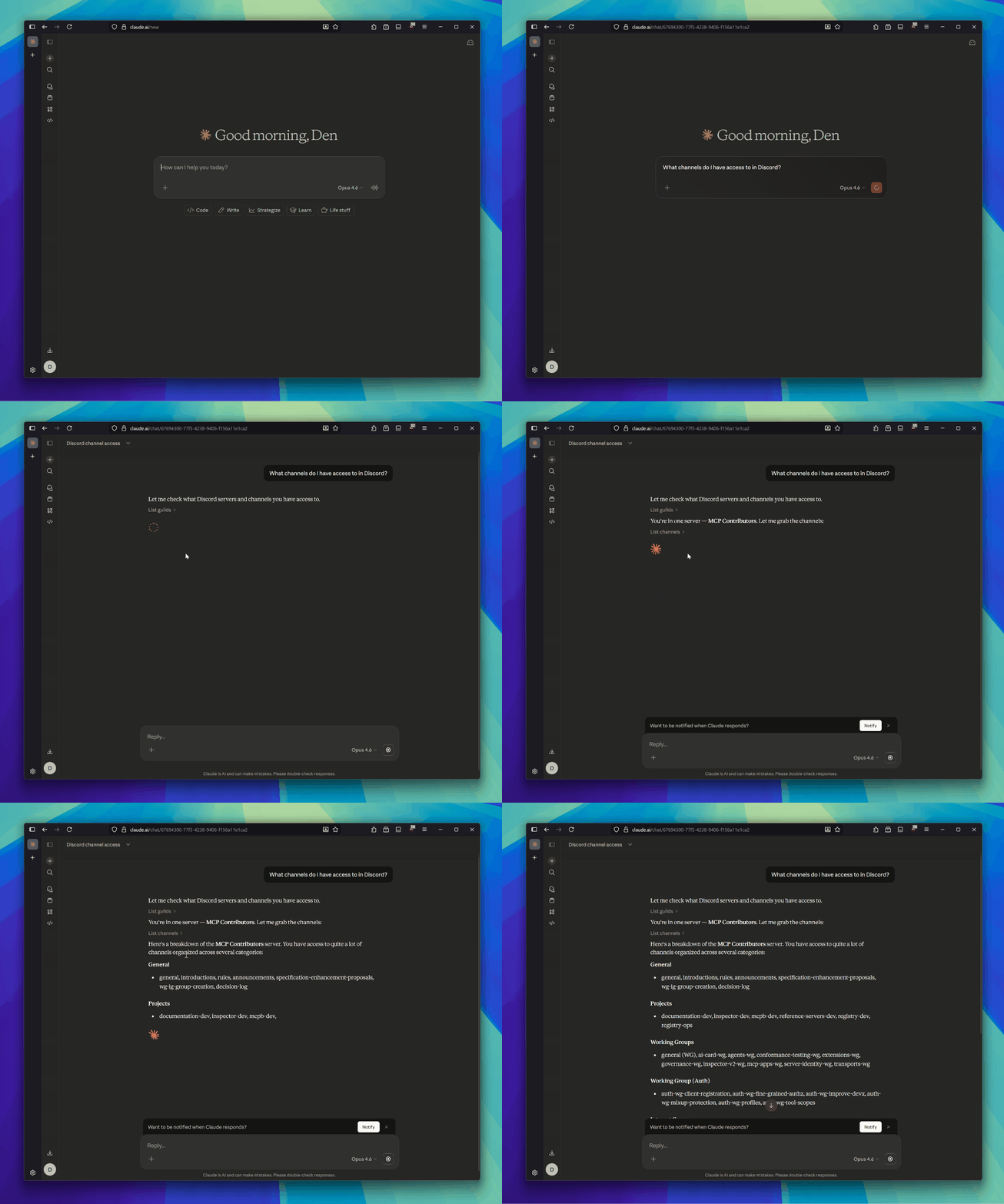
[!NOTE] When hosted, this MCP server authenticates users via Discord OAuth2 and makes all API calls with a bot token. Role-Based Access Control (RBAC) is implemented server-side, as Discord's own auth surface doesn't enable a clean role separation and integration with messaging APIs in its OAuth implementation.
Prerequisites
- Node.js (v18+)
- A Cloudflare account (using the free tier is sufficient)
- A Discord application with:
Discord App Setup
- Go to the Discord Developer Portal and create (or select) an application.
- Under Bot, click "Reset Token" to get your bot token. Save it.
- Under OAuth2, note the Client ID and Client Secret.
- Under OAuth2 > Redirects, add your callback URL:
- Local dev:
http://localhost:8788/callback - Production:
https://<your-worker>.workers.dev/callback(you will get this URI later when you deploy your MCP server to Cloudflare)
- Local dev:
- Under OAuth2 > Scopes, ensure
identifyandguildsare selected. - Under Bot > Privileged Gateway Intents, enable Message Content Intent if you want full message content in search results.
- Invite the bot to your server(s) using the OAuth2 URL Generator with the
botscope and these permissions:View Channels,Read Message History,Send Messages.
Local Development
# Install dependencies
npm install

# Copy the example files and fill in your values
cp wrangler.jsonc.example wrangler.jsonc
cp .dev.vars.example .dev.vars

# Start the dev server
npm run dev
The server runs at http://localhost:8788. The MCP endpoint is at /mcp.
.dev.vars
[!NOTE] You will need to fill this out prior to deployment to ensure that the MCP server can actually talk to Discord's APIs.
| Variable | Description |
|---|---|
DISCORD_CLIENT_ID |
OAuth2 client ID from Discord Developer Portal |
DISCORD_CLIENT_SECRET |
OAuth2 client secret |
DISCORD_BOT_TOKEN |
Bot token (used for all Discord API calls) |
COOKIE_ENCRYPTION_KEY |
Random string for signing cookies — generate with openssl rand -hex 16 |
CF_ACCESS_TEAM_DOMAIN |
Cloudflare Access team name — required for the admin panel |
CF_ACCESS_AUD |
Cloudflare Access Application Audience (AUD) tag — required for the admin panel |
DEV_SKIP_CF_ACCESS |
Set to true to bypass CF Access JWT validation in local dev |
Deploy to Cloudflare
The Worker binds to three stateful Cloudflare resources: a KV namespace (OAuth state + allowlist), a D1 database (audit log), and a Zero Trust Access application (gates /admin). You can provision all three at once with Terraform, or create them individually with the wrangler CLI.
Option A — Terraform
Provisions KV, D1, and the Access app + policy in one shot. Requires a Cloudflare API token with Workers KV Storage:Edit, D1:Edit, and Access: Apps and Policies:Edit scopes.
cd terraform
cp terraform.tfvars.example terraform.tfvars
# edit terraform.tfvars — set account ID, worker hostname, admin emails

export CLOUDFLARE_API_TOKEN=...
terraform init
terraform apply
Wire the outputs into your config:
| Output | Goes into |
|---|---|
kv_namespace_id |
wrangler.jsonc → kv_namespaces[0].id |
d1_database_id |
wrangler.jsonc → d1_databases[0].database_id |
d1_database_name |
wrangler.jsonc → d1_databases[0].database_name |
cf_access_aud |
wrangler secret put CF_ACCESS_AUD |
Then apply the D1 schema, set the remaining secrets, and deploy:
cd ..
npx wrangler d1 migrations apply "$(terraform -chdir=terraform output -raw d1_database_name)" --remote
npx wrangler secret bulk .dev.vars
terraform -chdir=terraform output -raw cf_access_aud | npx wrangler secret put CF_ACCESS_AUD
npm run deploy
If you used Terraform, skip the Setup subsections under Admin Panel and Observability — those resources already exist.
Option B — Manual (wrangler CLI)
# Create the KV namespace (https://developers.cloudflare.com/kv/)
npx wrangler kv namespace create OAUTH_KV
Copy the output id into wrangler.jsonc replacing PLACEHOLDER_KV_ID. (D1 and Access setup are covered under Observability and Admin Panel below.)
# Set secrets (https://developers.cloudflare.com/workers/configuration/secrets/)
npx wrangler secret bulk .dev.vars

# Deploy
npm run deploy
After deploying, Wrangler will print your worker URL (e.g. https://guildbridge.<your-subdomain>.workers.dev). Add https://<your-worker-url>/callback as a redirect URI in the Discord Developer Portal.
Connect an MCP Client
Point any MCP-compatible client at the server URL:
https://<your-worker>.workers.dev/mcp
Or locally:
http://localhost:8788/mcp
To test with the MCP Inspector:
npx @modelcontextprotocol/inspector@latest
Enter the URL above, complete the Discord OAuth flow, and the tools will become available.
Tools
| Tool | Description |
|---|---|
list_guilds |
List Discord servers you are in |
list_channels |
List channels in a server (optionally filtered by type) |
get_channel_info |
Get channel details (topic, type, etc.) |
read_messages |
Read messages from a channel (with pagination) |
search_messages |
Search messages in a server (by content, channel, author) |
send_message |
Send a message to a channel |
reply_to_message |
Reply to a specific message |
Admin Panel
The admin panel at /admin lets you add and remove allowed Discord users at runtime, without redeploying. The allowlist is stored in KV and is the sole source the OAuth callback checks. The allowlist is fail-closed — an empty list rejects everyone, so you must seed at least one user via /admin before the first OAuth login will succeed.
Setup
- In the Cloudflare Zero Trust dashboard, create an Access Application for
<your-worker-domain>/admin*. - Configure an identity provider (email OTP, Google, etc.).
- Copy the Application Audience (AUD) tag and set it as the
CF_ACCESS_AUDsecret. - Set the
CF_ACCESS_TEAM_DOMAINsecret to your Zero Trust team name.
Once deployed, visit https://<your-worker>.workers.dev/admin to manage the allowlist.
For local development, set DEV_SKIP_CF_ACCESS=true in .dev.vars to bypass CF Access JWT validation, then visit http://localhost:8788/admin.
Observability
Every MCP tool invocation is audited. Events are dual-written to D1 (ordered audit trail, queryable from the admin panel's Activity tab) and Analytics Engine (fire-and-forget metrics, queried via the Cloudflare dashboard SQL API).
Captured per event: timestamp, tool name, Discord user ID + username, outcome (ok/error), duration, guild_id (when present), channel_id (when present), created message_id (for send_message/reply_to_message), error message (on failure). Message content and search queries are never captured.
Setup
# Create the D1 database (one-time)
npx wrangler d1 create guildbridge-audit
Copy the output database_id into wrangler.jsonc replacing PLACEHOLDER_D1_ID, then apply the schema:
# Local dev
npx wrangler d1 migrations apply guildbridge-audit --local

# Production
npx wrangler d1 migrations apply guildbridge-audit --remote
Analytics Engine requires no setup — the TOOL_AUDIT binding in wrangler.jsonc is enough. In local dev, writeDataPoint is a no-op stub; it only writes when deployed.
Querying
Admin panel: https://<your-worker>.workers.dev/admin → Activity tab. Filter by tool or user ID.
D1 directly:
npx wrangler d1 execute guildbridge-audit --command \
  "SELECT * FROM audit_log ORDER BY ts DESC LIMIT 20"
Analytics Engine (aggregates):
npx wrangler analytics-engine sql \
  "SELECT blob1 AS tool, count() AS calls, avg(double1) AS avg_ms
   FROM guildbridge_tool_calls
   WHERE timestamp > now() - INTERVAL '7' DAY
   GROUP BY tool"
Field mapping: indexes[0] = userId, blobs = [tool, username, outcome, guildId, channelId, messageId, error], doubles = [durationMs].
Access Control
Every tool call goes through a layered access check before touching the Discord API. Guild membership is verified via the user's OAuth token, and channel visibility is enforced by computing Discord's permission algorithm from the bot's perspective.
flowchart TD
    A[Tool call] --> B{Channel or guild scoped?}

    B -->|Guild scoped| C[assertGuildAccess]
    B -->|Channel scoped| D[assertChannelAccess]

    C --> E[Fetch user guilds via OAuth token]
    E --> F{User is member?}
    F -->|No| G[Access denied]

    D --> H[Fetch channel info via bot token]
    H --> I{Channel in a guild?}
    I -->|No| G
    I -->|Yes| C

    F -->|Yes| J[getGuildPermContext]
    J --> K[Fetch guild roles + member roles + guild info]
    K --> L{User is guild owner?}
    L -->|Yes| M[Access granted]
    L -->|No| N[computePermissions]

    N --> O[Base: @everyone role perms]
    O --> P[OR in member role perms]
    P --> Q{ADMINISTRATOR set?}
    Q -->|Yes| M
    Q -->|No| R[Apply @everyone channel overwrite]
    R --> S[Apply matching role channel overwrites]
    S --> T[Apply member-specific channel overwrite]
    T --> U{VIEW_CHANNEL set?}
    U -->|Yes| M
    U -->|No| G
For list_channels and search_messages, the same permission computation is applied as a post-filter — channels the user can't see are stripped from results.
Token Usage
GuildBridge uses two distinct Discord tokens with intentionally separate roles:
| Token | Stored in | Used for |
|---|---|---|
| Bot token | Server-side env var (DISCORD_BOT_TOKEN) |
All Discord API calls — reading messages, sending messages, fetching channels, roles, and members |
| User OAuth token | Encrypted inside the MCP access token | Guild membership verification only (/users/@me/guilds) |
The bot token never leaves the server. The user's Discord OAuth token is obtained during the OAuth2 login flow, embedded into an encrypted MCP access token, and returned to the MCP client. GuildBridge does not store the user's token server-side — the MCP client holds the encrypted token and sends it with each request, where it is decrypted to extract the OAuth token for guild membership checks.
sequenceDiagram
    participant Client as MCP Client
    participant Server as GuildBridge
    participant Discord as Discord API

    note over Client,Discord: OAuth Flow (one-time setup)
    Client->>Server: Connect to /mcp
    Server-->>Client: 401 — authenticate via OAuth
    Client->>Server: /authorize
    Server->>Discord: Redirect to Discord OAuth
    Discord-->>Server: /callback with auth code
    Server->>Discord: Exchange code for user OAuth token
    Discord-->>Server: User OAuth token
    Server-->>Client: Encrypted MCP token (contains user OAuth token)

    note over Client,Discord: Tool Calls (ongoing)
    Client->>Server: Tool call + MCP token (Bearer)
    Server->>Server: Decrypt MCP token → extract user OAuth token
    Server->>Discord: Verify guild membership (Bearer user OAuth token)
    Discord-->>Server: User's guild list
    Server->>Discord: Execute tool action (Bot token from env)
    Discord-->>Server: API response
    Server-->>Client: Tool result
During the OAuth flow, short-lived session state is managed via:
- CSRF token — HTTP-only cookie, validates the approval form submission (600s TTL)
- State token — stored in Cloudflare KV, binds the OAuth request across redirects (600s TTL)
- Approved clients cookie — HMAC-signed, lets returning users skip the approval dialog (30 days)
Contributing
See CONTRIBUTING.md for setup instructions, code style guidelines, and how to submit changes. Please also review the AI Usage Policy before contributing.
GuildBridge MCPのよくある質問
GuildBridge MCPが提供するツールは
7個のツールを提供しており、list_guilds, list_channels, get_channel_info, read_messages, search_messagesなどがあります。
AIエージェントはDiscordで何ができますか?
サーバー内のギルドやチャンネルの一覧取得、チャンネル情報の取得、メッセージの読み取りと検索、およびメッセージや返信の送信が可能です。
セキュリティと権限はどのように管理されますか?
ユーザー認証にはDiscord OAuth2を使用し、サーバーサイドのロールベースアクセス制御(RBAC)を実装しています。これにより、ユーザーが閲覧権限を持つチャンネルにのみアクセスできるようになっています。
このサーバーはどこでホストされていますか?
Cloudflare Workersにデプロイするように設計されています。
AIの動作は記録されますか?
はい、すべてのツール呼び出しは監査され、D1データベースとCloudflare Analytics Engineに保存されます。メッセージの内容は取得せず、ツール名や実行結果などのメタデータのみを記録します。