
Memora MCPサーバー
コミット 2026年11月10日Model Context Protocolを介して、AIエージェントがMarkdown形式のノートを読み書きできる、セルフホスト型の長期記憶用ボルトを提供します。
別名 Codrihub/memora
- スター
- 11
- ツール
- —
- ダウンロード数(30日間)
- —
- 最新バージョン
- —
- 最終コミット
- 2026年11月10日
- ライセンス
- AGPL-3.0
Memora MCPとは
MemoraはMCPサーバーです。 Model Context Protocolを介して、AIエージェントがMarkdown形式のノートを読み書きできる、セルフホスト型の長期記憶用ボルトを提供します。.
プロジェクトのREADMEから生成された概要
Memora MCP server について
Memoraは、セルフホスト型のアーキテクチャを通じて、AIエージェントに長期記憶用のボルトを提供します。エージェントはgitで管理されたフォルダ内のMarkdownノートを読み書きできるため、すべての情報はユーザーが所有するプレーンテキスト形式で保持されます。このシステムは単一のRustバイナリとして動作し、組み込みのSQLiteデータベースを使用して状態管理を行いながら、単一のポート上でHTTP API、MCPエンドポイント、およびWeb UIを管理します。
開発者は、Docker、npm、またはネイティブのLinuxインストーラーを使用してサーバーをデプロイできます。起動後は、APIキーまたはOAuthを使用して、ClaudeやChatGPTなどのクライアントを接続できます。このプラットフォームはきめ細かな制御を提供し、異なるエージェントに対して読み取り、書き込み、管理者などの特定のスコープを割り当てることが可能です。また、Web UIを使用して、脳(brain)やグラフビューの閲覧、タグの管理、エージェントのアクティビティのリアルタイム監視を行うこともできます。
できること
- 1エージェントの知識を永続化するMarkdownファイルを使用して、AIエージェントが異なるセッション間で情報を保存および取得できるようにします。
- 2エージェントの権限を管理するツールへのアクセスを制限した固有のAPIキーを割り当てることで、特定のAIエージェントができることを制限します。
- 3変更の追跡と復元git連携を利用して、エージェントのノートの履歴を表示したり、以前のバージョンに復元したりできます。
- 4知識のつながりを可視化するインタラクティブなグラフレイアウトを通じて、異なるノートやフォルダがどのように関連しているかを確認できます。
プロジェクトの README から作成されています。すべてのユースケースは、その引用と照らし合わせて確認されています。
設定
MEMORA_STATEMEMORA_VAULT
| 名前 | 説明 | 種類 |
|---|---|---|
| MEMORA_STATE | — | |
| MEMORA_VAULT | — |
自動チェック
実行日 2026年11月14日完全なレポート →まだ検証されていません。サーバーには80点のスコア、重大な問題がないこと、および検証に必要な十分なデータが必要です。 チェックの仕組み · 点数を上げるための改善点

- ソースリポジトリがリンクされており、アクセス可能codrihub/memora is public and reachablegithub.com/codrihub/memora ↗合格
- パッケージがこのリポジトリをソースとして指定未チェック
- ビルドの来歴 (Sigstore 証明)未チェック
- オープンソースライセンス (OSI)AGPL-3.0spdx.org/licenses/AGPL-3.0.html ↗合格
- 過去1年以内にコミットまたはリリースありLast commit or release 2026-11-10github.com/codrihub/memora ↗合格
- OpenSSF Scorecard未チェック
- パッケージ名が有名なパッケージに酷似していない未チェック
- パッケージおよびその依存関係に重大な勧告なし未チェック
- モデルへの隠れた指示がない0 tool descriptions and the README read; no override phrases, credential paths or hidden characters合格
- 破壊的なツールがラベル付けされている未チェック
- リモートエンドポイントが MCP ハンドシェイクに応答未チェック
README
GitHubで見るMemora is a self-hosted memory vault for AI agents. Notes are plain markdown files in a git-backed folder. Agents read and write them over the Model Context Protocol (MCP); you browse, edit and govern them in a web UI. One Rust binary serves the HTTP API, the MCP endpoint, the web UI and realtime updates on a single port, with all server state in one embedded SQLite database.
Screenshots
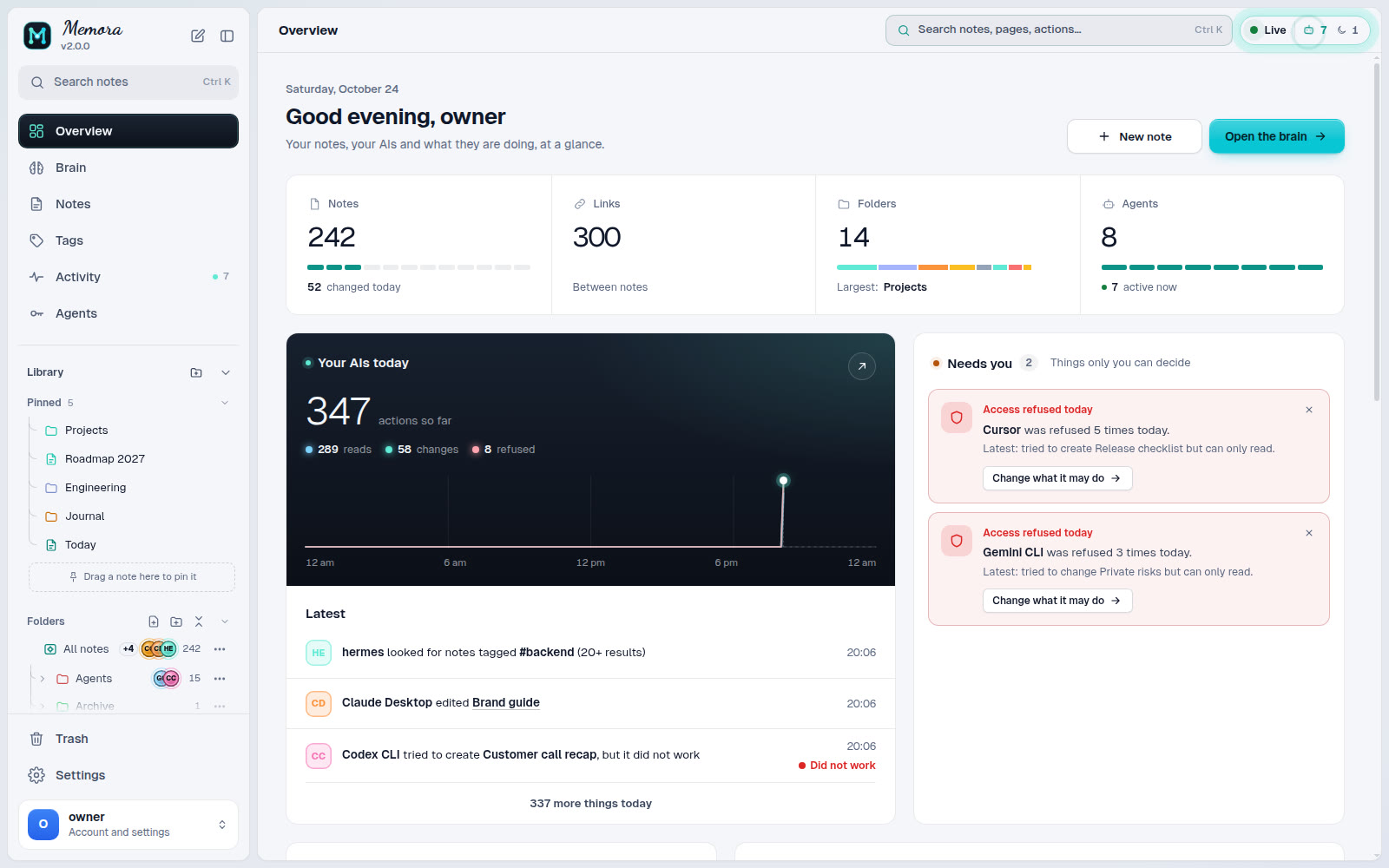
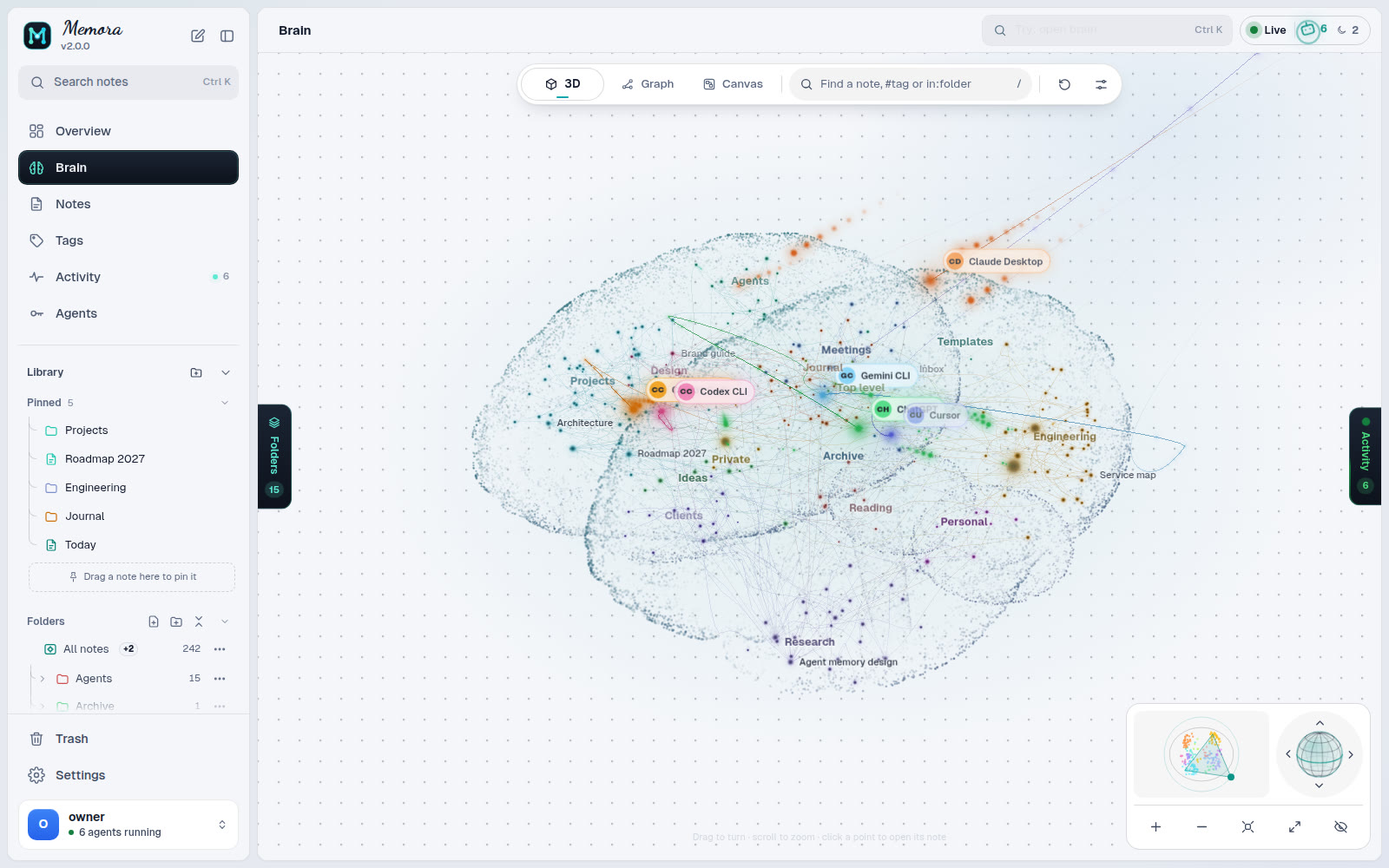 Brain: every folder is a region, every note a node |
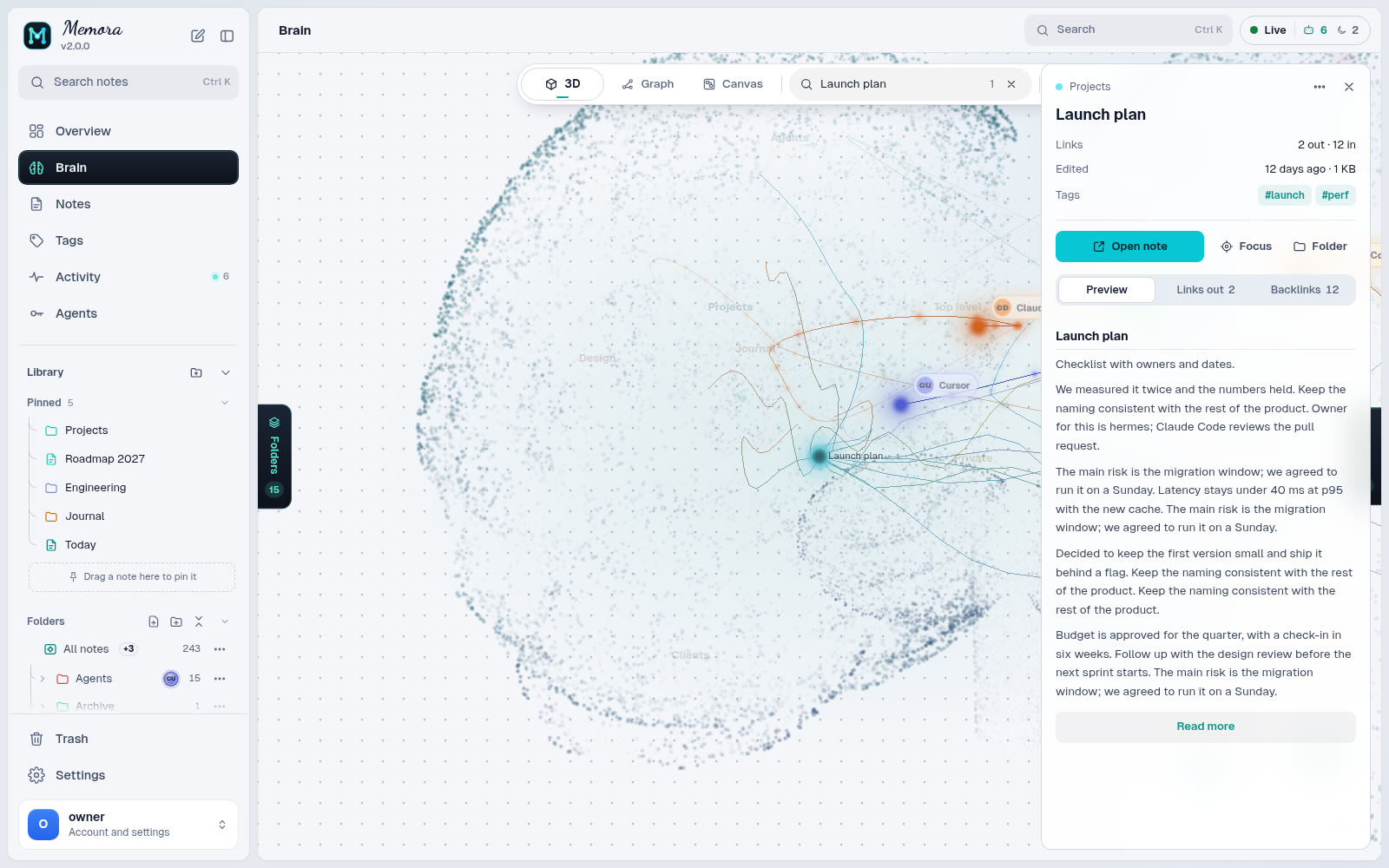 Node card: links, backlinks and a preview |
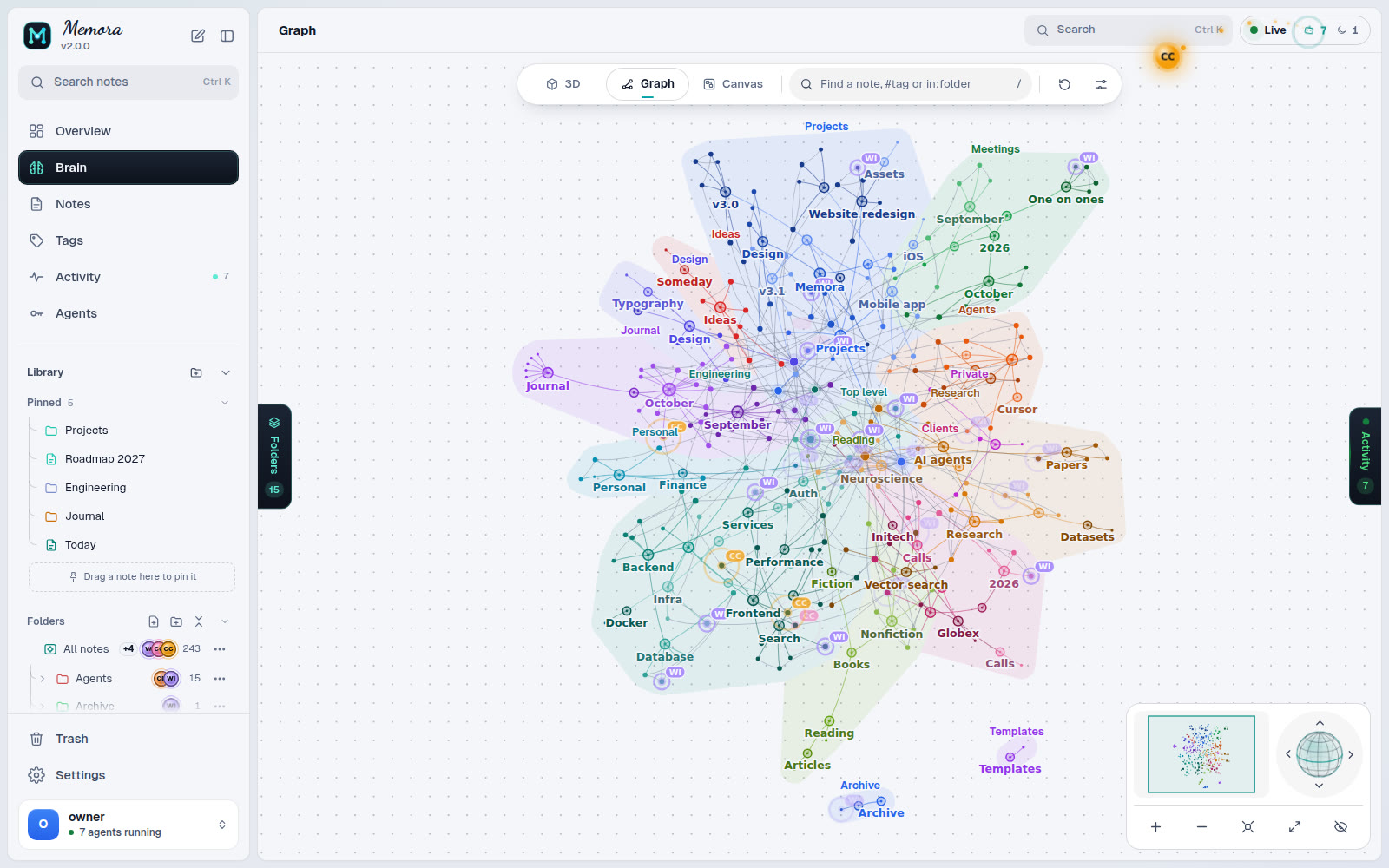 Graph: force, radial or cluster layouts |
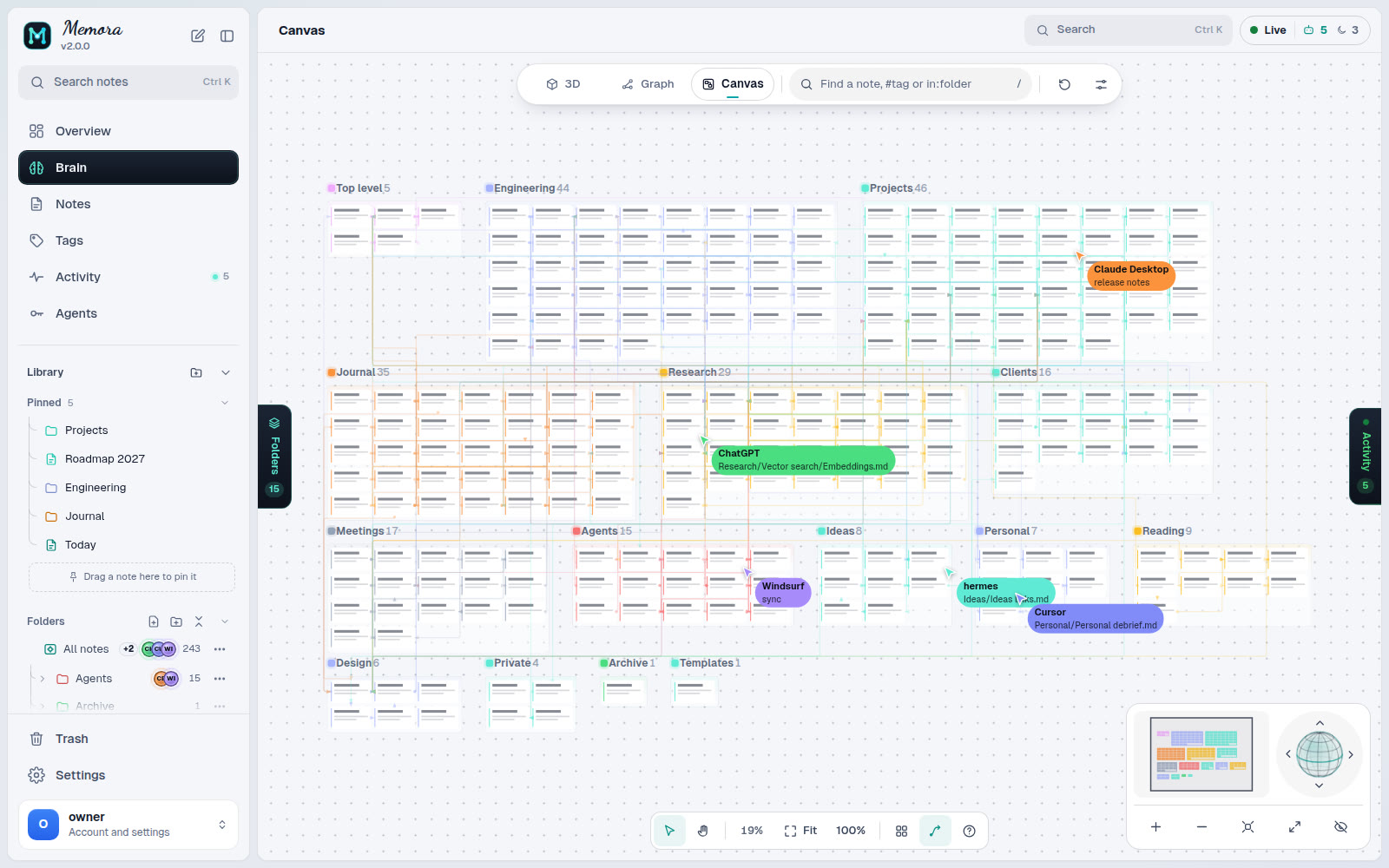 Canvas: one frame per folder |
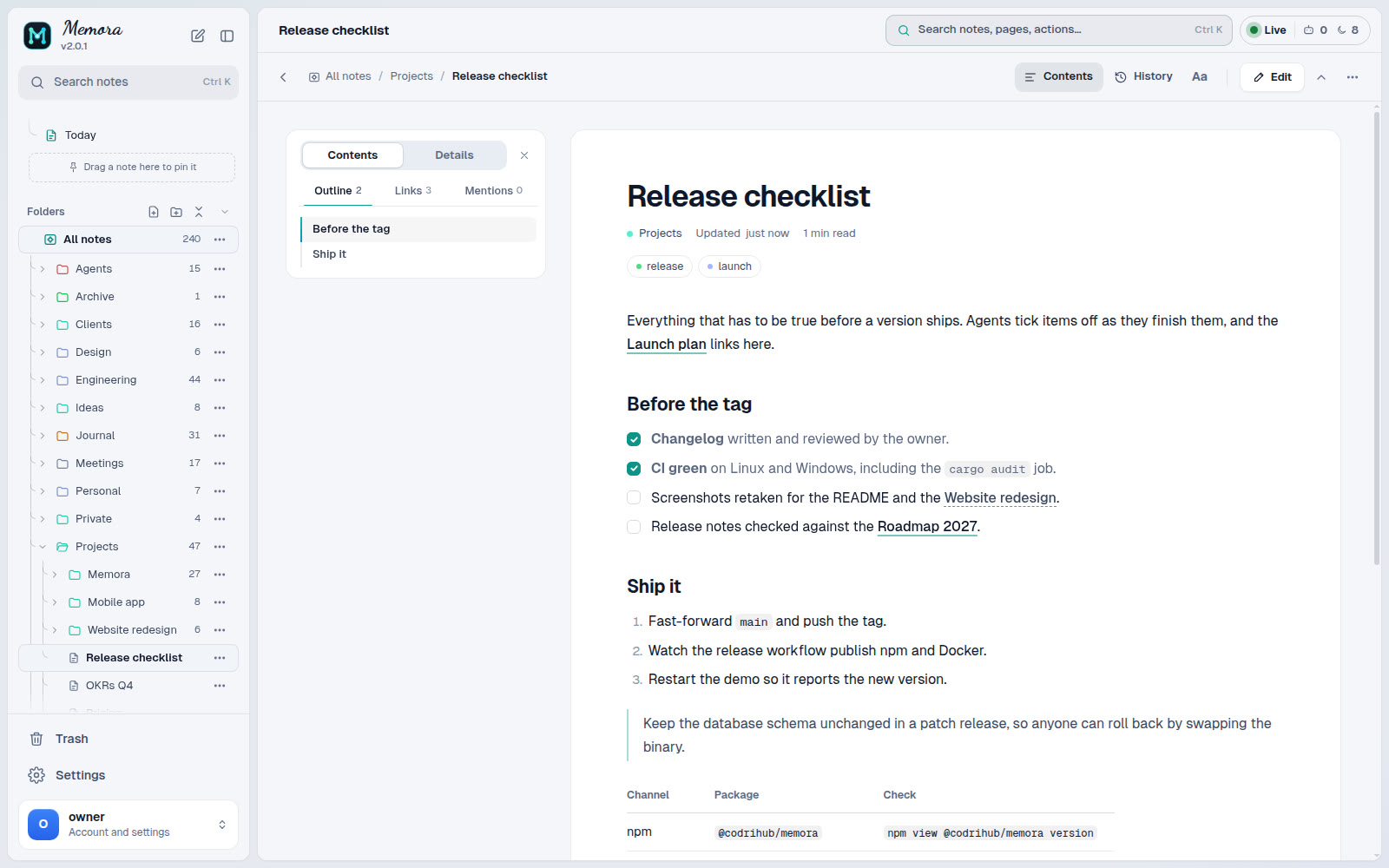 Reader with contents and reading settings |
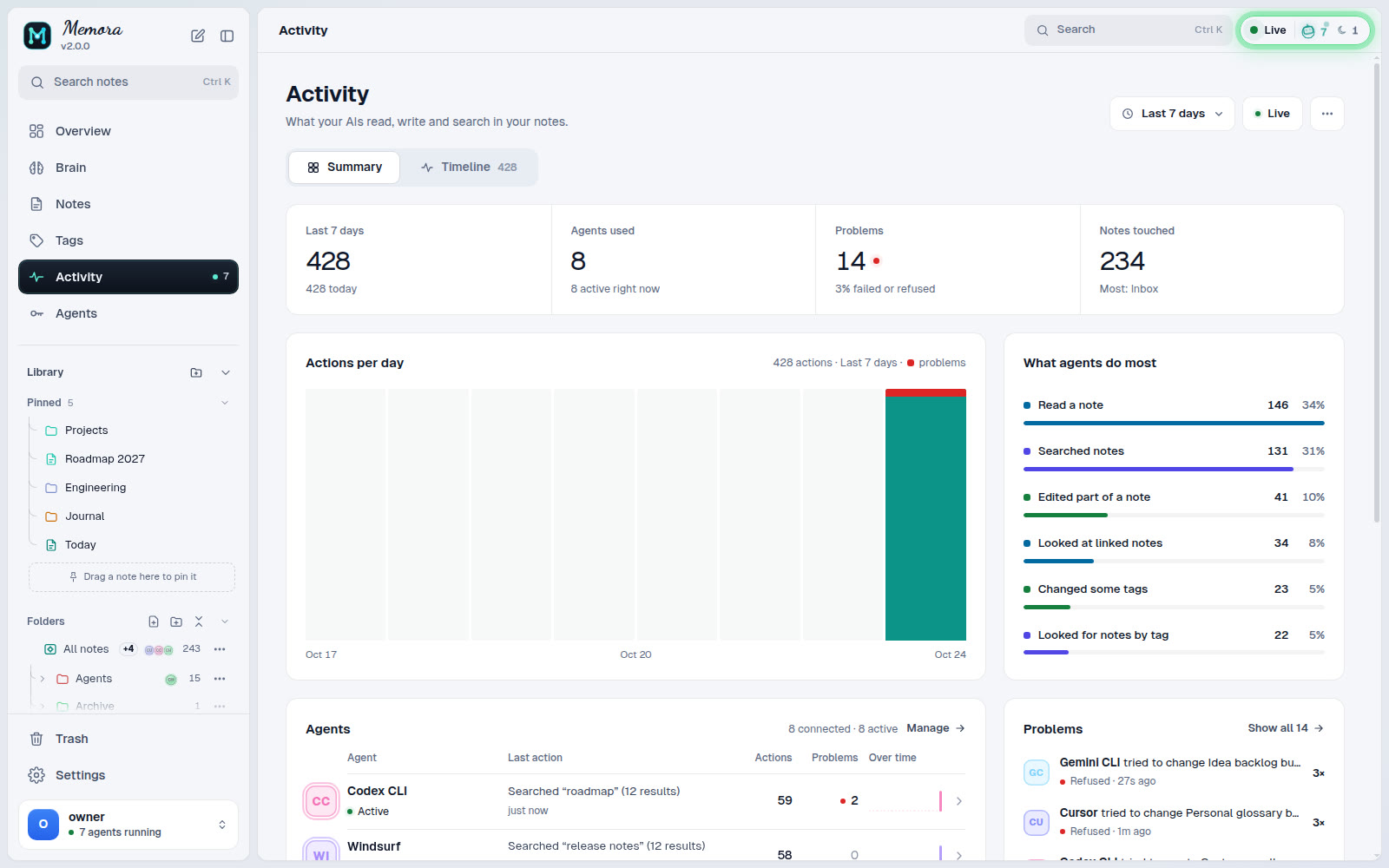 Activity: every agent call, live |
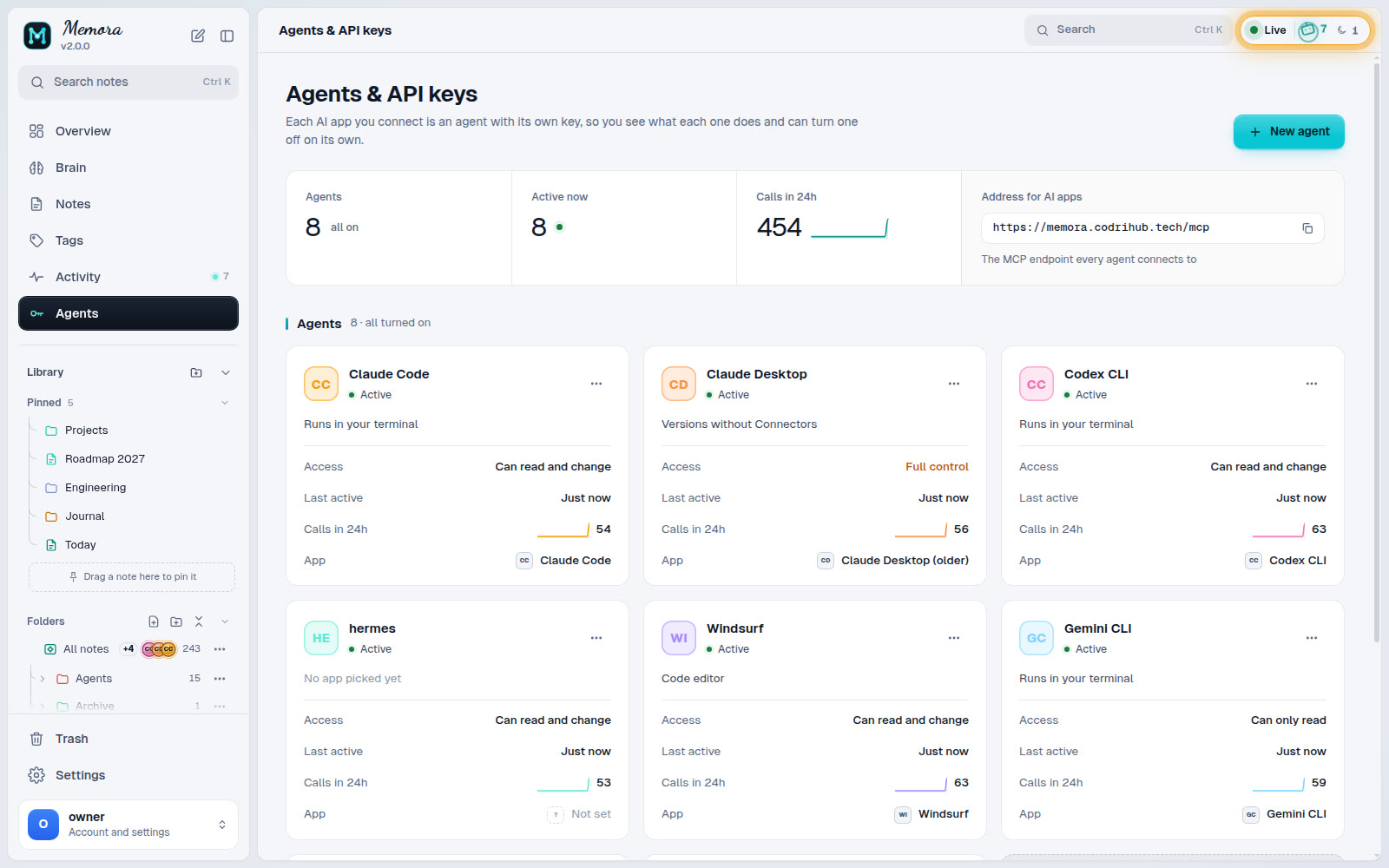 Agents & API keys: one key per agent, scoped |
Screenshots use a demo vault.
Features
- Markdown you own. Every note is a
.mdfile with optional frontmatter and[[wikilinks]]. Edit it with any tool; nothing is locked in a database. - Git history. Changes are committed, so any revision can be listed, diffed
and restored (
get_history,diff,restore_memory). - MCP for agents. 75 tools for notes, folders, search, tags, graph traversal, history, locks, activity, pins and import/export, plus admin tools, over the streamable HTTP transport.
- API keys or OAuth. Give each agent its own key, or let MCP clients such as Claude or ChatGPT connect with OAuth after you approve them in the browser.
- Per-agent control. Scopes (
mcp,read,write,admin), per-key tool lists, server-wide tool switches, and privacy rules that hide notes or folders from chosen agents. - Web UI. Brain and graph views, a canvas, the vault editor, tags, live agent activity, keys, tools, access rules and settings. Installable as a PWA.
- Safe first run. An unclaimed instance cannot be taken over by whoever finds the port: the operator console opens a short setup window and you finish in the browser.
- One port, one process. HTTP API, MCP, UI and WebSocket share port 8400. The database has no network port.
Quick start
Three steps, about two minutes.
1. Install (pick one, in this order of ease)
# npm (Linux x86_64 / arm64, Windows x64; Node.js 22 or newer): install, then keep it running
npm install -g @codrihub/memora && memora

# Docker (any OS with Docker)
docker run -d --name memora --restart unless-stopped -p 8400:8400 \
  -v memora-data:/data -v memora-state:/state ghcr.io/codrihub/memora:latest

# Native installer (Linux server with systemd, x86_64 or aarch64)
curl -fsSL https://raw.githubusercontent.com/Codrihub/memora/main/scripts/install.sh | sudo sh
On Windows, install Node.js 22 or newer and use npm (see npm).
2. Get a one-time setup code
memora-cli setup --minutes 15                         # npm, in a second terminal
docker exec -it memora memora-cli setup --minutes 15  # Docker
sudo memora-cli setup --minutes 15                    # native
3. Open the link it prints (http://<your-server>:8400/login), enter the code
and create your account. Memora then asks which folder to use as the vault and
shows how to connect your first agent.
That is all. The sections below cover every other option.
npm (Linux x86_64 / arm64, Windows x64)
npm install -g @codrihub/memora
mkdir -p ~/memora && cd ~/memora
MEMORA_VAULT=./vault MEMORA_STATE=./state memora
# in a second terminal, same folder:
MEMORA_STATE=./state memora-cli setup --minutes 15
On Windows (PowerShell):
npm install -g @codrihub/memora
mkdir ~\memora; cd ~\memora
$env:MEMORA_VAULT = '.\vault'; $env:MEMORA_STATE = '.\state'; memora
# in a second terminal, same folder:
$env:MEMORA_STATE = '.\state'; memora-cli setup --minutes 15
The package carries the prebuilt release binaries and the web UI (no install
script, nothing downloaded at install time) and needs Node.js 22 or newer. It is
handy for trying Memora or running it under your own user; for a server, the
native installer adds the systemd service. On macOS use Docker or build from
source. Update with npm install -g @codrihub/memora@latest.
Docker (any OS)
One container, notes and state in named volumes (no clone, no folder permissions):
docker run -d --name memora --restart unless-stopped -p 8400:8400 \
  -v memora-data:/data -v memora-state:/state ghcr.io/codrihub/memora:latest
docker exec -it memora memora-cli setup --minutes 15
With Docker Compose from the repository instead:
git clone https://github.com/Codrihub/memora.git && cd memora
cp .env.example .env                     # optional, every value has a default
mkdir -p data state && sudo chown -R 1000:1000 data state
docker compose up -d
docker compose exec -it gateway memora-cli setup --minutes 15
The image is ghcr.io/codrihub/memora (linux/amd64 and linux/arm64). See
docker/README.md for volumes, upgrades and local builds.
Native installer (Linux x86_64 / aarch64 with systemd)
One command:
curl -fsSL https://raw.githubusercontent.com/Codrihub/memora/main/scripts/install.sh | sudo sh
Or download it and read it first:
curl -fsSL https://raw.githubusercontent.com/Codrihub/memora/main/scripts/install.sh -o install.sh
less install.sh                          # read it first
sudo sh install.sh                       # add --behind-proxy for a local reverse proxy
sudo memora-cli                          # then type /web
The installer downloads the release for your CPU, verifies it against the
release SHA256SUMS, creates a memora system user, and installs a hardened
memora.service unit. Data lives in /var/lib/memora. Run
sh install.sh --help for every option, and see
docs/INSTALL.md for details.
From source
git clone https://github.com/Codrihub/memora.git && cd memora
cargo build --release
MEMORA_VAULT=./data MEMORA_STATE=./state ./target/release/memora
# in a second terminal:
./target/release/memora-cli              # then type /web
The server binds to 127.0.0.1:8400 by default. To install your build as a
service: sudo ./scripts/install.sh --from-source. The web UI is built from
web/ (see CONTRIBUTING.md).
First run
- Run
memora-cli setup(or type/webin thememora-cliconsole). It prints a one-time setup code and the link to open. - Open
http://<host>:8400/login, enter the code and create the owner account. - Choose the vault folder (
/var/lib/memora/vaultnatively,/datain Docker). - Add an agent: Agents, then New agent. Pick the app and paste the config it shows. One agent per app or device.
If a setup code expires unused, nothing breaks: run memora-cli setup again
for a new code.
Configuration
Settings come from the environment (systemd unit, .env for Docker) and can be
overridden in the state database with memora-cli -> /config; a stored value
wins until you clear it. The most common ones:
| Name | Default | Meaning |
|---|---|---|
MEMORA_PORT |
8400 |
HTTP port for API, MCP, UI and WebSocket |
MEMORA_BIND |
127.0.0.1 |
Bind address (0.0.0.0 in the container) |
MEMORA_STATE |
state |
Directory holding memora.db |
MEMORA_VAULT |
empty | Suggested vault folder; the vault is confirmed in the browser |
MEMORA_BASE_URL |
empty | Public URL behind a reverse proxy |
MEMORA_DOMAIN |
empty (any) | Allowed hostnames; other hosts get 404 |
MEMORA_TRUSTED_PROXIES |
empty | Remote proxies whose forwarding headers are trusted |
MEMORA_ADMIN_PASSWORD[_FILE], MEMORA_API_KEY[_FILE] |
unset | Provision an owner or an agent key at startup; only hashes are stored |
RUST_LOG |
info |
Log filter |
The full list, precedence rules and the Docker Compose variables are in docs/CONFIGURATION.md. For TLS, reverse proxies and hardening, see docs/DEPLOYMENT.md.
Connecting agents over MCP
The MCP endpoint is /mcp on the same port. Authenticate with an API key in
Authorization: Bearer <key> (or X-API-Key), or let the client use OAuth.
Claude Code:
claude mcp add --transport http memora https://memory.example.com/mcp \
  --header "Authorization: Bearer memora_live_REPLACE_WITH_YOUR_KEY"
Clients with an mcpServers JSON config:
{
  "mcpServers": {
    "memora": {
      "type": "http",
      "url": "http://localhost:8400/mcp",
      "headers": {
        "Authorization": "Bearer memora_live_REPLACE_WITH_YOUR_KEY"
      }
    }
  }
}
Clients that support MCP authorization can connect with only the URL; you
approve them in the browser and they appear as keys you can restrict or revoke.
The discovery card is at /.well-known/mcp.json and a readable tool catalog at
/tools. docs/MCP.md covers OAuth, other clients, every tool and
the error codes; docs/API.md lists the HTTP API.
Operating
sudo systemctl status memora             # native service
sudo journalctl -u memora -f             # logs
sudo memora-cli                          # console: /status, /keys, /tools, /config, /backup ...
sudo memora-cli db backup                # consistent copy of memora.db, safe while running
sudo /usr/local/share/memora/install.sh --upgrade
docker compose pull && docker compose up -d   # Docker upgrade
Back up the vault folder and memora.db (with memora-cli db backup, never a
plain cp of the live file). See docs/INSTALL.md.
Start, stop and restart
memora-cli start          # or /start in the console
memora-cli stop           # or /shutdown
memora-cli restart        # or /restart
memora-cli uninstall      # or /uninstall
They work out how this install runs: a systemd service is driven with
systemctl, an npm or source install runs in the background (pid and
log in the state folder), and inside Docker the console prints the host
commands (docker start / stop / restart memora). Uninstall asks, with a
checklist, whether to also delete your settings and your vault; both are kept
unless you tick them. Details: docs/INSTALL.md.
Update, uninstall, troubleshooting
memora-cli update prints the right steps for your install (npm:
npm install -g @codrihub/memora@latest, then memora-cli restart). Check
your version with memora --version. Per install method, and for older
versions without memora-cli uninstall (before 1.3.2), see
Update,
Uninstall by hand and
Troubleshooting.
The owner can also shut the server down from the browser: Settings, Server,
Shut down. Every browser and agent is disconnected until it is started again on
the server. When a supervisor restarts it on its own (systemd Restart=always,
Docker --restart unless-stopped), the confirmation says so and shows the stop
command to use instead.
Security notes
- The owner password is hashed with argon2id. API keys (
memora_live_...) and session ids are stored only as SHA-256 hashes; a key is shown once. - Session cookies are
HttpOnlyandSameSite=Lax, cookie writes are checked against the request origin, and pages use a nonce-based Content-Security-Policy. - Login and setup are rate limited with per-IP cooldowns; many failures from many IPs only slow sign-ins down and never lock the owner out.
- Forwarding headers are trusted only from loopback and
MEMORA_TRUSTED_PROXIES. - Access rules can allow or block by IP, range, CIDR and domain; loopback always stays allowed so you cannot lock yourself out.
- Terminate TLS at a reverse proxy before exposing Memora to the internet.
Report vulnerabilities privately as described in SECURITY.md.
Documentation
| Document | Contents |
|---|---|
| docs/INSTALL.md | Native installer, Docker, npm, updates, uninstall, troubleshooting, reverse proxy, backups |
| docs/CONFIGURATION.md | Every setting and where it lives |
| docs/DEPLOYMENT.md | Production deployment and hardening |
| docs/MCP.md | Connecting agents, OAuth, tool reference |
| docs/API.md | HTTP API |
| docs/ARCHITECTURE.md | Crates, request flow, vault files |
| docs/DATABASE.md | State database schema |
Project layout
crates/core      vault: markdown, wikilinks, search, graph, git history
crates/state     SQLite state database (memora.db)
crates/gateway   password and key hashing, access checks, environment provisioning
crates/mcp       MCP server: tool catalog, permissions, privacy
crates/http      axum server: middleware, API, OAuth, UI assets (binary: memora)
crates/cli       operator console (binary: memora-cli)
web/             web UI (TypeScript), built into crates/http/assets
docker/          container entrypoint and release Dockerfile
docs/            user and operator documentation
scripts/         installer and maintenance scripts
Versioning
Memora follows Semantic Versioning. Each release is a
vX.Y.Z tag with a GitHub Release
(static Linux binaries for x86_64 and aarch64 plus SHA256SUMS), npm
packages for Linux and Windows, and a
multi-arch image ghcr.io/codrihub/memora:X.Y.Z. Changes are listed in
CHANGELOG.md.
Contributing
Contributions are welcome. Read CONTRIBUTING.md and the Code of Conduct before opening a pull request.
License
Memora is free software under the GNU Affero General Public License v3.0 or later. You may use, modify and share it, including commercially. If you distribute a modified version, or run one as a service for others, you must publish its source under the same license and keep the attribution in NOTICE: "Based on Memora by Codrihub Tech". The name and logo are covered by TRADEMARK.md.
Versions 1.3.8 and earlier were released under the MIT License.
Memora MCPのよくある質問
ノートはどのような形式で保存されますか?
ノートは、gitで管理されたフォルダ内に、オプションのフロントマターやwikilinkを含むプレーンなMarkdownファイルとして保存されます。
Webインターフェースから記憶ボルトを管理できますか?
はい、MemoraにはWeb UIが含まれており、ノートの閲覧、編集、管理のほか、グラフやキャンバスレイアウトの表示も可能です。