
Metacortex MCPサーバー
コミット 2026年11月2日Firestoreのベクトル検索を利用して、AIエージェント向けのサーバーレスな永続メモリサービスを提供します。コンテキストの保存、検索、および永続的な取得が可能です。
別名 chrishonson/Metacortex
- スター
- 2
- ツール
- 3
- ダウンロード数(30日間)
- —
- 最新バージョン
- —
- 最終コミット
- 2026年11月2日
- ライセンス
- MIT
Metacortex MCPとは
MetacortexはMCPサーバーです。 Firestoreのベクトル検索を利用して、AIエージェント向けのサーバーレスな永続メモリサービスを提供します。コンテキストの保存、検索、および永続的な取得が可能です。. 3個のツールを提供しており、save_context, search_context, fetch_contextなどがあります。
プロジェクトのREADMEから生成された概要
Metacortex MCP server について
Metacortexは、サーバーレスアーキテクチャを通じてAIエージェントに永続的なメモリレイヤーを提供します。Claudeのウェブ版やChatGPTのウェブ版などのチャットクライアントが、Firestoreのベクトル検索を使用して、永続的なコンテキストを保存、検索、取得することを可能にします。Firebase Cloud Functions経由でデプロイすることで、複数の互換性のあるMCPクライアントが共有して統一されたナレッジベースを維持できるリモートバックエンドを提供します。
開発者は、このメモリを管理するために特定のツールを使用します。save_contextツールは、トピックなどのメタデータと共にテキストまたは画像ベースの情報を保存し、search_contextはベクトル検索を実行して関連する過去のやり取りを見つけます。関連するIDが見つかると、fetch_contextが保存されたレコード全体を取得します。このシステムはスコープ付きのクライアントプロファイルを使用しており、ブラウザベースのクライアントが、専用のベアラクレデンシャルとオリジン許可リストを通じて、必要なツールとエンドポイントのみにアクセスできるようにセキュリティを維持します。
このサービスは、独自のFirebaseプロジェクトを管理し、自律型エージェントに共有メモリコーパスを提供したいオペレーター向けに設計されています。画像入力は検索可能なテキストに正規化することでサポートしていますが、元の資産を取得するには外部ストレージの参照に依存します。
できること
- 1既存のプロジェクト知識の照会AIエージェントが以前に保存された情報を検索し、プロジェクトに関する特定の技術的な質問に回答できます。
- 2新しい技術詳細の保存ユーザーはAIに対し、将来のセッションのために特定のアーキテクチャの決定やライブラリの選択を記憶するよう指示できます。
- 3メモリレコード全体の取得検索を通じて関連する要約を見つけた後、エージェントは一意の識別子を使用して完全な元のテキストを呼び出すことができます。
- 4視覚的コンテキストの保存エージェントはスクリーンショットを検索可能なテキストに変換し、元のファイル場所へのリンクを作成することで、後で利用できるように処理できます。
プロジェクトの README から作成されています。すべてのユースケースは、その引用と照らし合わせて確認されています。
Metacortex MCPツール 3
READMEから検出save_contextsearch_contextfetch_context
| save_context | — | |
| search_context | — | |
| fetch_context | — |
設定
MCP_ADMIN_TOKENMCP_BASE_URLMCP_CLIENT_PROFILES_JSONMCP_SMOKE_MODE
| 名前 | 説明 | 種類 |
|---|---|---|
| MCP_ADMIN_TOKEN | — | |
| MCP_BASE_URL | — | |
| MCP_CLIENT_PROFILES_JSON | — | |
| MCP_SMOKE_MODE | — |
自動チェック
実行日 2026年11月15日完全なレポート →まだ検証されていません。サーバーには80点のスコア、重大な問題がないこと、および検証に必要な十分なデータが必要です。 チェックの仕組み · 点数を上げるための改善点

- ソースリポジトリがリンクされており、アクセス可能chrishonson/metacortex is public and reachablegithub.com/chrishonson/metacortex ↗合格
- パッケージがこのリポジトリをソースとして指定未チェック
- ビルドの来歴 (Sigstore 証明)未チェック
- オープンソースライセンス (OSI)MITspdx.org/licenses/MIT.html ↗合格
- 過去1年以内にコミットまたはリリースありLast commit or release 2026-11-02github.com/chrishonson/metacortex ↗合格
- OpenSSF Scorecard未チェック
- パッケージ名が有名なパッケージに酷似していない未チェック
- パッケージおよびその依存関係に重大な勧告なし未チェック
- モデルへの隠れた指示がない3 tool descriptions and the README read; no override phrases, credential paths or hidden characters合格
- 破壊的なツールがラベル付けされているNo tool named like delete, drop or exec合格
- リモートエンドポイントが MCP ハンドシェイクに応答未チェック
README
GitHubで見るMetaCortex
MetaCortex is a serverless MCP memory service backed by Firestore vector search and deployed through Firebase Cloud Functions 2nd Gen.
Status and roadmap
MetaCortex is already released (repository tag v0.3.0). This checkout contains a reconciled local baseline; publication and production deployment are separate operations. See the unified roadmap.
The browser setup wizard, owner login/OAuth, management dashboard, and ChatGPT extension are planned, not available in this baseline. Software is MIT-licensed; owners pay their own Firebase/model usage and agent subscriptions. One installation holds one owner's shared corpus; profiles do not provide tenant isolation.
Why Metacortex?
Persistent memory shared by compatible MCP clients, with Firebase-managed infrastructure. Operators still configure, deploy, monitor, and back up their own project.
[!TIP] Memory Layer: MetaCortex provides the hosted memory service, while autonomous agents such as OpenClaw use it as a shared remote memory backend. See the full Architecture & Use Cases for details.
The practical target is a remote MCP server that chat clients such as ChatGPT web or Claude web can use for:
- searching what the project already knows
- saving new durable memories from chat
- fetching the full stored memory behind a search result
How It Works
1. Chat clients use a narrow memory contract
MetaCortex gives browser clients a three-tool memory contract. The first write comes through save_context, which stores canonical text and lifecycle metadata on the server side.
2. Retrieval stays on the same remote backend
The same scoped MCP contract makes retrieval available later through search_context and fetch_context. ChatGPT and Claude both follow the same server-side retrieval flow, each with its own token and origin allowlist.
3. Firestore stores durable memory records plus vectors
Every saved memory lands in Firestore with searchable metadata and the corresponding vector embedding. That keeps the retrieval layer serverless while still exposing durable semantic search.
4. Scoped client profiles keep browser access safe
Browser clients never connect to the admin surface directly. Each client profile gets its own endpoint, token, origin allowlist, and allowed tool list so public chat surfaces only see the read/write tools they actually need.
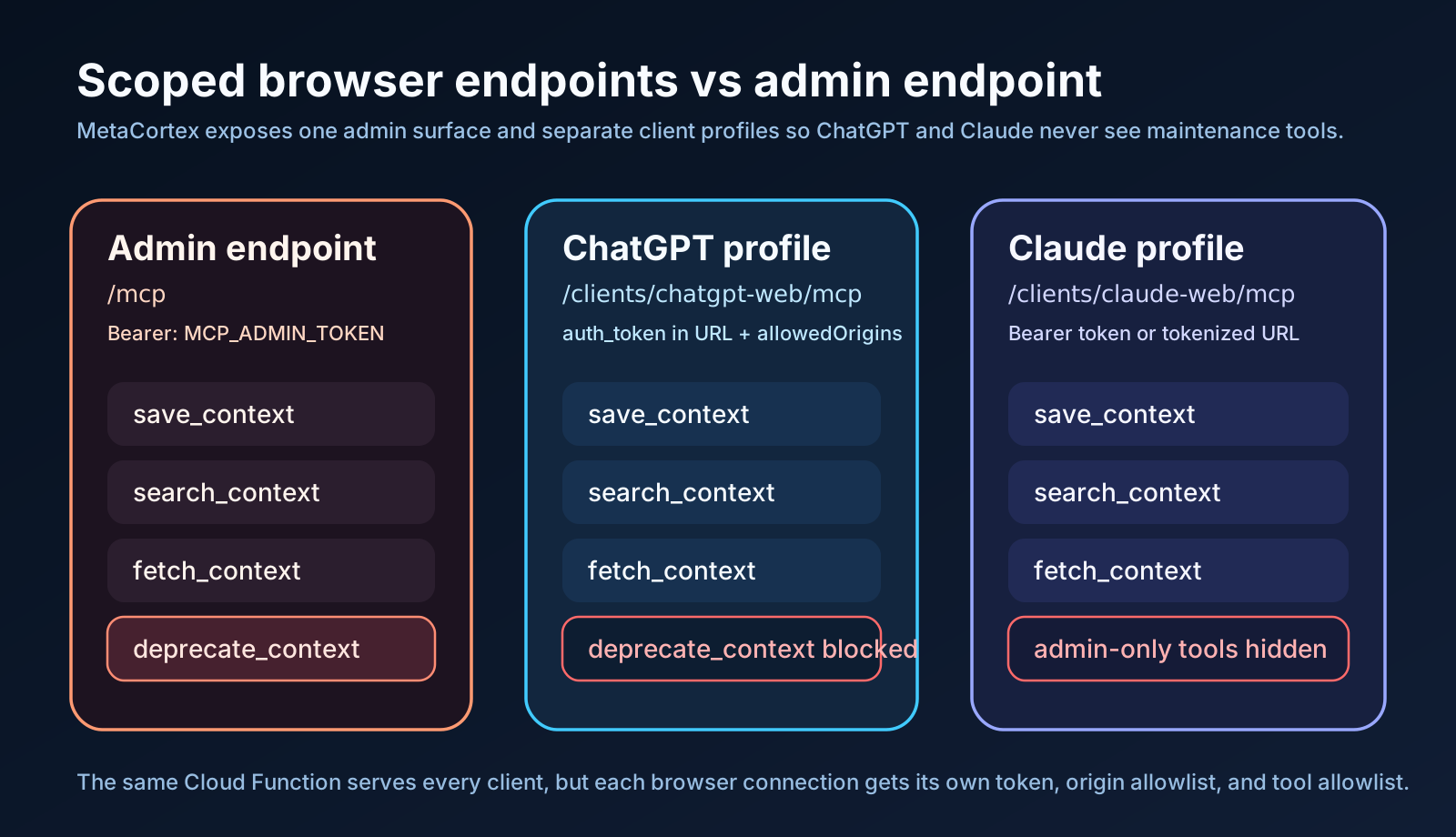
Important constraint
As of March 10, 2026, Cloud Functions production deployment requires the Firebase Blaze plan. The original Spark-only production target from the initial spec is not compatible with current Firebase Functions deployment rules, though low-traffic usage can still remain close to zero cost within Blaze no-cost quotas.
Primary use cases
This project is set up for these workflows:
- A chat client asks, "What do we already know about auth/session handling?"
The model calls
search_context. - The search results include stable
idvalues and external artifact refs when available. The model can callfetch_contextwith that sameidfor the one result it wants in full. - A user says, "Remember that we use Ktor for shared Android and iOS networking."
The model calls
save_context. - A user shares a screenshot and says to save it for later retrieval.
The model calls
save_contextwith image input plusartifact_refsif the real asset lives in storage.
Tool strategy
The current MCP surface is intentionally split between:
- a client-facing contract for browser-hosted chat clients
- a smaller admin-only maintenance surface documented later in this README
That means the server currently exposes 6 MCP tools total, but normal browser clients should only see 3 of them by default.
Ordinary-agent tools
These are the recommended ordinary-agent tools:
save_contextThe single write tool for normal chat use. The client supplies the memory text, optional topic, optionaldraft=truefor rough notes, optional image input, and optionalartifact_refs. The server fills in sensible defaults.search_contextVector search over stored memories. Results include stableidvalues and artifact refs when available.fetch_contextFetch one memory byidaftersave_contextorsearch_context.
Optional listing permission
list_context enumerates stored memories with cursor pagination and metadata/creation-time/provenance filtering. It returns summaries and IDs. Grant it explicitly; it is not part of the three-tool ordinary-agent default.
Why save_context Is The Write Tool
save_context keeps the public write surface simple:
topicis the public label and maps to the storedmodule_nameinternally- normal writes store canonical memory as
active draft=truestores draft material aswip
Explicit lifecycle overrides and cleanup flows are part of the admin maintenance surface described later in this README.
Metadata model
The main public metadata field is topic. Stored records also carry lifecycle metadata such as branch_state, but that is primarily for admin cleanup and filtering and is documented later in Admin Cleanup And Consolidation.
topic
Public topic or subsystem label for MCP clients. Internally this is stored as module_name.
Examples:
authbillingkmp-networkingui-settings
If omitted, the server defaults it to general.
Images
This project supports image-backed memories, but it does not store raw image bytes for later download.
What happens today:
- the image is normalized into retrieval text by Gemini
- that text is embedded and stored
- optional
artifact_refscan point to the real asset, for examplegs://bucket/path.png - search results and fetched records return those artifact refs when they exist
That means the practical image flow is:
- save a screenshot with
save_context - store the real asset elsewhere
- include its
artifact_refs - let semantic search find the memory
- let the client follow the returned artifact ref to the actual screenshot
Endpoints
- Default Streamable HTTP MCP endpoint:
/metaCortexMcp/mcp - Client-scoped Streamable HTTP MCP endpoint:
/metaCortexMcp/clients/<clientId>/mcp
Security model:
- the default
/mcpendpoint is the admin endpoint clients/<clientId>endpoints let you expose smaller toolsets to specific consumersMCP_ALLOWED_ORIGINSapplies only to the default admin endpoint- browser CORS should be configured per client profile through
MCP_CLIENT_PROFILES_JSON[].allowedOrigins - leave
MCP_ALLOWED_ORIGINSempty unless you intentionally want browser access to the admin endpoint
Recommended browser read/write toolset:
save_contextsearch_contextfetch_context
This is the default ordinary-agent profile; the server offers six tools overall.
Client setup and authentication status
Use a dedicated scoped endpoint <FUNCTION_BASE_URL>/clients/<clientId>/mcp and its matching bearer credential. Do not register the admin endpoint with an ordinary client. Configure exact origins per profile; clients without an Origin header do not need browser origins.
This baseline has static credentials, not OAuth or owner login. Current code also accepts ?auth_token=<SCOPED_TOKEN> for legacy URL-only clients. That credential is part of a URL and may enter infrastructure logs; do not describe it as secure secret transport. Existing connections are not removed by this baseline. The roadmap disables URL tokens for fresh installations after the auth work, migrates existing clients, then removes support in a documented breaking release.
Use the capabilities of the specific client/version being connected; do not assume a particular ChatGPT or Claude settings screen supports bearer headers. The future core compatibility matrix covers ChatGPT, Claude, Codex, and generic MCP. No fresh compatibility verification is implied by these examples. See deployment and the client recipe.
Tool Contract
The client-facing tools return one TextContent block whose text is a single JSON object.
save_context
Minimal text memory:
{
  "content": "We use Ktor for shared Android and iOS networking.",
  "topic": "kmp-networking"
}
Typical result:
{
  "item": {
    "id": "abc123",
    "content": "We use Ktor for shared Android and iOS networking.",
    "metadata": {
      "topic": "kmp-networking",
      "branch_state": "active",
      "modality": "text",
      "created_at": "2026-03-14T12:00:00.000Z",
      "updated_at": "2026-03-14T12:00:00.000Z"
    }
  },
  "write_status": "created"
}
Use item.id directly with fetch_context.
Image-backed memory with an external asset reference:
{
  "content": "Settings screen screenshot for the Compose UI.",
  "topic": "ui-settings",
  "artifact_refs": ["gs://your-bucket/settings-screen.png"],
  "image_base64": "<base64 image bytes>",
  "image_mime_type": "image/png"
}
search_context
Example input:
{
  "query": "shared networking for android and ios",
  "filter_topic": "kmp-networking",
  "filter_state": "active"
}
Typical result:
{
  "matches": [
    {
      "id": "abc123",
      "summary": "We use Ktor for shared Android and iOS networking.",
      "score": 0.92,
      "metadata": {
        "topic": "kmp-networking",
        "branch_state": "active",
        "modality": "text",
        "created_at": "2026-03-14T12:00:00.000Z",
        "updated_at": "2026-03-14T12:00:00.000Z"
      }
    }
  ],
  "applied_filters": {
    "filter_topic": "kmp-networking",
    "filter_state": "active"
  }
}
If an item has external refs, they appear in metadata.artifact_refs.
If nothing matches, the result is:
{
  "matches": [],
  "applied_filters": {
    "filter_topic": null,
    "filter_state": "active"
  }
}
fetch_context
Preferred input: pass the same id returned by save_context or search_context. document_id is accepted as a compatibility alias for older connector wrappers.
Example input:
{
  "id": "abc123"
}
Compatibility alias:
{
  "document_id": "abc123"
}
Typical result:
{
  "item": {
    "id": "abc123",
    "content": "We use Ktor for shared Android and iOS networking.",
    "metadata": {
      "topic": "kmp-networking",
      "branch_state": "active",
      "modality": "text",
      "created_at": "2026-03-14T12:00:00.000Z",
      "updated_at": "2026-03-14T12:00:00.000Z"
    }
  }
}
Search Behavior
search_context does one exact metadata filter step and one vector step:
filter_stateis always applied before nearest-neighbor searchfilter_topic, when present, is an exact match on the stored topic label- vector search then runs Firestore
findNearest()with cosine distance - the result count is
limitwhen provided, otherwiseSEARCH_RESULT_LIMIT - the default state is
activeunless the client profile allows and requests another state
fetch_context can still fail with a neutral 404 if the document exists but its branch_state is outside that client profile's allowedFilterStates.
Write Constraints
Write behavior that matters in production:
- request bodies are limited to
1mb, including base64 image data contentorimage_base64is requiredimage_mime_typeis required wheneverimage_base64is provided- images are normalized into retrieval text and embedded as text; raw image bytes are not stored for download
- if you want the real asset later, store it elsewhere and include
artifact_refs - exact duplicate writes within the current idempotency window are replay-safe and reuse the existing memory
id - duplicate suppression is intentionally light and based on the normalized write fingerprint, not semantic similarity
save_context defaults:
- omitted
topicbecomesgeneral - omitted
draftand omitted lifecycle overrides storebranch_state=active draft=truestoresbranch_state=wip
Explicit lifecycle overrides are part of the admin maintenance surface described later in this README.
Admin Cleanup And Consolidation
Maintenance may run automatically only after owner opt-in, in a separate trusted session with a configured small batch and review for uncertain changes. User corrections require owner authorization. These policies are not fully enforced by the current static-token service: prompts and caller-supplied initiator metadata are not proof of human action. See security limitations.
There is no permanent deletion feature. Deprecation retains memory history. Omit superseding_id to retire a memory with no replacement. A supplied one must exist, differ from the memory, and not lead back to it. Repeating the same deprecation changes nothing, and a different one on an already deprecated memory is rejected.
This section is for operators using the admin endpoint. Browser-hosted clients can usually ignore it.
Admin-only maintenance surface:
deprecate_contextSoft-delete obsolete memories by settingbranch_state=deprecatedand recordingsuperseded_by.consolidate_contextMerge multiple related memories into one canonical active memory via LLM. By default merges all WIP memories for a topic. Passsource_idsto consolidate specific memories regardless of their current state. All source memories are deprecated and linked to the merged result.
Lifecycle states:
activeCanonical memory that normal search should return.wipDraft memory awaiting consolidation.mergedIncorporated memory that is no longer the main active record.deprecatedObsolete memory kept only for history and audit.
Recommended usage:
- Browser clients save durable memories with
save_context. - Agent clients such as OpenClaw should use a dedicated scoped client profile with
save_context,search_context, andfetch_contextonly. - Use
draft=trueonly for provisional notes that should not appear in normal active search. - Use
consolidate_contextto merge a batch of WIP drafts or fragmented active memories into one canonical record. - Admin flows can set explicit
branch_statewhen they need non-default lifecycle control. - After writing the canonical replacement, admins can mark obsolete records with the admin-only
deprecate_contexttool.
Current lifecycle behavior:
save_contextdefaults toactive, supportsdraft=trueforwip, and also accepts explicitbranch_statefor advanced writesdraftandbranch_stateare mutually exclusivedeprecate_contextdoes not delete data; it setsbranch_state=deprecatedand recordssuperseded_byconsolidate_contextcalls Gemini to merge N source memories into one, stores the result asactive, and deprecates all sources withsuperseded_bypointing to the merged idmergedexists as a searchable historical state for explicit admin writes- client profiles can restrict visible lifecycle states through
allowedFilterStates
Observability
After deployment, there are three places to look:
memory_vectorsin Firestore shows the current memory corpusmemory_eventsin Firestore shows client-attributed tool usage over time- Cloud Logging shows request failures and structured tool-event logs
When RETRIEVAL_EVENT_LOGGING_ENABLED=true, retrieval_query_events also stores
full search queries, filters, limits, ranked result ids/scores, and fetch ids. This
collection is separate because the full queries may contain sensitive user text;
it uses the same 90-day TTL target as memory_events.
memory_events records one document per tool call and one document per ingress rejection. Events include:
client_idevent_typestatustimestampexpires_atlatency_ms- a compact
requestsummary - either a compact
responsesummary, anerror, or a request rejection reason
Examples:
-
public tool payloads use
idfor fetchable memory identifiers -
save_contextevents record the writtenid,topic,branch_state, andmodality -
search_contextevents record the requested filters,result_count, and returnedresult_ids -
fetch_contextevents record whichidwas read -
deprecate_contextevents recordid,superseding_id, andprevious_state -
rejected browser/admin requests record
reason=origin_not_allowedorreason=unauthorizedTraceability is by client profile id, so: -
admin endpoint traffic is attributed to
client_id=default -
ChatGPT web traffic is attributed to
client_id=chatgpt-web -
Claude web traffic is attributed to
client_id=claude-web
What is intentionally not stored in observability events:
- full memory bodies
- full image bytes
- raw image downloads
Search events do include a short query_preview, but the observability collection is designed to track behavior, not duplicate the corpus.
Retention is handled with Firestore TTL policies:
memory_events.expires_attargets 90-day audit retentionretrieval_query_events.expires_attargets 90-day retrieval telemetry retentionmemory_vectors_write_fingerprints.expires_attargets 30-day fingerprint retention- fingerprint documents keep numeric
dedupe_expires_atfor the short duplicate-write window
Retrieval evaluation
S4 adds frozen local source/case bundles and provider comparisons to the same entry point. These run without Firebase credentials. See the implementation and Onyx preflight. The checked-in examples are scripted contract tests, not live provider results.
The evaluation corpus is stored in retrieval_eval_cases; isolated synthetic
memories are stored separately in memory_vectors_eval. Cases have no lifecycle
field: regeneration replaces the selected source partition and removes obsolete
cases.
# Seed a deterministic isolated corpus and replace its eval cases.
npm --prefix functions run eval:generate

# Measure hit@k, recall@k, MRR, empty results, and p50/p95 latency.
npm --prefix functions run eval:run -- --mode isolated

# Explicitly convert recent production search-to-fetch evidence into eval cases.
npm --prefix functions run eval:import -- --lookback-hours 168

# Run imported production cases through the deployed MCP endpoint.
npm --prefix functions run eval:run -- --mode production --url "$MCP_BASE_URL"
Production retrieval events are evidence only. They do not become benchmark cases
until eval:import is run, and a successful fetch is treated as a weak implicit label;
the harness does not infer negative relevance judgments.
Backup and recovery
Existing operator commands are integrated from the archive worktree. Portable memory archives omit embeddings and re-embed on restore. Full top-level Firestore backups preserve vectors and discover collection inventory. Their current limits and destructive operator restore semantics are explicit in those guides; future recovery hardening remains on the roadmap.
Quick start
-
Install dependencies:
npm --prefix functions install -
Create local env vars:
cp functions/.env.example functions/.envFor local development, use placeholder/local values only. For deployment, place credentials and profiles in Secret Manager, not production dotenv. Example profile value:
MCP_CLIENT_PROFILES_JSON=[{"id":"chatgpt-web","token":"replace-chatgpt-token","allowedTools":["save_context","search_context","fetch_context"],"allowedFilterStates":["active"],"allowedOrigins":["https://chatgpt.com"]},{"id":"claude-web","token":"replace-claude-token","allowedTools":["save_context","search_context","fetch_context"],"allowedFilterStates":["active"],"allowedOrigins":["https://claude.ai"]}] -
Run verification:
npm --prefix functions test npm --prefix functions run build -
Start emulators:
npm --prefix functions run serve -
Optional MCP smoke test:
cd functions
MCP_BASE_URL="http://127.0.0.1:5001/demo-open-brain/us-central1/metaCortexMcp/mcp" \
MCP_ADMIN_TOKEN="replace-me" \
MCP_SMOKE_MODE="admin-read-write" \
npm run smoke
Browser-client flow:
cd functions
MCP_BASE_URL="http://127.0.0.1:5001/demo-open-brain/us-central1/metaCortexMcp/clients/chatgpt-web/mcp" \
MCP_ADMIN_TOKEN="replace-chatgpt-token" \
MCP_SMOKE_MODE="browser-read-write" \
npm run smoke
Repeat with
/clients/claude-web/mcpand the Claude token to verify Claude separately.
Deployment
Deployment playbook: docs/DEPLOYMENT.md
For the maintainer’s existing production project, the preflight below checks local configuration and production secrets. New owners should follow the explicit-target deployment playbook instead:
cd <your-metacortex-checkout>
./scripts/deploy-session-preflight.sh
Metacortex MCPのよくある質問
Metacortex MCPが提供するツールは
3個のツールを提供しており、save_context, search_context, fetch_contextなどがあります。
AIクライアントでMetacortexを利用すると何ができますか?
既存の知識の検索、チャットからの新しい永続メモリの保存、および特定のIDを使用した保存済みメモリレコード全体の取得が可能です。
Metacortexは画像ファイルをそのまま保存しますか?
いいえ、ダウンロード用の生の画像バイトは保存しません。代わりに画像を検索可能なテキストに正規化し、アーティファクト参照を介して外部アセットへのリンクを保持します。
Firebaseへのデプロイ要件は何ですか?
Cloud Functionsを本番環境にデプロイするには、FirebaseのBlazeプランが必要です。
検索機能はどのように動作しますか?
メタデータによる完全一致フィルタリングを行った後、FirestoreのfindNearest関数を使用してコサイン類似度によるベクトル検索を実行します。