
Bult DevOpsプラットフォームを通じて、AIコーディングエージェントによるクラウドインフラ、データベース、およびサービスのデプロイと管理を実現します。
別名 bultcloud/mcp-server, mcp-server, @bultcloud/mcp-server
- スター
- 2
- ツール
- 24
- ダウンロード数(30日間)
- 128
- 最新バージョン
- 1.0.1
- 最終コミット
- 2026年10月12日
- ライセンス
- MIT
Bult MCPとは
BultはMCPサーバーです。 Bult DevOpsプラットフォームを通じて、AIコーディングエージェントによるクラウドインフラ、データベース、およびサービスのデプロイと管理を実現します。. 24個のツールを提供しており、list-projects, get-project, create-projectなどがあります。
プロジェクトのREADMEから生成された概要
Bult MCP server について
Bultは、AIコーディングエージェントがBult DevOpsプラットフォームを通じて、クラウドインフラやホスティングリソースを直接管理できる手段を提供します。開発者は、このMCP serverをClaude Desktop、Claude Code、Cursor、Codexなどのクライアントと組み合わせて使用することで、GitHubリポジトリ、Dockerイメージ、およびデータベースサービスのデプロイを自動化できます。本サーバーはstdio経由で動作し、実行にはBult APIトークンとBult API URLが必要です。
このサーバーには、プロジェクトのライフサイクル全体を管理するための幅広いツールが含まれています。特定のコマンドを使用して、プロジェクトの一覧表示や作成、デーモンおよびデータベースサービスの管理、永続ボリュームの操作が可能です。また、ルートやドメインのマッピング設定、プロジェクトテンプレートの適用、ビルド履歴の確認も行えます。
デプロイだけでなく、サービスログへのアクセスを提供することで、能動的なトラブルシューティングも可能です。これにより、AIエージェントはデプロイの失敗原因の調査や、アプリケーションの動作監視を行うことができます。Bult APIへのリクエストを認証するために、ユーザーは環境変数を通じて BULT_API_TOKEN を提供する必要があります。
できること
- 1コードリポジトリのデプロイAIエージェントがGitHubリポジトリを取得し、Bultクラウドプラットフォームへデプロイできます。
- 2デプロイ失敗のトラブルシューティングAIに対してサービスログの確認を依頼し、デプロイが失敗した原因を特定できます。
- 3データベースサービスの管理開発者がエージェントに対し、新しいデータベースサービスの作成と設定を指示できます。
- 4ネットワークルートの設定AIが特定のサービスに対して、公開ドメインやパスのマッピングを設定できます。
プロジェクトの README から作成されています。すべてのユースケースは、その引用と照らし合わせて確認されています。
Bult MCPのインストール方法
フォーマット検証日 2026年11月10日Cursor に追加Gooseに追加Claude CodeにBult MCPをインストール
$ claude mcp add --env 'BULT_API_TOKEN=<YOUR_BULT_API_TOKEN>' --env 'BULT_API_URL=<BULT_API_URL>' mcp-server -- npx -y @bultcloud/mcp-serverCursorにBult MCPをインストール
~/.cursor/mcp.json
{
  "mcpServers": {
    "mcp-server": {
      "command": "npx",
      "args": [
        "-y",
        "@bultcloud/mcp-server"
      ],
      "env": {
        "BULT_API_TOKEN": "<YOUR_BULT_API_TOKEN>",
        "BULT_API_URL": "<BULT_API_URL>"
      }
    }
  }
}VS CodeにBult MCPをインストール
.vscode/mcp.json
{
  "servers": {
    "mcp-server": {
      "type": "stdio",
      "command": "npx",
      "args": [
        "-y",
        "@bultcloud/mcp-server"
      ],
      "env": {
        "BULT_API_TOKEN": "<YOUR_BULT_API_TOKEN>",
        "BULT_API_URL": "<BULT_API_URL>"
      }
    }
  }
}VS Code CLIにBult MCPをインストール
$ code --add-mcp '{"name":"mcp-server","type":"stdio","command":"npx","args":["-y","@bultcloud/mcp-server"],"env":{"BULT_API_TOKEN":"<YOUR_BULT_API_TOKEN>","BULT_API_URL":"<BULT_API_URL>"}}'Claude DesktopにBult MCPをインストール
claude_desktop_config.json
{
  "mcpServers": {
    "mcp-server": {
      "command": "npx",
      "args": [
        "-y",
        "@bultcloud/mcp-server"
      ],
      "env": {
        "BULT_API_TOKEN": "<YOUR_BULT_API_TOKEN>",
        "BULT_API_URL": "<BULT_API_URL>"
      }
    }
  }
}CodexにBult MCPをインストール
$ codex mcp add mcp-server --env 'BULT_API_TOKEN=<YOUR_BULT_API_TOKEN>' --env 'BULT_API_URL=<BULT_API_URL>' -- npx -y @bultcloud/mcp-serverCodex config.tomlにBult MCPをインストール
~/.codex/config.toml
[mcp_servers.mcp-server]
command = "npx"
args = ["-y", "@bultcloud/mcp-server"]

[mcp_servers.mcp-server.env]
BULT_API_TOKEN = "<YOUR_BULT_API_TOKEN>"
BULT_API_URL = "<BULT_API_URL>"
Gemini CLIにBult MCPをインストール
$ gemini mcp add -s user -e 'BULT_API_TOKEN=<YOUR_BULT_API_TOKEN>' -e 'BULT_API_URL=<BULT_API_URL>' mcp-server npx -- -y @bultcloud/mcp-serverGemini settings.jsonにBult MCPをインストール
~/.gemini/settings.json
{
  "mcpServers": {
    "mcp-server": {
      "command": "npx",
      "args": [
        "-y",
        "@bultcloud/mcp-server"
      ],
      "env": {
        "BULT_API_TOKEN": "<YOUR_BULT_API_TOKEN>",
        "BULT_API_URL": "<BULT_API_URL>"
      }
    }
  }
}Bult MCPツール 24
READMEから検出list-projectsget-projectcreate-projectupdate-projectdelete-projectdeploy-projectcontrol-projectlist-servicesget-servicecreate-serviceupdate-servicedelete-service
| list-projects | — | |
| get-project | — | |
| create-project | — | |
| update-project | — | |
| delete-project | — | |
| deploy-project | — | |
| control-project | — | |
| list-services | — | |
| get-service | — | |
| create-service | — | |
| update-service | — | |
| delete-service | — |
24個のツールをすべて表示ツールを折りたたむ
control-servicecreate-volumeupdate-volumedelete-volumewipe-volumecreate-routeupdate-routedelete-routelist-templatesapply-templateget-service-logslist-builds
| control-service | — | |
| create-volume | — | |
| update-volume | — | |
| delete-volume | — | |
| wipe-volume | — | |
| create-route | — | |
| update-route | — | |
| delete-route | — | |
| list-templates | — | |
| apply-template | — | |
| get-service-logs | — | |
| list-builds | — |
設定
BULT_API_TOKEN必須シークレットBult API token used to authenticate requests.
BULT_API_URL必須Base URL of the Bult.ai API.
| 名前 | 説明 | 種類 |
|---|---|---|
| BULT_API_TOKEN | Bult API token used to authenticate requests. | 必須シークレット |
| BULT_API_URL | Base URL of the Bult.ai API. | 必須 |
自動チェック
実行日 2026年11月14日完全なレポート →自動チェックに合格しました。これはセキュリティ監査ではありません。コードを読み、サーバーに必要最小限のアクセス権を与えてください。 チェックの仕組み

- ソースリポジトリがリンクされており、アクセス可能bultcloud/mcp-server is public and reachablegithub.com/bultcloud/mcp-server ↗合格
- パッケージがこのリポジトリをソースとして指定@bultcloud/mcp-server names bultcloud/mcp-server as sourcenpmjs.com/package/@bultcloud/mcp-server ↗合格
- ビルドの来歴 (Sigstore 証明)No build attestation published for this release未チェック
- オープンソースライセンス (OSI)MITspdx.org/licenses/MIT.html ↗合格
- 過去1年以内にコミットまたはリリースありLast commit or release 2026-10-12github.com/bultcloud/mcp-server ↗合格
- OpenSSF Scorecard未チェック
- パッケージ名が有名なパッケージに酷似していないNo popular package one edit away from @bultcloud/mcp-server合格
- パッケージおよびその依存関係に重大な勧告なし99 resolved dependencies checked; no critical advisoryosv.dev ↗合格
- モデルへの隠れた指示がない24 tool descriptions and the README read; no override phrases, credential paths or hidden characters合格
- 破壊的なツールがラベル付けされている未チェック
- リモートエンドポイントが MCP ハンドシェイクに応答未チェック
README
GitHubで見る@bultcloud/mcp-server

Official Model Context Protocol (MCP) server for Bult.ai, a DevOps platform and cloud hosting Platform-as-a-Service for deploying apps, GitHub repositories, Docker images, databases, and services with AI agents.
Use Bult MCP with Claude Desktop, Claude Code, Cursor, Codex, and other MCP-compatible clients to deploy apps, manage cloud infrastructure, inspect logs, and troubleshoot deployments through the Bult API.
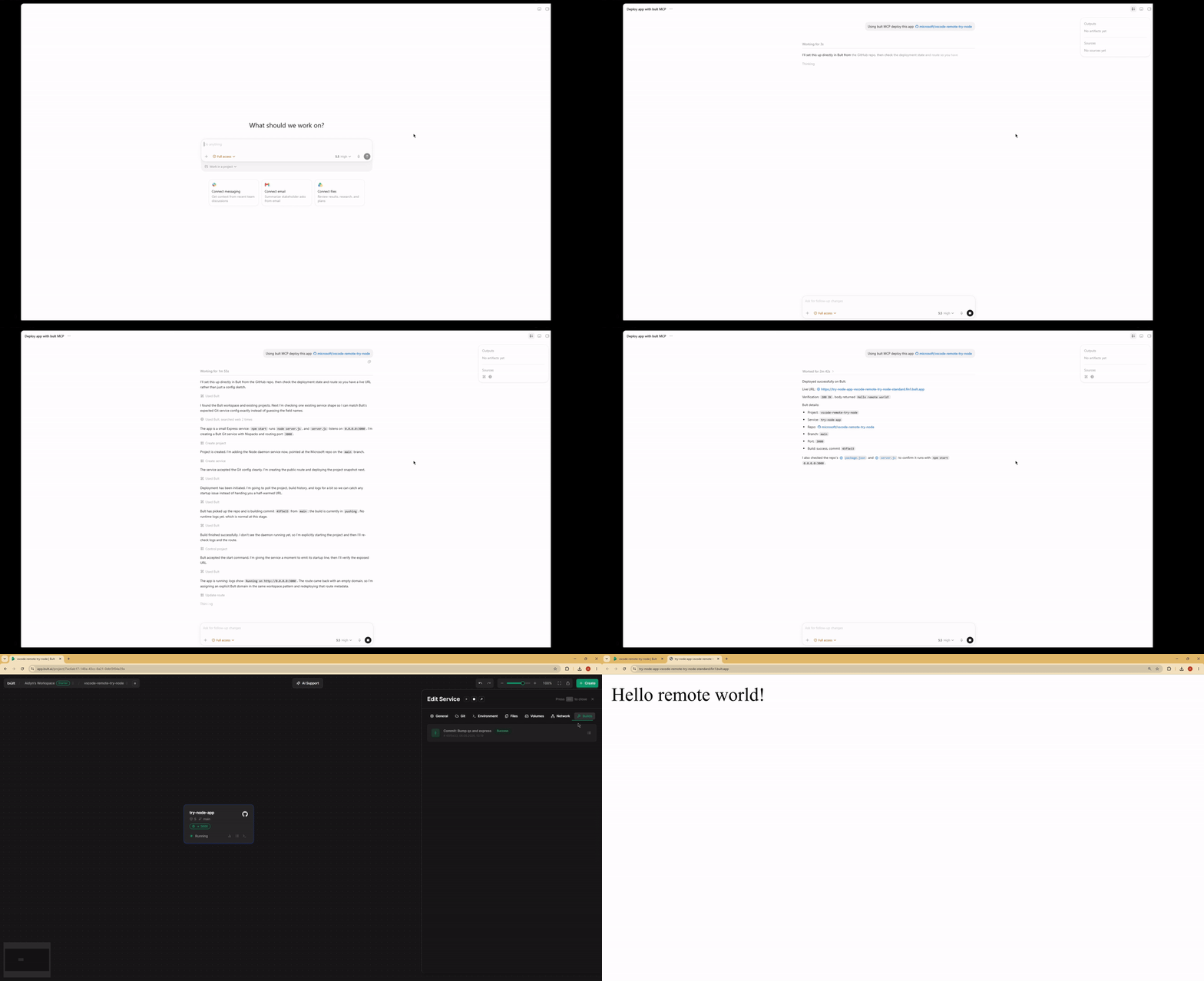
Demo
Features
- Deploy GitHub repositories, Docker images, databases, and app services from MCP-compatible AI agents.
- Project lifecycle tools: list, inspect, create, update, delete, deploy, start, stop, and discard changes.
- Service management for daemon and database services, including Docker image and Git-based deployments.
- Persistent volumes, route/domain mappings, templates, service logs, and build history.
- MCP tool annotations for read-only, idempotent, and destructive operations where supported.
- Works over stdio with Claude Desktop, Claude Code, Cursor, Google Antigravity and other MCP-compatible clients.
When to use Bult MCP
Use Bult MCP when you want an AI coding agent to deploy and operate cloud hosting resources for you. Common workflows include deploying a GitHub repo from Cursor, deploying the current project from Claude Code, launching a Docker image, creating a database service, adding a public route, checking build logs, and debugging failed deployments.
Requirements
- Node.js 18 or newer.
- Bult API token.
Installation
If you install the package globally, use the bult-mcp binary:
npm install -g @bultcloud/mcp-server
bult-mcp
You can also run it with npx from MCP client configs:
npx -y @bultcloud/mcp-server
Configuration
The server reads its configuration from environment variables.
| Variable | Required | Description |
|---|---|---|
BULT_API_URL |
Yes | Bult API base URL, https://app.bult.ai. |
BULT_API_TOKEN |
Yes | API token used for Bearer authentication. |
The server exits during startup if either variable is missing.
MCP Client Setup
Claude Desktop
Add the server to claude_desktop_config.json.
Using npx:
{
  "mcpServers": {
    "bult": {
      "command": "npx",
      "args": ["-y", "@bultcloud/mcp-server"],
      "env": {
        "BULT_API_URL": "https://app.bult.ai",
        "BULT_API_TOKEN": "your-token"
      }
    }
  }
}
Claude Code
Using npx:
claude mcp add bult \
  -e BULT_API_URL=https://app.bult.ai \
  -e BULT_API_TOKEN=your-token \
  -- npx -y @bultcloud/mcp-server
Codex CLI
Using npx:
codex mcp add \
  --env BULT_API_URL=https://app.bult.ai \
  --env BULT_API_TOKEN=your-token \
  bult \
  -- npx -y @bultcloud/mcp-server
Available Tools
Projects
| Tool | Description |
|---|---|
list-projects |
List all projects in the workspace. |
get-project |
Get a project overview with services, volumes, and routes. |
create-project |
Create a new project. |
update-project |
Update a project name. |
delete-project |
Delete a project and all of its resources. |
deploy-project |
Deploy project changes and create a version snapshot. |
control-project |
Start, stop, or discard project changes. |
Services
| Tool | Description |
|---|---|
list-services |
List all services in a project. |
get-service |
Get service details and configuration. |
create-service |
Create a daemon or database service. |
update-service |
Update service configuration. |
delete-service |
Delete a service. |
control-service |
Start, stop, or rebuild a service. |
Volumes
| Tool | Description |
|---|---|
create-volume |
Create a persistent storage volume. |
update-volume |
Update a volume name or size. |
delete-volume |
Delete a volume. |
wipe-volume |
Irreversibly wipe all data from a volume. |
Routes
| Tool | Description |
|---|---|
create-route |
Create a domain or path mapping for a service. |
update-route |
Update route configuration. |
delete-route |
Delete a route. |
Templates
| Tool | Description |
|---|---|
list-templates |
List available project templates. |
apply-template |
Apply a template to a project. |
Logs and Builds
| Tool | Description |
|---|---|
get-service-logs |
Read service logs with cursor-based pagination. |
list-builds |
List build history for a service. |
Example Prompts
- Deploy this GitHub repo to Bult and give me the public URL.
- Deploy the current project to Bult.
- Check why my deployment failed.
- Show the latest logs for my app.
- Set DATABASE_URL and restart the service.
- Deploy this Docker image to Bult.
- List my Bult projects and services.
Development
npm run dev      # run with tsx, no build step
npm run build    # compile TypeScript to dist/
npm run lint     # type-check without emitting files
Project layout:
src/index.ts          MCP server entrypoint
src/client.ts         Bult API client
src/tools/*.ts        MCP tool registrations by resource type
Security
BULT_API_TOKEN grants access to your Bult resources. Keep it out of
source control, shell history, issue reports, and screenshots. Prefer scoped or
rotatable tokens when available.
Some tools can create, delete, deploy, stop, or wipe resources. Review tool calls from your MCP client before approving destructive actions.
Privacy Policy
This MCP server connects your MCP client to Bult.ai using the API token you provide. Requests are sent to Bult.ai to perform actions such as listing projects, deploying services, managing routes and volumes, and reading logs.
The server does not store your API token. Tokens are passed through your MCP client configuration or extension settings. For Bult.ai data handling practices, see the Bult.ai Privacy Policy.
Contributing
Issues and pull requests are welcome at github.com/bultcloud/mcp-server.
Before opening a pull request, run:
npm run lint
npm run build
License
This project is licensed under the MIT License.
Bult MCPのよくある質問
Bult MCPをClaude Codeに追加するには
ターミナルでclaude mcp add --env 'BULT_API_TOKEN=<YOUR_BULT_API_TOKEN>' --env 'BULT_API_URL=<BULT_API_URL>' mcp-server -- npx -y @bultcloud/mcp-serverを実行します。すべてのプロジェクトで利用するには--scope userを追加します。
Bult MCPをCursorに追加するには
~/.cursor/mcp.jsonを開き、上記のインストールセクションに示すCursor設定を使ってmcpServersの下にサーバーを追加します。
Bult MCPが提供するツールは
24個のツールを提供しており、list-projects, get-project, create-project, update-project, delete-projectなどがあります。
Bult MCPを使用して何をデプロイできますか?
GitHubリポジトリ、Dockerイメージ、データベース、および各種アプリサービスをデプロイできます。
どのAIクライアントがBult MCPに対応していますか?
Claude Desktop、Claude Code、Cursor、Codex、Google Antigravity、およびその他のMCP対応クライアントで使用可能です。
インストールに必要なシステム要件は何ですか?
Node.js version 18以降と、有効なBult APIトークンが必要です。
サーバーの設定方法を教えてください。
環境変数 BULT_API_URL と BULT_API_TOKEN を使用してサーバーを設定します。