
SyncSo MCP server
Commit 16. Okt. 2026Ermöglicht KI-Agenten den Echtzeit-Zugriff auf Events in New York City, einschließlich Live-Musik, Theater, Kursen, Märkten und Nachtleben.
Auch bekannt als SyncSo-Inc/syncso
- Stars
- 2
- Tools
- —
- Downloads, 30 Tage
- —
- Neueste Version
- 2.0.0
- Letzter Commit
- 16. Okt. 2026
- Lizenz
- MIT
Was ist SyncSo MCP?
SyncSo ist ein MCP server. Ermöglicht KI-Agenten den Echtzeit-Zugriff auf Events in New York City, einschließlich Live-Musik, Theater, Kursen, Märkten und Nachtleben.
Zusammenfassung generiert aus dem README des Projekts
Über SyncSo MCP server
SyncSo versorgt KI-Agenten mit Echtzeitdaten zu lokalen Ereignissen in New York City. Während Standard-Sprachmodelle auf statischen Trainingsdaten basieren, die wie ein Reiseführer funktionieren, verbindet dieser MCP server Agenten mit einer Live-Datenbank für Musik, Theater, Comedy, Märkte, Kurse und Nachtleben. Er liefert spezifische Details wie Daten, Uhrzeiten, Preise und Buchungslinks für Events, die in herkömmlichen Datensätzen möglicherweise nicht enthalten sind.
Entwickler können diesen Service in verschiedene Umgebungen integrieren, darunter Claude Desktop, Claude Code, Cursor, Windsurf und VS Code. Die Verbindung wird über eine remote MCP URL oder durch Hinzufügen einer Skill-Datei hergestellt. Nutzer müssen sich unter syncso.com anmelden, um sich zu authentifizieren, und jedes Konto beinhaltet ein kostenloses monatliches Kontingent an Suchanfragen. Das System nutzt zwei primäre Tools, find_things_to_do und get_details, um Informationen abzurufen. Aktuell ist die Abdeckung auf New York City beschränkt, aber der Service ist darauf ausgelegt, in Zukunft auf weitere Städte ausgeweitet zu werden.
Was du damit machen kannst
- 1Lokale Aktivitäten für Besucher planenBitte einen Agenten, spezifische Aktivitäten für einen Elternteil zu finden, der an einem Dienstag zu Besuch kommt.
- 2Sofortige lokale Unterhaltung findenFordere eine Liste mit kostenlosen Outdoor-Events an, die in den nächsten vier Stunden stattfinden.
- 3Zukünftige soziale Ausflüge planenLass einen Agenten nach Aktivitäten suchen, die ein Paar bereits drei Wochen im Voraus buchen kann.
- 4Nischen-Events vor Ort entdeckenSuche nach kleineren Events wie Töpferkursen oder Nachtmärkten.
Geschrieben aus dem README des Projekts. Jeder Use Case wurde gegen ein Zitat daraus geprüft.
So installierst du SyncSo MCP
Formate geprüft am 10. Nov. 2026Zu Cursor hinzufügenZu Goose hinzufügenSyncSo MCP in Claude Code installieren
$ claude mcp add --transport http syncso https://rtdb.syncso.com/partner/mcpSyncSo MCP in Cursor installieren
~/.cursor/mcp.json
{
  "mcpServers": {
    "syncso": {
      "url": "https://rtdb.syncso.com/partner/mcp"
    }
  }
}SyncSo MCP in VS Code installieren
.vscode/mcp.json
{
  "servers": {
    "syncso": {
      "type": "http",
      "url": "https://rtdb.syncso.com/partner/mcp"
    }
  }
}SyncSo MCP in VS Code CLI installieren
$ code --add-mcp '{"name":"syncso","type":"http","url":"https://rtdb.syncso.com/partner/mcp"}'SyncSo MCP in Codex installieren
$ codex mcp add syncso --url https://rtdb.syncso.com/partner/mcpSyncSo MCP in Codex config.toml installieren
~/.codex/config.toml
[mcp_servers.syncso]
url = "https://rtdb.syncso.com/partner/mcp"
SyncSo MCP in Gemini CLI installieren
$ gemini mcp add -s user --transport http syncso https://rtdb.syncso.com/partner/mcpSyncSo MCP in Gemini settings.json installieren
~/.gemini/settings.json
{
  "mcpServers": {
    "syncso": {
      "url": "https://rtdb.syncso.com/partner/mcp",
      "type": "http"
    }
  }
}Automatisierte Checks
Geluften am 14. Nov. 2026Vollständiger Bericht →Noch nicht verifiziert. Ein Server benötigt einen Score von 80, keine kritischen Befunde und genug Daten für unsere Prüfung. Wie die Checks funktionieren · Was du für mehr Punkte verbessern kannst

- Source Repository verknüpft und erreichbarsyncso-inc/syncso is public and reachablegithub.com/syncso-inc/syncso ↗Bestanden
- Paket nennt dieses Repository als QuelleNicht geprüft
- Build-Provenienz (Sigstore-Attestierung)Nicht geprüft
- Open Source Lizenz (OSI)MITspdx.org/licenses/MIT.html ↗Bestanden
- Commit oder Release im letzten JahrLast commit or release 2026-10-16github.com/syncso-inc/syncso ↗Bestanden
- OpenSSF ScorecardNicht geprüft
- Package-Name ähnelt keinem populären PackageNicht geprüft
- Keine kritischen Advisories im Paket oder seinen AbhängigkeitenNicht geprüft
- Keine versteckten Anweisungen an das Modell0 tool descriptions and the README read; no override phrases, credential paths or hidden charactersBestanden
- Destruktive Tools sind markiertNicht geprüft
- Remote-Endpoint beantwortet den MCP-HandshakeHTTPS endpoint answered 401 (sign-in required)Bestanden
README
Auf GitHub ansehenSyncSo
Let your agents understand what's happening locally, in real time.
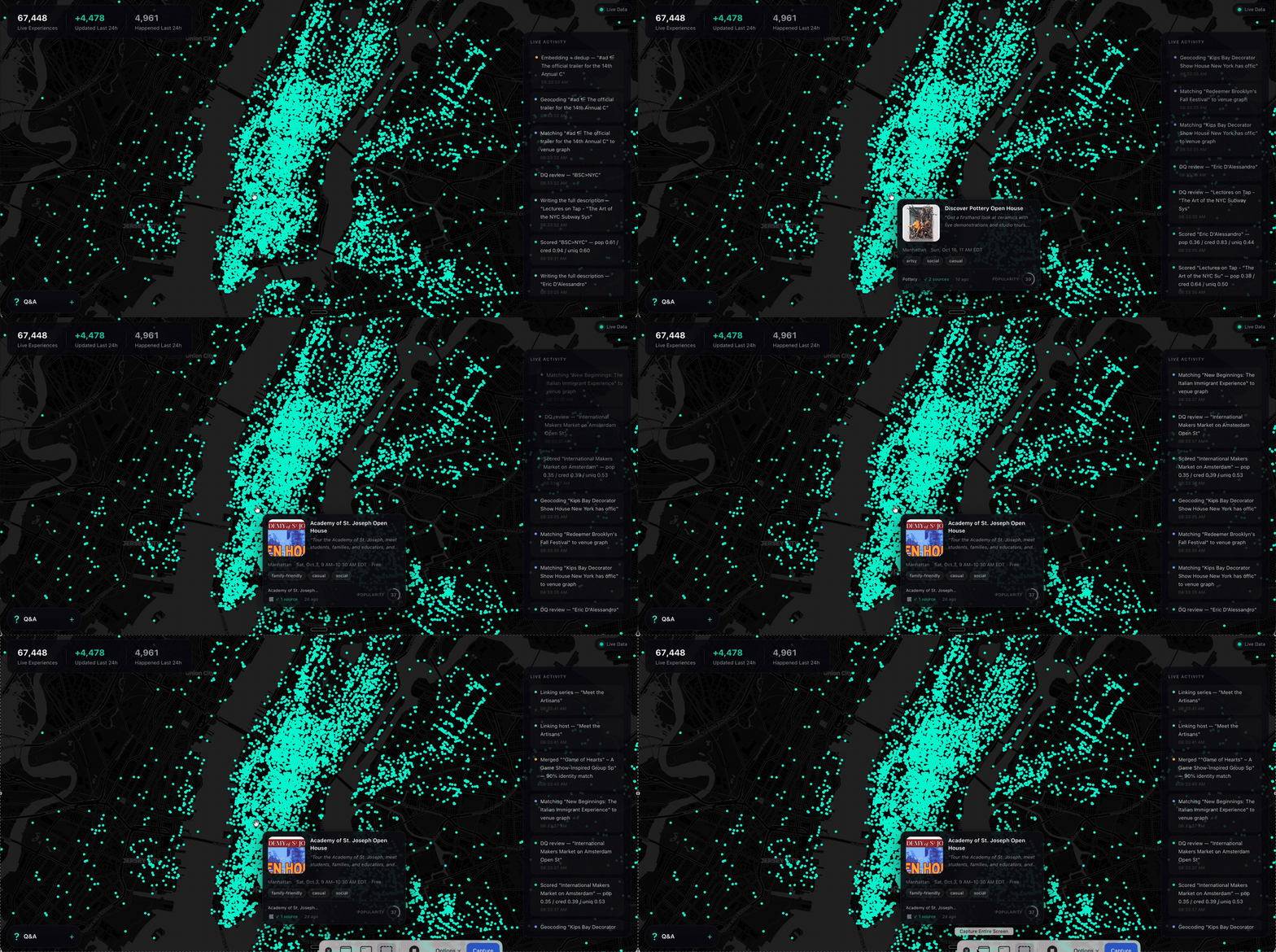
Ask a model what to do in New York and it names the Whitney. It is not wrong. It is just answering from a guidebook, because that is what it has — a city as a list of places, frozen whenever the training run ended.
What it does not have is everything going on inside those places, and the thousand rooms that never make a guidebook. The Tuesday gig. The pottery class with two seats left. The night market under the bridge. Your model has never heard of any of it.
SyncSo is that missing half: live music, theater, comedy, film, art, sports, festivals, markets, food and drink, classes, tours, nightlife — the whole surface of a city, each thing carrying its dates, times, prices, booking links and images. Not one category. Not the famous parts.
Which means your agent can finally take the questions it used to hand back. Where to take a visiting parent on a Tuesday. What a couple could book three weeks out. What is free, outdoors, and happening in the next four hours. Real answers, with a link to book them.
Install
One catalogue, two doors. Assistants that speak MCP connect to
https://rtdb.syncso.com/partner/mcp. Anything else reads the skill file at
https://syncso.com/SKILL.md. Both open the same account: the first search
asks the person to sign in once at syncso.com, and every account starts with
a free monthly allowance of searches.
Claude
In Claude.ai or the Claude desktop app: Settings → Connectors → Add custom connector, paste the MCP URL, and ask. Claude also lists SyncSo in its directory, where it is one click.
In Claude Code, connect the MCP server:
claude mcp add --transport http syncso https://rtdb.syncso.com/partner/mcp
or install the skill as a plugin, which keeps itself current:
claude plugin marketplace add SyncSo-Inc/syncso
claude plugin install syncso@syncso
ChatGPT
Coming to the ChatGPT app directory. Until it is listed: Settings → Apps & Connectors → Advanced → Developer mode, add a connector, paste the MCP URL. Developer mode is not available on every plan.
Cursor, Windsurf, VS Code and other MCP clients
Add SyncSo to the client's MCP configuration:
{
  "mcpServers": {
    "syncso": { "url": "https://rtdb.syncso.com/partner/mcp" }
  }
}
OpenClaw
openclaw skills install @liangstl/syncso
Also on ClawHub, where
clawhub install syncso does the same.
Coding agents that read skill folders
Claude Code, Codex, Cursor, Copilot and the rest, one command:
npx skills add SyncSo-Inc/syncso
Anything else
Tell your assistant:
Set up SyncSo from https://syncso.com/SKILL.md
The file carries the guidance and the tool definitions, works with anything that can call a tool and make an HTTPS request, and the copy at that URL is always the current one. A person using it gets their sign-in code at syncso.com/connect.
Two tools do the work, find_things_to_do and get_details. That is the
whole surface.
Coverage
New York only, for now. More cities over the coming months.
Within it, everything: every category above, from the institutions down to the one-night thing in a room above a bar. Ask about anywhere else and the skill tells your model to say so rather than invent an answer — the same refusal to guess that makes the New York answers worth trusting.
Links
- syncso.com — what SyncSo is
- syncso.com/connect — where your user gets their code
- syncso.com/SKILL.md — the skill itself, always the current copy (also in this repo)
Questions
Something missing, wrong, or not working the way this page says? Open an issue, or email hello@syncso.com. And if there is a city you want open, tell us.
License
MIT. See LICENSE.
SyncSo MCP Fragen
Wie füge ich SyncSo MCP zu Claude Code hinzu?
Führe claude mcp add --transport http syncso https://rtdb.syncso.com/partner/mcp in deinem Terminal aus. Füge --scope user hinzu, damit der Server in jedem Projekt verfügbar ist.
Wie füge ich SyncSo MCP zu Cursor hinzu?
Öffne ~/.cursor/mcp.json und füge den Server unter mcpServers hinzu, mit der Cursor-Config aus dem Installationsabschnitt oben.
Welche Gebiete deckt SyncSo ab?
Derzeit deckt der Service nur New York ab, weitere Städte sind für die kommenden Monate geplant.
Wie hoch sind die Nutzungskosten?
Jedes Konto beinhaltet ein kostenloses monatliches Kontingent an Suchanfragen.
Welche Art von Informationen kann ich finden?
Du findest Details zu Live-Musik, Theater, Comedy, Film, Kunst, Sport, Festivals, Märkten, Essen, Trinken, Kursen, Touren und Nachtleben.