
Ermöglicht es einem AI-Client, Videodateien zu transkribieren und zu bearbeiten, indem das Texttranskript manipuliert wird – inklusive dem Entfernen von Füllwörtern und dem Kürzen von Pausen.
Auch bekannt als SilverNine/trimscript
- Stars
- 0
- Tools
- —
- Downloads, 30 Tage
- 85
- Neueste Version
- 0.1.0
- Letzter Commit
- 10. Okt. 2026
- Lizenz
- MIT
Was ist TrimScript MCP?
TrimScript ist ein MCP server. Ermöglicht es einem AI-Client, Videodateien zu transkribieren und zu bearbeiten, indem das Texttranskript manipuliert wird – inklusive dem Entfernen von Füllwörtern und dem Kürzen von Pausen.
Zusammenfassung generiert aus dem README des Projekts
Über TrimScript MCP server
Die Hauptfunktion von TrimScript ist das Bearbeiten von Videodateien durch die Manipulation ihrer Texttranskripte. Dieses Tool wurde für Creator von Spoken-Word-Content wie Podcasts, Tutorials und Vorträgen entwickelt. Es ermöglicht Nutzern, unerwünschte Abschnitte zu entfernen, Füllwörter wie ums und uhs wegzuschneiden und lange Pausen zu verkürzen. Da es lokal auf deinem Rechner mit whisper.cpp und ffmpeg läuft, bleiben deine Medien privat, ohne dass du Dateien auf einen Remote-Server hochladen oder ein Konto erstellen musst.
Entwickler können diesen Server in MCP-Clients wie Claude Code oder Codex integrieren, um den Editing-Prozess zu automatisieren. Sobald die Verbindung steht, kann ein AI-Agent das Transkript lesen und spezifische Schnitte oder Textkorrekturen vorschlagen. Diese Edits erscheinen als Vorschläge im Editor zur Freigabe, anstatt stillschweigend angewendet zu werden. Das System unterstützt verschiedene Exportformate, darunter MP4, WAV, SRT/VTT-Untertitel und FCPXML für professionelle Workflows in Final Cut Pro oder DaVinci Resolve.
Was du damit machen kannst
- 1Redundante Videosegmente entfernenBitte einen AI-Agenten, eine neu gestartete Einleitung oder eine wiederholte Demo zu identifizieren und deren Entfernung vorzuschlagen.
- 2Entfernen von Füllwörtern automatisierenNutze einen einzigen Befehl, um alle Füllwörter wie um und uh aus einer Aufnahme zu entfernen.
- 3Transkriptionsfehler korrigierenWeise einen Coding-Agenten an, spezifische Wörter zu korrigieren, die der Speech-Recognizer falsch verstanden hat.
- 4Unangenehme Pausen verkürzenWende einen Befehl an, um jede Pause, die länger als eine Sekunde ist, zu reduzieren, um das Pacing straff zu halten.
Geschrieben aus dem README des Projekts. Jeder Use Case wurde gegen ein Zitat daraus geprüft.
So installierst du TrimScript MCP
Formate geprüft am 10. Nov. 2026Zu Cursor hinzufügenZu Goose hinzufügenTrimScript MCP in Claude Code installieren
$ claude mcp add trimscript -- uvx trimscriptTrimScript MCP in Cursor installieren
~/.cursor/mcp.json
{
  "mcpServers": {
    "trimscript": {
      "command": "uvx",
      "args": [
        "trimscript"
      ]
    }
  }
}TrimScript MCP in VS Code installieren
.vscode/mcp.json
{
  "servers": {
    "trimscript": {
      "type": "stdio",
      "command": "uvx",
      "args": [
        "trimscript"
      ]
    }
  }
}TrimScript MCP in VS Code CLI installieren
$ code --add-mcp '{"name":"trimscript","type":"stdio","command":"uvx","args":["trimscript"]}'TrimScript MCP in Claude Desktop installieren
claude_desktop_config.json
{
  "mcpServers": {
    "trimscript": {
      "command": "uvx",
      "args": [
        "trimscript"
      ]
    }
  }
}TrimScript MCP in Codex installieren
$ codex mcp add trimscript -- uvx trimscriptTrimScript MCP in Codex config.toml installieren
~/.codex/config.toml
[mcp_servers.trimscript]
command = "uvx"
args = ["trimscript"]
TrimScript MCP in Gemini CLI installieren
$ gemini mcp add -s user trimscript uvx -- trimscriptTrimScript MCP in Gemini settings.json installieren
~/.gemini/settings.json
{
  "mcpServers": {
    "trimscript": {
      "command": "uvx",
      "args": [
        "trimscript"
      ]
    }
  }
}Automatisierte Checks
Geluften am 15. Nov. 2026Vollständiger Bericht →Unsere automatisierten Checks bestanden. Das ist kein Security-Audit: Lies den Code und gib dem Server nur den minimal notwendigen Zugriff. Wie die Checks funktionieren

- Source Repository verknüpft und erreichbarsilvernine/trimscript is public and reachablegithub.com/silvernine/trimscript ↗Bestanden
- Paket nennt dieses Repository als Quelletrimscript names silvernine/trimscript as sourcepypi.org/project/trimscript/ ↗Bestanden
- Build-Provenienz (Sigstore-Attestierung)Sigstore attestation for trimscriptpypi.org/project/trimscript/ ↗Bestanden
- Open Source Lizenz (OSI)MITspdx.org/licenses/MIT.html ↗Bestanden
- Commit oder Release im letzten JahrLast commit or release 2026-10-10github.com/silvernine/trimscript ↗Bestanden
- OpenSSF ScorecardNicht geprüft
- Package-Name ähnelt keinem populären PackageNo popular package one edit away from trimscriptBestanden
- Keine kritischen Advisories im Paket oder seinen Abhängigkeiten53 resolved dependencies checked; no critical advisoryosv.dev ↗Bestanden
- Keine versteckten Anweisungen an das Modell0 tool descriptions and the README read; no override phrases, credential paths or hidden charactersBestanden
- Destruktive Tools sind markiertNicht geprüft
- Remote-Endpoint beantwortet den MCP-HandshakeNicht geprüft
README
Auf GitHub ansehenTrimScript

Edit video by editing the transcript. Runs on your machine. Free and open source. AI edits arrive as suggestions you approve.
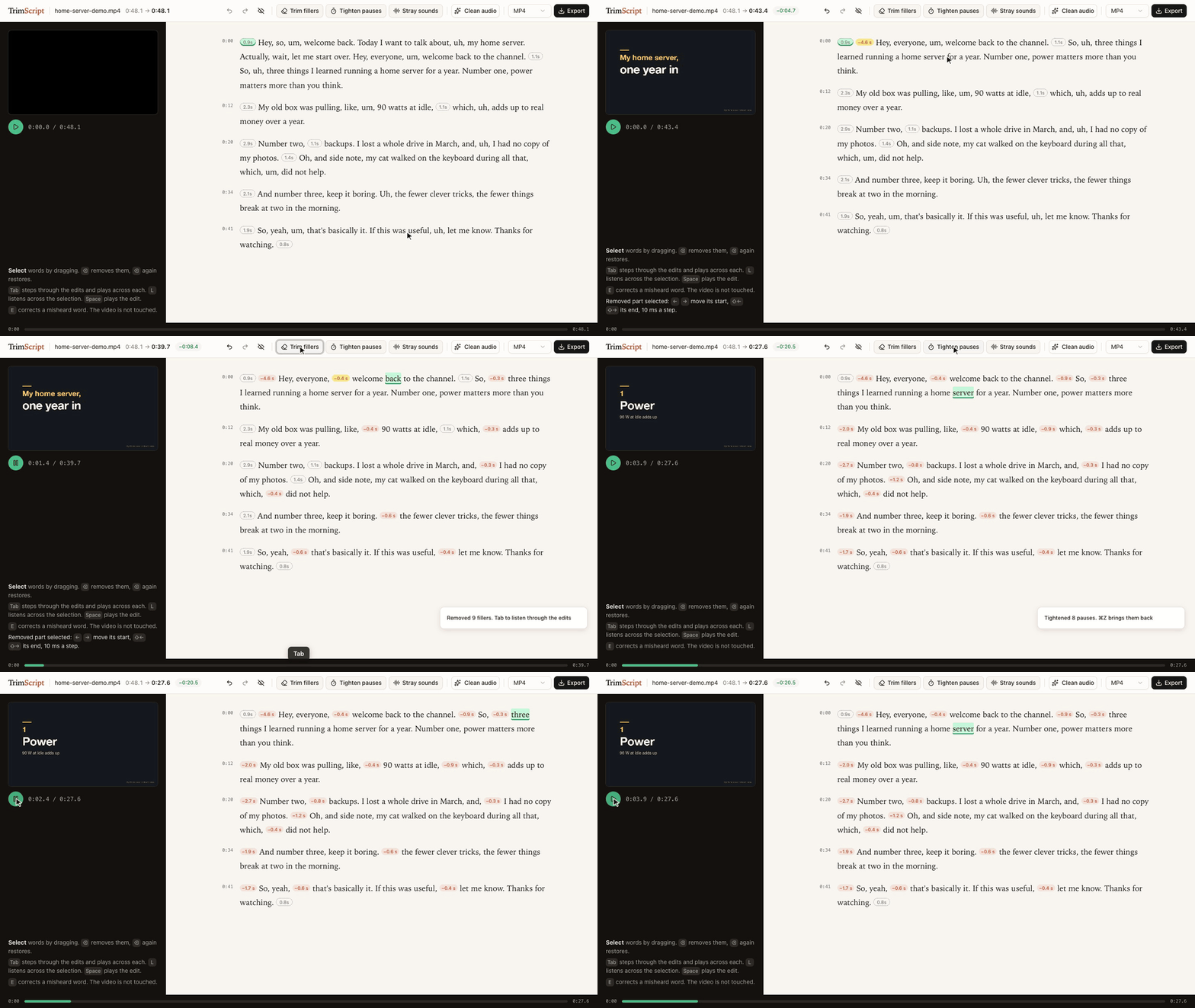
Delete the restarted intro, Trim fillers, Tab through the edits to listen, Tighten pauses: 48.1 s down to 27.6 s. The demo talk is synthetic: script and slides written for this demo, voice generated with Dia.
▶ Watch the 50-second demo: the same edit, then Claude Code suggesting cuts through the MCP server.
uvx trimscript open my-video.mp4
Needs uv and ffmpeg (brew install ffmpeg, apt install ffmpeg, winget install ffmpeg). Transcription, editing and export run on your machine: no account, no upload. If you connect a coding agent, that agent (and the model service behind it) reads the transcript.
Status: early. Developed on macOS with Apple Silicon. CI runs every push end to end on macOS, Linux and Windows (transcribe, remove, export); the editor itself has only been used on macOS so far.
What it does
- Transcribes locally with whisper.cpp, prompted to keep every "um" and "uh" instead of tidying them away. English only for now. The first run downloads the model (about 470 MB).
- Delete text, and the video skips it. Select words, press ⌫. The removed part folds into a small label with the seconds it saves, so the page reads like the finished edit. Select the label and press ⌫ to bring it back, or show all removed text with one switch. The preview skips removed parts as it plays.
- Trim fillers removes every um and uh in one go, and Tighten pauses shortens every pause over a second, keeping a little silence. Then press Tab to step through the edits and hear a second and a half on either side of each; ⌫ brings one back, ⌘Z brings them all back.
- Stray sounds jumps to voice between words that has no word in the transcript (a sound the recognizer skipped, a breath, half a word) and plays it. You listen and decide.
- Fine-tune any join by 10 ms with the arrow keys, listening across it each time.
- Clean audio: noise, level, gentle compression and loudness to -14 LUFS in one switch. The recording length never changes.
- Fix misheard words (E) without touching the media. Captions use the corrected text.
- Export MP4, WAV, SRT/VTT captions, or FCPXML to keep editing in Final Cut Pro or DaVinci Resolve with every edit point still adjustable.
- Nothing is destroyed. Your edit is one readable JSON file next to the video. The original file is never modified, and exports never overwrite it.
Use it with your coding agent
TrimScript ships an MCP server, so Claude Code, Codex or any MCP client can read the transcript and propose edits. Agent edits never apply silently: they show up in the open editor as suggestions with a reason, and you decide.
claude mcp add trimscript -- uvx trimscript mcp
Then ask things like:
- "In my-video.mp4 I restart the demo halfway through. Suggest removing the first attempt."
- "The speaker's product is called Acme, fix it wherever the transcript misheard it."
Tools: transcribe, get_transcript, suggest_removal, correct_text, list_edits, withdraw, enhance_voice, export.
The same actions are on the command line:
trimscript transcribe talk.mp4
trimscript show talk.mp4 --words      # transcript with item ids
trimscript remove talk.mp4 w120 w188 --reason "repeats the intro"
trimscript fillers talk.mp4            # remove every um and uh
trimscript pauses talk.mp4             # tighten pauses over a second
trimscript accept talk.mp4             # accept the agent's suggestions
trimscript export talk.mp4 -o talk-edit.mp4
Keyboard
| Key | Does |
|---|---|
| drag, Shift+click | select words |
| ⌫ | remove the selection, or restore it if it is already removed |
| Space | play the edit |
| double-click | play from that word |
| Tab / Shift+Tab | next / previous suggestion (or edit, when none wait), and listen across it |
| Enter / Shift+Enter | accept / reject the selected suggestion; a selection accepts every suggestion inside it |
| L | listen across the selection or a removed part |
| ← → / Shift+← → | move the start / end of a selected removed part by 10 ms |
| E | correct the text of the selection |
| ⌘Z / Shift+⌘Z | undo / redo |
How it works
- Every removed part covers a run of transcript items (words, fillers, pauses). The time to remove is derived from the words, so the preview and the export always agree.
- Edit points land midway between words, or keep a little silence when they meet a pause. Recognizers tend to stretch the last word of a sentence over the silence after it; TrimScript pulls word edges back to where the voice actually ends.
- Exports split on whole video frames and slice audio to about a millisecond, so sound never drifts from picture however many edits there are.
- The editor, the CLI and the MCP server all read and write the same project file. Edit from anywhere; the open editor updates live. Undo in the editor only reverts the editor's own change.
Tested on real talks
Three single-speaker talks from 38C3. For each: transcribe, trim fillers, tighten pauses, export with Clean audio on, then transcribe the export again with a larger model (Whisper large-v3-turbo) to check what is left.
| LoRa mesh | ACE up the sleeve | Going Long | |
|---|---|---|---|
| length | 32.9 min | 40.2 min | 36.2 min |
| removed (fillers trimmed, pauses tightened) | 5.2 min | 3.4 min | 6.5 min |
| fillers still heard in the export | 9 | 11 | 31 |
| export length vs. plan | -0.20 s | -0.16 s | -0.10 s |
| loudness | -14.1 LUFS | -14.3 LUFS | -14.3 LUFS |
| transcription | 1.2 min | 1.8 min | 1.7 min |
- 582 fillers trimmed across the three talks; 51 could still be heard after export. Filler counts are what the recognizer heard, not a judgment of any speaker.
- 3.0 to 4.5% of kept words read differently in the second transcript. Most of them sit away from any edit point: two different recognizers hearing jargon differently, not edits clipping words.
- Measured on an M1 Pro. Method and raw numbers: spikes/e2e-real.
Talks: "Building Your First LoRa Mesh Network From Scratch" by WillCrash, "ACE up the sleeve: Hacking into Apple's new USB-C Controller" by stacksmashing, and "Going Long! Sending weird signals over long haul optical networks" by Ben Cartwright-Cox. Recorded by the C3VOC at 38C3 and published on media.ccc.de under CC BY 4.0. The recordings are not part of this repository and were not modified; only measurements are reported. The speakers have not reviewed or endorsed TrimScript.
Scope
Editing recorded speech through its transcript is a long-standing idea, in research since at least Whittaker and Amento's "Semantic Speech Editing" (CHI 2004) and Berthouzoz, Li and Agrawala's "Tools for Placing Cuts and Transitions in Interview Video" (SIGGRAPH 2012), and in many editors since. TrimScript is a small, independent, local take on it for spoken-word recordings: talks, tutorials, podcasts, interviews.
It has no multitrack timeline, screen recorder, voice cloning or collaboration. Export FCPXML when you need a full editor.
Credits
- whisper.cpp and the Whisper small.en weights by OpenAI, MIT, run through pywhispercpp, MIT
- Optional: Parakeet TDT 0.6B v2 by NVIDIA, CC BY 4.0, in the MLX conversion by mlx-community, run through parakeet-mlx, Apache 2.0 (
trimscript[parakeet],--engine parakeet) - noisereduce, MIT
- FFmpeg, called as a separate program and not distributed with TrimScript
- Editor UI: React, shadcn/ui components on Radix UI, Tailwind CSS, Sonner, clsx and tailwind-merge (MIT), class-variance-authority (Apache 2.0), Lucide icons (ISC, some derived from Feather, MIT). Full license texts ship with the package in THIRD_PARTY_NOTICES.md and
src/trimscript/static/THIRD_PARTY_LICENSES.txt. - Demo voice: Dia by Nari Labs, Apache 2.0
Trademarks
Final Cut Pro is a trademark of Apple Inc. DaVinci Resolve is a trademark of Blackmagic Design. Claude Code is a trademark of Anthropic. Codex is a trademark of OpenAI. They are named only to say what TrimScript works with. TrimScript is an independent project and is not affiliated with, sponsored by or endorsed by any of these companies.
License
MIT. See LICENSE.
TrimScript MCP Fragen
Wie füge ich TrimScript MCP zu Claude Code hinzu?
Führe claude mcp add trimscript -- uvx trimscript in deinem Terminal aus. Füge --scope user hinzu, damit der Server in jedem Projekt verfügbar ist.
Wie füge ich TrimScript MCP zu Cursor hinzu?
Öffne ~/.cursor/mcp.json und füge den Server unter mcpServers hinzu, mit der Cursor-Config aus dem Installationsabschnitt oben.
Wie funktioniert der AI-Editing-Prozess?
Agent-Edits erscheinen als Vorschläge im Editor inklusive einer Begründung, sodass du sie manuell annehmen oder ablehnen kannst.
Lädt TrimScript meine Videos in die Cloud hoch?
Nein, Transkription, Bearbeitung und Export laufen alle lokal auf deinem Rechner, ohne dass ein Account oder ein Upload erforderlich ist.
In welchen Dateiformaten kann ich exportieren?
Du kannst deine Edits als MP4, WAV, SRT/VTT-Untertitel oder FCPXML für die Nutzung in professionellen Editoren wie Final Cut Pro oder DaVinci Resolve exportieren.
Kann ich das mit Claude Code nutzen?
Ja, TrimScript liefert einen MCP server mit, der es Claude Code oder anderen MCP-Clients ermöglicht, Transkripte zu lesen und Edits vorzuschlagen.