
Screen Browser MCP server
Commit 13. Nov. 2026Ermöglicht es Coding Agents, kommentierte Demo- und Tutorial-Videos von Webanwendungen zu erstellen, indem sie generierten Walkthrough-Guides folgen.
Auch bekannt als screenbrowser/skill, skill
- Stars
- 3
- Tools
- —
- Downloads, 30 Tage
- —
- Neueste Version
- 1.3.18
- Letzter Commit
- 13. Nov. 2026
- Lizenz
- MIT
Was ist Screen Browser MCP?
Screen Browser ist ein MCP server. Ermöglicht es Coding Agents, kommentierte Demo- und Tutorial-Videos von Webanwendungen zu erstellen, indem sie generierten Walkthrough-Guides folgen.
Zusammenfassung generiert aus dem README des Projekts
Über Screen Browser MCP server
Screen Browser ermöglicht es Coding Agents, kommentierte Video-Tutorials und Demonstrationen von Webanwendungen zu generieren. Durch das Lesen eines lokalen Codebase kann ein Agent Walkthrough-Guides schreiben, die den tatsächlichen Text von Buttons und Feldern verwenden. Der Server nimmt dann eine echte Browser-Session auf, die diesen Anweisungen anhand einer bereitgestellten URL folgt, und erstellt eine MP4-Datei inklusive Untertiteln, Kapiteln und On-Screen-Effekten.
Dieser Service funktioniert mit verschiedenen MCP Clients wie Claude Code, Cursor, Codex und GitHub Copilot. Nutzer können sich über einen browserbasierten OAuth-Flow oder durch Bereitstellung eines API Keys als Bearer Token authentifizieren. Der Server ist unter mcp.screenbrowser.com gehostet und verwaltet Aufgaben wie das Erstellen von Projekten, das Hochladen von Guides, das Starten von Runs und das Abrufen fertiger Videos. Er unterstützt Aufnahmen für verschiedene Geräte wie iPhone, Android oder iPad in unterschiedlichen Seitenverhältnissen.
Um dies zu nutzen, musst du eine bereitgestellte URL und einen Demo-User-Account angeben, der E-Mail- und Passwort-Authentifizierung nutzt. Der Agent liest dein Repository lokal, um das UI zu verstehen, sendet aber nur den generierten Guide-Text an den Server. Videos sind auf eine Länge von fünf Minuten begrenzt.
Was du damit machen kannst
- 1Feature-Tutorials generierenBitte deinen Coding Agent, einen Video-Walkthrough für ein spezifisches neues Feature in deiner Anwendung zu erstellen.
- 2Dokumentations-Updates automatisierenWenn sich dein App-Code ändert, kannst du deine Video-Guides schnell aktualisieren, indem du nur eine einzige Zeile bearbeitest.
- 3Walkthrough-Schritte validierenÜberprüfe die geschriebenen Anweisungen für einen Guide kostenlos, bevor du dich für eine vollständige Videoaufnahme entscheidest.
Geschrieben aus dem README des Projekts. Jeder Use Case wurde gegen ein Zitat daraus geprüft.
So installierst du Screen Browser MCP
Formate geprüft am 10. Nov. 2026Zu Cursor hinzufügenZu Goose hinzufügenScreen Browser MCP in Claude Code installieren
$ claude mcp add --transport http skill https://mcp.screenbrowser.com/Screen Browser MCP in Cursor installieren
~/.cursor/mcp.json
{
  "mcpServers": {
    "skill": {
      "url": "https://mcp.screenbrowser.com/"
    }
  }
}Screen Browser MCP in VS Code installieren
.vscode/mcp.json
{
  "servers": {
    "skill": {
      "type": "http",
      "url": "https://mcp.screenbrowser.com/"
    }
  }
}Screen Browser MCP in VS Code CLI installieren
$ code --add-mcp '{"name":"skill","type":"http","url":"https://mcp.screenbrowser.com/"}'Screen Browser MCP in Codex installieren
$ codex mcp add skill --url https://mcp.screenbrowser.com/Screen Browser MCP in Codex config.toml installieren
~/.codex/config.toml
[mcp_servers.skill]
url = "https://mcp.screenbrowser.com/"
Screen Browser MCP in Gemini CLI installieren
$ gemini mcp add -s user --transport http skill https://mcp.screenbrowser.com/Screen Browser MCP in Gemini settings.json installieren
~/.gemini/settings.json
{
  "mcpServers": {
    "skill": {
      "url": "https://mcp.screenbrowser.com/",
      "type": "http"
    }
  }
}Automatisierte Checks
Geluften am 14. Nov. 2026Vollständiger Bericht →Noch nicht verifiziert. Ein Server benötigt einen Score von 80, keine kritischen Befunde und genug Daten für unsere Prüfung. Wie die Checks funktionieren · Was du für mehr Punkte verbessern kannst

- Source Repository verknüpft und erreichbarscreenbrowser/skill is public and reachablegithub.com/screenbrowser/skill ↗Bestanden
- Paket nennt dieses Repository als QuelleNicht geprüft
- Build-Provenienz (Sigstore-Attestierung)Nicht geprüft
- Open Source Lizenz (OSI)MITspdx.org/licenses/MIT.html ↗Bestanden
- Commit oder Release im letzten JahrLast commit or release 2026-11-13github.com/screenbrowser/skill ↗Bestanden
- OpenSSF ScorecardNicht geprüft
- Package-Name ähnelt keinem populären PackageNicht geprüft
- Keine kritischen Advisories im Paket oder seinen AbhängigkeitenNicht geprüft
- Keine versteckten Anweisungen an das Modell0 tool descriptions and the README read; no override phrases, credential paths or hidden charactersBestanden
- Destruktive Tools sind markiertNicht geprüft
- Remote-Endpoint beantwortet den MCP-HandshakeHTTPS endpoint answered 401 (sign-in required)Bestanden
README
Auf GitHub ansehenScreen Browser skill
Narrated demo and tutorial videos of your web app, from a guide or your coding agent.
Ask the agent that knows your codebase for a tutorial video of a feature. It writes the walkthrough in the words your buttons and fields use, Screen Browser records a real browser following it against your deployed app, narrates it, adds the on-screen effects, and the agent hands you the MP4 with a GIF, subtitles and chapters. When the app changes, edit a line and ask again.
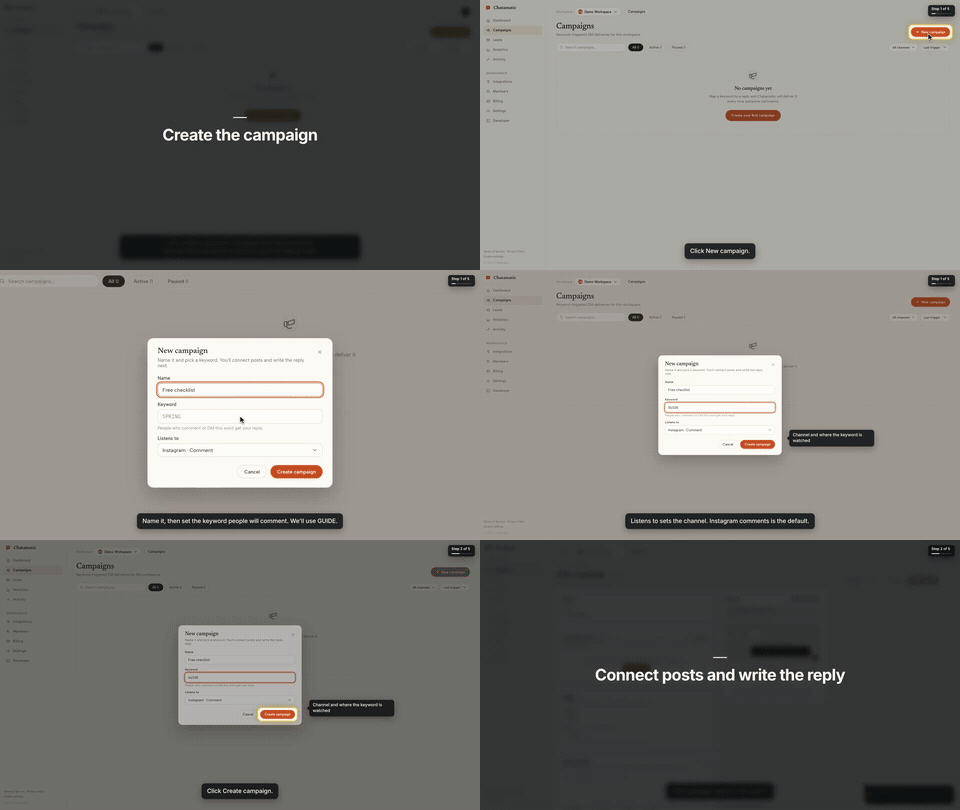
That is the first chapter of a 66-second video made from the request "make a tutorial video of creating a campaign". The whole session, from that sentence to the finished video with the exact prompt and every screen along the way, is in the Claude Code guide.
This repository gives your agent two things:
- The
screenbrowserskill — how to read your codebase and write the two guides Screen Browser needs (the login flow and the walkthrough), which effect fits which moment, how to check a guide for free before recording, and how to review the video before handing it over. - The MCP server configuration — the tools the agent calls: create the project, upload guides,
check them, start the run, poll it, fetch the video. The server itself is part of your Screen
Browser account at
https://mcp.screenbrowser.com.
Claude Code, Codex, Cursor or any MCP client can use it. Sign-in happens in the browser; there is no key to paste.
Install (Claude Code)
Add this repository as a plugin marketplace and install the plugin:
claude plugin marketplace add screenbrowser/skill
claude plugin install screenbrowser@screenbrowser
The first time the agent reaches for a Screen Browser tool, Claude Code opens your browser: sign in
to Screen Browser, approve the connection, and you are done. Nothing to copy. (If it does not
prompt, run /mcp and pick screenbrowser → Authenticate.)
Without the plugin system, register the server yourself and copy the skill:
claude mcp add --transport http screenbrowser https://mcp.screenbrowser.com
cp -r skills/screenbrowser ~/.claude/skills/
With an API key instead
If your agent cannot open a browser to sign in, create a key under Settings → API keys in Screen Browser and pass it as a bearer token:
claude mcp add --transport http screenbrowser https://mcp.screenbrowser.com \
  --header "Authorization: Bearer <your API key>"
Any MCP client works the same way: Streamable HTTP at https://mcp.screenbrowser.com, OAuth 2.1 with
dynamic client registration for interactive sign-in, or Authorization: Bearer <key>.
Other agents
The skill is a plain SKILL.md in the open Agent Skills format, and the server is standard MCP over
HTTP, so the same two pieces work outside Claude Code.
Cursor, VS Code, GitHub Copilot and other Agent Plugins clients — this repository is also an
Agent Plugins package (plugin.json, mcp.json, skills/), so
install it as a plugin from the repository URL and sign in when the client offers. Cursor without
the plugin: add the server to .cursor/mcp.json (or the global one in Cursor settings), click
Sign in next to it, and copy the skill into .cursor/skills/:
{
  "mcpServers": {
    "screenbrowser": { "url": "https://mcp.screenbrowser.com" }
  }
}
mkdir -p .cursor/skills && cp -r skills/screenbrowser .cursor/skills/
OpenAI Codex CLI — add the server to ~/.codex/config.toml, sign in once, and copy the skill
into Codex's skills folder:
[mcp_servers.screenbrowser]
url = "https://mcp.screenbrowser.com"
codex mcp login screenbrowser
mkdir -p ~/.codex/skills && cp -r skills/screenbrowser ~/.codex/skills/
Anything else (Gemini CLI, Windsurf, a custom agent) — register an HTTP MCP server with the URL
the way that tool documents it; a client that supports OAuth will sign you in, one that does not
takes the API key as an Authorization: Bearer header. Give the agent skills/screenbrowser/SKILL.md
as instructions (paste it, or point the tool's rules file at it). The MCP server itself also carries
the guide syntax as a resource and a write-tutorial-guide prompt, so a client with MCP prompts can
work without the skill file at all.
Use
Videos can be recorded on the desktop or as a phone or tablet (device: iphone, android, ipad,
…), in a phone frame on a vertical 9:16 or widescreen 16:9 canvas or as the bare screen; one run is
one device.
Open your app's repository in Claude Code and ask:
Make a tutorial video of creating a campaign.
The agent will check credits, create the project (it will ask you for the deployed URL, a demo user, and the legal attestation), write the guides from your routes and templates, validate them, show them to you, start the run, and give you the video link a few minutes later.
The MCP server also ships a get_guide_instructions tool with the same writing rules, for clients
without this skill, a write-tutorial-guide prompt that walks any client through the same flow, and
two resources: screenbrowser://guide-syntax and screenbrowser://example-guides.
What your app needs
- A demo user that signs in with email and password: no OAuth, no 2FA, no captcha. Seed it with realistic data.
- The deployed URL to record (staging is fine) and every host the app talks to (API subdomain, auth provider, CDN). An app that only runs on your computer works through a tunnel: ngrok or Cloudflare Tunnel (how).
- Confirmation that you are allowed to record the app (yours, a client's with permission, or an internal tool).
What it sends, and where
Everything the plugin does goes to one place: the Screen Browser MCP server at
https://mcp.screenbrowser.com, over HTTPS, signed in with your Screen Browser account. The
skill itself is instructions for the agent; it runs nothing on your machine and fetches nothing.
What the agent sends to Screen Browser when you ask for a video:
- the project's settings: your app's URL, the hosts it talks to, the sign-in check, narration language and voice;
- the guides it writes from your code: plain sentences naming buttons and fields as they appear on screen. Read them before they are saved; the agent shows them to you;
- the demo user's credentials, as project variables. Screen Browser stores them encrypted, uses them only to sign in during a recording, and never returns them through any tool. Values you give the agent pass through its conversation; to keep them out of chat, set them on the project's page in the Screen Browser dashboard instead;
- run commands: start, poll, cancel, and, only if you agree, a failure report with the recorder's screenshot and logs of a run that failed on Screen Browser's side.
It never sends your source code. The agent reads your repository locally to learn the labels; only the guide text leaves the machine. Nothing is sent to any other service. What Screen Browser keeps, and for how long, is in the privacy policy.
What it costs
Plans start at $49 a month, sized in minutes of finished video. Checking a guide before recording is free, and a run that fails is not charged. Videos are capped at five minutes. There is no free plan, but the first 100 accounts get 10 free minutes with no card. Current prices are on the pricing page.
Layout
plugin.json                        Agent Plugins manifest (Cursor, VS Code, Copilot, …)
mcp.json                           Agent Plugins MCP config (the URL; sign-in is OAuth)
.claude-plugin/plugin.json         Claude Code plugin manifest
.claude-plugin/marketplace.json    lets this repo act as its own Claude Code marketplace
.mcp.json                          Claude Code MCP server config
skills/screenbrowser/SKILL.md      the skill
skills/screenbrowser/references/   guide syntax reference, worked example
examples/chatamatic/               a real auth guide + main guide pair
What a guide looks like
Plain language, one step per line, naming things as they appear on screen. Screen Browser turns it into the script — the narration, the highlights, the pacing — and resolves each step against the live page:
Go to https://app.acme.test/campaigns
"Let's create a spring promotion."
Click "New campaign"
Type "Spring promo" into the Name field
Click "Save"
Confirm text "Campaign created" is visible
Ids and name= attributes are allowed when a step needs precision; class names generated by a build
tool are refused. The full reference, including the optional effect directives, is in
skills/screenbrowser/references/guide-syntax.md.
Documentation index for AI agents
The skill carries everything an agent needs to write a guide and run a recording. For anything else — prerequisites, costs, limitations, the API — https://screenbrowser.com/llms.txt is a Markdown index of the public documentation, and https://screenbrowser.com/docs/agents/ is the reference for this integration.
Support
Issues and ideas about the skill are welcome in this repository. Anything about your account or a particular recording: use the contact form at https://screenbrowser.com/contact/.
License
MIT. Screen Browser itself is a hosted service; this repository contains only the agent-facing skill, configuration and examples.
Screen Browser MCP Fragen
Wie füge ich Screen Browser MCP zu Claude Code hinzu?
Führe claude mcp add --transport http skill https://mcp.screenbrowser.com/ in deinem Terminal aus. Füge --scope user hinzu, damit der Server in jedem Projekt verfügbar ist.
Wie füge ich Screen Browser MCP zu Cursor hinzu?
Öffne ~/.cursor/mcp.json und füge den Server unter mcpServers hinzu, mit der Cursor-Config aus dem Installationsabschnitt oben.
Sendet der Server meinen Quellcode an Screen Browser?
Nein, der Agent liest dein Repository lokal, um Labels zu lernen, aber er sendet deinen Quellcode niemals an den Service.
Was sind die Anforderungen an meine Webanwendung?
Deine App benötigt einen Demo-User mit E-Mail/Passwort-Login (kein 2FA oder Captcha), eine bereitgestellte URL, und alle zugehörigen Hosts (API, Auth, CDN) müssen erreichbar sein.
Gibt es einen kostenlosen Plan?
Es gibt keinen dauerhaften kostenlosen Plan, aber die ersten 100 Accounts erhalten 10 kostenlose Minuten, und das Überprüfen eines Guides vor der Aufnahme ist kostenlos.