
aichivist MCP server
Commit 7. Nov. 2026Ein KI-gestütztes File-Management-Tool, das Dokumente basierend auf benutzergeprüften Plänen und Archivierungsprinzipien umbenennt, sortiert und Duplikate entfernt.
Auch bekannt als luftphilipp/aichivist
- Stars
- 3
- Tools
- —
- Downloads, 30 Tage
- —
- Neueste Version
- 0.1.1
- Letzter Commit
- 7. Nov. 2026
- Lizenz
- MIT
Was ist aichivist MCP?
Ein KI-gestütztes File-Management-Tool, das Dokumente basierend auf benutzergeprüften Plänen und Archivierungsprinzipien umbenennt, sortiert und Duplikate entfernt.
Zusammenfassung generiert aus dem README des Projekts
Über aichivist MCP server
aichivist ermöglicht es Nutzern mit lokalen Dateisystemen, unordentliche Dokumentensammlungen nach professionellen Archivierungsprinzipien zu organisieren. Es erlaubt einem KI-Client, Dateien basierend auf spezifischen Ablageregeln umzubenennen, zu sortieren und Duplikate zu entfernen – wobei du jeden Plan erst genehmigst, bevor Änderungen durchgeführt werden. Dieses Tool ist für Leute gedacht, die ihren Downloads-Ordner oder große Dokumentensätze aufräumen wollen, ohne das Risiko einzugehen, dass eine KI kritische Programmdateien verschiebt oder durch ungesteuerte Automatisierung Daten verliert.
Nutzer können dies lokal via Claude Desktop durch Herunterladen einer MCPB-Datei einrichten oder über CLI-Tools wie Claude Code, Cursor und VS Code. Es läuft auf deiner eigenen Maschine unter Verwendung von uv oder pipx, sodass deine Dateien auf deinem Computer bleiben und nicht auf einen zentralen Server hochgeladen werden. Das System bietet ein Sicherheitsnetz, indem es jede Aktion aufzeichnet, sodass du Schritte rückgängig machen kannst; Duplikate werden erst nach deiner ausdrücklichen Zustimmung in den Papierkorb verschoben. Es unterstützt mehrere Sprachen für Nachrichten und Regel-Templates, darunter Englisch, Deutsch, Französisch, Italienisch und Spanisch.
Was du damit machen kannst
- 1Unordentliche Downloads aufräumenBitte deinen KI-Client, einen überfüllten Ordner mithilfe eines strukturierten Plans zu organisieren, den du überprüfen und bearbeiten kannst.
- 2Dateien nach Inhalt de-duplizierenIdentifiziere und entferne redundante Dokumente, indem du deren tatsächlichen Inhalt analysierst, anstatt dich nur auf die Dateinamen zu verlassen.
- 3Speicher und Backups prüfenFühre eine Analyse durch, um verschwendeten Speicherplatz, sinnlose Dateinamen und den Zustand deiner Festplatte zu überprüfen.
- 4Foto-Organisation automatisierenGehe große Bildsammlungen durch, indem du sie nach dem Jahr der Aufnahme sortierst.
Geschrieben aus dem README des Projekts. Jeder Use Case wurde gegen ein Zitat daraus geprüft.
Automatisierte Checks
Geluften am 14. Nov. 2026Vollständiger Bericht →Noch nicht verifiziert. Ein Server benötigt einen Score von 80, keine kritischen Befunde und genug Daten für unsere Prüfung. Wie die Checks funktionieren · Was du für mehr Punkte verbessern kannst

- Source Repository verknüpft und erreichbarluftphilipp/aichivist is public and reachablegithub.com/luftphilipp/aichivist ↗Bestanden
- Paket nennt dieses Repository als QuelleNicht geprüft
- Build-Provenienz (Sigstore-Attestierung)Nicht geprüft
- Open Source Lizenz (OSI)MITspdx.org/licenses/MIT.html ↗Bestanden
- Commit oder Release im letzten JahrLast commit or release 2026-11-07github.com/luftphilipp/aichivist ↗Bestanden
- OpenSSF ScorecardNicht geprüft
- Package-Name ähnelt keinem populären PackageNicht geprüft
- Keine kritischen Advisories im Paket oder seinen AbhängigkeitenNicht geprüft
- Keine versteckten Anweisungen an das Modell0 tool descriptions and the README read; no override phrases, credential paths or hidden charactersBestanden
- Destruktive Tools sind markiertNicht geprüft
- Remote-Endpoint beantwortet den MCP-HandshakeNicht geprüft
README
Auf GitHub ansehenaichivist
Clean up your files – like an archivist.
Your AI renames, sorts and de-duplicates your documents.You approve every step, and everything can be undone.



Get started · Why not just ask an AI? · What it can do
Why not just ask an AI?
Tell ChatGPT or Claude "tidy up my documents" and you usually get a quick job: folders by file type
(PDFs, Images, Misc), the same cryptic names, duplicates left where they were – and sometimes a game or program
that no longer starts because its files were moved. It happens all at once, with no plan to check and no way back.
Next time, the AI invents a different system.
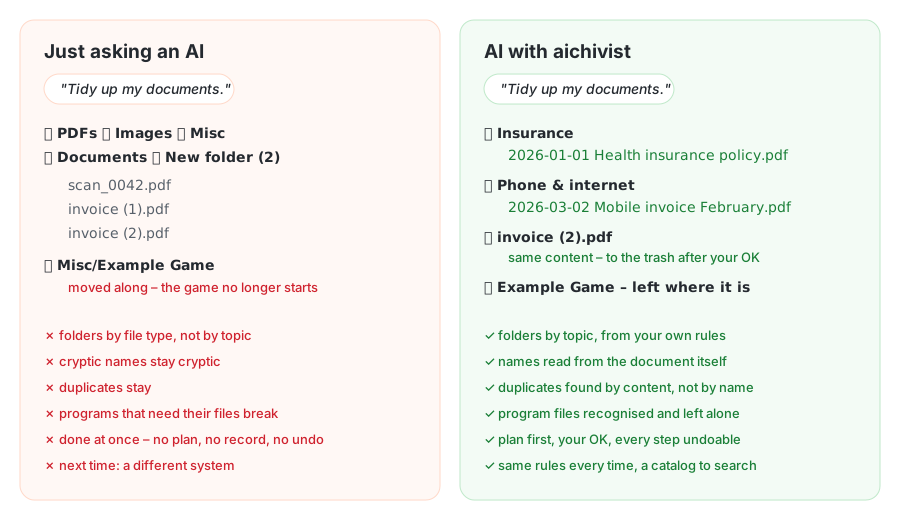
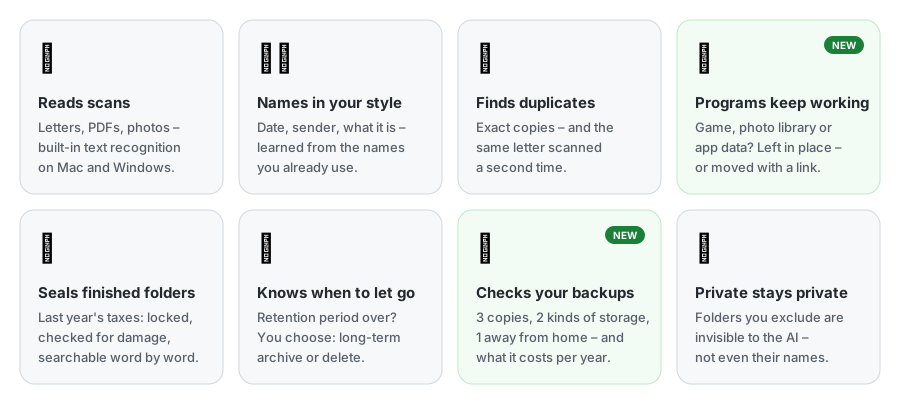
aichivist gives your AI what a professional archivist works with: your own filing rules, a plan you approve, names read from the document itself, duplicates found by content, programs that keep working, and a record of every step that can be undone. Tried in real use on 25,000 photos and 1,500 documents.
How it works
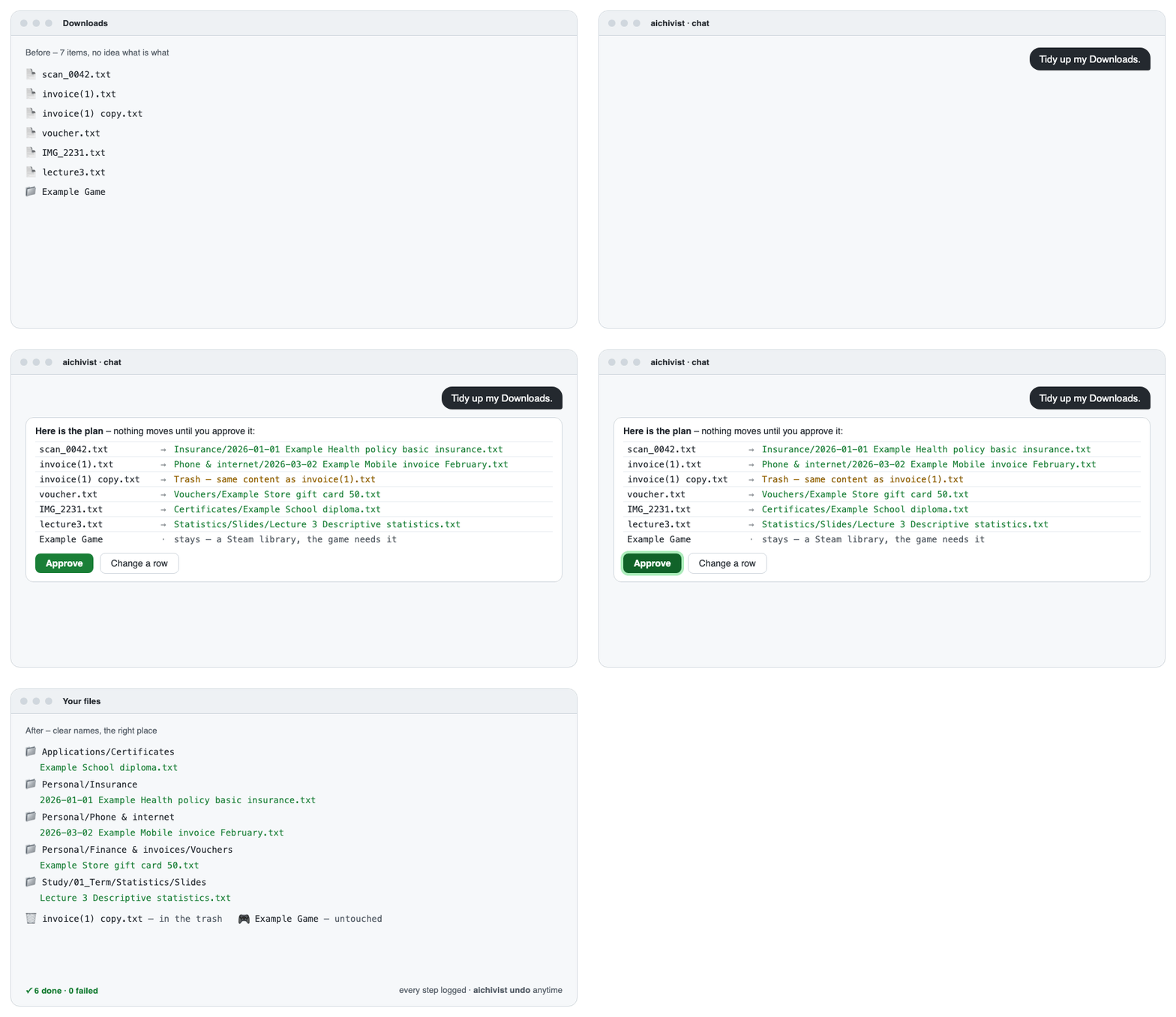
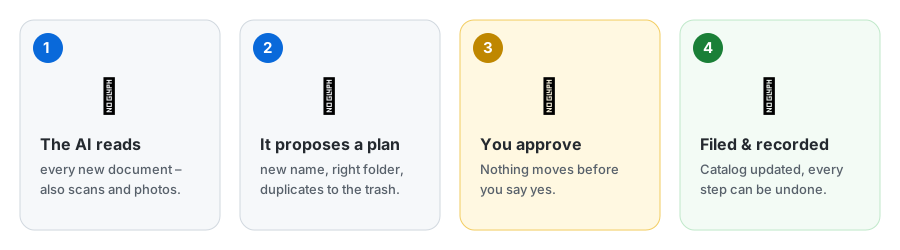
- Nothing happens without your OK. You see the plan first and can change or strike any line.
- Nothing gets lost. Every step is recorded and can be undone; duplicates go to the trash only after you agree.
- Your files stay yours. Normal folders, your own cloud, no account, no server.
- Speaks your language. Messages in English or German; rule templates in English, German, French, Italian and Spanish.
What it can do
Get started
Claude Desktop – the easiest way, no technical knowledge needed
- Click Download for Claude Desktop above (no Claude Desktop yet? claude.ai/download).
- Double-click the downloaded file and choose the folders Claude may organize. If Windows asks which app to use, open Claude Desktop instead: Settings → Extensions → Advanced settings → Install Extension… and pick the file.
- Ask Claude: "Tidy up my Downloads."
Claude Code – type /plugin install aichivist --marketplace luftphilipp/aichivist, then say "Set up
aichivist." The setup installs the command-line tool if it is missing (it asks first).
Codex, Gemini CLI, Cursor – pipx install aichivist (or uv tool install aichivist), then copy
templates/AGENTS.md to where your agent reads instructions.
Other AI apps – aichivist's MCP server runs locally with uv installed:
- Cursor: one-click install (organizes the open project folder).
- VS Code / GitHub Copilot: one-click install (organizes the open folder).
- Codex (OpenAI) – add to
~/.codex/config.toml, with the folders it may organize:[mcp_servers.aichivist] command = "uvx" args = ["--from", "aichivist[mcp]", "aichivist", "mcp", "--root", "~/Downloads", "--root", "~/Documents"] - Antigravity CLI (Google) – the same server in
~/.gemini/config/mcp_config.jsonundermcpServers; Gemini CLI (paid plans):gemini extensions install https://github.com/luftphilipp/aichivist. - ChatGPT connects only to servers on the internet, not to local ones – aichivist keeps your files on your computer, so it does not offer that. Use Codex instead.
Downloaded the ZIP? Unpack it and double-click Start (Mac).command or Start (Windows).bat
(Linux: start.sh). A simple menu opens – look at your Downloads, check your backups, and see which AI app on your
computer can tidy up. No installation needed, only Python 3 (a new Mac offers to install it by itself).
The first time, your computer warns because the file comes from the internet:
- Mac: click Done, open System Settings → Privacy & Security, scroll down and click Open Anyway next to "Start (Mac).command", then confirm.
- Windows: click More info → Run anyway.
Just curious? See what's going on in your folders – no AI, nothing is changed:
pipx install aichivist
aichivist survey ~/Downloads
It shows how many files you have, duplicates that waste space, files with meaningless names, folders that slow down
your cloud, program folders to leave alone, and whether your hard drive is healthy. aichivist storage storage.md
checks whether your backups are safe and what your storage costs per year (it shows the table format on first run).
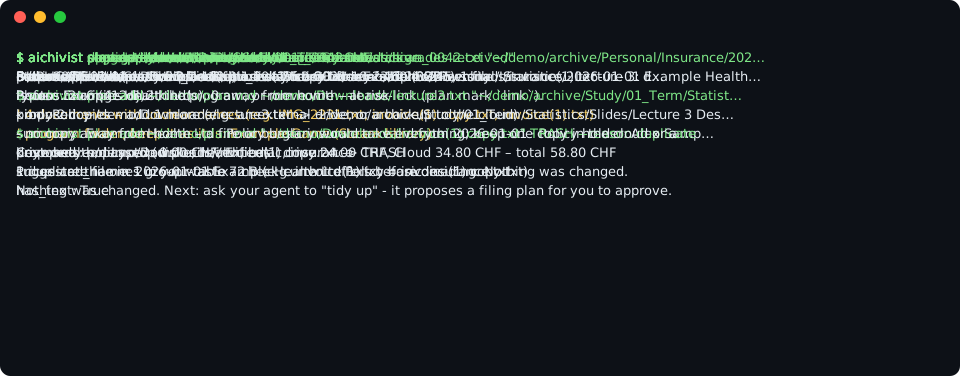
aichivist catalog-page <folder> --open turns your catalogs into a searchable page, aichivist photos sorts photos
by year, and aichivist watch ~/Downloads --install reminds you once 25 files have piled up.
Built on real archive practice
Archives have organized documents reliably for centuries. aichivist brings their rules to your computer:
| In an archive | In aichivist |
|---|---|
| A filing plan says where everything belongs | Your rules say which documents go where – the AI follows them |
| Nothing is thrown away without a decision | Duplicates and old files are only removed after your OK |
| Every document is described in a catalog | Each folder gets a list of what is in it, so you find things later |
| Finished collections are sealed | A completed folder (e.g. last year's taxes) is locked, checked and searchable |
| Records are kept for a set time, then archived or destroyed | Old records come up when their time is over – you choose |
| Copies are kept in separate places | It checks the 3-2-1 rule: 3 copies, 2 kinds of storage, 1 away from home |
Privacy Policy
aichivist itself works only on your computer: no account, no server, no telemetry. The AI that reads your documents (e.g. Claude) receives the content of the documents it reads – so you decide which folders it may open, and can exclude private ones completely. Full text: PRIVACY.md.
How this was built
aichivist was designed by Philipp Luft, a trained archivist and information professional (Fachmann Information & Dokumentation) studying Business AI, who brought the archival principles and the requirements. The code was written with Claude Code – every commit lists Claude as co-author.
More
aichivist MCP Fragen
Wie stellt aichivist sicher, dass meine Dateien sicher sind?
Das Tool erfordert, dass du jeden Schritt des Plans genehmigst, bevor Änderungen vorgenommen werden, und jede Aktion kann rückgängig gemacht werden.
Sind meine Daten privat?
Ja, aichivist läuft lokal auf deinem Computer – ohne Accounts, ohne externe Server und ohne Telemetrie.
Kann ich es mit Claude Desktop nutzen?
Ja, Claude Desktop wird als der einfachste Weg beschrieben, um durch das Herunterladen der bereitgestellten Datei zu starten.
Funktioniert es auf Windows und Mac?
Ja, es ist mit Windows, macOS und Linux kompatibel.